React-beautiful-dnd: Issue using display: grid with grid-gap to layout <Draggable/>s
Bug or feature request?
bug
Expected behavior
Items in a <Draggable/> _not_ being dragged would maintain position after an item that _is_ being dragged is released/dropped. (E.G. using grid-gap: 20px, sibling items would not slightly reposition when dragged sibling is dropped)
Actual behavior
Items in a <Draggable/> shuffle/shift slightly to one side when an item being dragged is dropped on a <Droppable/> when using grid-gap.
Steps to reproduce
Use display: grid && grid-gap to layout and space <Draggable/> items, rather than using margin rules to space items.
Browser version
FireFox Developer Edition 59.0b12
Demo

 joehdodd
All 7 comments
Super interesting. I have not looking into the implications of using grid on the box model.
According to the box model the grid gap as no impact
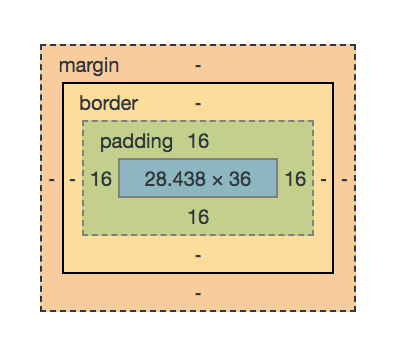
Also, from the grid item itself it seems like there is no way I could see as to whether it had any grid gap applied
From get computed styles:
grid: "none / none / none / row / auto / auto",
gridArea: "auto / auto / auto / auto",
gridAutoColumns: "auto",
gridAutoFlow: "row",
gridAutoRows: "auto",
gridColumn: "auto / auto",
gridColumnEnd: "auto",
gridColumnGap: "0px",
gridColumnStart: "auto",
gridGap: "0px 0px",
gridRow: "auto / auto",
gridRowEnd: "auto",
gridRowGap: "0px",
gridRowStart: "auto",
gridTemplate: "none / none / none",
gridTemplateAreas: "none",
gridTemplateColumns: "none",
gridTemplateRows: "none",
At this stage I am not sure how to know if there is a grid gap applied from the Draggable itself. We would need to be able to know that in order to fix this
 alexreardon
on 1 Mar 2018
alexreardon
on 1 Mar 2018
Could you determine if it's a grid child, then just query the parent's grid gap?
 souporserious
on 1 Mar 2018
souporserious
on 1 Mar 2018
Is that even possible? Also, that would not help us if the Draggable itself is not the true grid child. It is possible to wrap a Draggable in as many nodes as you like as long as they do not take up visual space https://github.com/atlassian/react-beautiful-dnd#draggables-should-be-visible-siblings
alexreardon
on 1 Mar 2018
The only thing I can think of right now is if you pass 'gridGap' through as a prop to the Draggable. However, that is super lame
alexreardon
on 1 Mar 2018
Hmm 🤔 yeah that stinks. I guess you could query each parent until you find it. Not my favorite, but maybe something like this...
function isGridParent(element) {
  return getComputedStyle(element).getPropertyValue('display') === 'grid'
}

function getGridParent(element) {
  if (isGridParent(element)) {
    return element;
  } else {
    return getGridParent(element.parentNode);
  }
}

function getGridGap(element) {
  return getComputedStyle(getGridParent(element)).getPropertyValue('grid-gap')
}
Oh, wow. Now I'm even more interested in this.
I had no idea grid-gap has no impact when looking at computed styles, but I think it makes sense.
From my understanding, using grid-gap provides the parent grid container a value to compute _within_ its own area of the box model. Unlike using margin on each child, grid-gap allows the parent dynamically size and space its children so that it maintains correct size in the overall page layout, using its various grid rules.
So I see how it would be difficult to properly compute grid-gap to ensure <Draggable/>s properly re-flow. 🙃 Thanks for taking a look! I'll be interested to follow this and see what comes of it.
joehdodd
on 1 Mar 2018
I would love to look at this. It would involve some extra information from css-box-model but it should be doable based on what I know today
alexreardon
on 22 Jul 2019
Related issues
 FutureKode
·
3Comments
FutureKode
·
3Comments
 vrg-success
·
3Comments
vrg-success
·
3Comments
 khurram-wasim
·
3Comments
khurram-wasim
·
3Comments
 Tsabary
·
3Comments
Tsabary
·
3Comments
 WJKwok
·
3Comments
WJKwok
·
3Comments
Most helpful comment
I would love to look at this. It would involve some extra information from
css-box-modelbut it should be doable based on what I know today