React-autosuggest: Clear auto suggest input field
Is there a way to clear the input field after a user has selected a suggestion?
I am interested in what the user has selected, and use this data to update another component but once this is done, I'd like to have access to the input so that I can clear it.
Please can you let me know if this is possible.
Thanks.
 icodejs
All 5 comments
@icodejs Currently, there is no nice way to clear the input on selection. You could try something like this:
class MyComponent extends React.component {
clearInput() {
React.findDOMNode(this.refs.autosuggest.refs.input).value = '';
}
render() {
<Autosuggest ref="autosuggest" onSuggestionSelected={this.clearInput} ... />
}
}
I haven't tested it, so let me know if it works ;)
I'd be interested to know about your use case. What type of items you have in the autosuggest, and what is that another component that you want to update once suggestion is selected?
 moroshko
on 23 Apr 2015
moroshko
on 23 Apr 2015
Thanks @moroshko,
Your solution worked!!
I had wrapped your auto suggest component in my own pillbox component, which would allow a user to select from the suggestions, and then create a pillbox. Obviously once pillbox was created, the text within the input was no longer be needed.
I will close the issue now as your solution did the trick.
Thanks!
icodejs
on 23 Apr 2015
this.refs.autosuggest.props.inputProps.value = '';
this.refs.autosuggest.input.value = '';
this.refs.autosuggest.input.focus();
 StephanGeorg
on 4 Aug 2016
StephanGeorg
on 4 Aug 2016
@icodejs Currently, there is no nice way to clear the input on selection. You could try something like this:
class MyComponent extends React.component {
  clearInput() {
    React.findDOMNode(this.refs.autosuggest.refs.input).value = '';
  }
  render() {
    <Autosuggest ref="autosuggest" onSuggestionSelected={this.clearInput} ... />
  }
}
I haven't tested it, so let me know if it works ;)
I'd be interested to know about your use case. What type of items you have in the autosuggest, and what is that another component that you want to update once suggestion is selected?
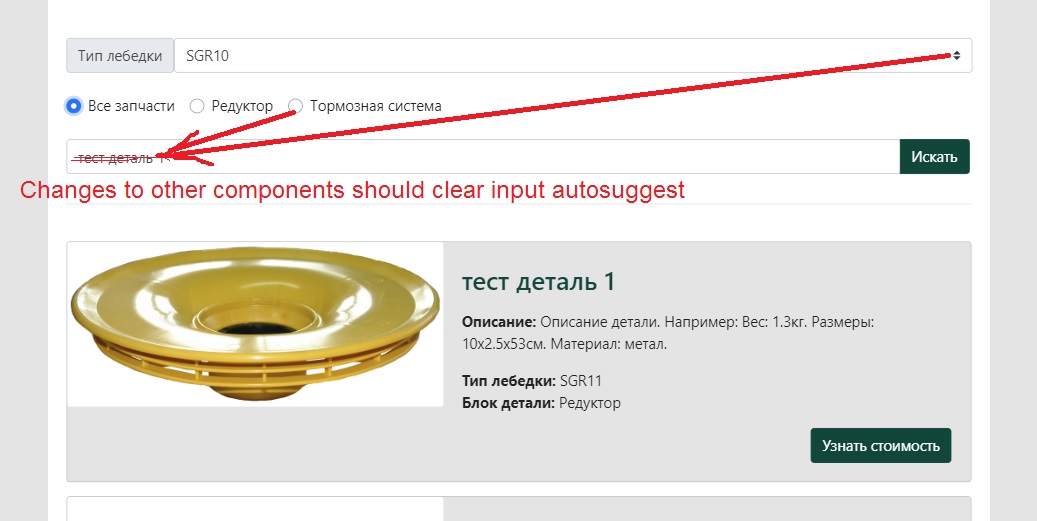
I came across a similar task.
Changes to other components must clear the input autosuggest. How to do it? I am a beginner React programmer.
I tried your code, but I get a lot of errors. Perhaps there is not placing your code. Please show a working code example.
Here are my react components:
https://github.com/Serj-M/vellift-react/blob/developer/src/components/Search.js
https://github.com/Serj-M/vellift-react/blob/developer/src/components/App.js
 Serj-M
on 25 Jul 2019
Serj-M
on 25 Jul 2019
class App extends React.Component {
  constructor(props) {
    super(props);
    ...
    this.handleSelectChange = this.handleSelectChange.bind(this);
    this.searchRef = React.createRef();
  }

  handleSelectChange(value) {
    ...
    this.searchRef.current.clearSearch();
  }
  ....
  render() {
    return <div>
      ...
      <Select value={this.state.value} onChange={this.handleSelectChange}/>
      <Search ref={this.searchRef} />
    </div>
  }
}

class Search extends React.Component {
  constructor(props) {
    super(props);
    ...
    this.clearSearch = this.clearSearch.bind(this);
  };

  clearSearch() {
    this.setState({ value: '' })
  }
  ...
  render() {
  ...
  }
}
Related issues
 eldyvoon
·
3Comments
eldyvoon
·
3Comments
 adrianmcli
·
4Comments
adrianmcli
·
4Comments
 mbulfair
·
4Comments
mbulfair
·
4Comments
 fondberg
·
4Comments
fondberg
·
4Comments
 Razinsky
·
3Comments
Razinsky
·
3Comments
Most helpful comment