React-app-rewired: Profile webpack
Hello! Is there a way to profile the webpack build? With CRA I was using the following command (a bit of a hack) to profile my generated bundle:
NODE_ENV=production ./node_modules/webpack/bin/webpack.js --config node_modules/react-scripts/config/webpack.config.prod.js --profile --json > stats.json
 dan-kez
All 8 comments
I think you can do the equivalent to this by using the stats-webpack-plugin and setting profile: true in the webpack config.
Documentation Sources:
https://webpack.js.org/configuration/other-options/#profile
https://www.npmjs.com/package/stats-webpack-plugin
If I am reading what those are saying correctly, your config-overrides.js file would need to contain something like:
const StatsPlugin = require('stats-webpack-plugin');
module.exports = function override(config, env) {
if (env === 'production') {
config.profile = true;
if (!config.plugins) {
// It should already exist, but initialize it if it does not already exist.
config.plugins = [];
}
config.plugins.push(
new StatsPlugin('stats.json', {
// Replace the next 2 lines with any options you need to give to the stats plugin - these are their example options.
chunkModules: true,
exclude: [/node_modules[\\\/]react/]
})
);
}
return config;
};
You would then use it in the package.json file in the normal way for react-app-rewired:
"scripts": {
"build": "react-app-rewired build"
}
 dawnmist
on 13 Jan 2018
dawnmist
on 13 Jan 2018
Another option would be to look at the webpack-bundle-analyzer plugin with generateStatsFile: true.
Documentation:
https://github.com/webpack-contrib/webpack-bundle-analyzer
const BundleAnalyzerPlugin = require('webpack-bundle-analyzer').BundleAnalyzerPlugin;

module.exports = function overrides(config, env) {
  if (env === 'production') {
    if (!config.plugins) {
      config.plugins = [];
    }
    config.plugins.push(
      new BundleAnalyzerPlugin({generateStatsFile: true})
    );
  }
  return config;
}
I think Bundle Analyzer is better documented, and I have used it personally both at home and at work for the treemap generation (which is a very useful visualization for what is actually being put into the bundles being generated).
dawnmist
on 13 Jan 2018
That's awesome! Thank you!
I'm having one issue which is consistent with the issue reported here (https://github.com/webpack-contrib/webpack-bundle-analyzer/issues/86)
It appears that output.path is empty which results in my stats.json file being written to root app directory rather than in the build directory. This means that webpack-bundler-analyzer can't find the source map as per this comment (https://github.com/webpack-contrib/webpack-bundle-analyzer/issues/86#issuecomment-307437809).
Any thoughts on this given you're past experience with the library & react-app-rewired?
dan-kez
on 16 Jan 2018
I haven't used the stats.json output from it previously (just the treemap generation). Does specifying the filename for the stats.json file with the missing path information address the issue?
i.e.
config.plugins.push(
  new BundleAnalyzerPlugin({generateStatsFile: true, statsFilename: 'build/stats.json'})
);
Otherwise I'd have to pass you back to the people who support the BundleAnalyzerPlugin for further assistance with it.
Although, the issue you linked seems to be related specifically to development mode...which shouldn't be affecting a production build. If you're seeing the same issue in production I'd be asking them what is going wrong as there is definitely bundles being written to the filesystem in production mode.
dawnmist
on 17 Jan 2018
So I am also using the Treemap generation but I don't have the ability to see the gzip'd tree. Per the issue I linked above it seems like this might be tied to the fact that output.path may not be set. I tested this by generating the stats.json file and found it was not generated in the build directory (which confirms an issue with output.path).
My config override is below:
const {injectBabelPlugin} = require('react-app-rewired')
const BundleAnalyzerPlugin = require('webpack-bundle-analyzer').BundleAnalyzerPlugin
const config = require('config')
const fs = require('fs')
const path = require('path')

const ourConfigDir = path.join(__dirname, 'src/config')
const baseConfig = config.util.loadFileConfigs(ourConfigDir)

// This will take the config based on the current NODE_ENV and save it to 'build/client.json'
// Note: If '/build' does not exist, this command will error; alternatively, write to '/config'.
// The webpack alias below will then build that file into the client build.
fs.writeFileSync(path.resolve(__dirname, 'src/config/client.json'), JSON.stringify(baseConfig))

module.exports = function override(config) {
  config = injectBabelPlugin(['lodash', ], config)
  config.plugins = (config.plugins || []).concat([
    new BundleAnalyzerPlugin({
      analyzerHost: '0.0.0.0',
      // generateStatsFile: true,
    })
  ])

  config.resolve = {
    ...config.resolve,
    alias: {
      config: path.resolve(__dirname, 'src/config/client.json')
    }
  }
  //do stuff with the webpack config...
  return config
}
I have been using the static file output and get full details for a production build, but for a development mode build I have only ever had the stat tree in the treemap. The exact configuration that I use is:
// Get a breakdown of what libraries are being bundled and how much space each takes.
config.plugins.push(
  new BundleAnalyzerPlugin({
    analyzerMode: 'static',
    reportFilename: `../build-analysis-${env || 'development'}.html`,
    openAnalyzer: false,
    generateStatsFile: true
  })
);
For the production build, the generated html file has all 3 of the stat, parsed & gzipped details. For the development build/dev server I only get the stat details.
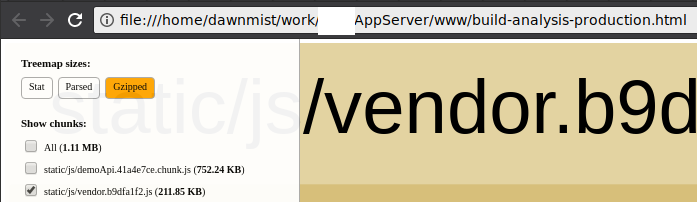
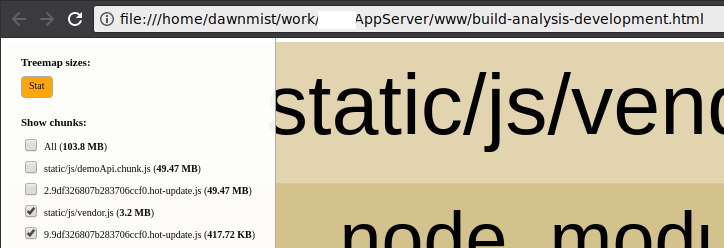
(Demo API chunk contains large json data files, which is why it is so big - and why it's separated out ;) ).
I had thought that the reason for not getting the gzip/parsed versions in development mode was because the files were not actually being written to disk/being gzipped up at all. Your link shows that it may be due to an incorrect path. Whichever it is, if it is not able to provide what you specifically needed then look around at other webpack plugins to produce the data you do need. The basics of how to use any of them with react-app-rewired will be the same - create the override function that takes the default config, add the plugin that you need, then return the updated config.
dawnmist
on 18 Jan 2018
All good on this?
 timarney
on 24 Jan 2018
timarney
on 24 Jan 2018
Yup - all good!
Thanks for the help!
dan-kez
on 25 Jan 2018
Related issues
 lyudad
·
6Comments
lyudad
·
6Comments
 srhise
·
5Comments
srhise
·
5Comments
 artalar
·
4Comments
artalar
·
4Comments
 ljxyweb
·
4Comments
ljxyweb
·
4Comments
 huygn
·
3Comments
huygn
·
3Comments
Most helpful comment
Another option would be to look at the
webpack-bundle-analyzerplugin withgenerateStatsFile: true.Documentation:
https://github.com/webpack-contrib/webpack-bundle-analyzer
I think Bundle Analyzer is better documented, and I have used it personally both at home and at work for the treemap generation (which is a very useful visualization for what is actually being put into the bundles being generated).