React-apollo: Unhandled Rejection (TypeError): Cannot read property 'refetch' of undefined
Hello friends,
Today I faced an issue with GraphQL in my React.js project. What I tried to do is refetch a query once a mutation is completed. My codebase is as below
const getUserTeamQuery = useQuery(getUserTeam(usersFragment))
const data = get(getUserTeamQuery, 'data.getUserTeam')

const [updateUser] = useMutation(updateUserMutation(usersFragment), {
  onCompleted: () => {
    getUserTeamQuery.refetch()
  }
})

const updateTeam = async () => {
  updateUser({ variables: { input: { pullTeam } } })
}

Is there any solution to fix the issue?
 proIT324
All 26 comments
Hi @proIT324, I just faced the same issue. It was because my component was unmount before the call of refetch. Maybe you have a side effect caused by your mutation which unmount the component were you call your useQuery ?
 jean9696
on 4 Mar 2020
jean9696
on 4 Mar 2020
I noticed the same thing while building a logout function that calles cache.reset(). Maybe this leads to an invalid state internally.
 EyMaddis
on 5 Mar 2020
EyMaddis
on 5 Mar 2020
Was running into the same issue, but noticed that it only appears after a Live Reload.
Works just fine after a full reload.
 alradadi
on 12 Mar 2020
alradadi
on 12 Mar 2020
I am experiencing this as well in React Native when trying to refetch when the subscription client reconnects
SubscriptionClient.onReconnected(() => {
      refetch()
})
This works fine when the component loads initially. However, if I navigate to the previous screen, then back to the screen with the subscription _this.currentObservable is an empty object in
_this.obsRefetch = function (variables) {
      return _this.currentObservable.query.refetch(variables);
};
thus, query is undefined.
 forbesgillikin
on 26 Mar 2020
forbesgillikin
on 26 Mar 2020
I am experiencing the same problem. When I am loading my screen for the first time, my FlatList pull to refresh is working. After editing my screen.js file and saving it, right after that i will get this failure. I am also using chrome debug with fast refresh enabled.
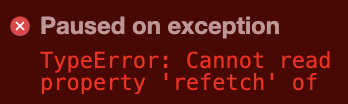

This is my FlatList:
            <FlatList
              data={data.users}
              renderItem={({ item }) => (
                <Item
                  id={item.id}
                  username={item.username}
                  email={item.email}
                  role={item.role}
                  // eslint-disable-next-line react/prop-types
                  selected={!!selected.get(item.id)}
                  onSelect={onSelect}
                />
              )}
              extraData={data}
              keyExtractor={(item) => item.id}
              // keyExtractor tells the list to use the ids for the react keys instead of the default key property.
              refreshing={networkStatus === 4}
              // As long as networkStatus is 4 (true) refetching is in progress. It has to be true, otherwise refetch will not work.
              onRefresh={() => refetch()}
            />
 cryptedx
on 29 Mar 2020
cryptedx
on 29 Mar 2020
I am having the same problem in web React (Create React App and Typescript) with Fast Refresh. If a refetch happens after a fast refreshed change, it just crashes with this error. Would it be possible to fix it? It is probably not a production issue, but it is a huge annoyance when developing an app.
 danieldunderfelt
on 15 Apr 2020
danieldunderfelt
on 15 Apr 2020
Indeed, it's so annoying. I always have to completely restart the app. Please please is a fix possible?
cryptedx
on 15 Apr 2020
This also happens with Hermes in React Native, every time we save a file and triggers a refresh, refetching will throw.
I am using @apollo/[email protected]
 vicary
on 20 Apr 2020
vicary
on 20 Apr 2020
The annoying thing is, this happens to us on production as well in combination with CodePush. Whenever a new version is updated the app will restart and voila, the whole app crashes because Apollo refetch is unavailable.
 callaars
on 7 May 2020
callaars
on 7 May 2020
I thought it could be a problem because I had declared some anon functions. I fixed that but problem is still occurring.
cryptedx
on 8 May 2020
I currently am working around this like so:
const { data, refetch } = useQuery(...) || {}
EDIT:
This didn't actually work :(
 briangonzalez
on 12 May 2020
briangonzalez
on 12 May 2020
I'm using NextJS. I got the same error after upgrade to next 9.4, it happened after React refresh implemented by NextJS.
 oknoorap
on 13 May 2020
oknoorap
on 13 May 2020
Use link not url in the configuration
`import { ApolloClient } from '@apollo/client';
import { InMemoryCache } from 'apollo-cache-inmemory';
import { HttpLink } from 'apollo-link-http';
const client = new ApolloClient({
cache: new InMemoryCache({
addTypename: true
}),
link: new HttpLink({
uri: 'http://192.168.1.39:4000'
})
});
export default client;`
 daviddionis
on 14 May 2020
daviddionis
on 14 May 2020
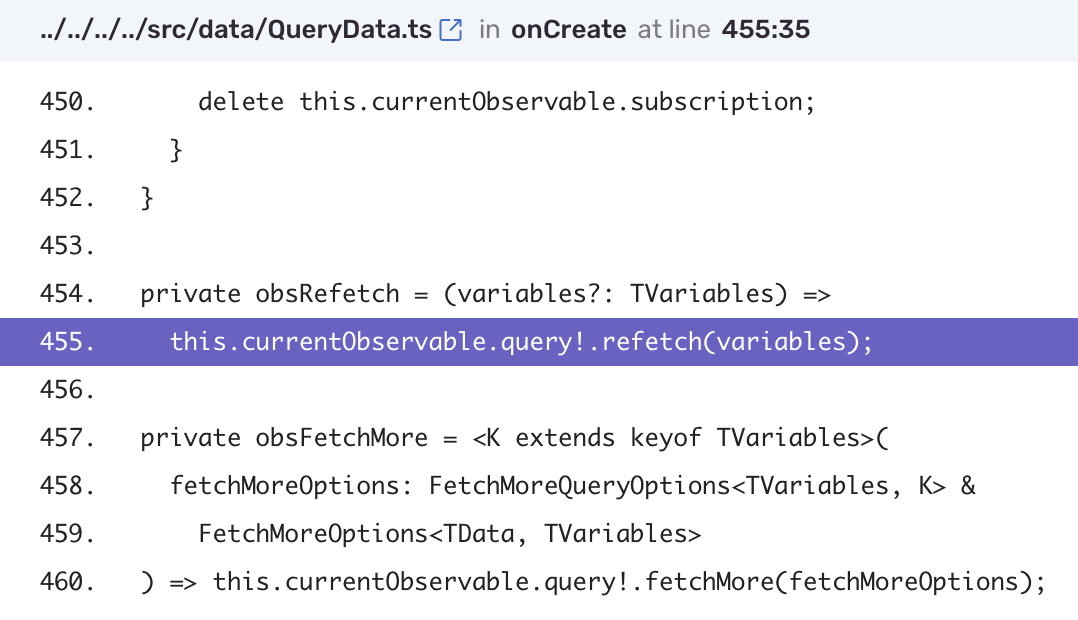
I stumbled upon the same problem and it looks like the culprit is the ! operator in Apollo's code:
 derekstavis
on 14 May 2020
derekstavis
on 14 May 2020
@derekstavis Is it some kind of pre-draft babel for optional chaining (?.)?
vicary
on 15 May 2020
It's typescript, @vicary
callaars
on 15 May 2020
^ https://www.typescriptlang.org/docs/handbook/release-notes/typescript-2-0.html#non-null-assertion-operator
 ethanIncentify
on 15 May 2020
ethanIncentify
on 15 May 2020
A quick fix is to wrap it in setTimout like so:
const refetch = useCallback(() => {
    setTimeout(() => _refetch(), 0)
  }, [_refetch])
 maxb94
on 17 May 2020
maxb94
on 17 May 2020
@callaars It was meant to be a joke but it pulled off poorly I guess, the use optional chaining would at least make it not crash.
vicary
on 18 May 2020
A quick fix is to wrap it in
setTimoutlike so:
const refetch = useCallback(() => { setTimeout(() => _refetch(), 0) }, [_refetch])
const {loading, error, data} = useQuery(VIEW_ALL_COMMENTS);
const _refetch = useQuery(VIEW_ALL_COMMENTS).refetch;
const refetch = useCallback(() => { setTimeout(() => _refetch(), 0) }, [_refetch]);
This code works!
Thanks, maxb94!!
 wooogler
on 18 May 2020
wooogler
on 18 May 2020
Same issue as others, NextJS 9.4 which implements React's native live reload (instead of hot module reload). The only solution is the one proposed by @maxb94
@wooogler a better way to do that is this
const {loading, error, data, refetch: _refetch} = useQuery(VIEW_ALL_COMMENTS);
const refetch = useCallback(() => { setTimeout(() => _refetch(), 0) }, [_refetch]);
 tm1000
on 19 May 2020
tm1000
on 20 May 2020
tm1000
on 19 May 2020
tm1000
on 20 May 2020
@tm1000 Thanks for taking my joke seriously, I guess. I have no idea about the inner workings, it was just a patchy-patch attitude. 😄
vicary
on 23 May 2020
Is this issue being looked at or abandoned? or do we wait for v4.0 ?
 peitalin
on 21 Jun 2020
peitalin
on 21 Jun 2020
^
 santaclauze
on 22 Jun 2020
santaclauze
on 22 Jun 2020
^^
 grantspeelman
on 26 Jun 2020
grantspeelman
on 26 Jun 2020
Related issues
 DennisBaekgaard
·
3Comments
DennisBaekgaard
·
3Comments
 bdouram
·
3Comments
bdouram
·
3Comments
 borisyordanov
·
3Comments
borisyordanov
·
3Comments
 johhansantana
·
3Comments
johhansantana
·
3Comments
 voodooattack
·
3Comments
voodooattack
·
3Comments
Most helpful comment
Is this issue being looked at or abandoned? or do we wait for v4.0 ?