React-apollo: Android gives "[Error: Network error: Requested keys of a value that is not an object.]" on React Native
Intended outcome:
I'm running a query agains aws-appsync to retrieve information from the graphql.
It works fine on iOs, but it does not from Android emulator or phone.
I'm using Expo on React Native application.
Actual outcome:
The following error appears when executing it: [Error: Network error: Requested keys of a value that is not an object.]
How to reproduce the issue:
The code is very standard:
import React from 'react';
import { StyleSheet, Text, View } from 'react-native';

import { compose } from 'react-apollo';
import * as GraphQL from './graphql';

import AWSAppSyncClient from "aws-appsync";
import { Rehydrated } from 'aws-appsync-react';
import { ApolloProvider } from 'react-apollo';
import AWSConfig from './aws-exports';

const client = new AWSAppSyncClient({
  url: AWSConfig.graphqlEndpoint,
  region: AWSConfig.region,
  auth: {
      type: AWSConfig.authenticationType,
      apiKey: AWSConfig.apiKey,
  }
});

class Home extends React.Component {
  componentWillReceiveProps(){
    if (this.props.loading)
      return;

    console.log(this.props.takes)
    console.log(this.props.takes.length)
  }

  render() {
    return (
      <View style={styles.container}>
          <Text>Leo! con otro {this.props.loading} items</Text>
    </View>
    )
  }
}

    AllTakes: graphql(AllTakes, {
        options: {
            fetchPolicy: 'cache-and-network'
        },
        props: ({data}) => {
            console.log(data)
            return {
                loading: data.loading,
                takes: data.takes
            }
        }
    })

const AllTakesResponse = compose(
  AllTakes
)(Home);

const WithProvider = () => (
  <ApolloProvider client={client}>
    <Rehydrated>
        <AllTakesResponse />
    </Rehydrated>
  </ApolloProvider>
);

export default WithProvider;
Version
"
- apollo-cache-inmemory": "^1.2.7",
- "apollo-link-http": "^1.5.4",
- "aws-appsync": "^1.3.3",
- "aws-appsync-react": "^1.1.3",
- "expo": "^27.0.1",
- "graphql-tag": "^2.9.2",
- "react": "16.3.1",
- "react-apollo": "^2.1.11",
- "react-native": "~0.55.2"
Issue Labels
- [ ] has-reproduction
- [ ] feature
- [ ] docs
- [ x] blocking
- [ ] good first issue
 lcrodriguez
All 6 comments
I've detected that this does not happen if I enable remote debugging on the application.
lcrodriguez
on 10 Aug 2018
@lcrodriguez how do i enable remote debugging? I am having the same issue on the android emulator.
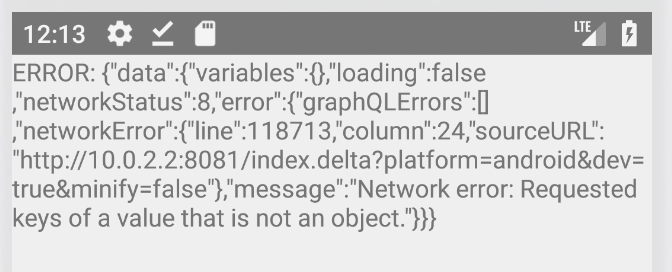
i tried on my device now as well, still the same error.
 oxbits
on 13 Aug 2018
oxbits
on 13 Aug 2018
On OSX you use Command-M on the emulator. Check here: https://facebook.github.io/react-native/docs/debugging.html
I'm also trying this solution: https://github.com/awslabs/aws-mobile-appsync-sdk-js/issues/219#issuecomment-412496060
I will post there if it works for now.
lcrodriguez
on 13 Aug 2018
@lcrodriguez Yes, i saw this too:
"""
Downgrading to "aws-appsync": "1.3.2", seems to fix this for now
"""
downgrading is working for me for now!
(thank you for posting!)
oxbits
on 13 Aug 2018
@lcrodriguez @oxbits : For me its working again with the newest versions
"dependencies": {
"aws-appsync": "1.3.4",
"aws-appsync-react": "1.1.4",
}
 florian-heer
on 28 Aug 2018
florian-heer
on 28 Aug 2018
This appears unrelated to react-apollo.
 rosskevin
on 26 Dec 2018
rosskevin
on 26 Dec 2018
Related issues
 KenilDomadia
·
3Comments
KenilDomadia
·
3Comments
 Acentelles
·
3Comments
Acentelles
·
3Comments
 thisbejim
·
3Comments
thisbejim
·
3Comments
 bdouram
·
3Comments
bdouram
·
3Comments
 voodooattack
·
3Comments
voodooattack
·
3Comments
Most helpful comment
I've detected that this does not happen if I enable remote debugging on the application.