React-admin: View and edit crash when reload page or press F5
Hello everyone!
When i refresh the page, edit or view with simpleform this can't load the fields.
What you were expecting:
Fields are load when access for button edit in the list.

What happened instead:
Fields are not load when refresh the page with F5.
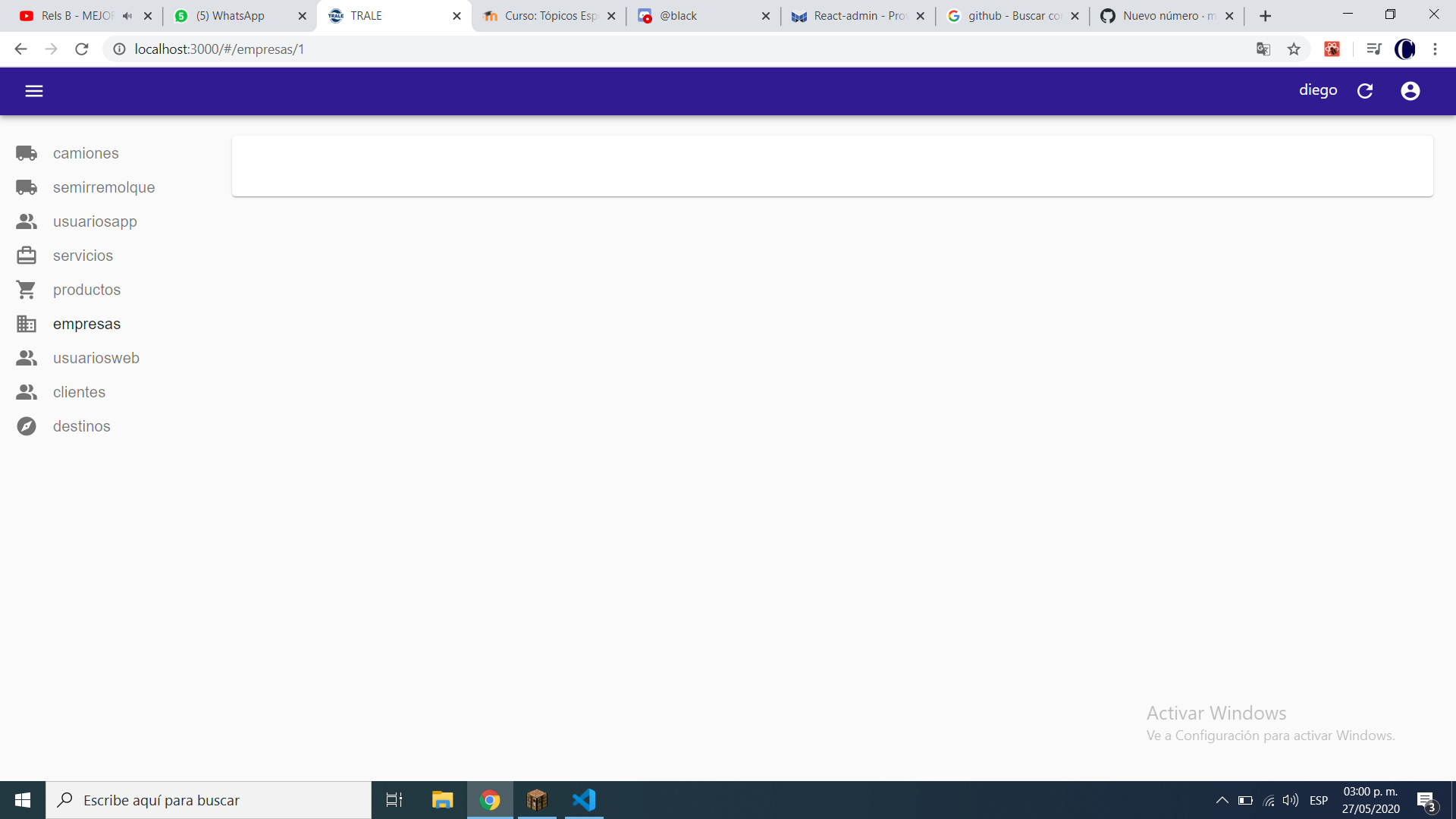
Related code:
My app component
class App extends Component {
  render() {
    const dataProvider = jsonServerProvider('', httpClient); //delete the address for obvious reasons

    return (
      <Admin customRoutes={customRoutes}  layout={MyLayout} theme={theme} title="TRALE" dashboard={Dashboard} dataProvider={dataProvider} authProvider={authProvider} i18nProvider={i18nProvider}>
        {permissions => [

          // Restrict access to the edit and remove views to admin only
          <Resource name="empresas_desplegable" />,
          <Resource options={{ label: 'Camiones' }} name="camiones" list={CamionesList} create={CamionesPost} edit={CamionesEdit} icon={CamionesIcon} />,
          <Resource options={{ label: 'Semirremolques' }} name="semirremolque" icon={CamionesIcon} list={SemirremolquesList} create={SemirremolquesPost} edit={SemirremolquesEdit} />,
          <Resource options={{ label: 'UsuariosApp' }} name="usuariosapp" icon={UsuariosIcon} list={UsuariosAppList} create={UsuariosAppPost} edit={UsuariosAppEdit} />,
          <Resource options={{ label: 'Viajes' }} name="servicios" edit={ViajesEdit} show={ViajesShow} icon={ViajesServicios} list={ViajesList} create={CrearViaje} />,
          <Resource options={{ label: 'Productos' }} name="productos" edit={ProductosEdit} icon={ProductosIcon} list={ProductosList} create={ProductosPost} />,

          // Only include the categories resource for admin users
          permissions === 'superadmin'
            ? <Resource options={{ label: 'Empresas' }} name="empresas" icon={Business}  list={EmpresasList} edit={EmpresasEdit} create={EmpresasPost} />
            : null,
          permissions === 'superadmin'
            ? <Resource options={{ label: 'UsuariosWeb' }} name="usuariosweb" list={UsuariosList} icon={UsuariosIcon} create={UsuariosPost} edit={UsuariosEdit} />
            : null,
          permissions === 'superadmin'
            ? <Resource options={{ label: 'Clientes' }} name="clientes" icon={UsuariosIcon} list={ClientesList} create={ClientesPost} edit={ClientesEdit} />
            : <Resource options={{ label: 'Clientes' }} name="clientes" icon={UsuariosIcon} list={ClientesList} />,
          permissions === 'superadmin'
            ? <Resource options={{ label: 'Destinos' }} name="destinos" icon={DestinosIcon} list={DestinosList} create={DestinosPost} edit={DestinosEdit} />
            : <Resource options={{ label: 'Destinos' }} name="destinos" icon={DestinosIcon} list={DestinosList} />,

        ]}

      </Admin>
    );
  }
}

export default App;
My edit component. This issue is in all edit and view components that i have in the app.
import React, { Component } from 'react';
import { TextInput, SimpleForm, Edit, BooleanInput, required } from 'react-admin';
import ThumbUp from '@material-ui/icons/ThumbUp';

class EmpresaEdit extends Component {
    render() {
        return (
            <Edit {...this.props}>
                <SimpleForm>
                    <TextInput source="nombre" validate={[required()]} />
                    <TextInput source="rut" validate={[required()]} />
                    <TextInput source="telefono" validate={[required()]} />
                    <BooleanInput
                        source="habilitado"
                        checked={true}
                        options={{
                            checkedIcon: <ThumbUp />,
                        }}
                    />
                </SimpleForm>
            </Edit>
        );
    }
}

export default EmpresaEdit;
Environment
- React-admin version: 3.1.1
- React version: "^16.12.0
- Browser: Chrome
 celciusjj
All 14 comments
Thanks for reporting this. If you are able to illustrate the bug or feature request with an example, please provide a sample application via one of the following means:
- CodeSandbox (https://codesandbox.io/s/github/marmelab/react-admin/tree/master/examples/simple)
- A sample application via GitHub
 djhi
on 28 May 2020
djhi
on 28 May 2020
I am also facing the same problem
 manohar719
on 29 May 2020
manohar719
on 29 May 2020
Then maybe you could create a codesandbox reproducing the issue? Without a way to reproduce it, we'll close the issue
djhi
on 29 May 2020
Okay, I will create a codesandbox, give me a day
manohar719
on 29 May 2020
This happens to us too but it occurs when in development after the react-scripts reloads on a save and you are in a create or edit view.
 wattry
on 29 May 2020
wattry
on 29 May 2020
@09wattry do you found any solution?
celciusjj
on 1 Jun 2020
Then maybe you could create a codesandbox reproducing the issue? Without a way to reproduce it, we'll close the issue
https://codesandbox.io/s/confident-snowflake-u8f03?file=/src/posts.js
I have created the demo for your reference, url end point /booking and edit on first record then try to reload the browser, it do not update the values only blank screen appears. It would be really helpful.
manohar719
on 10 Jun 2020
I think, I am uuid. If I change id to number without dash, it reload with the updated values.
manohar719
on 10 Jun 2020
I have this issue as well. It seems to only happen on the edit screen. I have not been able to reproduce it with the create screen.
manohar719's codesandbox reproduced the exact same issue I am seeing
 mikevanceCA
on 10 Jul 2020
mikevanceCA
on 10 Jul 2020
I have this issue as well. It seems to only happen on the edit screen. I have not been able to reproduce it with the create screen.
manohar719's codesandbox reproduced the exact same issue I am seeing
For me I found out the issue.
After some testing I found out that the display "disappears" when the request from the dataProvider with the id field does not get any data, or returns with a different "id", This return request is what makes it not display any fields.
Since the id field is sent as follows "localhost:3000/posts/123" you must make sure the api(what data the dataProvider returns) handles the "id" field correctly and matches with the original id sent.
Once I lined those up (I am using my own custom dataProvider, and just ended up setting the id as an auto increment integer) I was able to get past this bug.
mikevanceCA
on 13 Jul 2020
I am also facing the-same issue on the edit page. When I reload the page with command+R, the textfields as well as their content disappears.
Exactly how @celciusjj displayed it
 Mov3s
on 7 Aug 2020
Mov3s
on 7 Aug 2020
@manohar719 I can't reproduce the issue on your codesandbox.
 fzaninotto
on 7 Aug 2020
fzaninotto
on 7 Aug 2020
Just adding in here I'm seeing the exact same issue. The data provider is called and data is returned but nothing gets loaded in the edit view. I realize that isn't helpful for chasing this done.
This is when running with dev-server from create-react-app and not a build version. I'm not sure what else to look for that would signal a go ahead and render. Setting a breakpoint on the
 GimpMaster
on 28 Sep 2020
GimpMaster
on 28 Sep 2020
We haven't been able to reproduce the error, so I'm closing this issue. If any of the commenters here can provide a codesandbox reproducing the issue, please comment here and we'll reopen the issue.
fzaninotto
on 30 Sep 2020
Related issues
 marknelissen
·
3Comments
marknelissen
·
3Comments
 ericwb
·
3Comments
ericwb
·
3Comments
 Kmaschta
·
3Comments
Kmaschta
·
3Comments
 nicgirault
·
3Comments
nicgirault
·
3Comments
 ilaif
·
3Comments
ilaif
·
3Comments
Most helpful comment
Okay, I will create a codesandbox, give me a day