React-ace: Question: Documentation on AutoComplete
I can't find any details on AutoComplete, the difference between Basic and Live, how to add new AutoComplete rules, etc. I'm not clear if this is part of brace or something done externally. Can anyone point me in the right direction?
 Eric24
All 13 comments
@Eric24 they are part of ace.js https://github.com/ajaxorg/ace/wiki/How-to-enable-Autocomplete-in-the-Ace-editor
by including the language_tools like in this example https://github.com/ajaxorg/ace/wiki/How-to-enable-Autocomplete-in-the-Ace-editor you can enable them. As far as adding custom completers there is probably a way to do it by accessing the editor. When the editor has autocomplete turned on it has completers available which you can push something like the rhymecompleter in this example http://plnkr.co/edit/6MVntVmXYUbjR0DI82Cr?p=preview from ace.js
 securingsincity
on 14 Dec 2017
securingsincity
on 14 Dec 2017
I needed an html code editor with basic autocomplete, live autocomplete and snippet suggestion and I have managed to achieve my goal in this way:
Packages used
"react-ace": "^5.8.0",
"react": "^16.2.0",
Imports
import AceEditor from 'react-ace';
import 'brace/mode/html';
import 'brace/theme/xcode';
import 'brace/snippets/html';
import 'brace/ext/language_tools';
Render
<AceEditor
  mode="html"
  theme="xcode"
  name="content"
  onChange={this.onContentChange}
  showPrintMargin={true}
  showGutter={true}
  highlightActiveLine={true}
  value={form.content}
  editorProps={{$blockScrolling: Infinity}}
  setOptions={{
    enableBasicAutocompletion: true,
    enableLiveAutocompletion: true,
    enableSnippets: true,
    showLineNumbers: true,
    tabSize: 2
  }}
/>
Output
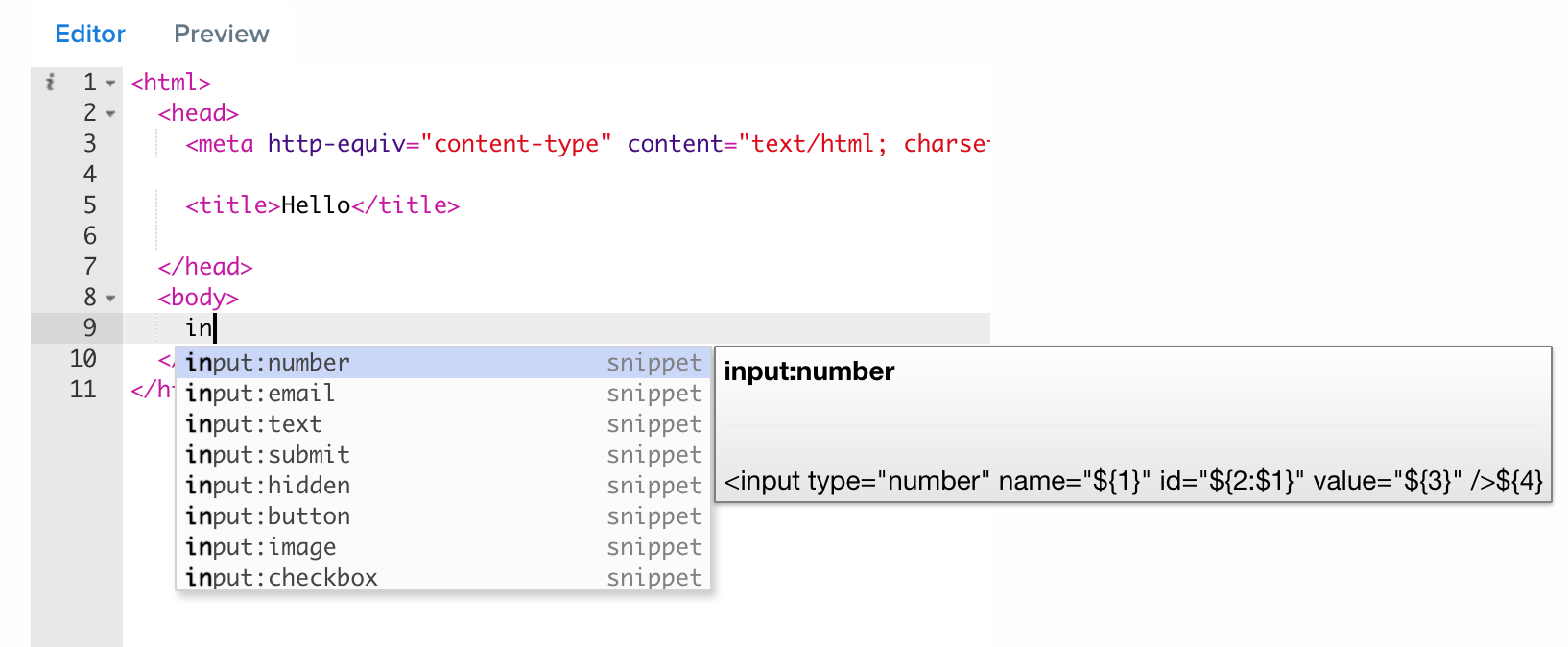
I believe, for other languages, by following this way, a similar output can be achieved.
Hope, it helps.
 anindya-dhruba
on 27 Dec 2017
anindya-dhruba
on 27 Dec 2017
@anindya-dhruba How to write a custom mode? Your example shows clearly about adding mode which is in the brace, but what if I want to add my own?
 oakland
on 31 Aug 2018
oakland
on 31 Aug 2018
@oakland, I am not the author of this repo, but I guess, you need to write one yourself and import that instead of the built-in one. I don't know how to write custom mode. The author @securingsincity might help you in this case.
Thanks.
anindya-dhruba
on 31 Aug 2018
I still cannot find any docs about what is live and basic?
 Obiwarn
on 22 Oct 2018
Obiwarn
on 22 Oct 2018
@Obiwarn as far as I understand, "basic" is the completion mode that has to be manually triggered by pressing ctrl+space, and "live" is the one that displays suggestions as you type.
 n1313
on 21 Nov 2018
n1313
on 21 Nov 2018
Hi there! I'm trying to turn on auto complete and add my own, custom variables but I'm running into issues. I'm trying to combine code from these two sources:
http://plnkr.co/edit/PNvznZCXwr8nJAHwhxA2?p=preview
https://github.com/securingsincity/react-ace/blob/master/docs/FAQ.md#how-do-i-add-language-snippets
Here's basically what I've got so far:
Imports:
import AceEditor from 'react-ace';
import 'brace/mode/java';
import 'brace/theme/textmate';
import CustomMode from "./customMode.js"; //This is because I'm making my own mode, I think you can ignore it
import "brace/ext/language_tools";
Render:
//The text editor:
    renderWidget(args) {
        Object.assign(args, {
            ref: "aceEditor",
            mode: "java",
            fontSize: 16,
            theme: "textmate",
            showPrintMargin: false,
            showGutter: true,
            readOnly: false,
            wrapEnabled: true,
            editorProps: {$blockScrolling: true},
            setOptions: {
                enableBasicAutocompletion: true,
                enableLiveAutocompletion: true,
                enableSnippets: true,
                showLineNumbers: true,
                tabSize: 2,
                }
        });

        return <AceEditor {...args}/>;
    }
Other:
componentDidMount() {
   const customMode = new CustomMode(); //Has to do with custom mode
   this.refs.aceEditor.editor.getSession().setMode(customMode); //Has to do with custom mode
   language_tools.addCompleter(staticWordCompleter);
}
I'm getting a type error: language_tools is not defined
Any help would be appreciated!
 Memnarch1113
on 27 Dec 2018
Memnarch1113
on 27 Dec 2018
Hi there! I'm trying to turn on auto complete and add my own, custom variables but I'm running into issues. I'm trying to combine code from these two sources:
http://plnkr.co/edit/PNvznZCXwr8nJAHwhxA2?p=previewhttps://github.com/securingsincity/react-ace/blob/master/docs/FAQ.md#how-do-i-add-language-snippets
Here's basically what I've got so far:
Imports:
import AceEditor from 'react-ace';
import 'brace/mode/java';
import 'brace/theme/textmate';
import CustomMode from "./customMode.js"; //This is because I'm making my own mode, I think you can ignore it
import "brace/ext/language_tools";
Render:
//The text editor:
    renderWidget(args) {
        Object.assign(args, {
            ref: "aceEditor",
            mode: "java",
            fontSize: 16,
            theme: "textmate",
            showPrintMargin: false,
            showGutter: true,
            readOnly: false,
            wrapEnabled: true,
            editorProps: {$blockScrolling: true},
            setOptions: {
                enableBasicAutocompletion: true,
                enableLiveAutocompletion: true,
                enableSnippets: true,
                showLineNumbers: true,
                tabSize: 2,
                }
        });

        return <AceEditor {...args}/>;
    }
Other:
componentDidMount() {
   const customMode = new CustomMode(); //Has to do with custom mode
   this.refs.aceEditor.editor.getSession().setMode(customMode); //Has to do with custom mode
   language_tools.addCompleter(staticWordCompleter);
}
I'm getting a type error:
language_tools is not definedAny help would be appreciated!
Give up the old iron, it does not support custom!
 isnl
on 19 Feb 2019
isnl
on 19 Feb 2019
@anindya-dhruba worked like a charm <3
 lobo
on 17 Mar 2019
lobo
on 17 Mar 2019
forgot language tools, thanks man
 Vlad412
on 15 May 2019
Vlad412
on 15 May 2019
Note from the react-ace Readme:
NOTE FOR VERSION 8! : We have stopped support for Brace and now use Ace-builds. Please read the documentation on how to migrate. Examples are being updated.
 worldsayshi
on 5 Nov 2019
worldsayshi
on 5 Nov 2019
下面的方法可以添加自定义的代码补全。
import { addCompleter } from 'ace-builds/src-noconflict/ext-language_tools';
componentDidMount() {
    addCompleter({
        getCompletions: function(editor, session, pos, prefix, callback) {
            callback(null, [
                {
                    name: 'test',
                    value: 'test',
                    caption: 'test',
                    meta: 'local',
                    score: 1000,
                },
            ]);
        },
    });
}
 YangDong0729
on 30 Jan 2020
YangDong0729
on 30 Jan 2020
You can also do something like:
const customCompleter = (editor, session, pos, prefix, cb) => {
    cb(null, [...])
}

<AceEditor
    ...
    setOptions={{
        ...,
        enableBasicAutocompletion: [customCompleter],
        enableLiveAutocompletion: true
    }}
/>
 samtes
on 6 Aug 2020
samtes
on 6 Aug 2020
Related issues
 ponelat
·
3Comments
ponelat
·
3Comments
 SecMao
·
4Comments
SecMao
·
4Comments
 ghiden
·
3Comments
ghiden
·
3Comments
 avalkowsky
·
6Comments
avalkowsky
·
6Comments
 anderoonies
·
5Comments
anderoonies
·
5Comments
Most helpful comment
I needed an html code editor with basic autocomplete, live autocomplete and snippet suggestion and I have managed to achieve my goal in this way:
Packages used
Imports
Render
Output
I believe, for other languages, by following this way, a similar output can be achieved.
Hope, it helps.