Reach-ui: Trick to debugging CSS of open menu?
What's the best way to inspecting the CSS styles of the open menu/menu items in Chrome? Every time I click on the inspector, the menu closes. I ended up pulling down reach, changing the isOpen state, removing the click listeners, rebuilding, and linking locally.
Am I missing something here? Is there an easier way to do this? Thanks.
 hedgerh
All 8 comments
First click the button to open the menu, and then right click -> inspect element on the MenuButton while the menu is open.
 jakierice
on 14 Sep 2018
jakierice
on 14 Sep 2018
Ah, thank you! That didn't occur to me. I was having a rough time trying to inspect the MenuList/MenuItem.
hedgerh
on 14 Sep 2018
Glad I could help!
jakierice
on 14 Sep 2018
I went through this exact same conundrum yesterday. I also ended up commenting out the blur handler in the source while I styled it.
Usually interacting with the devtools "preserves" the UI, but it was closing super aggressively no matter what I did. /shrug
 lee-reinhardt
on 14 Sep 2018
lee-reinhardt
on 14 Sep 2018
You can also use F8 to halt execution and the page will be frozen in the current state.
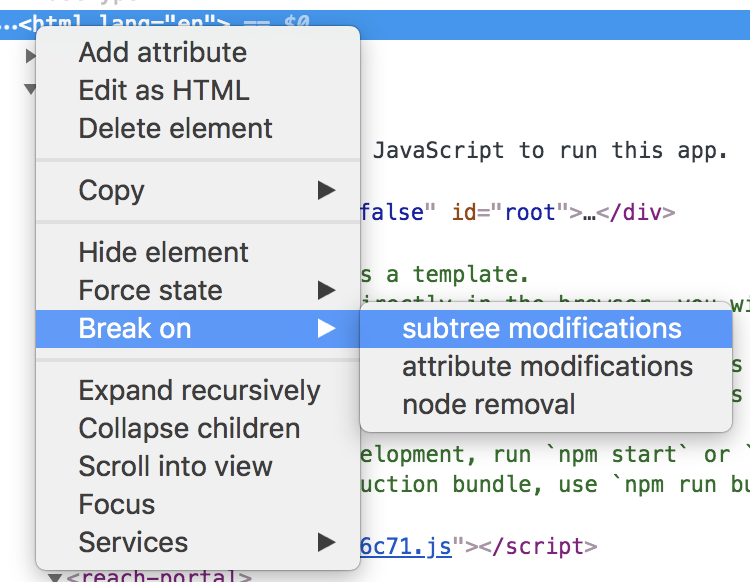
Another option is to add an HTML breakpoint on subtree modifications
 nathanforce
on 4 Oct 2018
nathanforce
on 4 Oct 2018
This seems to be a common enough problem that it should probably be formally documented, unless there is some way to fix this. I imagine that there may not be..
hedgerh
on 3 Nov 2018
Would be interesting to have a "how to debug web applications" page, but none of this is really unique to React or Reach UI :)
 ryanflorence
on 4 Jan 2019
ryanflorence
on 4 Jan 2019
Chrome crashes when doing this trying to click on the MenuItem:
jakierice's solution works and seems to disable focus behaviour going from the page to the inspector and closing the dropdown
 qoalu
on 5 Jun 2019
qoalu
on 5 Jun 2019
Related issues
 rumsky
·
6Comments
rumsky
·
6Comments
 gdsrosa
·
3Comments
ryanflorence
·
4Comments
gdsrosa
·
3Comments
ryanflorence
·
4Comments
 kylemh
·
3Comments
kylemh
·
3Comments
 sanderfish
·
5Comments
sanderfish
·
5Comments
Most helpful comment
You can also use F8 to halt execution and the page will be frozen in the current state.
Another option is to add an HTML breakpoint on subtree modifications