Good afternoon. RDP stopped working. Can anyone help me?
 Alex874
All 25 comments
Can anyone help me?
Alex874
on 13 Jan 2021
add this GIST in autoupdate file
 javedsumaro
on 13 Jan 2021
javedsumaro
on 13 Jan 2021
There version 10.0.19041.662 and I have 10.0.19041.746
Alex874
on 13 Jan 2021
Just try it once... i was having the same issue.. in same version
javedsumaro
on 13 Jan 2021
This configuration is working for me:
[10.0.19041.746]
LocalOnlyPatch.x64=1
LocalOnlyOffset.x64=88F31
LocalOnlyCode.x64=jmpshort
SingleUserPatch.x64=1
SingleUserOffset.x64=0CB22
SingleUserCode.x64=Zero
DefPolicyPatch.x64=1
DefPolicyOffset.x64=18A15
DefPolicyCode.x64=CDefPolicy_Query_eax_rcx
SLInitHook.x64=1
SLInitOffset.x64=1D5BC
SLInitFunc.x64=New_CSLQuery_Initialize

[10.0.19041.746-SLInit]
bInitialized.x64 =106028
bServerSku.x64 =10602C
lMaxUserSessions.x64 =106030
bAppServerAllowed.x64 =106038
bRemoteConnAllowed.x64=106040
bMultimonAllowed.x64 =106044
ulMaxDebugSessions.x64=106048
bFUSEnabled.x64 =10604C
 martin-korf
on 13 Jan 2021
martin-korf
on 13 Jan 2021
add this GIST in autoupdate file

https://gist.githubusercontent.com/javedsumaro/11fcabdf595241148ab962660ed470cc/raw/b5b1ff7a9cb72dea84b4dad3697680d0846aa62f/rdpwrap.ini
Thanks, configuration is working 19041.746
 chap-s
on 13 Jan 2021
chap-s
on 13 Jan 2021
add this GIST in autoupdate file
That worked for me.
 joebeem
on 13 Jan 2021
joebeem
on 13 Jan 2021
Thank you very much
Alex874
on 13 Jan 2021
I can't delete or edit the file "rdpwrap.ini" to change it same you, how can I do that?
 mh-yavari
on 13 Jan 2021
mh-yavari
on 13 Jan 2021
I can't delete or edit the file "rdpwrap.ini" to change it same you, how can I do that?
Need to stop the Remote Desktop service
Alex874
on 13 Jan 2021
I can't delete or edit the file "rdpwrap.ini" to change it same you, how can I do that?
Need to stop the Remote Desktop service

I have stoped it here but it doesn't solve
mh-yavari
on 13 Jan 2021
add 10.0.18362.1316 (x64) and 10.0.19041.746 (x64)
autoupdate (recommended)
_Info: please use/downlaod the latest autoupdate.bat file (added "Wait for network connection" :: important fix)_
or
[10.0.19041.746]
LocalOnlyPatch.x64=1
LocalOnlyOffset.x64=88F31
LocalOnlyCode.x64=jmpshort
SingleUserPatch.x64=1
SingleUserOffset.x64=0CA4C
SingleUserCode.x64=Zero
DefPolicyPatch.x64=1
DefPolicyOffset.x64=18A15
DefPolicyCode.x64=CDefPolicy_Query_eax_rcx
SLInitHook.x64=1
SLInitOffset.x64=1D5BC
SLInitFunc.x64=New_CSLQuery_Initialize

[10.0.19041.746-SLInit]
bInitialized.x64      =106028
bServerSku.x64        =10602C
lMaxUserSessions.x64  =106030
bAppServerAllowed.x64 =106038
bRemoteConnAllowed.x64=106040
bMultimonAllowed.x64  =106044
ulMaxDebugSessions.x64=106048
bFUSEnabled.x64       =10604C
please upload the 32Bit variant of termsrv.dll v.10.0.18362.1316 and v.10.0.19041.746
 asmtron
on 13 Jan 2021
asmtron
on 13 Jan 2021
Removing KB459842 and KB4598481 will get it going again if .ini isn't updated yet
 eslamiar
on 13 Jan 2021
eslamiar
on 13 Jan 2021
Hello,
I have updated the to the last rdwrap.ini file and my RDPWrapConf is successful, but still I am unable to have concurrent users in windows, it says another user is logged in.
This is the first time this happens since I have been using RDP Wrapper.
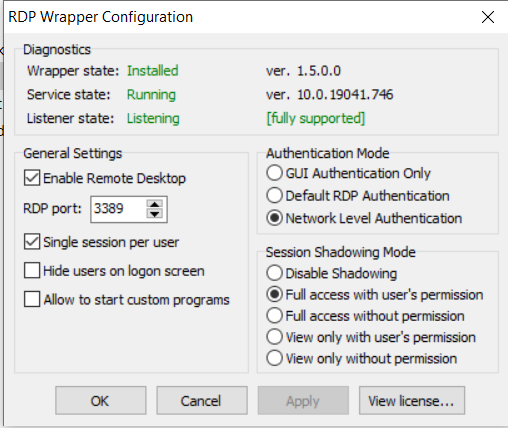
Can anyone help with this?
Why is it not letting me have concurrent users?
Thanks
 Bolex80
on 13 Jan 2021
Bolex80
on 13 Jan 2021
Hello
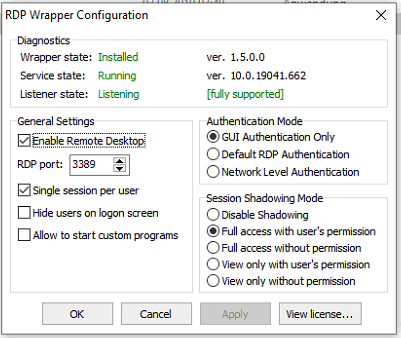
i have the Same Problem
"I have updated the to the last rdwrap.ini file and my RDPWrapConf is successful, but still I am unable to have concurrent users in windows, it says another user is logged in.
This is the first time this happens since I have been using RDP Wrapper."
all green but not more then one user at the same time ....
please help ... i need the function ....
with 10.0.19041.662 and 10.0.19041.746
Thanks
 FoxMulder0815
on 13 Jan 2021
FoxMulder0815
on 13 Jan 2021
 oshoincontrol
on 13 Jan 2021
oshoincontrol
on 13 Jan 2021
Hello oshoincontrol,
I appreciate the help sending us the file, unfortunately, when I put in in Windows/system32 instead of the old file, My terminal services, do not start anymore and are in a constant crash state.
I execute in CMD (administrator rights):
- net stop termservice (this works ok)
- change the name of the original termsrv.dll to termserv-old.dll
- copy your version of the file (provided in zip file above)
- net start termservice (service cannot start, it says it is starting, but stays frozen, nothing happens)
If I reboot windows, nothing changes. Same status.
I had to revert to the previous file to get terminal services working again.
Is there any other solution?
Thanks
:)
Bolex80
on 13 Jan 2021
Hi, it is original and unpatched file from my today installed and updated 32bit x86 system (Win 10 Home). I don't know why it doesn't work and what are you trying to achieve. I have uploaded it here as was requested for this version by asmtron (probably to be searched for correct dll entries to be added to rdpwrap.ini for this version), though request was targeted to someone else.
oshoincontrol
on 13 Jan 2021
Hi All,
Sorry for this misunderstanding (didnt realize you had the 32 bit version, that's why mine failed).
I found the solution and it was as simple as installing it via the Autoupdate service (few posts above): https://github.com/asmtron/rdpwrap/blob/master/binary-download.md
After rebooting, I can have concurrent users again.
Thank you to all
Bolex80
on 13 Jan 2021
asmtron, any chance to add 19041.746 x86 version to autoupdate? Thanks.
oshoincontrol
on 19 Jan 2021
someone can fix it? i try all your post and nothing for fix this version, RDPConf appear on green but still not concurrent users.
 maxi32uy
on 19 Jan 2021
maxi32uy
on 19 Jan 2021
I do have same problem , anyone can help .. win10 pro 32bit - version 19041.746
cannot concurrent users..
 some1o1
on 20 Jan 2021
some1o1
on 20 Jan 2021
Settings for the x86 and x64 version:
[10.0.19041.746]
LocalOnlyPatch.x86  =1
LocalOnlyOffset.x86 =B5979
LocalOnlyCode.x86   =jmpshort
SingleUserPatch.x86 =1
SingleUserOffset.x86=3BC05
SingleUserCode.x86  =nop
DefPolicyPatch.x86  =1
DefPolicyOffset.x86 =3E779
DefPolicyCode.x86   =CDefPolicy_Query_eax_ecx
SLInitHook.x86      =1
SLInitOffset.x86    =67B9A
SLInitFunc.x86      =New_CSLQuery_Initialize

LocalOnlyPatch.x64  =1
LocalOnlyOffset.x64 =88F31
LocalOnlyCode.x64   =jmpshort
SingleUserPatch.x64 =1
SingleUserOffset.x64=0CB22
SingleUserCode.x64  =Zero
DefPolicyPatch.x64  =1
DefPolicyOffset.x64 =18A15
DefPolicyCode.x64   =CDefPolicy_Query_eax_rcx
SLInitHook.x64      =1
SLInitOffset.x64    =1D5BC
SLInitFunc.x64      =New_CSLQuery_Initialize

[10.0.19041.746-SLInit]
bInitialized.x86      =D0954
bServerSku.x86        =D0958
lMaxUserSessions.x86  =D095C
bAppServerAllowed.x86 =D0964
bRemoteConnAllowed.x86=D096C
bMultimonAllowed.x86  =D0970
ulMaxDebugSessions.x86=D0974
bFUSEnabled.x86       =D0978

bInitialized.x64      =106028
bServerSku.x64        =10602C
lMaxUserSessions.x64  =106030
bAppServerAllowed.x64 =106038
bRemoteConnAllowed.x64=106040
bMultimonAllowed.x64  =106044
ulMaxDebugSessions.x64=106048
bFUSEnabled.x64       =10604C
 MarcinWerra
on 20 Jan 2021
MarcinWerra
on 20 Jan 2021
Settings for the x86 and x64 version:
[10.0.19041.746]
LocalOnlyPatch.x86  =1
LocalOnlyOffset.x86 =B5979
LocalOnlyCode.x86   =jmpshort
SingleUserPatch.x86 =1
SingleUserOffset.x86=3BC05
SingleUserCode.x86  =nop
DefPolicyPatch.x86  =1
DefPolicyOffset.x86 =3E779
DefPolicyCode.x86   =CDefPolicy_Query_eax_ecx
SLInitHook.x86      =1
SLInitOffset.x86    =67B9A
SLInitFunc.x86      =New_CSLQuery_Initialize

LocalOnlyPatch.x64  =1
LocalOnlyOffset.x64 =88F31
LocalOnlyCode.x64   =jmpshort
SingleUserPatch.x64 =1
SingleUserOffset.x64=0CB22
SingleUserCode.x64  =Zero
DefPolicyPatch.x64  =1
DefPolicyOffset.x64 =18A15
DefPolicyCode.x64   =CDefPolicy_Query_eax_rcx
SLInitHook.x64      =1
SLInitOffset.x64    =1D5BC
SLInitFunc.x64      =New_CSLQuery_Initialize

[10.0.19041.746-SLInit]
bInitialized.x86      =D0954
bServerSku.x86        =D0958
lMaxUserSessions.x86  =D095C
bAppServerAllowed.x86 =D0964
bRemoteConnAllowed.x86=D096C
bMultimonAllowed.x86  =D0970
ulMaxDebugSessions.x86=D0974
bFUSEnabled.x86       =D0978

bInitialized.x64      =106028
bServerSku.x64        =10602C
lMaxUserSessions.x64  =106030
bAppServerAllowed.x64 =106038
bRemoteConnAllowed.x64=106040
bMultimonAllowed.x64  =106044
ulMaxDebugSessions.x64=106048
bFUSEnabled.x64       =10604C
Thank you . Now is can work . Thank you so much !!
some1o1
on 20 Jan 2021
Indeed it works on x86
 w1lddog2
on 21 Jan 2021
w1lddog2
on 21 Jan 2021
Related issues
 francescofalanga92
·
3Comments
francescofalanga92
·
3Comments
 apolyakov2017
·
4Comments
apolyakov2017
·
4Comments
 cakexxx
·
6Comments
cakexxx
·
6Comments
 eyeTechSolutions
·
5Comments
eyeTechSolutions
·
5Comments
 isidorosss
·
5Comments
isidorosss
·
5Comments
Most helpful comment
This configuration is working for me: