hi
I can't find the .ini file supporting this version. Can anyone help me?
 ynt25860
All 53 comments

ynt25860
on 1 Dec 2020
My win version is 20H2 (OS Build 19042.662)
ynt25860
on 1 Dec 2020
This is the latest 20H2 update, there is no .ini file for this yet
Please uninstall the latest windows update to get it back working
 sk-lau
on 1 Dec 2020
sk-lau
on 1 Dec 2020
IT may help if you upload a copy of your termsvc.dll file from windows/system32 somewhere, and post a link to it here. Some of the users here are very quick at creating the .ini file if they have a sample of the file.
 robbak
on 1 Dec 2020
robbak
on 1 Dec 2020
Could really do with the ini file details for this, too late for me to rollback apparently :(
 SNM1966
on 1 Dec 2020
SNM1966
on 1 Dec 2020
This is the latest 20H2 update, there is no .ini file for this yet
Please uninstall the latest windows update to get it back working
Thank you. I've tried to roll back the system version, but it's disappointing that this version doesn't support rollback. I can only look for the latest ini replacement.
ynt25860
on 1 Dec 2020
I have this problem too. Ver. 10.0.19041.662
 bezridnuy
on 1 Dec 2020
bezridnuy
on 1 Dec 2020
+1
 TheMRLokopOff
on 1 Dec 2020
TheMRLokopOff
on 1 Dec 2020
Keep an eye on @sebaxakerhtc 's repo. He is the person who is most likely
to produce the offsets for a new version.
https://github.com/sebaxakerhtc/rdpwrap.ini
On Tue, 1 Dec 2020 at 21:05, Artem Mishin notifications@github.com wrote:
+1
—
You are receiving this because you commented.
Reply to this email directly, view it on GitHub
https://github.com/stascorp/rdpwrap/issues/1220#issuecomment-736425013,
or unsubscribe
https://github.com/notifications/unsubscribe-auth/AAMCGIXF5PMBKSMYJDUVW2DSSTEWHANCNFSM4UIRLJLA
.
robbak
on 1 Dec 2020
try adding the following lines to your existing rdpwrap.ini files
[10.0.19041.662]
LocalOnlyPatch.x64=1
LocalOnlyOffset.x64=88E81
LocalOnlyCode.x64=jmpshort
SingleUserPatch.x64=1
SingleUserOffset.x64=0CAE2
SingleUserCode.x64=Zero
DefPolicyPatch.x64=1
DefPolicyOffset.x64=189D5
DefPolicyCode.x64=CDefPolicy_Query_eax_rcx
SLInitHook.x64=1
SLInitOffset.x64=1D50C
SLInitFunc.x64=New_CSLQuery_Initialize
[10.0.19041.662-SLInit]
bInitialized.x64 =106028
bServerSku.x64 =10602C
lMaxUserSessions.x64 =106030
bAppServerAllowed.x64 =106038
bRemoteConnAllowed.x64=106040
bMultimonAllowed.x64 =106044
ulMaxDebugSessions.x64=106048
bFUSEnabled.x64 =10604C
You may need to stop the terminal services before you add the above codes
After adding the codes, restart terminal services
Please let me know if it works :)
sk-lau
on 1 Dec 2020
Of coure, it work.
It's my values, wich tested 🤣
вт, 1 дек. 2020 г., 16:41 sk-lau notifications@github.com:
try adding the following lines to your existing rdpwrap.ini files
[10.0.19041.662]
LocalOnlyPatch.x64=1
LocalOnlyOffset.x64=88E81
LocalOnlyCode.x64=jmpshort
SingleUserPatch.x64=1
SingleUserOffset.x64=0CAE2
SingleUserCode.x64=Zero
DefPolicyPatch.x64=1
DefPolicyOffset.x64=189D5
DefPolicyCode.x64=CDefPolicy_Query_eax_rcx
SLInitHook.x64=1
SLInitOffset.x64=1D50C
SLInitFunc.x64=New_CSLQuery_Initialize[10.0.19041.662-SLInit]
bInitialized.x64 =106028
bServerSku.x64 =10602C
lMaxUserSessions.x64 =106030
bAppServerAllowed.x64 =106038
bRemoteConnAllowed.x64=106040
bMultimonAllowed.x64 =106044
ulMaxDebugSessions.x64=106048
bFUSEnabled.x64 =10604CYou may need to stop the terminal services before you add the above codes
After adding the codes, restart terminal servicesPlease let me know if it works :)
—
You are receiving this because you were mentioned.
Reply to this email directly, view it on GitHub
https://github.com/stascorp/rdpwrap/issues/1220#issuecomment-736594134,
or unsubscribe
https://github.com/notifications/unsubscribe-auth/AHZDR4RNC3KSZBSC74VZICLSST6CLANCNFSM4UIRLJLA
.
 sebaxakerhtc
on 1 Dec 2020
sebaxakerhtc
on 1 Dec 2020
try adding the following lines to your existing rdpwrap.ini files
[10.0.19041.662]
LocalOnlyPatch.x64=1
LocalOnlyOffset.x64=88E81
LocalOnlyCode.x64=jmpshort
SingleUserPatch.x64=1
SingleUserOffset.x64=0CAE2
SingleUserCode.x64=Zero
DefPolicyPatch.x64=1
DefPolicyOffset.x64=189D5
DefPolicyCode.x64=CDefPolicy_Query_eax_rcx
SLInitHook.x64=1
SLInitOffset.x64=1D50C
SLInitFunc.x64=New_CSLQuery_Initialize[10.0.19041.662-SLInit]
bInitialized.x64 =106028
bServerSku.x64 =10602C
lMaxUserSessions.x64 =106030
bAppServerAllowed.x64 =106038
bRemoteConnAllowed.x64=106040
bMultimonAllowed.x64 =106044
ulMaxDebugSessions.x64=106048
bFUSEnabled.x64 =10604CYou may need to stop the terminal services before you add the above codes
After adding the codes, restart terminal servicesPlease let me know if it works :)
unfortunately doesn't work on home version
fck microsoft why they constantly fck this up, the whole rdp month by month?
 mailor33
on 1 Dec 2020
mailor33
on 1 Dec 2020
Look at readme.md
Beginning with the Creators Update for Windows 10 Home, RDP Wrapper will no longer work, claiming that the listener is [not listening] because of rfxvmt.dll is missing - more info, download links
sebaxakerhtc
on 1 Dec 2020
Look at readme.md
Beginning with the Creators Update for Windows 10 Home, RDP Wrapper will no longer work, claiming that the listener is [not listening] because of rfxvmt.dll is missing - more info, download links
Until yesterday , the KB4586853 (2020.11 Preview optional update i used perfectly rdp wrapper on windows 10 home.
mailor33
on 1 Dec 2020
Not sure who did this and who to thank but thank you it's working for me, took a reboot though as Terminal Services was reluctant to restart.
SNM1966
on 1 Dec 2020
Is the Autoupdate been updated? I just tired it but I am still not work yet.
 StarfighterJ
on 1 Dec 2020
StarfighterJ
on 1 Dec 2020
Just edit autoupdate.bat and add to repos my repo.
Enjoy
вт, 1 дек. 2020 г., 22:51 StarfighterJ notifications@github.com:
Is the Autoupdate been updated? I just tired it but I am still not work
yet.—
You are receiving this because you were mentioned.
Reply to this email directly, view it on GitHub
https://github.com/stascorp/rdpwrap/issues/1220#issuecomment-736812006,
or unsubscribe
https://github.com/notifications/unsubscribe-auth/AHZDR4UQRHQBLUARHZI2Z5DSSVJMXANCNFSM4UIRLJLA
.
sebaxakerhtc
on 1 Dec 2020
I ran the Autoupdate as Administrator not working still. not sure what you mean by edit Autoupdate.bat sedaxakerhtc pleas advice.
Thank you Jay
and FYI my Current win version is 20H2(OS Build 19042.662
StarfighterJ
on 1 Dec 2020
I ran the Autoupdate as Administrator not working still. not sure what you mean by edit Autoupdate.bat sedaxakerhtc pleas advice.
Thank you Jay
and FYI my Current win version is 20H2(OS Build 19042.662
Ok. Than just download my modded version here https://github.com/sebaxakerhtc/rdpwrap.ini
and replace your autoupdate.bat
sebaxakerhtc
on 1 Dec 2020
and replace your autoupdate.bat
Where can I download the new version of auto-update? Something I can't update with my hands.
 Smartecs39
on 1 Dec 2020
Smartecs39
on 1 Dec 2020
I uninstalled it and did re- downloaded UPD 29.05.2020: My modded version you can download here http://rdpwrapper.myftp.biz/RDP_Wrapper_mod.zip. put it in RDPwrap folder. ran Admin Install and it all works now. I did not run the Autoupdate.bat, I am guessing this is the new one and should work lol again when Microsoft does it thing.
Thank again sebaxkerhtc :)
StarfighterJ
on 2 Dec 2020
I uninstalled it and did re- downloaded UPD 29.05.2020: My modded version you can download here http://rdpwrapper.myftp.biz/RDP_Wrapper_mod.zip. put it in RDPwrap folder. ran Admin Install and it all works now. I did not run the Autoupdate.bat, I am guessing this is the new one and should work lol again when Microsoft does it thing.
Thank again sebaxkerhtc :)
Nice to hear it. But for my version you don't need to copy it. Run it from any folder and it will copy files to right place and start automaticaly autoupdate :)
sebaxakerhtc
on 2 Dec 2020
Of coure, it work. It's my values, wich tested 🤣 вт, 1 дек. 2020 г., 16:41 sk-lau notifications@github.com:
…
try adding the following lines to your existing rdpwrap.ini files [10.0.19041.662] LocalOnlyPatch.x64=1 LocalOnlyOffset.x64=88E81 LocalOnlyCode.x64=jmpshort SingleUserPatch.x64=1 SingleUserOffset.x64=0CAE2 SingleUserCode.x64=Zero DefPolicyPatch.x64=1 DefPolicyOffset.x64=189D5 DefPolicyCode.x64=CDefPolicy_Query_eax_rcx SLInitHook.x64=1 SLInitOffset.x64=1D50C SLInitFunc.x64=New_CSLQuery_Initialize [10.0.19041.662-SLInit] bInitialized.x64 =106028 bServerSku.x64 =10602C lMaxUserSessions.x64 =106030 bAppServerAllowed.x64 =106038 bRemoteConnAllowed.x64=106040 bMultimonAllowed.x64 =106044 ulMaxDebugSessions.x64=106048 bFUSEnabled.x64 =10604C You may need to stop the terminal services before you add the above codes After adding the codes, restart terminal services Please let me know if it works :) — You are receiving this because you were mentioned. Reply to this email directly, view it on GitHub <#1220 (comment)>, or unsubscribe https://github.com/notifications/unsubscribe-auth/AHZDR4RNC3KSZBSC74VZICLSST6CLANCNFSM4UIRLJLA .
Yes I took the codes from your github and pasted here as to make it easier for other users to change their rdpwrap.ini
Many thanks for the effort
However I have not tried it yet so was waiting for users feedback :)
sk-lau
on 2 Dec 2020
No problems. But better way is to provide the link to original.
I have not tried it yet so was waiting for users feedback :)
https://github.com/sebaxakerhtc/rdpwrap.ini/issues/25#issuecomment-736540099
sebaxakerhtc
on 2 Dec 2020
try adding the following lines to your existing rdpwrap.ini files
[10.0.19041.662]
LocalOnlyPatch.x64=1
LocalOnlyOffset.x64=88E81
LocalOnlyCode.x64=jmpshort
SingleUserPatch.x64=1
SingleUserOffset.x64=0CAE2
SingleUserCode.x64=Zero
DefPolicyPatch.x64=1
DefPolicyOffset.x64=189D5
DefPolicyCode.x64=CDefPolicy_Query_eax_rcx
SLInitHook.x64=1
SLInitOffset.x64=1D50C
SLInitFunc.x64=New_CSLQuery_Initialize[10.0.19041.662-SLInit]
bInitialized.x64 =106028
bServerSku.x64 =10602C
lMaxUserSessions.x64 =106030
bAppServerAllowed.x64 =106038
bRemoteConnAllowed.x64=106040
bMultimonAllowed.x64 =106044
ulMaxDebugSessions.x64=106048
bFUSEnabled.x64 =10604CYou may need to stop the terminal services before you add the above codes
After adding the codes, restart terminal servicesPlease let me know if it works :)
I need the .ini-File for x86-Version. Please upload it - Thanks
 card0384
on 2 Dec 2020
card0384
on 2 Dec 2020
mevcut rdpwrap.ini dosyalarınıza aşağıdaki satırları eklemeyi deneyin
[10.0.19041.662]
LocalOnlyPatch.x64 = 1
LocalOnlyOffset.x64 = 88E81
LocalOnlyCode.x64 = jmpshort
SingleUserPatch.x64 = 1
SingleUserOffset.x64 = 0CAE2
SingleUserCode.x64 = Sıfır
DefPolicyPatch.x64 = 1
DefPolicyOffset.x64 = 189D5
DefPolicyCode.x64 = CDefPolicy_Query_eax_rcx
SLInitHook.x64 = 1
SLInitOffset.x64 = 1D50C
SLInitFunc.x64 = Yeni_CSLQuery_Initialize
[10.0.19041.662-SLInit]
bInitialized.x64 = 106.028
bServerSku.x64 = 10602C
lMaxUserSessions.x64 = 106.030
bAppServerAllowed.x64 = 106.038
bRemoteConnAllowed.x64 = 106.040
bMultimonAllowed.x64 = 106044
ulMaxDebugSessions.x64 = 106.048
bFUSEnabled.x64 = 10604C
Yukarıdaki kodları
eklemeden önce terminal hizmetlerini durdurmanız gerekebilir Kodları ekledikten sonra terminal hizmetlerini yeniden başlatın
Lütfen çalışıp çalışmadığını bana bildirin :)X86 Sürümü için .ini dosyasına ihtiyacım var. Lütfen yükleyin - Teşekkürler
Did not
 yalkink
on 2 Dec 2020
yalkink
on 2 Dec 2020
someone else?
card0384
on 2 Dec 2020
@card0384: Could be related: https://github.com/stascorp/rdpwrap/issues/1223
 strarsis
on 2 Dec 2020
strarsis
on 2 Dec 2020
@card0384: Could be related: #1223
Thanks for your hint, but unfortunately does Not bring me to X86-inf. Other ideas?
card0384
on 3 Dec 2020
Hello, I'm running Windows 10 19042.662.
Does someone have the right code to be added to the .ini to make RDPWrapper work with the 20H2?
 mlazzarotto
on 6 Dec 2020
mlazzarotto
on 6 Dec 2020
Having the same issue with 10.0.19041.662. While it says it is install and fully supported. Only one user can RDP. When using RDPCheck.exe I'm thrown a "Disconnected by server" and the screen remain black. I'll add some screenshots. I've tried everything listed above.

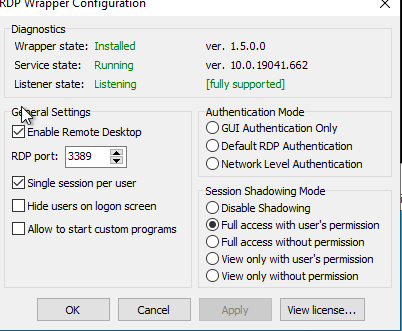
Going to roll back for now.
 MrSaintJCode
on 8 Dec 2020
MrSaintJCode
on 8 Dec 2020
Going to roll back for now
On your screenshot you have selected just single session per user. What are you waiting for?
sebaxakerhtc
on 8 Dec 2020
Please, can someone clever solve 32bit termsrv.dll 10.0.19041.662. Thanks
termsrv.zip
 1Pekol
on 9 Dec 2020
1Pekol
on 9 Dec 2020
You can find an up-to-date rdpwrap.ini file here: https://github.com/asmtron/rdpwrap/blob/master/res/rdpwrap.ini
RDPWinst.exe -u- copy the ini file over
RDPWinst.exe -i
 brechtm
on 9 Dec 2020
brechtm
on 9 Dec 2020
Thanks for everyone who took the time to create the new ini for 662 and so fast!!! Thnks a lot!
 TGeRi
on 9 Dec 2020
TGeRi
on 9 Dec 2020
up-to-date rdpwrap.ini file here: https://github.com/asmtron/rdpwrap/blob/master/res/rdpwrap.ini
Seriously?
ynt25860 opened this issue 8 days ago
But before 5 hours
https://github.com/asmtron/rdpwrap/commit/526d0b7dbcd943513caa53af2d2bcb32a34438b6
sebaxakerhtc
on 9 Dec 2020
What about Windows 10 19042.662 ini?
mlazzarotto
on 10 Dec 2020
I think there is no such dll.
Don't look at the Windows version. (Start-run-winver --> that is NOT what you need!)
Look at rdpconf.exe! That version is what you need the ini for!

TGeRi
on 10 Dec 2020
@TGeRi Thank you, you're right! I copied the right ini and now RDP Wrapper is running, but
when I try to login, Windows still asks me if I want to kick out the other user. So I think I'm missing some setting.

mlazzarotto
on 10 Dec 2020
Your conf.exe looks okt% Try a full reboot first!
TGeRi
on 10 Dec 2020
Windows still asks me if I want to kick out the other user.
Unmark single session per user!
Your conf.exe looks okt% Try a full reboot first!
No. Look up
sebaxakerhtc
on 10 Dec 2020
@sebaxakerhtc @TGeRi
Thank you guys. I tried to reboot but it wasn't still working.
Then I uninstalled RDP Wrapper and installed RDP_Wrapper_Mod from @StarfighterJ post above, and now it's fully working.
mlazzarotto
on 10 Dec 2020
Install from where? 🤣
чт, 10 дек. 2020 г., 10:24 Marco Lazzarotto notifications@github.com:
@sebaxakerhtc https://github.com/sebaxakerhtc @TGeRi
https://github.com/TGeRi
Thank you guys. I tried to reboot but it wasn't still working.
Then I uninstalled RDP Wrapper and installed RDP_Wrapper_Mod from
@StarfighterJ https://github.com/StarfighterJ post above, and now it's
fully working.—
You are receiving this because you were mentioned.
Reply to this email directly, view it on GitHub
https://github.com/stascorp/rdpwrap/issues/1220#issuecomment-742363499,
or unsubscribe
https://github.com/notifications/unsubscribe-auth/AHZDR4WGRMQ7SIKSQJB6XRLSUCATTANCNFSM4UIRLJLA
.
sebaxakerhtc
on 10 Dec 2020
autoupdater (https://github.com/asmtron/rdpwrap/blob/master/binary-download.md) added the following to my ini: confirmed working
[10.0.19041.662-SLInit]
bInitialized.x86 =D1954
bServerSku.x86 =D1958
lMaxUserSessions.x86 =D195C
bAppServerAllowed.x86 =D1964
bRemoteConnAllowed.x86=D196C
bMultimonAllowed.x86 =D1970
ulMaxDebugSessions.x86=D1974
bFUSEnabled.x86 =D1978
bInitialized.x64 =106028
bServerSku.x64 =10602C
lMaxUserSessions.x64 =106030
bAppServerAllowed.x64 =106038
bRemoteConnAllowed.x64=106040
bMultimonAllowed.x64 =106044
ulMaxDebugSessions.x64=106048
bFUSEnabled.x64 =10604C
 hexbinoct
on 10 Dec 2020
hexbinoct
on 10 Dec 2020
Windows still asks me if I want to kick out the other user.
Unmark single session per user!
Your conf.exe looks okt% Try a full reboot first!
No. Look up
hey hello! Have you considered starting a discord server for this it will be SO helpful for all of us, wont be dependent on github threads.
hexbinoct
on 10 Dec 2020
added the following to my ini: confirmed working
Of course! It work from 9 days ago
sebaxakerhtc
on 10 Dec 2020
hey hello! Have you considered starting a discord server for this it will be SO helpful for all of us, wont be dependent on github threads.
Sorry, but i can't.
My free time every day is different.
That's why i wrote a autoscript for generating values for this tool
sebaxakerhtc
on 10 Dec 2020
ok, so I have created a server https://discord.gg/24mDptTN and its only for anything related to rdpwrap, in case anyone wants to hangout to get help or help others, even if you cant be there most of the times we will just volunteer. RDPWrap is very imp to me.
hexbinoct
on 10 Dec 2020
You can find an up-to-date rdpwrap.ini file here: https://github.com/asmtron/rdpwrap/blob/master/res/rdpwrap.ini
RDPWinst.exe -u- copy the ini file over
RDPWinst.exe -i
I can verify this works for the 10.0.19041.662 version for Win10 Home. Many thanks for the life saver!
 shadowlips
on 10 Dec 2020
shadowlips
on 10 Dec 2020
If changes to the ini file do not work upon restarting the service, remember to try reinstalling RDPWrapper.
 dmcdivitt
on 13 Dec 2020
dmcdivitt
on 13 Dec 2020
Help me please. Not how I can not achieve what would work. When a terminal client is connected, the local one crashes. I've already tried a lot of ini files. I'm using a modified RDPWrapper: https://github.com/sebaxakerhtc/rdpwrap.ini
i uninstalled update KB4586853


 edgiru
on 26 Dec 2020
edgiru
on 26 Dec 2020
Ok. Than just download my modded version here https://github.com/sebaxakerhtc/rdpwrap.ini
and replace your autoupdate.bat
Your repo/work is great. Finally got the listener working with your mod! :)
 voarsh2
on 5 Jan 2021
voarsh2
on 5 Jan 2021
Your repo/work is great. Finally got the listener working with your mod! :)
Thank you!
sebaxakerhtc
on 6 Jan 2021
Related issues
 cakexxx
·
6Comments
sk-lau
·
4Comments
cakexxx
·
6Comments
sk-lau
·
4Comments
 eyeTechSolutions
·
5Comments
eyeTechSolutions
·
5Comments
 mahmoodyali
·
4Comments
mahmoodyali
·
4Comments
 papoluisjr
·
3Comments
papoluisjr
·
3Comments
Most helpful comment
try adding the following lines to your existing rdpwrap.ini files
[10.0.19041.662]
LocalOnlyPatch.x64=1
LocalOnlyOffset.x64=88E81
LocalOnlyCode.x64=jmpshort
SingleUserPatch.x64=1
SingleUserOffset.x64=0CAE2
SingleUserCode.x64=Zero
DefPolicyPatch.x64=1
DefPolicyOffset.x64=189D5
DefPolicyCode.x64=CDefPolicy_Query_eax_rcx
SLInitHook.x64=1
SLInitOffset.x64=1D50C
SLInitFunc.x64=New_CSLQuery_Initialize
[10.0.19041.662-SLInit]
bInitialized.x64 =106028
bServerSku.x64 =10602C
lMaxUserSessions.x64 =106030
bAppServerAllowed.x64 =106038
bRemoteConnAllowed.x64=106040
bMultimonAllowed.x64 =106044
ulMaxDebugSessions.x64=106048
bFUSEnabled.x64 =10604C
You may need to stop the terminal services before you add the above codes
After adding the codes, restart terminal services
Please let me know if it works :)