hi
running on windows server 2019, 10.0.17763.1613 version of DLL is not supported...
Any help please ?
thx !
 Crush33
All 17 comments
Why are you running this on windows server? Windows server should natively support all the features of this program.
 rom4ster
on 27 Nov 2020
rom4ster
on 27 Nov 2020
The problem also exists for Windows 10 LTSC 1809 10.0.17763.1613 after the latest KB4586839 update from 2020-11-19
termsrv.dll-10.0.17763.1613.zip
Please, help!
 haba-haba
on 28 Nov 2020
haba-haba
on 28 Nov 2020
Same issue
 LPVOIDDev
on 28 Nov 2020
LPVOIDDev
on 28 Nov 2020
Hi,
Same here on Windows 2019 server 10.0.17763.1613, I would like to use RDPWrapper like I do it in W10 to avoid to use the RDP feature of 2K19 server.
Thanks
termsrv.dll-10.0.17763.1613-fr_2k19.zip
 accnetdev
on 29 Nov 2020
accnetdev
on 29 Nov 2020
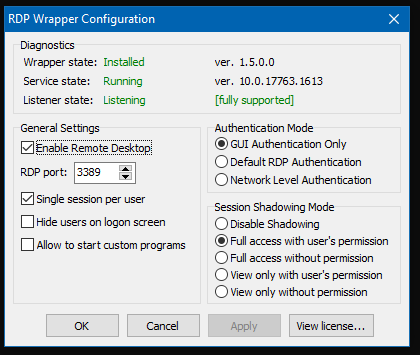
Enjoy.
`
[10.0.17763.1613]
LocalOnlyPatch.x86 =1
LocalOnlyOffset.x86 =B5834
LocalOnlyCode.x86 =jmpshort
SingleUserPatch.x86 =1
SingleUserOffset.x86=4EC35
SingleUserCode.x86 =nop
DefPolicyPatch.x86 =1
DefPolicyOffset.x86 =4D439
DefPolicyCode.x86 =CDefPolicy_Query_eax_ecx
SLInitHook.x86 =1
SLInitOffset.x86 =61A0A
SLInitFunc.x86 =New_CSLQuery_Initialize
LocalOnlyPatch.x64 =1
LocalOnlyOffset.x64 =7E381
LocalOnlyCode.x64 =jmpshort
SingleUserPatch.x64 =1
SingleUserOffset.x64=1386C
SingleUserCode.x64 =Zero
DefPolicyPatch.x64 =1
DefPolicyOffset.x64 =184F5
DefPolicyCode.x64 =CDefPolicy_Query_eax_rcx
SLInitHook.x64 =1
SLInitOffset.x64 =2198C
SLInitFunc.x64 =New_CSLQuery_Initialize
[10.0.17763.1613-SLInit]
bInitialized.x86 =D3828
bServerSku.x86 =D382C
lMaxUserSessions.x86 =D3830
bAppServerAllowed.x86 =D3838
bRemoteConnAllowed.x86=D383C
bMultimonAllowed.x86 =D3840
ulMaxDebugSessions.x86=D3844
bFUSEnabled.x86 =D3848
bServerSku.x64 =F3B90
lMaxUserSessions.x64 =F3B94
bAppServerAllowed.x64 =F3B9C
bInitialized.x64 =F3B8C
bRemoteConnAllowed.x64=F3BA0
bMultimonAllowed.x64 =F3BA4
ulMaxDebugSessions.x64=F3BA8
bFUSEnabled.x64 =F3BAC
`
 zzelalex
on 29 Nov 2020
zzelalex
on 29 Nov 2020
@zzelalex Thank you so much! Working perfectly now!
LPVOIDDev
on 29 Nov 2020
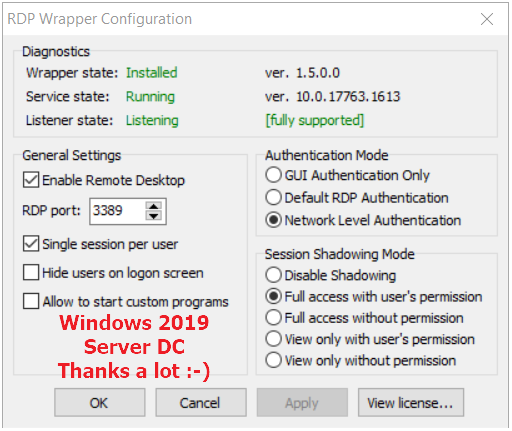
accnetdev
on 29 Nov 2020
Hello,
Could you explaine what must be done with / where must it be pasted,
[10.0.17763.1613-SLInit]
bServerSku.x64 =F3B90
lMaxUserSessions.x64 =F3B94
bAppServerAllowed.x64 =F3B9C
bInitialized.x64 =F3B8C
bRemoteConnAllowed.x64=F3BA0
bMultimonAllowed.x64 =F3BA4
ulMaxDebugSessions.x64=F3BA8
bFUSEnabled.x64 =F3BAC
[10.0.17763.1613]
LocalOnlyPatch.x64 =1
LocalOnlyOffset.x64 =7E381
LocalOnlyCode.x64 =jmpshort
SingleUserPatch.x64 =1
SingleUserOffset.x64=1386C
SingleUserCode.x64 =Zero
DefPolicyPatch.x64 =1
DefPolicyOffset.x64 =184F5
DefPolicyCode.x64 =CDefPolicy_Query_eax_rcx
SLInitHook.x64 =1
SLInitOffset.x64 =2198C
SLInitFunc.x64 =New_CSLQuery_Initialize
Thanks
 Sovepro
on 9 Dec 2020
Sovepro
on 9 Dec 2020
@Sovepro
C:\Program Files\RDP Wrapper\rdpwrap.ini
win10 lts need reboot system.
 yorks
on 10 Dec 2020
yorks
on 10 Dec 2020
I Want 32bit rdpwrap.ini plz ㅠ.ㅠ
 sesso7
on 11 Dec 2020
sesso7
on 11 Dec 2020
I Want 32bit rdpwrap.ini plz ㅠ.ㅠ
Well, let's assume I want to help you.
So, I need to install a 32-bit windows ltsc 1809 on my testing system, update it to the current state and take the termsrv.dll from there.
Then I need to make an "ini" file and to ask you to try it.
Again, I need to revert the test system to x64 because I definitely don't need x32.
Doesn't it seem to you too much?
Can you, at least, provide the current termsrv.dll?
zzelalex
on 11 Dec 2020
Thank you.
This is the file you mentioned.
termsrv.zip
sesso7
on 12 Dec 2020
This is the file you mentioned.
Try this:
`
[10.0.17763.1613-SLInit]
bInitialized.x86 =D3828
bServerSku.x86 =D382C
lMaxUserSessions.x86 =D3830
bAppServerAllowed.x86 =D3838
bRemoteConnAllowed.x86=D383C
bMultimonAllowed.x86 =D3840
ulMaxDebugSessions.x86=D3844
bFUSEnabled.x86 =D3848
[10.0.17763.1613]
LocalOnlyPatch.x86 =1
LocalOnlyOffset.x86 =B5834
LocalOnlyCode.x86 =jmpshort
SingleUserPatch.x86 =1
SingleUserOffset.x86=4EC35
SingleUserCode.x86 =nop
DefPolicyPatch.x86 =1
DefPolicyOffset.x86 =4D439
DefPolicyCode.x86 =CDefPolicy_Query_eax_ecx
SLInitHook.x86 =1
SLInitOffset.x86 =61A0A
SLInitFunc.x86 =New_CSLQuery_Initialize
`
zzelalex
on 12 Dec 2020
Thank you very much.
sesso7
on 12 Dec 2020
thanks!
 ginesvet
on 19 Dec 2020
ginesvet
on 19 Dec 2020
@zzelalex could you please help me to get the patch for version 10.0.17763.1637 x64 ? it is not posted anywhere :(
 newbiebay
on 5 Jan 2021
newbiebay
on 5 Jan 2021
version 10.0.17763.1637 x64
This is not correct, your dll has another version (recheck, please).
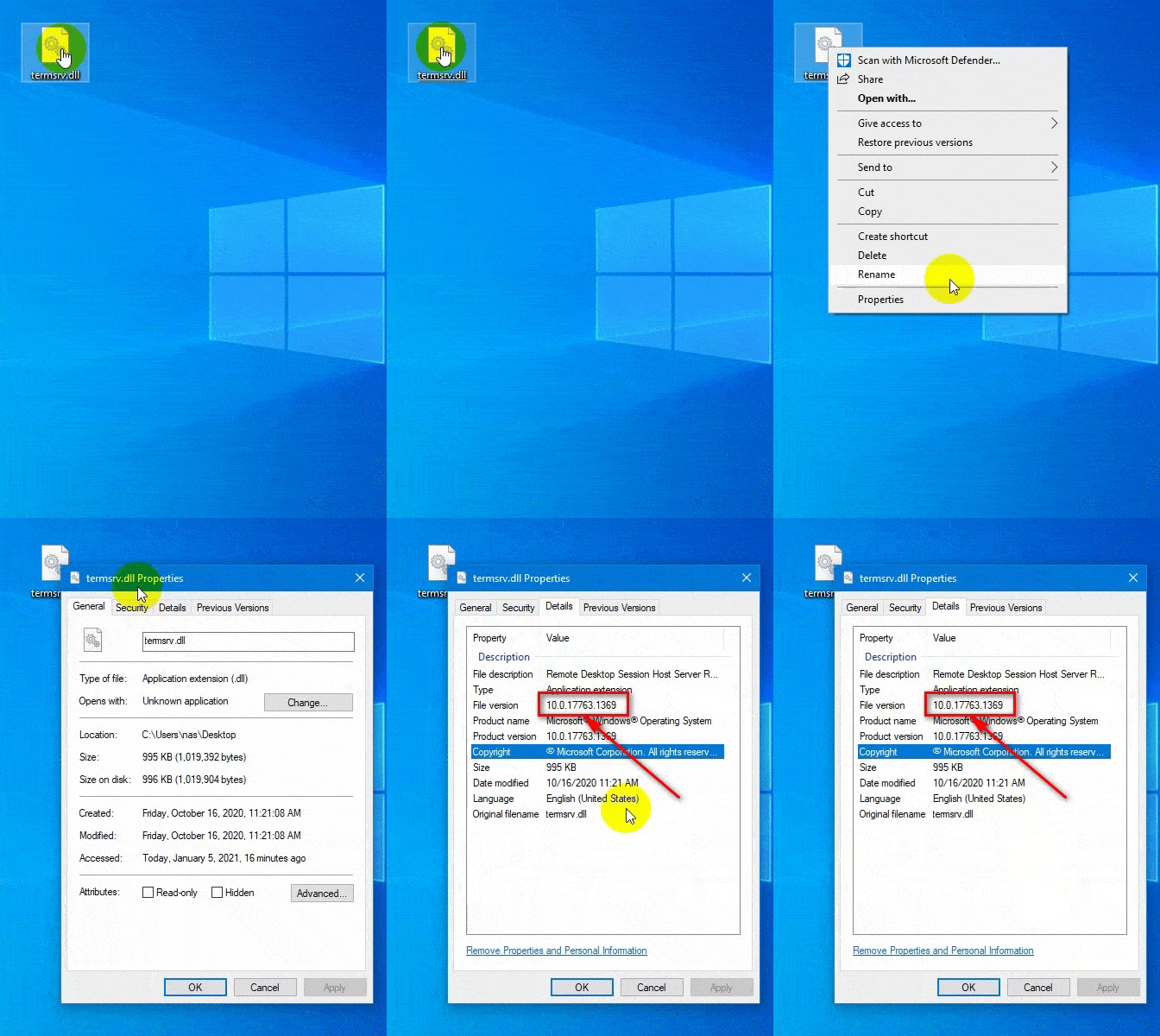
And the solution for this version has been already posted. In the appropriate thread.
zzelalex
on 5 Jan 2021
Related issues
 cH40z32
·
4Comments
cH40z32
·
4Comments
 apolyakov2017
·
4Comments
apolyakov2017
·
4Comments
 dagwieers
·
4Comments
dagwieers
·
4Comments
 mahmoodyali
·
4Comments
mahmoodyali
·
4Comments
 sihow29
·
4Comments
sihow29
·
4Comments
Most helpful comment
Enjoy.
`
[10.0.17763.1613]
LocalOnlyPatch.x86 =1
LocalOnlyOffset.x86 =B5834
LocalOnlyCode.x86 =jmpshort
SingleUserPatch.x86 =1
SingleUserOffset.x86=4EC35
SingleUserCode.x86 =nop
DefPolicyPatch.x86 =1
DefPolicyOffset.x86 =4D439
DefPolicyCode.x86 =CDefPolicy_Query_eax_ecx
SLInitHook.x86 =1
SLInitOffset.x86 =61A0A
SLInitFunc.x86 =New_CSLQuery_Initialize
LocalOnlyPatch.x64 =1
LocalOnlyOffset.x64 =7E381
LocalOnlyCode.x64 =jmpshort
SingleUserPatch.x64 =1
SingleUserOffset.x64=1386C
SingleUserCode.x64 =Zero
DefPolicyPatch.x64 =1
DefPolicyOffset.x64 =184F5
DefPolicyCode.x64 =CDefPolicy_Query_eax_rcx
SLInitHook.x64 =1
SLInitOffset.x64 =2198C
SLInitFunc.x64 =New_CSLQuery_Initialize
[10.0.17763.1613-SLInit]
bInitialized.x86 =D3828
bServerSku.x86 =D382C
lMaxUserSessions.x86 =D3830
bAppServerAllowed.x86 =D3838
bRemoteConnAllowed.x86=D383C
bMultimonAllowed.x86 =D3840
ulMaxDebugSessions.x86=D3844
bFUSEnabled.x86 =D3848
bServerSku.x64 =F3B90
lMaxUserSessions.x64 =F3B94
bAppServerAllowed.x64 =F3B9C
bInitialized.x64 =F3B8C
bRemoteConnAllowed.x64=F3BA0
bMultimonAllowed.x64 =F3BA4
ulMaxDebugSessions.x64=F3BA8
bFUSEnabled.x64 =F3BAC
`