Rdpwrap: not supported [10.0.14393.3986]
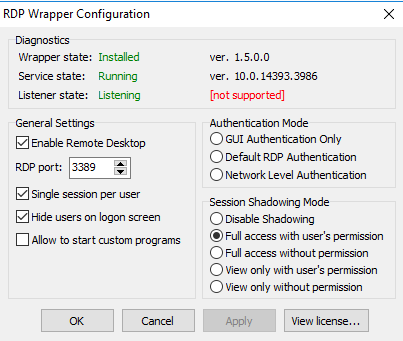
autoupdate not helping(
 enigmen
All 37 comments
Get the updated rdpwrap.ini file from here and place it in the same folder as RDPWinst. Next uninstall your current version and reinstall with the new rdpwrap.ini.
 samthelion
on 14 Oct 2020
samthelion
on 14 Oct 2020
I've tested the version of this rdpwrap.ini and for this particular version it doesn't work
also I do not see 10.0.14393.3986 in this ini file
 hbakiewicz
on 14 Oct 2020
hbakiewicz
on 14 Oct 2020
You're right, there's no [10.0.14393.3986] section in that file, sorry. I've done a little research and I think you have tree options:
- Find out how to to patch the file yourself
- Ask/Wait for someone to make a patch
- Update Windows to a version supported by any of these rdpwrap.ini files
samthelion
on 14 Oct 2020
samthelion,
is there any chance you are going to add the updated section to the ini file ?
 jjwhite77
on 14 Oct 2020
jjwhite77
on 14 Oct 2020
Sorry buddy but I'm just a user, i have absolutely no idea on how to do so.
samthelion
on 14 Oct 2020
Ok, Thanks
Do you know where I should be looking for the INI update ?
jjwhite77
on 14 Oct 2020
Well, this repo was modified 2 days ago, and the modified file was the rdpwrap.ini, so i assume it is one of the most updated. Maybe you can ask the owner to patch the file for your version of Windows.
samthelion
on 14 Oct 2020
So any have an idea of how to fix it? :(
 CrisRmz
on 14 Oct 2020
CrisRmz
on 14 Oct 2020
Same problem
 Adeshwar03
on 15 Oct 2020
Adeshwar03
on 15 Oct 2020
waiting for the solution
 Razorvu
on 15 Oct 2020
Razorvu
on 15 Oct 2020
workaround - uninstall update KB4580346
enigmen
on 15 Oct 2020
I used this solution : link
check the last comment, where "KUBAT" provided solution how to patch the dll.
for me it worked
hbakiewicz
on 15 Oct 2020
Hello same code as the previous one [10.0.14393.3503]
just copy paste and change the code to [10.0.14393.3986]
for the lazy ones here the code to paste at the end on the .ini file (and dont forget to leave a blanc line after the code or it will not work)
[10.0.14393.3986]
LocalOnlyPatch.x86=1
LocalOnlyOffset.x86=A6578
LocalOnlyCode.x86=jmpshort
LocalOnlyPatch.x64=1
LocalOnlyOffset.x64=8D8A1
LocalOnlyCode.x64=jmpshort
SingleUserPatch.x86=1
SingleUserOffset.x86=36CE5
SingleUserCode.x86=nop
SingleUserPatch.x64=1
SingleUserOffset.x64=1B6A4
SingleUserCode.x64=Zero
DefPolicyPatch.x86=1
DefPolicyOffset.x86=31209
DefPolicyCode.x86=CDefPolicy_Query_eax_ecx
DefPolicyPatch.x64=1
DefPolicyOffset.x64=F185
DefPolicyCode.x64=CDefPolicy_Query_eax_rcx
SLInitHook.x86=1
SLInitOffset.x86=45912
SLInitFunc.x86=New_CSLQuery_Initialize
SLInitHook.x64=1
SLInitOffset.x64=22C80
SLInitFunc.x64=New_CSLQuery_Initialize
[10.0.14393.3986-SLInit]
bInitialized.x86 =C2F94
bServerSku.x86 =C2F98
lMaxUserSessions.x86 =C2F9C
bAppServerAllowed.x86 =C2FA0
bRemoteConnAllowed.x86=C2FA4
bMultimonAllowed.x86 =C2FA8
ulMaxDebugSessions.x86=C2FAC
bFUSEnabled.x86 =C2FB0
bServerSku.x64 =E73D0
lMaxUserSessions.x64 =E73D4
bAppServerAllowed.x64 =E73D8
bInitialized.x64 =E8470
bRemoteConnAllowed.x64=E8474
bMultimonAllowed.x64 =E8478
ulMaxDebugSessions.x64=E847C
bFUSEnabled.x64 =E8480
 sweettweaks
on 15 Oct 2020
sweettweaks
on 15 Oct 2020
a try change 3503 to 3986, restart rdp but whatever not work
enigmen
on 15 Oct 2020
Hello same code as the previous one [10.0.14393.3503]
just copy paste and change the code to [10.0.14393.3986]
for the lazy ones here the code to paste at the end on the .ini file (and dont forget to leave a blanc line after the code or it will not work)[10.0.14393.3986]
LocalOnlyPatch.x86=1
LocalOnlyOffset.x86=A6578
LocalOnlyCode.x86=jmpshort
LocalOnlyPatch.x64=1
LocalOnlyOffset.x64=8D8A1
LocalOnlyCode.x64=jmpshort
SingleUserPatch.x86=1
SingleUserOffset.x86=36CE5
SingleUserCode.x86=nop
SingleUserPatch.x64=1
SingleUserOffset.x64=1B6A4
SingleUserCode.x64=Zero
DefPolicyPatch.x86=1
DefPolicyOffset.x86=31209
DefPolicyCode.x86=CDefPolicy_Query_eax_ecx
DefPolicyPatch.x64=1
DefPolicyOffset.x64=F185
DefPolicyCode.x64=CDefPolicy_Query_eax_rcx
SLInitHook.x86=1
SLInitOffset.x86=45912
SLInitFunc.x86=New_CSLQuery_Initialize
SLInitHook.x64=1
SLInitOffset.x64=22C80
SLInitFunc.x64=New_CSLQuery_Initialize[10.0.14393.3986-SLInit]
bInitialized.x86 =C2F94
bServerSku.x86 =C2F98
lMaxUserSessions.x86 =C2F9C
bAppServerAllowed.x86 =C2FA0
bRemoteConnAllowed.x86=C2FA4
bMultimonAllowed.x86 =C2FA8
ulMaxDebugSessions.x86=C2FAC
bFUSEnabled.x86 =C2FB0bServerSku.x64 =E73D0
lMaxUserSessions.x64 =E73D4
bAppServerAllowed.x64 =E73D8
bInitialized.x64 =E8470
bRemoteConnAllowed.x64=E8474
bMultimonAllowed.x64 =E8478
ulMaxDebugSessions.x64=E847C
bFUSEnabled.x64 =E8480
thanks) work
Razorvu
on 16 Oct 2020
I can confirm that it is working. Either add the lines above or Use Addinityv full code to copy paste in RDPwrap.ini and you will have it working.
Adeshwar03
on 16 Oct 2020
hi, i run autoupdate, and see RDPConf
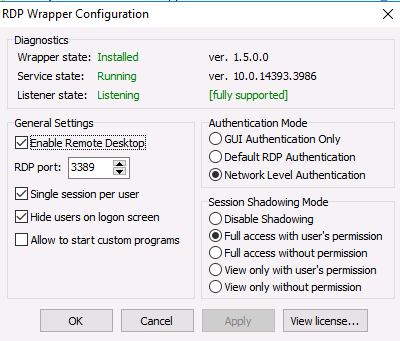
but when trying to connect rdp - error
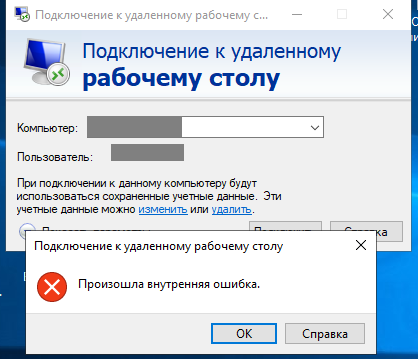
and after that if you look RDPConf, then
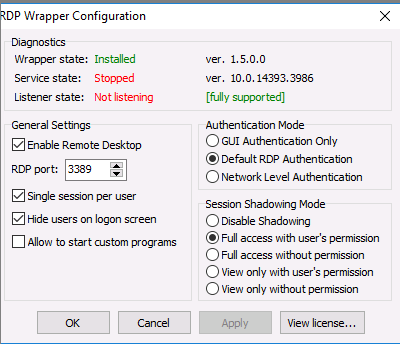
I removed the rdpwrap, installed it again, rebooting pc, all the same the same. I don't understand why it doesn't work.
enigmen
on 16 Oct 2020
@enigmen Windows Defender or some other "av security" "protection" product may be interfering, add exception. Make sure the new INI file is in place, then do RDPWInst.exe -r as admin user.
 affinityv
on 16 Oct 2020
affinityv
on 16 Oct 2020
hello
have left a blank (empty) line at the end of the .ini file? without that the service stops.
to edit the .ini file just run a text edit as admin (notepad for example) than once opened as admin, go on file, open navigate to the ini file ad the code, add an empty line and register
restart termserv (on cmd prompt as admin type net stop termserv to stop the service, than net start termserv to start the service)
this should work
keep checking running and listening state with rdpconf
sweettweaks
on 16 Oct 2020
@enigmen Windows Defender or some other "av security" "protection" product may be interfering, add exception. Make sure the new INI file is in place, then do
RDPConf.exeas admin user.
windows defender and security protection is off, yes run as admin user.
enigmen
on 16 Oct 2020
hello
have left a blank (empty) line at the end of the .ini file? without that the service stops.
to edit the .ini file just run a text edit as admin (notepad for example) than once opened as admin, go on file, open navigate to the ini file ad the code, add an empty line and registerrestart termserv (on cmd prompt as admin type net stop termserv to stop the service, than net start termserv to start the service)
this should work
keep checking running and listening state with rdpconf
after autoupdate and net stop - net start
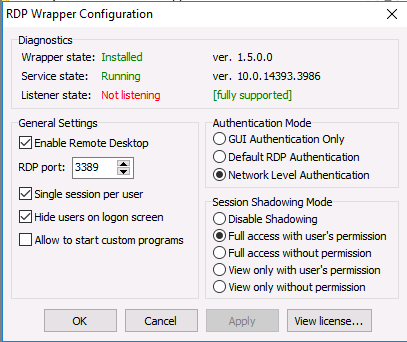
enigmen
on 16 Oct 2020
i just replaced termsrv.dll ver 10.0.14393.3986 to 10.0.14393.3503 and work)
enigmen
on 16 Oct 2020
yep, messing with the files is not the best way to go, i just keep the original ones
sweettweaks
on 16 Oct 2020
https://github.com/stascorp/rdpwrap/issues/1183#issuecomment-709918807
а подскажите где взять termsrv.dll ver 10.0.14393.3503
чтобы сменить 10.0.14393.3986
 McSon1
on 17 Oct 2020
McSon1
on 17 Oct 2020
Sorry to confirm that after the ini-patch to 14393.3986 provided by @affinityv - although the RDPWrapper configuration looks like fully supported - the remote desktop service terminates if a user tries to log in. Same result after restarting this service as soon as users try to log in via RDP again. I turned off Antivirus products, Defender, etc. before.
Before uninstalling the whole October Update, I rolled back to 14393.3503 version of termsrv.dll only, but concurrent RDP sessions are then not possible anymore. Users are forced to choose a running session to terminate before they are allowed to log in.
I now finally ended up in uninstalling the October 2020 Update.
I assume that the ini-patch details from 14393.3503 cannot completely transferred to the ini-patch for 14393.3986 without any changes.
 antiRad-web
on 18 Oct 2020
antiRad-web
on 18 Oct 2020
I agree with AntiRAD it worked once or twice.. later it is broken.
Adeshwar03
on 19 Oct 2020
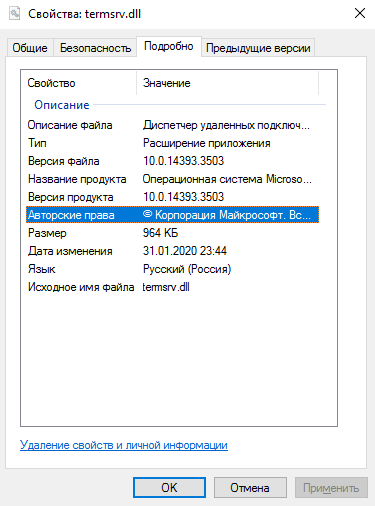
termsrv.zip
just replaced dll, and no problem:)
enigmen
on 19 Oct 2020
This results in a single session.. and disconnects the other user.
Adeshwar03
on 19 Oct 2020
well i have several machines working just fine on win 10 and win server 2016
i would suggest:
revert to the original dll files (and please don't mess with the dll's)
make sure that you save as utf-8 when you modify the .ini file
make sure you have an EMPTY LINE at the end of the .ini file.
check the dll file rights and, to be sure you have no other problems, run: SFC /scannow from an elevated cmd
if this does not work start praying :)
sweettweaks
on 19 Oct 2020
I updated MS Server 2016 at last weekend. I got this 10.0.14393.3986 termsvr.dll - I have RDWrap AUTOUPDATEr, but it loads an older .INI file - so not supporting.
For the working of my RDWrap I deleted the last update. After reboot RDWrap working again! As temporary solution, this can help you.
 Jetteroh
on 19 Oct 2020
Jetteroh
on 19 Oct 2020
Solution posted by sweettweaks worked for me.
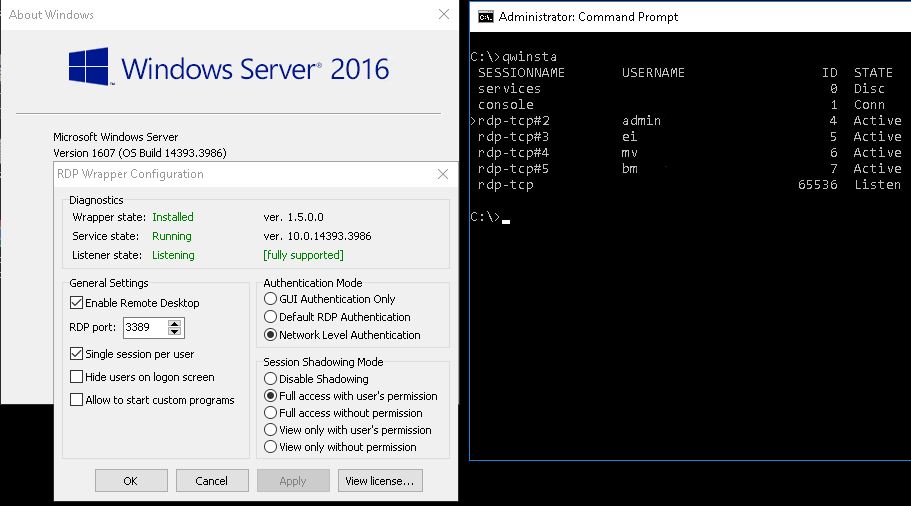
rdpwrap.zip
 pravyroxor
on 20 Oct 2020
pravyroxor
on 20 Oct 2020
UTF-8 ???? Plain ordinary text I think.
sfc /scannow iwll likely be an issue if you are not using the "current" termsrv.dll
affinityv
on 20 Oct 2020
pravyroxor:
Solution posted by sweettweaks worked for me.
rdpwrap.zip
This rdpwrap.ini not working well for me on MS Server 2016:
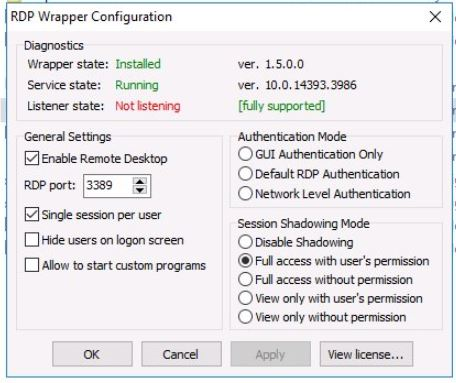
Jetteroh
on 22 Oct 2020
This rdpwrap.ini not working well for me on MS Server 2016:
Actually it works, but you can see the error - Listener is not listening. This is not problem of rdp wrapper...
Your RDP connections are disabled or blocked by firewall.
REG ADD "HKLM\SYSTEM\CurrentControlSet\Control\Terminal Server" /v fDenyTSConnections /t REG_DWORD /d 0 /f
pravyroxor
on 23 Oct 2020
@pravyroxor
This is a working environment. After I deleted this update and the VPS restarted, I can login through RDP. RDWrap is working again. (I have autoupdater scheduled at startup.)
Though I will do all the procedure again at weekend. I will check is the Windows update changing this registry value.
Jetteroh
on 23 Oct 2020
pravyroxor:
Solution posted by sweettweaks worked for me.
rdpwrap.zip
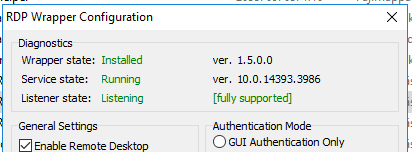
Now I can confirm that this rdwrap.ini is working on MS Server 2016:
I had put it in my autoupdate.bat file and now working well. It may happen before that the editing of rdwrap.ini was not as good as it should.
Thanks!
 Jetteroh
on 1 Nov 2020
Jetteroh
on 1 Nov 2020
termsrv.zip
just replaced dll, and no problem:)
Thanks,it works.
 yjmoming
on 2 Nov 2020
yjmoming
on 2 Nov 2020
Related issues
 cH40z32
·
4Comments
cH40z32
·
4Comments
 wanglulei
·
4Comments
wanglulei
·
4Comments
 sihow29
·
4Comments
sihow29
·
4Comments
 apolyakov2017
·
4Comments
apolyakov2017
·
4Comments
 papoluisjr
·
3Comments
papoluisjr
·
3Comments