Came to know about this great program today. Could not get it to work.
Plain vanilla install from release folder. I was able to connect both rdp from other computer and RDPCheck from local computer. When logging in to a different account: RDPCheck result - only one user can login. Other computer result - currently logged user will be logged out.
Then I used @affinityv latest ini file as is. Same result.
Then I added two more entries (10.0.19645.1) in ini file with version replaced. Got every thing green but RDPCheck gave error disconnected unknown code 0x04. Attaching screenshots, ini and untouched termsrv.dll. Hope to get an ini supporting this dll.
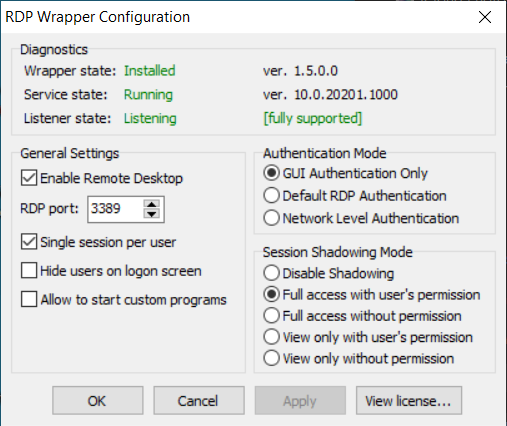
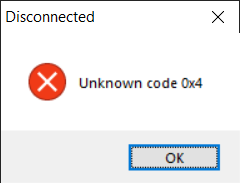
 pshri
pshri
All 10 comments
If you add broken entries to the .ini file, as you did, then that is exactly what you will get - 3 green in RDPCheck, but errors and crashes when you try to use it.
Delete that .ini file, use a known good one ( @affinityv 's is generally the best) unedited. Editing it will always break it.
General reasons for failure - normally, it is your antivirus program getting in the way. In addition, there are group policy settings and registry settings that cause that 'only one user can login' message. I haven't had to edit them myself, but this looks like an accurate how-to : https://portal.databasemart.com/kb/a220/how-to-enable-multiple-single-remote-desktop-sessions-in-windows-server-2012.aspx
 robbak
on 28 Aug 2020
robbak
on 28 Aug 2020
Thanks for your prompt reply. I started over, after changing policy group and registry settings as mentioned in the link shared. Still unable to do second user login while first user is already using the computer. Attaching local check screenshot

After that I used @affinityv ini. No luck. I think 0.0.20201.1000 needs new settings. I tried to figure it out from the video in readme but could not. I don't know all the details of the process. Can it be automated or requires careful eyeballing in debug tools.
I hope @affinityv or some other expert dissect the attached dll and post updated ini.
pshri
on 28 Aug 2020
OH, that error. That's not the number of RDP connections, but the number or
TCP connections.
This catches people using un-patched rdp and other uses too.
There are plenty of solutions to that one around. This is the result of one
search -
https://thegeekpage.com/fix-number-of-connections-to-this-computer-is-limited-problem-in-windows-10/
There are also suggestions that this is a misleading error message hiding a
number of actual underlying errors. See
http://www.kuskaya.info/2014/05/23/how-to-troubleshoot-the-number-of-connections-to-this-computer-is-limited-and-all-connections-are-in-use-right-now-try-connecting-later-or-contact-your-system-administrator-warning-message/
On Fri, 28 Aug 2020 at 17:08, Pankaj Shrivastava notifications@github.com
wrote:
Thanks for your prompt reply. I started over, after changing policy group
and registry settings as mentioned in the link shared. Still unable to do
second user login while first user is already using the computer. Attaching
local check screenshot[image: local_rdp_checker]
https://user-images.githubusercontent.com/34524699/91531491-b880c380-e8c1-11ea-8e64-2c09085d7ad9.pngAfter that I used https://github.com/affinityv ini. No luck. I think
0.0.20201.1000 needs new settings. I tried to figure it out from the video
in readme but could not. I don't know all the details of the process. Can
it be automated or requires careful eyeballing in debug tools.I hope affinityv or some other expert dissect the attached dll and post
updated ini.—
You are receiving this because you commented.
Reply to this email directly, view it on GitHub
https://github.com/stascorp/rdpwrap/issues/1154#issuecomment-682366599,
or unsubscribe
https://github.com/notifications/unsubscribe-auth/AAMCGIURROVXYCJSQ5GLUZ3SC5JVTANCNFSM4QNVKKNQ
.
robbak
on 28 Aug 2020
Getting same error even after registry fix for number of connections. Rebooted as well.
pshri
on 28 Aug 2020
Do you really need the Insider build? If so, perhaps you can upload your termsrv.dll so that someone skilled in getting the actual offsets / settings for the INI section(s) can do so.
 affinityv
on 28 Aug 2020
affinityv
on 28 Aug 2020
I got on insider builds for wsl2 few months back. Not sure if I can stop it without reinstall. termsrv.dll was attached in first post. https://github.com/stascorp/rdpwrap/files/5139830/termsrv.zip
pshri
on 29 Aug 2020
I got on insider builds for wsl2 few months back. Not sure if I can stop it without reinstall. termsrv.dll was attached in first post. https://github.com/stascorp/rdpwrap/files/5139830/termsrv.zip
 sebaxakerhtc
on 2 Sep 2020
sebaxakerhtc
on 2 Sep 2020
My INI file has been updated as follows:
New sections added and reformatted (no x86 sections in these ones) from:
    https://raw.githubusercontent.com/sebaxakerhtc/rdpwrap.ini/master/rdpwrap.ini

    [10.0.18963.1000] [10.0.18963.1000-SLInit]
    [10.0.20150.1000] [10.0.20150.1000-SLInit]
    [10.0.20152.1000] [10.0.20152.1000-SLInit]
    [10.0.20161.1000] [10.0.20161.1000-SLInit]
    [10.0.20170.1000] [10.0.20170.1000-SLInit]
    [10.0.20175.1000] [10.0.20175.1000-SLInit]
    [10.0.20180.1000] [10.0.20180.1000-SLInit]
    [10.0.20185.1000] [10.0.20185.1000-SLInit]
    [10.0.20190.1000] [10.0.20190.1000-SLInit]
    [10.0.20197.1000] [10.0.20197.1000-SLInit]
    [10.0.20201.1000] [10.0.20201.1000-SLInit]
Thanks a lot @sebaxakerhtc and @affinityv . Everything is working fine with new ini file. Plenty of joy.
pshri
on 3 Sep 2020
Was able to fix it using some INI from another user - but RDPConf.exe incorrectly indicates an unsupported version, see https://github.com/stascorp/rdpwrap/issues/1054#issuecomment-742637185.
 strarsis
on 10 Dec 2020
strarsis
on 10 Dec 2020
Related issues
 papoluisjr
·
3Comments
papoluisjr
·
3Comments
 francescofalanga92
·
3Comments
francescofalanga92
·
3Comments
 eyeTechSolutions
·
5Comments
eyeTechSolutions
·
5Comments
 wanglulei
·
4Comments
wanglulei
·
4Comments
 apolyakov2017
·
4Comments
apolyakov2017
·
4Comments
Most helpful comment
Thanks a lot @sebaxakerhtc and @affinityv . Everything is working fine with new ini file. Plenty of joy.