Rdpwrap: OS 10.0.17763.1369 not supported
Hi,
I have OS build 17763.1369 but hen running the RDPConf.exe I get Listener state: Not listening and not supported
It seems that sections [10.0.17763.1369] and [10.0.17763.1369-SLInit] are missing in rdpwrap.ini, event after trying to update.
Does someone knows how to get the correct offsets for this build ?
Thanks in advance.
Cedric
 cedvink
All 15 comments
What version does rdpconf.exe show for the DLL?
 affinityv
on 22 Jul 2020
affinityv
on 22 Jul 2020
Hi,
Wrapper : 1.5.0.0
Service : 10.0.17763.1369
cedvink
on 22 Jul 2020
Okay, please upload the DLL so that some clever person can work out the details for the INI sections.
affinityv
on 22 Jul 2020
cedvink
on 22 Jul 2020
ditto!
 Jagermeister56
on 23 Jul 2020
Jagermeister56
on 23 Jul 2020
remove latest updates for now, worked for me
Jagermeister56
on 24 Jul 2020
It's obvious that 1369 has the same offsets as 771.
Sorry, only have x64 systems here to test.
Enjoy.
`
[10.0.17763.1369-SLInit]
bServerSku.x64 =ECAB8
lMaxUserSessions.x64 =ECABC
bAppServerAllowed.x64 =ECAC4
bInitialized.x64 =ECAB4
bRemoteConnAllowed.x64=ECAC8
bMultimonAllowed.x64 =ECACC
ulMaxDebugSessions.x64=ECAD0
bFUSEnabled.x64 =ECAD4
[10.0.17763.1369]
LocalOnlyPatch.x64 =1
LocalOnlyOffset.x64 =77AD1
LocalOnlyCode.x64 =jmpshort
SingleUserPatch.x64 =1
SingleUserOffset.x64=1339C
SingleUserCode.x64 =Zero
DefPolicyPatch.x64 =1
DefPolicyOffset.x64 =18025
DefPolicyCode.x64 =CDefPolicy_Query_eax_rcx
SLInitHook.x64 =1
SLInitOffset.x64 =1ACDC
SLInitFunc.x64 =New_CSLQuery_Initialize
`
 zzelalex
on 25 Jul 2020
zzelalex
on 25 Jul 2020
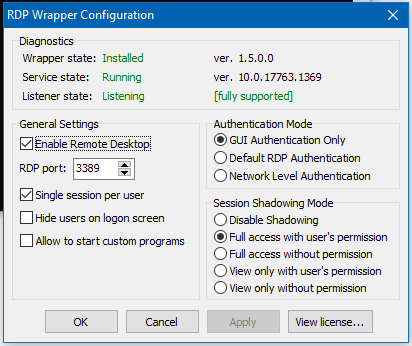
Says it is fully supported, but does not connect without logging off active user.
UPDATE: Working after complete uninstall and reinstall of rdpwrap.
 s8m
on 26 Jul 2020
s8m
on 26 Jul 2020
@sbozdag Please, only provide properly determined INI sections; I understand it works for you, but it may not work fully and properly.
affinityv
on 27 Jul 2020
Says it is fully supported, but does not connect without logging off active user.
It is now working after a complete uninstall and reinstall - not sure why it didn't "take" at first like it usually does.
s8m
on 27 Jul 2020
@s8m
copy this rdpwrap 10.0.17763.1369.zip *.ini file to C:\Program Files\RDP Wrapper and restart your pc
thx to @zzelalex
 V1RTuE
on 29 Jul 2020
V1RTuE
on 29 Jul 2020
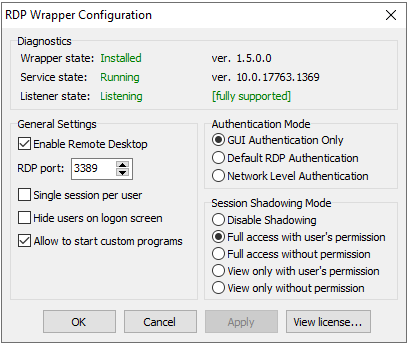
windows server 2019 datacenter 10.0.17763.1369
положить оба файла из архива в папку
"C:\Program Files\RDP Wrapper"
чтобы лежали так:
"C:\Program Files\RDP Wrapper\rdpwrap.dll"
"C:\Program Files\RDP Wrapper\rdpwrap.ini"
после чего ребутнуть винду и все должно работать "без пинка"
 velmyshanovnyi
on 10 Aug 2020
velmyshanovnyi
on 10 Aug 2020
windows server 2019 datacenter 10.0.17763.1369
положить оба файла из архива в папку
"C:\Program Files\RDP Wrapper"
чтобы лежали так:
"C:\Program Files\RDP Wrapper\rdpwrap.dll"
"C:\Program Files\RDP Wrapper\rdpwrap.ini"
после чего ребутнуть винду и все должно работать "без пинка"
work with me
 Mahdifarzaneh
on 12 Aug 2020
Mahdifarzaneh
on 12 Aug 2020
Hi, can somebody provide the original termsrv.dll with 17763.1369 for me, thanks a lot!
 wenan1130
on 26 Aug 2020
wenan1130
on 26 Aug 2020
@wenan1130 If you do the following as an admin user in the C:\Windows directory, you may find the original termsrv.dll in one of the sub-directories, it should be around 1MB in size I expect.
dir/s termsrv*dll
When you find the right file, do something like the following with a cmd file in an admin cmd.exe window to replace a bad one in place:
@echo off

rem c:\windows\system32\termsrv.dll needs to be owned by administrators and modify rights enabled

net stop termservice /y
copy found_file_with_path c:\windows\system32\termsrv.dll /y
net start termservice
You want to run it as a cmd file because as part of the process, you will lose connectivity.... but the cmd file will continue to run in the cmd.exe window and restart the termservice facility so that, hopefully, you can reconnect!
affinityv
on 26 Aug 2020
Related issues
 apolyakov2017
·
4Comments
apolyakov2017
·
4Comments
 isidorosss
·
5Comments
isidorosss
·
5Comments
 eyeTechSolutions
·
5Comments
eyeTechSolutions
·
5Comments
 cakexxx
·
6Comments
cakexxx
·
6Comments
 sihow29
·
4Comments
sihow29
·
4Comments
Most helpful comment
It's obvious that 1369 has the same offsets as 771.
Sorry, only have x64 systems here to test.
Enjoy.
`
[10.0.17763.1369-SLInit]
bServerSku.x64 =ECAB8
lMaxUserSessions.x64 =ECABC
bAppServerAllowed.x64 =ECAC4
bInitialized.x64 =ECAB4
bRemoteConnAllowed.x64=ECAC8
bMultimonAllowed.x64 =ECACC
ulMaxDebugSessions.x64=ECAD0
bFUSEnabled.x64 =ECAD4
[10.0.17763.1369]
LocalOnlyPatch.x64 =1
LocalOnlyOffset.x64 =77AD1
LocalOnlyCode.x64 =jmpshort
SingleUserPatch.x64 =1
SingleUserOffset.x64=1339C

SingleUserCode.x64 =Zero
DefPolicyPatch.x64 =1
DefPolicyOffset.x64 =18025
DefPolicyCode.x64 =CDefPolicy_Query_eax_rcx
SLInitHook.x64 =1
SLInitOffset.x64 =1ACDC
SLInitFunc.x64 =New_CSLQuery_Initialize
`