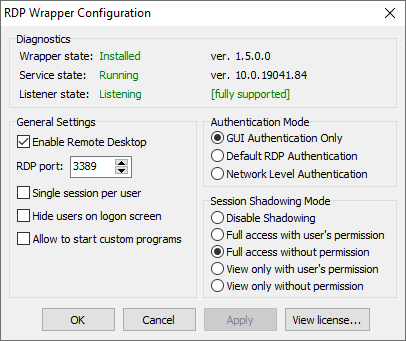
19041.388 was downloaded and installed. As you can see I put 19041.84 on but the wrapper appears to be crashing the terserv process, as it continues to be a stopped process that refuses to start. Term serve file attached as is screen shot. Checked for active pull messages, nothing found.

Error
Faulting application name: svchost.exe_TermService, version: 10.0.19041.1, time stamp: 0x7f0c4c00
Faulting module name: rdpwrap.dll, version: 1.5.0.0, time stamp: 0x5488aa5a
Exception code: 0xc0000005
Fault offset: 0x00000000000029fc
Faulting process id: 0x3350
Faulting application start time: 0x01d65bbac8f88af1
Faulting application path: C:\WINDOWS\System32\svchost.exe
Faulting module path: c:\program files\rdp wrapper\rdpwrap.dll
Report Id: 8ec0024c-f4a3-4c35-af13-4e255a5955b2
Faulting package full name:
Faulting package-relative application ID:
Informaiton:
Fault bucket 1550489832630857616, type 4
Event Name: APPCRASH
Response: Not available
Cab Id: 0
Problem signature:
P1: svchost.exe_TermService
P2: 10.0.19041.1
P3: 7f0c4c00
P4: rdpwrap.dll
P5: 1.5.0.0
P6: 5488aa5a
P7: c0000005
P8: 00000000000029fc
P9:
P10:
Attached files:
\?\C:\ProgramData\Microsoft\Windows\WER\Temp\WERF6DE.tmp.dmp
\?\C:\ProgramData\Microsoft\Windows\WER\Temp\WERF72D.tmp.WERInternalMetadata.xml
\?\C:\ProgramData\Microsoft\Windows\WER\Temp\WERF73E.tmp.xml
\?\C:\ProgramData\Microsoft\Windows\WER\Temp\WERF742.tmp.csv
\?\C:\ProgramData\Microsoft\Windows\WER\Temp\WERF752.tmp.txt
These files may be available here:
\?\C:\ProgramData\Microsoft\Windows\WER\ReportArchive\AppCrash_svchost.exe_Term_5bae6f1915967851b53db61fdceebfa870227e_40f4a76e_98c11e68-675c-4217-b00a-1ac77923b4fb
Analysis symbol:
Rechecking for solution: 0
Report Id: 4f14a722-2cac-4ee9-b885-3c6c03f9154b
Report Status: 268435456
Hashed bucket: f8ab5b77d3123e9db5847249b5d12f90
Cab Guid: 0
Second error in the same second.
Faulting application name: svchost.exe_TermService, version: 10.0.19041.1, time stamp: 0x7f0c4c00
Faulting module name: rdpwrap.dll, version: 1.5.0.0, time stamp: 0x5488aa5a
Exception code: 0xc0000005
Fault offset: 0x00000000000029fc
Faulting process id: 0x2b88
Faulting application start time: 0x01d65bbac87d8d1d
Faulting application path: C:\WINDOWS\System32\svchost.exe
Faulting module path: c:\program files\rdp wrapper\rdpwrap.dll
Report Id: 4f14a722-2cac-4ee9-b885-3c6c03f9154b
Faulting package full name:
Faulting package-relative application ID:
 aclease
All 11 comments
Here is the crash/WER file.
Version=1
EventType=APPCRASH
EventTime=132394095625902917
ReportType=2
Consent=1
UploadTime=132394095896656712
ReportStatus=268435462
ReportIdentifier=6e35a25a-2e42-4c08-b5fd-f214070b7fe9
IntegratorReportIdentifier=f1a1dfdf-d770-4758-a4f1-9241a86edce7
Wow64Host=34404
NsAppName=svchost.exe_TermService
OriginalFilename=svchost.exe
AppSessionGuid=000004fc-0000-0004-a736-0480ba5bd601
TargetAppId=W:0000f519feec486de87ed73cb92d3cac802400000000!000066f5e6dade65d7dba979602830d58e53e60fdffb!svchost.exe
TargetAppVer=2037//07//18:06:45:20!15eca!svchost.exe
BootId=4294967295
ServiceGroupName=NetworkService
ServiceDllName=rdpwrap.dll
ServiceSplit=1
TargetAsId=22
IsFatal=1
EtwNonCollectReason=1
Response.BucketId=f8ab5b77d3123e9db5847249b5d12f90
Response.BucketTable=4
Response.LegacyBucketId=1550489832630857616
Response.type=4
Sig[0].Name=Application Name
Sig[0].Value=svchost.exe_TermService
Sig[1].Name=Application Version
Sig[1].Value=10.0.19041.1
Sig[2].Name=Application Timestamp
Sig[2].Value=7f0c4c00
Sig[3].Name=Fault Module Name
Sig[3].Value=rdpwrap.dll
Sig[4].Name=Fault Module Version
Sig[4].Value=1.5.0.0
Sig[5].Name=Fault Module Timestamp
Sig[5].Value=5488aa5a
Sig[6].Name=Exception Code
Sig[6].Value=c0000005
Sig[7].Name=Exception Offset
Sig[7].Value=00000000000029fc
DynamicSig[1].Name=OS Version
DynamicSig[1].Value=10.0.19041.2.0.0.256.48
DynamicSig[2].Name=Locale ID
DynamicSig[2].Value=1033
DynamicSig[22].Name=Additional Information 1
DynamicSig[22].Value=af8c
DynamicSig[23].Name=Additional Information 2
DynamicSig[23].Value=af8c52f576b188e155a538932914b863
DynamicSig[24].Name=Additional Information 3
DynamicSig[24].Value=8fa9
DynamicSig[25].Name=Additional Information 4
DynamicSig[25].Value=8fa9494f0d36332b8ba141bff0c8c31d
UI[2]=C:\WINDOWS\System32\svchost.exe
UI[5]=Close
UI[8]=TermService stopped working and was closed
UI[9]=A problem caused the application to stop working correctly. Windows will notify you if a solution is available.
UI[10]=&Close
LoadedModule[0]=C:\WINDOWS\System32\svchost.exe
LoadedModule[1]=C:\WINDOWS\SYSTEM32\ntdll.dll
LoadedModule[2]=C:\WINDOWS\System32\KERNEL32.DLL
LoadedModule[3]=C:\WINDOWS\System32\KERNELBASE.dll
LoadedModule[4]=C:\WINDOWS\System32\sechost.dll
LoadedModule[5]=C:\WINDOWS\System32\RPCRT4.dll
LoadedModule[6]=C:\WINDOWS\System32\ucrtbase.dll
LoadedModule[7]=C:\WINDOWS\System32\combase.dll
LoadedModule[8]=C:\WINDOWS\SYSTEM32\kernel.appcore.dll
LoadedModule[9]=C:\WINDOWS\System32\msvcrt.dll
LoadedModule[10]=C:\WINDOWS\System32\bcryptPrimitives.dll
LoadedModule[11]=C:\WINDOWS\System32\user32.dll
LoadedModule[12]=C:\WINDOWS\System32\win32u.dll
LoadedModule[13]=C:\WINDOWS\System32\GDI32.dll
LoadedModule[14]=C:\WINDOWS\System32\gdi32full.dll
LoadedModule[15]=C:\WINDOWS\System32\msvcp_win.dll
LoadedModule[16]=c:\program files\rdp wrapper\rdpwrap.dll
LoadedModule[17]=C:\WINDOWS\SYSTEM32\WLDP.DLL
LoadedModule[18]=C:\WINDOWS\System32\advapi32.dll
LoadedModule[19]=C:\WINDOWS\System32\termsrv.dll
LoadedModule[20]=C:\WINDOWS\System32\WS2_32.dll
LoadedModule[21]=C:\WINDOWS\System32\cfgmgr32.dll
LoadedModule[22]=C:\WINDOWS\System32\UMPDC.dll
LoadedModule[23]=C:\WINDOWS\System32\clbcatq.dll
LoadedModule[24]=C:\WINDOWS\system32\lsmproxy.dll
State[0].Key=Transport.DoneStage1
State[0].Value=1
OsInfo[0].Key=vermaj
OsInfo[0].Value=10
OsInfo[1].Key=vermin
OsInfo[1].Value=0
OsInfo[2].Key=verbld
OsInfo[2].Value=19041
OsInfo[3].Key=ubr
OsInfo[3].Value=388
OsInfo[4].Key=versp
OsInfo[4].Value=0
OsInfo[5].Key=arch
OsInfo[5].Value=9
OsInfo[6].Key=lcid
OsInfo[6].Value=1033
OsInfo[7].Key=geoid
OsInfo[7].Value=244
OsInfo[8].Key=sku
OsInfo[8].Value=48
OsInfo[9].Key=domain
OsInfo[9].Value=0
OsInfo[10].Key=prodsuite
OsInfo[10].Value=256
OsInfo[11].Key=ntprodtype
OsInfo[11].Value=1
OsInfo[12].Key=platid
OsInfo[12].Value=10
OsInfo[13].Key=sr
OsInfo[13].Value=0
OsInfo[14].Key=tmsi
OsInfo[14].Value=59
OsInfo[15].Key=osinsty
OsInfo[15].Value=1
OsInfo[16].Key=iever
OsInfo[16].Value=11.388.19041.0-11.0.200
OsInfo[17].Key=portos
OsInfo[17].Value=0
OsInfo[18].Key=ram
OsInfo[18].Value=16308
OsInfo[19].Key=svolsz
OsInfo[19].Value=464
OsInfo[20].Key=wimbt
OsInfo[20].Value=0
OsInfo[21].Key=blddt
OsInfo[21].Value=191206
OsInfo[22].Key=bldtm
OsInfo[22].Value=1406
OsInfo[23].Key=bldbrch
OsInfo[23].Value=vb_release
OsInfo[24].Key=bldchk
OsInfo[24].Value=0
OsInfo[25].Key=wpvermaj
OsInfo[25].Value=0
OsInfo[26].Key=wpvermin
OsInfo[26].Value=0
OsInfo[27].Key=wpbuildmaj
OsInfo[27].Value=0
OsInfo[28].Key=wpbuildmin
OsInfo[28].Value=0
OsInfo[29].Key=osver
OsInfo[29].Value=10.0.19041.388.amd64fre.vb_release.191206-1406
OsInfo[30].Key=buildflightid
OsInfo[30].Value=AFBFD20A-E84A-4FA1-8A13-8B50298D5BBA.1
OsInfo[31].Key=edition
OsInfo[31].Value=Professional
OsInfo[32].Key=ring
OsInfo[32].Value=Retail
OsInfo[33].Key=expid
OsInfo[33].Value=RS:683D
OsInfo[34].Key=fconid
OsInfo[35].Key=containerid
OsInfo[36].Key=containertype
OsInfo[37].Key=edu
OsInfo[37].Value=0
FriendlyEventName=Stopped working
ConsentKey=APPCRASH
AppName=TermService
AppPath=C:\WINDOWS\System32\svchost.exe
NsPartner=windows
NsGroup=windows8
ApplicationIdentity=66A57EB86392E2D2709F96FE1B0FFED4
MetadataHash=-22749321
aclease
on 17 Jul 2020
No, still looking for this guys, can someone reverse enginer and get right offset for this version of windows ?????????????
 princepsycho
on 20 Jul 2020
princepsycho
on 20 Jul 2020
Princepsycho, 19041 has a solution for it on the pull requests. My issue is, it loads and says it is supported but the termsrv.dll is crashed out by something in the rdpwrapper. I have tried everything I can to make sure the wrapper works. If I uninstall RDPWrapper, termser.dll immediately starts on reboot. Install 1.6.2 and it fails again.
aclease
on 20 Jul 2020
I'm not aware there's a termsvr.dll update to 10.0.19041.388
My windows update is up to date
 sk-lau
on 21 Jul 2020
sk-lau
on 21 Jul 2020
Princepsycho, 19041 has a solution for it on the pull requests. My issue is, it loads and says it is supported but the termsrv.dll is crashed out by something in the rdpwrapper. I have tried everything I can to make sure the wrapper works. If I uninstall RDPWrapper, termser.dll immediately starts on reboot. Install 1.6.2 and it fails again.
I dont understand, are you able to install concurrent rdp on version 10.0.19041.388 at least or not ?
princepsycho
on 22 Jul 2020
Windows version 10.0.19041.388 works well with:
[10.0.19041.84]
LocalOnlyPatch.x86=1
LocalOnlyOffset.x86=B46B9
LocalOnlyCode.x86=jmpshort
LocalOnlyPatch.x64=1
LocalOnlyOffset.x64=87611
LocalOnlyCode.x64=jmpshort
SingleUserPatch.x86=1
SingleUserOffset.x86=3AD27
SingleUserCode.x86=Zero
SingleUserPatch.x64=1
SingleUserOffset.x64=0BF0C
SingleUserCode.x64=Zero
DefPolicyPatch.x86=1
DefPolicyOffset.x86=3D7D9
DefPolicyCode.x86=CDefPolicy_Query_eax_ecx
DefPolicyPatch.x64=1
DefPolicyOffset.x64=17ED5
DefPolicyCode.x64=CDefPolicy_Query_eax_rcx
SLInitHook.x86=1
SLInitOffset.x86=66658
SLInitFunc.x86=New_CSLQuery_Initialize
SLInitHook.x64=1
SLInitOffset.x64=1BDFC
SLInitFunc.x64=New_CSLQuery_Initialize
[10.0.19041.84-SLInit]
bInitialized.x86=CF920
bServerSku.x86=CF924
lMaxUserSessions.x86=CF928
bAppServerAllowed.x86=CF930
bRemoteConnAllowed.x86=CF938
bMultimonAllowed.x86=CF93C
ulMaxDebugSessions.x86=CF940
bFUSEnabled.x86=CF944
bInitialized.x64=103FF8
bServerSku.x64=103FFC
lMaxUserSessions.x64=104000
bAppServerAllowed.x64=104008
bRemoteConnAllowed.x64=104010
bMultimonAllowed.x64=104014
ulMaxDebugSessions.x64=104018
bFUSEnabled.x64=10401C
 alexxlynx
on 23 Jul 2020
alexxlynx
on 23 Jul 2020
Windows version 10.0.19041.388 works well with:
[10.0.19041.84]
LocalOnlyPatch.x86=1
LocalOnlyOffset.x86=B46B9
LocalOnlyCode.x86=jmpshort
LocalOnlyPatch.x64=1
LocalOnlyOffset.x64=87611
..........
@alexxlynx
使用您的配置文件,依然无法启动TermService。
版本win10 Pro For Workstations,chinese
Using your configuration file, TermService still cannot be started.
Version win10 Pro For Workstations,chinese
错误应用程序名称: svchost.exe_TermService,版本: 10.0.19041.1,时间戳: 0x7f0c4c00
错误模块名称: rdpwrap.dll,版本: 1.5.0.0,时间戳: 0x5488aa5a
异常代码: 0xc0000005
错误偏移量: 0x00000000000029fc
错误进程 ID: 0x1738
错误应用程序启动时间: 0x01d6665a3024cf41
错误应用程序路径: C:\windows\System32\svchost.exe
错误模块路径: c:\program files\rdp wrapper\rdpwrap.dll
报告 ID: 684b2abe-2e59-435a-b17a-65366350e4a8
错误程序包全名:
错误程序包相对应用程序 ID:
 kero990
on 30 Jul 2020
kero990
on 30 Jul 2020
That is the correct INI entry that I am using, and if I uninstall rdpwrapper then termsrv starts. I then install rdpwrapper and put the INI in place and everything works.... until reboot, then rdpwrapper fails to work. I have been trying things on and off and have started testing on other machines in a non production environment, was just hoping there was something that I was missing within the wrapper that might be causing this. thanks for looking at it kero and others.
aclease
on 30 Jul 2020
I have the same problem as aclease has. Are there some news about?
my termsrv.dll is version: 10.0.19041.84
 Rolf56
on 5 Aug 2020
Rolf56
on 5 Aug 2020
Hi all
I found a fix for this issue: https://github.com/stascorp/rdpwrap/issues/1081#issuecomment-656202393
Rolf56
on 6 Aug 2020
Thanks Rold56 this solved the termsrv crashing on start.
aclease
on 10 Aug 2020
Related issues
 papoluisjr
·
3Comments
papoluisjr
·
3Comments
 mascarasnake66
·
4Comments
mascarasnake66
·
4Comments
 nick7inc
·
5Comments
nick7inc
·
5Comments
 shardy-uk
·
3Comments
shardy-uk
·
3Comments
 apolyakov2017
·
4Comments
apolyakov2017
·
4Comments
Most helpful comment
Windows version 10.0.19041.388 works well with:

[10.0.19041.84]
LocalOnlyPatch.x86=1
LocalOnlyOffset.x86=B46B9
LocalOnlyCode.x86=jmpshort
LocalOnlyPatch.x64=1
LocalOnlyOffset.x64=87611
LocalOnlyCode.x64=jmpshort
SingleUserPatch.x86=1
SingleUserOffset.x86=3AD27
SingleUserCode.x86=Zero
SingleUserPatch.x64=1
SingleUserOffset.x64=0BF0C
SingleUserCode.x64=Zero
DefPolicyPatch.x86=1
DefPolicyOffset.x86=3D7D9
DefPolicyCode.x86=CDefPolicy_Query_eax_ecx
DefPolicyPatch.x64=1
DefPolicyOffset.x64=17ED5
DefPolicyCode.x64=CDefPolicy_Query_eax_rcx
SLInitHook.x86=1
SLInitOffset.x86=66658
SLInitFunc.x86=New_CSLQuery_Initialize
SLInitHook.x64=1
SLInitOffset.x64=1BDFC
SLInitFunc.x64=New_CSLQuery_Initialize
[10.0.19041.84-SLInit]
bInitialized.x86=CF920
bServerSku.x86=CF924
lMaxUserSessions.x86=CF928
bAppServerAllowed.x86=CF930
bRemoteConnAllowed.x86=CF938
bMultimonAllowed.x86=CF93C
ulMaxDebugSessions.x86=CF940
bFUSEnabled.x86=CF944
bInitialized.x64=103FF8
bServerSku.x64=103FFC
lMaxUserSessions.x64=104000
bAppServerAllowed.x64=104008
bRemoteConnAllowed.x64=104010
bMultimonAllowed.x64=104014
ulMaxDebugSessions.x64=104018
bFUSEnabled.x64=10401C