Rdpwrap: Any help available for 10.0.18363.476 (1909 enterprise)?
The title is self-explanatory. Looks like a new .ini file is needed.
 actanner
All 42 comments
This is fairly new. Let's give it some time
Perhaps Amstron and gang can update this ? Thanks
 sk-lau
on 17 Nov 2019
sk-lau
on 17 Nov 2019
Windows version has nothing to do with termsrv.dll version which is at .267 which is supported.
 s0nic9
on 17 Nov 2019
s0nic9
on 17 Nov 2019
Interested in update for this version of W10 Home too.
I take it that once available it will be just a case of running the update.bat script again? TIA
 scb31
on 18 Nov 2019
scb31
on 18 Nov 2019
rdpwrap_10.0.18363.476_1909.zip
stop the service running CMD as administrator
net stop termservice
Replace rdpwrap.ini in C:\Program FilesRDP Wrapper
net start termservice
Reboot your PC
then when your pc rebooted, run RDPConf to check the states, make sure All states are green
 SlavaSumyUA
on 19 Nov 2019
SlavaSumyUA
on 19 Nov 2019
Many thanks @SlavaSumyUA
Instructions followed & all now working again (although did not need final reboot).
scb31
on 19 Nov 2019
i already downloaded rdpwrap_10.0.18363.476_1909.ini and renamed it rdpwrap.ini then paste to C:\Program FilesRDP Wrapper but still i cannot use multiple remotes

 asleylorenzo
on 21 Nov 2019
asleylorenzo
on 21 Nov 2019
I finally got to try it out...works like a charm! Thanks, SlavaSumyUA!!!
To asleylorenzo: Try unchecking the box next to "Single session per user"
actanner
on 22 Nov 2019
Ok so, with this ini file, I do get multiple sessions working, but I can't get the printers to share over RDP, could anyone fix that?
This is a issue I've had with several versions of Windows 10 Pro, to have a working setup, I have to rely on 1703 which is kind of dating.
Yes, I got it to work with more recent versions, but now over-updating can be hard at times.
Thanks for the help
 NeoGandalf
on 22 Nov 2019
NeoGandalf
on 22 Nov 2019
Unfortunately the above posted ini with the offset doesn't work for the Home version 10.0.18363.467 (1909). And yes, I have the blank line at the end of the file ;-)
Anybody found the values working?
 bifericeras
on 23 Nov 2019
bifericeras
on 23 Nov 2019
rdpwrap_10.0.18363.476_1909.zip
stop the service running CMD as administratornet stop termservice
Replace rdpwrap.ini in C:\Program FilesRDP Wrapper
net start termservice
Reboot your PCthen when your pc rebooted, run RDPConf to check the states, make sure All states are green
I just tested this on my lab PC running Windows 10 version 1909 (OS Build 18363.476 | November 2019 Update). I just needed a quick way to access a test Window 10 VM with two users (admin and just another test user); and this works fine. Thanks.
 bhenstra
on 24 Nov 2019
bhenstra
on 24 Nov 2019
For whatever reasons usually I edit my ini file add the new entries and restart. This time I had to replace the ini file with the one above and after a reboot it worked for my Windows version. I am only a single user.
bifericeras
on 25 Nov 2019
Many thanks @SlavaSumyUA
 jlipovac85
on 26 Nov 2019
jlipovac85
on 26 Nov 2019
thanks very much
 mengxiangyudlut
on 1 Dec 2019
mengxiangyudlut
on 1 Dec 2019
Works like a charm, Confirmed on Windows 10 Home 1909 18363.535! Many thanks!
 swaptil7
on 29 Dec 2019
swaptil7
on 29 Dec 2019
First thank you so much for this project. It has been extremely helpful in my lab environment so I can RDP instead of using a KVM or VNC (yuck).
Second, I was wondering if there is anything in these INI's that are predictable in regards to upgrading. So next time around we could make our own local changes instead of having to wait for one to be posted?
 mamc-llc
on 3 Jan 2020
mamc-llc
on 3 Jan 2020
rdpwrap_10.0.18363.476_1909.zip
stop the service running CMD as administratornet stop termservice
Replace rdpwrap.ini in C:\Program FilesRDP Wrapper
net start termservice
Reboot your PCthen when your pc rebooted, run RDPConf to check the states, make sure All states are green
Thank you very much!!!
 Timon2
on 16 Jan 2020
Timon2
on 16 Jan 2020
Hi. I have this working on 1909 (18363.592) - however the "Single session per user" option doesn't seem to work (ie, I can start several sessions with the same sign in). Has anyone got this working or is there a problem with the patch?
 casperbudtz
on 27 Jan 2020
casperbudtz
on 27 Jan 2020
So i tried this but as soon as I do I get "error 126, the specified module could not be found." when trying to start termservice
Windows 10 Enterprise 10.0.18363.535
Any ideas?
 muaddib912
on 28 Jan 2020
muaddib912
on 28 Jan 2020
Today I got a new release of Windows 10.0.18363.657
Now the RDPWrapper doesn't work anymore. New INI values seem to be necessary.
Someone found the right values already?
bifericeras
on 11 Feb 2020
I got the same issue, I found this on another website, worked for me (version 10.0.18363.657), just paste below the rest at ini file
[10.0.18362.657]
LocalOnlyPatch.x86=1
LocalOnlyOffset.x86=B7D06
LocalOnlyCode.x86=jmpshort
LocalOnlyPatch.x64=1
LocalOnlyOffset.x64=82FB5
LocalOnlyCode.x64=jmpshort
SingleUserPatch.x86=1
SingleUserOffset.x86=50535
SingleUserCode.x86=nop
SingleUserPatch.x64=1
SingleUserOffset.x64=0DBFC
SingleUserCode.x64=Zero
DefPolicyPatch.x86=1
DefPolicyOffset.x86=50269
DefPolicyCode.x86=CDefPolicy_Query_eax_ecx
DefPolicyPatch.x64=1
DefPolicyOffset.x64=1FE15
DefPolicyCode.x64=CDefPolicy_Query_eax_rcx
SLInitHook.x86=1
SLInitOffset.x86=5A77A
SLInitFunc.x86=New_CSLQuery_Initialize
SLInitHook.x64=1
SLInitOffset.x64=22DDC
SLInitFunc.x64=New_CSLQuery_Initialize
[10.0.18362.657-SLInit]
bInitialized.x86 =D577C
bServerSku.x86 =D5780
lMaxUserSessions.x86 =D5784
bAppServerAllowed.x86 =D578C
bRemoteConnAllowed.x86=D5790
bMultimonAllowed.x86 =D5794
ulMaxDebugSessions.x86=D5798
bFUSEnabled.x86 =D579C
bInitialized.x64 =F6A8C
bServerSku.x64 =F6A90
lMaxUserSessions.x64 =F6A94
bAppServerAllowed.x64 =F6A9C
bRemoteConnAllowed.x64=F6AA0
bMultimonAllowed.x64 =F6AA4
ulMaxDebugSessions.x64=F6AA8
bFUSEnabled.x64 =F6AAC
 jaimesca81
on 16 Feb 2020
jaimesca81
on 16 Feb 2020
I got the same issue, I found this on another website, worked for me (version 10.0.18363.657), just paste below the rest at ini file
[10.0.18362.657]
LocalOnlyPatch.x86=1
LocalOnlyOffset.x86=B7D06
LocalOnlyCode.x86=jmpshort
LocalOnlyPatch.x64=1
LocalOnlyOffset.x64=82FB5
LocalOnlyCode.x64=jmpshort
SingleUserPatch.x86=1
SingleUserOffset.x86=50535
SingleUserCode.x86=nop
SingleUserPatch.x64=1
SingleUserOffset.x64=0DBFC
SingleUserCode.x64=Zero
DefPolicyPatch.x86=1
DefPolicyOffset.x86=50269
DefPolicyCode.x86=CDefPolicy_Query_eax_ecx
DefPolicyPatch.x64=1
DefPolicyOffset.x64=1FE15
DefPolicyCode.x64=CDefPolicy_Query_eax_rcx
SLInitHook.x86=1
SLInitOffset.x86=5A77A
SLInitFunc.x86=New_CSLQuery_Initialize
SLInitHook.x64=1
SLInitOffset.x64=22DDC
SLInitFunc.x64=New_CSLQuery_Initialize[10.0.18362.657-SLInit]
bInitialized.x86 =D577C
bServerSku.x86 =D5780
lMaxUserSessions.x86 =D5784
bAppServerAllowed.x86 =D578C
bRemoteConnAllowed.x86=D5790
bMultimonAllowed.x86 =D5794
ulMaxDebugSessions.x86=D5798
bFUSEnabled.x86 =D579C
bInitialized.x64 =F6A8C
bServerSku.x64 =F6A90
lMaxUserSessions.x64 =F6A94
bAppServerAllowed.x64 =F6A9C
bRemoteConnAllowed.x64=F6AA0
bMultimonAllowed.x64 =F6AA4
ulMaxDebugSessions.x64=F6AA8
bFUSEnabled.x64 =F6AAC
Thanks for the offsets. Actually the x64 offsets are same as stated here . Nevertheless they work very well.
Though my RDPConf.exe says service not listening, still I can rdp into my machine. There a misreporting bug somewhere, I guess.
I have Win 10 Home 1909 18363.657.
Thanks once again!
-Gamma
 gamma-577
on 17 Feb 2020
gamma-577
on 17 Feb 2020
Great, working. Im thinking... we need stop win updates for a while...
 mariano3eb
on 20 Feb 2020
mariano3eb
on 20 Feb 2020
Hello Guys,
Someone might help me out with the RDP Wrapper i have installed on a Windows 10 Pro v1909
OS Build 18263.657
Whatever i have tried already i still get Not supported in Red color… Anyone know the solution? please help
 FrankSaijoen
on 28 Feb 2020
FrankSaijoen
on 28 Feb 2020
Hello Guys,
Someone might help me out with the RDP Wrapper i have installed on a Windows 10 Pro v1909
OS Build 18263.657
Whatever i have tried already i still get Not supported in Red color… Anyone know the solution? please help
Hello Frank,
Did you try to actually rdp into your machine? After recent update (18363.257) I too have some things reported as broken. Still I can use rdp. Hope this helps.
Thank you!
-Gamma
gamma-577
on 29 Feb 2020
Hi Gamma, Yes i did. I have W10 Enterprise version and if i update with the file ini file mentioned than where should be Fully supported is clear nothing shows up. pretty much stressy this.
FrankSaijoen
on 1 Mar 2020
Hello Frank,
Maybe the versions are not matching. Your windows version is 1909-18363.257. But the file termsrv.dll thinks otherwise.
Can you confirm that the versions are matching? To get the Windows version please go to settings --> System --> About --> Windows specification.
At the bottom of the panel you will find version and os build.
To get termsrv.dll version, please run rdpconf.exe and the panel shows version next to 'ver.'.
Please report here both the data.
Thank you!
-Gamma
gamma-577
on 1 Mar 2020
HI Gamma,
Here the specifications:
[cid:[email protected]]
[cid:[email protected]]
[cid:[email protected]]
[cid:[email protected]]
Van: gamma-577 notifications@github.com
Verzonden: zondag 1 maart 2020 19:01
Aan: stascorp/rdpwrap rdpwrap@noreply.github.com
CC: Frank Saijoen 4889@saijoen.nl; Comment comment@noreply.github.com
Onderwerp: Re: [stascorp/rdpwrap] Any help available for 10.0.18363.476 (1909 enterprise)? (#928)
Hello Frank,
Maybe the versions are not matching. Your windows version is 1909-18363.257. But the file termsrv.dll thinks otherwise.
Can you confirm that the versions are matching? To get the Windows version please go to settings --> System --> About --> Windows specification.
At the bottom of the panel you will find version and os build.
To get termsrv.dll version, please run rdpconf.exe and the panel shows version next to 'ver.'.
Please report here both the data.
Thank you!
-Gamma
—
You are receiving this because you commented.
Reply to this email directly, view it on GitHubhttps://github.com/stascorp/rdpwrap/issues/928?email_source=notifications&email_token=AOV4Q4TEU2ZQAEZNOHJOZCTRFKPENA5CNFSM4JOG5WXKYY3PNVWWK3TUL52HS4DFVREXG43VMVBW63LNMVXHJKTDN5WW2ZLOORPWSZGOENNGCUA#issuecomment-593125712, or unsubscribehttps://github.com/notifications/unsubscribe-auth/AOV4Q4TPPHWDGHAU4DVVCJLRFKPENANCNFSM4JOG5WXA.
Disclaimer: ----> De informatie in dit e-mailbericht is vertrouwelijk en uitsluitend bestemd voor de geadresseerde. Wanneer u dit bericht per abuis ontvangt, verzoeken wij u contact op te nemen met de afzender per kerende e-mail. Verder verzoeken wij u in dat geval dit e-mailbericht te vernietigen en de inhoud ervan aan niemand openbaar te maken. Wij aanvaarden geen aansprakelijkheid voor onjuiste, onvolledige dan wel ontijdige overbrenging van de inhoud van een verzonden e-mailbericht, noch voor daarbij overgebrachte virussen. <---------------------- >The information contained in this e-mail is confidential and may be privileged. It may be read, copied and used only by the intended recipient. If you have received it in error, please contact the sender immediately by return e-mail; please delete in this case the e-mail and do not disclose its contents to any person. We don't accept liability for any errors, omissions, delays of receipt or viruses in the contents of this message which arise as a result of e-mail transmission.
FrankSaijoen
on 2 Mar 2020
Sorry Frank! I don't see any screenshots here!
-Gamma
gamma-577
on 2 Mar 2020
Hi Gamma,
I send an email with some screenshots, but seems that they are blocked
Is there another way to send it to you?
Frank
Van: gamma-577 notifications@github.com
Verzonden: maandag 2 maart 2020 10:49
Aan: stascorp/rdpwrap rdpwrap@noreply.github.com
CC: Frank Saijoen 4889@saijoen.nl; Comment comment@noreply.github.com
Onderwerp: Re: [stascorp/rdpwrap] Any help available for 10.0.18363.476 (1909 enterprise)? (#928)
Sorry Frank! I don't see any screenshots here!
-Gamma
—
You are receiving this because you commented.
Reply to this email directly, view it on GitHubhttps://github.com/stascorp/rdpwrap/issues/928?email_source=notifications&email_token=AOV4Q4VJTQNED5ODR3ZX6B3RFN6KFA5CNFSM4JOG5WXKYY3PNVWWK3TUL52HS4DFVREXG43VMVBW63LNMVXHJKTDN5WW2ZLOORPWSZGOENOURBA#issuecomment-593315972, or unsubscribehttps://github.com/notifications/unsubscribe-auth/AOV4Q4S7EDNW7H2UW4CZDELRFN6KFANCNFSM4JOG5WXA.
Disclaimer: ----> De informatie in dit e-mailbericht is vertrouwelijk en uitsluitend bestemd voor de geadresseerde. Wanneer u dit bericht per abuis ontvangt, verzoeken wij u contact op te nemen met de afzender per kerende e-mail. Verder verzoeken wij u in dat geval dit e-mailbericht te vernietigen en de inhoud ervan aan niemand openbaar te maken. Wij aanvaarden geen aansprakelijkheid voor onjuiste, onvolledige dan wel ontijdige overbrenging van de inhoud van een verzonden e-mailbericht, noch voor daarbij overgebrachte virussen. <---------------------- >The information contained in this e-mail is confidential and may be privileged. It may be read, copied and used only by the intended recipient. If you have received it in error, please contact the sender immediately by return e-mail; please delete in this case the e-mail and do not disclose its contents to any person. We don't accept liability for any errors, omissions, delays of receipt or viruses in the contents of this message which arise as a result of e-mail transmission.
FrankSaijoen
on 2 Mar 2020
Hello Frank,
I think you can embed images in your posts. Please see here : https://guides.github.com/features/mastering-markdown/
Thank you!
-Gamma
gamma-577
on 2 Mar 2020
FrankSaijoen
on 2 Mar 2020
Hi Frank,
I saw your screenshots. Since everything is green rdpwrap should work.
But if it is not working, there could be a possible mismatch.
In that case you need to uninstall old rdpwrap. Please use uninstall.bat . This will clear old leftovers.
Then you need to install the latest version ( that is version 1.6.2) of rdpwrap again.
Then you need to add above mentioned entries in rdpwrap.ini located at "%systemdrive%\Program FilesRDP Wrapper\". Please make sure that entry headers are modified to these :
[10.0.18362.657]
and
[10.0.18362.657-SLInit]
Basically file headers should match with your termsrv.dll version.
Once done, please reboot your machine.
Hope this helps.
-Gamma
gamma-577
on 2 Mar 2020
Hi Gamma,
Thanks for your reply..
In the last screenshot not all is green.. The text (Fully supported) is not even shows… and also not green.
I think that there could be something in the termsrv.dll but a am not sure..
And your suggestion is what I did several time at last I reinstalled the Windows 10 Enterprise from scratch.
I really don’t know
Frank
Van: gamma-577 notifications@github.com
Verzonden: maandag 2 maart 2020 15:30
Aan: stascorp/rdpwrap rdpwrap@noreply.github.com
CC: Frank Saijoen 4889@saijoen.nl; Comment comment@noreply.github.com
Onderwerp: Re: [stascorp/rdpwrap] Any help available for 10.0.18363.476 (1909 enterprise)? (#928)
Hi Frank,
I saw your screenshots. Since everything is green rdpwrap should work.
But if it is not working, there could be a possible mismatch.
In that case you need to uninstall old rdpwrap. Please use uninstall.bat . This will clear old leftovers.
Then you need to install the latest version ( that is version 1.6.2) of rdpwrap again.
Then you need to add above mentioned entries in rdpwrap.ini located at "%systemdrive%\Program FilesRDP Wrapper". Please make sure that entry headers are modified to these :
[10.0.18362.657]
and
[10.0.18362.657-SLInit]
Basically file headers should match with your termsrv.dll version.
Once done, please reboot your machine.
Hope this helps.
-Gamma
—
You are receiving this because you commented.
Reply to this email directly, view it on GitHubhttps://github.com/stascorp/rdpwrap/issues/928?email_source=notifications&email_token=AOV4Q4U6ZR7NHQ7KL6XL2IDRFO7HFA5CNFSM4JOG5WXKYY3PNVWWK3TUL52HS4DFVREXG43VMVBW63LNMVXHJKTDN5WW2ZLOORPWSZGOENPQJPQ#issuecomment-593429694, or unsubscribehttps://github.com/notifications/unsubscribe-auth/AOV4Q4UXTZPYT7KBPYCCO63RFO7HFANCNFSM4JOG5WXA.
Disclaimer: ----> De informatie in dit e-mailbericht is vertrouwelijk en uitsluitend bestemd voor de geadresseerde. Wanneer u dit bericht per abuis ontvangt, verzoeken wij u contact op te nemen met de afzender per kerende e-mail. Verder verzoeken wij u in dat geval dit e-mailbericht te vernietigen en de inhoud ervan aan niemand openbaar te maken. Wij aanvaarden geen aansprakelijkheid voor onjuiste, onvolledige dan wel ontijdige overbrenging van de inhoud van een verzonden e-mailbericht, noch voor daarbij overgebrachte virussen. <---------------------- >The information contained in this e-mail is confidential and may be privileged. It may be read, copied and used only by the intended recipient. If you have received it in error, please contact the sender immediately by return e-mail; please delete in this case the e-mail and do not disclose its contents to any person. We don't accept liability for any errors, omissions, delays of receipt or viruses in the contents of this message which arise as a result of e-mail transmission.
FrankSaijoen
on 2 Mar 2020
Hi Frank,
Sorry to say, but I did not find any error message in red colour in the document you enclosed.
Thank you!
-Gamma
gamma-577
on 2 Mar 2020
Hi all,
after last update of Win 10 Home edition (1909) I have problem with RDP. I read all here and I reinstall RDP Wrap. And got that Wrap working
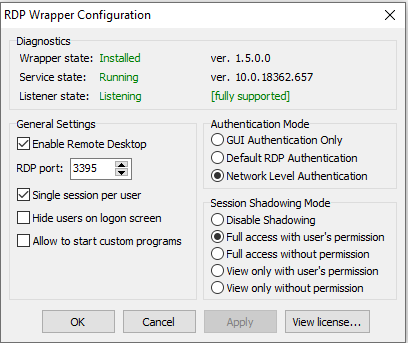
I was happy coz I got good result in first try. When I tried to connect I can't.
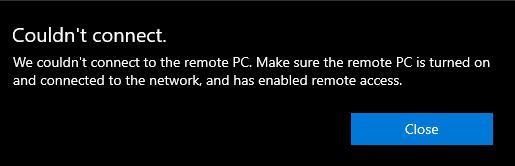
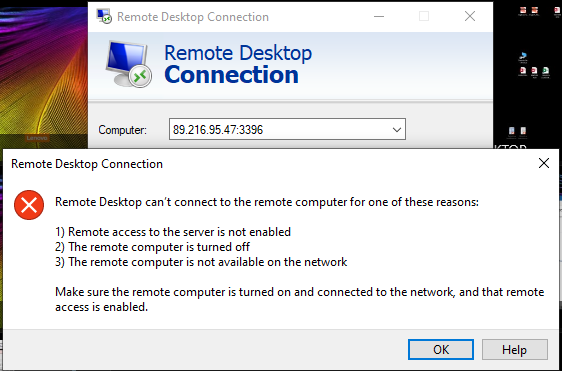
I checked firewall settings for RD and all is good.
Any suggestion?
Thanks
 vojkannik
on 12 Mar 2020
vojkannik
on 12 Mar 2020
have you checked your forwarding rules at the router? (I see you're using the port 3396 instead of 3395, or even trying changing the port at RDP Wrapper.
jaimesca81
on 12 Mar 2020
Hi,
Your port number is wrong. Your RDP server is running port 3395, you are connecting to 3396
From: "vojkannik" notifications@github.com
Sent: Friday, March 13, 2020 4:40 AM
To: "stascorp/rdpwrap" rdpwrap@noreply.github.com
Cc: "sk-lau" sklau@aikotech.com, "Comment" comment@noreply.github.com
Subject: Re: [stascorp/rdpwrap] Any help available for 10.0.18363.476 (1909enterprise)? (#928)
Hi all,
after last update of Win 10 Home edition (1909) I have problem with RDP. I read all here and I reinstall RDP Wrap. And got that Wrap working
I was happy coz I got good result in first try. When I tried to connect I can't.
I checked firewall settings for RD and all is good.
Any suggestion?
Thanks
-
You are receiving this because you commented.
Reply to this email directly, view it on GitHub, or unsubscribe.
sk-lau
on 13 Mar 2020
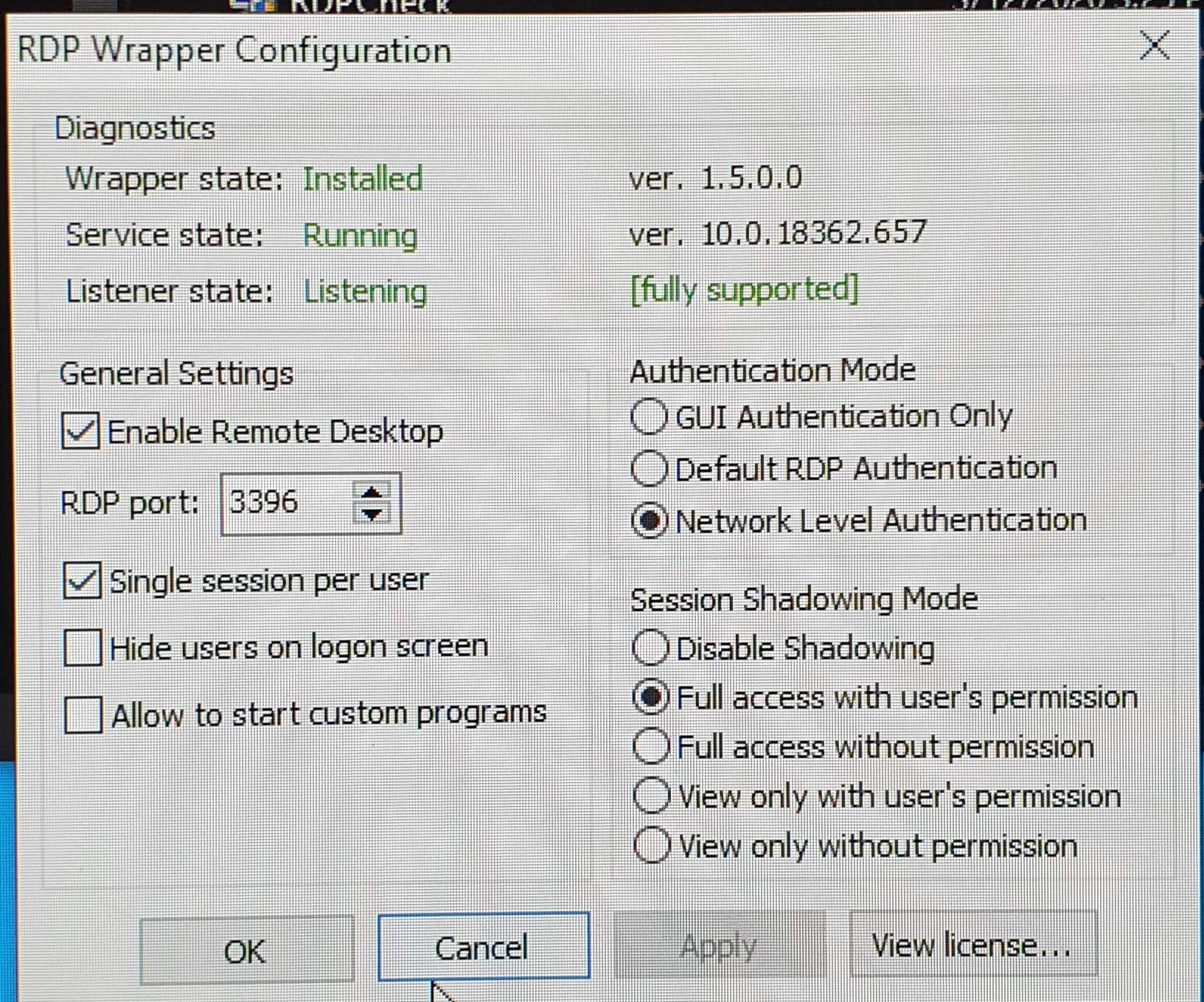
sorry guys. I posted wrong SS. I used the correct port. And also fwd port on router is the same 3396
vojkannik
on 13 Mar 2020
I think, first try using the default ports and check if it does work, the issue would be at the router (some routers have the capability to setup port forwarding but at the real moment to use it, doesn't work
jaimesca81
on 13 Mar 2020
I find out what is the problem. Windows update KB4535996. When i removed this update I got a connection
Thank you all for helping me
vojkannik
on 13 Mar 2020
This doesn't appear to be working for me, version 10.0.18362.752. When I run RDPConf Listener state isn't listening and it isn't supported. I tried pasting the new offsets and now it says fully supported but the listener state still isn't listening and now it says service state has stopped. Any ideas?
 GasPoweredTomato
on 27 Apr 2020
GasPoweredTomato
on 27 Apr 2020
You probably just need to restart the service. Use the services program
(Tap windows key and type services, Windows +r to open the run tool and
type services.msc) locate Remote Desktop Services, and click 'Restart' the
service.
On Mon, 27 Apr 2020 15:05 GasPoweredTomato, notifications@github.com
wrote:
This doesn't appear to be working for me, version 10.0.18362.752. When I
run RDPConf Listener state isn't listening and it isn't supported. I tried
pasting the new offsets and now it says fully supported but the listener
state still isn't listening and now it says service state has stopped. Any
ideas?—
You are receiving this because you are subscribed to this thread.
Reply to this email directly, view it on GitHub
https://github.com/stascorp/rdpwrap/issues/928#issuecomment-619721272,
or unsubscribe
https://github.com/notifications/unsubscribe-auth/AAMCGIQALFRHVHQ36IOCQGDROUHA7ANCNFSM4JOG5WXA
.
 robbak
on 27 Apr 2020
robbak
on 27 Apr 2020
Related issues
 Trooper29
·
4Comments
Trooper29
·
4Comments
 cH40z32
·
4Comments
cH40z32
·
4Comments
 philippseith
·
6Comments
philippseith
·
6Comments
 eyeTechSolutions
·
5Comments
eyeTechSolutions
·
5Comments
 mascarasnake66
·
4Comments
mascarasnake66
·
4Comments
Most helpful comment
rdpwrap_10.0.18363.476_1909.zip
net stop termservice
Replace rdpwrap.ini in C:\Program FilesRDP Wrapper
net start termservice
Reboot your PC
then when your pc rebooted, run RDPConf to check the states, make sure All states are green