Rdpwrap: RDP Wrapper 17763.771 Listening, still getting "Another user is signed in.." error.
Used auto updater, re-installed everything, powered down restarted services, nothing. Any hints?
 trjwaugh
All 6 comments
Try this rdpwrap
 RostyslavBaidak
on 6 Nov 2019
RostyslavBaidak
on 6 Nov 2019
Used auto updater, re-installed everything, powered down restarted services, nothing. Any hints?
Hi, I've had great success with this variant from #906
https://github.com/SobieskiCodes/RDPWrap
The key for me was to:
- Grant Everyone as Owner and Everyone : Full Control to C:\Program Files\RDP Wrapper
- Extract all / copy & replace all bits into that directory
- Perform all operations from that directory (that is: the 2 batch files to be run)
- Run all .bat files as admin (elevated) FROM THAT DIRECTORY. Order = [1] install.bat [2] autoupdate.bat ... then mstsc.exe should be able to RDP into yourself at 127.0.0.2 (which is what RDPCheck.exe does).
[LPTs] ::
- If you dont see a lot of output in the cmd.exe opened from these .bat files, then it did NOT launch elevated. I'd CD to that directory with an elevated cmd.exe (Ctrl + Shift + Enter to run cmd.exe elevated) so you can obtain and see all output since they dont have PAUSE embedded
Notice that initially before all of these operations if rdpwrap.dll is locked and cannot be replaced (when replacing at least 2 pre-existing files rdpwrap.dll & rdpwrap.ini), then in an elevated cmd.exe before running the batch files, perform a: net stop UmRdpService & net stop TermService
I didn't have to reboot at all, even with past RDPWrap running and RDP svchost.exe operating as normal, just the key was to do a net stop UmRdpService & net stop TermService before anything else
If you have further questions let me know. This worked on Win10 1903 Pro and tested on Home just to see, because yolo :-)
 AltF5
on 7 Nov 2019
AltF5
on 7 Nov 2019
I have my windows updated to date and this method has stopped working, any ideas?
 blacktraceus
on 14 Nov 2019
blacktraceus
on 14 Nov 2019
I think this is not the main problem. I have never played with access to directories on windows 10.
I have administrator rights.
I installed like this:
- create folder C:\RDPWrap-v1.6.2
- add the directory RDPWrap-v1.6.2 to exceptions in the antivirus settings or windows defender
- unpacked the RDPWrap-v1.6.2 archive in C:\RDPWrap-v1.6.2
- run as administrator install.bat
- create a directory C:\Program Files\RDP Wrapper\
- stop the service TermService

- copy the latest (fresh) files rdpwrap.zip from the archive for my version of the operating system in the directory C:\Program Files\RDP Wrapper\
- start the service TermService
- reboot OS
- check status of the C:\RDPWrap-v1.6.2\RDPConf.exe
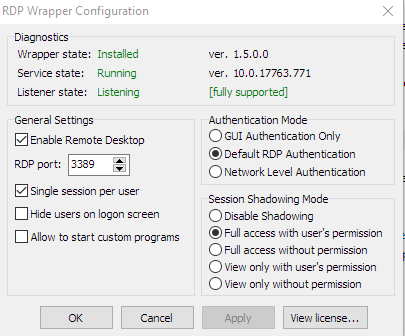
- if everything as in the screenshot means it works
- if everything is ok - try to sign in as another user
RDPWrap-v1.6.2.zip
rdpwrap.zip
RostyslavBaidak
on 15 Nov 2019
Try this rdpwrap
This worked, thank you!
trjwaugh
on 20 Nov 2019
Try this rdpwrap
This worked. Thanks!
Also, needed to restart "Remote Desktop Services" from services.
 mihafiz
on 25 Nov 2019
mihafiz
on 25 Nov 2019
Related issues
 eyeTechSolutions
·
5Comments
eyeTechSolutions
·
5Comments
 Trooper29
·
4Comments
Trooper29
·
4Comments
 apolyakov2017
·
4Comments
apolyakov2017
·
4Comments
 nick7inc
·
5Comments
nick7inc
·
5Comments
 cakexxx
·
6Comments
cakexxx
·
6Comments
Most helpful comment
Try this rdpwrap