Rdpwrap: Automatic RDP Wrapper installer and updater (autoupdate.bat **bugfix)
Pull request: https://github.com/stascorp/rdpwrap/pull/859
The new batch file "autoupdate.bat" check, install and update the RDP Wrapper automatically in the background. _For example very useful after a windows update reboot ..._
{ Special thak to binarymaster, saurav-biswas and all other contributors }
                        autoupdate.bat

 Automatic RDP Wrapper installer and updater // asmtron (07-09-2019)
 -------------------------------------------------------------------
 Options:
   -log        = redirect display output to the file autoupdate.log
   -taskadd    = add autorun of autoupdate.bat on startup in schedule task
   -taskremove = remove autorun of autoupdate.bat on startup in schedule task

 Info:
   The autoupdater first use and check the official rdpwrap.ini.
   If a new termsrv.dll is not supported in the offical rdpwrap.ini,
   autoupdater first tries the asmtron rdpwrap.ini (disassembled and
   tested by asmtron). The autoupdater will also use rdpwrap.ini files
   of other contributors like the one of "saurav-biswas".
   Extra rdpwrap.ini sources can also be defined...

 { Special thak to binarymaster, saurav-biswas and all other contributors }


 INSTALL of RDP Wrapper and Autoupdater
 ======================================

 1. Copy the files from the archive "RDPWrap-v1.6.2.zip" (or newer) to the "%ProgramFiles%\RDP Wrapper" directory

    DO NOT use other location to install/extract the RDP Wrapper files.
    USE ONLY the "%ProgramFiles%\RDP Wrapper" directory (normally C:\Program Files\RDP Wrapper)


 2. Copy the files/folder from the archive "autoupdate-v07.09.2019.zip" (or newer) to the "%ProgramFiles%\RDP Wrapper" directory


 3. To enable autorun of autoupdate.bat on system startup, run the folling helper batch file as administrator:

    "%ProgramFiles%\RDP Wrapper\helper\autoupdate__enable_autorun_on_startup.bat"


 4. Set in your Antivirus/WindowsDefnder an exclusion on the folder "%ProgramFiles%\RDP Wrapper" to prevent the deletion of RDP Wrapper files


 5. Now you can use the autoupdate batch file to install and update the RDP Wrapper. Please run the folling autoupdate batch file as administrator:

   "%ProgramFiles%\RDP Wrapper\autoupdate.bat"
 asmtron
All 24 comments
Thank you but I am getting Listener state: Not listening. Everything else seems supported and fine.
 junkwes
on 12 Aug 2019
junkwes
on 12 Aug 2019
Important -> autoupdate.bat _bugfix!_**
- bug: normal copy with admin right of the file "rdpwrap_new.ini" to "rdpwrap.ini" will not work properly (file locked)
- fix: we need to stream the data line by line from "rdpwrap_new.ini" to "rdpwrap.ini"
- add: listener check
With this bugfix autoupdate.bat works now as expected...
asmtron
on 13 Aug 2019
Works like a charm! Incredible work, there's a way to propose that tool to be integrated on RDPWrap? That's a game changer, main problem I have since I'm using RDPWrap is Windows Update handling but with this that's no longer a problem. Thanks!
 luisBSBDATA
on 13 Aug 2019
luisBSBDATA
on 13 Aug 2019
Ok I just got a update today going from 18362.267 to 18362.295 not sure if rdpwrap is effected yet I hope this Autoupdate.bat works.
Looks like terms.dil didn't change in this 295 update no way to know if autoupdate.bat work yet
 StarfighterJ
on 14 Aug 2019
StarfighterJ
on 14 Aug 2019
Awesome! Thanks a lot!
 PocketSam
on 15 Aug 2019
PocketSam
on 15 Aug 2019
Woot woot! I got Windows Defender warnings the first time just because it was an unknown app, but after that no problem. Thanks!
 gitgotgone
on 17 Aug 2019
gitgotgone
on 17 Aug 2019
On Windows 7 Corporate x64 with termsrv 6.1.7601.24402 Remote Desctop often crashes. :(
termsrv.dll
PocketSam
on 19 Aug 2019
cool, it solved my no-listener problem on 17134.885
 smyle10
on 20 Aug 2019
smyle10
on 20 Aug 2019
hey Asmtron, I love the work you have done to create that awesome BAT to update the INI, but why not just modify the source code of RDPWInst.exe in your fork to make the native update function (-w) pull the INI from your fork? Seems like you reinvented the wheel. Also, I couldn't find a place to send you a message via your github page - did you disable comments or something? I have a delphi7 compiler if that would be of any help to you. thanks!
 shippj
on 26 Aug 2019
shippj
on 26 Aug 2019
Hi shippj, thanks for your offer. With the batch file we avoid hard coded links in a binary file and the download links are always visible for everyone. It is also very easy for everyone to modify/add new ini download sources. The batch file is an addon for the RDP Wrapper and it does no touch the RDP Wrapper binaries (it's intended).
asmtron
on 26 Aug 2019
@asmtron Can you merge Win7+2008R2 last update of @fre4kyC0de
https://github.com/fre4kyC0de/rdpwrap/blob/master/6.1.7601.24402.txt
 s0nic9
on 29 Aug 2019
s0nic9
on 29 Aug 2019
@asmtron Have a look at this https://github.com/stascorp/rdpwrap/issues/872#issuecomment-526190589
 ghost
on 29 Aug 2019
ghost
on 29 Aug 2019
@s0nic9: Thanks! I just added your config to an ini file and manually reinstalled rdpwrap with the custom ini and it works now.
 strarsis
on 29 Aug 2019
strarsis
on 29 Aug 2019
I have done the steps listed. Here are my issues:
Service State: Starting... Ver. 10.0.18362.53
Listener: Not Listening [Fully Supported]
I bring up Remote Desktop Services in services.msc and it shows "Starting" and I am unable to Stop, Restart, or Start it.
 RsRough
on 28 Sep 2019
RsRough
on 28 Sep 2019
Awesome!! This recover my install of RDPwrap! Thank you, man! :-)
 vlciho
on 2 Nov 2019
vlciho
on 2 Nov 2019
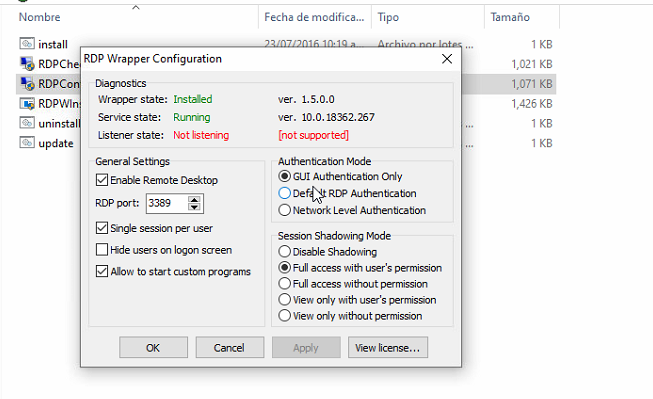
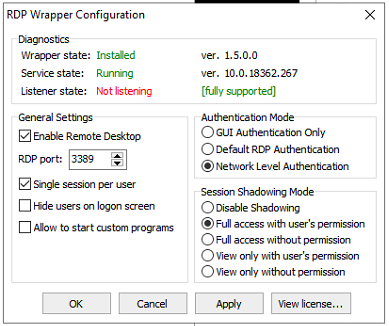
@vlciho Hello sir, I hope you are well, could you please help me with the solution you applied to solve the problem of the rdpwrap_10.0.18362.267 version
 RDPGREX2019
on 9 Nov 2019
RDPGREX2019
on 9 Nov 2019
HELPPPPPPPPPPPPPPPP!!!!!!!!!!!!!!!!!!
I couldn't solve this problem

RDPGREX2019
on 9 Nov 2019
Hello sir,
i used autoupdate utility:
https://github.com/stascorp/rdpwrap/issues/860
I runed this utility twice and resolved my problém.
V.
From: RDPGREX2019 notifications@github.com
Sent: Saturday, November 9, 2019 12:42 AM
To: stascorp/rdpwrap rdpwrap@noreply.github.com
Cc: Vladimír Cihlář vcihlar@vlciho.cz; Mention mention@noreply.github.com
Subject: Re: [stascorp/rdpwrap] Automatic RDP Wrapper installer and updater (autoupdate.bat **bugfix) (#860)
HELPPPPPPPPPPPPPPPP!!!!!!!!!!!!!!!!!!
I couldn't solve this problem
[Captura de pantalla (224)]https://user-images.githubusercontent.com/48032846/68517879-917bd700-0246-11ea-943d-a6d2dea7d48e.png
[Captura de pantalla (225)]https://user-images.githubusercontent.com/48032846/68517880-92146d80-0246-11ea-9e33-57ebfc3faae6.png
[Captura de pantalla (226)]https://user-images.githubusercontent.com/48032846/68517881-92146d80-0246-11ea-8291-25647c6a89a3.png
—
You are receiving this because you were mentioned.
Reply to this email directly, view it on GitHubhttps://github.com/stascorp/rdpwrap/issues/860?email_source=notifications&email_token=AKIT2DUNR65PYAWP5MKHJWLQSX2MVA5CNFSM4IK5IIR2YY3PNVWWK3TUL52HS4DFVREXG43VMVBW63LNMVXHJKTDN5WW2ZLOORPWSZGOEDTVX2Q#issuecomment-552033258, or unsubscribehttps://github.com/notifications/unsubscribe-auth/AKIT2DX4ECQD62CLJ6GEOELQSX2MVANCNFSM4IK5IIRQ.
vlciho
on 9 Nov 2019
Log here.
autoupdate.log


vlciho
on 9 Nov 2019
Please forgive my github ignorance. How do I get the most recent version of the autoupdate.bat file? Thank you.
 actanner
on 23 Nov 2019
actanner
on 23 Nov 2019
Please forgive my github ignorance. How do I get the most recent version of the autoupdate.bat file? Thank you.
here ya go:
https://github.com/asmtron/rdpwrap/tree/master/bin
shippj
on 23 Nov 2019
Well, I still have lots to learn about github. I see the autoupdate.bat listing, but I still don't know how to download the .bat file directly so that I can execute it. Thanks in advance, and I hope to learn lots more about github soon.
actanner
on 23 Nov 2019
Well, I clicked on the "Raw" button and downloaded but wound up with a strange "overdrive" extension. Once I renamed the file, it looks like it would properly execute as a batch file, but it has the 07/09/2019 date in the remarks section, leading me to believe that it is not the most recent, since bugs were fixed on 12 Aug. I think I am getting closer, but....
actanner
on 23 Nov 2019
windows 10.0.18363 暂缺 Build 18363 & 6.3.9600 win8.1
rdpwrap is ok
 csy9730
on 2 Feb 2020
csy9730
on 2 Feb 2020
Related issues
 sk-lau
·
4Comments
sk-lau
·
4Comments
 cH40z32
·
4Comments
cH40z32
·
4Comments
 korolartemnexus
·
6Comments
korolartemnexus
·
6Comments
 philippseith
·
6Comments
philippseith
·
6Comments
 shardy-uk
·
3Comments
shardy-uk
·
3Comments
Most helpful comment
Ok I just got a update today going from 18362.267 to 18362.295 not sure if rdpwrap is effected yet I hope this Autoupdate.bat works.
Looks like terms.dil didn't change in this 295 update no way to know if autoupdate.bat work yet