rdpwrap_ini_updater: support for 10.0.18362.267, 10.0.18362.53, 10.0.18362.1, 10.0.17134.706 ...
Hi,
the batch file rdpwrap_ini_updater add support to rdpwrap.ini for the following new termsrv.dll versions:
10.0.18362.267
10.0.18362.53 _(Build 18362.239, 18362.207, 18362.175, 18362.145, 18362.116, 18362.53)_
10.0.18362.1
10.0.17763.437
10.0.17763.379
10.0.17763.292
10.0.17763.165 x64
10.0.17134.706
It's easy to use and can be extended to newer upcoming versions...
rdpwrap_ini_updater_(02_August_2019).zip
Usage:
copy the batch files from zip archive to the "Program Files\RDP Wrapper" directory and then run "re-install.bat" as administrator
_Note: RDP Wrapper needs the original termsrv.dll versions to work properly.
Note: Please copy files only to the default directory %ProgramFiles%\RDP Wrapper
Note: Add exclusion on Windows Defender (or other AV) for directory %ProgramFiles%\RDP Wrapper_
 asmtron
All 113 comments
Steps to reinstall
- uninstall.bat
- install.bat
- rdpwrap_ini_updater.bat
asmtron
on 25 May 2019
thanks! I see some x86 version are missing, e.g. for version 10.0.18362.1. Any Idea to get that version included?
 blb4github
on 25 May 2019
blb4github
on 25 May 2019
... upload the 10.0.18362.1 x86 termsrv.dll
asmtron
on 25 May 2019
termsrv.zip
Attached the 10.0.18362.1 x86 termserv.dll, thanks!
blb4github
on 25 May 2019
Although my termsrv.dll is version 10.0.18362.53
After updating using this bat file, my pc is still single user
 sk-lau
on 27 May 2019
sk-lau
on 27 May 2019
RDP Wrapper Library is already installed
why rdpwrap.ini not found
 syou21
on 28 May 2019
syou21
on 28 May 2019
termsrv.zip
Attached the 10.0.18362.1 x86 termserv.dll, thanks!
this termsrv.dll doesn't work. I managed to replace the original with this version. And patch it with the .bat file above. After that RDP service cannot start
sk-lau
on 29 May 2019
1903 18362 succeeded
step:
- Execute install.bat
- Copy RDPWInst.exe and rdpwrap_ini_updater.bat to C:\Program Files\RDP Wrapper\
- Execute rdpwrap_ini_updater.bat
- Success
 Monster0303
on 29 May 2019
Monster0303
on 29 May 2019
Followed instructions but still get only single session rdp. Screenshot as below

I'm using the original termserv.dll
sk-lau
on 30 May 2019
Hi Guys. I make RDP working normally on W10 Pro 1903 version by instructions above from user ljf0717, printers are redirecting normally, but not using Easy Desktop print driver first but original driver which is installed on my computer (Easy Desktop print driver is needed for some HP printers that don't support remote print through HP drivers). If anyone solve this with printers pls write here. Thx
 IlFenomeno9
on 30 May 2019
IlFenomeno9
on 30 May 2019
1903 18362 succeeded
step:
- Execute install.bat
- Copy RDPWInst.exe and rdpwrap_ini_updater.bat to C:\Program Files\RDP Wrapper\
- Execute rdpwrap_ini_updater.bat
- Success
Work!
Thanks!
 icekingcy
on 30 May 2019
icekingcy
on 30 May 2019
Hi,
termsrv.dll: 10.0.17763.437
Windows 10 Pro: 1809 17763.529
Steps:
- Copy RDPWInst.exe and rdpwrap_ini_updater.bat to C:\Program Files\RDP Wrapper\
- Execute rdpwrap_ini_updater.bat
Success !
Thanks !
 JaWaRo
on 30 May 2019
JaWaRo
on 30 May 2019
same program - https://www.octaniumsw.site//2019/04/rdp-wrapper-confg-update-tool-en.html (but gets info from web)
 Octanium91
on 1 Jun 2019
Octanium91
on 1 Jun 2019
Every few days I have the same problem. My system gets updated, file version doesn't change, everything is green in the window, but RDP can't connect. Every time I manage to find some new ini here and it works again but this time it just won't. I tried to use both updaters above. What else can I do?


 Woo-Cash
on 4 Jun 2019
Woo-Cash
on 4 Jun 2019
Please support for x86 version on 10.0.18362.53
termsrv_10.0.18362.53_x86.zip
 sbhawks
on 4 Jun 2019
sbhawks
on 4 Jun 2019
Hi All,
I've run "re-install.bat" as administrator but listener state is not listening, despite being fully supported.
I'm on W10 Home v1809 OS build 17763.504 with termsrv.dll 10.0.17763.437.
Can anyone help, please?
 NewtCon
on 5 Jun 2019
NewtCon
on 5 Jun 2019
Hi All,
I've run "re-install.bat" as administrator but listener state is not listening, despite being fully supported.
I'm on W10 Home v1809 OS build 17763.504 with termsrv.dll 10.0.17763.437.
Can anyone help, please?
Hi, I have same problem, The attached "rdpwrap.ini" file Make the "Listener state" to "Listening" but when I try to remote, connection closes very fast !
I found it here :
https://github.com/tmaguire/rdpwrap/releases
 mer30hamid
on 5 Jun 2019
mer30hamid
on 5 Jun 2019
Hello! I unpack rdpwrap_ini_updater_(03_June_2019).zip reinstall and reboot.
It works, but "single session per user" don't work. I boot PC, do something, later i connect to PC remotely via local net and rdp always opens new session. So i need always connect to old session from users tab.


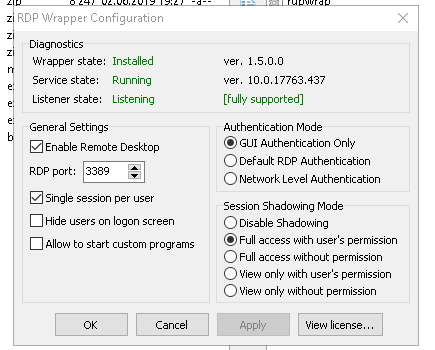
I need simultaneos multiple users work, but only one session. What can i do?
Reinstall success but i see that change date is 15.04.2019

 cynepnaxa
on 6 Jun 2019
cynepnaxa
on 6 Jun 2019
Problems with: 10.0.17763.437 x64 -> please try the new rdpwrap_ini_updater_(07_June_2019).zip
asmtron
on 7 Jun 2019
Hi asmtron, thanks for today’s update. I’ve re-installed with this version on build 18362.53 x86 but it’s not working yet (not listening). It’s restarting service a couple of times, than stops.
blb4github
on 7 Jun 2019
Hi blb4github, fixed the 18362.53 x86 (the correct SLInit entries were missing)
asmtron
on 7 Jun 2019
Thanks, working now!
blb4github
on 7 Jun 2019
Is it possible to add full support for Win7 termserv 6.1.7601.24402 ?

termsrv.dll attached:
 CaptInsano
on 8 Jun 2019
CaptInsano
on 8 Jun 2019
Its working on windows 10 1903 18362145
Thanks
 kams75
on 8 Jun 2019
kams75
on 8 Jun 2019
It's working for me too now. Thank you very much.
Woo-Cash
on 9 Jun 2019
Hi @asmtron,
Tried with rdpwrap_ini_updater_(08_June_2019).zip on W10 Home v1809 OS build 17763.504 with termsrv.dll 10.0.17763.437 but still not listening:


NewtCon
on 9 Jun 2019
i find that the best way is to run CMD as administrator
Then run the install.bat and the rest of the .bat file from command line, it will work !
sk-lau
on 11 Jun 2019
_Fix: wrong entry fixed in 10.0.17763.437 x64_
Thank you for your support! Unfortunatelly single session per user still not working. I never see how it works :). I try many rdpwrapper ini versions and RDP always create new session. Maybe i need to replace dll? How to upgrade termsrv.dll properly? Why it is not updated with windows update? buid updated to 17763,529, but termsrv.dll still 437...
cynepnaxa
on 11 Jun 2019
Hi sk-lau, I tried running CMD as administrator but still "not listening" :(
NewtCon
on 12 Jun 2019
Hi,
the batch file rdpwrap_ini_updater add support to rdpwrap.ini for the following new termsrv.dll versions :
10.0.18362.53 _(Win10 1903; Build 18362.145, 18362.116 and 18362.53; May 2019)_
10.0.18362.1
10.0.17763.437
10.0.17763.379
10.0.17763.292
10.0.17763.165 x64
10.0.17134.706It's easy to use and can be extended to newer upcoming versions...
rdpwrap_ini_updater_(08_June_2019).zip
Usage:
copy the batch files from zip archive to the "Program Files\RDP Wrapper" directory and then run "re-install.bat" as administrator_Edit: add x86 support for 10.0.17134.706, 10.0.18362.1, 10.0.18362.53, 10.0.17763.437_
_Fix: wrong entry fixed in 10.0.17763.437 x64_
11 de junho de 2019 — KB4503293 (build do SO 18362.175) works!!! thanks!!!
 leuzinhugomes
on 15 Jun 2019
leuzinhugomes
on 15 Jun 2019
@asmtron, thank you very much. Can you update the official rdpwrap.ini file and submit a pull request?
It would show that the project supports new Windows versions, without digging through the GitHub issues. Moreover, upgrading would have been more seamless, without requiring to run external batch scripts.
 teo-tsirpanis
on 16 Jun 2019
teo-tsirpanis
on 16 Jun 2019
Here's some fresh termsrv,dll for 18912.1001
termsrv.zip
 johnvondoe
on 18 Jun 2019
johnvondoe
on 18 Jun 2019
@asmtron, thanks for all your support. Finally we have a new meeting point using your bat.
Have a nice day
 supportuser27
on 19 Jun 2019
supportuser27
on 19 Jun 2019
Hi,
the batch file rdpwrap_ini_updater add support to rdpwrap.ini for the following new termsrv.dll versions :
10.0.18362.53 _(Win10 1903; Build 18362.145, 18362.116 and 18362.53; May 2019)_
10.0.18362.1
10.0.17763.437
10.0.17763.379
10.0.17763.292
10.0.17763.165 x64
10.0.17134.706It's easy to use and can be extended to newer upcoming versions...
rdpwrap_ini_updater_(08_June_2019).zip
Usage:
copy the batch files from zip archive to the "Program Files\RDP Wrapper" directory and then run "re-install.bat" as administrator_Edit: add x86 support for 10.0.17134.706, 10.0.18362.1, 10.0.18362.53, 10.0.17763.437_
_Fix: wrong entry fixed in 10.0.17763.437 x64_
You, Sir, are my new hero, that much you can take for certain. It works like a charm on my freshly updated Win10 home box, from the previous 16xx-Version to the up to date 1803 (10.0.17134.829).
 efferle
on 20 Jun 2019
efferle
on 20 Jun 2019
@efferle, could you make a pull request to update the official rdpwrap.ini file? It looks as if the project is dead.
teo-tsirpanis
on 20 Jun 2019
@efferle, could you make a pull request to update the official
rdpwrap.inifile? It looks as if the project is dead.
Dear teo-tsirpanis, I actually do not have any clue on how to do that, not to mention that I am not familiar with git. I am just another IBM (very big) host guy in the pursuit of being able to RDP into my Windows 10 home box via VPN from my office place.
What I did was, after being forced to upgrade to 1803 today, simply following asmtron's instructions on top of this thread. I just downloaded the ZIP and, after checking at Virustotal, un-ZIPed it's content to the forementionend folder, did what asmtron suggested in his second post
- uninstall.bat
- install.bat
- rdpwrap_ini_updater.bat
- rebooted my PC, and that was it.
Sorry if it may sound stupid, but I do not know what I am supposed to do. And BTW, I do not think this project of stascorp/ binarymaster is dead, as he seems to be very active on his real life job; he is maybe just too busy to care for his hobby project on a daily basis? However, don't get me wrong, I'd love to assist in any way, but actually I did exactly what asmtron suggested, nothing more, nothing less.
efferle
on 21 Jun 2019
@efferle, I am sorry, I didn't see that you weren't the author of this patch. 😂😂 It was this forum-like structure of the issue that got me confused.
And I 've just seen there is a pull request open.
teo-tsirpanis
on 21 Jun 2019
@efferle, I am sorry, I didn't see that you weren't the author of this patch. joyjoy It was this forum-like structure of the issue that got me confused.
No worries whatsoever, dear teo-tsirpanis, we're all just regular guys trying to RDP into some of our boxes by the sake, fortune and luck of binarymaster. ,-)
efferle
on 22 Jun 2019
17134.706, everything is green but still doesn't work.
 tayxmch
on 26 Jun 2019
tayxmch
on 26 Jun 2019
@tayxmch
I have tested and used successfully on Win10 Pro the Build 17134.706 x64.
_Did you used the original termsrv.dll 17134.706 x64 (SHA-1: d14df27c67eb40d157505ec535b103ab754a8e4f)?_
asmtron
on 28 Jun 2019
@asmtron para el archivo que adjuntaste, que tengo que hacer, si ya tengo instalado 1 version anterior de rdpwraper
 Wmx-2
on 28 Jun 2019
Wmx-2
on 28 Jun 2019
@asmtron
On Win10 Build 17763.437 x64 which you tested, what should be SHA-1 of the termsrv.dll 17763.437 x64 ?
I have uninstalled, reinstalled, rebooted, swapped termsrv.dll, installed as different user.
But cannot change listener state from from Not Listening to Listening.
NewtCon
on 1 Jul 2019
Hi, @asmtron
I'm using WIN 10 18362.175, and I got 'listening' but 'not supported':

The updater and ini are both the latest, please help.

 zhangjizhong-86
on 1 Jul 2019
zhangjizhong-86
on 1 Jul 2019
Is it possible to add support 10.0.17763.557 (1809) ?
 ALEXks
on 1 Jul 2019
ALEXks
on 1 Jul 2019
Not working @ Win10 1903 18362.207
Can please help on that? Thanks.
 ghostrat26
on 3 Jul 2019
ghostrat26
on 3 Jul 2019
Maybe for someone it will be useful.
I have the latest update Win10 Pro 10.0.18362.10000 (It is updated regularly)
None of the .ini was like this.
10.0.18362.1 did not fit.
Decision:
in rdpwrap.ini last 2 blocks:
[10.0.18362.53]
[10.0.18362.53-SLInit]
renamed to my version
[10.0.18362.10000]
[10.0.18362.10000-SLInit]
profit..
 GigaVik
on 3 Jul 2019
GigaVik
on 3 Jul 2019
These values/procedure did not work for the Windows Home edition of 1903 x64 build 18362.207. In previous WIndows 10 ini updates for rdpwrap, I've found the Home edition is not the same as Pro sometimes with this. I did finally get it working with these steps:
1) Had to download the rdpwrap_ini_updater_(08_June_2019).zip to the folder where I have RDPWrap-v1.6.2.zip unpacked (I don't have that in the "\Program Files\RDP Wrapper" folder. If you run RDPWrap's install.bat, it will just copy over the rdpwrap.ini and rdpwrap.dll to the program files folder by default and that's all I have inside that folder).
2) I had to manually copy over the now patched rdpwrap.ini file from where I ran the re-install.bat into the "\Program Files\RDP Wrapper" folder. Again nothing in this folder but rdpwrap.ini and rdpwrap.dll
3) In a cmd window ran as administrator, I had to run C:\RDPWInst.exe -r from the folder where RDPWrap-v1.6.2 was originally unpacked.
Once step 3 restarted term services and picked up the new ini file, then it finally worked.
 drshock
on 5 Jul 2019
drshock
on 5 Jul 2019
@ghostrat26
Tested successfully on new Win10 x64 Version 1903 (Build 18362.207). This new Build use also the termsrv.dll Version 10.0.18362.52 ( SHA-1: 09e5fb1406b5f0eb929518471c4e7bca26613f53)
@NewtCon
termsrv.dll v.10.0.17763.437 x64 (SHA-1: 3ca0926483d57b572b3aa1bd5eb855c464ce4819)
@zhangjizhong-86
please try: run "re-install.bat" as administrator
Note: RDP Wrapper needs the original termsrv.dll versions to work properly.
Note: Please copy files only to the default directory %ProgramFiles%\RDP Wrapper
asmtron
on 6 Jul 2019
Why not simply change the rdpwrap_ini_updater.bat file slightly to allow it to run from any folder containing the RDP Wrapper installation files? Handy to have them stored somewhere to check config etc.
set rdpwrap_ini="C:\Program Files\RDP Wrapper\rdpwrap.ini"
Thanks for a great update!
 Holraven
on 10 Jul 2019
Holraven
on 10 Jul 2019
I can confirm that Windows 10 Pro Version 1903 (OS Build 18362.239), which RDP Wrap identifies as 18362.53, works like a charm with the latest update. Thank you!
 qSebastiaNp
on 10 Jul 2019
qSebastiaNp
on 10 Jul 2019
Like @qSebastiaNp, got mine running after using the rdpwrap_ini_updater with Windows 10 Home which for me also shows up as 18362.53 in RDPWrap and Version 1903 (OS Build 18362.239) with winver
 gaikaz
on 10 Jul 2019
gaikaz
on 10 Jul 2019
Thanks, it worked.
I think my promblem was that I didn't notice it must be installed to %ProgramFiles%\RDP Wrapper. Copied everything there and it turned "fully supported".
WIN 10 1903 18362.175.
zhangjizhong-86
on 12 Jul 2019
Thanks! I'm on 18362.207 and it worked.
I had two issues I had to solve:
1) Windows SmartDefender needed to be off.
2) My 1.6.2 original install files including RDPWInst.exe needed to be in the Program Files\RDP Wrapper directory.
 gitgotgone
on 15 Jul 2019
gitgotgone
on 15 Jul 2019
10.0.18362.267 doesn't work
 romanad
on 27 Jul 2019
romanad
on 27 Jul 2019
10.0.18362.267 (from https://github.com/stascorp/rdpwrap/issues/848):
[10.0.18362.267]
LocalOnlyPatch.x86=1
LocalOnlyOffset.x86=B7D06
LocalOnlyCode.x86=jmpshort
LocalOnlyPatch.x64=1
LocalOnlyOffset.x64=82FB5
LocalOnlyCode.x64=jmpshort
SingleUserPatch.x86=1
SingleUserOffset.x86=50535
SingleUserCode.x86=nop
SingleUserPatch.x64=1
SingleUserOffset.x64=0DBFC
SingleUserCode.x64=Zero
DefPolicyPatch.x86=1
DefPolicyOffset.x86=50269
DefPolicyCode.x86=CDefPolicy_Query_eax_ecx
DefPolicyPatch.x64=1
DefPolicyOffset.x64=1FE15
DefPolicyCode.x64=CDefPolicy_Query_eax_rcx
SLInitHook.x86=1
SLInitOffset.x86=5A77A
SLInitFunc.x86=New_CSLQuery_Initialize
SLInitHook.x64=1
SLInitOffset.x64=22DDC
SLInitFunc.x64=New_CSLQuery_Initialize

[10.0.18362.267-SLInit]
bInitialized.x86      =D577C
bServerSku.x86        =D5780
lMaxUserSessions.x86  =D5784
bAppServerAllowed.x86 =D578C
bRemoteConnAllowed.x86=D5790
bMultimonAllowed.x86  =D5794
ulMaxDebugSessions.x86=D5798
bFUSEnabled.x86       =D579C

bInitialized.x64      =F6A8C
bServerSku.x64        =F6A90
lMaxUserSessions.x64  =F6A94
bAppServerAllowed.x64 =F6A9C
bRemoteConnAllowed.x64=F6AA0
bMultimonAllowed.x64  =F6AA4
ulMaxDebugSessions.x64=F6AA8
bFUSEnabled.x64       =F6AAC
Did not test it yet.
 marcosfrm
on 30 Jul 2019
marcosfrm
on 30 Jul 2019
10.0.18362.267 (from #848):
[10.0.18362.267]
LocalOnlyPatch.x86=1
LocalOnlyOffset.x86=B7D06
LocalOnlyCode.x86=jmpshort
LocalOnlyPatch.x64=1
LocalOnlyOffset.x64=82FB5
LocalOnlyCode.x64=jmpshort
SingleUserPatch.x86=1
SingleUserOffset.x86=50535
SingleUserCode.x86=nop
SingleUserPatch.x64=1
SingleUserOffset.x64=0DBFC
SingleUserCode.x64=Zero
DefPolicyPatch.x86=1
DefPolicyOffset.x86=50269
DefPolicyCode.x86=CDefPolicy_Query_eax_ecx
DefPolicyPatch.x64=1
DefPolicyOffset.x64=1FE15
DefPolicyCode.x64=CDefPolicy_Query_eax_rcx
SLInitHook.x86=1
SLInitOffset.x86=5A77A
SLInitFunc.x86=New_CSLQuery_Initialize
SLInitHook.x64=1
SLInitOffset.x64=22DDC
SLInitFunc.x64=New_CSLQuery_Initialize

[10.0.18362.267-SLInit]
bInitialized.x86      =D577C
bServerSku.x86        =D5780
lMaxUserSessions.x86  =D5784
bAppServerAllowed.x86 =D578C
bRemoteConnAllowed.x86=D5790
bMultimonAllowed.x86  =D5794
ulMaxDebugSessions.x86=D5798
bFUSEnabled.x86       =D579C

bInitialized.x64      =F6A8C
bServerSku.x64        =F6A90
lMaxUserSessions.x64  =F6A94
bAppServerAllowed.x64 =F6A9C
bRemoteConnAllowed.x64=F6AA0
bMultimonAllowed.x64  =F6AA4
ulMaxDebugSessions.x64=F6AA8
bFUSEnabled.x64       =F6AAC
Did not test it yet.
Tested and working! x86 latest win10 professional
 FormadorLar
on 30 Jul 2019
FormadorLar
on 30 Jul 2019
[10.0.18362.267-SLInit]

 thestinger24rus
on 31 Jul 2019
thestinger24rus
on 31 Jul 2019
thanks! it works well...
10.0.17134.706
 liugt34
on 5 Aug 2019
liugt34
on 5 Aug 2019
thanks! it works well...
10.0.17134.706
Does it work with NLA?
romanad
on 5 Aug 2019
thanks! it works well...
10.0.17134.706Does it work with NLA?
i checked my services, it has a service name of NLA,it run automatically

liugt34
on 5 Aug 2019
thanks! it works well...
10.0.17134.706Does it work with NLA?
i checked my services, it has a service name of NLA,it run automatically
: )
You need to enable Network Level Authentication in RDP Wrapper Configuration (see screenshot above), otherwise it's very insecure !
romanad
on 5 Aug 2019
@romanad
i cheched the "Network Level Authentication" item ,it worked well

liugt34
on 5 Aug 2019

i dont understand how i can image smaller, sorry. 3 different users at the same time. Works well
thestinger24rus
on 5 Aug 2019
Hi,
the batch file rdpwrap_ini_updater add support to rdpwrap.ini for the following new termsrv.dll versions:
10.0.18362.267
10.0.18362.53 _(Build 18362.239, 18362.207, 18362.175, 18362.145, 18362.116, 18362.53)_
10.0.18362.1
10.0.17763.437
10.0.17763.379
10.0.17763.292
10.0.17763.165 x64
10.0.17134.706It's easy to use and can be extended to newer upcoming versions...
rdpwrap_ini_updater_(02_August_2019).zip
Usage:
copy the batch files from zip archive to the "Program Files\RDP Wrapper" directory and then run "re-install.bat" as administrator_Note: RDP Wrapper needs the original termsrv.dll versions to work properly. Note: Please copy files only to the default directory %ProgramFiles%\RDP Wrapper Note: Add exclusion on Windows Defender (or other AV) for directory %ProgramFiles%\RDP Wrapper_
thanks mate, this really works for me
 moaeddy
on 7 Aug 2019
moaeddy
on 7 Aug 2019
Just did the insider preview to 10.8956.1000 and I can no longer RDP. Is there documentation on what to do to create the appropriate configuration settings? I tried looking at the ini file and can tell that they look like hex patches. If there is some documentation on what to do I will create a patch.
 ultrawebmarketing
on 8 Aug 2019
ultrawebmarketing
on 8 Aug 2019
1903 18362 succeeded
step:
- Execute install.bat
- Copy RDPWInst.exe and rdpwrap_ini_updater.bat to C:\Program Files\RDP Wrapper\
- Execute rdpwrap_ini_updater.bat
- Success
Thank you for your help. I succeeded
 abcdafeiji
on 9 Aug 2019
abcdafeiji
on 9 Aug 2019
Automatic RDP Wrapper installer and updater (autoupdate.bat)
https://github.com/stascorp/rdpwrap/issues/860
The new batch file "autoupdate.bat" check, install and update the RDP Wrapper automatically in the background. For example very useful after a windows update reboot ...
As update source it use up-to-date rdpwrap_ini files from GitHub
asmtron
on 12 Aug 2019
thank you that worked !
 bramburn
on 15 Aug 2019
bramburn
on 15 Aug 2019
thank you that worker, you are the best!!
 MushuK
on 18 Aug 2019
MushuK
on 18 Aug 2019
can you please add 18362.10013?
termsrv-10013.zip

 ramiwi
on 19 Aug 2019
ramiwi
on 19 Aug 2019
Hi,
the batch file rdpwrap_ini_updater add support to rdpwrap.ini for the following new termsrv.dll versions:
10.0.18362.267
10.0.18362.53 _(Build 18362.239, 18362.207, 18362.175, 18362.145, 18362.116, 18362.53)_
10.0.18362.1
10.0.17763.437
10.0.17763.379
10.0.17763.292
10.0.17763.165 x64
10.0.17134.706It's easy to use and can be extended to newer upcoming versions...
rdpwrap_ini_updater_(02_August_2019).zip
Usage:
copy the batch files from zip archive to the "Program Files\RDP Wrapper" directory and then run "re-install.bat" as administrator_Note: RDP Wrapper needs the original termsrv.dll versions to work properly. Note: Please copy files only to the default directory %ProgramFiles%\RDP Wrapper Note: Add exclusion on Windows Defender (or other AV) for directory %ProgramFiles%\RDP Wrapper_
Thank You! Works like charm in Windows 10 Home 1903 18362.295.
It's of VITAL importance to copy files into C:\Program Files\RDP Wrapper [NOT x64!] and to run rdpwrap_ini_updater.bat as administrator. I also uninstalled [using previous version uninstaller] the old version too.

 uplink777
on 25 Aug 2019
uplink777
on 25 Aug 2019
18362.267 stilll not supported

 andyj51
on 30 Aug 2019
andyj51
on 30 Aug 2019
@andyj51 you are doing something wrong. Try again from scratch and i suggest to use the last version of the script:
 graphixillusion
on 30 Aug 2019
graphixillusion
on 30 Aug 2019
please support the version for 10.0.18362.295,i hate the update auto to help me update this version
 CHOIKAMWING
on 1 Sep 2019
CHOIKAMWING
on 1 Sep 2019
@CHOIKAMWING please read carefully https://github.com/stascorp/rdpwrap/issues/871#issuecomment-526744678
 s0nic9
on 1 Sep 2019
s0nic9
on 1 Sep 2019
Hi,
the batch file rdpwrap_ini_updater add support to rdpwrap.ini for the following new termsrv.dll versions:
10.0.18362.267
10.0.18362.53 _(Build 18362.239, 18362.207, 18362.175, 18362.145, 18362.116, 18362.53)_
10.0.18362.1
10.0.17763.437
10.0.17763.379
10.0.17763.292
10.0.17763.165 x64
10.0.17134.706It's easy to use and can be extended to newer upcoming versions...
rdpwrap_ini_updater_(02_August_2019).zip
Usage:
copy the batch files from zip archive to the "Program Files\RDP Wrapper" directory and then run "re-install.bat" as administrator_Note: RDP Wrapper needs the original termsrv.dll versions to work properly. Note: Please copy files only to the default directory %ProgramFiles%\RDP Wrapper Note: Add exclusion on Windows Defender (or other AV) for directory %ProgramFiles%\RDP Wrapper_
Hi, it doesn't work with 10.0.18362.356
EDIT : IT WORKS BUT...
_you absolutely need to make a C:\Program Files\RDP Wrapper folder and put all your stuff (bat files, ini files etc...) there._
(I know it was mentioned but I am a bit in a hurry sometimes)
 mightytyphoon
on 11 Sep 2019
mightytyphoon
on 11 Sep 2019
you absolutely need to make a C:\Program Files\RDP Wrapper folder and put all your stuff (bat files, ini files etc...) there.
Not necessarily.
I just added the autoupdate.bat file to the original RDPWrapper and edited a few lines in the original install.bat:
@echo off
:: RUN AUTOUPDATE (https://github.com/asmtron/rdpwrap/blob/master/bin/autoupdate.bat)
if exist "%~dp0autoupdate.bat" cmd /c "%~dp0autoupdate.bat"
:: RUN NORMAL INSTALL
if not exist "%~dp0RDPWInst.exe" goto :error
"%~dp0RDPWInst" -i -o
echo ______________________________________________________________
echo.
echo You can check RDP functionality with RDPCheck program.
echo Also you can configure advanced settings with RDPConf program.
echo.
goto :anykey
:error
echo [-] Installer executable not found.
echo Please extract all files from the downloaded package or check your anti-virus.
:anykey
:: COPY LATEST rdpwrap.ini
if exist "%ProgramFiles%\RDP Wrapper\rdpwrap.ini" copy "%~dp0rdpwrap.ini" "%ProgramFiles%\RDP Wrapper\rdpwrap.ini" /Y
"%~dp0RDPWInst.exe" -r
pause
This isn't all that original, and does service terminations and restarts consecutively, but this way I don't have to do anything else manually, nor did I want to swift through autoupdate.bat to make the necessary changes.
 ner00
on 23 Sep 2019
ner00
on 23 Sep 2019
I confirm it works for W10 1903 (18362.418). Many thanks ❤️
 jendakol
on 30 Oct 2019
jendakol
on 30 Oct 2019
I've followed the instructions and turned off anti virus and I get not listening but everything else green.
I'm on 10.0.18362.476 but the wrapper thinks i'm on .267
Any suggestions?
 Sp0oner
on 14 Nov 2019
Sp0oner
on 14 Nov 2019
I've followed the instructions and turned off anti virus and I get not listening but everything else green.
I'm on 10.0.18362.476 but the wrapper thinks i'm on .267
Any suggestions?
I suggest to check the version of termsrv.dll (C:Windows\System32\termsrv.dll).
For my case, my Win10 version is 18362.476, while my termsrv.dll version is .267
I follow the SlavaSumyUA's reply in #845, and solving my problem.
 huangxuezhen
on 1 Dec 2019
huangxuezhen
on 1 Dec 2019
I've followed the instructions and turned off anti virus and I get not listening but everything else green.
I'm on 10.0.18362.476 but the wrapper thinks i'm on .267
Any suggestions?I suggest to check the version of termsrv.dll (C:Windows\System32\termsrv.dll).
For my case, my Win10 version is 18362.476, while my termsrv.dll version is .267
I follow the mytharch's reply in #845, and solving my problem.
Many thanks! I have followed that and replaced the ini but it's still not working for me with listener state still not listening.
Sp0oner
on 3 Dec 2019
you did something wrong. I've tested it on many virtual machines and it works. Read more.
thestinger24rus
on 3 Dec 2019
you did something wrong. I've tested it on many virtual machines and it works. Read more.
I've done exactly as stated, stop termservice copy ini file over to install folder then start termservice then reboot pc. Prior to this rdpwrapper has been updated with latest version as per other threads and everything was done to the letter.
Sp0oner
on 3 Dec 2019
Show us your ini file "C:\Program Files\RDP Wrapperrdpwrap.ini"
thestinger24rus
on 3 Dec 2019
Sp0oner
on 4 Dec 2019
Please, help.
Windows 10.0.18362.3 build, printers are not migrated after updating rdp wrap.
In RDPConf everything is ok.
thank you
 Jeka80jeka
on 4 Feb 2020
Jeka80jeka
on 4 Feb 2020
Please, help.
Windows 10.0.18362.3 build, printers are not migrated after updating rdp wrap.
In RDPConf everything is ok.
thank you
same issue
 Artycoka
on 5 Feb 2020
Artycoka
on 5 Feb 2020
I need your help, today the version of Windows was updated to “10.0.18362.657”
The update of 2-ogosto-2019 does not work for me
You can tell me how to update RDP to this version.
Thank you.
 gonzalolamata
on 12 Feb 2020
gonzalolamata
on 12 Feb 2020
Try adding this to the end of your .ini file and don't forget the blank line at the bottom ... :
[10.0.18362.657]
LocalOnlyPatch.x64=1
LocalOnlyOffset.x64=82FB5
LocalOnlyCode.x64=jmpshort
SingleUserPatch.x64=1
SingleUserOffset.x64=0DBFC
SingleUserCode.x64=Zero
DefPolicyPatch.x64=1
DefPolicyOffset.x64=1FE15
DefPolicyCode.x64=CDefPolicy_Query_eax_rcx
SLInitHook.x64=1
SLInitOffset.x64=22DDC
SLInitFunc.x64=New_CSLQuery_Initialize
[10.0.18362.657-SLInit]
bInitialized.x64 =F6A8C
bServerSku.x64 =F6A90
lMaxUserSessions.x64 =F6A94
bAppServerAllowed.x64 =F6A9C
bRemoteConnAllowed.x64=F6AA0
bMultimonAllowed.x64 =F6AA4
ulMaxDebugSessions.x64=F6AA8
bFUSEnabled.x64 =F6AAC
 nakemar
on 12 Feb 2020
nakemar
on 12 Feb 2020
Try adding this to the end of your .ini file and don't forget the blank line at the bottom ... :
[10.0.18362.657]
LocalOnlyPatch.x64=1
LocalOnlyOffset.x64=82FB5
LocalOnlyCode.x64=jmpshort
SingleUserPatch.x64=1
SingleUserOffset.x64=0DBFC
SingleUserCode.x64=Zero
DefPolicyPatch.x64=1
DefPolicyOffset.x64=1FE15
DefPolicyCode.x64=CDefPolicy_Query_eax_rcx
SLInitHook.x64=1
SLInitOffset.x64=22DDC
SLInitFunc.x64=New_CSLQuery_Initialize[10.0.18362.657-SLInit]
bInitialized.x64 =F6A8C
bServerSku.x64 =F6A90
lMaxUserSessions.x64 =F6A94
bAppServerAllowed.x64 =F6A9C
bRemoteConnAllowed.x64=F6AA0
bMultimonAllowed.x64 =F6AA4
ulMaxDebugSessions.x64=F6AA8
bFUSEnabled.x64 =F6AAC
Is it fixing the print issue?
Artycoka
on 12 Feb 2020
hola! tengo el mismo problema y realicé los pasos de agregar las lineas anteriores dentro del .ini pero al reiniciar el sistema me puso el SERVICE STATE en STOPPED y el LISTENER STATE en NOT LISTENING pero FULLY SUPPORTED.
Pudieron encontrar alguna solución para el rdpwrap_10.0.18362.567 ???
DESDE YA, MUCHAS GRACIAS!
Juan Manuel
 jhonny003
on 12 Feb 2020
jhonny003
on 12 Feb 2020
Lo acabo de probar y funciona perfectamente.
Gracias por la rapidez y la eficacia.
I just tried it and it works perfectly.
Thanks for the speed and efficiency.
gonzalolamata
on 12 Feb 2020
Lo acabo de probar y funciona perfectamente.
Gracias por la rapidez y la eficacia.
I just tried it and it works perfectly.
Thanks for the speed and efficiency.
Gonza... cómo lograste resolverlo? Con qué versión te quedó trabajando... con la 18362.567? Te molesto porque yo no logré resolverlo.
jhonny003
on 12 Feb 2020
Simplemente aplicando la actualización de agosto. y después unicamente añadir al archivo "rdpwrap.ini" ubicado en "C:\Program Files\RDP Wrapper".
`
[10.0.18362.657]
LocalOnlyPatch.x64=1
LocalOnlyOffset.x64=82FB5
LocalOnlyCode.x64=jmpshort
SingleUserPatch.x64=1
SingleUserOffset.x64=0DBFC
SingleUserCode.x64=Zero
DefPolicyPatch.x64=1
DefPolicyOffset.x64=1FE15
DefPolicyCode.x64=CDefPolicy_Query_eax_rcx
SLInitHook.x64=1
SLInitOffset.x64=22DDC
SLInitFunc.x64=New_CSLQuery_Initialize
[10.0.18362.657-SLInit]
bInitialized.x64 =F6A8C
bServerSku.x64 =F6A90
lMaxUserSessions.x64 =F6A94
bAppServerAllowed.x64 =F6A9C
bRemoteConnAllowed.x64=F6AA0
bMultimonAllowed.x64 =F6AA4
ulMaxDebugSessions.x64=F6AA8
bFUSEnabled.x64 =F6AAC
`
NOTA: Para editar el archivo "rdpwrap.ini" hay que hacerlo como administrador.
Importante dejar una linea vacía al final de archivo.
gonzalolamata
on 12 Feb 2020
Try adding this to the end of your .ini file and don't forget the blank line at the bottom ... :
[10.0.18362.657]
LocalOnlyPatch.x64=1
LocalOnlyOffset.x64=82FB5
LocalOnlyCode.x64=jmpshort
SingleUserPatch.x64=1
SingleUserOffset.x64=0DBFC
SingleUserCode.x64=Zero
DefPolicyPatch.x64=1
DefPolicyOffset.x64=1FE15
DefPolicyCode.x64=CDefPolicy_Query_eax_rcx
SLInitHook.x64=1
SLInitOffset.x64=22DDC
SLInitFunc.x64=New_CSLQuery_Initialize
[10.0.18362.657-SLInit]
bInitialized.x64 =F6A8C
bServerSku.x64 =F6A90
lMaxUserSessions.x64 =F6A94
bAppServerAllowed.x64 =F6A9C
bRemoteConnAllowed.x64=F6AA0
bMultimonAllowed.x64 =F6AA4
ulMaxDebugSessions.x64=F6AA8
bFUSEnabled.x64 =F6AACIs it fixing the print issue?
I tried the above fix and its not working. Build windows build is Windows 10 Pro, 1909, 18363.657
After loading this into the ini I get this error

 RingIT-Tech
on 13 Feb 2020
RingIT-Tech
on 13 Feb 2020
Are you sure that you have an empty line after the last line (SLInitFunc.x64) of the first block?
And then another empty line at the end of the second block, after the last line (bFUSEnabled.x64)?
ner00
on 13 Feb 2020
My case:
I added above lines at the end of rdpwrap.ini, including obligatory empty lines. However, after executing re-install.bat these added lines disappeared from from rdpwrap.ini and rdpconf.exe showed not supported version.
Because of that I edited re-install.bat and added:
At the end of section :start_update:
findstr /x /c:"[10.0.18362.657]" %rdpwrap_ini% >nul || call :Update_10_0_18362_657
and at the end of the file
:Update_10_0_18362_657
set updated=1
echo [+] add support for termsrv.dll v.10.0.18362.657
(
echo.
echo [10.0.18362.657]
echo LocalOnlyPatch.x64=1
echo LocalOnlyOffset.x64=82FB5
echo LocalOnlyCode.x64=jmpshort
echo SingleUserPatch.x64=1
echo SingleUserOffset.x64=0DBFC
echo SingleUserCode.x64=Zero
echo DefPolicyPatch.x64=1
echo DefPolicyOffset.x64=1FE15
echo DefPolicyCode.x64=CDefPolicy_Query_eax_rcx
echo SLInitHook.x64=1
echo SLInitOffset.x64=22DDC
echo SLInitFunc.x64=New_CSLQuery_Initialize
echo.
echo [10.0.18362.657-SLInit]
echo bInitialized.x64 =F6A8C
echo bServerSku.x64 =F6A90
echo lMaxUserSessions.x64 =F6A94
echo bAppServerAllowed.x64 =F6A9C
echo bRemoteConnAllowed.x64=F6AA0
echo bMultimonAllowed.x64 =F6AA4
echo ulMaxDebugSessions.x64=F6AA8
echo bFUSEnabled.x64 =F6AAC
) >> %rdpwrap_ini%
goto :eof
These are the same codes with echo command in front of them. Then I executed re-install.bat and saw

 jwalkerbg
on 18 Feb 2020
jwalkerbg
on 18 Feb 2020
My case:
I added above lines at the end of
rdpwrap.ini, including obligatory empty lines. However, after executingre-install.batthese added lines disappeared from fromrdpwrap.iniandrdpconf.exeshowed not supported version.Because of that I edited
re-install.batand added:At the end of section
:start_update:findstr /x /c:"[10.0.18362.657]" %rdpwrap_ini% >nul || call :Update_10_0_18362_657and at the end of the file
:Update_10_0_18362_657
set updated=1
echo [+] add support for termsrv.dll v.10.0.18362.657
(
echo.
echo [10.0.18362.657]
echo LocalOnlyPatch.x64=1
echo LocalOnlyOffset.x64=82FB5
echo LocalOnlyCode.x64=jmpshort
echo SingleUserPatch.x64=1
echo SingleUserOffset.x64=0DBFC
echo SingleUserCode.x64=Zero
echo DefPolicyPatch.x64=1
echo DefPolicyOffset.x64=1FE15
echo DefPolicyCode.x64=CDefPolicy_Query_eax_rcx
echo SLInitHook.x64=1
echo SLInitOffset.x64=22DDC
echo SLInitFunc.x64=New_CSLQuery_Initialize
echo.
echo [10.0.18362.657-SLInit]
echo bInitialized.x64 =F6A8C
echo bServerSku.x64 =F6A90
echo lMaxUserSessions.x64 =F6A94
echo bAppServerAllowed.x64 =F6A9C
echo bRemoteConnAllowed.x64=F6AA0
echo bMultimonAllowed.x64 =F6AA4
echo ulMaxDebugSessions.x64=F6AA8
echo bFUSEnabled.x64 =F6AAC
) >> %rdpwrap_ini%
goto :eof
These are the same codes with
echocommand in front of them. Then I executedre-install.batand saw
The solution I just quoted works for 1909 build 18636.657 as well. thank you sir!
 BUDDGAF
on 20 Feb 2020
BUDDGAF
on 20 Feb 2020
My case:
I added above lines at the end ofrdpwrap.ini, including obligatory empty lines. However, after executingre-install.batthese added lines disappeared from fromrdpwrap.iniandrdpconf.exeshowed not supported version.
Because of that I editedre-install.batand added:
At the end of section:start_update:findstr /x /c:"[10.0.18362.657]" %rdpwrap_ini% >nul || call :Update_10_0_18362_657and at the end of the file
:Update_10_0_18362_657
set updated=1
echo [+] add support for termsrv.dll v.10.0.18362.657
(
echo.
echo [10.0.18362.657]
echo LocalOnlyPatch.x64=1
echo LocalOnlyOffset.x64=82FB5
echo LocalOnlyCode.x64=jmpshort
echo SingleUserPatch.x64=1
echo SingleUserOffset.x64=0DBFC
echo SingleUserCode.x64=Zero
echo DefPolicyPatch.x64=1
echo DefPolicyOffset.x64=1FE15
echo DefPolicyCode.x64=CDefPolicy_Query_eax_rcx
echo SLInitHook.x64=1
echo SLInitOffset.x64=22DDC
echo SLInitFunc.x64=New_CSLQuery_Initialize
echo.
echo [10.0.18362.657-SLInit]
echo bInitialized.x64 =F6A8C
echo bServerSku.x64 =F6A90
echo lMaxUserSessions.x64 =F6A94
echo bAppServerAllowed.x64 =F6A9C
echo bRemoteConnAllowed.x64=F6AA0
echo bMultimonAllowed.x64 =F6AA4
echo ulMaxDebugSessions.x64=F6AA8
echo bFUSEnabled.x64 =F6AAC
) >> %rdpwrap_ini%
goto :eof
These are the same codes with
echocommand in front of them. Then I executedre-install.batand saw
The solution I just quoted works for 1909 build 18636.657 as well. thank you sir!
Hi guys ... could you help me, I already added the lines, but it appears to me that I am doing it wrong.
Could you please help me

 Vakasutra
on 21 Feb 2020
Vakasutra
on 21 Feb 2020
My case:
I added above lines at the end ofrdpwrap.ini, including obligatory empty lines. However, after executingre-install.batthese added lines disappeared from fromrdpwrap.iniandrdpconf.exeshowed not supported version.
Because of that I editedre-install.batand added:
At the end of section:start_update:findstr /x /c:"[10.0.18362.657]" %rdpwrap_ini% >nul || call :Update_10_0_18362_657and at the end of the file
:Update_10_0_18362_657
set updated=1
echo [+] add support for termsrv.dll v.10.0.18362.657
(
echo.
echo [10.0.18362.657]
echo LocalOnlyPatch.x64=1
echo LocalOnlyOffset.x64=82FB5
echo LocalOnlyCode.x64=jmpshort
echo SingleUserPatch.x64=1
echo SingleUserOffset.x64=0DBFC
echo SingleUserCode.x64=Zero
echo DefPolicyPatch.x64=1
echo DefPolicyOffset.x64=1FE15
echo DefPolicyCode.x64=CDefPolicy_Query_eax_rcx
echo SLInitHook.x64=1
echo SLInitOffset.x64=22DDC
echo SLInitFunc.x64=New_CSLQuery_Initialize
echo.
echo [10.0.18362.657-SLInit]
echo bInitialized.x64 =F6A8C
echo bServerSku.x64 =F6A90
echo lMaxUserSessions.x64 =F6A94
echo bAppServerAllowed.x64 =F6A9C
echo bRemoteConnAllowed.x64=F6AA0
echo bMultimonAllowed.x64 =F6AA4
echo ulMaxDebugSessions.x64=F6AA8
echo bFUSEnabled.x64 =F6AAC
) >> %rdpwrap_ini%
goto :eof
These are the same codes with
echocommand in front of them. Then I executedre-install.batand saw
The solution I just quoted works for 1909 build 18636.657 as well. thank you sir!
Hi guys ... could you help me, I already added the lines, but it appears to me that I am doing it wrong.
Could you please help me
Hello again ... I could correct that message but now what happens is that if I log in with multisession in the Remote Desktop the account is loaded but in the main machine that user disconnects me and I can see what they do with the one connected. Help
Vakasutra
on 21 Feb 2020
@Vakasutra you need to uncheck the option: "single session per user"
graphixillusion
on 21 Feb 2020
Try adding this to the end of your .ini file and don't forget the blank line at the bottom ... :
[10.0.18362.657]
LocalOnlyPatch.x64=1
LocalOnlyOffset.x64=82FB5
LocalOnlyCode.x64=jmpshort
SingleUserPatch.x64=1
SingleUserOffset.x64=0DBFC
SingleUserCode.x64=Zero
DefPolicyPatch.x64=1
DefPolicyOffset.x64=1FE15
DefPolicyCode.x64=CDefPolicy_Query_eax_rcx
SLInitHook.x64=1
SLInitOffset.x64=22DDC
SLInitFunc.x64=New_CSLQuery_Initialize[10.0.18362.657-SLInit]
bInitialized.x64 =F6A8C
bServerSku.x64 =F6A90
lMaxUserSessions.x64 =F6A94
bAppServerAllowed.x64 =F6A9C
bRemoteConnAllowed.x64=F6AA0
bMultimonAllowed.x64 =F6AA4
ulMaxDebugSessions.x64=F6AA8
bFUSEnabled.x64 =F6AAC
This works for me

 iacob28
on 11 Mar 2020
iacob28
on 11 Mar 2020
>
Try adding this to the end of your .ini file and don't forget the blank line at the bottom ... :
[10.0.18362.657]
LocalOnlyPatch.x64=1
LocalOnlyOffset.x64=82FB5
LocalOnlyCode.x64=jmpshort
SingleUserPatch.x64=1
SingleUserOffset.x64=0DBFC
SingleUserCode.x64=Zero
DefPolicyPatch.x64=1
DefPolicyOffset.x64=1FE15
DefPolicyCode.x64=CDefPolicy_Query_eax_rcx
SLInitHook.x64=1
SLInitOffset.x64=22DDC
SLInitFunc.x64=New_CSLQuery_Initialize
[10.0.18362.657-SLInit]
bInitialized.x64 =F6A8C
bServerSku.x64 =F6A90
lMaxUserSessions.x64 =F6A94
bAppServerAllowed.x64 =F6A9C
bRemoteConnAllowed.x64=F6AA0
bMultimonAllowed.x64 =F6AA4
ulMaxDebugSessions.x64=F6AA8
bFUSEnabled.x64 =F6AACThis works for me
Change authentication mode to NLA for secure reason
thestinger24rus
on 11 Mar 2020
@thestinger24rus the NLA auth works for you? You can set in the config but after the first connect, if you open the config again it switches back to GUI Auth.
graphixillusion
on 11 Mar 2020
@thestinger24rus the NLA auth works for you? You can set in the config but after the first connect, if you open the config again it switches back to GUI Auth.
i see it now. Just checked my server (i disabled updates there) and it works well. Checked my home win10 (i dont use RDPwrap actually) and its alway GUI. Need new injection code


thestinger24rus
on 11 Mar 2020
My case:
I added above lines at the end of
rdpwrap.ini, including obligatory empty lines. However, after executingre-install.batthese added lines disappeared from fromrdpwrap.iniandrdpconf.exeshowed not supported version.Because of that I edited
re-install.batand added:At the end of section
:start_update:findstr /x /c:"[10.0.18362.657]" %rdpwrap_ini% >nul || call :Update_10_0_18362_657and at the end of the file
:Update_10_0_18362_657
set updated=1
echo [+] add support for termsrv.dll v.10.0.18362.657
(
echo.
echo [10.0.18362.657]
echo LocalOnlyPatch.x64=1
echo LocalOnlyOffset.x64=82FB5
echo LocalOnlyCode.x64=jmpshort
echo SingleUserPatch.x64=1
echo SingleUserOffset.x64=0DBFC
echo SingleUserCode.x64=Zero
echo DefPolicyPatch.x64=1
echo DefPolicyOffset.x64=1FE15
echo DefPolicyCode.x64=CDefPolicy_Query_eax_rcx
echo SLInitHook.x64=1
echo SLInitOffset.x64=22DDC
echo SLInitFunc.x64=New_CSLQuery_Initialize
echo.
echo [10.0.18362.657-SLInit]
echo bInitialized.x64 =F6A8C
echo bServerSku.x64 =F6A90
echo lMaxUserSessions.x64 =F6A94
echo bAppServerAllowed.x64 =F6A9C
echo bRemoteConnAllowed.x64=F6AA0
echo bMultimonAllowed.x64 =F6AA4
echo ulMaxDebugSessions.x64=F6AA8
echo bFUSEnabled.x64 =F6AAC
) >> %rdpwrap_ini%
goto :eof
These are the same codes with
echocommand in front of them. Then I executedre-install.batand saw
Working with these procedure. Thank you for sharing!
 antonioambriz
on 24 Mar 2020
antonioambriz
on 24 Mar 2020
Worked like a charm by following procedure + highly rated comments here for version 10.0.18362.267. Thanks a lot for this, it is a life saver!
 srosato
on 1 Apr 2020
srosato
on 1 Apr 2020
1903 version don't work.
 g0mtech
on 10 Jun 2020
g0mtech
on 10 Jun 2020
1903 version don't work.
That's the Windows version. The only thing that matters is the termsrv.dll version. And honestly, I'm pretty sure the latest updates of 1903 are already covered and work fine.
ner00
on 10 Jun 2020
1903 version don't work.
That's the Windows version. The only thing that matters is the termsrv.dll version. And honestly, I'm pretty sure the latest updates of 1903 are already covered and work fine.
of course this is windows version. not linux)
g0mtech
on 10 Jun 2020
of course this is windows version. not linux)
Did you miss the point or are you just trolling? 1903 means nothing because the patches are based on the termsrv DLL.'s version. In other words: saying "1903 version don't work." means nothing to anyone.
ner00
on 10 Jun 2020

 enigmen
on 14 Oct 2020
enigmen
on 14 Oct 2020
Got it working with the latest Windows 10 Enterprise 1809 (LTSC) using the following ini updater:
https://github.com/Octanium91/rdpwupDownloads/ (download latest version)
- Make clean install of RDP wrapper (with reboots) >> run the rdwup tool (get needed config) >> reboot >> open the beer
termsrv.dll version: 10.0.17763.771 (termsrv.dll.zip)
Attached my RDP Wrapper folder in case it helps (RDP Wrapper.zip)
RDP Wrapper.zip
termsrv.dll.zip
- _I also have modified the Group Policy ()dont know if that helped but just in case see the following screenshot (gpedit.msc):_

 MarkTycoon
on 25 Oct 2020
MarkTycoon
on 25 Oct 2020
Related issues
 wanglulei
·
4Comments
wanglulei
·
4Comments
 cakexxx
·
6Comments
sk-lau
·
4Comments
cakexxx
·
6Comments
sk-lau
·
4Comments
 isidorosss
·
5Comments
isidorosss
·
5Comments
 cH40z32
·
4Comments
cH40z32
·
4Comments
Most helpful comment
1903 18362 succeeded
step: