2 issues already have been closed without proper confirmation :
https://github.com/stascorp/rdpwrap/issues/764
https://github.com/stascorp/rdpwrap/issues/738
Can someone confirm or find the correct values?
 ner00
ner00
All 44 comments
@ner00 have you tried this .ini from ZeljkoManjkas?
 samtarling
on 30 Apr 2019
samtarling
on 30 Apr 2019
@samtarling no, I haven't, I also don't have the Windows version in question to test, but seeing as it's an upcoming public version that some people already have I would like to see support for it added sooner rather than later. In any case, I opened the INI you mentioned and I didn't find any entry for 10.0.18362.53
ner00
on 30 Apr 2019
@sbzagorodin I took a look at it and this is my conclusion for x64:
[10.0.18362.53]
LocalOnlyPatch.x64=1
LocalOnlyOffset.x64=82FB5
LocalOnlyCode.x64=jmpshort
SingleUserPatch.x64=1
SingleUserOffset.x64=4CB40
SingleUserCode.x64=Zero
DefPolicyPatch.x64=1
DefPolicyOffset.x64=1FE15
DefPolicyCode.x64=CDefPolicy_Query_eax_rcx
SLInitHook.x64=1
SLInitOffset.x64=22DDC
SLInitFunc.x64=New_CSLQuery_Initialize
[10.0.18362.53-SLInit]
bInitialized.x64 =F6A8C
bServerSku.x64 =F6A90
lMaxUserSessions.x64 =F6A94
bAppServerAllowed.x64 =F6A9C
bRemoteConnAllowed.x64=F6AA0
bMultimonAllowed.x64 =F6AA4
ulMaxDebugSessions.x64=F6AA8
bFUSEnabled.x64 =F6AAC
@ner00 your config does not work but this one works (problem was in SingleUserOffset). Thanks.
[10.0.18362.53]
LocalOnlyPatch.x64=1
LocalOnlyOffset.x64=82FB5
LocalOnlyCode.x64=jmpshort
SingleUserPatch.x64=1
SingleUserOffset.x64=0DCC9
SingleUserCode.x64=Zero
DefPolicyPatch.x64=1
DefPolicyOffset.x64=1FE15
DefPolicyCode.x64=CDefPolicy_Query_eax_rcx
SLInitHook.x64=1
SLInitOffset.x64=22DDC
SLInitFunc.x64=New_CSLQuery_Initialize

[10.0.18362.53-SLInit]
bInitialized.x64 =F6A8C
bServerSku.x64 =F6A90
lMaxUserSessions.x64 =F6A94
bAppServerAllowed.x64 =F6A9C
bRemoteConnAllowed.x64=F6AA0
bMultimonAllowed.x64 =F6AA4
ulMaxDebugSessions.x64=F6AA8
bFUSEnabled.x64 =F6AAC
 sbzagorodin
on 30 Apr 2019
sbzagorodin
on 30 Apr 2019
@sbzagorodin Glad it works, unfortunately I don't understand why there are so much conflicting reports. My analysis was based on an INI that someone posted for 10.0.17763.437, and suprisingly for that version there are quite a few reports of SingleUserOffset.x64=3E520, but upon a closer look it doesn't make sense to begin with, because:
10.0.17763.437
018003E50A loc_18003E50A:    ; CODE XREF: CRemoteTerminal::GetTerminalTypeExtended(...)+7F
018003E50A    mov     rcx, [rbp+640h]
018003E511    mov     rdx, r14
018003E514    mov     r8, [rsp+28h+arg_20]
018003E519    mov     rax, [rcx]
018003E51C    mov     rax, [rax+158h] <-SingleUserOffset.x64, makes no sense!
018003E523    call    cs:__guard_dispatch_icall_fptr
018003E529    mov     edi, eax
018003E52B    test    eax, eax
018003E52D    jns     short loc_18003E54A
018003E52F    lea     r9, aCremoteterm_28 ; "CRemoteTerminal::GetTerminalTypeExtende"...
018003E536    mov     r8d, eax
018003E539    lea     rdx, aPtrconnectionG ; "ptrConnection->GetProtocolClassGuid fai"...
018003E540    mov     ecx, 8          ; int
018003E545    call    ?_DbgPrintMessage@@YAXHPEBDZZ ; _DbgPrintMessage(int,char const *,...)
...yet this is a completely different area of code... whereas the one you identified above is in 10.0.17763.437 as follows:
0180013450    mov     [rsp-18h+arg_0], rbx
0180013455    mov     [rsp-18h+arg_10], rsi
018001345A    push    rbp
018001345B    push    rdi
018001345C    push    r14
018001345E    mov     rbp, rsp
0180013461    sub     rsp, 60h
0180013465    xor     edi, edi
0180013467    mov     dword ptr [rdx], 1 <-SingleUserOffset.x64 @0x180013469
10.0.18362.53
Same function as above (10.0.17763.437), but in 10.0.18362.53:
018000DCB0    mov     [rsp-18h+arg_0], rbx
018000DCB5    mov     [rsp-18h+arg_10], rsi
018000DCBA    push    rbp
018000DCBB    push    rdi
018000DCBC    push    r14
018000DCBE    mov     rbp, rsp
018000DCC1    sub     rsp, 60h
018000DCC5    xor     edi, edi
018000DCC7    mov     dword ptr [rdx], 1 <-SingleUserOffset.x64 @0x18000DCC9
Note: SingleUserOffset.x64 demonstrated here is wrong.
ner00
on 30 Apr 2019
@ner00 I think many people do not need SingleUser feature and therefore profiles with invalid SingleUserOffset work for them.
sbzagorodin
on 30 Apr 2019
Okay, so I haven't been able to have any luck with 18362.53, which according to rdpconf is the correct build for me (yes, I use the single user version since I don't want fragmented sessions):
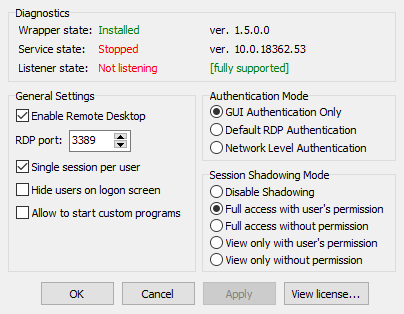
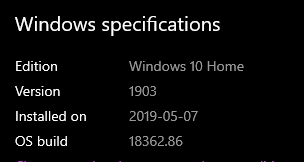
Now that said, is that number not directly related, or supposed to be, the OS build version? I have a totally different number reported for my OS:
 Kyrluckechuck
on 10 May 2019
Kyrluckechuck
on 10 May 2019
@Kyrluckechuck do you mind sharing your termsrv.dll file from Windows\System32?
ner00
on 10 May 2019
Not a problem, here it is! (After install of RDPWrap, Win 10 Home, if that makes a difference)
Kyrluckechuck
on 10 May 2019
@Kyrluckechuck Thanks.
I'm a bit at loss here, for one the version of the DLL you shared is v10.0.18362.53, like the one posted by everyone else, but this is expected since DLLs don't necessarily transition versions when Windows itself does, unless they were updated as well. But the curious thing is that people who tried the INI settings from this issue (https://github.com/stascorp/rdpwrap/issues/766) were successfull while failing with the settings from issue https://github.com/stascorp/rdpwrap/issues/738, and in your case you had the opposite experience where the latter worked while the former didn't. The important thing is that you found a way to make it work, but it boggles my mind why some people with seemingly same versions of Terminal Services will have varying degrees of success.
ner00
on 10 May 2019
@ner00 so I actually don't have it working, though with that other example I had posted on, it gave me all success messages but when actually trying to use it, it doesn't make it to the authentication step.
At this point I'm pretty confused and without RDP, but at least Parsec is working enough for the time being
You raise a good point though, it's interesting how much of the stuff will work when people have different configuration options and don't need some of it, such as the SingleUser option and such you guys have brought up
Kyrluckechuck
on 10 May 2019
@Kyrluckechuck Okay, that's weird but not unheard of.
First try uninstalling RDPWrap, no need to reboot afterwards, but you should restart the Terminal Services (RDPWInst.exe -r), then try to use first the settings from https://github.com/stascorp/rdpwrap/issues/766#issuecomment-487993832
Here's how I typically do it nowdays:
- Download the latest RDPWrap zip package and extract it somewhere;
- Place an updated rdpwrap.ini (containing the new version entries) in the same folder as all the RDPWrap binaries;
- Edit both
update.batandinstall.batand add the following lines before thepausestatement and after the:anykeylabel:
    if exist "%ProgramFiles%\RDP Wrapper\rdpwrap.ini" copy "%~dp0rdpwrap.ini" "%ProgramFiles%\RDP Wrapper\rdpwrap.ini" /Y
    "%~dp0RDPWInst.exe" -r
- Run
install.batas an Administrator
ner00
on 10 May 2019
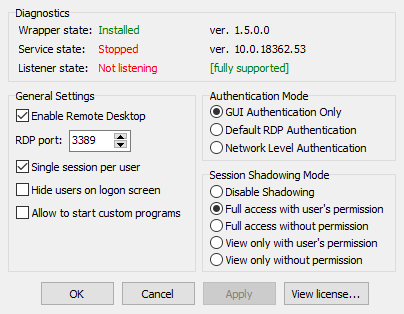
Hmm, I have been following a similar philosophy, but to rule it out I followed exactly as you commented.
Unfortunately still getting this:
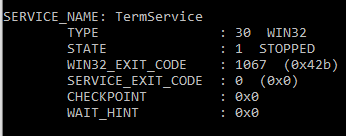
with this showing when using sc query TermService:
Kyrluckechuck
on 10 May 2019
@Kyrluckechuck If u can't start service with sbzagorodin's code, u need to check rdpwarp.ini file end line.
it must be last line is end with blank
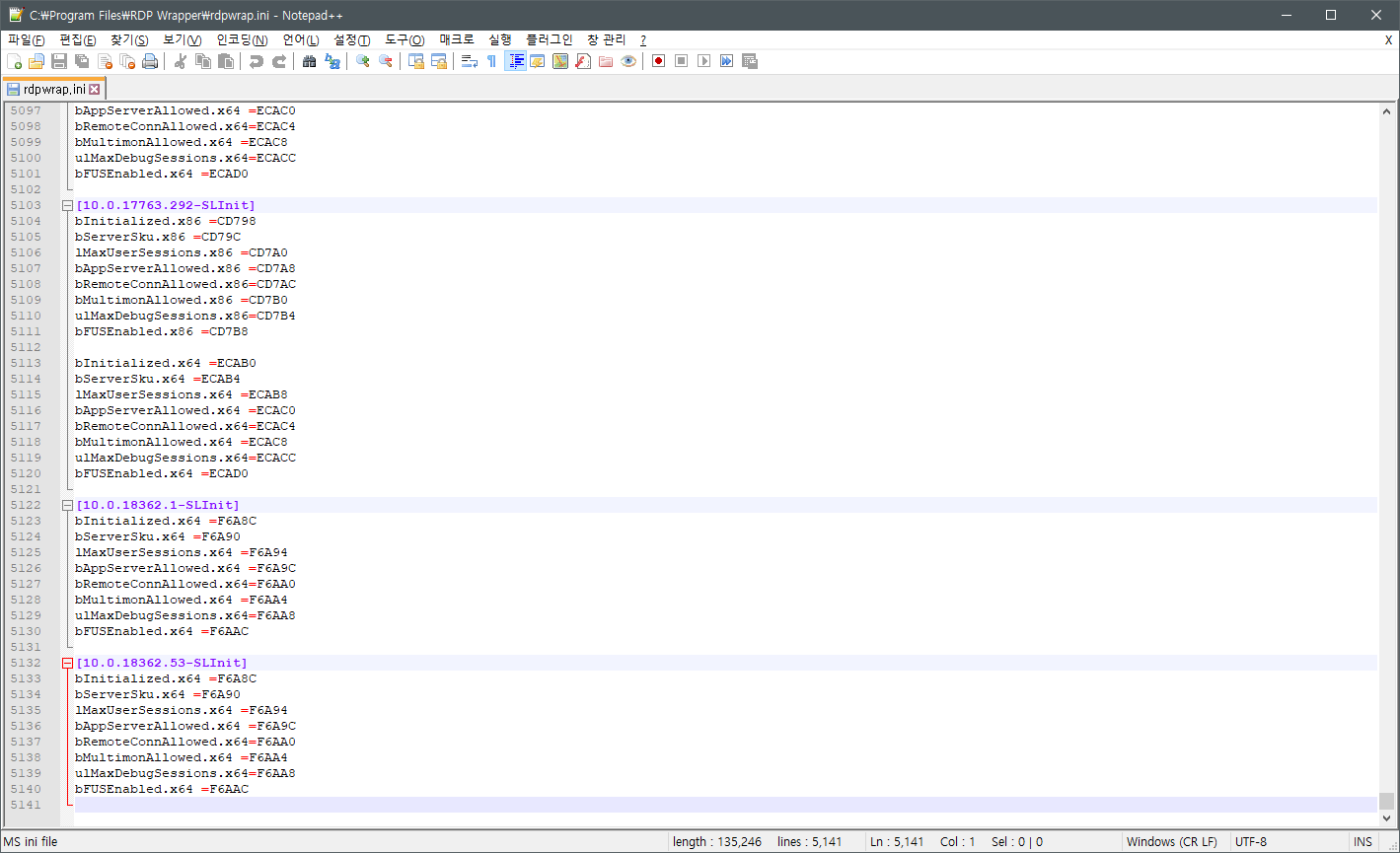
working file
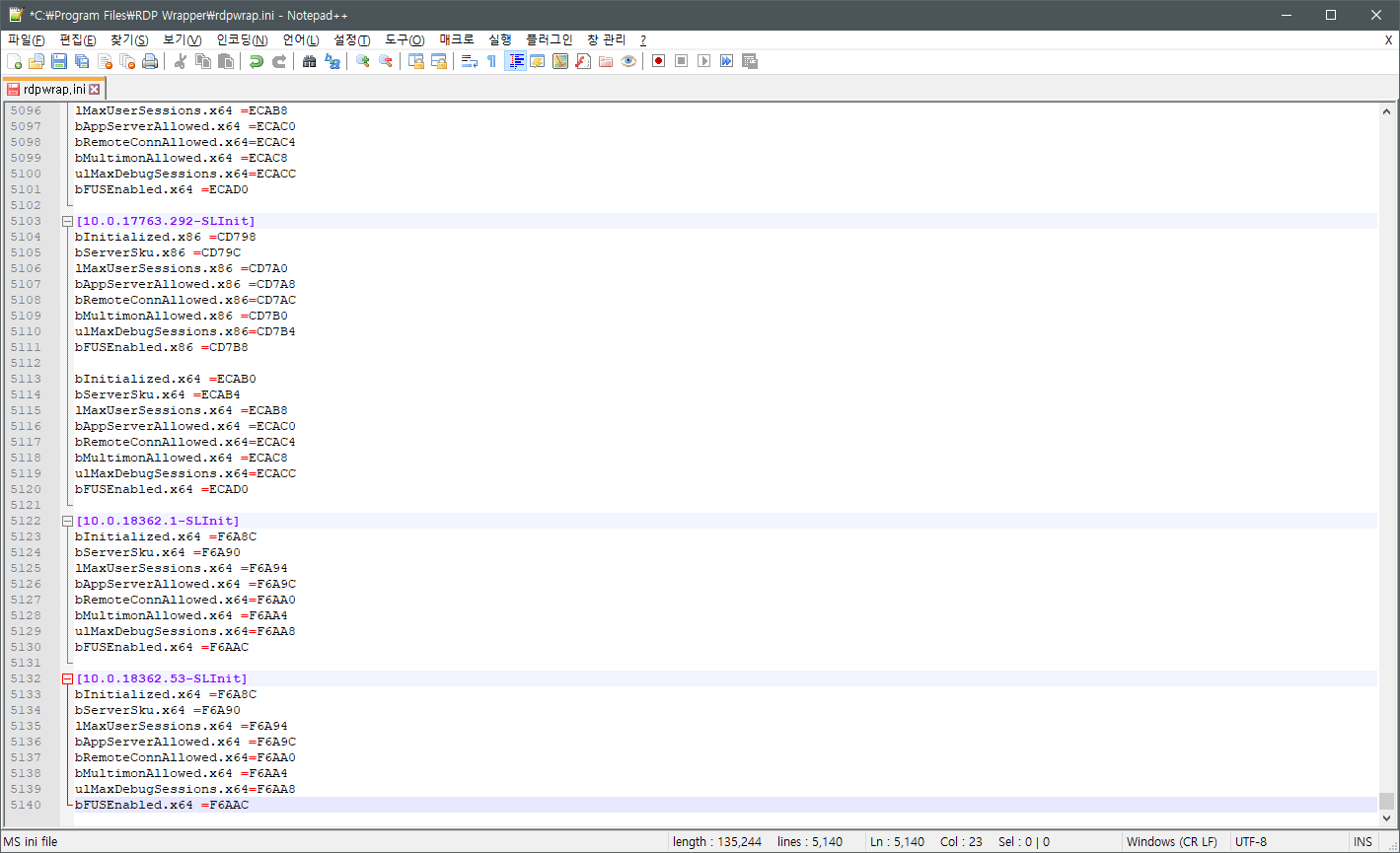
service crash
 swan201
on 11 May 2019
swan201
on 11 May 2019
@swan201 you are a saviour, thank you!
Can confirm -- the above offsets provided by @sbzagorodin which account for the single-user offsets are working and it just needed an extra line at the end. Haven't seen that cause an issue in years and totally forgot it could be a thing! 🤦♂
Kyrluckechuck
on 13 May 2019
Hello guys,
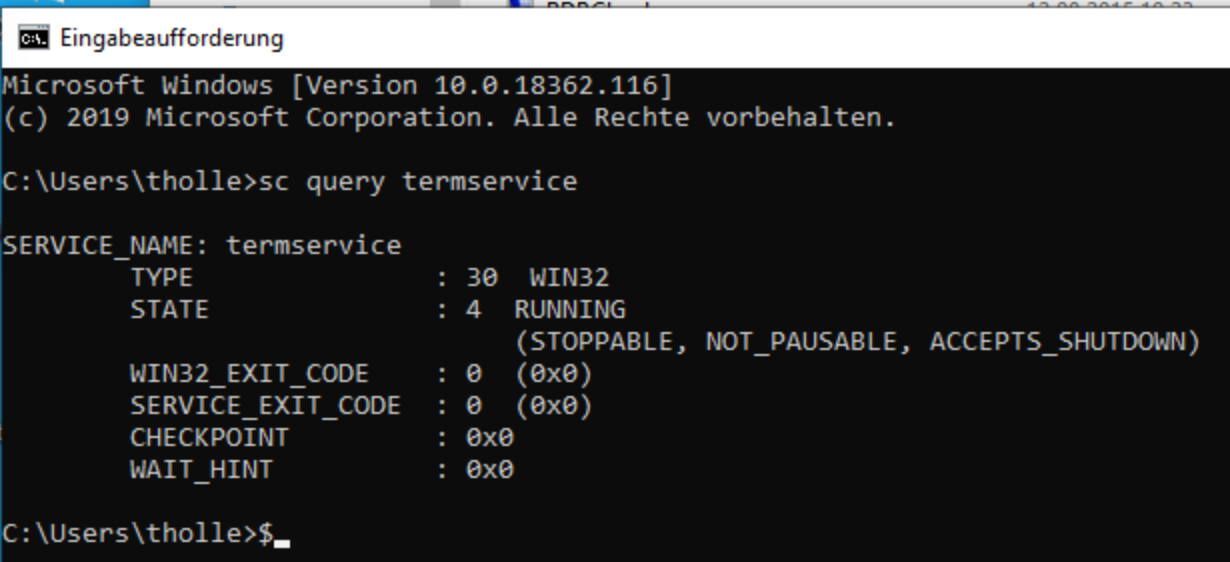
after a lot of hours and reading some posts im able to run RDP Service on Win10 Home too.
But unfortunatly the running service is not able to listening.
Do you have any idea, where the problem is?
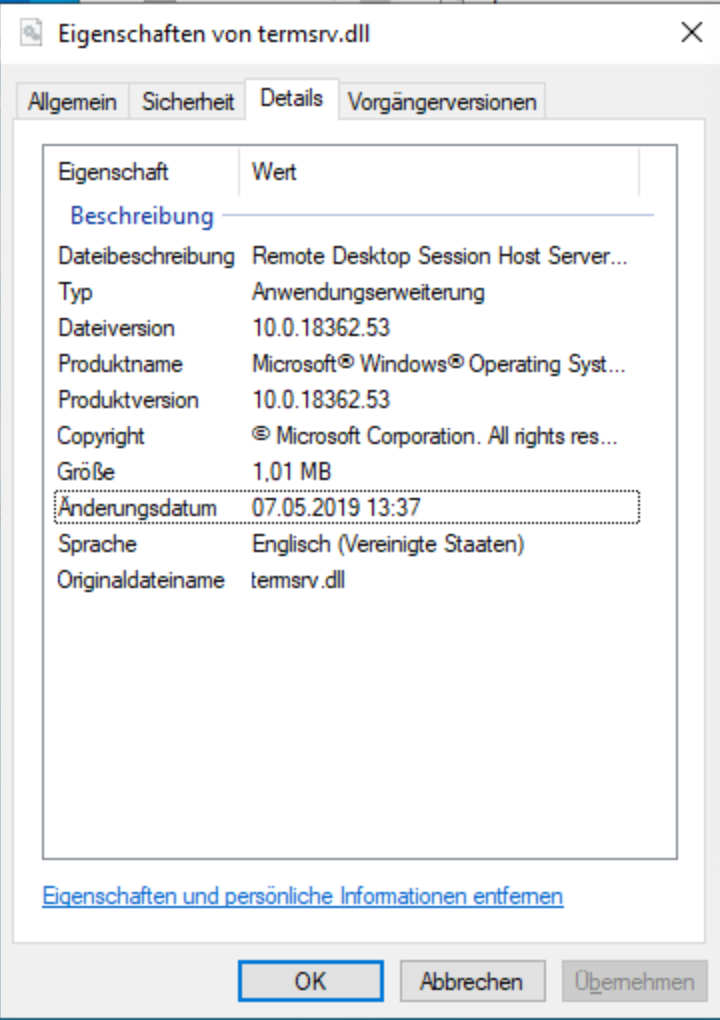
specs: RDP version: 10.18362.53
Windows 10 version: 1903
rdpwrap.ini has included @sbzagorodin's code in this tread (with blank line at the end)
termsrv.dll version: see attatchmend
It would be nice if someone can help me out.
thank you,
tholle

 tholle26
on 21 May 2019
tholle26
on 21 May 2019
This worked for me. Thank you!
 stvkodra
on 23 May 2019
stvkodra
on 23 May 2019
This worked for me. Thank you!
Hi @stvkodra , can you share how to do it, i'm new here. Thank you !
 minhnnhat
on 23 May 2019
minhnnhat
on 23 May 2019
@sbzagorodin code works, I needed to reinstall the wrapper after upgrading to Win10 1903 (and update the ini)
@ner00 suggested this above - just do it !
 CypherAus
on 23 May 2019
CypherAus
on 23 May 2019
Can someone post a working ini file for 10.0.18362.116?
 FOSSFOREVER
on 23 May 2019
FOSSFOREVER
on 23 May 2019
@FOSSFOREVER Please share your termsrv.dll
ner00
on 23 May 2019
@FOSSFOREVER Please share your
termsrv.dll
FOSSFOREVER
on 23 May 2019
@FOSSFOREVER Please share your
termsrv.dll
RDPWrapper patches Terminal Services, but that service isn't updated every time Windows is updated.
Regardless of the Windows version you report, if you check the properties of termsrv.dll you'll notice that it is actually still v10.0.18362.53 - like most of the people commenting on this issue. Personally, I'm still behind that specific version, but based on previous research and feedback above it seems that the current settings from https://github.com/stascorp/rdpwrap/issues/766#issuecomment-487993832 work for most people. If needed, use that with the additional info from https://github.com/stascorp/rdpwrap/issues/766#issuecomment-491301715
ner00
on 23 May 2019
hmm.. too bad.
i've replaced my termsrv.dll with @FOSSFOREVER's termsrv.dll, but the RDP Service is still not listening (but fully supported as in my post above.
maybe i've misconfigured the properties of the termsrv.dll.
It would be nice, if someone can share a screenshot of the properties from a running/listening RDP-Service.
thank you in advance.
tholle
tholle26
on 24 May 2019
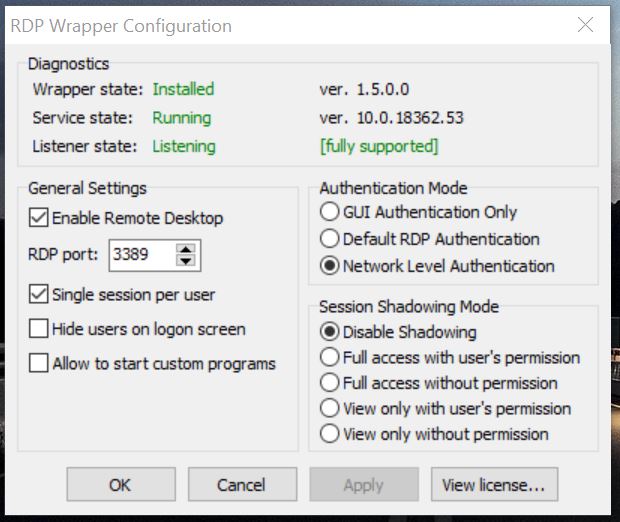
 SlavaSumyUA
on 24 May 2019
SlavaSumyUA
on 24 May 2019
Thanks for posting this @SlavaSumyUA . It is working on 18362.116 but I can't get multiple remote sessions with the same user account. It just takes over the first session. Any help is appreciated.
 efloth
on 24 May 2019
efloth
on 24 May 2019
You're welcome! Very glad that helped.
Try this algorithm:
All operations are done with administrator rights.
1) uninstall.bat
2) Reboot PC
3) install.bat
4) cmd net stop termservice // Click Y and wait for the termservice to stop
5) Copy my version of rdpwrap.ini in the folder c: Program Files RDP Wrapper
6) net start termservice
7) Reboot PC
8) cmd net stop termservice // Click Y and wait for the termservice to stop
9) On the "RDP Wrapper" folder on the c: Program Files RDP Wrapper path, right-click "Properties-tab Security-button Change-button Add-button Extras-button Search-name SERVICE-two clicks with the right mouse button- ok - we put the checkboxes Full access and Change-ok-ok "also done with the files inside the folder.
10) Reboot PC
Test, please ;-))
Sorry for my English.
SlavaSumyUA
on 24 May 2019
I followed this precisely with no change. I can get multiple sessions but not with the same user account. Ill continue to troubleshoot.
EDIT: I logged in the console session with the desired account and it is working now thanks!
efloth
on 24 May 2019
Hi,
use this fix for win10 18362.53 / 18362.116; also multiple sessions with the same user account will work (successfully with RDPCheck.exe)
795
 asmtron
on 25 May 2019
asmtron
on 25 May 2019
@asmtron Thanks for sharing.
Neither me nor @sbzagorodin got the SingleUser offset right, I looked through your offsets and checked the function, which is just slightly different. The correct one you identified is:
CSessionArbitrationHelperMgr::IsSingleSessionPerUserEnabled
...but we were mistakenly looking at:
CSessionArbitrationHelper::IsSingleSessionPerUserEnabled
Corrected SingleUserOffset for v10.0.18362.53:
[10.0.18362.53]
LocalOnlyPatch.x64=1
LocalOnlyOffset.x64=82FB5
LocalOnlyCode.x64=jmpshort
SingleUserPatch.x64=1
SingleUserOffset.x64=0DBFC
SingleUserCode.x64=Zero
DefPolicyPatch.x64=1
DefPolicyOffset.x64=1FE15
DefPolicyCode.x64=CDefPolicy_Query_eax_rcx
SLInitHook.x64=1
SLInitOffset.x64=22DDC
SLInitFunc.x64=New_CSLQuery_Initialize

[10.0.18362.53-SLInit]
bInitialized.x64 =F6A8C
bServerSku.x64 =F6A90
lMaxUserSessions.x64 =F6A94
bAppServerAllowed.x64 =F6A9C
bRemoteConnAllowed.x64=F6AA0
bMultimonAllowed.x64 =F6AA4
ulMaxDebugSessions.x64=F6AA8
bFUSEnabled.x64 =F6AAC
Tested with SingleUserOffset.x64=0DBFC -- all ok
CypherAus
on 25 May 2019
You're welcome! Very glad that helped.
Try this algorithm:
All operations are done with administrator rights.
- uninstall.bat
- Reboot PC
- install.bat
- cmd net stop termservice // Click Y and wait for the termservice to stop
- Copy my version of rdpwrap.ini in the folder c: Program Files RDP Wrapper
- net start termservice
- Reboot PC
- cmd net stop termservice // Click Y and wait for the termservice to stop
- On the "RDP Wrapper" folder on the c: Program Files RDP Wrapper path, right-click "Properties-tab Security-button Change-button Add-button Extras-button Search-name SERVICE-two clicks with the right mouse button- ok - we put the checkboxes Full access and Change-ok-ok "also done with the files inside the folder.
- Reboot PC
Test, please ;-))
Sorry for my English.
Hi, i know, this hint is not explicit in relation to my problem, but i am desperate so i tried this hint too. But with no success. My RDP-Service is still not listening. It's so frustrating.
edit://
I've gave up. I've bought a Windows 10 Pro key on eBay. 5 Euro. All works pretty well.
tholle26
on 25 May 2019
I added an additional script in https://github.com/stascorp/rdpwrap/issues/780 to help consolidate the ini file @SlavaSumyUA uploaded with what I had.
 dmcdivitt
on 27 May 2019
dmcdivitt
on 27 May 2019
i got this updated unfortunately the printer issue still appear to happens.
redirect printers are not working and showing on the RDP.
 Julien-nl
on 27 May 2019
Julien-nl
on 27 May 2019
I've never tried printer redirection with RDPWrapper, but from a few searches it appears that the problem is RDPWrapper itself and, for some reason, it appears to work fine on the English version of Windows. I'm not sure what part of the RDPWrapper source code can trace to locale dependent functionality. In any case, there are a few suggestions - the most drastic being patching the termsrv.dll file directly instead of using RDPWrapper at all. I am unsure if this is still relevant: https://github.com/stascorp/rdpwrap/issues/504#issuecomment-462381929
ner00
on 28 May 2019
same program - https://www.octaniumsw.site//2019/04/rdp-wrapper-confg-update-tool-en.html (but gets info from web)
 Octanium91
on 1 Jun 2019
Octanium91
on 1 Jun 2019
@ner00 yes this correct its not working on the no-english windows unfortunately.
do you happens to know where we can find the patched termsrv.dll ?
Thank you
Julien-nl
on 1 Jun 2019
@Julien-nl I suppose you can take the offsets from the INI and patch directly the binary (DLL). I am not completely sure what the exact operation is, let's see an example:
[10.0.18362.53]
LocalOnlyPatch.x64=1
LocalOnlyOffset.x64=82FB5
LocalOnlyCode.x64=jmpshort
The offset 82FB5 in an hexeditor would be 823B5 (82FB5-C00), there you find the following set of instructions:
82FB1   |   83 7D BB 00   |   cmp     [rbp+57h+var_9C], 0
82FB5   |   74 52         |   jz      short loc_180083009
My guess is that that conditional jump short if zero (jz) becomes unconditional jump short (jmp)
82FB5 | EB 52 | jmp short loc_180083009
...or maybe it's the other way around and doesn't jump at all, I'm not entirely sure.
Another example is:
SingleUserPatch.x64=1
SingleUserOffset.x64=0DBFC
SingleUserCode.x64=Zero
DBF9 | C7 40 08 [01] 00 00 00 | mov dword ptr [rax+8], 1
In this case I guess that the value 01 must be patched to 00 so that the move operation always carries 0 instead of 1.
This is my best guess of how this should be hardcoded.
ner00
on 2 Jun 2019
according to my calculation this should be the HEX file ?
39813C0600000F845D610100
B80001000089813806000090
Julien-nl
on 2 Jun 2019
according to my calculation this should be the HEX file ?
39813C0600000F845D610100
B80001000089813806000090
I think that should be correct, it will patch the CDefPolicy_Query_eax_rcx instructions:
1FE15                 cmp     [rcx+63Ch], eax
1FE1B                 jz      loc_180035F7E
into
1FE15                 mov     eax, 100h
1FE1A                 mov     [rcx+638h], eax
1FE20                 nop
CSessionArbitrationHelperMgr::IsSingleSessionPerUserEnabled has a local variable at [rsp+50h] [rbp+8h] which is initialized to 1. The address of this variable is passed to CSessionArbitrationHelper::IsSingleSessionPerUserEnabled as the second argument. CSessionArbitrationHelper::IsSingleSessionPerUserEnabled dereference this argument and initialize its value to 1 again.
IMHO, modifying the local variable initializing in CSessionArbitrationHelperMgr::IsSingleSessionPerUserEnabled will not be effective to change the value.
 zhangyoufu
on 11 Jun 2019
zhangyoufu
on 11 Jun 2019
Which would be the most correct approach?
ner00
on 11 Jun 2019
Thanks SlavaSumyUA This is still working on VER 1903 10.0.18362.207
 StarfighterJ
on 3 Jul 2019
StarfighterJ
on 3 Jul 2019
same problem
 vgdh
on 9 Jul 2019
vgdh
on 9 Jul 2019
Related issues
 wanglulei
·
4Comments
wanglulei
·
4Comments
 papoluisjr
·
3Comments
papoluisjr
·
3Comments
 eyeTechSolutions
·
5Comments
eyeTechSolutions
·
5Comments
 mascarasnake66
·
4Comments
mascarasnake66
·
4Comments
 shardy-uk
·
3Comments
shardy-uk
·
3Comments
Most helpful comment
@ner00 your config does not work but this one works (problem was in SingleUserOffset). Thanks.