Rdpwrap: not supported for 10.0.17104.706 after update please help me
listener state listening but not supported after update to 10.0.17134.706 plese provide me rdpwrap.ini file which supports this version
 sailendra00
All 28 comments
I just wrote this on another thread.
I don't have KB4493475 install on my system but then again I'm Windows 10 version 1803.
I noted that 4 KB were installed last night and my system rebooted and RDP has now stopped working (or should I say is not listening on port 3389).
Out of the 4 updates I would have said it was KB4493464.
I have removed that KB and I'm now back up and running RDP as expected, thanks for the pointers.
wusa /uninstall /kb:4493464
Regards
So double check what updates there has been if you see KB4493464 you could use this work around until it's fixed.
wusa /uninstall /kb:4493464
For Devs: This is new termsrv.dll file that is installed with that update.
termsrv.zip
Note: this is from Windows 10 ver 1803 build 17134.706
 Poohbear69
on 11 Apr 2019
Poohbear69
on 11 Apr 2019
Is your win build correct in the title?
Poohbear69
on 11 Apr 2019
no sorry its 10.0.17134.706 please help me dude
sailendra00
on 11 Apr 2019
ini file update for 10.0.17134.706
_created and tested today on Windows 10 64 Bit with termsrv.dll version 10.0.17134.706_
[10.0.17134.706-SLInit]
bServerSku.x64 =F1378
lMaxUserSessions.x64 =F137C
bAppServerAllowed.x64 =F1380
bInitialized.x64 =F2430
bRemoteConnAllowed.x64=F2434
bMultimonAllowed.x64 =F2438
ulMaxDebugSessions.x64=F243C
bFUSEnabled.x64 =F2440
[10.0.17134.706]
LocalOnlyPatch.x64=1
LocalOnlyOffset.x64=92521
LocalOnlyCode.x64=jmpshort
SingleUserPatch.x64=1
SingleUserOffset.x64=1511C
SingleUserCode.x64=Zero
DefPolicyPatch.x64=1
DefPolicyOffset.x64=10E78
DefPolicyCode.x64=CDefPolicy_Query_edi_rcx
SLInitHook.x64=1
SLInitOffset.x64=22F5C
SLInitFunc.x64=New_CSLQuery_Initialize
....
@sailendra00: please correct the title to 10.0.17134.706 :)
 asmtron
on 11 Apr 2019
asmtron
on 11 Apr 2019
ini file update for 10.0.17134.706
_created and tested today on Windows 10 64 Bit with termsrv.dll version 10.0.17134.706_[10.0.17134.706-SLInit]
bServerSku.x64 =F1378
lMaxUserSessions.x64 =F137C
bAppServerAllowed.x64 =F1380
bInitialized.x64 =F2430
bRemoteConnAllowed.x64=F2434
bMultimonAllowed.x64 =F2438
ulMaxDebugSessions.x64=F243C
bFUSEnabled.x64 =F2440[10.0.17134.706]
LocalOnlyPatch.x64=1
LocalOnlyOffset.x64=92521
LocalOnlyCode.x64=jmpshort
SingleUserPatch.x64=1
SingleUserOffset.x64=1511C
SingleUserCode.x64=Zero
DefPolicyPatch.x64=1
DefPolicyOffset.x64=10E78
DefPolicyCode.x64=CDefPolicy_Query_edi_rcx
SLInitHook.x64=1
SLInitOffset.x64=22F5C
SLInitFunc.x64=New_CSLQuery_Initialize....
@sailendra00: please correct the title to 10.0.17134.706 :)
Works perfectly, thanks..
Poohbear69
on 11 Apr 2019
I'm having the same problem because of the update in Windows. Do I need to add the above sections to the INI file ? Do I need to reboot server ?
 jjwhite77
on 11 Apr 2019
jjwhite77
on 11 Apr 2019
I updated INI and Now I can't access server
jjwhite77
on 11 Apr 2019
thanku sir i wil try it thanks for the help
sailendra00
on 11 Apr 2019
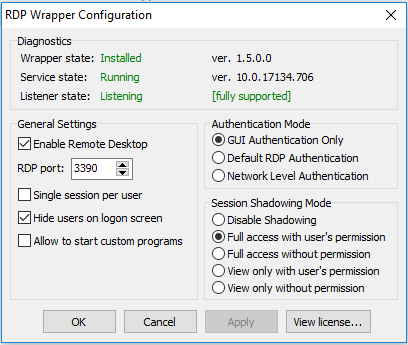
I updated ini file, and it states it is fully supported, but it only allows one person to be logged in at a time.
 joecamel
on 11 Apr 2019
joecamel
on 11 Apr 2019
ini file update for 10.0.17134.706
_created and tested today on Windows 10 64 Bit with termsrv.dll version 10.0.17134.706_[10.0.17134.706-SLInit]
bServerSku.x64 =F1378
lMaxUserSessions.x64 =F137C
bAppServerAllowed.x64 =F1380
bInitialized.x64 =F2430
bRemoteConnAllowed.x64=F2434
bMultimonAllowed.x64 =F2438
ulMaxDebugSessions.x64=F243C
bFUSEnabled.x64 =F2440[10.0.17134.706]
LocalOnlyPatch.x64=1
LocalOnlyOffset.x64=92521
LocalOnlyCode.x64=jmpshort
SingleUserPatch.x64=1
SingleUserOffset.x64=1511C
SingleUserCode.x64=Zero
DefPolicyPatch.x64=1
DefPolicyOffset.x64=10E78
DefPolicyCode.x64=CDefPolicy_Query_edi_rcx
SLInitHook.x64=1
SLInitOffset.x64=22F5C
SLInitFunc.x64=New_CSLQuery_Initialize....
@sailendra00: please correct the title to 10.0.17134.706 :)
have you that lines for 6.3.9600.19318?
 Jonathan-rodriguez-r
on 11 Apr 2019
Jonathan-rodriguez-r
on 11 Apr 2019
Windows 10 ver 1809 compilación 17134.706 desinstale la actualizacion kb4493464 y actualice el archivo .ini y funciono perfecto
 walterGom
on 11 Apr 2019
walterGom
on 11 Apr 2019
ini file update for 10.0.17134.706
_created and tested today on Windows 10 64 Bit with termsrv.dll version 10.0.17134.706_[10.0.17134.706-SLInit]
bServerSku.x64 =F1378
lMaxUserSessions.x64 =F137C
bAppServerAllowed.x64 =F1380
bInitialized.x64 =F2430
bRemoteConnAllowed.x64=F2434
bMultimonAllowed.x64 =F2438
ulMaxDebugSessions.x64=F243C
bFUSEnabled.x64 =F2440[10.0.17134.706]
LocalOnlyPatch.x64=1
LocalOnlyOffset.x64=92521
LocalOnlyCode.x64=jmpshort
SingleUserPatch.x64=1
SingleUserOffset.x64=1511C
SingleUserCode.x64=Zero
DefPolicyPatch.x64=1
DefPolicyOffset.x64=10E78
DefPolicyCode.x64=CDefPolicy_Query_edi_rcx
SLInitHook.x64=1
SLInitOffset.x64=22F5C
SLInitFunc.x64=New_CSLQuery_Initialize....
@sailendra00: please correct the title to 10.0.17134.706 :)
Thanks!! Worked like a charm.
 neymp
on 11 Apr 2019
neymp
on 11 Apr 2019
Does anyone happen to be able to provide the same for the 32-bit version ?
Many thanks in advance!
 ogerardin
on 11 Apr 2019
ogerardin
on 11 Apr 2019
You need to post here termsrv.dll from 32 bit version.
 jirijanata
on 11 Apr 2019
jirijanata
on 11 Apr 2019
You need to post here termsrv.dll from 32 bit version.
Here you go!
termsrv.zip
ogerardin
on 11 Apr 2019
All files patched, tests are running ATM.
Second half of 2019-04 updates will follow as soon as tests are finished.
https://github.com/fre4kyC0de/rdpwrap
 fre4kyC0de
on 12 Apr 2019
fre4kyC0de
on 12 Apr 2019
@fre4kyC0de on 10.0.17134.706, according bytecode length of CDefPolicy_Query_edi_rcx and my test, your
DefPolicyOffset.x64=10E7E
should be
DefPolicyOffset.x64=10E78
as asmtron's post.
so no code after jz ... will be overwritten, like this:
;.text:0000000180010E78                 mov     edi, [rcx+638h]
;.text:0000000180010E7E                 cmp     ebx, edi
;.text:0000000180010E80                 jz      loc_18003B08C
;.text:0000000180010E86                 xor     ecx, ecx
;.text:0000000180010E88                 mov     eax, 0D00A0013h
patched to CDefPolicy_Query_edi_rcx:
;.text:0000000180010E78                 mov     edi, 100h
;.text:0000000180010E7D                 mov     [rcx+638h], edi
;.text:0000000180010E83                 nop
;.text:0000000180010E84                 nop
;.text:0000000180010E85                 nop
;.text:0000000180010E86                 xor     ecx, ecx
;.text:0000000180010E88                 mov     eax, 0D00A0013h
 sinsinpub
on 12 Apr 2019
sinsinpub
on 12 Apr 2019
Will check this.
fre4kyC0de
on 12 Apr 2019
listener not supported after adding text to .ini file what to do should we change termsv.dll file??
sailendra00
on 12 Apr 2019
Can confirm sinsinpub comment,
DefPolicyOffset.x64=10E7E
should be
DefPolicyOffset.x64=10E78
With your offset service hung up after one user try login through rdp. Then rdpconf says not listening. Changing value to 10E78 make it works great.
 Sirul
on 12 Apr 2019
Sirul
on 12 Apr 2019
its say supported but when i login throuhh next computer my first computer user login also change please help me guys rdp is becoming useless for me
sailendra00
on 12 Apr 2019
thanku sir i wil try it thanks for the help
got same problem in same win version... i will try what i see here!
 yeyopanta1402
on 12 Apr 2019
yeyopanta1402
on 12 Apr 2019
ini file update for 10.0.17134.706
_created and tested today on Windows 10 64 Bit with termsrv.dll version 10.0.17134.706_
[10.0.17134.706-SLInit]
bServerSku.x64 =F1378
lMaxUserSessions.x64 =F137C
bAppServerAllowed.x64 =F1380
bInitialized.x64 =F2430
bRemoteConnAllowed.x64=F2434
bMultimonAllowed.x64 =F2438
ulMaxDebugSessions.x64=F243C
bFUSEnabled.x64 =F2440
[10.0.17134.706]
LocalOnlyPatch.x64=1
LocalOnlyOffset.x64=92521
LocalOnlyCode.x64=jmpshort
SingleUserPatch.x64=1
SingleUserOffset.x64=1511C
SingleUserCode.x64=Zero
DefPolicyPatch.x64=1
DefPolicyOffset.x64=10E78
DefPolicyCode.x64=CDefPolicy_Query_edi_rcx
SLInitHook.x64=1
SLInitOffset.x64=22F5C
SLInitFunc.x64=New_CSLQuery_Initialize
....
@sailendra00: please correct the title to 10.0.17134.706 :)Thanks!! Worked like a charm.
ini file update for 10.0.17134.706
_created and tested today on Windows 10 64 Bit with termsrv.dll version 10.0.17134.706_[10.0.17134.706-SLInit]
bServerSku.x64 =F1378
lMaxUserSessions.x64 =F137C
bAppServerAllowed.x64 =F1380
bInitialized.x64 =F2430
bRemoteConnAllowed.x64=F2434
bMultimonAllowed.x64 =F2438
ulMaxDebugSessions.x64=F243C
bFUSEnabled.x64 =F2440[10.0.17134.706]
LocalOnlyPatch.x64=1
LocalOnlyOffset.x64=92521
LocalOnlyCode.x64=jmpshort
SingleUserPatch.x64=1
SingleUserOffset.x64=1511C
SingleUserCode.x64=Zero
DefPolicyPatch.x64=1
DefPolicyOffset.x64=10E78
DefPolicyCode.x64=CDefPolicy_Query_edi_rcx
SLInitHook.x64=1
SLInitOffset.x64=22F5C
SLInitFunc.x64=New_CSLQuery_Initialize....
@sailendra00: please correct the title to 10.0.17134.706 :)
is working right now!!! tks for your help!!
yeyopanta1402
on 12 Apr 2019
@sinsinpub
You're right.
I just took the wrong line while copying offsets. (shouldn't do this at 1:30 AM...)
Offsets in my repo are fixed now
fre4kyC0de
on 13 Apr 2019
Any news for the 32 bit version ?
ogerardin
on 13 Apr 2019
My repo contains x64 and x86 offsets
fre4kyC0de
on 13 Apr 2019
My repo contains x64 and x86 offsets
Oh that's true! Thanks.
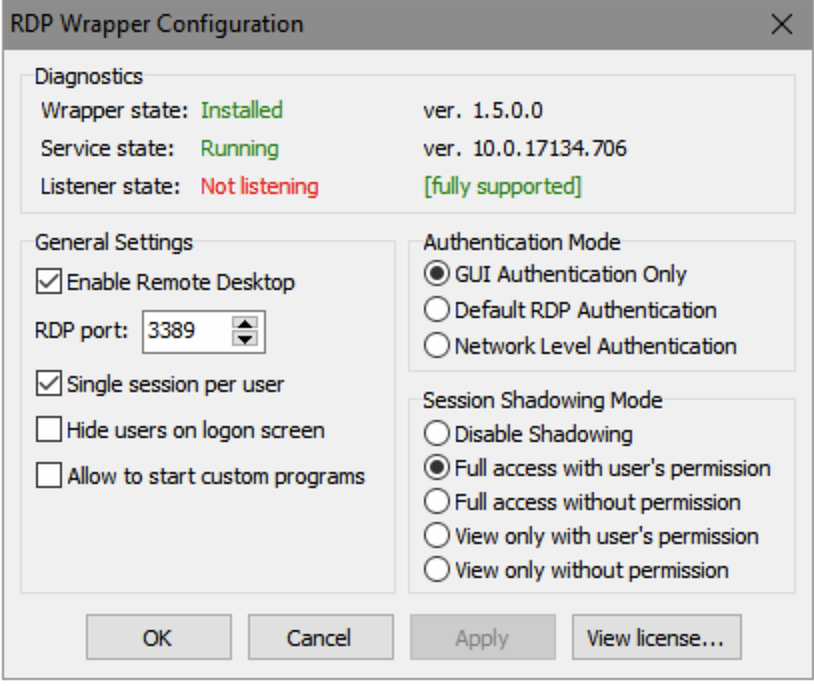
However I still get "Not listening". What could be wrong?
ogerardin
on 14 Apr 2019
However I still get "Not listening". What could be wrong?
Never mind I did the whole thing again and now it works :)
ogerardin
on 15 Apr 2019
Related issues
 mahmoodyali
·
4Comments
mahmoodyali
·
4Comments
 shardy-uk
·
3Comments
shardy-uk
·
3Comments
 eyeTechSolutions
·
5Comments
eyeTechSolutions
·
5Comments
 cakexxx
·
6Comments
cakexxx
·
6Comments
 papoluisjr
·
3Comments
papoluisjr
·
3Comments
Most helpful comment
ini file update for 10.0.17134.706
_created and tested today on Windows 10 64 Bit with termsrv.dll version 10.0.17134.706_
[10.0.17134.706-SLInit]
bServerSku.x64 =F1378
lMaxUserSessions.x64 =F137C
bAppServerAllowed.x64 =F1380
bInitialized.x64 =F2430
bRemoteConnAllowed.x64=F2434
bMultimonAllowed.x64 =F2438
ulMaxDebugSessions.x64=F243C
bFUSEnabled.x64 =F2440
[10.0.17134.706]
LocalOnlyPatch.x64=1
LocalOnlyOffset.x64=92521
LocalOnlyCode.x64=jmpshort
SingleUserPatch.x64=1
SingleUserOffset.x64=1511C
SingleUserCode.x64=Zero
DefPolicyPatch.x64=1
DefPolicyOffset.x64=10E78
DefPolicyCode.x64=CDefPolicy_Query_edi_rcx
SLInitHook.x64=1
SLInitOffset.x64=22F5C
SLInitFunc.x64=New_CSLQuery_Initialize
....
@sailendra00: please correct the title to 10.0.17134.706 :)