Rdpwrap: Windows 10 Latest Not Supported

Is this version of Windows 10 not supported? It doesn't work....
 frinkfromthedrink
All 16 comments

W10HOME 17763.379
I also tried to uninstall and reboot. rewriting INI 292 → 379, but it does not work.
I tried initializing the OS and installing it.1.6.2 installation, termservice stop, replace termsrv.dll, INI rewrite, restart.
Is the procedure wrong? I want you to help.
 yuumusic
on 23 Mar 2019
yuumusic
on 23 Mar 2019
I have the same problem.
 ailearncoder
on 23 Mar 2019
ailearncoder
on 23 Mar 2019
Same problem.
My Windows 10 version is profession 1809 17763.379
 qpcyet
on 25 Mar 2019
qpcyet
on 25 Mar 2019
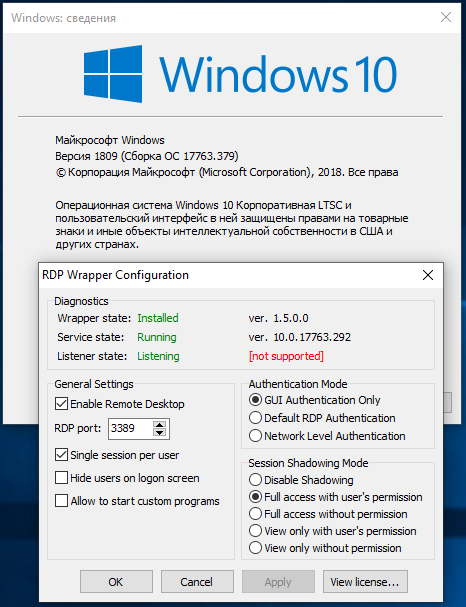
Same problem.
Please fix it!
 savitsky
on 25 Mar 2019
savitsky
on 25 Mar 2019
sorry, same for me with a regular Win 10 LTSC 1809

 mpibpc-mroose
on 25 Mar 2019
mpibpc-mroose
on 25 Mar 2019
Use the following file :
Open a command prompt windows in admin mode then :
net stop termservice
Copy the file from the zip provided into C:\Program files\RDP Wrapper
Return to your command prompt windows (still in admin mode) then :
net start termservice.
If it is not working, simply reboot the computer.
rdpwrap 10.0.17763.292.zip
 thaguitarist
on 25 Mar 2019
thaguitarist
on 25 Mar 2019
I have had this problem but it was solved by the following. Use "administrator rights" as necessary.
- uninstall rdpwrap including deleting the rdpwrap.ini and rdpwrap.dll files in
- reboot the computer
- install rdpwrap.
- Check RDPConf and note the version number. The screenshot above shows .292
- Check the version of termserv.dll and compare to that of RDPConf.
- Use CMD to "net stop termservice"
- edit the rdpwrap.ini file in
to include the snippets relative to the versions above. save it in documents if you can't save it the same spot. Or you can use one of the files mentioned above. - Rename rdpwrap.ini and move the edited one into
.
8., Use CMD to "net start termservice". - Reboot computer.
- run RDPConf to confirm it is listening and supported.
A comment on the above screenshots. RDP is used by hackers to install ransomware as it is easily hacked. Maintaining maximum security is very important and 2 of the settings above do not do that. "Hide users on logon screen" and "Network level Authentication" should be checked. In addition Windows security should limit the number of failed password attempts and your users and passwords should not be short nor simple or common. I made these mistakes and have lost all my work and memories from the last 20 years.
If I've made a mistake in my directions above please post the correction.
 DCS59
on 25 Mar 2019
DCS59
on 25 Mar 2019
Use the following file :
Open a command prompt windows in admin mode then :
net stop termserviceCopy the file from the zip provided into C:\Program files\RDP Wrapper
Return to your command prompt windows (still in admin mode) then :
net start termservice.If it is not working, simply reboot the computer.
rdpwrap 10.0.17763.292.zip
Thank you very much @thaguitarist, this fixed the problem for me.
 xhotzkin
on 25 Mar 2019
xhotzkin
on 25 Mar 2019
Maybe somebody could do a merge request for https://github.com/stascorp/rdpwrap/blob/master/res/rdpwrap.ini ? Then the installer would just download the right version on install, I guess.
mpibpc-mroose
on 26 Mar 2019
Hello good morning friends, and try the version 10.0.17763.292 and works perfectly in the version 10.0.17763.379 ... They must install the RDP 1.6.2 version, if they already have it installed it is just running the patch and it is ready and it is working.
I hope you help them who have not yet been able to solve the error.

 yesidtaz
on 27 Mar 2019
yesidtaz
on 27 Mar 2019
Hello good morning friends, and try the version 10.0.17763.292 and works perfectly in the version 10.0.17763.379 ... They must install the RDP 1.6.2 version, if they already have it installed it is just running the patch and it is ready and it is working.
I hope you help them who have not yet been able to solve the error.Download Patch
THE REAL MVP
insertgif THANKYOU!
 auliarahmed
on 28 Mar 2019
auliarahmed
on 28 Mar 2019
你好早上好朋友,并尝试10.0.17763.292版本,并在10.0.17763.379版本中完美运行...他们必须安装RDP 1.6.2版本,如果他们已经安装它只是运行补丁它已经准备好了它正在发挥作用。
我希望你帮助那些尚未解决错误的人。
这个是有效的,谢谢
 zixun123
on 28 Mar 2019
zixun123
on 28 Mar 2019
Use the following file :
Open a command prompt windows in admin mode then :
net stop termserviceCopy the file from the zip provided into C:\Program files\RDP Wrapper
Return to your command prompt windows (still in admin mode) then :
net start termservice.If it is not working, simply reboot the computer.
rdpwrap 10.0.17763.292.zip
This works on me. ver. 10.0.17763.292
 Jed-Z
on 1 Apr 2019
Jed-Z
on 1 Apr 2019
Use the following file :
Open a command prompt windows in admin mode then :
net stop termserviceCopy the file from the zip provided into C:\Program files\RDP Wrapper
Return to your command prompt windows (still in admin mode) then :
net start termservice.If it is not working, simply reboot the computer.
rdpwrap 10.0.17763.292.zip
it does work on 292
 guojindai
on 2 Apr 2019
guojindai
on 2 Apr 2019
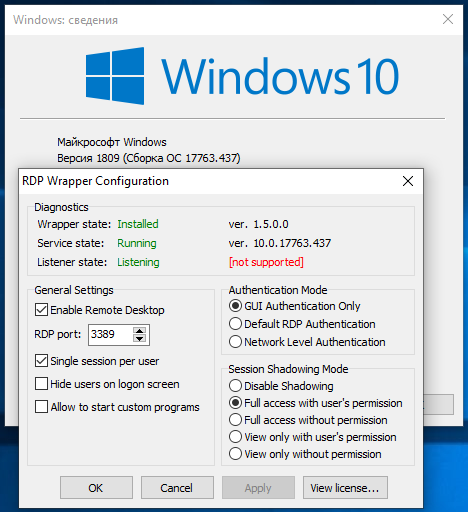
new build and same problem.
can you write the "how-to" steps to solve the problem?
savitsky
on 15 Apr 2019
::::::::::::::
[10.0.17763.437]
::::::::::::::
[10.0.17763.437]
LocalOnlyPatch.x64=1
LocalOnlyOffset.x64=77A41
LocalOnlyCode.x64=jmpshort
SingleUserPatch.x64=1
SingleUserOffset.x64=3E520
SingleUserCode.x64=Zero
DefPolicyPatch.x64=1
DefPolicyOffset.x64=18025
DefPolicyCode.x64=CDefPolicy_Query_eax_rcx
SLInitHook.x64=1
SLInitOffset.x64=1ACDC
SLInitFunc.x64=New_CSLQuery_Initialize
bInitialized.x64 =ECAB0
bServerSku.x64 =ECAB4
lMaxUserSessions.x64 =ECAB8
bAppServerAllowed.x64 =ECAC0
bRemoteConnAllowed.x64=ECAC4
bMultimonAllowed.x64 =ECAC8
ulMaxDebugSessions.x64=ECACC
bFUSEnabled.x64 =ECAD0
::::::::::::::
[10.0.17763.437-SLInit]
::::::::::::::
[10.0.17763.437-SLInit]
bInitialized.x86 =CD798
bServerSku.x86 =CD79C
lMaxUserSessions.x86 =CD7A0
bAppServerAllowed.x86 =CD7A8
bRemoteConnAllowed.x86=CD7AC
bMultimonAllowed.x86 =CD7B0
ulMaxDebugSessions.x86=CD7B4
bFUSEnabled.x86 =CD7B8
bInitialized.x64 =ECAB0
bServerSku.x64 =ECAB4
lMaxUserSessions.x64 =ECAB8
bAppServerAllowed.x64 =ECAC0
bRemoteConnAllowed.x64=ECAC4
bMultimonAllowed.x64 =ECAC8
ulMaxDebugSessions.x64=ECACC
bFUSEnabled.x64 =ECAD0
 affinityv
on 15 Apr 2019
affinityv
on 15 Apr 2019
Related issues
 papoluisjr
·
3Comments
papoluisjr
·
3Comments
 philippseith
·
6Comments
philippseith
·
6Comments
 wanglulei
·
4Comments
wanglulei
·
4Comments
 dagwieers
·
4Comments
dagwieers
·
4Comments
 cH40z32
·
4Comments
cH40z32
·
4Comments
Most helpful comment
Use the following file :
Open a command prompt windows in admin mode then :
net stop termservice
Copy the file from the zip provided into C:\Program files\RDP Wrapper
Return to your command prompt windows (still in admin mode) then :
net start termservice.
If it is not working, simply reboot the computer.
rdpwrap 10.0.17763.292.zip