Rdpwrap: Please support for Windows 10 1809 - 10.0.17763.379
I updated windows 1803 to 1809 and now rdpwrap does not work!
can anyone help me?
 miguelcarr
All 32 comments
 affinityv
on 15 Mar 2019
affinityv
on 15 Mar 2019
This file has a merge of entries 10.0.17763.288 and 10.0.17763.292 from the infowayrs project with this addition 6.1.7601.24326 which I got from elsewhere to fix Windows 7's latest updates.
- also re-ordered entries to properly group them
https://raw.githubusercontent.com/affinityv/INI-RDPWRAP/master/rdpwrap.ini
affinityv
on 15 Mar 2019
Thanks, but the link before doesn't include version 10.0.17763.379.
 chenqiuhao1997
on 15 Mar 2019
chenqiuhao1997
on 15 Mar 2019
It is working, thanks so much affinityv.
first, i installed https://github.com/stascorp/rdpwrap/releases/download/v1.6.2/RDPWrap-v1.6.2.zip
after that i replaced in the next path "C:\Program Files\RDP Wrapper" rdpwrap.ini and termsrv.dll for these ones
10.0.17763.292.zip and then the computer has to be rebooted.
working on W10 1809 10.0.17763.379
miguelcarr
on 15 Mar 2019
Okay, so we need the INI section(s) for 10.0.17763.379 now. Best not to replace the dll, but glad it's working for you as it is.
affinityv
on 15 Mar 2019
If you have the original termsrv.dll, please upload it so that someone whom has the skillz can create the required INI file entries for it.
affinityv
on 15 Mar 2019
Thanks for your help and recommendations.
miguelcarr
on 16 Mar 2019
There's already a INI available for termsrv.dll with W10 1809 10.0.17763.379. You just can't update it from rdp wrapper as it is not yet supported.
If you don't have it, add this to your current INI file :
[10.0.17763.292]
; Patch CEnforcementCore::GetInstanceOfTSLicense
LocalOnlyPatch.x86=1
LocalOnlyOffset.x86=AFAD4
LocalOnlyCode.x86=jmpshort
LocalOnlyPatch.x64=1
LocalOnlyOffset.x64=77A11
LocalOnlyCode.x64=jmpshort
; Patch CSessionArbitrationHelper::IsSingleSessionPerUserEnabled
SingleUserPatch.x86=1
SingleUserOffset.x86=4D665
SingleUserCode.x86=nop
SingleUserPatch.x64=1
SingleUserOffset.x64=1322C
SingleUserCode.x64=Zero
; Patch CDefPolicy::Query
DefPolicyPatch.x86=1
DefPolicyOffset.x86=4BE69
DefPolicyCode.x86=CDefPolicy_Query_eax_ecx
DefPolicyPatch.x64=1
DefPolicyOffset.x64=17F45
DefPolicyCode.x64=CDefPolicy_Query_eax_rcx
; Hook CSLQuery::Initialize
SLInitHook.x86=1
SLInitOffset.x86=5B18A
SLInitFunc.x86=New_CSLQuery_Initialize
SLInitHook.x64=1
SLInitOffset.x64=1ABFC
SLInitFunc.x64=New_CSLQuery_Initialize
(including the empty line at the end)
 thaguitarist
on 18 Mar 2019
thaguitarist
on 18 Mar 2019
Hello there, same problem here..
I reinstalled Wrapper, added lines in *.ini, as @thaguitarist mentioned (also added empty line at the end), but still don't work. Even after reboot. RDPconf says listener fully supported but not listening.
Windows 10 home Version 1809, Build 17763.379, termsrv.dll Version 10.0.17763.292
 itf2019
on 19 Mar 2019
itf2019
on 19 Mar 2019
Hello there, same problem here..
I reinstalled Wrapper, added lines in *.ini, as @thaguitarist mentioned (also added empty line at the end), but still don't work. Even after reboot. RDPconf says listener fully supported but not listening.
Windows 10 home Version 1809, Build 17763.379, termsrv.dll Version 10.0.17763.292
This is my bad!
I Forgot that you also have to add the SLInit for that version.
so add this :
[10.0.17763.292]
; Patch CEnforcementCore::GetInstanceOfTSLicense
LocalOnlyPatch.x86=1
LocalOnlyOffset.x86=AFAD4
LocalOnlyCode.x86=jmpshort
LocalOnlyPatch.x64=1
LocalOnlyOffset.x64=77A11
LocalOnlyCode.x64=jmpshort
; Patch CSessionArbitrationHelper::IsSingleSessionPerUserEnabled
SingleUserPatch.x86=1
SingleUserOffset.x86=4D665
SingleUserCode.x86=nop
SingleUserPatch.x64=1
SingleUserOffset.x64=1322C
SingleUserCode.x64=Zero
; Patch CDefPolicy::Query
DefPolicyPatch.x86=1
DefPolicyOffset.x86=4BE69
DefPolicyCode.x86=CDefPolicy_Query_eax_ecx
DefPolicyPatch.x64=1
DefPolicyOffset.x64=17F45
DefPolicyCode.x64=CDefPolicy_Query_eax_rcx
; Hook CSLQuery::Initialize
SLInitHook.x86=1
SLInitOffset.x86=5B18A
SLInitFunc.x86=New_CSLQuery_Initialize
SLInitHook.x64=1
SLInitOffset.x64=1ABFC
SLInitFunc.x64=New_CSLQuery_Initialize
AND at the end of the ini file, you must ALSO add the following lines :
[10.0.17763.292-SLInit]
bInitialized.x86 =CD798
bServerSku.x86 =CD79C
lMaxUserSessions.x86 =CD7A0
bAppServerAllowed.x86 =CD7A8
bRemoteConnAllowed.x86=CD7AC
bMultimonAllowed.x86 =CD7B0
ulMaxDebugSessions.x86=CD7B4
bFUSEnabled.x86 =CD7B8
bInitialized.x64 =ECAB0
bServerSku.x64 =ECAB4
lMaxUserSessions.x64 =ECAB8
bAppServerAllowed.x64 =ECAC0
bRemoteConnAllowed.x64=ECAC4
bMultimonAllowed.x64 =ECAC8
ulMaxDebugSessions.x64=ECACC
bFUSEnabled.x64 =ECAD0
(make sure your file finishes with an empty line.)
thaguitarist
on 19 Mar 2019
So,
I added
[10.0.17763.292]
; Patch CEnforcementCore::GetInstanceOfTSLicense
...
after line 3056 (last entry before SLInit-Part begins)
and
[10.0.17763.292-SLInit]
...
right at the end of the INI-File, after that I inserted an empy line and save the file.
RDPconf still says "not listening", and RDPcheck says still "socket connection failed". Should I restart the whole system? I'm just connected via TeamViewer, so on reboot I'll be kicked..!
@thaguitarist edit: just stopped and restarted timeservice, now it works..we'll see how long/ when the next update appears ;-)
Thanks a lot for quick support!!
itf2019
on 19 Mar 2019
Hi,
I tried to apply... but I got a

Any Idea to help me?
Best regards
 Quoniam
on 20 Mar 2019
Quoniam
on 20 Mar 2019
All you need to do for the most recent update (may change later) is change the version number to the version number shown in your system info. So instead of:
[10.0.17763.292]
You put your version number:
[10.0.17763.379]

You can find this image by pressing [Windows] and typing "About".
I'm assuming this works for now since the most recent update was very small. I'm unsure if this will work for more comprehensive windows updates.
 bennybroseph
on 21 Mar 2019
bennybroseph
on 21 Mar 2019
I have completed this process on several computers successfully. However, I had a lot of trouble on my last one. I could not get it to update to 10.17763.292. It remained at .168 and was unsupported. Success came when I completely uninstalled rdpwrap, deleted the files in
I think that the termserv.dll has to be the same version number as shown in rdpconf. For some reason, rdpwrap was stuck on an old version number and had to be removed completely and reinstalled to make the change.
 DCS59
on 22 Mar 2019
DCS59
on 22 Mar 2019
Hello! Thank you yesidtaz. Works perfect on .292 Life saver
 Ciorapel1111
on 4 Apr 2019
Ciorapel1111
on 4 Apr 2019
Report: .437 doesn't work again.
 graphixillusion
on 9 Apr 2019
graphixillusion
on 9 Apr 2019
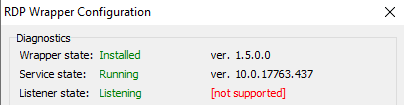
Need support for termsrv.dll version 10.0.1.17763.437
 jurekcz
on 10 Apr 2019
jurekcz
on 10 Apr 2019
Sorry about typo above. termsrv.dll version 10.0.17763.437
jurekcz
on 10 Apr 2019
It worked with termsrv.dll version 292, but no longer works with version 437.
jurekcz
on 10 Apr 2019
Nice utility, but does not change the outcome in this case. It appears that https://support.microsoft.com/en-us/help/4493509/windows-10-update-kb4493509 updates termsrv.dll version to 10.0.17763.437. Uninstalling the update solves the problem.
jurekcz
on 11 Apr 2019
Nice utility, but does not change the outcome in this case. It appears that https://support.microsoft.com/en-us/help/4493509/windows-10-update-kb4493509 updates termsrv.dll version to 10.0.17763.437. Uninstalling the update solves the problem.
 yesidtaz
on 11 Apr 2019
yesidtaz
on 11 Apr 2019
any ini-file to use whiteout the update roll-back?! (4493509/windows-10-update-kb4493509)
ps: fix is possible - deleting the update, thx.
I also use the tool to to hide the update but need help of the cracks for a new ini.file, thx @ll!
 n8claw
on 11 Apr 2019
n8claw
on 11 Apr 2019
Changing the ini file to .437 >>> "Fully Supported" but it doesn't work
After Restart Service State stoppet, Listener State not listening but "Fully Supportet"
This makes no sence
 Deba1981
on 20 Apr 2019
Deba1981
on 20 Apr 2019
sometime you have to fully reboot the computer to make it work.
Get Outlook for Androidhttps://aka.ms/ghei36
From: Deba1981 notifications@github.com
Sent: Saturday, April 20, 2019 1:19:16 PM
To: stascorp/rdpwrap
Cc: thaguitarist; Mention
Subject: Re: [stascorp/rdpwrap] Please support for Windows 10 1809 - 10.0.17763.379 (#699)
Changing the ini file to .437 >>> "Fully Supported" but it doesn't work
After Restart Service State stoppet, Listener State not listening but "Fully Supportet"
This makes no sence
—
You are receiving this because you were mentioned.
Reply to this email directly, view it on GitHubhttps://github.com/stascorp/rdpwrap/issues/699#issuecomment-485144512, or mute the threadhttps://github.com/notifications/unsubscribe-auth/ADZEPOZKUNCO6KKEFE4BFNDPRNGBJANCNFSM4G62UQTQ.
thaguitarist
on 20 Apr 2019
Microsoft Windows Family 1809 [version 10.0.17763.437]
with the ini file from affinityv (3rd post), the listener state changed to listening, and fully supported. Thanks.
I just stopped termService (sc stop TermService), updated the ini file, started the termService.
The remote desktop is fully supported and works. anyone knows when the 2018.10.10 ini version will be updated with this one ?
 edgd1er
on 27 Apr 2019
edgd1er
on 27 Apr 2019
Hello there, same problem here..
I reinstalled Wrapper, added lines in *.ini, as @thaguitarist mentioned (also added empty line at the end), but still don't work. Even after reboot. RDPconf says listener fully supported but not listening.
Windows 10 home Version 1809, Build 17763.379, termsrv.dll Version 10.0.17763.292
i used this solution but i can't use RDP any more and it's look like Remote desktop is disabled
and i can' do any thing because also the normally remote desktop doesn't work any more.
thanks to all.
1809 clean installation.
what all do only use this program .
thanks all
 amink69
on 30 Apr 2019
amink69
on 30 Apr 2019
Does anyone have an INI file for [10.0.17763.503] the ones I found do not work.
 DarkLegacy24
on 22 May 2019
DarkLegacy24
on 22 May 2019
поделитесь пожалуйста INI на 17763.615
 Kerpicj
on 10 Jul 2019
Kerpicj
on 10 Jul 2019
В ini добавил соответсвующие правки но так и не заработало. Только разрешен один сеанс соединения.
Сборка ОС Вин10 : 18363.476
 o-homyak
on 16 Jan 2020
o-homyak
on 16 Jan 2020
I updated windows to 17763.1432 1809 and now RDPWrapper-v.1.2 does not work! can anyone help me?
Обновил 17763.1432 до версии 1809, перестал работать RDPWrapper-v.1.2
Помогите пожалуйста, кто может((( (Windows10 LTSC)
 Dezmonsolitude
on 26 Aug 2020
Dezmonsolitude
on 26 Aug 2020
I updated windows to 17763.1432 1809 and now RDPWrapper-v.1.2 does not work! can anyone help me?
Обновил 17763.1432 до версии 1809, перестал работать RDPWrapper-v.1.2
Помогите пожалуйста, кто может((( (Windows10 LTSC)
 1nkid
on 14 Sep 2020
1nkid
on 14 Sep 2020
I updated windows to 17763.1432 1809 and now RDPWrapper-v.1.2 does not work! can anyone help me?
Обновил 17763.1432 до версии 1809, перестал работать RDPWrapper-v.1.2
Помогите пожалуйста, кто может((( (Windows10 LTSC)try it #1143
долго мучался помогло еще доводка такой утилитой Termsrv.Patch.10.0.17763.437_v2
o-homyak
on 14 Sep 2020
Related issues
 shardy-uk
·
3Comments
shardy-uk
·
3Comments
 eyeTechSolutions
·
5Comments
eyeTechSolutions
·
5Comments
 cakexxx
·
6Comments
cakexxx
·
6Comments
 wanglulei
·
4Comments
wanglulei
·
4Comments
 apolyakov2017
·
4Comments
apolyakov2017
·
4Comments
Most helpful comment
This is my bad!
I Forgot that you also have to add the SLInit for that version.
so add this :
[10.0.17763.292]
; Patch CEnforcementCore::GetInstanceOfTSLicense
LocalOnlyPatch.x86=1
LocalOnlyOffset.x86=AFAD4
LocalOnlyCode.x86=jmpshort
LocalOnlyPatch.x64=1
LocalOnlyOffset.x64=77A11
LocalOnlyCode.x64=jmpshort
; Patch CSessionArbitrationHelper::IsSingleSessionPerUserEnabled
SingleUserPatch.x86=1
SingleUserOffset.x86=4D665
SingleUserCode.x86=nop
SingleUserPatch.x64=1
SingleUserOffset.x64=1322C
SingleUserCode.x64=Zero
; Patch CDefPolicy::Query
DefPolicyPatch.x86=1
DefPolicyOffset.x86=4BE69
DefPolicyCode.x86=CDefPolicy_Query_eax_ecx
DefPolicyPatch.x64=1
DefPolicyOffset.x64=17F45
DefPolicyCode.x64=CDefPolicy_Query_eax_rcx
; Hook CSLQuery::Initialize
SLInitHook.x86=1
SLInitOffset.x86=5B18A
SLInitFunc.x86=New_CSLQuery_Initialize
SLInitHook.x64=1
SLInitOffset.x64=1ABFC
SLInitFunc.x64=New_CSLQuery_Initialize
AND at the end of the ini file, you must ALSO add the following lines :
[10.0.17763.292-SLInit]
bInitialized.x86 =CD798
bServerSku.x86 =CD79C
lMaxUserSessions.x86 =CD7A0
bAppServerAllowed.x86 =CD7A8
bRemoteConnAllowed.x86=CD7AC
bMultimonAllowed.x86 =CD7B0
ulMaxDebugSessions.x86=CD7B4
bFUSEnabled.x86 =CD7B8
bInitialized.x64 =ECAB0
bServerSku.x64 =ECAB4
lMaxUserSessions.x64 =ECAB8
bAppServerAllowed.x64 =ECAC0
bRemoteConnAllowed.x64=ECAC4
bMultimonAllowed.x64 =ECAC8
ulMaxDebugSessions.x64=ECACC
bFUSEnabled.x64 =ECAD0
(make sure your file finishes with an empty line.)