Rdpwrap: Looking for support for 10.0.17763.292
10.0.17763.292 is not working. I've even tried INI files from the issue that was locked (dunno why, because the solutions aren't working - why to close an issue that hasn't been solved?) and most I got was some kind of teamviewer-like behavior where if I log in with another user, it will switch the main screen to the user I RDP'd with, which makes no sense.
Any help would be greatly appreciated. I can't believe the lack of support of this project regarding updated INI files, one has to hunt them around...
 darkguy2008
All 12 comments
I test work Windows 10 Version 1809 Build 17763.316
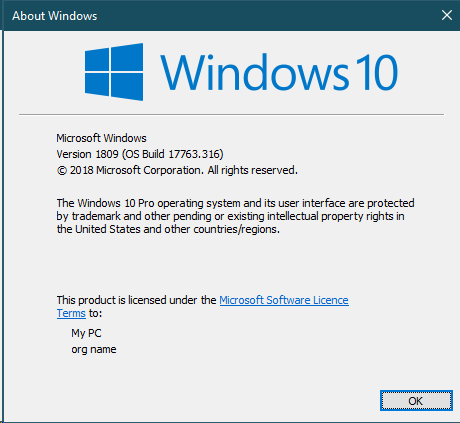
Run CMD as Administrator
- Type net stop termservice
- Backup file rdpwrap.ini (129KB) or rename it rdpwrap.ini.bak in C:\Program Files\RDP Wrapper\
- Copy file rdpwarp.ini (130KB) in C:\Program Files\RDP Wrapper\
- Return to the window CMD type net start termservice
- Exit CMD
- Test RDPConf.exe
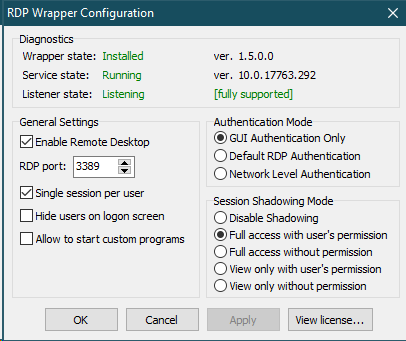
 Binhbnt
on 18 Feb 2019
Binhbnt
on 18 Feb 2019
Hi @Binhbnt can you please share your rdpwrap.ini file? also, can you confirm that you are able to have two concurrent sessions at the same time, with different users? I was able to get it like that before, but when I logged in with user B, it logged out user A and RDP worked, but user B's session was also displayed on the screen (like TeamViewer does) so it's useless.
darkguy2008
on 18 Feb 2019
@darkguy2008 On step 3 add these snippets to your rdpwrap.ini: https://github.com/stascorp/rdpwrap/issues/645 - it worked for me
 aiac
on 18 Feb 2019
aiac
on 18 Feb 2019
Duplicate of #645.
why to close an issue that hasn't been solved?
Because members of community already posted a solution in according issue. There is no reason to keep such issues open, and we have Telegram chat for user support.
 binarymaster
on 18 Feb 2019
binarymaster
on 18 Feb 2019
Just tried it, thanks @aiac and @Binhbnt, you both were actually more useful than @binarymaster .
As for you, yeah, the members have posted a solution. Solution that should be already live when you type "RDPWinst -w", else, why is it there? Your definitions haven't been updated in months, I fail to see how a github search and a Telegram is your solution for your lack of maintenance. Also, needless to say, but Telegram requires a phone number, and a phone number is something very personal that I'm not willing to share (this reminds me of Docker's loginwall...) and honestly it's not a valid support channel. You guys might like it, but I'm sure that most issue watchers here (including me) aren't happy with such a poor response.
This is clearly an issue: The INI file is not updated to the latest versions, it doesn't update itself either. As such, it should not be closed just because you can't be bothered to help or update the INI file.
And take it for granted, if a new version is released and RDPWInst -w or update.bat doesn't update the INI file, I will create a new issue until you guys get better maintenance or figure out a better way to get your INI definitions right aside from depending on each users's contributions.
Which leads me to ask: Isn't there a way to get automatic offsets? I'm sure there is.
darkguy2008
on 19 Feb 2019
Here's something interesting: The solution worked with a VM. However, I've got both a VPS and two physical machines where the issue I'm describing is happening.
I'd upload a video, but I guess GitHub doesn't like that, so here's a GIF for ya:

Notice how, when logging in with the Local RDP Checker, the new session takes over the current session (on the TeamViewer screen) and if I open a new RDP to log in with the other user, I can move the mouse and it will move the host as well, essentially converting my RDP session into a TeamViewer-like session. This GIF might be handy to explain the situation.
Yes, I also tried uninstalling, rebooting, installing, rebooting, changing INI file, rebooting and trying. In that order. Didn't work. A/V was disabled (Windows Defender) too. No dice.
darkguy2008
on 19 Feb 2019
Hi everyone I hope you are well, I had problems with the last update of windows 10 pro. I show you the version of my operating system and what you do in the .ini with version RDPWRAP 1.6.2 is too easy, it's just a matter of understanding the procedure well this comment is dated 26/02/2019 on Tuesday.
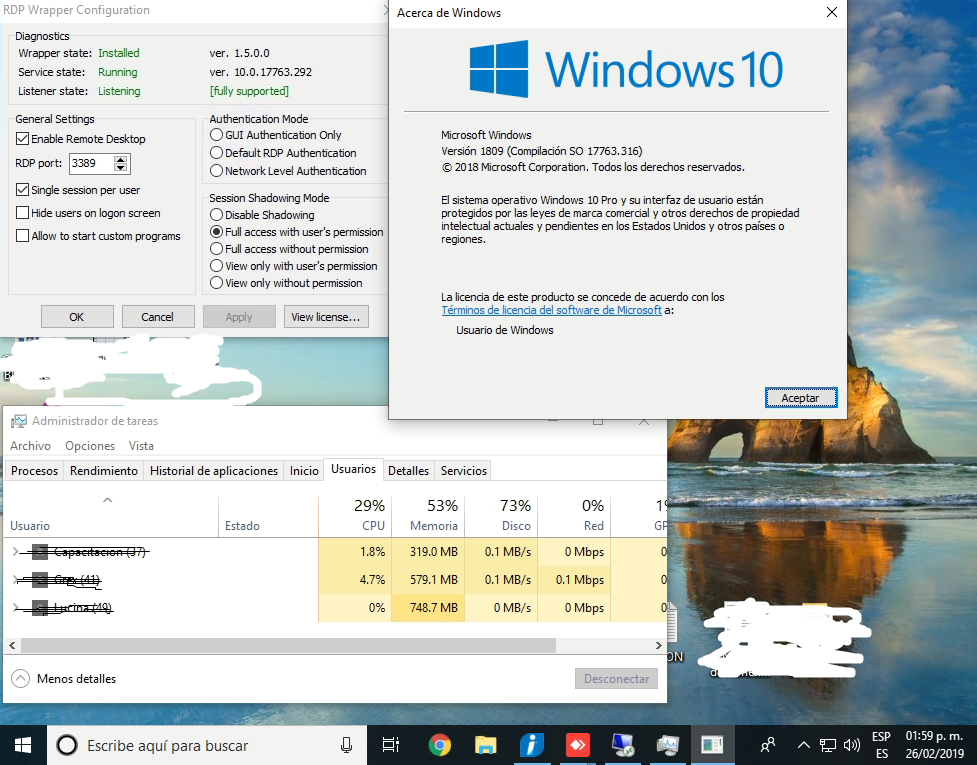
I am with 3 users at once, I indicate the steps that I take.
1.- stop the service with the command * Net Stop TermService *
2.- Open init file of the path C: \ Program Files \ RDP Wrapper \
- copy the ticket code #645 from @ [RoosterIllusion] at the end of the document .ini
4.- Restore the TermService service with the command * Net Start TermService *
5.- Exit cmd
6.- Verify RDPConfig.exe
 RDPGREX2019
on 26 Feb 2019
RDPGREX2019
on 26 Feb 2019
@RDPGREX2019 thanks for your answer. That's exactly what I did. As I say, it correctly works in a new install, but in two computers (a VPS and a physical Win10 machine) that got upgraded lately, I have the issue I'm describing in the GIF I uploaded a few days ago. How do you explain that? I've tried to remove/uninstall RDPWrap and reinstall it, and I still get the same results.
So bad, that I had to reinstall them back to Win8 because it has better support.
darkguy2008
on 26 Feb 2019
@darkguy2008 Are you using the RDPWRAP 1.6.2 installer?
RDPGREX2019
on 26 Feb 2019
@RDPGREX2019 no, I'm using the ZIP one, I never had success with the installer some time ago... should I? is it better?
darkguy2008
on 26 Feb 2019
@darkguy2008 Well I have not used the ZIP the truth, but you do not lose anything with trying the installer maybe you find it.
RDPGREX2019
on 26 Feb 2019
@RDPGREX2019
Thank you for the link to the offsets for 10.0.17763.292. The rdpwrap on my x86 enterprise version 10.0.17763.404 was not fully supported. The multiuser concurrent sessions functionality was missing. With these offsets it's working fine.
-Gamma
 gamma-577
on 10 Apr 2019
gamma-577
on 10 Apr 2019
Related issues
 philippseith
·
6Comments
philippseith
·
6Comments
 sihow29
·
4Comments
sihow29
·
4Comments
 mahmoodyali
·
4Comments
mahmoodyali
·
4Comments
 apolyakov2017
·
4Comments
apolyakov2017
·
4Comments
 nick7inc
·
5Comments
nick7inc
·
5Comments
Most helpful comment
Hi everyone I hope you are well, I had problems with the last update of windows 10 pro. I show you the version of my operating system and what you do in the .ini with version RDPWRAP 1.6.2 is too easy, it's just a matter of understanding the procedure well this comment is dated 26/02/2019 on Tuesday.
I am with 3 users at once, I indicate the steps that I take.
1.- stop the service with the command * Net Stop TermService *
2.- Open init file of the path C: \ Program Files \ RDP Wrapper \
4.- Restore the TermService service with the command * Net Start TermService *
5.- Exit cmd
6.- Verify RDPConfig.exe