Rdpwrap: Add support for termsrv 10.0.17134.1
termsrv.zip
RDPconf indicates it is not supported.

Thank you!
 thaguitarist
All 96 comments

Same issue.
 isjerryxiao
on 29 Apr 2018
isjerryxiao
on 29 Apr 2018
Hi,
I also have the same issue with 10.0.17134.1
Any word on a fix yet?
Thanks
 Everglase
on 1 May 2018
Everglase
on 1 May 2018
Temporally fix by replace termsrv.dll with the version 16299.15
 tvcat
on 1 May 2018
tvcat
on 1 May 2018
Cool.
Next question.... Does anyone have a copy of termsrv.dll that is version 16299.15?
I don't as this is a fresh install of Win10Pro
Thanks.
Everglase
on 1 May 2018
@Everglase
termsrv.zip
isjerryxiao
on 1 May 2018
Thanks @Jerry981028
I will give it a shot.
Everglase
on 1 May 2018
Exact same problem since upgrading to Windows 10 1803 17134.1. Replaced termsrv.dll with the one that was in the Windows.old directory and that "Solved" the problem for you. Here is the newest termsrv.dll (version 10.0.17134.1 dated 4/11/2018
 bryanh99
on 1 May 2018
bryanh99
on 1 May 2018
How can I replace the file Windows won't let me.?
 quicken2k
on 1 May 2018
quicken2k
on 1 May 2018
@quicken2k
check here:
https://github.com/stascorp/rdpwrap/issues/442#issuecomment-379121357
 graphixillusion
on 1 May 2018
graphixillusion
on 1 May 2018
This is also broken for me, got the new Windows 1803 update on my HTPC yesterday, patcher not working any more.
I couldn't (easily) replace the termserv.dll file. I see some people recommending fixes above (thank you) but I can just wait. What kind of turnaround would we expect from the devs? A few days or weeks?
 jaxjexjox
on 2 May 2018
jaxjexjox
on 2 May 2018
@tvcat
16299 will cause the live account cannot logon for windows store.
 cuureel
on 2 May 2018
cuureel
on 2 May 2018
Bi k3
On Wed., 2 May 2018, 4:24 pm cuureel, notifications@github.com wrote:
@tvcat https://github.com/tvcat
16299 will cause the live account cannot logon for windows store.—
You are receiving this because you were mentioned.
Reply to this email directly, view it on GitHub
https://github.com/stascorp/rdpwrap/issues/456#issuecomment-385876631,
or mute the thread
https://github.com/notifications/unsubscribe-auth/AlEfrYsyoA0GyN7AYv0WpHz18ADUpIe6ks5tuVEpgaJpZM4TlRO8
.
Everglase
on 2 May 2018
@cuureel
What you mean by live account. I can logon to Windows Store.
tvcat
on 2 May 2018
@Everglase replacing the old termsrv.dll worked for me.thanks
 erkancinar
on 3 May 2018
erkancinar
on 3 May 2018
Although downgrading termsrv.dll fixes the problem for now, it's quite the hack. 1803 has been out for a couple of days already, and still no support for the new version. When can we expect a version of RDP Wrapper that works with 1803???
 TanMan1217
on 3 May 2018
TanMan1217
on 3 May 2018
@TanMan1217
The developer owe you nothing.
You can pay to Microsoft or ThinStuff or just shut up and wait.
tvcat
on 4 May 2018
@TanMan1217
I share your frustration. But please keep the conversation polite. Nobody is getting paid to do this job. It’s all our curiosity and willing ness to help out.
Thanks
 LinusT
on 4 May 2018
LinusT
on 4 May 2018
Yeah, it's frustrating but just be calm, patient.
jaxjexjox
on 4 May 2018
My biggest frustration is actually at M$. Brand new iso download from them and bam, rdpwrap doesn't work :D Though they are just doing their job too.
But the support here has been great and thanks again to @bryanh99 for the older termsrv.dll file.
Everglase
on 4 May 2018
IMO there is nothing to frustrate about.
It's not that hard to fix by replacing the DLL at all and it work perfectly fine.
And how much did you save from using this?
tvcat
on 4 May 2018
@tvcat, my issue is that we have to install a downlevel version of termsrv.dll to get this working. The reason is that Microsoft updated it again for 1803, and although we can never know why they changed it, most of their documented changes have been security related. It is therefore reasonable to assume that the changes they made to termsrv.dll are, at least partially, security related. Therefore, installing the downlevel version could potentially expose our systems to malware.
My comment above was neither rude nor demanding. I apologize if it came across that way. All I was asking for was an idea about whether this was being worked on, and if so, whether there was an anticipated release date. It required none of the snarkiness I received.
RDP Wrapper is the most elegant of the concurrent RDP packages, and that's why I use it. But if it's not going to continue being updated, I'll have to find a different solution.
TanMan1217
on 4 May 2018
It's free and it's not written by many people. You need to relax, there's nothing you can do about it unfortunately.
I don't want to downgrade the DLL either, mostly because it's fidgety. You SHOULD be angry at Microsoft, why do they keep needing to 'mess with files' between updates? They never did this anywhere near as much with Windows 7. Messing with the DLL like 3 times (if I recall) in 10 years. Windows 10? It's many times already
This is open source (isn't it?) so if the lead dev drops it, someone else can pick it up.
jaxjexjox
on 4 May 2018
@TanMan1217
If your concern is on security then too bad you have the security risk from the start you use RDPWrap.
I'm not saying that RDPWrap is having security risk but when you do something it is not suppose to, there maybe security risk.
It's just common sense.
And the only and best solution is pay Microsoft.
tvcat
on 4 May 2018
@jaxjexjox
You should not angry at Microsoft. Your Windows license is not including the RDP service.
tvcat
on 4 May 2018
I should be angry at Microsoft because they're patching a file that doesn't need patching. I'm 99.9% positive it's simply to break this functionality.
It was almost NEVER messed with under Windows 7.
jaxjexjox
on 4 May 2018
@tvcat
I replaced termsvr.dll of 17134 with the modified one of 16299 (The security rights have been set same as the original one). The RdpConf showed "fully supported", and The RDP works well. But I found there is something wrong with the add account function with email account.
- The add account windows will crash after it shows.
- The microsoft store cannot be logon. An error message showed.
- All applications from microsoft store cannot be launched. An error message showed "File System Error (-2147219196)".
After I executed the command "SFC /scannow", all above problems were solved, but the termsvr.dll was also recovered by the one of 17134. If I replace it with 16299, all above problems will appear again.
cuureel
on 4 May 2018
@jaxjexjox
Is your Windows license come RDP feature?
If it's not then you are cheating on Microsoft and they have the all the rights to disable your cheat.
Windows 10 Pro come with RDP but no concurrent, it's not that expensive.
If you need concurrent then you need server license and terminal service license and client license IINM.
Edit: Please prove that I'm wrong rather then just thumb down, thanks.
tvcat
on 4 May 2018
@cuureel
I can confirm this on Windows 10 Home 17134.1 after testing and i found the fix.
You need the same version of rfxvmt.dll (16299.15)
- stop termservice.
- replace with rfxvmt.dll (16299.15).
- Restart
tvcat
on 4 May 2018
Windows 10 April 2018 Update (1803) Build 17134.1 (x64)
termsrv.dll version 10.0.17134.1 (x64)
Find:
8B 99 3C 06 00 00 8B B9 38 06 00 00
Replace With:
B8 00 01 00 00 89 81 38 06 00 00 90
Find: (Concurrent Users Patch)
28 44 8D 77 01 44 89 32
Replace With:
28 44 8D 77 00 44 89 32
Find: (Local Only Patch)
00 74 18 48 8D
Replace With:
00 EB 18 48 8D
(Configure and check with respectively RDPConf.exe and RDPCheck.exe from RDPWrap)
Standalone:
termsrv-x64.10.0.17134.1.patched.zip
rdpwrap.ini (I have not tested this, but it should work!: offsets + C00)
[10.0.17134.1]
LocalOnlyPatch.x64=1
LocalOnlyOffset.x64=925D1
LocalOnlyCode.x64=jmpshort
SingleUserPatch.x64=1
SingleUserOffset.x64=18B64
SingleUserCode.x64=Zero
DefPolicyPatch.x64=1
DefPolicyOffset.x64=10E72
DefPolicyCode.x64=CDefPolicy_Query_eax_rcx
SLInitHook.x64=1 [10.0.16299.15]
SLInitOffset.x64=22D5C
SLInitFunc.x64=New_CSLQuery_Initialize
EDIT: I think that this is the correct value.
SLInitHook.x64=1 [10.0.17134.1]
SLInitOffset.x64=22E6C
SLInitFunc.x64=New_CSLQuery_Initialize
 macchrome
on 4 May 2018
macchrome
on 4 May 2018
What about the 32 bits version ?
 tibidi
on 4 May 2018
tibidi
on 4 May 2018
@tvcat
Thank you for the solution, but your solution can only solve the logon problem of ms store.
For the problem of failure to launch ms store apps, I found another solution.
Get-AppXPackage -AllUsers | Foreach {Add-AppxPackage -DisableDevelopmentMode -Register "$($_.InstallLocation)\AppXManifest.xml"}
After executed the above command, all apps launched successfully.
Thanks again.
cuureel
on 4 May 2018
@cuureel
I can install and launch any MS Store App without running any command.
However I have never login or install any app before replace the termsrv.dll and rfxvmt.dll.
Is the app that failed to launch installed before the Windows 17134.1 update?
If no then i think it's not related to RDP service.
tvcat
on 4 May 2018
same problem. april 2018 update break my RDPWrap :(
 tetelom
on 4 May 2018
tetelom
on 4 May 2018
Can we copy the patch above into official rdpwrapper.ini (so update.bat can get it)?
Thank you so much for the great program !
 FoGBaV
on 4 May 2018
FoGBaV
on 4 May 2018
i can use RDPwrap whit old versión termsrv.dll thank u so much! amazing program.
tetelom
on 4 May 2018
There is a reason why Microsoft released a new version ... especially RDP Protocol is extremely great for hackers to get into your system ... not a good advice to use old version of termsrv.dll
FoGBaV
on 4 May 2018
@FoGBaV
You can copy to the ini yourself.
Latest version of the installer can use local ini, read the readme
tvcat
on 5 May 2018
thanks @macchrome
This is dirt simple to update yourself ini file wise, presuming RDP was working fine before the Windows 10 1803 update and you have the latest ini file installed already. I didn't want to wait for the next official rdpwrap update. And I didn't want to overwrite the latest termsrv.dll with a deprecated version. This was my solution, for x64 only.
1) Go to C:\Program Files\RDP Wrapper and make a backup copy of rdpwrap.ini (optional step)
2) Right click on original rdpwrap.ini and click Properties, and then the Security tab, and edit the permissions to full control as necessary so you can edit the ini file (optional step)
3) Open rdpwrap.ini up in an text editor, notepad is fine
4) Under label [Main], change the value for Updated to some newer date say Updated=2018-04-30 (optional step)
5) Search for and copy/paste label section [10.0.17063.1000] to just below as a new section (make sure you leave a blank line in between), change the copied label value to [10.0.17134.1] instead, and then delete all lines underneath with "x86" in them since there are no values from IDA yet. Make sure you leave a blank line below what was copied and where the [SLInit] label begins
7) Update the values for the remaining x64 lines to what macchrome posted above (note the updated value edit for SLInitOffset.x64=22E6C)
8) Now search for and copy/paste label section [10.0.17063.1000-SLInit] to just below as a new section (make sure you leave a blank line in between), change the copied label value to [10.0.17134.1-SLInit], and then delete all lines with "x86" in them. Leave a blank line below what was copied and the end of the ini file. The previous x64 values from 10.0.17063.1000 are ok as-is.
8) Save the ini file, restart the PC, and then rerun RDPConf.exe to check your work. If you followed the above steps, it's all green now.
RDP functionality works fine again for me with these steps. I tested using Microsoft Remote Desktop for MacOS v8.0.43 as the client into Windows 10 Home as the server with no problems - again.
 drshock
on 5 May 2018
drshock
on 5 May 2018
@drshock
Good one and thanks for sharing.
However you don't have to change the ini file permission.
Just open elevated cmd and copy the ini file for backup then "notepad _path to ini file_" to edit and save.
After that you don't have to restart Windows too, just run "RDPWInst -r" in the RDP installation folder.
tvcat
on 5 May 2018
Is it possible to post the rdpwrapper.ini with the fixes above .. i only get "not listening" ... Thanks !
FoGBaV
on 5 May 2018
@FoGBaV
You copy the wrong offset, see the edited value by @macchrome
tvcat
on 5 May 2018
Works perfect - thank you ... missed something in the great instructions from drshock ...8)
If someone likes to try out the modded ini file ... : https://ufile.io/yzn0f
(hope it is ok to post the link here - otherwise please delete)
Greetings and many thanks !
FoGBaV
on 5 May 2018
@FoGBaV
I used your modified ini file but i still have the listening state not working under Win 10 Home. I tried both with rfxvmt.dll 16299.15 and 17134.1 in System32 and SysWOW64 folders but still the same results.
graphixillusion
on 5 May 2018
@graphixillusion
That's mean you are doing something wrong or FoGBaV uploaded the wrong ini file.
All the info is just above you, not that hard to check yourself.
tvcat
on 6 May 2018
@drshock Thank you for your support.
followed your instruction and it does works now.
 Julien-nl
on 6 May 2018
Julien-nl
on 6 May 2018
I don't know why the @FoGBaV ini doesn't work: i checked and compared it several time and the values are correct but with it i always got listener not working. Adding manually the new data to the original ini worked flawless.
UPDATE:
Maybe i understood why the @FoGBaV ini file doesn't work: it is saved as Unix LF format, while the original file is saved as Windows CR LF format.
graphixillusion
on 6 May 2018
thanks drshock for your detailed instructions. I am back to all green now, using the patched termsrv.dll and all looks good, but I still cannot connect from external computers using rdp. it never initiates the connection. checking it with rdpconfi looks good and rdpcheck opens the connections properly, but externally it still does not work. I opened the port in the firewall, and even turned off the firewall to test, and still no dice. any suggestions what else might be blocking the rdp connection?
 gldmeier
on 6 May 2018
gldmeier
on 6 May 2018
I actually figured it out just now. the pc had previously had a static ip with port forwarding set in the router. upon reinstall of the pc, with the upgrade to 1803, I had forgotten to reset the static ip. Just did that now and it works. Thanks everyone, especially drshock and macchrome
gldmeier
on 6 May 2018
Ok, This is interesting. I load the new ini file from @FoGBaV and it comes up fully supported which is good. But "Service State: Stopped" and "Listener State: Not Listening"
Restarting does not fix it. I go into services.msc and try to start the service manually and it says "access is denied"...
Uninstall RDPWrap and I can start the RDP service. Reinstall and the service stops and again I can't start it....
Does anyone have any ideas?
Everglase
on 6 May 2018
The ini file from FoGBaV is OK for all my 64 bit Windows. I had only to load it with WordPad (Unix text format) and save it (Windows text format).
Has anyone the 32 bits adresses to complete the 32 bits part ?
 SamuFr
on 7 May 2018
SamuFr
on 7 May 2018
[10.0.17134.1]
LocalOnlyPatch.x86=1
LocalOnlyOffset.x86=AD738
LocalOnlyCode.x86=jmpshort
SingleUserPatch.x86=1
SingleUserOffset.x86=36B0C
SingleUserCode.x86=nop
DefPolicyPatch.x86=1
DefPolicyOffset.x86=33569
DefPolicyCode.x86=CDefPolicy_Query_eax_ecx
SLInitHook.x86=1
SLInitOffset.x86=474AD
SLInitFunc.x86=New_CSLQuery_Initialize
[10.0.17134.1-SLInit]
bInitialized.x86 =CBF38
bServerSku.x86 =CBF3C
lMaxUserSessions.x86 =CBF40
bAppServerAllowed.x86 =CBF44
bRemoteConnAllowed.x86=CBF48
bMultimonAllowed.x86 =CBF4C
ulMaxDebugSessions.x86=CBF50
bFUSEnabled.x86 =CBF54
========
Purely experimental! Only single sessions work. Tested under Windows Pro Virtual Machine.
EDIT:
I think that the "Single Sessions" problem has been solved: I don't know which step solved the problem! But this is what I did:
(i) gpedit.msc
Computer Configuration\Administrative Templates\Windows Components\Remote Desktop Services\Remote Desktop Session Host\Always prompts the client for a password upon connection [ENABLED]
(ii) REBOOT
(ii) Run RDPWrap's "install.bat" with "Trusted Installer" status - I used NSudo:
https://github.com/M2Team/NSudo/releases
(iii) Edit/Replace rdpwrap.ini - Stop and Start "Remote Desktop Services
(iv) Configure RDPWrap: Try "GUI Authentication Only" or "Network Level Authentication"
(v) RDPCheck and check externally
I'm pretty sure that "Trusted Installer" status is the key. Open an NSudo command prompt, cd directory to where install.bat is located then run install.bat from the command prompt.
macchrome
on 7 May 2018
Hmm, I've updated as per the details above, and have 3 greens, fully supported and it's not working. I've not been able to log in remotely (different and same users) to the user already logged in.
Weird. Thoughts.
 GeorgeCastanza
on 7 May 2018
GeorgeCastanza
on 7 May 2018
Thanks to Macchrome, I place your code in the ini file of a 32 bits Windows 10 Home with its original "termsrv.dll" (the W10 April 2018 termsrv.dll) and I can now log to this PC.
I'll test realy this configuration later.
P.S. I used before the Fall Creators "termsrv.dll". So I didn't install again RDPWrap. I replaced only "termsrv.dll" and "rdpwrap.ini" and rebooted the PC..
SamuFr
on 7 May 2018
Exactly the same as Everglase has:
TermService cannot be started (access denied error) if RDPWrap is installed
TermService can be started if RDPWrap is uninstalled.
Is there a security check that prevents to start wrapped service? How fix it?
 sokolik74
on 7 May 2018
sokolik74
on 7 May 2018
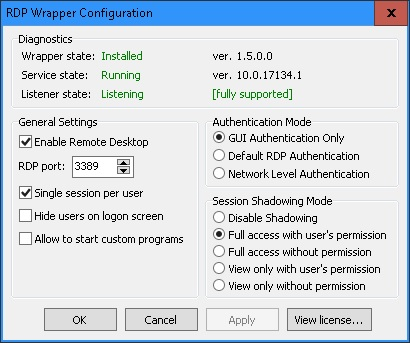
Through RDP, I am writing here from a 64 bits Windows 10 HOME ("April 2018") . Here is the conf log:
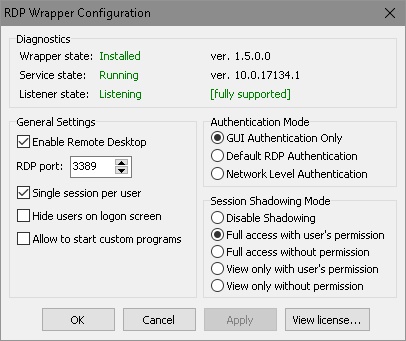
Through RDP, I am writing here from a 32 bits Windows 10 HOME ("April 2018") . Here is the conf log:
Here is the "rdpwrap.ini" made with Macchrome's scripts:
rdpwrap.ini.TXT
(delete the TXT extension to get the "rdpwrap.ini' file)
My install procedures were these ones:
1) I runed install.bat (RDPWrap does'nt work with this "termsrv.dll")
2) I changed rights of "termsrv.dll" to administrators, renamed it and replaced it with the "termsrv.dll" from "Windows.old" (renaming can be done even with "termsrv.dll" running)
3) I rebooted PC ( (RDPWrap works now with this termsrv.dll)
4) I replaced "termsrv.dll" by the 1st one (the renamed one) (can be done even with RDP running if you only rename it) (I did it trough an RDP connetion)
5) I replaced "rdpwrap.ini" by the new one (always through an RDP connection)
6) I rebooted PC ( (RDPWrap works now with termsrv 10.0.17134.1)
P.S. That what I did. even if I think than 2, 3 and 4 are not necessaries (but I did'nt try).
SamuFr
on 8 May 2018
Hi SamuFr
where have you got the 10.0.17134.1 version ? is it originally of 1803 win10 ?
Julien-nl
on 9 May 2018
I use the original "termsrv.dll" (10.0.17134.1) from Windows 10 April 2018 (Windows 10 version 1803).
Installs are french; the only differences could be with "C:\Windows\System32\fr-FR\termsrv.dll.mui"
Julien-nl, I belived your instal was OK since 3 days. Was'nt it ?
SamuFr
on 9 May 2018
Thanks @macchrome, @SamuFr, and all.
rdpwrap.ini previously posted by @SamuFr
https://github.com/stascorp/rdpwrap/files/1985682/rdpwrap.ini.TXT
(delete the TXT extension to get the "rdpwrap.ini' file)
My install procedures
After installation, stop TermService (and linked services) copy rdpwrap.ini to Program Files\RDPWrap
and start again TermService. (RDPWrap works now with termsrv 10.0.17134.1)
Tested in Windows 10 Pro.
The problem is you cant do that in remote mode. You can use
HKEY_LOCAL_MACHINE\SYSTEM\CurrentControlSet\Control\Session Manager]
"PendingFileRenameOperations"
to rename rdpwrap.ini after restart
Greetings!!
 mOrfiUs
on 10 May 2018
mOrfiUs
on 10 May 2018
Well I wish I understood all this, but I don't. I am trying to recover the rdpwrapper functionality by just using the modified rdpwrap.ini file, without success. Some say that the termsrv file which came with build 17134 needs to be modified, and some say it doesn't. In the past, binarymaster has discovered and fixed the obstructions introduced by a Msft upgrade so that we just have to re-install rdpwrapper. I hope that happens this time too. Thanks in advance, binarymaster!
 actanner
on 10 May 2018
actanner
on 10 May 2018
Samu,
i have got this working but only with the oldest version, when i try the 10.0.17134.1 its shows not supported ( see attached). can someone please share the ini file of 10.0.17134.1 ?
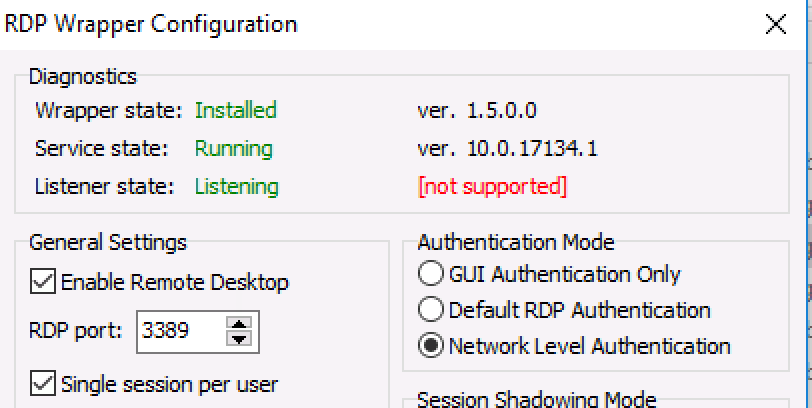
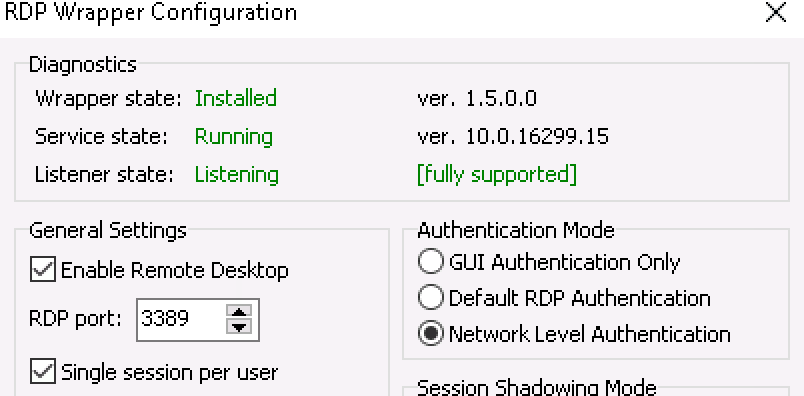
Julien-nl
on 11 May 2018
Hi @Julien-nl
Follow the procedure above. This work for me.
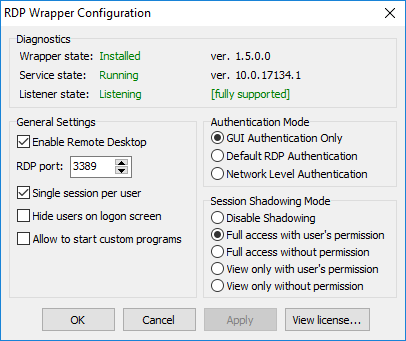
Greetings!!
mOrfiUs
on 11 May 2018
@mOrfiUs Can you please share your rdpwrap.ini file ?
Cannot seem to write the ini file proply.
if you share your ini file would point me to the right directions.
Julien-nl
on 11 May 2018
Success! I finally understand what to do! mOrfiUs got it right! I was putting the rdpwrap.ini file in the folder with the install and update files, and it needs to be put in the "Program Files" folder! May I re-state the obvious:
1) Copy the modified rdpwrap.ini.TXT file to C:\Program Files\RDP Wrapper
2) STOP the service named "Remote Desktop Services".
3) Navigate to C:\Program Files\RDP Wrapper and rename the rdpwrap.ini file to something like "rdpwrap17063.ini"
4) Rename the rdpwrap.ini.TXT file to "rdpwrap.ini"
5) Restart the Remote Desktop Services service.
Then you can run RDPConf.exe and you should see the desired green results. Thanks, everybody!
Next questions: what process normally puts the rdpwrap.ini file in the "Program Files\RDP Wrapper" folder? Can/will that process be amended to put the modified rdpwrap.ini file there instead? That would make these special installation tasks unnecessary.
actanner
on 11 May 2018
what process normally puts the rdpwrap.ini file in the "Program Files\RDP Wrapper" folder?
Installer (RDPWInst.exe).
 binarymaster
on 11 May 2018
binarymaster
on 11 May 2018
Then I guess the newly modified rdpwrap.ini file will soon be put in the place where the installer can find it so that all that is needed to satisfy the 1803 builds will be to perform an install and/or an update.
actanner
on 11 May 2018
Shouldn't the new rdpwrap.ini be merged to this repo or isn't it ready yet?
 teo-tsirpanis
on 11 May 2018
teo-tsirpanis
on 11 May 2018
How i do it only over Remote and without restart
- Get a programm too unlock locked files.
(thanks @macchrome, @SamuFr, @mOrfiUs and all for sharing this.)
Replace the rdpwrap.ini with the from @mOrfiUs
folder: C:\Program Files\RDP Wrapper
Go to Taskmanager or open services directly and RESTART the service that called "Remote Desktop Services" or "TermService".
DONT STOP this service, if you do that you cant connect again !!!
Finish
You will lose the connection too your Server, and you just need too wait until the Service get started again then you can reconnect and test it.
 DaniGTA
on 12 May 2018
DaniGTA
on 12 May 2018
I have Windows 10 Enterprise v1803.
The text file does have the utility show Fully Supported, but when I try to RDP, it still asks to disconnect the current logged in user.
This was working in Windows 10 Enterprise v1709.
 HighStar01a
on 12 May 2018
HighStar01a
on 12 May 2018
Hi all. hi @Julien-nl . The ini file is the same uploaded by @SamuFr .
My procedure isn't the Holy Bible (far from it). Just my experience based in previous posts.
You can't copy new ini file because is in use by TermServ.
If you are in remote mode and you stop TermServ, you loss connection. You need copy the ini file at restart by using "PendingFileRenameOperations" or another method. (like proposed by @DaniGTA )
PendingFileRenameOperations is the most secure and effective way, but you need restart server.
I hope this solve your problem.
@HighStar01a the ini file just read and write the hex pointers of the termsrv.dll file. Check if your dll is the same of the Pro version. If not, you need to find hex pointers mannualy and modify ini file. See previous posts by @macchrome . but it is complex. If termserv.dll is the same this should work.
RDPWrap, at this moment (AFAIK) is the only way to use multi accounts without paid or migrate to server 2012.
Greetings!!
mOrfiUs
on 12 May 2018
Thank you
i've got it working. the miss s teps were need to replace pre cracked termsrv.
Step 1
replace the termsrv.dll can be found on the c:\windowssystem32
i've attached activated termserv.dll
step 2
go to service and stop remote desktop service and replace termserv.dll with the attached one and also replayce the rdpwrap.ini with the attached file.
step 3
go to services and start the remote desktop service again and you everything sould works fine.
termsrv-x64.10.0.17134.1.patched.zip
rdpwrap.ini.TXT
Julien-nl
on 12 May 2018
@mOrfiUs, for some reason Chrome considers rdpwrap.ini.TXT file to be malicious. Of course I know it isn't. But I don't understand, why don't we make a new release instead of this workaround?
teo-tsirpanis
on 12 May 2018
@Julien-nl I'm glad it works for you.
There are too many posts and seems has been created a bit of confusion. As far as my knowledge goes about rdpwrap (thanks @stascorp for your wonderful soft),
it is not necessary to patch termsrv.dll.
That's this program does, without the need to change system files. Just with ini file.
It seems that you have done the same task twice.
The problem is that @stascorp (thanks again) has not yet updated its repository to work properly "update.bat".
@teo-tsirpanis of course it is malicious, but it is only malicious for MS.
For us, the program users, it is cool!!
Just answer yes when chrome ask you.
Greetings!!
mOrfiUs
on 12 May 2018
I seem to be part of a minority of users for whom this .ini fix is not working. Win 10 pro.
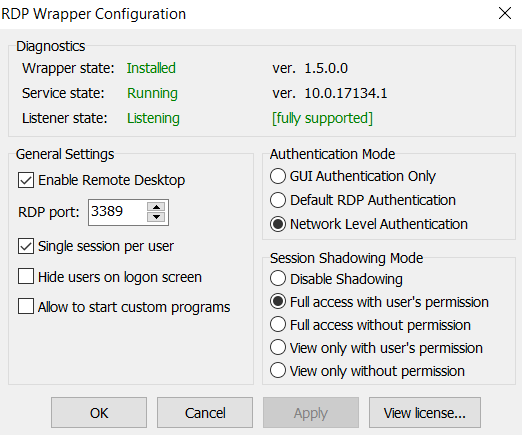
 wwikke
on 12 May 2018
wwikke
on 12 May 2018
I think there is still something wrong ... i have everything "green" as stated above ... but when i try to RPC into the remote System it asks to log out the user logged into the PC locally ...
FoGBaV
on 12 May 2018
@FoGBaV have you replaced the ini file and restarted the PC ?
i've got it working the only issue i have is the printers redirect are not working over the RDP
Julien-nl
on 13 May 2018
@mOrfiUs has got it right as far as I'm concerned, works a treat.
Thanks
 goofyC
on 13 May 2018
goofyC
on 13 May 2018
Got a way to fix the problem Everglase and I had:
TermService cannot be started with "access denied" error if RDPWrap is installed
TermService can be started if RDPWrap is uninstalled.
To start wrapped service:
- add "Service" user to "Administrators" group
or more correctly - grant "Service" user read and execute access on "C:\Program Files\RDP Wrapper" folder.
sokolik74
on 13 May 2018
@macchrome I'm with Windows 10 home 10.0.17134.48.. used the patched termsrv.dll file and the 10.16??? rfxvmt.dll file and the rdpwrap.ini file, but the listener is still off.. is this because i'm with the home version? any workaround?

 FormadorLar
on 14 May 2018
FormadorLar
on 14 May 2018
@FormadorLar
I do not know the procedure for using RDP Wrapper with Windows 10 Home. You are using RDP Wrapper so it is not necessary to use a patched termsrv.dll: RDP Wrapper dynamically patches the required code and policies in memory.
Re-install the original termsrv.dll and the necessary files. Uninstall RDPWrap; reinstall it using the install.bat from a "trusted installer" prompt. I don't know if Windows 10 Home natively ships with termsrv.dll; but it should be owned by "trusted installer". A reboot of the machine might be necessary.
I've tested RDPWrap (amended rdpwrap.ini) using Windows 10 Pro 32 bit and it funcntions correctly.
SKUs that natively support Terminal Services can use a patched termsrv.dll - but it is important to preserve the original ownership of the file.
I've been lurking on this forum. Yes the thread is (too) long, but all the information to attain a correctly functioning RDPWrap is here. People who expect to be spoon fed will be disappointed.
As an aside, Windows 1803 is basically (essentially) garbage; there is no compelling reason to update: infact, 1803 makes the case for LTSB.
macchrome
on 14 May 2018
Last days, I was very busy and didnt read new messages.
I am very surprised you need to stop rdp service for changing "termsrv.dll" and "rdpwrap.ini" files:
- after I had taken ownership of "Windir%system32\termsrv.dll and replaced administrators's rights by total control, I only renamed it to termsrv.dl.old and copied the right one as "termsrv.dll",
- I had only deleted the old "%ProgramFiles%\RDP Wrapperrdpwrap.ini" and replaced it by the new one,
- I had rebooted the PC to use the new files.
I did all of these operations from an other PC in the target PC, in rdp mode.
(whole my procedure is described 6 days ago)
SamuFr
on 14 May 2018
Had the update of 1803 and went able to get it working with thise method:
1) Freshly installed new windows 10 update open command prompt in administrator mode then enter this command: net stop TermService
2) Go to Windows.old\System32 and locate your old version of termsrv.dll the 10.0.16299.15 was mine but i think this is the same for you all.
_Just keep in mind that this dll is related to your windows's language and version. termsrv.dll english will not work in windows french version. termsrv.dll Home version will not work in Pro version._
3) Go to Windows\System32 then right click termsrv.dll and go to properties context menu > security tab.
4) Click Advanced button then Edit Owner (with the little shield). In new window click Advanced then Search and select your actual session user, select it and validate your setting with OK.
5) come back to properties context menu > security tab > Advanced, select your username then add total control to this file. then Validate with OK.
6) replace termsrv.dll with the old one (who has the correct owner and rights).
7) Return to command prompt administrator mode then type: net start TermService
8) Run RDPWrap install.bat and Voila !!! That works no need to restart your system.
Hope that helps
 armentix
on 15 May 2018
armentix
on 15 May 2018
I kept my mouth shut, because some people were complaining only hours after the patch for 1803.
However, it's now been over a week or two, several people have posted fixes in this thread, surely it's time for the main application to now be updated?
jaxjexjox
on 15 May 2018
@macchrome perfect! The mistake i was making was related to an older version of rfxvmt.dll... As soon i restored it to the original version (windows 10 version1803), only thing i had to do is "net stop termservice", replace the ini file and... voilá! Up and Running! Thankx.
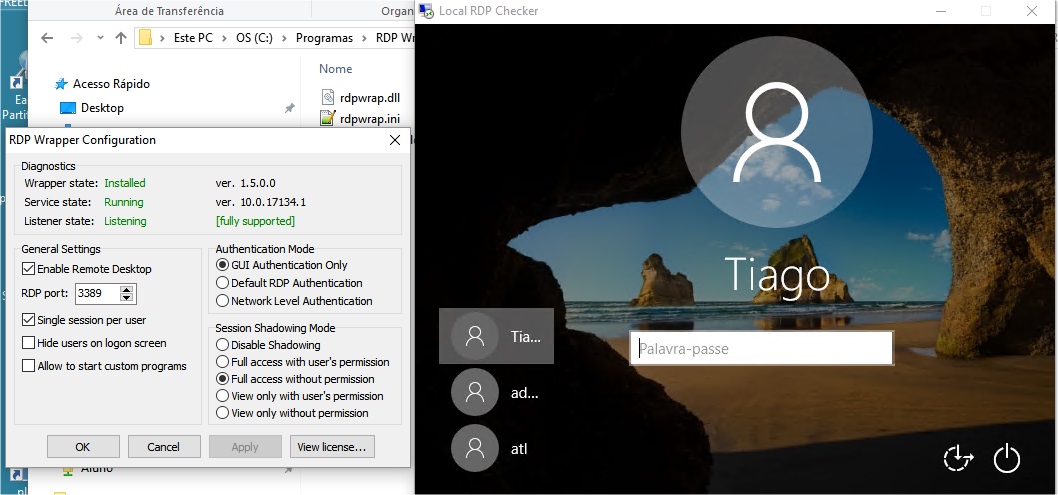
FormadorLar
on 15 May 2018
I found the simplest way (and it even works over a remote session) was to
1) download the @SamuFr .ini file and remove the .TXT from the end
2) copy it to the C:\Program Files\RDP Wrapper directory. Even with remote desktop running and termsrv.dll not stopped, it will allow you to copy the new .ini over the old .ini if you are an administrator.
3) at this point RDPConf will report everything is good, but I still couldn't get a second session to work. I then tried restarting the TermService service and it didn't stop/start it. So I just did a restart of the machine and then logged on and everything was working after that . This is on Win 10 Pro 64 bit.
No need for the old termsrv.dll, no need to stop any service (unless you are not doing this over a remote desktop session). It is literally as simple as download the file, remove the .TXT, copy the file over the old one and reboot.
Thanks @macchrome and @SamuFr
 lemmy999
on 15 May 2018
lemmy999
on 15 May 2018
The procedure lemmy999 outlined is correct in Win10-1803 Pro.
TL;DR - Copy the new INI file over and restart.
 Kizan
on 15 May 2018
Kizan
on 15 May 2018
Why nobody shared x86 (32-bit) DLL yet? :confused:
binarymaster
on 16 May 2018
Here it is. Thank You
termsrv.dll 32 bit Ver. 10.0.17134.1
termsrv.zip
 piripallo
on 16 May 2018
piripallo
on 16 May 2018
with new rdpwrapper.ini from update everything works again ... !
Thank you sooooo much !
FoGBaV
on 16 May 2018
Thanks for the new "rdpwrapper.ini" from update.
A question: exept trying and retrying update.bat, how to know there is a new update ?
SamuFr
on 17 May 2018
Hi,
I can log in to remote session through RDPCheck.exe with no problem, but when i try to do this through windows Remote Session tool, or through clicking on computer name on the network and then selecting connect remote session it fails with error "Your computer could not connect to another console session on the remote computer because you already have a console session in progress."
Any hints as to why this happens?
 hefeas
on 17 May 2018
hefeas
on 17 May 2018
A question: exept trying and retrying update.bat, how to know there is a new update ?
Read the installer source code to get an idea.
"Your computer could not connect to another console session on the remote computer because you already have a console session in progress."
Are you connecting from the same PC? Use 127.0.0.2 address then. If this wouldn't work, I have no idea.
binarymaster
on 17 May 2018
After applying the fix, we can access multiple sessions remotely, but we cannot get printer redirection to work. Any ideas?
 wormsloe
on 18 May 2018
wormsloe
on 18 May 2018
I use the new ini file and can connect remotely with multiple users. Unfortunately, I can connect to the same user multiple times and each time, new session is created. it should be if i connect using the same user that is being used, the user is logged out and i can resume the session. instead, new session is created each time. it is as if, im logging with different user each time. anybody know a fix?
 syaifulnizamyahya
on 19 May 2018
syaifulnizamyahya
on 19 May 2018
@syaifulnizamyahya same problem as me. check this:
https://github.com/stascorp/rdpwrap/issues/422#issuecomment-389843513
graphixillusion
on 19 May 2018
Is there a fix to the problem where login will create new session? Can we use old teamsrv file and use old rdpwrap? Im not interested in the new enhancement by microsoft. the old one that works is fine with me.
syaifulnizamyahya
on 19 May 2018
@syaifulnizamyahya for now i haven't found any fix yet. Let's wait and see...
graphixillusion
on 19 May 2018
Related issues
 dagwieers
·
4Comments
dagwieers
·
4Comments
 cH40z32
·
4Comments
cH40z32
·
4Comments
 apolyakov2017
·
4Comments
apolyakov2017
·
4Comments
 francescofalanga92
·
3Comments
francescofalanga92
·
3Comments
 cakexxx
·
6Comments
cakexxx
·
6Comments
Most helpful comment
Windows 10 April 2018 Update (1803) Build 17134.1 (x64)
termsrv.dll version 10.0.17134.1 (x64)
Find:
8B 99 3C 06 00 00 8B B9 38 06 00 00
Replace With:
B8 00 01 00 00 89 81 38 06 00 00 90
Find: (Concurrent Users Patch)
28 44 8D 77 01 44 89 32
Replace With:
28 44 8D 77 00 44 89 32
Find: (Local Only Patch)
00 74 18 48 8D
Replace With:
00 EB 18 48 8D
(Configure and check with respectively RDPConf.exe and RDPCheck.exe from RDPWrap)
Standalone:
termsrv-x64.10.0.17134.1.patched.zip
rdpwrap.ini (I have not tested this, but it should work!: offsets + C00)
[10.0.17134.1]
LocalOnlyPatch.x64=1
LocalOnlyOffset.x64=925D1
LocalOnlyCode.x64=jmpshort
SingleUserPatch.x64=1
SingleUserOffset.x64=18B64
SingleUserCode.x64=Zero
DefPolicyPatch.x64=1
DefPolicyOffset.x64=10E72
DefPolicyCode.x64=CDefPolicy_Query_eax_rcx
SLInitHook.x64=1 [10.0.16299.15]
SLInitOffset.x64=22D5C
SLInitFunc.x64=New_CSLQuery_Initialize
EDIT: I think that this is the correct value.
SLInitHook.x64=1 [10.0.17134.1]
SLInitOffset.x64=22E6C
SLInitFunc.x64=New_CSLQuery_Initialize