Rdpwrap: Listener is not listening on Win 10 Home (build 14997+)
Hello,
Thank you for rdpwrap!
Unfortunately, on Windows 10 Home edition, it is not working anymore since Insider build 15002.
Rdpwrap is fully updated and says "fully supported", but Listener state is "not listening" for some reason.
Thank you!
 aiugrivef
All 376 comments
Support for 15007 has been added in https://github.com/stascorp/rdpwrap/commit/5814e3fcf126989f1a5d5ecdcffdadb884a16245, try again.
 binarymaster
on 15 Jan 2017
binarymaster
on 15 Jan 2017
Hello,
I have updated and tested again on 15007, without success.
It is not working on a Home edition, here is what RDPConf is displaying:
- wrapper: installed
- service: running
- listener: not listening
aiugrivef
on 15 Jan 2017
I am experiencing the same thing on a fresh WIndows 10 Home install.
 johanatan
on 15 Jan 2017
johanatan
on 15 Jan 2017
i.e., Listener state: _not listening_
johanatan
on 15 Jan 2017
Try this way, maybe it will help: https://github.com/stascorp/rdpwrap/issues/45#issuecomment-182632817
(i.e. fully uninstall and install again)
binarymaster
on 16 Jan 2017
Hello, I have tried again several times today, and it is not working.
I am nowhere near as good as you are, but it looks like M$ have changed their SLC method again starting with 15002...
15002 have public symbols, but I am not good enough to understand them sorry...
aiugrivef
on 16 Jan 2017
I have the same problem with 15002. Reinstall does not solve the problem.
 wfmde
on 19 Jan 2017
wfmde
on 19 Jan 2017
I'm experiencing the same issue on 15007. Already tried a reinstall.

 CaptainThrowback
on 19 Jan 2017
CaptainThrowback
on 19 Jan 2017
Issue confirmed in 10.0.15007.1000.
binarymaster
on 20 Jan 2017
Interesting observation about file sizes between builds:
| Build | x86 size | x64 size |
| ----- | -------- | -------- |
| 10.0.14971.1000 | 840 KB | 998 KB |
| 10.0.14986.1000 | 840 KB | 998 KB |
| 10.0.14997.1001 | ? KB | 1002 KB |
| 10.0.15002.1001 | 847 KB | 1002 KB |
| 10.0.15007.1000 | 847 KB | 1002 KB |
| 10.0.15014.1000 | 847 KB | 1002 KB |
So there's something new added in 14997.
binarymaster
on 21 Jan 2017
Hello,
Same issue with 15014 and 15019 :-(
aiugrivef
on 28 Jan 2017
Hello,
I have tried to debug the TermService, but I am not skilled enough :(
According to me, it looks like the patching of the global variables (bRemoteConnAllowed...) is done well, but this is not enough: the service does not start listening on RDP port.
Maybe there is a new variable?
Maybe the fact that CSQLQuery::Initialize() is not executed is blocking the service launch?
I fear this issue will be worse once Microsoft releases its next public version (probably in 1 month or so) - could you help me to fix this issue please?
aiugrivef
on 15 Feb 2017
Maybe the fact that CSQLQuery::Initialize() is not executed is blocking the service launch?
@aiugrivef Win 10 Pro have no problems with RDPWrap, so I think there is something other.
binarymaster
on 27 Feb 2017
Having the same issue on 15048. Windows 10 Home Preview.

CaptainThrowback
on 7 Mar 2017
Having the same issue on 15048.
Not big surprise.
binarymaster
on 7 Mar 2017
Win 10 Home does not support RDP at all I think.
 TicTac9k1
on 20 Mar 2017
TicTac9k1
on 20 Mar 2017
Win 10 Home does not support RDP at all I think.
O RLY?
This is plain Windows 10 (core) (not build 15002+ though).
binarymaster
on 20 Mar 2017
/me too
On a Windows 10 Home Insider Build, Version 1703, Build 15063.0 ("systeminfo"),
OS Name:                   Microsoft Windows 10 Home
OS Version:                10.0.15063 N/A Build 15063
OS Manufacturer:           Microsoft Corporation
OS Configuration:          Standalone Workstation
OS Build Type:             Multiprocessor Free
I continue to get
Listener State: Not listening
from RDPConf.exe, although my build is flagged as fully supported. RDPCheck.exe will not connect (to 127.0.0.2)
I have tried
git pull
update.bat
uninstall.bat
install.bat
The irritating part here is "[+] Successfully installed.", where as earlier it complains
[-] This version of Terminal Services is not supported.
Try running "update.bat" or "RDPWInst -w" to download latest INI file.
If it doesn't help, send your termsrv.dll to project developer for support.
File termsrv.dll in %WINDOWDIR%System32 has a size of 992,256 bytes
 shoffmeister
on 3 Apr 2017
shoffmeister
on 3 Apr 2017
With respect to "send your termsrv.dll to project developer for support" - what is the preferred means?
shoffmeister
on 3 Apr 2017
I have experienced the same issue as @shoffmeister
Win 10 build 15063.15 - attached termserv.dll
Here is my termserv.dll:
termsrv.zip
````
[] Installing...
[] Terminal Services version: 10.0.15063.0
[-] This version of Terminal Services is not supported.
Try running "update.bat" or "RDPWInst -w" to download latest INI file.
If it doesn't help, send your termsrv.dll to project developer for support.
[+] TermService found (pid 1096).
[] No shared services found.
[] Extracting files...
[] Downloading latest INI file...
[+] Latest INI file -> C:\Program Files\RDP Wrapper\rdpwrap.ini
[+] Extracted rdpw64 -> C:\Program Files\RDP Wrapper\rdpwrap.dll
[] Configuring service library...
[] Checking dependencies...
[] Checking CertPropSvc...
[] Checking SessionEnv...
[] Terminating service...
[] Starting TermService...
[] Configuring registry...
[*] Configuring firewall...
Ok.
[+] Successfully installed.
````
But It's not successfully installed:

 zen-engineer
on 5 Apr 2017
zen-engineer
on 5 Apr 2017
As novice can only pay close attention. I hope you can solve it at an early date.
 linzyjx
on 6 Apr 2017
linzyjx
on 6 Apr 2017
I hope you can solve it at an early date.

binarymaster
on 6 Apr 2017
Hi.
I am not sure what this means? Does this mean that the issue is not possible to resolve?
zen-engineer
on 6 Apr 2017
This means it is not so easy to resolve.
binarymaster
on 6 Apr 2017
Is it possible to provide any technical details so perhaps we can try and contribute to getting this solved?
zen-engineer
on 6 Apr 2017
Is it possible to provide any technical details so perhaps we can try and contribute to getting this solved?
Okay, so this is we already know:
- build
10.0.14986.1000have no issue - build
10.0.15002.1001introduced the issue
It means the latter build has changed something in the code - it may be termsrv.dll, but may be not.
So, it will require to set up two (virtual) machines with these two different Windows 10 Home builds (Pro is not affected). Then enable kernel debugger with serial output, and try to investigate where the behaviour differs (with RDP Wrapper installed).
If we find the actual reason of the listener problem, then it will be possible to fix it.
binarymaster
on 6 Apr 2017
The "Fully supported" is a bit confusing, to be honest, although I now understand this to only to refer to successful hot-patching of the termsrv.dll PE image.
I am not sure whether I'd be up-to-speed to support here; I don't have good tooling (no IDA Pro, for instance) and no awareness / mental model of the peculiar things that happen in terminal server licensing, and do not know the enabling strategy used by rdpwrap.
FWIW, wouldn't it make sense to religiously check the return value of all API calls, e.g. at
WriteProcessMemory(GetCurrentProcess, SignPtr, @Patch[I][0], Length(Patch[I]), bw);
I am not sure whether Delphi has acquired a compiler warning switch which flags these scenarios, sorry.
Anyway, thank you very much for acknowledging the issue, for the service - and happy hunting!
shoffmeister
on 6 Apr 2017
The "Fully supported" is a bit confusing, to be honest, although I now understand this to only to refer to successful hot-patching of the termsrv.dll PE image.
This does not refer to successful hot-patching. This only indicates that INI file includes current termsrv.dll build section.
FWIW, wouldn't it make sense to religiously check the return value of all API calls
Good idea. Since RDP Wrapper have a log file, these events can be logged into it. For now they are not checked for successfull execution.
binarymaster
on 6 Apr 2017
FWIW, I just realized that the Delphi version is not what I would be running, being that I am on a 64 bit OS. Fortunately, the API result checking strategy in the C++ version matches ;)
This may be a stupid question, but why is there (still) a Delphi version around, as the C++ version seems to be more general? (I do have very fond memories of my times with Delphi, mind you)
And why is the C++ version in C++, given that I see nothing that could not be done easily in plain C, either? (The INI class would be almost a search/replace conversion, at least on first glance). Using C would have the benefit of having a smaller runtime library, with less "magic" going on underneath. If that DLL is mapped into a "foreign" process space, then DLL_PROCESS_ATTACH and DLL_THREAD_ATTACH would be a whole lot less worrisome. (https://msdn.microsoft.com/en-us/library/988ye33t.aspx)
Anyway, once upon a time, up to and including Windows XP / 32 bit, I was doing (other) hooking and injection - this is only faint recollection of my troubles with, specifically, the Delphi RTL doing unwanted things such as re-init of the FPU control word (but conceptionally totally within the spirit of Delphi, no less).
shoffmeister
on 7 Apr 2017
This may be a stupid question, but why is there (still) a Delphi version around, as the C++ version seems to be more general? (I do have very fond memories of my times with Delphi, mind you)
Delphi compiled binary (rdpwrap.dll) has smaller size against C++ x86 compiled binary.
And why is the C++ version in C++, given that I see nothing that could not be done easily in plain C, either?
Well, that was not my choose, since it was ported by @FusixGit.
The INI class would be almost a search/replace conversion, at least on first glance). Using C would have the benefit of having a smaller runtime library, with less "magic" going on underneath.
I agree with this. Also some days ago I realized that INI class can be replaced by using these APIs:
- https://msdn.microsoft.com/en-us/library/windows/desktop/ms724353(v=vs.85).aspx
- https://msdn.microsoft.com/en-us/library/windows/desktop/ms725501(v=vs.85).aspx
- etc.
binarymaster
on 7 Apr 2017
Best way to solve the problem is to buy a win 10 pro version on ebay for 5€.
 aphofes
on 7 Apr 2017
aphofes
on 7 Apr 2017
Do you really think to get a regular license for 5€?
 ultradj83
on 7 Apr 2017
ultradj83
on 7 Apr 2017
I think so. Otherwise it is not allowed to be on ebay.
aphofes
on 7 Apr 2017
Also eagerly awaiting for a fix. Thanks to developer(s) looking into it.
 bubbleguuum
on 7 Apr 2017
bubbleguuum
on 7 Apr 2017
Hey my ticket didn't get resolved and was closed?!
I was told it's a duplicate but it's a different issue.
My RDP worked until upgrading to Creators Update (1703) on Win 10 Home but now is "not listening"
 Recka50
on 9 Apr 2017
Recka50
on 9 Apr 2017
@Recka50 it is not different issue, it's the same. Trust me, I'm developer.
binarymaster
on 9 Apr 2017
See https://github.com/stascorp/rdpwrap/issues/229#issuecomment-292485948.
binarymaster
on 9 Apr 2017
"Not listening" after Creators update even with older version of termsrv.dll (14393). Looks like MS insists on "no rdp in Home edition" and introduced some new mechanism outside of termsrv.dll .
 stan2k
on 11 Apr 2017
stan2k
on 11 Apr 2017
I don't know if it helps but I had an updated windows 10 home that used to work, I had to install it from scratch and it ceased to work. I mean: updated version coming from an old version -> works ; updated version installed from scratch -> does not work
 shakeador
on 12 Apr 2017
shakeador
on 12 Apr 2017
Is this a home edition issue or is it for all versions?
 erdemcc
on 12 Apr 2017
erdemcc
on 12 Apr 2017
Win 7 unlimited sp 1 same issue here, listener state : not listening.
 NakKampung
on 12 Apr 2017
NakKampung
on 12 Apr 2017
@erdemcc yes, only Home Edition.
@NakKampung your issue is not the same, provide diagnostics screenshot.
binarymaster
on 12 Apr 2017
I apologize for being off-topic: the link @aphofes provided for 5 EUR upgrade to pro actually works. I needed to upgrade one of my PC's to professional (for reasons which have nothing to do with RDP), so I decided to risk the cost of pint of beer, and ended up pleasantly surprised. However I still have a bunch of PC's running the home edition, so I value the work of RDPwrap developers and(of course) eagerly wait for its update.
Keep up the good work!
 otalado
on 14 Apr 2017
otalado
on 14 Apr 2017
I know about the issue with Creators Update what I meant was will it get fixed?
 quicken2k
on 14 Apr 2017
quicken2k
on 14 Apr 2017
@otalado Please be aware that these PRO keys are not legal and the key will most likely going to be deactivated in months. Legal upgrades of Windows from Home to Pro will cost you around 100 USD, unless you are lucky, anything costing less than that was very likely obtained through improper channels and is likely going to be eventually deactivated by Microsoft. They are obtained through MSDN subscriptions for example and then sold to many people.
 milasch
on 17 Apr 2017
milasch
on 17 Apr 2017
Got into trouble after installing creator's update 1703 on my windows 10 home on Atom stick. Not able to do remote desktop to that machine after the update. RDPWrap not listening error. Request @binarymaster to fix the issue as soon as possible. Waiting for the same..........
 rajivdeo
on 17 Apr 2017
rajivdeo
on 17 Apr 2017
Working perfectly on W10 Home x64 before creator's update, now also 'not listening'.
Great job so far, hopefully the clever guys can figure out how to enable it again.
 cmhowarth
on 19 Apr 2017
cmhowarth
on 19 Apr 2017
This's a free project so we need to keep calm and wait :)
 lctam
on 20 Apr 2017
lctam
on 20 Apr 2017
Is this the best place to look to see when this is fixed?
Same problem, Windows 10 Version 1703, Build 15063.138
 340Cuda
on 20 Apr 2017
340Cuda
on 20 Apr 2017
I don't have any knowledge with Windows's kernels and such, but would restoring the relevant files to RDP from before this update may be able to resolve this?
 raisen
on 21 Apr 2017
raisen
on 21 Apr 2017
Restoring the old version of termsrv.dll does not help. It must be more than only this.
Seems M$ made this more complicated in purpose. I'd pay some money for this functionality but surely not 100 or more bucks for the whole Win 10 Pro only to have this feature. The worst thing is that there is no equivalent. Teamviewer or VNC and similar stuff make it impossible to work in few sessions simultaneously on one machine :( RDP makes this possible.
@binarymaster - have you perhaps have any progress with the analysis or the fix itself? Great job so far! RDPwrap was one of the key things I applied to my Win10 Home
 dgtal1
on 21 Apr 2017
dgtal1
on 21 Apr 2017
Home Edition, Starter Edition was fine for both Windows 7 or 10. But after this 15063.138 update from Windows 10 everything stopped. :(
 omiazad
on 22 Apr 2017
omiazad
on 22 Apr 2017
What is the benefit of using rdpwrap on a Windows pro version?
This version should support RDP out of the box anyway.
 Marty56
on 26 Apr 2017
Marty56
on 26 Apr 2017
Concurrent sessions is the main thing
 YisroelTech
on 26 Apr 2017
YisroelTech
on 26 Apr 2017
@Marty56
I think you do not get understand the concept yet. This application unleashes the multi RDP feature on your regular windows, which is officially and only available in Windows Server Platforms. This means multiple users can log-in to the same desktop at the same time.
omiazad
on 26 Apr 2017
Guys I have Pro (Enterprise actually) and it doesn't work either. Build 16179 here.
 MrObvious
on 29 Apr 2017
MrObvious
on 29 Apr 2017
I am using Windows 10 Home Creators edition, and it has broken the listening link. Can RDPwrap be updated to function in the Creators update ? I hate using TeamViewer
 mrpentium
on 29 Apr 2017
mrpentium
on 29 Apr 2017
same as above
hope master can fix this
 themikesam
on 1 May 2017
themikesam
on 1 May 2017
same issue((
 chshkhr
on 1 May 2017
chshkhr
on 1 May 2017
I am facing the same hopefully a update will be released for this
 Julien-nl
on 1 May 2017
Julien-nl
on 1 May 2017
Same here, after doing Creators Update on Win 10 Home.
Microsoft Windows [Version 10.0.15063]
RDPwrapper 1.6.1
Fingers crossed it is possible to fix it!
 guilegatan
on 3 May 2017
guilegatan
on 3 May 2017
sorry to bother u bt still NOT LISTENING(•̩̩̩̩_•̩̩̩̩)
 haorengg12
on 4 May 2017
haorengg12
on 4 May 2017
@MrObvious
Guys I have Pro (Enterprise actually) and it doesn't work either. Build 16179 here.
Added in https://github.com/stascorp/rdpwrap/commit/8b2e24cecf62dba1cbcbec07cc033541de5516f1, run update.
binarymaster
on 4 May 2017
Hi @binarymaster
Same here, after doing Creators Update on Win 10 Home today night.
Microsoft Windows [Version 10.0.15063]
RDPwrapper 1.6.1
Hope you can find the fix !!!
 jagoliveira
on 4 May 2017
jagoliveira
on 4 May 2017
Same problem with the creator update. Stupid me didn't think hard enough before installing update -.-
 Joe295159
on 4 May 2017
Joe295159
on 4 May 2017

still the same, but thanks master, you had listened our voice.
themikesam
on 4 May 2017
Looks like it's working for me...


Win 10 Enterprise build 16184.
MrObvious
on 5 May 2017
MrObvious ,how do u update to ver. 10.0.16184.1001?
i clicked update.bat and still 10.0.15063.0
themikesam
on 5 May 2017
Home Edition uses a different build then you. I may just upgrade to PRO if they can't fix it.
quicken2k
on 5 May 2017
Windows build. I'm on the Insider Fast Ring.
MrObvious
on 5 May 2017
so i can't update to ver. 10.0.16184.1001?
themikesam
on 5 May 2017
http://www.windowscentral.com/how-join-windows-insider-program
I don't know why Home builds would be different.
MrObvious
on 5 May 2017
Home builds do not allow the PC to act as a Remote Desktop host. That's been true for the last several Windows OSs.
 dblbassman
on 6 May 2017
dblbassman
on 6 May 2017
I'm on 16179 and even with last update, still not listening.
I hate this.
 gonzalon88
on 7 May 2017
gonzalon88
on 7 May 2017
@binarymaster wrote:
Okay, so this is we already know:
- build 10.0.14986.1000 have no issue
- build 10.0.15002.1001 introduced the issue
It means the latter build has changed something in the code - it may be termsrv.dll, but may be not.
Yes. And as Windows instance generally can be seen as a combination of Files + Registry values, a way to do a minimal incremental change (update) may let investigator use simple comparison between trees of files and registry branches on both instances (versions).
I used such method of blind diffing a lot when debugging Wine circa 2005.
So, it will require to set up two (virtual) machines with these two different Windows 10 Home builds (Pro is not affected). Then enable kernel debugger with serial output, and try to investigate where the behaviour differs (with RDP Wrapper installed).
Right, this is more analytical method. It would benefit from being able to do an minimal incremental change too. Does anyone know if there are any other w10home builds between 10.0.14986.1000 and 10.0.15002.1001 ?
I am not w10 guy but got interested.
 sskras
on 7 May 2017
sskras
on 7 May 2017
Does anyone know if there are any other w10home builds between 10.0.14986.1000 and 10.0.15002.1001 ?
Obviously, but they are not publicly released by Microsoft. Both builds available for "insiders".
binarymaster
on 7 May 2017
Thanks for all the work you guys are doing; this app has been a lifesaver!
I installed on windows 10 home (ver 1607 OS Build 14393.0) today and had all the 'not listening' problems at first, then ran the updater batch and the RDPcheck started working!
Now happily remoting from Windows 7 Pro..
 StewieLittle
on 7 May 2017
StewieLittle
on 7 May 2017
@sskras
Actually, i got bug in 16179 Windows 10 PRO
My state it's all fine (actually, should start service manually, doesnt start up when install RDP Wrapper on this version) then, stay everything good BUT "Not Listening".
If i can do some test for look out where is the problem, i will be happy helping.
Thanks
gonzalon88
on 7 May 2017
I have two programs running as services that needed to have the AppNoConsole psrameter set to 1 for them to work with the latest build of Windows 10 Home. I think this could be related to RDPWrapper's difficulty with this version.
 Altomb
on 8 May 2017
Altomb
on 8 May 2017
Passing in to see the progress of the present ...
It seems the latest version still do not listening

linzyjx
on 8 May 2017
@binarymaster - Here is the build of windows home that I am on which still is not working after the latest update:

And just for verification, I am on the latest as of this morning but the listener state is still "Not Listening":

FWIW - I'm not accepting insider builds. This is a publicly available release.
 digitalmonarch
on 8 May 2017
digitalmonarch
on 8 May 2017
People - I think everyone has the message now.
After the publicly distributed Creator's Update, RDPWrap doesn't work any more.
Let's leave the clever people in peace for a while and hope that they can come up with another great solution for us. And if they do, then please let's have at least as many thanks as these requests.
cmhowarth
on 8 May 2017
Calm down dude. We're trying to provide more information to help. Take your holier than thou attitude somewhere else.
digitalmonarch
on 8 May 2017
@digitalmonarch , the only information your post provides is:
- you run w10home without Insider Preview updates;
- OS Build (15063.250) differs from minor version of the service (shown in the pic, 10.0.15063.0).
Did I get you right? If yes, that could have been simply put into two lines instead of making larger post. Or at least at the start, not the end of it:)
Plus, IMO @cmhowarth just wants to keep Signal-to-Noize ratio as low as possible here – it's doesn't look like an attidude to me, really. Thanks anyway:)
Thanks to @binarymaster I found some Build 14997. But it seems to be an Enterprise edition + "rs_onecore_base" branch instead of "rs_prerelease":
10.0.14997.1001.rs_onecore_base.161218-0833_amd64fre_client-enterprise_volume_en-us-CENA_X64FREV_EN-US_DV5.iso
So it would probably be uninteresting as middle testing step for this "regression", right?
Unless it can be somehow turned into Home edition, nah?
sskras
on 8 May 2017
If you're looking for older builds, see here:
https://mdl-tb.ct8.pl/products.php?prod=win10ip&lang=en-US
Edit:
Never mind. Saw you're looking for a specific build range. Maybe ask him
 l33tissw00t
on 8 May 2017
l33tissw00t
on 8 May 2017
@sskras
If I'm not mistaking, Build 14997 was never released to the insiders (that is why it has the rs_onecore_base), it was only a leaked ISO, and there was only the Enterprise.
YisroelTech
on 8 May 2017
@sskras wrote:
I found some Build 14997. But it seems to be an Enterprise edition + "rs_onecore_base" branch instead of "rs_prerelease"
So it would probably be uninteresting as middle testing step for this "regression", right?
Unless it can be somehow turned into Home edition, nah?
Please share termsrv.dll file from this release, both x86 and x64 if possible. It would be interesting to compare file sizes against known values.
binarymaster
on 8 May 2017
@binarymaster
Please share termsrv.dll file from this release, both x86 and x64 if possible. It would be interesting to compare file sizes against known values.
There was also only this one single ISO @sskras mentioned (64 bit I think), so you cannot have both x86 and x64.
YisroelTech
on 8 May 2017
termsrv.zip
Im on 16179 and this is the version of Termsrv that i got here.
Win 10 Pro 64 Bit
gonzalon88
on 9 May 2017
16179
I don't need this version since I already added it.
binarymaster
on 9 May 2017

Just installed from scratch Windows 10 Pro on VirtualBox (as local user, all options turn off), then installed and updated RDPWrap as administrator and everything is working fine for me...
chshkhr
on 9 May 2017
termsrv.zip
It was working for me prior to Creators Update. I am now on Windows 10 Home version 10.0.15063 and it is not working anymore.
I hope my termsrv.dll can help you
 WoMayr
on 9 May 2017
WoMayr
on 9 May 2017
@chshkhr (and everyone else), the issue is only for Home edition.
l33tissw00t
on 9 May 2017
No it's not. I'm having it in PRO version of creators...
El 9/5/2017 14:43, "l33tissw00t" notifications@github.com escribió:
@chshkhr https://github.com/chshkhr (and everyone else), the issue is
only for Home edition.—
You are receiving this because you commented.
Reply to this email directly, view it on GitHub
https://github.com/stascorp/rdpwrap/issues/194#issuecomment-300245883,
or mute the thread
https://github.com/notifications/unsubscribe-auth/AbLkIgwvqYc0Xdl1xwXnDRu60MX8_KAPks5r4KXdgaJpZM4LjrPS
.
gonzalon88
on 9 May 2017
@gonzalon88 it works fine in the Pro version for Creators update for me. Only Home is having the issue for me.
 ManiacDC
on 9 May 2017
ManiacDC
on 9 May 2017
For god sake. I'm sending my capture.
Maybe in the build that you are running.

El 9/5/2017 17:26, "ManiacDC" notifications@github.com escribió:
@gonzalon88 https://github.com/gonzalon88 it works fine in the Pro
version for Creators update for me. Only Home is having the issue for me.—
You are receiving this because you were mentioned.
Reply to this email directly, view it on GitHub
https://github.com/stascorp/rdpwrap/issues/194#issuecomment-300290911,
or mute the thread
https://github.com/notifications/unsubscribe-auth/AbLkIj1euyymHey6G5fk_eTXT26f1Mikks5r4MvwgaJpZM4LjrPS
.
gonzalon88
on 9 May 2017
There are a lot of "it's happening to me too" comments here, but no progress on finding a workaround.
Could anyone with more experience in debugging this issue provide some information on how to tackle this? I haven't done Windows programming since the Visual Basic days (before .NET) so I'm really rusty in this aspect, but maybe with some steps, I or somebody else could provide some more information.
Please don't consider this comment as a rant, I'm just trying to move further on fixing this.
raisen
on 10 May 2017
for me on 1703 Creator Pro 10 RDP Wrapper not work, i choose the alternative option and fix the termsrv.dll with a hex editor
search for
39 81 3C 06 00 00 0F 84 53 71 02 00
and replace it with
B8 00 01 00 00 89 81 38 06 00 00 90
then it works on 1703 Creator Pro 10
but make a backup before for Rollback etc.
 kockott
on 10 May 2017
kockott
on 10 May 2017
@kockott
Both are
39 81 3C 06 00 00 0F 84 53 71 02 00
What is the original intention?
 yanorei32
on 10 May 2017
yanorei32
on 10 May 2017
oh sorry - i have edit the wrong value into B8 00 01 00 00 89 81 38 06 00 00 90
kockott
on 10 May 2017
Closer adress that i got from original value that must be edit, its this:

Actually doing this in a blind way, so, not sure what i'm doing. It's a happy thing that are lot of experienced people helping here!
Thanks!
gonzalon88
on 10 May 2017
I rollback KB4019472 update and RDP Wrapper Worked for me.
As temporary it is possible to use RDP Wrapper.
Windows 10 Home 1607 14393.1066 32Bit
 foxpdll
on 11 May 2017
foxpdll
on 11 May 2017
@binarymaster,
I found some Build 14997. But it seems to be an Enterprise edition + "rs_onecore_base" branch instead of "rs_prerelease"
Please share termsrv.dll file from this release, both x86 and x64 if possible. It would be interesting to compare file sizes against known values.
Finally I got time to install this release:
OS Name:                   Microsoft Windows 10 Enterprise Insider Preview
OS Version:                10.0.14997 N/A Build 14997
OS Manufacturer:           Microsoft Corporation
OS Configuration:          Standalone Workstation
OS Build Type:             Multiprocessor Free
...
Product ID:                00329-00000-00003-AA883
I agree to @YisroelAdler, it's x64 version only, I guess.
Here it is: termsrv.dll (1,002 KB, 10.0.14997.1001).zip
Of course, RDP Wrapper says "not supported":

This is after I run update.bat:
[Main]
Updated=2017-05-12
LogFile=\rdpwrap.txt
@sskras This version have the same size as 10.0.15002.1001 x64 version, so this build seems to be affected too. INI file updated.
binarymaster
on 17 May 2017
Same problem, Windows 10 Home Version 1703, Build 15063.296 (Intel, 64bit)

 thechrisgregory
on 19 May 2017
thechrisgregory
on 19 May 2017
Exactly the same as @thechrisgregory here. Cannot connect, and RDPCheck also fails with a "Socket connection failed" error.
 msiniscalchi
on 23 May 2017
msiniscalchi
on 23 May 2017
Any idea to make it finally work again ?
 TuxBel
on 23 May 2017
TuxBel
on 23 May 2017
Does this affect Win 10 Pro? - I have turned off updates for now.
Wish I could help.
 jaggeri
on 23 May 2017
jaggeri
on 23 May 2017
Exactly as @thechrisgregory and @msiniscalchi.
 shiretu
on 23 May 2017
shiretu
on 23 May 2017
Same here. Does it means there will be no possibility to get RDP on Home edition anytime soon?
 aiac
on 25 May 2017
aiac
on 25 May 2017
Does it still work with PRO creators Update?.
Mark
From: AiacPL notifications@github.com
Sent: Thursday, May 25, 2017 12:06:24 PM
To: stascorp/rdpwrap
Cc: quicken2k; Comment
Subject: Re: [stascorp/rdpwrap] Listener is not listening on Win 10 Home (build 14997+) (#194)
Same here. Does it means there will be no possibility to get RDP on Home edition anytime soon?
—
You are receiving this because you commented.
Reply to this email directly, view it on GitHubhttps://github.com/stascorp/rdpwrap/issues/194#issuecomment-304049884, or mute the threadhttps://github.com/notifications/unsubscribe-auth/AHip9a67eipGWr3VTcXUdjRYEyKvyUW8ks5r9acAgaJpZM4LjrPS.
quicken2k
on 25 May 2017
@jaggeri @quicken2k RDP works fine on W10 Pro Creators Update (as it should because it's one of the Pro's features). What won't work on Pro are all the features of RDP Wraper (ex. multisession, console and remote session at the same time, etc...)
By the way, is anyone working on this issue?
 GTT8
on 26 May 2017
GTT8
on 26 May 2017
@GTT8 - I beg to differ, I have Windows 10 Pro Version 1703 (15063.296) x64 with the creator update and concurrent remote desktop sessions work just fine.

thechrisgregory
on 26 May 2017
You have Pro, remote desktop is a feature of Pro, if you had a home version of win10 you would have this issue
 pagslol
on 27 May 2017
pagslol
on 27 May 2017
First of all, thanks for providing this software. It's awesome because the only Pro feature I need is RDP.
I had the same problem after applying the Creators Update to Windows 10 home. I rolled back the creators update by using "Go back to an earlier build" in Windows 10. I think this option is only available for 10 days after the upgrade. Could you please let me know if you found a solution? I am waiting to apply the Creators Update until then.
 bjokro
on 27 May 2017
bjokro
on 27 May 2017
same problem with new w10 Home version...
Trying to find an alternative...
Br
 didier8174
on 27 May 2017
didier8174
on 27 May 2017
@thechrisgregory You are rightI've reinstalled RDPWrap and it works fine now. Thanks!
GTT8
on 27 May 2017
GTT8 - what version Windows 10 do you run ?
mrpentium
on 27 May 2017
thanks to all, but not working after installation of Windows 10 Home Creators update.
I run Windows 10 Home (10.0.15063.296).
I use RDPWrap-v1.6 and I did uninstall, install & update. Conf is ok, but when Check : it gives "socket connection failed".
I run the same settings on 3 PCs ... with the same result, but before Creators it was fine.
Is the a way to run RDPWinst.exe in a CMD line with some parameters / switches to help u ?
Thanks a lot. BR
didier8174
on 27 May 2017
it seems that rdpwrap project is dead, i use "upgrade to Pro version" (Win10 home creators update --> Win10 Pro), this is simple method and quick (many information at google, just enter another product code (to pass this step just find a code at google), that system restart and than activate any way you want).
Does anybody knows what method use microsoft to make rdpwrap "not listening" at home version? it looks like a undocumented firewall features or something like this.
may be this way doesn't works at w7, w8; i don't know.
 mika3444
on 30 May 2017
mika3444
on 30 May 2017
thanks to all, but not working after installation of Windows 10 Home Creators update.
Yes, that's what this thread is about.
it seems that rdpwrap project is dead
4 commits this month, must be dead! How about not insulting the developers?
many information at google, just enter another product code (to pass this step just find a code at google)
Sure, if you want a pirated version.
Does anybody knows what method use microsoft to make rdpwrap "not listening" at home version?
Nobody is sure yet, that's why it doesn't work. You could have read this thread to find out.
ManiacDC
on 30 May 2017
Mika3444 said "upgrade to Pro version" (Win10 home creators update --> Win10 Pro), this is simple method and quick "
but this is not a free upgrade, RIGHT ?
mrpentium
on 31 May 2017
termsrv.zip
@mrpentium, a legitimate upgrade to Pro from Home is $139 Canadian, which I guess is likely $100US. You can do the upgrade yourself from the Settings About screen using the link "Change product key or upgrade you edition of Windows"
Listener state: Not listening
I'm currently running x64 Home v10.0.15063.332
termsrv.dll is from 2017/03/18 4:58pm v10.0.15063.0
v1.6.1 of RDP Wrap library
[*] Current update date: 2017.05.29
[*] Latest update date:  2017.05.29
[*] Everything is up to date.
I am open to suggestions. I can use a Hex editor. I can replace my termsrv.dll and re-apply the correct permissions to it. I have faith in @binarymaster to solve this. I'm the admin for a fairly hefty Windows 2016 Hyper-V server with a 150Mbps synchronous Internet connection, so if you (@binarymaster) have any VMs for me to play around with or test while logging with Process Monitor, reach out and let me know if I might be able to help.
 MadDog927ca
on 31 May 2017
MadDog927ca
on 31 May 2017
@mrpentium, i just didn't find other way to make it works. i wasted а time (one week), wait rdpwrap updates and then upgraded w10.
I also tryed HEX editor, different term.dll, and it fail.
mika3444
on 31 May 2017
Well, I am still hoping and waiting for rdpwrapper to work on Home version 15603. I keep installing and updating the wrapper, but of course, as of now, it doesn't work. So my question is: Should I uninstall whatever I have installed? I see an uninstall.bat file in the directory.....should I use it? Thanks in advance for any advice you can provide.
 actanner
on 2 Jun 2017
actanner
on 2 Jun 2017
Hi, I used it on two computers with Windows 10 Home - on both it worked fine before the creators update, but on both it is no longer working since creators update. Both computer are not fresh installations - one is a upgrade from the first Win 10 build and the other is a upgrade from Windows 7 to 10 and then to creators.
Nothing written above seems to work :-(
 HonkXL
on 6 Jun 2017
HonkXL
on 6 Jun 2017
Thanks a lot for RDPWrap.
It will cost me ¥808 to upgrade my windows 10 to pro edition, which is a lot of money for a undergraduate student. (With ¥799 I can buy myself a new Android Phone)
Hoping and waiting for rdpwrapper to work on Home version.
 lousuan
on 10 Jun 2017
lousuan
on 10 Jun 2017
I see that "RDPWrap-v 1.6.1 Stoped wroking after Windows 10 Creatore Edition 1703 #256" was closed, but it still not working for me. I already tried reinstall. Anybody helps me plz.
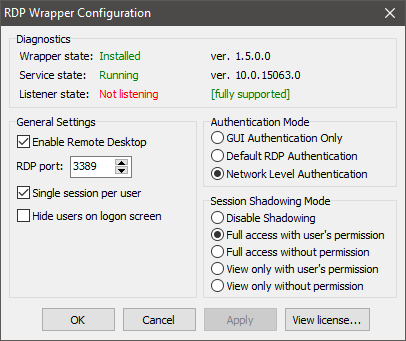
lctam
on 12 Jun 2017
Because 256 was marked as a duplicate of this issue and this issue is still open. There's no need for 20 issues that say the same thing.
ManiacDC
on 12 Jun 2017
Is there a way to fix for Windows 10 Home 1703?
 alexivanoff
on 12 Jun 2017
alexivanoff
on 12 Jun 2017
Hi,
I have the same issue (Surprise!), but this is not the reason of my message.
All the negative messages telling you that something does not work should not hide the fact that you made an awesome work ! Thank you for your work and your time !
 CPatou
on 13 Jun 2017
CPatou
on 13 Jun 2017
I compared System32 files that have "rdp" in their name between Win 10 Home 10.0.15063.0 ("not listening") and Windows Server 2016 10.0.14393 VM (works by default) and it seems that some of the files from Server are missing in Home and most of the dll and sys files have different sizes, both files starting with "term" are also different. If you need those files I can upload them.
 Pawiczekk
on 18 Jun 2017
Pawiczekk
on 18 Jun 2017
Comparing different editions is incorrect strategy. You should compare different builds of the same edition.
binarymaster
on 18 Jun 2017
I have Windows 10 Home install files on a USB drive, I think it is from before the creators update, I will try installing it on a VM to compare.
Pawiczekk
on 18 Jun 2017
I have both a pre and post creators update Home version. What are the files that you want to compare and what comparison? I could possibly forward the files.
 WizardToo
on 19 Jun 2017
WizardToo
on 19 Jun 2017
Same problem on 15063.
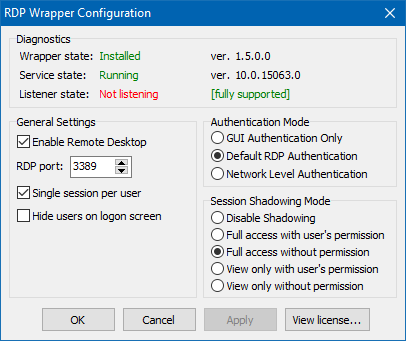
 zkelo
on 23 Jun 2017
zkelo
on 23 Jun 2017
I can confirm, same issue on 15063.
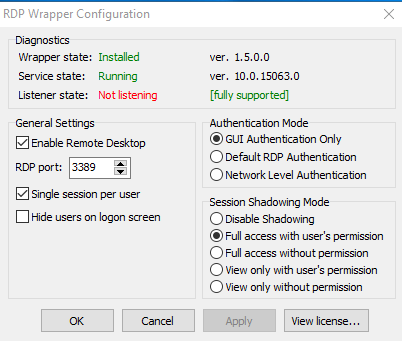
 beefsupreme13
on 29 Jun 2017
beefsupreme13
on 29 Jun 2017
CTRL-F is your friend 👍

 porear
on 29 Jun 2017
porear
on 29 Jun 2017
A new update broke the work of the PDP.
Many people have a salary of 300-500$ and cant buy a licensed Windows 10 pro (250$) .
Go to ebay, and buy OEM key 2-4$ win 10 pro. All working with shadow.
Now i have win10 pro and working RDP, thank you!
Спасибо за проделанную работу, очень крутая штука.
 Steklorez
on 29 Jun 2017
Steklorez
on 29 Jun 2017
I tried editing termsrv.dll as suggested to no avail. So I used the Recovery option "Go back to an earlier build" which took me back to Version 1607 and RDP wrapper is working again. Of course the first thing Windows does is download the Creator's Update. So for now I won't Install Updates hoping for a fix eventually.
 ckran
on 1 Jul 2017
ckran
on 1 Jul 2017
Same issue after updated to version 1703.
 sslhk
on 3 Jul 2017
sslhk
on 3 Jul 2017
Can i do something to help with finding a fix?
 kadzsol
on 3 Jul 2017
kadzsol
on 3 Jul 2017
Thank you Steklorez. I did as you suggested and paid $2.08. I bought from instant-pc-activation on eBay. I now have Windows 10 Pro and do not need to worry about this going forward.
beefsupreme13
on 3 Jul 2017
Is there any progress on this yet? I am not sure if I missed something with the fix in it.
 tel19
on 12 Jul 2017
tel19
on 12 Jul 2017
Nope, still no progress.
When this will be fixed, issue would be closed.
binarymaster
on 12 Jul 2017
Upgrading to windows 10 pro is a fix. I paid under $3 for a oem license on eBay. Cheap and No more worrying about this breaking after windows updates.
beefsupreme13
on 12 Jul 2017
@beefsupreme13 can you provide a link to the ebay listing you purchased? I'd like to find another one like it. Thanks.
 chapaj
on 12 Jul 2017
chapaj
on 12 Jul 2017
Excuse me, but this:
Upgrading to windows 10 pro is a fix
... isn't a fix. It's a workaround at best. And then this:
can you provide a link to the ebay listing
... is an offtopic.
At the moment we need some Windows debugging skills.
Please stop the noize:)
sskras
on 12 Jul 2017
@chapaj search for windows 10 pro oem. This is where I bought from, but they don't have any left.
http://www.ebay.com/itm/WINDOWS-10-PRO-32-64BIT-PROFESSIONAL-LICENSE-KEY-ORIGINAL-CODE-OEM-SCRAP-PC/282389196016?ssPageName=STRK%3AMEBIDX%3AIT&_trksid=p2057872.m2749.l2649
@sskras relax, your comments helped no one. Use you skillz to fix the code if you don't want to use an easy cheap workaround that also future proofs the problem going no forward.
beefsupreme13
on 14 Jul 2017
And another important point to remember: rdp under Win 10 Pro permits only ONE console application at any time. This prevents you from RDPing into localhost to conveniently open two or more sessions which can be very useful. RDPWrapper conveniently bypasses this limitation.
Again what we need here are coding/debugging skills.
 alegault
on 14 Jul 2017
alegault
on 14 Jul 2017
only ONE console application at any time. This prevents you from RDPing into localhost to conveniently open two or more sessions
This is client-side (mstsc) limitation, try using rdesktop or FreeRDP.
binarymaster
on 14 Jul 2017
You can also use this workaround to enable multiple sessions..
http://woshub.com/how-to-allow-multiple-rdp-sessions-in-windows-10/
beefsupreme13
on 14 Jul 2017
@beefsupreme13 Thanks for a great tip
alegault
on 14 Jul 2017
Will Rdesktop or FreeRDP work on Windows Home ?
mrpentium
on 15 Jul 2017
Tareiner, stop spam.
Steklorez
on 18 Jul 2017
I have the same problem with build 15063. I don't know anything about coding so I'm just anxiously waiting for this problem to be resolved - how will we know when the problem is fixed? Do I check to see if v1.6.2 comes out?
 bryang22
on 22 Jul 2017
bryang22
on 22 Jul 2017
Also, I'm not sure if anybody in this thread suggested going back to Windows 8, but that might be an option if you're willing to do a clean install and don't like windows 10.
bryang22
on 22 Jul 2017
@binarymaster
bryang22
on 23 Jul 2017
@bryang22 what?
binarymaster
on 23 Jul 2017
@binarymaster Sorry - I meant to say:
"I have the same problem with build 15063. I don't know anything about coding so I'm just anxiously waiting for this problem to be resolved - how will we know when the problem is fixed? Do I check to see if v1.6.2 comes out?"
thanks for your work
bryang22
on 23 Jul 2017
how will we know when the problem is fixed?
Read this comment: https://github.com/stascorp/rdpwrap/issues/194#issuecomment-314722315
You'll get a notification when this issue will be closed.
binarymaster
on 23 Jul 2017
@binarymaster Just wondering, would donating money to this cause speed up fixing the problem? I personally wouldn't donate a significant sum, but a couple of people's beneficiaries together would be remarkable and might motivate the developers to speed up the process a bit.
Or maybe I'm mistaken and already the developers are working at full speed.
I really can't seem to find any other free alternative to RDP wrap.
bryang22
on 25 Jul 2017
I have the same problem with build 15063.
 xhou
on 26 Jul 2017
xhou
on 26 Jul 2017
For anyone not already aware of it, VNC such as the open-source TightVNC may be a reasonable workaround while waiting for a fix for this. You'd need to install it on both machines as it's a different protocol from RDP. TeamViewer is another popular option which may be easier to use than VNC.
 ivorget
on 26 Jul 2017
ivorget
on 26 Jul 2017
For anyone not already aware of it, VNC such as the open-source TightVNC may be a reasonable workaround while waiting for a fix for this. (...) TeamViewer is another popular option which may be easier to use than VNC.
Unfortunately these options, while very useful, do not allow you to open a true remote session , they only provide "remote control" i.e. let you use the computer as if you were sitting in front of it.
Afaik, the Windows remote desktop is the only tool that will let you initiate a remote session. If there's another tool that offers this functionality, I'd be glad to know!
 ogerardin
on 26 Jul 2017
ogerardin
on 26 Jul 2017
I agree with @ogerardin. @ivorget , if you find TightVNC or TeamViewer to be a reasonable workaround, go for it. I just find the VNC to be quite laggy (for gaming).
So what is this "afaik" remote desktop tool? Could you comment the link? Thanks.
bryang22
on 26 Jul 2017
Afaik = As far as I know.
CPatou
on 26 Jul 2017
@ogerardin (and others who may be interrested): I used to control two of my boxes -- those set up with Win10 home edition -- via binarymaster's excellent RDPwrapper, that's how I landed here.
Unfortunatelly, I upgraded one of them to the so called 'Creators Update' (Version 1703, build 15063.483) which, I suppose, is true for most of my help searching comrades here on github. And to make things worse, after the upgrade I immediatelly deleted the old version of Windows 10 -- C:\Windows.old and C:\Windows10Upgrade -- for space reasons, prior to check all functionality I needed. So in the end, on one of my boxes I was not able to revert to a state allowing a RDPwrap to 'wrap' things as it used to do.
To make a long story short ;), I had to search for an alternative solution until my coding hero binarymaster is able to find a solution. Being familiar with almost every 'remote control' software there is for ages, both professionally and in private, and in need of a solution that crosses OS boundaries, and being aware that TeamViewer now runs under surveillance of Britain's GCHQ, I finally bumped into AnyDesk (anydesk.com).
It's free for private/ hobbyist things, it's cross OS(ed), it's fast, and it avoids traffic leaving your own network; if wanted/ needed. Last, but not least, by installing a Windows service on the target machine -- my unfortunate Windows 10 home box running the 'Creators Update' Version 1703, build 15063.483 in the example mentioned above -- you can 'RDP' into the target machine without any hassle and do whatever you need to do (as an Administrator).
However, there is a limit in the free version: one instance into one machine at one time. Anyway, it suits my needs in the meantime.
HTH, Frank.
 efferle
on 26 Jul 2017
efferle
on 26 Jul 2017
@efferle Anydesk looks fine, but does it let you open a remote Windows session? I.e. if a user is logged in and using the computer, can you open a second concurrent session without interfering with the local user's session?
ogerardin
on 27 Jul 2017
Same problem after reinstalling my windows 10 home on new drive
 ahmadooka
on 27 Jul 2017
ahmadooka
on 27 Jul 2017
@ogerardin: I am afraid no. You can't establish a 'new' session in terms of functionality a typical terminal server software would offer. That reads, if a user 'Bob' is already logged in on the target box -- the machine you'd like to control -- you'd have to use Bob's credentials to use his session/ environment. There is no way to open a new session on the target box that allows you to log in as 'Alice' at the same time Bob is working there.
Of course, the Windows built-in functionality of user switching is available -- Bob's session would be halted, and you could work as Alice as long as you need to do so. But again, AnyDesk is just some sort of 'distance-from-your-desk-to-remote-PC' shortener in the first place, it's not a RDPwrapper replacement. or even a piece of terminal server software. Apologies if I made the impression AnyDesk would fit into such a setting.
It's just like a keyboard-, mouse-, and display-extender for machinery located on the other side of the city/ country/ or your office located on top of New York's Empire State Building, while your PCs are in the basement -- and all the elevators are shut down due to maintenance work. ,)
Again, sorry for any confusion I may instilled.
efferle
on 27 Jul 2017
Dear @binarymaster.
after reading this long long thread, post after post i can clearly say there is not a fix yet :)
Can you tell us (Please) from 1 to 100 - how much % you already "Cracked"..
saying to people you are 40-50-60-70 % done will give us hope.. and hope is the only thing we have now my friend.
Thanks buddy! :-)
 smounche
on 28 Jul 2017
smounche
on 28 Jul 2017
For those for whom the extra effort is worth it, you can go back and do a clean install of 1607. ISOs are catalogued here, and per the site the actual download links are from MS and will pass MD5 checks. You'll still need your own valid product key to activate, unless re-activation of prior valid license is automatic upon recognizing your hardware.
http://windowsiso.net/windows-10-iso/windows-10-anniversary-update-1607-download-build-14393-0/
I don't think the Win 10 media tool lets you choose an ISO to create a USB installer, but the old Win 7 tool will and will successfully make a Win 10 installer USB.
https://www.microsoft.com/en-us/download/windows-usb-dvd-download-tool
porear
on 28 Jul 2017
Can you tell us (Please) from 1 to 100 - how much % you already "Cracked"..
Actually 0%, because I have no idea what exactly changed in termsrv logic since build 14997.
binarymaster
on 28 Jul 2017
Hi
I am not a developer but i noticed that when i open the "termsrv.dll" with 7zip i notice a change on the size of only 4 files.
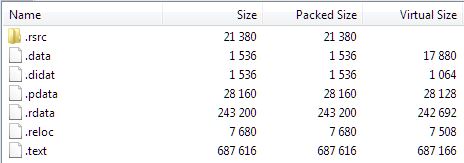
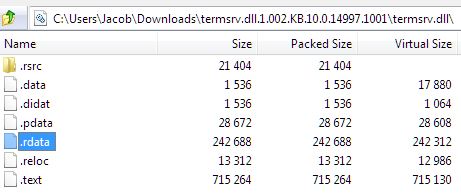
I am not sure how to dig more in, and even if it will help to get a fix.
Thanks
 jacobshilitz
on 28 Jul 2017
jacobshilitz
on 28 Jul 2017
@efferle well yes I had some hope, but actually AnyDesk is just a rmote control solution just like TeamViewer or VNC... So no concurrent remote sessions :(
ogerardin
on 29 Jul 2017
@ogerardin: Right, sorry for any disappointment I might have caused.
It seems there is a (commercial) reason why binarymaster's efforts to allow "terminal servicing" on the low end/ price Windows 10 (Home Edition) has come to some sort of an end: it did suit the needs of the 'average Joe'.
I suppose that is one (or the most important?) reason why Microsoft did change one or two things in respect of binarymaster's efforts. Since these (Microsoft) guys are aware of projects of this scale, I am pretty much sure they did everything they could to circumvent any of binarymaster's approaches to solve the issues regarding "Creator's Update".
And since we all know that this f_cking "Creator's Update (Version 1703)" will be installed by MS-force on all internet connected Home Versions sooner or later, we might seek for alternatives, in some way. Be it by change in doing things, be it by change of operating sytems, be it by 'anything else'.
Given binarymaster's last answer to a well driven question raised by porear, I definitely, and personally, have no hope that he -- my coding hero binarymaster -- will be able to manage MS torpedoing the/ his project.
efferle
on 29 Jul 2017
I am monitoring this thread for quite some time now and I think efferle is right about the situation. MS might have removed some files/processes from the latest build to break rdpwrapper. Technically it should be possible to compare the new situation to the old one and reverse the change made. It might be needed to (re)use some components from other/earlier builds but it would mean a license violation. I am not sure if binarymaster wants to do this. It would be nice if he could give us clarity on this. If he decides to stop further development I would perfectly understand that.
kadzsol
on 29 Jul 2017
@foxpdll writes:
I rollback KB4019472 update and RDP Wrapper Worked for me.
As temporary it is possible to use RDP Wrapper.Windows 10 Home 1607 14393.1066 32Bit
Posts like that seems very useful!
This info gives me idea to install clean x86 version 1607 (OS build 14393.0), 3.15 GiB. Then to install cummulative update KB4015217 for x86 (572 MiB) to get the build 14393.1066 used by @foxpdll to ensure the project functionality is OK on another machine too.
In positive case this would give us OS testbed which require only 230.7 MiB size Delta update KB4019472 for x86 to bring it to OS build 14393.1198.
Now if this breaks the project, installation of 230 megabytes package would be a lot easier to bisect than usual / uncontrolled / unknown online process of updating the OS.
That's the plan I've improvised.
Fingers crossed for finding some time to set it up like that in a VM.
sskras
on 29 Jul 2017
Same problem. I BELIEVE IN YOU GUYS!
(Seriously, please find a fix for this and don't let this project that helped so many people die.)
Thanks for all your efforts!
 Dumonster
on 2 Aug 2017
Dumonster
on 2 Aug 2017
@binarymaster you mentioned kernel debugging with serial output way back, https://github.com/stascorp/rdpwrap/issues/194#issuecomment-292202816 , i am wondering if this is something you want done still? i have got some time and can play around, but i need som help or pointers to enable the serial output and kernel debug.
 zapy85
on 6 Aug 2017
zapy85
on 6 Aug 2017
@zapy85 see these links:
binarymaster
on 7 Aug 2017
@binarymaster cool, i actually work a lot with serial communication so that shouldnt be a problem, the versions i should compare is what you commented before i assume?
ill see if i can ge a hold of the isos and install them on an older laptop :)
zapy85
on 7 Aug 2017
Compare between 10.0.14986.1000 and 10.0.15002.1001, with and without RDP Wrapper.
binarymaster
on 7 Aug 2017
@zapy85 it is probably easier to use VMWare player free or VirtualBox for the testing.
ManiacDC
on 7 Aug 2017
yeah, ill see whats easiest to setup
zapy85
on 7 Aug 2017
cant seem to find the 15002 build anywhere :(
zapy85
on 7 Aug 2017
l33tissw00t
on 7 Aug 2017
@l33tissw00t good try but it only gives me " Attention!!!
Generation of links to the software-download.microsoft.com service - is paused. "
zapy85
on 7 Aug 2017
l33tissw00t
on 7 Aug 2017
cool cool!
zapy85
on 7 Aug 2017
@binarymaster btw, what do you mean with with and without rdpwraper? (i assumed i would try the Home edition as thats the one thats having problems?)
zapy85
on 7 Aug 2017
@zapy86 I think he means "without and with rdpwrap installed"
 LufyCZ
on 7 Aug 2017
LufyCZ
on 7 Aug 2017
@LufyCZ Home dosnt support remote desktop native, apart from the " Remote Assistance " function thats why i got a bit confused!
zapy85
on 7 Aug 2017
Home dosnt support remote desktop native, apart from the " Remote Assistance " function thats why i got a bit confused!
But anyway, the debug log from it would be appreciated.
binarymaster
on 7 Aug 2017
@binarymaster you on irc or something? iwe gotten so far that windbg connects to the computer, got something that said winterm service etc, but now im not getting it any more :/ could we do a joint effort?
zapy85
on 7 Aug 2017
@binarymaster i got this at least, if this is "all" you need (successful connection to 14986)
Using NET for debugging
Opened WinSock 2.0
Waiting to reconnect...
Connected to target 192.168.1.68 on port 49152 on local IP 192.168.1.251.
You can get the target MAC address by running .kdtargetmac command.
Connected to Windows 10 14986 x64 target at (Mon Aug 7 22:36:24.459 2017 (UTC + 2:00)), ptr64 TRUE
Kernel Debugger connection established.
Symbol search path is: srv*
Executable search path is:
Windows 10 Kernel Version 14986 MP (1 procs) Free x64
Product: WinNt, suite: TerminalServer SingleUserTS Personal
Built by: 14986.1000.amd64fre.rs_prerelease.161202-1928
Machine Name:
Kernel base = 0xfffff801f221a000 PsLoadedModuleList = 0xfffff801f25247f0
Debug session time: Mon Aug 7 22:36:23.324 2017 (UTC + 2:00)
System Uptime: 0 days 0:06:30.778
i will do the same for 15002 tomorrow.
zapy85
on 7 Aug 2017
l33tissw00t
on 7 Aug 2017
Here's a fun fact.
I have an intel NUC which came with an included win 10 home licence in the wild with RDP wrapper and clearly was in the same boat as everyone else.
Here's the fun part
You can upgrade Windows 10 home, to Windows 10 pro, using a Windows 7 Pro key.
I expect you can do the same with a windows 8 pro key.
howto:
Go to the store. Search for windows 10 pro. Choose the enter your own key option and throw in the win 7 pro key, and it upgrades.
You heard it here first
 iwanttobeamole
on 9 Aug 2017
iwanttobeamole
on 9 Aug 2017
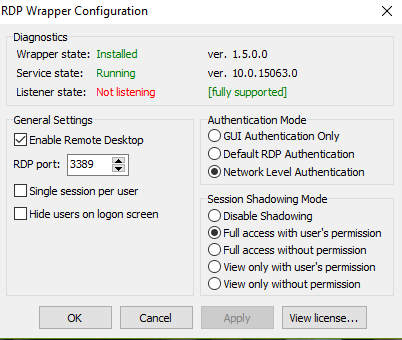
OS BUILD :- 15063.540
VERSION :- 1703 (WINDOWS 10 HOME)
Is there any fix to this or any alternative method?
 sickingajay
on 17 Aug 2017
sickingajay
on 17 Aug 2017
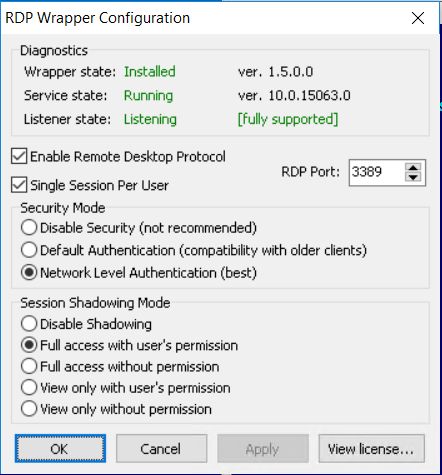
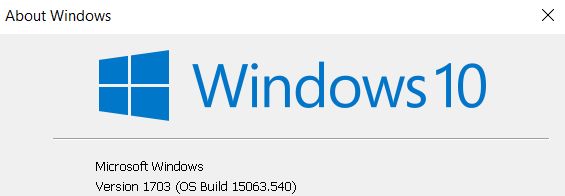
I found Thinstuff XP/VS Terminal Sever for Windows ( http://www.thinstuff.com/products/xpvs-server/ ). It looks like great alternative to RDPWrap. And, it works :) (see screen from RDPWrap conf). and it is cheaper than Windows 10 Pro https://www.thinstuff.com/licensing/index.php?selected_product=16;14;15
 psimkovic
on 17 Aug 2017
psimkovic
on 17 Aug 2017
@binarymaster, What @psimkovic says can help you, if you enter the page
(https://www.thinstuff.com/products/rdh/) you can see a note to the right [New version of RDH! Windows compatibility 10 1703 Jun. 26, 2017 Version 1.0.840Registering Changes] If you check the package maybe you can find something that can help you.
 Joaquinhuberto
on 17 Aug 2017
Joaquinhuberto
on 17 Aug 2017
@binarymaster +1 from me after creative edition update. Running services 10.0.15063.0 with wrapper 1.5.0.0 with windows Version 1703 (os build 150634.483). Also, I recommend everyone in this thread send Binary a cold beverage of his choice for all the headache he has to go through to fix this :-)
Till then, I dug out my ancient but still working kvm switcher and I'm good for now.
 mccorkle
on 18 Aug 2017
mccorkle
on 18 Aug 2017
You could get windows 10 without a product key. Just download and install the windows 10 ISO file from https://www.microsoft.com/en-us/software-download . The inconvenience is that there is an "Activate Windows" watermark in the bottom-right corner and that you cannot personalize your computer. It could be kind of annoying, but it's not too bad.
bryang22
on 18 Aug 2017
Would using an older build of termsrv.dll help?
 ghost
on 19 Aug 2017
ghost
on 19 Aug 2017
@markyi370: Somebody already tried it, and it didn't work
LufyCZ
on 19 Aug 2017
Try this dll file (for 64bit win10 home edition) : rfxvmt.zip.
Unzip it into the C:\windows\system32 folder (if the file with the same name exists, rename it to rfxvmt.dll.old).
Reinstall rdpwrap and run update.bat.
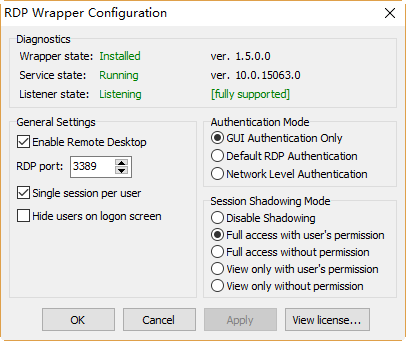
Hi everyone, this is not my effort.
I happened to find a "method" to solve the problem for me and the dll file rfxvmt.dll, I think is the key.
Perhaps you can try 32bit rfxvmt.dll or other different version that you think safety.
BTW, I'm not a "hacker", even not a coder.
 youjoy
on 20 Aug 2017
youjoy
on 20 Aug 2017
Do we all owe @youjoy a massive thank you?!?
l33tissw00t
on 20 Aug 2017
Hi all
The fix from @youjoy does not works for me ;-(( (But many thanks to you)
Edit: Trying with both rdwrap 1.6 and 1.6.1
Note that i had already the last update version before copying rfxvmt.dll to the target folder.
;-((
 astro075
on 20 Aug 2017
astro075
on 20 Aug 2017
it works ................and many thanks to all
BUT using MSTSC to connect somewhere else, the remote screen is not resized as it was before.
May be I neeed to investigate but your solution works.
BR
didier8174
on 20 Aug 2017
SORRY your last DLL works perfect (and connections to all W10 computers are Ok now).
Congratulations
didier8174
on 20 Aug 2017
@youjoy: It seems I have to extend my personal hall of heroic coders. ,) Works perfectly on my problematic box I mentioned earlier in this thread. What a beautiful experience this is, just minutes before lunch on this sunny sunday afternoon here in the middle if Europe. Thank you, and may the force bless you for your efforts, you really made my day. ,) A million hugs to you.
@astro075: Did you reboot your box? It turned out for me that this was neccessary after hitting RDPWrap's uninstall.bat and before running install.bat again.
efferle
on 20 Aug 2017
@efferle
Yes i tried many times. And i did an unsinstall-reboot-install-update (all this with "Run as admin".
But no way :-((
astro075
on 20 Aug 2017
@astro075: Sorry to read this. And please don't get angry with by repeating what I actually did, just a couple of minutes ago to finally succeed using youjoy's solution.
I myself was a happy RDPWrap v1.6.1 user on two of my PCs running Windows 10, 64-bit, Version 1607 (Build 14393.1593) Home Editions, determined by Start -> Run -> winver -> Enter. A couple of months ago, I upgraded both machines by accepting Microsoft's "Good news! The Windows 10 Creators Update is on its way." dialogue shown by Windows-key + I. Stupid, I know, to upgrade both boxes prior to check all functionality I needed. However, on one machine I could revert the upgrade, but on the other I couldn't because I deleted all relevant files and folders due to space reasons.
In the meantime -- until today's revelation delivered by youjoy -- I helped myself out by using AnyDesk, a remote access software similar to TeamViewer which I used in the past; until I learned by Edward Snowden, Wikileaks and a few other publications, it's the prefered SW used by Britains GCHQ for intercepting remote stuff. ;( But I think I get off the track. ,)
So after waking up today I checked my inbox, downloaded rfxvmt.zip, asked for some help from my older pal virustotal.com -- please don't get that wrong, youjoy ,) --, ran RDPWrap's uninstall.bat, renamed the original rfxvmt.dll to rfxvmt.dll.org, copied rfxvmt.dll to %windir%\system32 -- NOT to the other locations where it is available, like %windir%\SysWOW64, %windir%\WinSxS, and the like -- rebooted the PC, ran RDPWrap's install.bat again and voilà, RDPConf.exe worked the way it was developed by binarymaster.
Finally, I closed the remote session I used to establish by alternative software AnyDesk, opend a regular mstsc.exe dialogue from my source machine and voilà again, my problematic Windows 10 Home Edition, 64-bit, Version 1703 (Build 15063.540) aka Creators Update was connected the way it should.
Again, don't get angry with me because of this post, I just wanted to give a possibly helping hand in case you skipped or missed a file or folder or something. Anyway, good luck, I'll keep my fingers crossed.
efferle
on 20 Aug 2017
Thanks a lot, it worked for me too
@astro075, "Run as admin" is not required, uninstall & reinstall, you don't need to run scripts as admin.
 endmarsfr
on 20 Aug 2017
endmarsfr
on 20 Aug 2017
Hi
I am not angry at all. Don't worry about that.
I tried everything even not used "run as admin".
No way, listener is not listening...
Maybe I have a firewall problem.
But thanks at all for your help
From: efferle notifications@github.com
Sent: Sunday, August 20, 2017 2:03:17 PM
To: stascorp/rdpwrap
Cc: astro075; Mention
Subject: Re: [stascorp/rdpwrap] Listener is not listening on Win 10 Home (build 14997+) (#194)
@astro075https://github.com/astro075: Sorry to read this. And please don't get angry with by repeating what I actually did, just a couple of minutes ago to finally succeed using youjoy's solution.
I myself was a happy RDPWrap v1.6.1 user on two of my PCs running Windows 10, 64-bit, Version 1607 (Build 14393.1593) Home Editions, determined by Start -> Run -> winver -> Enter. A couple of months ago, I upgraded both machines by accepting Microsoft's "Good news! The Windows 10 Creators Update is on its way." dialogue shown by Windows-key + I. Stupid, I know, to upgrade both boxes prior to check all functionality I needed. However, on one machine I could revert the upgrade, but on the other I couldn't because I deleted all relevant files and folders due to space reasons.
In the meantime -- until today's revelation delivered by youjoy -- I helped myself out by using AnyDesk, a remote access software similar to TeamViewer which I used in the past; until I learned by Edward Snowden, Wikileaks and a few other publications, it's the prefered SW used by Britains GCHQ for intercepting remote stuff. ;( But I think I get off the track. ,)
So after waking up today I checked my inbox, downloaded rfxvmt.zip, asked for some help from my older pal virustotal.com -- please don't get that wrong, youjoy ,) --, ran RDPWrap's uninstall.bat, renamed the original rfxvmt.dll to rfxvmt.dll.org, copied rfxvmt.dll to %windir%\system32 -- NOT to the other locations where it is available, like %windir%\SysWOW64, %windir%\WinSxS, and the like -- rebooted the PC, ran RDPWrap's install.bat again and voilà, RDPConf.exe worked the way it was developed by binarymaster.
Finally, I closed the remote session I used to establish by alternative software AnyDesk, opend a regular mstsc.exe dialogue from my source machine and voilà again, my problematic Windows 10 Home Edition, 64-bit, Version 1703 (Build 15063.540) aka Creators Update was connected the way it should.
Again, don't get angry with me because of this post, I just wanted to give a possibly helping hand in case you skipped or missed a file or folder or something. Anyway, good luck, I'll keep my fingers crossed.
—
You are receiving this because you were mentioned.
Reply to this email directly, view it on GitHubhttps://github.com/stascorp/rdpwrap/issues/194#issuecomment-323580706, or mute the threadhttps://github.com/notifications/unsubscribe-auth/AbUlEHWTzsmV8CMSSfEu0JBZvXX7LnNHks5saCCEgaJpZM4LjrPS.
astro075
on 20 Aug 2017
have you tried to run "update" after reinstall ?
endmarsfr
on 20 Aug 2017
Yep i did... . But i had already the last version. (20170804)
I think the problem could be here. The needed update process is not performed because already up2date.
astro075
on 20 Aug 2017
it's strange, even if you had a firewall that blocking connections, you should be able to run rdpcheck and rdpconf must shows listener state listening
endmarsfr
on 20 Aug 2017
@youjoy thank you so much....that fixed my problem on Windows 10 Home/Version 1703/Build 15063.540
 RSilvers1
on 20 Aug 2017
RSilvers1
on 20 Aug 2017
It's great job but...
I would like to try but how can I probe that rfxvmt.zip is safe to install. (No virus or no malware are in rfxvmt.zip.)
Am I too scared?
 zefimia
on 20 Aug 2017
zefimia
on 20 Aug 2017
@zefimia virustotal https://www.virustotal.com/#/file/32ff81be7818fa7140817fa0bc856975ae9fcb324a081d0e0560d7b5b87efb30/detection
 BiteByteBit
on 20 Aug 2017
BiteByteBit
on 20 Aug 2017
@zefimia, the rfxvmt.dll file in it is a file readily available in any Windows 10 Pro computer.
I compared the hashes and this one is identical to the original in Windows Pro. And if you have a Windows Pro available you can copy it yourself from there.
YisroelTech
on 20 Aug 2017
@YisroelAdler rfxvmt.dll is present in my one machine with windows home that does not have the creators update. Can anyone with the update installed check the windows.old and see if it's present in there?
BiteByteBit
on 20 Aug 2017
@BiteByteBit it is not in windows.old on my device. But is the rfxvmt.dll in the system32 folder and is it the same file then this one? Becuase I found it in the WinSxS folder (basically not used) on my Windows with Creators Update, but it is a much smaller file.
YisroelTech
on 20 Aug 2017
oops.
Thanks for very quick reply. :)
I've win10 pro machine, which upgrade from win7 ultimate, and I check the sha1sum to the rfxvmt.dll in rfxvmt.zip and it's match.
rf)Sorry for not Engligh but Japanese.
PS C:\Windows\system32> certutil -hashfile c:\windows\system32\rfxvmt.dll
SHA1 ハッシュ (ファイル c:\windows\system32\rfxvmt.dll):
81d4ad81a92177c2116c5589609a9a08a5ccd0f2
PS C:\Uers**\Downloads> certutil -hashfile .\rfxvmt.dll
SHA1 ハッシュ (ファイル .\rfxvmt.dll):
81d4ad81a92177c2116c5589609a9a08a5ccd0f2
zefimia
on 20 Aug 2017
Great work -- so nice to see real progress! But when I run RDPCheck, my logon screen comes up and I enter my password, I get "Access Denied." If I enter the wrong password, I get the prompt to try again. When I try to access from another device, I don't even get the logon screen. Any ideas?
 PortlandPaw
on 20 Aug 2017
PortlandPaw
on 20 Aug 2017
@YisroelAdler rfxvmt.dll on the left is from my windows home machine that was not updated and the one on the right is from @youjoy 's zip. I tried the wrapper with both and both work on my windows home machine that has been updated.
I did find the rfxvmt.dll in my system32 folder on the non updated machine
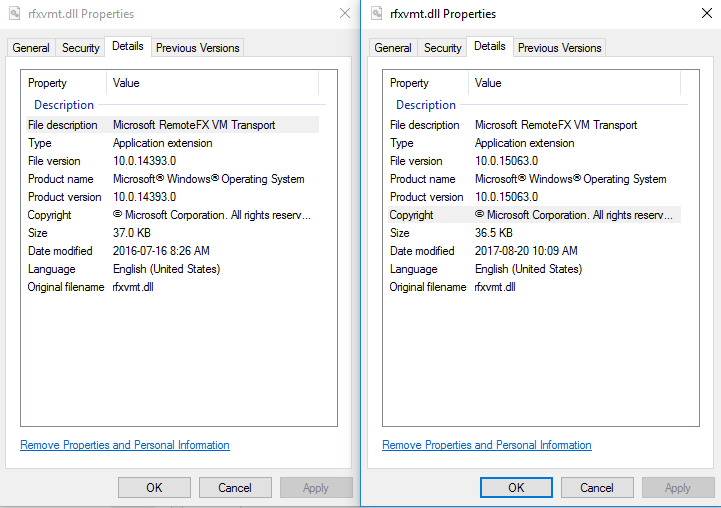
BiteByteBit
on 20 Aug 2017
Hey thanks!
Now it works. If i take the rfxvmt.dll file from my other 10 home machine that is (extra because of that) not yet updated.
Uninstall rdwrap, install rdwrap again and update. Now is the listener listening!
Works great now! Youpie!
astro075
on 20 Aug 2017
Well, I just went back to my old rfxvmt.dll in place of the one provided by youjoy and am seeing the same behavior. It says the listener is listening but apparently not hearing anything. Am I missing something?
PortlandPaw
on 20 Aug 2017
+1 on the fix from @youjoy above. I did not have that file on my machine before I installed, so I just dropped it in, uninstalled, re-installed, updated, and poof, back to working as expected. Thank you @youjoy !
mccorkle
on 20 Aug 2017
Yeah, really great work. Ist DOES work on my maschine that did not had the dll before. But on a second one, which had the dll already in place, it DOES NOT work. Replaced the dll, uninstalled/reinstalled rdpwrap but no way. :(
 bombcheck
on 20 Aug 2017
bombcheck
on 20 Aug 2017
So now just add this dll to the package, and maybe add a bat file to install it.
Maybe it possible to get a fix in the code
jacobshilitz
on 20 Aug 2017
@PortlandPaw just disable "Single session per user"
LufyCZ
on 20 Aug 2017
@astro075: Yey, I knew you'd finally make it. ,)
@98jbsz: I am afraid it's not that simple for binarymaster to make this happen. As this problem resolving DLL provided by youjoy is an intellectual 'property' of Microsoft -- as you can see via Window's own property dialogue -- any distribution of it without proper legal permission would result in a copyright violation/ infringement; including all possible penalty charges.
efferle
on 20 Aug 2017
Is the dll different on 32 and 64 bit systems? It works for me on my 64 bit maschine but not on my 32 bit...
bombcheck
on 20 Aug 2017
@LufyCZ -- Thanks, but that didn't do it. I can "logon" from RDPCheck (i.e. get past the logon screen), but it's still not visible from external devices, on or off the network.
PortlandPaw
on 20 Aug 2017
I verified the given file against one that I had on my Win 10 pro 15063
installation and upon finding it same copied the latter to the machine I
wanted fixed. Subsequent rdpwrap uninstall, reboot, install and update
later, it started working as before.
@youjoy, Thank you for finding this workaround/fix. I want to hope that
things do not change after further windows updates...
On Sun, Aug 20, 2017 at 1:12 PM, youjoy notifications@github.com wrote:
Try this file :rfxvmt.zip
https://github.com/stascorp/rdpwrap/files/1236856/rfxvmt.zip.
Unzip it into the C:\windows\system32 folder.
Reinstall rdpwrap.
[image: 2017-8-20 13-10-33]
https://user-images.githubusercontent.com/785060/29492268-2d01c42c-85a9-11e7-9835-0eefb524fcbc.png—
You are receiving this because you are subscribed to this thread.
Reply to this email directly, view it on GitHub
https://github.com/stascorp/rdpwrap/issues/194#issuecomment-323564111,
or mute the thread
https://github.com/notifications/unsubscribe-auth/AcvkrAb7PeUOX6BmF-sR3Q4hFjIsbhdUks5sZ8BEgaJpZM4LjrPS
.
 findanoop
on 21 Aug 2017
findanoop
on 21 Aug 2017
also works on 10.0.16257.1
@youjoy thank you so much!
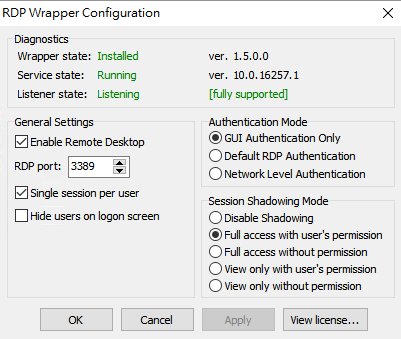
 mickeywong
on 21 Aug 2017
mickeywong
on 21 Aug 2017
Nice catch @youjoy . Anybody concerned about the origins of rfxvmt.dll can locate their own copy from a Windows 10 Pro workstation (including Creator's Edition) in the %SystemRoot%System32 directory. The problem this whole time hasn't been with RDP Wrapper at all. Microsoft re-wrote the remote desktop functionality to include this new system DLL, and made sure it was absent on Home Edition versions of Windows. @binarymaster , I suppose this will have to be a new file to keep an eye on with subsequent MS Windows updates.
I was able to successfully "patch" my Home Edition by uninstalling RDP Wrapper, copying (not moving) rfxvmt.dll to my C:\WindowsSystem32 directory, updated the security settings to match the other DLL's in this folder, then re-installed RDP Wrapper. No reboot necessary. Perhaps other people only got this to work because the OS corrected the permissions automatically after a reboot.
The reason you copy rfxvmt.dll instead of moving it is so the file will assume the default permissions for the System32 directory. Moving the file into this folder retains the permissions from the directory where the file originated.
To manually set the permissions after rfxvmt.dll has been copied (not moved) into the System32 directory:
1) Go into 'Properties' for the file, select the 'Security' tab then select the 'Advanced' button, select 'Change Permissions' button, disable inheritance and have the existing inherited permissions converted to explicit permissions. It's okay to apply these changes at this point.
2) Change the file ownership to TrustedInstaller. To do this, click the 'Change' link next to the 'Owner' field and enter NT Service\TrustedInstaller. It's okay to apply this change at this point.
3) Add 'NT Service\TrustedInstaller' with 'Full' permissions; edit 'Administrators' and 'SYSTEM' permissions by ensuring they're each only granted 'Read & execute' permissions.
- highlight SYSTEM, select the 'Edit' button, select the link to clear all permissions, put the checkmark next to 'Read & Execute' then select okay.
- repeat for 'Administrators'
4) OK your way out of the file permissions and properties for the file and re-install RDP Wrapper
Voila!
Kudos again to @youjoy for their find and to @binarymaster for enabling this wonderful enhancement to Remote Desktop functionality on all Windows workstations. I'm so happy, and good luck to the rest of you.
MadDog927ca
on 21 Aug 2017
@MadDog927ca
Thanks for having a look on the fike permissions. I already thought that it may not work if they are wrong. Corrected them, re-installed RDPwrap (rebootet between), but still "not listening"...
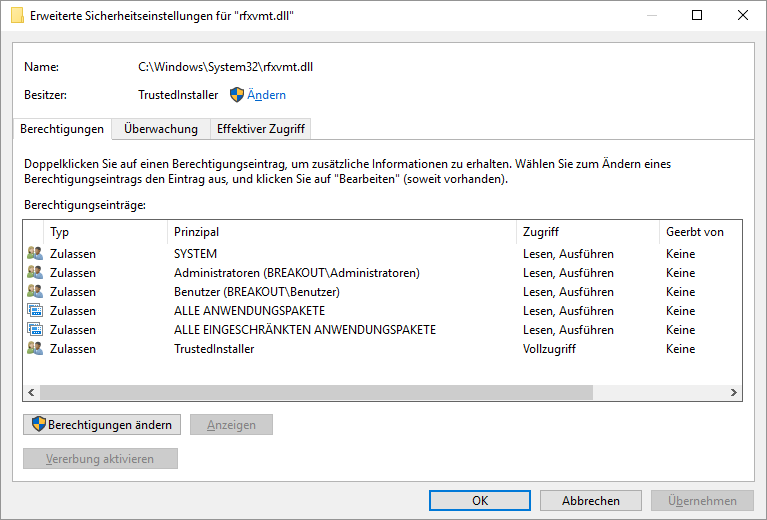
Anything wrong with my permissions?
bombcheck
on 21 Aug 2017
@bombcheck: I see some difference to my 'Advanced Security Settings' tab on my Win 10 Home Edition box that had problems until youjoy fixed it by providing the DLL. Sorry for providing no picture, but I can see you're on a German Windows, and mine is in Hebrew, so I spare you the 'cryptics'. ,)
- SYSTEM: mine has Full control, which oviously translates to Vollzugriff. You got Read & execute (Lesen, Ausführen);
- Administratoren: mine has Full control, too, you got Read & execute again;
These are the differences to my box, as I can see.
HTH, efferle.
efferle
on 21 Aug 2017
Hello,
Can anyone post a 32-bit version of the rfxvmt.dll file? I have this problem on a 32-bit system and no other 32-bit systems to copy the file from.
Tnx in advance!
 gewonecolalight
on 21 Aug 2017
gewonecolalight
on 21 Aug 2017
@efferle
Thx for your post. But I THINK my permessions are correct. Checked with the untouched workstation in my office: They are equal.
I may be an issue with 32/64bit as the provided dll does only work (for me) on 64bit systems...
bombcheck
on 21 Aug 2017
@bombcheck: OK then, was just comparing your posted file permissions on your not-so-good-working machine to mine, which runs perfectly again after months. ,)
»Nichts für ungut«, as your saying goes. ,)
efferle
on 21 Aug 2017
@efferle
You're welcome. :)
Will set up an w10 pro x32 vm and extract the dll from there. Can somebody confirm please: Update the os to latest patch level and THEN copy dll from there?
bombcheck
on 21 Aug 2017
FINISHED. Use the attached dll file for your 32bit windows 10 home systems. Please restore file permissions as MadDog927ca pointed out.
bombcheck
on 21 Aug 2017
@bombcheck
Thank you very much. Works like a charm!
gewonecolalight
on 21 Aug 2017
I can confirm @bombcheck's file works. Thanks.
ghost
on 21 Aug 2017
And thanks to @youjoy for finding the solution. :)
ghost
on 21 Aug 2017
Finally got it to work after several reboots following machine hangs. No real idea why it kept hanging, perhaps it was a conflict with Anydesk.
Thanks to @youjoy for the fix.
tel19
on 21 Aug 2017
No joy here. I did all the file permission tweaks listed by @bombcheck with @youjoy's .dll and though the configuration shows "Installed," "Running," and "Listening." and though the RDPCheck shows that it should be working correctly, I get nothing externally. I've checked my router and Windows firewall settings and nothing has changed since the days when it used to work.
I was overjoyed when I saw "Listening," but it's still not hearing anything. Any ideas? Thanks to everyone working so hard to return this valuable feature.
PortlandPaw
on 21 Aug 2017
@PortlandPaw
If it does work from localhost, it should also work from somewhere else in your lan.
Any anti-virus programs running that might block the connection? Tried to disable your local windows firewall to test if it works then?
bombcheck
on 21 Aug 2017
YES!! Got it! Windows firewall had somehow defaulted back to port 3389 instead of my custom port. So all is good now. Thank you all so much!
PortlandPaw
on 21 Aug 2017
@youjoy, Thank you for finding this workaround.
It works like a charm now.
jagoliveira
on 21 Aug 2017
@binarymaster - what are your views on this, is it really just down to the missing rfxvmt.dll in the 15063+ distribution for the WinHome edition ?
thechrisgregory
on 21 Aug 2017
So now just add this dll to the package, and maybe add a bat file to install it.
[...]
I am afraid it's not that simple for binarymaster to make this happen.
@efferle Do you think binarymaster will succeed sooner or later to publish a RDPWrap update without manipulating the DLL file and its permissions as mentionned in youjoy's and MadDog927ca's workaroud?
Should we wait the "official" update and use youjoy's DLL only in emergency case or testing purpose?
 webmylife
on 21 Aug 2017
webmylife
on 21 Aug 2017
@webmylife
The dll is from an official w10 pro so it should be safe to use it. Maybe binarymaster will find a fix but this is a question only he can give us an answer to.
bombcheck
on 22 Aug 2017
@youjoy many thanks for the simple solution!
I'll have to investigate the logic of this DLL, and I think it's possible to hot-patch the termsrv to work with actual version or even without it.
binarymaster
on 22 Aug 2017
@youjoy Thank you!!! solved my problem on Windows 10 64Bit Home edition
 TroyQ79
on 22 Aug 2017
TroyQ79
on 22 Aug 2017
Please note that this is not really legal as we are taking this DLL from a licensed copy of Windows 10 Pro when some of us may not own Pro.
If you want legality, we will have to wait for @binarymaster to patch RDPWrap to work without it.
ghost
on 22 Aug 2017
Not really true. This dll was part of the home version before upgrading to creator...
From: Mark Yisri notifications@github.com
Sent: Tuesday, August 22, 2017 1:06:29 PM
To: stascorp/rdpwrap
Cc: astro075; Mention
Subject: Re: [stascorp/rdpwrap] Listener is not listening on Win 10 Home (build 14997+) (#194)
Please note that this is not really legal as we are taking this DLL from a licensed copy of Windows 10 Pro when some of us may not own Pro.
If you want legality, we will have to wait for @binarymasterhttps://github.com/binarymaster to patch RDPWrap to work without it.
—
You are receiving this because you were mentioned.
Reply to this email directly, view it on GitHubhttps://github.com/stascorp/rdpwrap/issues/194#issuecomment-323994015, or mute the threadhttps://github.com/notifications/unsubscribe-auth/AbUlEHSHOMl4hf5bE04MCxPvvRHvQZsBks5sarY1gaJpZM4LjrPS.
astro075
on 22 Aug 2017
It's confirm the dll that I provided is the same from win10 pro (my thinkpad runs on win10 pro). They are binary same.
But I'm not sure rfxvmt.dll from a elder version of win10 home is useful. The rfxvmt.dll file was deleted by win10 after it updated. So when I copied the new rfxvmt.dll file into system32 folder I didn't find the old one at all.
youjoy
on 22 Aug 2017
Yes it is useful. I taked it from there. From my non-upgraded home version. Because, by me, your provided file did not fix the problem :-).
But you are right. After upgrade, this dll is no more in the system. Maybe in Windows.old...
astro075
on 22 Aug 2017
@youjoy , can you hint me about the way you found this?
I am interested whether you were comparing clean builds 10.0.14986.1000 and 10.0.15002.1001, or applying some security update and making comparison around it, or doing some other debugging.
sskras
on 22 Aug 2017
@markyi370 wrote:
Please note that this is not really legal as we are taking
this DLL from a licensed copy of Windows 10 [...]If you want legality, we will have to wait for
@binarymaster to patch RDPWrap to work without it.
In the case using the older DLL versions is unavoidable, there should be lots of security updates online which carry older versions of the DLL, like this:
https://support.microsoft.com/en-us/help/3134700/ms16-017-security-update-for-remote-desktop-display-driver-to-address
https://support.microsoft.com/en-us/help/3135174/cumulative-update-for-windows-10-february-9--2016
So it should be perfectly legal to download a public update and then extract the DLL from it.
sskras
on 22 Aug 2017
What magic @youjoy - Thanks a lot for the fix. I didn't have this DLL in my system32 folder but had a .sys file with same name. Working perfect with RD client on iOS (That's what I was finding a solve for also).
Cheers guys!
 eiskafee
on 24 Aug 2017
eiskafee
on 24 Aug 2017
Thanks to @youjoy for the fix! It works!
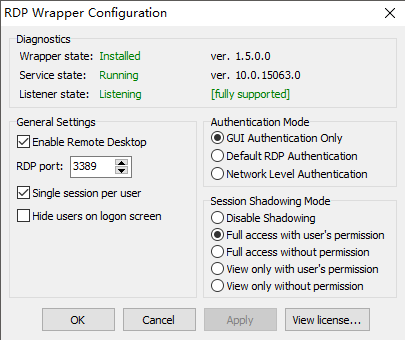
lousuan
on 24 Aug 2017
The following comment solved it. Thank you very much.
Try this dll file (for 64bit win10 home edition) : rfxvmt.zip.
 tomoo-github
on 24 Aug 2017
tomoo-github
on 24 Aug 2017
Thank you very much @youjoy.
The was no rfxvmt.dll in my system32 directory. I put it in, startet uninstall.bat, install.bat, update.bat and it worked. I even didn't had to restart windows. Great!
 klopps
on 25 Aug 2017
klopps
on 25 Aug 2017
Thanks for the fix
For info
I put rfxvmt.dll in my RDPWrap folder (Not in the system32 folder) and added the folder to the PATH
and all now works OK
Hopefully this will be a bit more tolerant of future windows updates.
 kmr1962
on 26 Aug 2017
kmr1962
on 26 Aug 2017
Doesn't work for me, could somebody help, please?
rfxvmt.dll -> windows/system32 (downloaded and extracted from zip archive provided above, size: 32768)
exec: uninstall.bat, install.bat, RDPWInst.exe -r
but Listener state is still in Not listening state (
 vmouse
on 26 Aug 2017
vmouse
on 26 Aug 2017
 unlocKing
on 26 Aug 2017
unlocKing
on 26 Aug 2017
@vmouse I had the same problem initially, I don't know what I did that actually made it start working but I did the following after I couldn't get it to work:
- Uninstall RDPWrap
- Reboot
- Install RDPWrap
- Run Update (still not listening)
- Reboot
- System hung after login
- Reboot
- Login successful, RDPWrap listening
As I said, I have no idea what tripped it into listening but it did eventually work. Good luck
tel19
on 26 Aug 2017
Hi all!
I tried the "youjoy" workaround on two Win10 home machines, and ended in all my attempts with "listener state: not listening" shown in RDPconf :-(.
Maybe I overlooked something?! I greatly appreciate any hint in that direction.
Both machines have a German Windows 10 home version 1703 build 15063.483, on current update level. One machine was freshly installed with creators release some weeks ago, the other was upgraded from previous release. I tried with rfxvmt.dll from this thread as well as the version from a backup of the upgraded machine. I checked security settings to match access rights of other files in system32. Both machines had no RDPwrap installation before. On both machines, rfxvmt.dll was missing in system32 before my attempts.
First attempt was: (using an administrator shell)
(1) copy my own rfxvmt.dll to system32 and check permissions
(2) run install.bat, output see below
(3) run RDPconf.exe
Further attempts were:
(f1) run uninstall.bat
(f2) reboot
(f3) copy a rfxvmt.dll version and check permissions
(f4) run install.bat
(f5) run RDPconf.exe
(f6) reboot
(f7) run RDPconf.exek
(f8) run update.bat
(f9) run RDPconf.exe
Finally I tried to put a further rfxvmt.dll copy into the RDPwrap folder and add it to the system path, as @kmr1962 wrote. No success.
Installer wrote:
`[] Installing...
[] Terminal Services version: 10.0.15063.0
[-] This version of Terminal Services is not supported.
Try running "update.bat" or "RDPWInst -w" to download latest INI file.
If it doesn't help, send your termsrv.dll to project developer for support.
[] Configuring TermService...
[] Starting TermService...
[+] TermService found (pid 4380).
[] No shared services found.
[] Extracting files...
[+] Folder created: C:\Program Files\RDP Wrapper\
[] Downloading latest INI file...
[+] Latest INI file -> C:\Program Files\RDP Wrapper\rdpwrap.ini
[+] Extracted rdpw64 -> C:\Program Files\RDP Wrapperrdpwrap.dll
[] Configuring service library...
[] Checking dependencies...
[] Checking CertPropSvc...
[] Checking SessionEnv...
[] Terminating service...
[] Starting TermService...
[] Configuring registry...
[*] Configuring firewall...
OK.
[+] Successfully installed.`
 rryi
on 26 Aug 2017
rryi
on 26 Aug 2017
I just wanted to let people know that permissions don't seem to make a difference from what I can see. I just unzipped the dll (from @youjoy), copied the dll to C:\WindowsSystem32 (accepted the dialog for admin privileges), uninstalled rdpwrap, rebooted, installed rdpwrap and it worked. The permissions after reboot are the same as before reboot and don't match at all with the termsrv.dll permissions or what @MadDog927ca listed (which are the same as termsrv.sll) and it still works fine.
EDIT: I noticed the DLL version of rfxvmt.dll is the same as what is listed in rdpwrap conf in case that makes any difference. Might explain why it doesn't work for some people if they don't match.
 zeroepoch
on 27 Aug 2017
zeroepoch
on 27 Aug 2017
I did not change back permissions on my first try (x64), too. Worked fine...
Then the only difference is between x32 and x64 I think...
bombcheck
on 27 Aug 2017
@youjoy Great thanks for the fix!
 irvingliao
on 28 Aug 2017
irvingliao
on 28 Aug 2017
@youjoy thx bro
it works in my win10 home basic 64bit
and RD CLIENT APP in IOS 10
 cj233cj
on 28 Aug 2017
cj233cj
on 28 Aug 2017
I notice @binarymaster hasn't commented recently. It's great that a workaround has been found, but I'm interested to know how 'official' this is deemed by the project maintainers.
 justinjhayes
on 28 Aug 2017
justinjhayes
on 28 Aug 2017
Let me clarify.
64-bit Windows 10: https://github.com/stascorp/rdpwrap/files/1236856/rfxvmt.zip
32-bit Windows 10: https://github.com/stascorp/rdpwrap/files/1238499/rfxvmt.zip
Make sure you use the correct one, and everything should work.
ghost
on 29 Aug 2017
Just retried with 64bit version from @markyi370 above on a Win10 64bit home machine. Still "Listener state: not listening".
rryi
on 29 Aug 2017
Thanks for all, I did it!
I don't understand what was wrong in my previous attempts. Several uninstalls/installs/reboots and
"Listener state:" is "Listening"! Also I copied the rfxvmt.dll into C:\Windows\SysWOW64\
vmouse
on 29 Aug 2017
Running Win 10 Home 64-bit, build 15063.540
Downloaded the 64-bit zip from @markyi370's post, extracted and copied rfxvmt.dll to %windir%System32. Ran the RDPWrap uninstall, install and update scripts. RDPConf showed everything green, and RDPCheck was able to connect.
 obel15k
on 29 Aug 2017
obel15k
on 29 Aug 2017
tried with 64bit version from @markyi370 above on a Win10 64bit home machine (15063.540). now it works. thx~
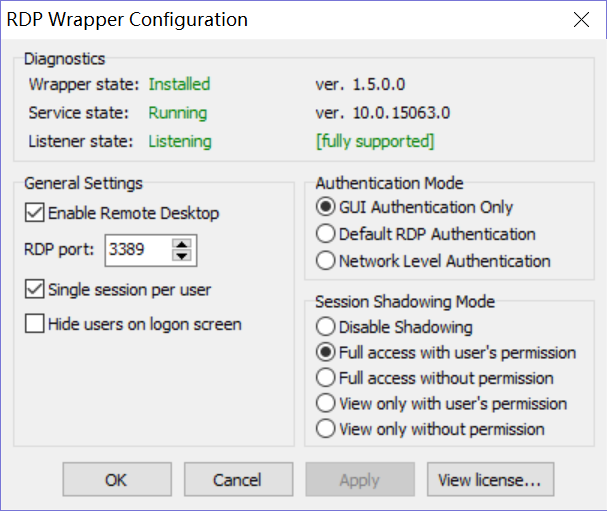
 asubeta
on 30 Aug 2017
asubeta
on 30 Aug 2017
The workaround of copying rfxvmt.dll to \system32 also works on Win 10 x64 Home ver. 10.0.16251.0
Thanks for all your help!
 wellsleep
on 30 Aug 2017
wellsleep
on 30 Aug 2017
1.6.1 and the dll works like a charm on "Windows 10 Home Build 15063.rs2_release.170317-1834". However RDPWrap 1.6.1 won't download with Chrome as it's stated to be malware, works with FireFox.
 sixuniform
on 30 Aug 2017
sixuniform
on 30 Aug 2017
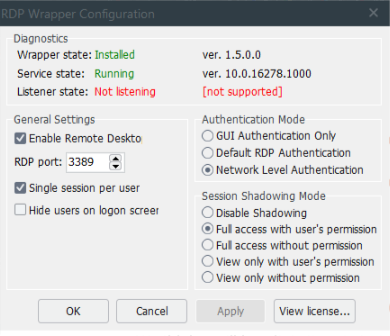
go back captain. Windows 10 Home Insider Fast Ring not support.
 azomega
on 30 Aug 2017
azomega
on 30 Aug 2017
Absolutely giant thanks to @youjoy for this dll.
Now it's working cool!
Thanks a lot!
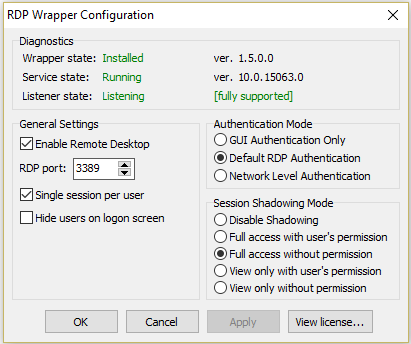
 stalk3rr
on 4 Sep 2017
stalk3rr
on 4 Sep 2017
Let's just hope it still works come October 17th when the Fall Creators Update comes out.
quicken2k
on 4 Sep 2017
Great work @youjoy ! You really made everyone joyful!
I was greatly relying on RDPWrap, until Creator's update just broke that. I was checking this issue page from time to time and lost hope and stopped watching here.
I first tried TeamViewer - I hated it - It's only usable through their network cannot connect even through local network.
Then went on to TightVNC - It was working fine but
- It was very slow, even in local network
- I cannot control windows needing admin rights
Nothing is as good compared to Microsoft RDP.
And today i found @youjoy 's post and wow! Thank you so much man! Am back to using my Windows 10 Home pc through mobile.
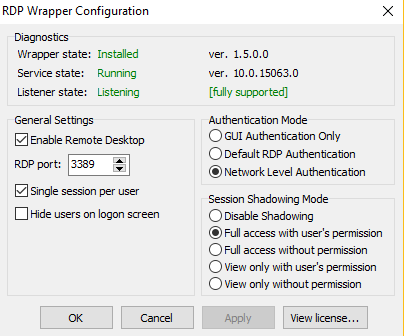
Thank you so much man! Again!
 ilango100
on 10 Sep 2017
ilango100
on 10 Sep 2017
Don't know if this helps at all - just a complete n00b here but love RDPWrap - I had the same problem as everyone here (Win10 Developer Update, etc.) and tried @youjoy 's fix and it worked like a dream.
Before applying the fixt though I did an open port check (http://www.yougetsignal.com/tools/open-ports/) on port 3389 and it was showing as not being connectable despite being open through my router and Windows Firewall. Dropped in rfxvmt.dll and magically the port is connectable again.
Looks like whatever M$ did in the update - as well as breaking RDPWrap - also deliberately closes port 3389.
Just my experiences from this evening.
EDIT: I may actually be wrong here, port is only connectable when the service is running. I refer you to my earlier n00b status. Nothing to see here,
 LazloWoodbine
on 14 Sep 2017
LazloWoodbine
on 14 Sep 2017
Thank you thank you thank you after all these months it's fixed! This should be a 'sticky' at the top as it's the number one issue that has been affecting people and i've only just found out about it.
 Sp0oner
on 14 Sep 2017
Sp0oner
on 14 Sep 2017
Thanks for RDPWrap and for the fix.
It works on my french W10 Home: I started this comment on the laptop, and I'm sending it from my desktop. Until M$ want to break it again ?
 HackerDeviant
on 15 Sep 2017
HackerDeviant
on 15 Sep 2017
Maybe an update to RDPWrap Installer/Updater could check for the workaround file present on Home versions and display the manual on how to do it, if DLL distribution is not possible legally? Not a complete fix but it would inform the user nicely
 OneCrazyRussian
on 15 Sep 2017
OneCrazyRussian
on 15 Sep 2017
Great work @youjoy I can confirmed rfxvmt.dll was the solutions for me under
OS Name: Microsoft Windows 10 Home
OS Version: 10.0.15063 N/A Build 15063
and thanks for all the contributes
 Kpaxxx
on 17 Sep 2017
Kpaxxx
on 17 Sep 2017
We'll see how long this lasts when the Fall Creators Update comes out..
I'll be the guinea pig and test it out.
On Sat, Sep 16, 2017 at 7:46 PM, Kpaxxx notifications@github.com wrote:
Great work @youjoy https://github.com/youjoy I can confirmed rfxvmt.dll
was the solutions for me under
OS Name: Microsoft Windows 10 Home
OS Version: 10.0.15063 N/A Build 15063
and thanks for all the contributes—
You are receiving this because you were mentioned.
Reply to this email directly, view it on GitHub
https://github.com/stascorp/rdpwrap/issues/194#issuecomment-330001836,
or mute the thread
https://github.com/notifications/unsubscribe-auth/ASVvX9l--v-EiEAnDA1-CD8JEZaAckhUks5sjF3EgaJpZM4LjrPS
.
ghost
on 17 Sep 2017
Can I add an observation that may have something to do with the changes since Creator Update. With the new update Windows 10 introduced a new feature to project one PC to another PC screen via WiFi. You can duplicate, share, extend... just like you would if you had a second monitor but using two PCs. Each PC can be be the Projector or Connector. Another function introduced is the ability of any W10 PC to connect another W10 PC and view the screen and send keyboard strokes and so on. Now this is almost like Remote Desktop and they probably used/modfied some of the RDP libraries to add this new feature. The changes may have been more drastic on the Home edition than PRO.
I am not an expert in this area nor do I know for sure that what I am saying has any truth to it but simply pointing out something that the Creator Update introduced in the area of sharing desktops between PCs. Maybe someone reading this who has the skills and thinks this is worth looking into might find useful.
 edddiiie
on 18 Sep 2017
edddiiie
on 18 Sep 2017
Hmm, interesting idea @edddiiie. I might look into this.
On Mon, Sep 18, 2017 at 9:45 AM, edddiiie notifications@github.com wrote:
Can I add an observation that may have something to do with the changes
since Creator Update. With the new update Windows 10 introduced a new
feature to project one PC to another PC screen via WiFi. You can duplicate,
share, extend... just like you would if you had a second monitor but using
two PCs. Each PC can be be the Projector or Connector. Another function
introduced is the ability of any W10 PC to connect another W10 PC and view
the screen and send keyboard strokes and so on. Now this is almost like
Remote Desktop and they probably used/modfied some of the RDP libraries to
add this new feature. The changes may have been more drastic on the Home
edition than PRO.I am not an expert in this area nor do I know for sure that what I am
saying has any truth to it but simply pointing out something that the
Creator Update introduced in the area of sharing desktops between PCs.
Maybe someone reading this who has the skills and thinks this is worth
looking into might find useful.—
You are receiving this because you were mentioned.
Reply to this email directly, view it on GitHub
https://github.com/stascorp/rdpwrap/issues/194#issuecomment-330225881,
or mute the thread
https://github.com/notifications/unsubscribe-auth/ASVvXzRkQguvw4xlgY7wePVRapPe7O2Mks5sjnPqgaJpZM4LjrPS
.
ghost
on 20 Sep 2017
There must be a link between the new Creator feature that enables projection of one PC to another. I performed a test, setup two laptops and projected laptop 1 onto the screen of laptop 2. I chose extended display. When I drag an application from laptop 1 to the edge of the screen it will appear on laptop 2 - just like when you have a second monitor hooked up. Next I fired up the Remote Desktop on my Windows 10 Pro laptop 1 and connected to a third PC, when I tried to drag the remote desktop window from PC 1 to the screen of PC 2 it wouldn't appear. All other applications will come across except the RDP.
edddiiie
on 21 Sep 2017
@youjoy Your dll file was the fix I needed. The RDP Listener is a green and I can connect to my Windows machine just fine now.
Thanks a bunch!
 esblack00
on 21 Sep 2017
esblack00
on 21 Sep 2017
Is there any chance that Rdpwrap will works without replacing rfxvmt.dll?
 AlexeiScherbakov
on 26 Sep 2017
AlexeiScherbakov
on 26 Sep 2017
Not for now, the DLL change is necessary to fix something that MS broke in
the Creators Update.
On Tue, Sep 26, 2017 at 4:59 PM, AlexeiScherbakov notifications@github.com
wrote:
Is there any chance that Rdpwrap will works without replacing rfxvmt.dll?
—
You are receiving this because you were mentioned.
Reply to this email directly, view it on GitHub
https://github.com/stascorp/rdpwrap/issues/194#issuecomment-332334297,
or mute the thread
https://github.com/notifications/unsubscribe-auth/ASVvX792Mg0EAj548fo9PTqiXDgHsaJ4ks5smWXGgaJpZM4LjrPS
.
ghost
on 27 Sep 2017
Just wanted to confirm for everyone that the DLL provided is the same exact DLL that is provided with the 64 bit version of Windows 10 Pro.
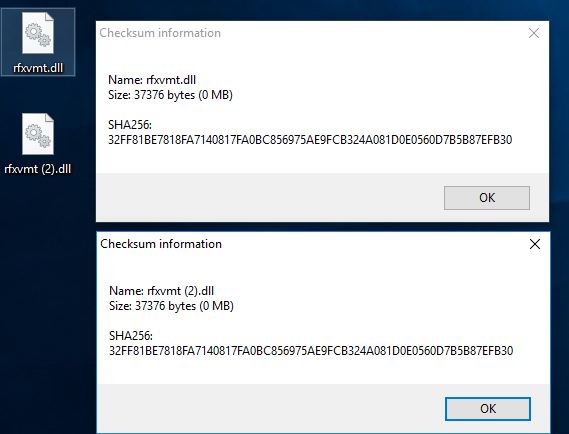
 BLEEPBLOOPforLife
on 29 Sep 2017
BLEEPBLOOPforLife
on 29 Sep 2017
I also confirm that rfxvmt.dll is missing in Windows 10 Home One Language
rfxvmt.dll is exists in Windows 10 Pro and it hashes:
SHA256: 32FF81BE7818FA7140817FA0BC856975AE9FCB324A081D0E0560D7B5B87EFB30
SHA1: 81D4AD81A92177C2116C5589609A9A08A5CCD0F2
MD5: E3E4492E2C871F65B5CEA8F1A14164E2
I don't have Windows 10 Enterprise to check what version of rfxvmt.dll it have.
AlexeiScherbakov
on 30 Sep 2017
Have been using @youjoy since mentioned on this thread. Recently however the fix has stopped working, with Listener State - not listening and unsupported.
Failed socket connection.
Has anyone else had this issue?
 wabula
on 1 Oct 2017
wabula
on 1 Oct 2017
Thanks @youjoy your solution https://github.com/stascorp/rdpwrap/issues/194#issuecomment-323564111 fixed my not listening issue.
 Samyoul
on 2 Oct 2017
Samyoul
on 2 Oct 2017
Thank you @youjoy .
Your given solution worked and saved me a lot more than I can thank you for.
 remo420
on 2 Oct 2017
remo420
on 2 Oct 2017
I'd suggest opening a new bug. This is a different issue more than likely
because this bug only affected Win10 Home due to the DLL above missing.
MrObvious
on 4 Oct 2017
I also got it. After last update this dll is missing. On Windows 10 Pro it is exists.
AlexeiScherbakov
on 6 Oct 2017
Still not fixed?
 SuperJMN
on 6 Oct 2017
SuperJMN
on 6 Oct 2017
@SuperJMN you have to download the rfxvmt.dll and install it manually.
binarymaster
on 6 Oct 2017
@binarymaster, it is not helped when rfxvmt.dll is missing in distro. One of updates completely removes it. I have 4 computers, one with latest updated Windows 10 x64 Home (rfxvmt.dll is missing), Windows 10 x32 Home without installed Creative Update (all worked fine), and 2 with Windows 10 x64 Pro (rfxvmt.dll exists).
AlexeiScherbakov
on 6 Oct 2017
I don't see where the installer was updated?
Change log:
2016.08.01
Version 1.6.1
Include updated INI file for latest Windows builds
Installer updated
Added online install mode
Added feature to keep settings on uninstall
RDP Config updated
Fixed update firewall rule on RDP port change
Added feature to hide users on logon
MrObvious
on 6 Oct 2017
this is a definite thing for me as well
 shakattak
on 11 Oct 2017
shakattak
on 11 Oct 2017
Deleted a bunch of comments that were not related to this thread.
binarymaster
on 12 Oct 2017
am sorry if my message was not related to his thread, but can you please provide me a link on where i can get a solution for the same.
 tradewithvj
on 12 Oct 2017
tradewithvj
on 12 Oct 2017
Anyway to pin the installation of rfxvmt.dll to the top of his thread? I have been looking for a fix for several months, however this fix is crucial and is found far below where most would give up. I was lucky to find a search link to 194 and saw the THANKS to youjoy which lead me to search for the link. Yes the link to the file would be nice to have included with the synopsis of what this issue is about. I got the link to the file from a google search which lead back here I think. Thanks to all for the software and the fix! It would be nice to find the solution quicker.
BTW, this fixed all the machines I had issues with . All my Win 10 Home machines took a dive. Removing the file was likely a MS fix to disable RDP on Home machines. I threw it into the Windows folder, but expect it may be deleted in the future. I will likely just make a script to check for it and replace it when lost. Or, make a path to it in my current RDP Wrapper folder.
Again, THANKS!!!!!
 joekex
on 19 Oct 2017
joekex
on 19 Oct 2017
Since no one else seems to have tested the fall creators update yet I just wanted to report that this fix still works. The termsrv.dll version is of course higher now than the rfxvmt.dll version posted here, but it still seems to work. You will need to add the DLL again because the update removes it. Ideally someone with access to a pro version of Windows 10 with the fall creators update should post their new DLL.
zeroepoch
on 19 Oct 2017
Anyway to pin the installation of rfxvmt.dll to the top of his thread?
That was already done in README: https://github.com/stascorp/rdpwrap/commit/476e277ad3728e34679c611b46b4a61ff9dfe26f
binarymaster
on 19 Oct 2017
Works fine here with FCU
Sent from Mail for Windows 10
From: Eric Work
Sent: October 19, 2017 2:13 AM
To: stascorp/rdpwrap
Cc: quicken2k; Mention
Subject: Re: [stascorp/rdpwrap] Listener is not listening on Win 10 Home(build 14997+) (#194)
Since no one else seems to have tested the fall creators update yet I just wanted to report that this fix still works. The termsrv.dll version is of course higher now than the rfxvmt.dll version posted here, but it still seems to work. You will need to add the DLL again because the update removes it. Ideally someone with access to a pro version of Windows 10 with the fall creators update should post their new DLL.
—
You are receiving this because you were mentioned.
Reply to this email directly, view it on GitHub, or mute the thread.
quicken2k
on 19 Oct 2017
@zeroepoch: Funny coincidence, as I just returned from work and thought about sharing my experience from last night here on github. You are absolutely right, updating my Windows Home box to 1709 (Build 16299.19) aka Fall Creators Update was an easy going.
Of course, after succesfully updating your machine, one would have to copy that famous rfxvmt.dll to %windir%\system32 again, reboot a last time and run update.bat, but afterwards, RDPwrap runs smoothly and does what it is supposed to do.
Thx again, binarymaster and youjoy.
efferle
on 19 Oct 2017
Do not work after upgrading to fall creators update [Not listening]. Copying an old file rfxvmt.dll or a new one does not help.
 nikshatilov
on 20 Oct 2017
nikshatilov
on 20 Oct 2017
Hi folks,
sorry for asking this presumably stupid question: but when I try to copy the modified rfxvmt.dll with an Admin account in my System32 folder on a Windows 10 pro fall creator update machine, the system simply is refusing the task: I do not have the permission to rename or overwrite the rfxvmt.dll.
What can I do to get permission for this?
 hanneshar
on 22 Oct 2017
hanneshar
on 22 Oct 2017
On Windows 10 Pro it should work without replacing rfxvmt.dll
binarymaster
on 22 Oct 2017
Yes, you are right, on Win10 pro 1703 RDPwrapper 1.6.1 is still doing it's job. Wonderful.
I just was confused because in parallel I've tried to connect multiple users to Server 2016 machines I've successfully patched with RDPwrapper before. And this is not working anymore: I just can have an active session on the console and a RDP session. Additional RDP sessions are not possible anymore, even after reinstallation of RDPwrapper. Is this problem known? Has MS modiefied recently anything in Server 2016 so that RDPwrapper is not working properly anymore as before? Or did I've changed anything in the configuration without understanding what actually I've did...?
hanneshar
on 23 Oct 2017
Works fine here!
Get Outlook for iOShttps://aka.ms/o0ukef
From: Mark Yisri notifications@github.com
Sent: Monday, October 23, 2017 2:29:13 PM
To: stascorp/rdpwrap
Cc: quicken2k; Mention
Subject: Re: [stascorp/rdpwrap] Listener is not listening on Win 10 Home (build 14997+) (#194)
RDPWrap no longer states "Listening" running on Version 1709, build 16299, the Fall Creators Update.
I will try to redownload everything again in case updates have been made to RDPWrap.
—
You are receiving this because you were mentioned.
Reply to this email directly, view it on GitHubhttps://github.com/stascorp/rdpwrap/issues/194#issuecomment-338753479, or mute the threadhttps://github.com/notifications/unsubscribe-auth/AHip9XyOfn9yXxLxI7iHlsF3Ccqc-ha-ks5svNr5gaJpZM4LjrPS.
quicken2k
on 23 Oct 2017
My apologies, I hadn't updated. It does work. Version 1709, build 16299, the Fall Creators Update.
I'll upload a 64-bit rfxvmt.dll for W10 Pro 1709 soon.
ghost
on 24 Oct 2017
@muz0n run update.bat from rdpwrapper after the update.
If that doesn't work run uninstall.bat, install.bat, update.bat.
 tjgng
on 25 Oct 2017
tjgng
on 25 Oct 2017
Has anybody recently tried RDPwarapper on Server 2016? Initially, this was working quite nice but now it stopped working on different machines - presumbaly after some MS updates.
hanneshar
on 25 Oct 2017
Hey, folks. This is not a forum :-)
This thread is dedicated only for problems with Windows 10 Home Edition
build higher than 14997.
25 Окт 2017 г. 17:13 пользователь "hanneshar" notifications@github.com
написал:
Has anybody recently tried RDPwarapper on Server 2016? Initially, this was
working quite nice but now it stopped working on different machines -
presumbaly after some MS updates.—
You are receiving this because you are subscribed to this thread.
Reply to this email directly, view it on GitHub
https://github.com/stascorp/rdpwrap/issues/194#issuecomment-339343441,
or mute the thread
https://github.com/notifications/unsubscribe-auth/AIQ7O_BtKfL2Egd0gCHxFvbjB9cvbw6wks5sv0H5gaJpZM4LjrPS
.
AlexeiScherbakov
on 25 Oct 2017
@tjgng I tried everything that is listed in this topic, nothing works. I do not understand what I'm doing wrong
nikshatilov
on 26 Oct 2017
It didn't work for me after the upgrade either. I had to copy the dll back to windows\system32, run rdpwrapper unistall, install and update batch files as elevated admin.
tjgng
on 26 Oct 2017
Hi guys,
I have been looking around forums and tried to find the answer to install RDP Wrap correct the first time. I cant promise this will work for you, but it worked at 16 computers at my work. Hope it will help you.
Running Windows 10 Home - Version 1703 - Build 15063.674
- Start by controlling the correct port in the firewall is open. "I work behind a firewall, so i turned off the firewall on the slave machines. Port 3389 <- not completely sure this is needed."
- Download the x86 or x64 file from Download Link - markyi370 link.
- Copy the rfxvmt.dll file into WindowsSystem32 and Windows\SysWOW64 (If the already is there rename it to rfxvmt.dllOld."
- Start a CMD in administrator mode.
- Dirrect to the folder, I always made a folder on my C drive. example for CMD command "cd C:\RDPWrap-v1.6.1"
- First run a uninstall.bat "I don't know why, but if i didnt do it, it didt nok work"
- Secound run install.bat
- Third run update.bat
- And as the last stop run RDPConf.exe in administrator mode.
If it didn't work the i repeated step 4-9 :D
I truly hope it will work for you as well.
 sDunkan
on 26 Oct 2017
sDunkan
on 26 Oct 2017
@sickingajay Please open a new issue for that problem. It is unrelated to the discussion here, which is about a known issue from build 14997 for Windows 10.
ghost
on 27 Oct 2017
Please open a new issue for that problem.
Don't open if the issue exists.
but it gives me the error 'wrong credentials' tho both username and password are right
Looks like #280.
binarymaster
on 27 Oct 2017
@markyi370 okay.
sickingajay
on 27 Oct 2017
@sDunkan Worked for me! Thanks!
 markespl
on 29 Oct 2017
markespl
on 29 Oct 2017
@sDunkan meothod is working. Thanks, mate!
Checked after Fall Update - everything is ok.
stalk3rr
on 30 Oct 2017
Just tried sDunkan method, but in my case 32-bit/64-bit where reversed.
37kB file inside System32
SHA256: 32FF81BE7818FA7140817FA0BC856975AE9FCB324A081D0E0560D7B5B87EFB30
SHA1: 81D4AD81A92177C2116C5589609A9A08A5CCD0F2
MD5: E3E4492E2C871F65B5CEA8F1A14164E2
32kB file inside SysWOW64
SHA256: 4C19D053751A68B30C045119642964268659BF79BD066046C32DDB875EC339EB
SHA1: 1D4D62475D6AB667FDBC68A46177B7AE01C2DDEB
MD5: B52AC2B928342EE016739834AF802BEB
Windows 10 Home Swedish - Version 1703 - Build 15063.674
One Language 64-bit OEM
Service ver: 10.0.15063.0
I could also skip placing a rfxvmt.dll inside SysWOW64. Thanks for the files!
 jreklund
on 31 Oct 2017
jreklund
on 31 Oct 2017
@jreklund , on a 64 bit system, the 64 bit file should be in System32 and the 32 bit file in SysWOW64 (I know, it's a bit counter-intuitive). As you noted, you don't need to put it in SysWOW64 as the RDP Server is probably 64 bit.
ManiacDC
on 31 Oct 2017
@ManiacDC That explains it. Thanks!
jreklund
on 31 Oct 2017
I suspect that if 10 Home includes the ability to add the Hyper-V feature, the rfx dll will be installed on the system, since hyper-v utilizes RemoteFX when a gpu is installed in the host machine in order to 'talk' to the virtual machine's gui. This may be another route to fix the issues with Home edition.
 jgdaqs
on 2 Nov 2017
jgdaqs
on 2 Nov 2017
https://docs.microsoft.com/en-us/virtualization/hyper-v-on-windows/quick-start/enable-hyper-v
Can someone try it ?
thechrisgregory
on 2 Nov 2017
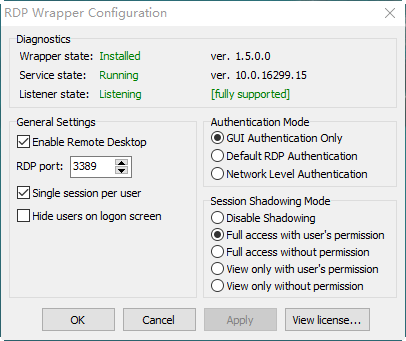
https://github.com/stascorp/rdpwrap/files/1236856/rfxvmt.zip
It's checked that the same rfxvmt.dll file can support version 1709 and 1703 (both 64bit).
After updated to version 1709, the file rfxvmt.dll is deleted so you should place rfxvmt.dll in the folder "windows\system32" again and re-install the Rdpwrap.
youjoy
on 11 Nov 2017
Just an FYI.
Looks like the Hyper-V solution also is broken for Windows 10 Home, it now requires Pro, Enterprise or education editions.
 kravenoff42
on 11 Nov 2017
kravenoff42
on 11 Nov 2017
This worked for me on Win 10 Home ver 1709. Copied 64 bit rfxvmt.dll to windows\system32 only.
 marcmarshall
on 13 Nov 2017
marcmarshall
on 13 Nov 2017
win10 pro v1709 (build 16299.64) - 32-bit
followed @sDunkan instructions with 32-bit rfxvmt.zip by @markyi370
still Listener State: Not Listening
i'm attaching my termsrv.dll with md5= 307086c0460f1e3e2f0fa2e40013b287
hope this could be of any help
BTW my listener state have always been to Not Listening from day 1 (more than 1 year ago), when i fresh installed win10
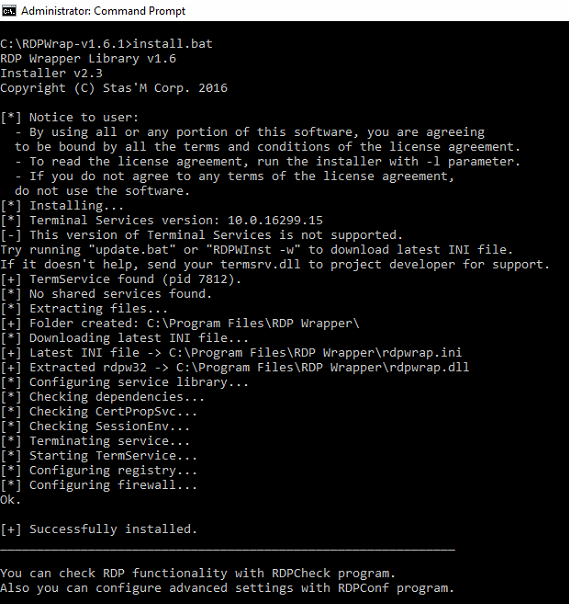
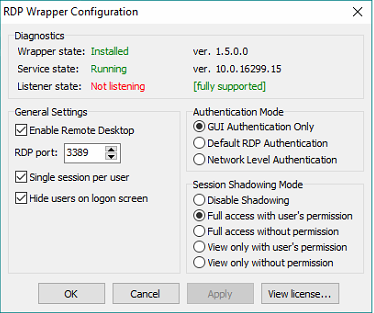
 kamilmirza
on 15 Nov 2017
kamilmirza
on 15 Nov 2017
Checked port 3389 in your firewall.
Chris
From: Kamil Mirza [mailto:[email protected]]
Sent: 14 November 2017 23:26
To: stascorp/rdpwrap rdpwrap@noreply.github.com
Cc: thechrisgregory thechrisgregory@gmail.com; Mention mention@noreply.github.com
Subject: Re: [stascorp/rdpwrap] Listener is not listening on Win 10 Home (build 14997+) (#194)
win10 pro v1709 (build 16299.64) - 32-bit
followed @sDunkan https://github.com/sdunkan instructions https://github.com/stascorp/rdpwrap/issues/194#issuecomment-339586541 with 32-bit rfxvmt.zip https://github.com/stascorp/rdpwrap/issues/194#issuecomment-325627235 by @markyi370 https://github.com/markyi370
still Listener State: Not Listening
i'm attaching my termsrv.dll https://transfer.sh/dGAGR/termsrv.dll with md5= 307086c0460f1e3e2f0fa2e40013b287
hope this could be of any help
BTW my listener state have always been to Not Listening from day 1 (more than 1 year ago), when i fresh installed win10
—
You are receiving this because you were mentioned.
Reply to this email directly, view it on GitHub https://github.com/stascorp/rdpwrap/issues/194#issuecomment-344434287 , or mute the thread https://github.com/notifications/unsubscribe-auth/AbZscREfge9kbYfjsg0iMnIYoOs_0a-_ks5s2iF9gaJpZM4LjrPS . https://github.com/notifications/beacon/AbZscVn3VKsP1Emgf2gK0EdK-rgk9Emaks5s2iF9gaJpZM4LjrPS.gif
thechrisgregory
on 16 Nov 2017
@thechrisgregory
no issues in firewall whatsoever
have created a custom rule to allow 3389
even tried with disabled firewall
and even tried changing RDP port still no go
kamilmirza
on 16 Nov 2017
@sDunkan fix worked for me. I just want to add - not sure if part of the windows update(1709), but those files were missing for me in the first place.
Not sure if that will shed some light in the situation for some ppl still having issues
 sheva29
on 25 Nov 2017
sheva29
on 25 Nov 2017
@sheva29 These files are always missing from the Home edition (probably deliberately done to cripple the OS). We're copying them from a Pro edition.
ghost
on 26 Nov 2017
I can confirm that @sDunkan fix worked for me too. (1703 Home 15063.726)
 mr-flibble
on 26 Nov 2017
mr-flibble
on 26 Nov 2017
Thank you @youjoy I'm on windows 10 "home" 1709, copied the file and worked for me.
 TiagoDM
on 29 Nov 2017
TiagoDM
on 29 Nov 2017
Just tried @sDunkan proposed. Works for Windows 10 Home 1703 Build 15063.726
Many thanks to you, man))
 gokareless
on 3 Dec 2017
gokareless
on 3 Dec 2017
Copying rfxvmt.dll file into WindowsSystem32 works for me.
Thank you, sDunkan!
 foobar167
on 4 Dec 2017
foobar167
on 4 Dec 2017
Copying rfxvmt.dll file into WindowsSystem32 works for me as well. Just make sure to use command prompt with Administrator mode to copy. Regular copy wont work.
 tblog1234
on 15 Dec 2017
tblog1234
on 15 Dec 2017
Copying rfxvmt.dll file into WindowsSystem32 worked for me too, but I have windows 10 32 (1709) home edition, I used the x86 dll from here:
https://github.com/stascorp/rdpwrap/issues/229#issuecomment-341947372
 mer30hamid
on 15 Dec 2017
mer30hamid
on 15 Dec 2017
Hi,
As you know without the correct File Permissions, the file "rfxvmt.dll" isn't properlly loaded.
So, I present a guide for setting the correct ICLs using the Command-Line. You will get it usefull when connecting through SSH to your system when you have lost the RDP connection.
In this guide, "PCADDR" is the _name_ of you PC, and "user" is the _username_ you use in the login (it needs to have administrator privileges!):
net stop TermService

copy c:\rfxvmt.dll c:\windows\system32\
cd c:\windows\system32\
takeown.exe /A /F rfxvmt.dll
icacls.exe rfxvmt.dll /grant "PCADDR\user:F"

icacls.exe rfxvmt.dll /inheritance:d
icacls.exe rfxvmt.dll /setowner "NT SERVICE\TrustedInstaller"
icacls.exe rfxvmt.dll /grant "NT SERVICE\TrustedInstaller:F"

icacls.exe rfxvmt.dll /remove "NT AUTHORITY\SYSTEM"
icacls.exe rfxvmt.dll /grant "NT AUTHORITY\SYSTEM:RX"

icacls.exe rfxvmt.dll /remove "BUILTIN\Administrators"
icacls.exe rfxvmt.dll /grant "BUILTIN\Administrators:RX"

icacls.exe rfxvmt.dll /remove "PCADDR\user"

net start TermService
If you use another locale different that English, then "BUILTIN\Administrators" will be "BUILTIN\something" where "something" is name group in this language.
In general the guide does: Copy the file to the right location. Take own of the new file. Grant explicit privileges to the user (temporal). Remove inherited privileges. Set correct owner and generic permissions. Remove the explicit privileges of the user (this is required because when you remove the privileges for the Administrators Group then you lost acccess).
_Perhaps someone likes to craete an script for doing all tasks automatically._
Regards!
 lars18th
on 20 Dec 2017
lars18th
on 20 Dec 2017
confirmed script is working
small fix to set pcaddr and user at the top for easier editing
set PC_NAME=
set USER_NAME=
net stop TermService
copy c:rfxvmt.dll c:\windows\system32\
cd c:\windows\system32\
takeown.exe /A /F rfxvmt.dll
icacls.exe rfxvmt.dll /grant "%PCADDR%\%USER_NAME%:F"
icacls.exe rfxvmt.dll /inheritance:d
icacls.exe rfxvmt.dll /setowner "NT SERVICE\TrustedInstaller"
icacls.exe rfxvmt.dll /grant "NT SERVICE\TrustedInstaller:F"
icacls.exe rfxvmt.dll /remove "NT AUTHORITY\SYSTEM"
icacls.exe rfxvmt.dll /grant "NT AUTHORITY\SYSTEM:RX"
icacls.exe rfxvmt.dll /remove "BUILTIN\Administrators"
icacls.exe rfxvmt.dll /grant "BUILTIN\Administrators:RX"
icacls.exe rfxvmt.dll /remove "%PCADDR%\%USER_NAME%"
net start TermService
 XUnderShadow
on 20 Dec 2017
XUnderShadow
on 20 Dec 2017
Attention with the var PC_NAME you are using at the top and in your commands [%PCADDR%]!
set PC_NAME= in your script is supposed to be set PCADDR=
 eLenoAr
on 21 Dec 2017
eLenoAr
on 21 Dec 2017
set PC_NAME=
set USER_NAME=
net stop TermService
copy c:rfxvmt.dll c:\windows\system32\
cd c:\windows\system32\
takeown.exe /A /F rfxvmt.dll
icacls.exe rfxvmt.dll /grant "%PC_NAME%\%USER_NAME%:F"
icacls.exe rfxvmt.dll /inheritance:d
icacls.exe rfxvmt.dll /setowner "NT SERVICE\TrustedInstaller"
icacls.exe rfxvmt.dll /grant "NT SERVICE\TrustedInstaller:F"
icacls.exe rfxvmt.dll /remove "NT AUTHORITY\SYSTEM"
icacls.exe rfxvmt.dll /grant "NT AUTHORITY\SYSTEM:RX"
icacls.exe rfxvmt.dll /remove "BUILTIN\Administrators"
icacls.exe rfxvmt.dll /grant "BUILTIN\Administrators:RX"
icacls.exe rfxvmt.dll /remove "%PC_NAME%\%USER_NAME%"
net start TermService
XUnderShadow
on 21 Dec 2017
Hi all !
I have the same issue (not listening) with last update 16299, i have download new rfxvmt.dll (thx sDunkan) and make a batch file with XUnderShadow's code but it don't work for me.
I've try to grant privileges to everyown, uninstall, update and install, not working too.
Somebody have a solution for me ?
Thanks you in advance
 YenHaEncore
on 24 Dec 2017
YenHaEncore
on 24 Dec 2017
You can try my dlls https://github.com/stascorp/rdpwrap/files/1545652/dlls.zip in https://github.com/stascorp/rdpwrap/issues/368
AlexeiScherbakov
on 24 Dec 2017
Works perfect ! Thanks you AlexeiScherbakov
YenHaEncore
on 25 Dec 2017
Hi all !
Do not work terminal server on Win10 x86 16299.125 one language (
And please check offset patch for x86
[10.0.16299.15]
LocalOnlyPatch.x86=1
LocalOnlyOffset.x86=A8E08
LocalOnlyCode.x86=jmpshort
LocalOnlyPatch.x64=1
LocalOnlyOffset.x64=8FD01
LocalOnlyCode.x64=jmpshort
SingleUserPatch.x86=1
SingleUserOffset.x86=39215
SingleUserCode.x86=nop
SingleUserPatch.x64=1
SingleUserOffset.x64=1C774
SingleUserCode.x64=Zero
DefPolicyPatch.x86=1
DefPolicyOffset.x86=3DC89
DefPolicyCode.x86=CDefPolicy_Query_eax_ecx
DefPolicyPatch.x64=1
DefPolicyOffset.x64=12D85
DefPolicyCode.x64=CDefPolicy_Query_eax_rcx
SLInitHook.x86=1
SLInitOffset.x86=461BD
SLInitFunc.x86=New_CSLQuery_Initialize
SLInitHook.x64=1
SLInitOffset.x64=22D5C
SLInitFunc.x64=New_CSLQuery_Initialize
In this termsrv.dll not DefPolicyOffset.x86=3DC89.
I find 3B81200300000F84 on offset 3D089. May be mistake misspell?
termsrv(2).zip
 texNICKru
on 27 Dec 2017
texNICKru
on 27 Dec 2017
I find 3B81200300000F84 on offset 3D089. May be mistake misspell?
Offsets are relative to image base address, not from start of file.
binarymaster
on 27 Dec 2017
Thanks!!! Now working)
texNICKru
on 27 Dec 2017
Fixed in v1.6.2 release.
binarymaster
on 27 Dec 2017
Microsoft forced an update today for Windows 10 that broke the listener. W10 V 1709, build 16299.125. 32bit laptop that I use for interfacing to some signal generators. I've tried to go through all of the thread above but haven't found a solution. uninstalled and reinstalled v1.6.2, copied over rfxvmt.dll and termserv.dll with no luck.
 sfhurt
on 27 Feb 2018
sfhurt
on 27 Feb 2018
Can't confirm on 16299.248, seems ok on both configurations for me (one is with manual rfxvmt.dll extraction and another is with automatic rfxvmt.dll extraction). They show up with different service versions but both seem to work
OneCrazyRussian
on 27 Feb 2018
It seems not works on Win10 x64 1803 Home, with "not listening" and "not supported", also tried the rfxvmt.dll.
 sunriseydy
on 18 Mar 2018
sunriseydy
on 18 Mar 2018

RDPwrap stopped working after 8.1 installing updates. Microsoft Windows [Version 6.3.9600]
when I try to replace the rfxvmt.dll, I get the below error. How do I replace it?
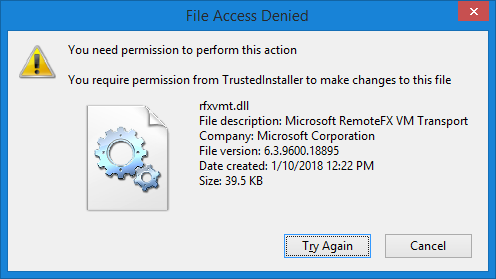
 vgerald
on 20 Mar 2018
vgerald
on 20 Mar 2018
@vgerald Take a look at the issue below. There's a fix action there that doesn't requiring you to replace any .dll files.
418
 Rebelpyr7
on 20 Mar 2018
Rebelpyr7
on 20 Mar 2018
418
Solved! - Thanks @Rebelpyr7
the updates to rdpwrap.ini file mentioned by @amrgb ==> show it as supported.
replacing the termsrv.dll ==> shows the listener state as 'Not listening'

vgerald
on 20 Mar 2018
@vgerald Glad I could help, I was messing around with this way too much today before I tried the simplest fix which ended up working.
Rebelpyr7
on 20 Mar 2018
Related issues
 shardy-uk
·
3Comments
shardy-uk
·
3Comments
 dagwieers
·
4Comments
dagwieers
·
4Comments
 mahmoodyali
·
4Comments
mahmoodyali
·
4Comments
 korolartemnexus
·
6Comments
korolartemnexus
·
6Comments
 mascarasnake66
·
4Comments
mascarasnake66
·
4Comments
Most helpful comment
Try this dll file (for 64bit win10 home edition) : rfxvmt.zip.

Unzip it into the C:\windows\system32 folder (if the file with the same name exists, rename it to rfxvmt.dll.old).
Reinstall rdpwrap and run update.bat.
Hi everyone, this is not my effort.
I happened to find a "method" to solve the problem for me and the dll file rfxvmt.dll, I think is the key.
Perhaps you can try 32bit rfxvmt.dll or other different version that you think safety.
BTW, I'm not a "hacker", even not a coder.