Razzle: scss loader package not updated on npm
Hey gang, I've noticed that the .scss razzle package pulled from npm is not the latest shown here in github (implemented 2 days ago).
Using yarn upgrade razzle-plugin-scss@qwer the list provided only version 2.2.0 shows, and its file contents are
'use strict';

module.exports = function modify(config) {
  console.log(
    'Not yet implemented. Help out at https://github.com/jaredpalmer/razzle'
  );
  return config;
};
Anyone else running into this issue, just import a copy of the newest scss loader in your razzle config
/* razzle.config.js */
const scssLoader = require('./packages/razzle/razzle-plugin-scss');

module.exports = {
  plugins: [
    scssLoader,
    ...
  ],
}
 vancityhuddy
All 11 comments
Yeah I have not deployed those changes yet.
 jaredpalmer
on 24 Oct 2018
jaredpalmer
on 24 Oct 2018
In the scss package loader, you'll need to add after line 105 the sassLoader, as well.
should be
use: isServer
? [
{
loader: require.resolve('css-loader/locals'),
options: options.css[constantEnv],
},
sassLoader,
]
: [
dev ? styleLoader : MiniCssExtractPlugin.loader,
cssLoader,
resolveUrlLoader,
postCssLoader,
sassLoader,
],
@jaredpalmer
vancityhuddy
on 24 Oct 2018
@jaredpalmer dude any update when we are coming up with sass/scss
 n0umankhan
on 9 Nov 2018
n0umankhan
on 9 Nov 2018
I'll just add that I have been using the package by building it from this repo and not had any problems with it :)
 grantcodes
on 9 Nov 2018
grantcodes
on 9 Nov 2018
I had also been manually copying the scss plugin, and it was working fine. But recently it has started breaking. I have been getting this error:
Module build failed (from ./node_modules/css-loader/locals.js):
Unknown word (3:1)
I see quite a bit of chatter about that bug on forums, but I haven't been able to figure out why I can't fix the plugin to make the error go away. A lot of forums say it's an issue with re-ordering the loaders. Here is an example: https://github.com/webpack-contrib/css-loader/issues/295 But I've tried to edit the plugin changing the order in various ways and it hasn't fixed it for me so far.
It would be really great to fix this and update the documentation so the examples aren't broken! Maybe I could spend a little more time looking into it in the future as well.
update: To add a little more context about my Unknown word bug...
In my main scss file, I am importing some external scss. Specifically, I'm importing some of the materialize-css library which is in /node_modules/materialize-css/sass/. That all works fine, normally. But for some reason, I started getting that "Unknown word" error when I tried to use the media query: @media #{$large-and-up} {...}.
The craziest thing is that I still got the unknown word error even if I just put that expression into a comment, like this.
// @media #{$large-and-up} {
wat?. That's super weird. It should be a clue, since it makes no sense for one comment to cause an error with other comments are fine. But I couldn't figure this one out.
My work around is to expand the scss expression from @media #{$large-and-up} to @media only screen and (min-width : #{$medium-screen-up}) which is equivalent, and for some reason, works just fine without that error.
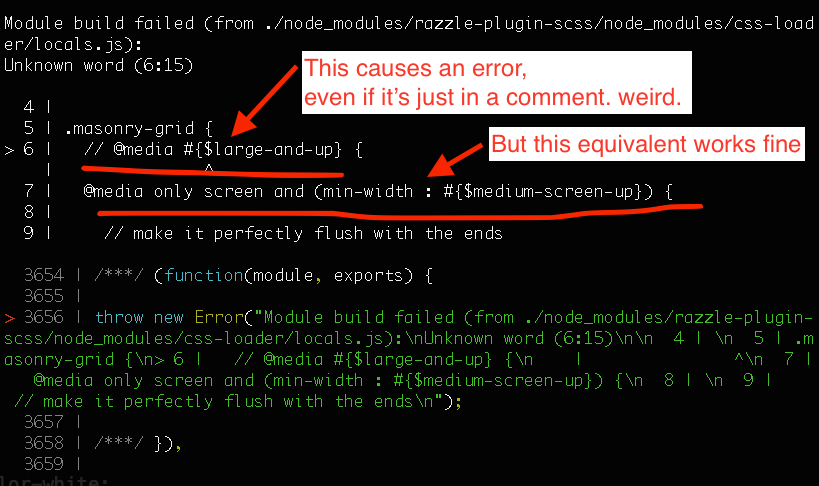
To clarify that screenshot above ^, simply adding or removing that comment
// @media #{$large-and-up} {
will cause the error to occur or not.
 erchaves
on 14 Nov 2018
erchaves
on 14 Nov 2018
As a workaround until this gets pushed to npm, I did the following:
- Downloaded the repo
- Copied
packages/razzle-plugin-scssinto a directory in my project (made alib/directory) - In my package.json I set
  "dependencies": {
    "razzle-plugin-scss": "./lib/razzle-plugin-scss"
     ...
  }
- Created a razzle.config.js with
module.exports = {
  plugins: ['scss'],
};
 FreedCapybara
on 12 Dec 2018
FreedCapybara
on 12 Dec 2018
Hi there, I'm seeing another strange error now that seems to be related to the error I posted above.
I am sometimes getting this build error when I have a // style comment in one of my scss files.
When I run razzle build I get:
Module build failed (from ./node_modules/razzle-plugin-scss/node_modules/css-loader/locals.js):
Error: Unexpected "space" found.
I get the error even if my scss file is nothing but a // comment and a simple rule like body {}.
The weird thing is that I do not get the error if I put that same comment in most of my other scss files and run the build. I can't see a pattern why it only causes an error in some places.
I can resolve the error by wrapping the // comment in a /**/ style comment. It seems that the error might have to do with the css-loader configuration in the razzle-plugin-scss plugin? Per my comment above, might it have to do with a loader ordering issue? As I said, I tried to look into to it to see if I could fix it, but I don't know webpack super well and I'm stumped for now.
erchaves
on 4 Jan 2019
@erchaves this seems to be fixed in https://github.com/jaredpalmer/razzle/pull/902.
@jaredpalmer would it be possible to tag a new release?
 rvanlaarhoven
on 8 Mar 2019
rvanlaarhoven
on 8 Mar 2019
It's very hack-y but a little bit simpler than cloning and manually including the plugin, I edited my razzle.config.js something like this:
let sassRule;

module.exports = {
  plugins: ['scss'],
  modify: config => {
    config.module.rules.forEach(rule => {
      if (!rule.use) return;
      // This copies the client sass rule to the server to fix compilation issues.
      if (rule.test.toString() === '/\\.(sa|sc)ss$/') {
        rule.use[4] ? (sassRule = rule.use[4]) : rule.use.push(sassRule);
      }
    });

    return config;
  }
};
This could obviously be better in a lot of ways (the [4] index is pretty bad and one could do much better than that forEach), but, still a bit easier than manually copying and works until this gets tagged for a new release.
 zjr
on 12 Mar 2019
zjr
on 12 Mar 2019
@erchaves this seems to be fixed in #902.
Amazing, thanks so much! I'm not working on the project anymore where I had the issue before, so I haven't verified the fix, but sounds like it's solved, thanks.
Details:
The scss package is now published here and works great for me.
https://www.npmjs.com/package/razzle-plugin-scss
See example here:
https://github.com/jaredpalmer/razzle/tree/master/examples/with-scss
erchaves
on 25 Jul 2019
Seems solved, closing
 fivethreeo
on 10 May 2020
fivethreeo
on 10 May 2020
Related issues
 Jayphen
·
4Comments
Jayphen
·
4Comments
 mhuggins
·
3Comments
mhuggins
·
3Comments
 jcblw
·
4Comments
jcblw
·
4Comments
 GouthamKD
·
3Comments
GouthamKD
·
3Comments
 charlie632
·
4Comments
charlie632
·
4Comments
Most helpful comment
As a workaround until this gets pushed to npm, I did the following:
packages/razzle-plugin-scssinto a directory in my project (made alib/directory)