Ray: Tune example on landing page is broken!
Hi - I started a cluster, pulling the rayproject/ray:latest-gpu container.
It has python 3.7.7, and running the tune example on the landing page gives:
import torch.optim as optim
from ray import tune
from ray.tune.examples.mnist_pytorch import (
    get_data_loaders, ConvNet, train, test)


def train_mnist(config):
    train_loader, test_loader = get_data_loaders()
    model = ConvNet()
    optimizer = optim.SGD(model.parameters(), lr=config["lr"])
    for i in range(10):
        train(model, optimizer, train_loader)
        acc = test(model, test_loader)
        tune.track.log(mean_accuracy=acc)


analysis = tune.run(
    train_mnist, config={"lr": tune.grid_search([0.001, 0.01, 0.1])})

print("Best config: ", analysis.get_best_config(metric="mean_accuracy"))

# Get a dataframe for analyzing trial results.
df = analysis.dataframe()
Error:
Traceback:
Traceback (most recent call last):
  File "/root/anaconda3/lib/python3.7/site-packages/ray/function_manager.py", line 493, in _load_actor_class_from_gcs
    actor_class = pickle.loads(pickled_class)
  File "/root/anaconda3/lib/python3.7/site-packages/ray/tune/__init__.py", line 2, in <module>
    from ray.tune.tune import run_experiments, run
  File "/root/anaconda3/lib/python3.7/site-packages/ray/tune/tune.py", line 7, in <module>
    from ray.tune.analysis import ExperimentAnalysis
  File "/root/anaconda3/lib/python3.7/site-packages/ray/tune/analysis/__init__.py", line 1, in <module>
    from ray.tune.analysis.experiment_analysis import ExperimentAnalysis, Analysis
  File "/root/anaconda3/lib/python3.7/site-packages/ray/tune/analysis/experiment_analysis.py", line 19, in <module>
    from ray.tune.trial import Trial
  File "/root/anaconda3/lib/python3.7/site-packages/ray/tune/trial.py", line 15, in <module>
    from ray.tune.durable_trainable import DurableTrainable
  File "/root/anaconda3/lib/python3.7/site-packages/ray/tune/durable_trainable.py", line 4, in <module>
    from ray.tune.trainable import Trainable, TrainableUtil
  File "/root/anaconda3/lib/python3.7/site-packages/ray/tune/trainable.py", line 23, in <module>
    from ray.tune.logger import UnifiedLogger
  File "/root/anaconda3/lib/python3.7/site-packages/ray/tune/logger.py", line 15, in <module>
    from ray.tune.syncer import get_node_syncer
  File "/root/anaconda3/lib/python3.7/site-packages/ray/tune/syncer.py", line 80, in <module>
    @dataclass
  File "/root/anaconda3/lib/python3.7/site-packages/dataclasses.py", line 958, in dataclass
    return wrap(_cls)
  File "/root/anaconda3/lib/python3.7/site-packages/dataclasses.py", line 950, in wrap
    return _process_class(cls, init, repr, eq, order, unsafe_hash, frozen)
  File "/root/anaconda3/lib/python3.7/site-packages/dataclasses.py", line 801, in _process_class
    for name, type in cls_annotations.items()]
  File "/root/anaconda3/lib/python3.7/site-packages/dataclasses.py", line 801, in <listcomp>
    for name, type in cls_annotations.items()]
  File "/root/anaconda3/lib/python3.7/site-packages/dataclasses.py", line 659, in _get_field
    if (_is_classvar(a_type, typing)
  File "/root/anaconda3/lib/python3.7/site-packages/dataclasses.py", line 550, in _is_classvar
    return type(a_type) is typing._ClassVar
AttributeError: module 'typing' has no attribute '_ClassVar'
Ray looks really good, but it is frustrating when the landing page examples don't work
 aced125
All 31 comments
The error seems to be related to typing, dataclasses and python 3.7.
aced125
on 18 Nov 2020
Hi @aced125 can you do pip uninstall dataclasses and try again? There's a problem if dataclasses is installed as its own package since it should already be included in Python 3.7.
 amogkam
on 18 Nov 2020
amogkam
on 18 Nov 2020
Still doesn't work.
aced125
on 18 Nov 2020
With the same error? It looks like the same thing as here https://github.com/ray-project/ray/pull/10936
amogkam
on 18 Nov 2020
I would suggest some test automation for the docs - to make sure it runs with the default docker image.
aced125
on 18 Nov 2020
With the same error? It looks like the same thing as here #10936
yes
aced125
on 18 Nov 2020
Sorry you ran into this--did you try running pip uninstall dataclasses on every node in the cluster, or just on one node? If you're able to use the cluster launcher, you can add pip uninstall --yes dataclasses to the field setup_commands in the cluster YAML file.
 architkulkarni
on 18 Nov 2020
architkulkarni
on 18 Nov 2020
pip uninstall -y dataclasses is in the setup_commands in the YAML. Doesn't work.
aced125
on 18 Nov 2020
@aced125 Can you share your full yaml file?
amogkam
on 18 Nov 2020
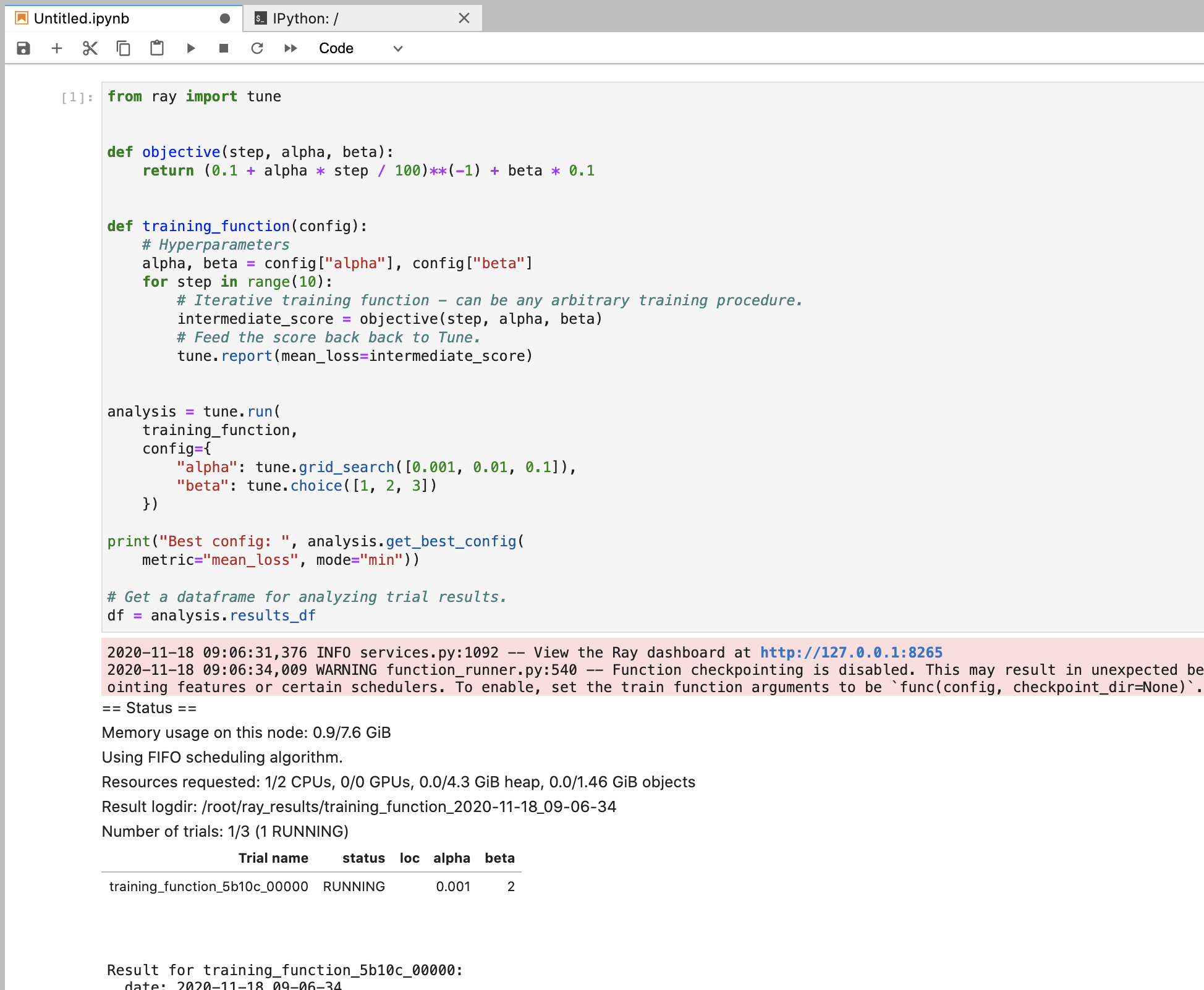
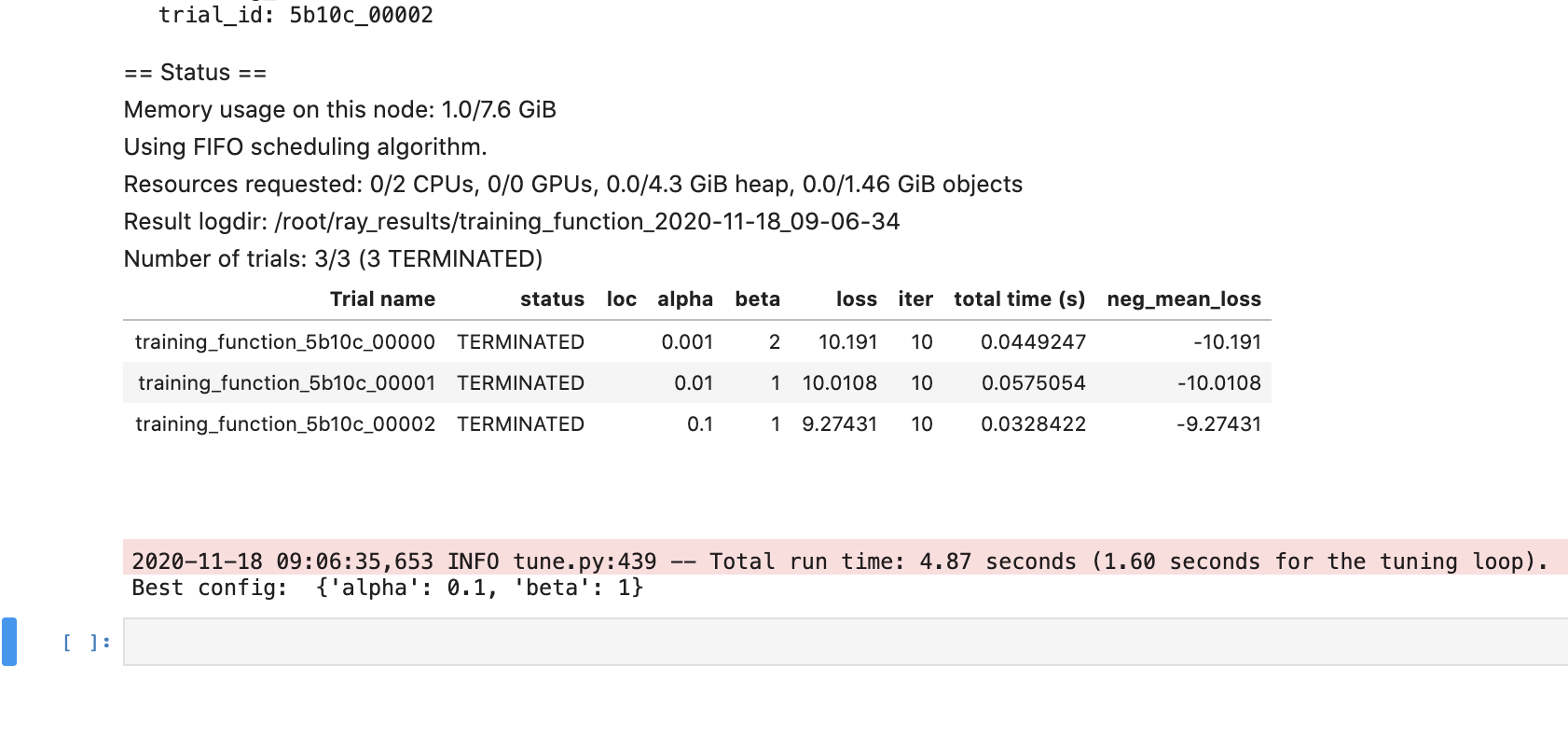
@aced125 I just ran aws/example-full.yaml and ran the above Ray Tune starter script via ray submit and was not able to reproduce this issue.
 richardliaw
on 18 Nov 2020
richardliaw
on 18 Nov 2020
I'm running it via a jupyter notebook @richardliaw
ray exec $conf --port-forward=8899 'jupyter lab --port=8899 --allow-root'
aced125
on 18 Nov 2020
@amogkam
# An unique identifier for the head node and workers of this cluster.
cluster_name: default
# The minimum number of workers nodes to launch in addition to the head
# node. This number should be >= 0.
min_workers: 0
# The maximum number of workers nodes to launch in addition to the head
# node. This takes precedence over min_workers.
max_workers: 2
# The autoscaler will scale up the cluster faster with higher upscaling speed.
# E.g., if the task requires adding more nodes then autoscaler will gradually
# scale up the cluster in chunks of upscaling_speed*currently_running_nodes.
# This number should be > 0.
# upscaling_speed: 1.0
# This executes all commands on all nodes in the docker container,
# and opens all the necessary ports to support the Ray cluster.
# Empty string means disabled.
docker:
image: "rayproject/ray:latest-gpu" # You can change this to latest-cpu if you don't need GPU support and want a faster startup
container_name: "ray_container"
# If true, pulls latest version of image. Otherwise, `docker run` will only pull the image
# if no cached version is present.
pull_before_run: True
run_options: [] # Extra options to pass into "docker run"
# Example of running a GPU head with CPU workers
# head_image: "rayproject/ray:latest-gpu"
# Allow Ray to automatically detect GPUs
# worker_image: "rayproject/ray:latest-cpu"
# worker_run_options: []
# If a node is idle for this many minutes, it will be removed.
idle_timeout_minutes: 5
# Cloud-provider specific configuration.
provider:
type: aws
region: us-west-2
# Availability zone(s), comma-separated, that nodes may be launched in.
# Nodes are currently spread between zones by a round-robin approach,
# however this implementation detail should not be relied upon.
availability_zone: us-west-2a,us-west-2b
# Whether to allow node reuse. If set to False, nodes will be terminated
# instead of stopped.
cache_stopped_nodes: True # If not present, the default is True.
# How Ray will authenticate with newly launched nodes.
auth:
ssh_user: ubuntu
# By default Ray creates a new private keypair, but you can also use your own.
# If you do so, make sure to also set "KeyName" in the head and worker node
# configurations below.
# ssh_private_key: /path/to/your/key.pem
# Provider-specific config for the head node, e.g. instance type. By default
# Ray will auto-configure unspecified fields such as SubnetId and KeyName.
# For more documentation on available fields, see:
# http://boto3.readthedocs.io/en/latest/reference/services/ec2.html#EC2.ServiceResource.create_instances
head_node:
InstanceType: m5.large
ImageId: ami-0a2363a9cff180a64 # Deep Learning AMI (Ubuntu) Version 30
# You can provision additional disk space with a conf as follows
BlockDeviceMappings:
- DeviceName: /dev/sda1
Ebs:
VolumeSize: 100
# Additional options in the boto docs.
# Provider-specific config for worker nodes, e.g. instance type. By default
# Ray will auto-configure unspecified fields such as SubnetId and KeyName.
# For more documentation on available fields, see:
# http://boto3.readthedocs.io/en/latest/reference/services/ec2.html#EC2.ServiceResource.create_instances
worker_nodes:
InstanceType: m5.large
ImageId: ami-0a2363a9cff180a64 # Deep Learning AMI (Ubuntu) Version 30
# Run workers on spot by default. Comment this out to use on-demand.
InstanceMarketOptions:
MarketType: spot
# Additional options can be found in the boto docs, e.g.
# SpotOptions:
# MaxPrice: MAX_HOURLY_PRICE
# Additional options in the boto docs.
# Files or directories to copy to the head and worker nodes. The format is a
# dictionary from REMOTE_PATH: LOCAL_PATH, e.g.
file_mounts: {
# "/path1/on/remote/machine": "/path1/on/local/machine",
# "/path2/on/remote/machine": "/path2/on/local/machine",
}
# Files or directories to copy from the head node to the worker nodes. The format is a
# list of paths. The same path on the head node will be copied to the worker node.
# This behavior is a subset of the file_mounts behavior. In the vast majority of cases
# you should just use file_mounts. Only use this if you know what you're doing!
cluster_synced_files: []
# Whether changes to directories in file_mounts or cluster_synced_files in the head node
# should sync to the worker node continuously
file_mounts_sync_continuously: False
# Patterns for files to exclude when running rsync up or rsync down
rsync_exclude:
- "**/.git"
- "**/.git/**"
# Pattern files to use for filtering out files when running rsync up or rsync down. The file is searched for
# in the source directory and recursively through all subdirectories. For example, if .gitignore is provided
# as a value, the behavior will match git's behavior for finding and using .gitignore files.
rsync_filter:
- ".gitignore"
# List of commands that will be run before `setup_commands`. If docker is
# enabled, these commands will run outside the container and before docker
# is setup.
initialization_commands: []
# List of shell commands to run to set up nodes.
setup_commands:
- pip uninstall dataclasses
- pip install jupyterlab torch torchvision
# Note: if you're developing Ray, you probably want to create a Docker image that
# has your Ray repo pre-cloned. Then, you can replace the pip installs
# below with a git checkout <your_sha> (and possibly a recompile).
# Uncomment the following line if you want to run the nightly version of ray (as opposed to the latest)
# - pip install -U https://s3-us-west-2.amazonaws.com/ray-wheels/latest/ray-1.1.0.dev0-cp37-cp37m-manylinux2014_x86_64.whl
# Custom commands that will be run on the head node after common setup.
head_setup_commands: []
# Custom commands that will be run on worker nodes after common setup.
worker_setup_commands: []
# Command to start ray on the head node. You don't need to change this.
head_start_ray_commands:
- ray stop
- ulimit -n 65536; ray start --head --port=6379 --object-manager-port=8076 --autoscaling-config=~/ray_bootstrap_config.yaml
# Command to start ray on worker nodes. You don't need to change this.
worker_start_ray_commands:
- ray stop
- ulimit -n 65536; ray start --address=$RAY_HEAD_IP:6379 --object-manager-port=8076
@aced125 I ran your command on the example-full.yaml cluster that I started today:
richardliaw
on 18 Nov 2020
richardliaw
on 18 Nov 2020
@aced125 Maybe try flipping the order of your installs. One potential problem here is that it seems like torch requires dataclasses
- torch [required: >=1.6, installed: 1.7.0]
- dataclasses [required: Any, installed: 0.6]
 ijrsvt
on 18 Nov 2020
ijrsvt
on 18 Nov 2020
Ah good catch. It looks like that's related to this torch issue https://github.com/pytorch/pytorch/issues/46930. Hopefully they remove dataclasses as a dependency for Python > 3.6. (EDIT: actually it looks like the conditional install https://github.com/pytorch/pytorch/pull/46932 was merged, so maybe it just needs to find its way into the latest version.)
architkulkarni
on 18 Nov 2020
@richardliaw I'm using the latest PyPi version of Ray. I'm assuming you're using the master/development branch though? Also - could you just confirm that the pytorch mnist example works as well please?
 Laksh1997
on 18 Nov 2020
Laksh1997
on 18 Nov 2020
@richardliaw @architkulkarni @ijrsvt Swapping installation works:
- pip install jupyterlab torch torchvision
- pip uninstall -y dataclasses
BUT - now I have a new error:
AttributeError: module 'ray.tune' has no attribute 'track'
So I just found out that tune.track.log is now tune.report.
I don't think the landing page demo should have this sort of error. It's the landing page!!!!
Think there needs to be some automated testing for all snippets
aced125
on 18 Nov 2020
Also:
print("Best config: ", analysis.get_best_config(metric="mean_accuracy"))
gives
ValueError: No `mode` has been passed and `default_mode` has not been set. Please specify the `mode` parameter.
Hey @aced125 what version of the documentation are you looking at? Is this on master/latest?
amogkam
on 18 Nov 2020
The landing page train_mnist example you posted is from an old version of Ray, <0.8.5 I believe
amogkam
on 18 Nov 2020
@amogkam I am installing the latest version of Ray on PyPi, as can be seen from the YAML file.
I do not think the landing page example should be out of date.
aced125
on 18 Nov 2020
Hey @aced125 just to clarify you're using the latest stable version of Ray (1.0.1) right?
In that case you want to look at the master documentation (https://docs.ray.io/en/master/tune/index.html) or the documentation for the version of Ray that you are using (https://docs.ray.io/en/releases-1.0.1/tune/index.html).
The landing page example for both of these is different from what you posted originally.
The example that you posted is probably coming from documentation for an older version of Ray. https://docs.ray.io/en/releases-0.8.5/tune.html. This example won't work with newer versions of Ray.
Just going to https://docs.ray.io will take you to the master documentation.
amogkam
on 18 Nov 2020
oh @aced125 are you looking at ray.io or docs.ray.io?
richardliaw
on 18 Nov 2020
@richardliaw I am looking at ray.io, the landing page. The mnist tune example.
Laksh1997
on 18 Nov 2020
Ohh my bad I thought you meant the Tune landing page (tune.io) which redirects directly to the docs. Yes you're right the ray.io example is out of date. We should definitely update that.
amogkam
on 18 Nov 2020
OK we should get rid of that code snippet on ray.io; can you please use
https://docs.ray.io/en/releases-1.0.1/
instead?
richardliaw
on 18 Nov 2020
sure - everything working for me anyway - just thought I'd point out so others have a flawless experience
Laksh1997
on 18 Nov 2020
OK we update the example (and will probably remove it later) from the landing page. @aced125 let us know if you're running into other issues.
richardliaw
on 18 Nov 2020
Fixed.
 ericl
on 19 Nov 2020
ericl
on 19 Nov 2020
Related issues
 1beb
·
3Comments
1beb
·
3Comments
 dragon28
·
3Comments
dragon28
·
3Comments
 coreylowman
·
3Comments
coreylowman
·
3Comments
 heavyinfo
·
3Comments
heavyinfo
·
3Comments
 monocongo
·
3Comments
monocongo
·
3Comments
Most helpful comment
@richardliaw @architkulkarni @ijrsvt Swapping installation works:
BUT - now I have a new error: