What is the problem?
Ray version and other system information (Python version, TensorFlow version, OS):
Reproduction (REQUIRED)
Please provide a script that can be run to reproduce the issue. The script should have no external library dependencies (i.e., use fake or mock data / environments):
> ray start --head # start a cluster
> ray start --address auto # start the worker
go to the dashboard:
SyntaxError: Unexpected token I in JSON at position 4
GET http://localhost:8265/api/raylet_info 500 (Internal Server Error)
Dashboard log
Error handling request
Traceback (most recent call last):
  File "/Users/simonmo/miniconda3/lib/python3.6/site-packages/aiohttp/web_protocol.py", line 418, in start
    resp = await task
  File "/Users/simonmo/miniconda3/lib/python3.6/site-packages/aiohttp/web_app.py", line 458, in _handle
    resp = await handler(request)
  File "/Users/simonmo/Desktop/ray/ray/python/ray/dashboard/dashboard.py", line 264, in raylet_info
    result = self.dashboard_controller.get_raylet_info()
  File "/Users/simonmo/Desktop/ray/ray/python/ray/dashboard/dashboard.py", line 158, in get_raylet_info
    return self._construct_raylet_info()
  File "/Users/simonmo/Desktop/ray/ray/python/ray/dashboard/dashboard.py", line 96, in _construct_raylet_info
    workers_info_by_node, infeasible_tasks, ready_tasks)
  File "/Users/simonmo/Desktop/ray/ray/python/ray/dashboard/node_stats.py", line 162, in get_actors
    for worker_info in workers_info:
TypeError: 'NoneType' object is not iterable
If we cannot run your script, we cannot fix your issue.
- [x] I have verified my script runs in a clean environment and reproduces the issue.
- [x] I have verified the issue also occurs with the latest wheels.
 simon-mo
All 17 comments
Will this go away with the new dashboard btw? If so feel free to remote the P1 flag
simon-mo
on 2 Oct 2020
Also seeing this issue.
 rkooo567
on 2 Oct 2020
rkooo567
on 2 Oct 2020
same problem pops up for me
 utke1
on 19 Oct 2020
utke1
on 19 Oct 2020
@utke1 can you try the latest wheel? @mfitton and @edoakes just merged a large refactor of the dashboard, and this issue might be fix now!
simon-mo
on 19 Oct 2020
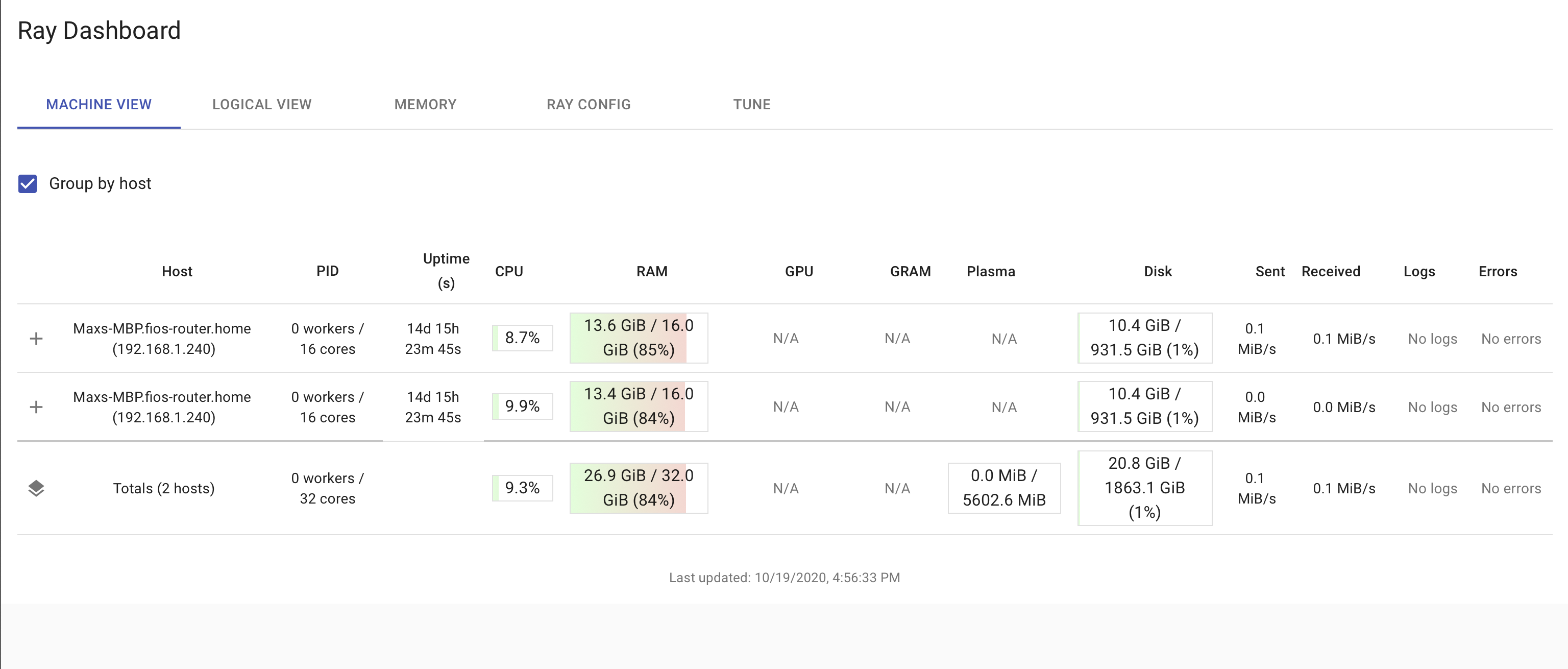
I checked this again locally to make sure it's fixed by the new dashboard release and it is! The latest nightly works, and this code will be contained in the next stable release 1.0.1.
 mfitton
on 19 Oct 2020
mfitton
on 19 Oct 2020
For me the issue is not in first tab (which worked OK) but instead in the "TUNE" tab when I set the directory it gives the json error.
I got the latest(?) wheel from https://s3-us-west-2.amazonaws.com/ray-wheels/latest/ray-1.1.0.dev0-cp36-cp36m-manylinux1_x86_64.whl following the instructions on https://docs.ray.io/en/master/installation.html
The ray install-nightly pointed to a non-existent `https://s3-us-west-2.amazonaws.com/ray-wheels/latest/ray-1.0.0-cp36-cp36m-manylinux1_x86_64.whl so I grabbed the wheel one from the table.
In any case, with that wheel I am now getting different errors showing in the log
2020-10-19 16:40:12,385 WARNING dashboard.py:220 -- The dashboard on node vap0846 failed with the following error:
Traceback (most recent call last):
  File "/usr/local/lib/python3.6/dist-packages/ray/new_dashboard/dashboard.py", line 207, in <module>
    log_dir=log_dir)
  File "/usr/local/lib/python3.6/dist-packages/ray/new_dashboard/dashboard.py", line 78, in __init__
    build_dir = setup_static_dir()
  File "/usr/local/lib/python3.6/dist-packages/ray/new_dashboard/dashboard.py", line 42, in setup_static_dir
    "&& npm run build)", build_dir)
FileNotFoundError: [Errno 2] Dashboard build directory not found. If installing from source, please follow the additional steps required to build the dashboard(cd python/ray/new_dashboard/client && npm install && npm ci && npm run build): '/usr/local/lib/python3.6/dist-packages/ray/new_dashboard/client/build'
so I guess something in the pip update went wrong...
utke1
on 19 Oct 2020
@utke1 you're right, there's something wrong with the way the dashboard is built in the wheel. I'm currently working on a solution and will have it ready before tomorrow morning. Sorry for the false alarm on the fix.
mfitton
on 20 Oct 2020
Do you want to reopen this then or is there a different issue that I should watch for a solution to this problem?
utke1
on 20 Oct 2020
Hey, is this issue already solved? I got the problem and when I'm going to update the Ray from the wheel, it returns 404: Not Found. I guess the wheel link download is broken.
 swicaksono
on 27 Oct 2020
swicaksono
on 27 Oct 2020
@swicaksono sorry you ran into this issue, it's a bug in the 1.0.0 release in which the ray install-nightly command fails because of a broken URL. You can still install the latest nightly (which also contains a fix for this error) by following the instructions to install manually here: https://docs.ray.io/en/master/installation.html#installing-from-a-specific-commit and following the pip install -U [wheel] command for the wheel that corresponds to your OS and python version.
@utke1 to loop back, the nightly wheel now has a fix for this issue. I'm going to close this issue again, but if you hit any more issues don't hesitate to reopen. Thanks.
mfitton
on 27 Oct 2020
Hi @mfitton - sorry for the delay - I tried this morning's (Nov/5) nightly pulled from https://s3-us-west-2.amazonaws.com/ray-wheels/latest/ray-1.1.0.dev0-cp36-cp36m-manylinux2014_x86_64.whl
With that I got this error:
"No module named ray.tests"


2020-11-05 10:12:25,872 WARNING worker.py:1111 -- The agent on node vap1104 failed with the following error:

Traceback (most recent call last):

  File "/usr/local/lib/python3.6/dist-packages/ray/new_dashboard/agent.py", line 298, in <module>

    loop.run_until_complete(agent.run())

  File "/usr/lib/python3.6/asyncio/base_events.py", line 484, in run_until_complete

    return future.result()

  File "/usr/local/lib/python3.6/dist-packages/ray/new_dashboard/agent.py", line 123, in run

    modules = self._load_modules()

  File "/usr/local/lib/python3.6/dist-packages/ray/new_dashboard/agent.py", line 78, in _load_modules

    dashboard_utils.DashboardAgentModule)

  File "/usr/local/lib/python3.6/dist-packages/ray/new_dashboard/utils.py", line 207, in get_all_modules

    importlib.import_module(name)

  File "/usr/lib/python3.6/importlib/__init__.py", line 126, in import_module

    return _bootstrap._gcd_import(name[level:], package, level)

  File "<frozen importlib._bootstrap>", line 994, in _gcd_import

  File "<frozen importlib._bootstrap>", line 971, in _find_and_load

  File "<frozen importlib._bootstrap>", line 955, in _find_and_load_unlocked

  File "<frozen importlib._bootstrap>", line 665, in _load_unlocked

  File "<frozen importlib._bootstrap_external>", line 678, in exec_module

  File "<frozen importlib._bootstrap>", line 219, in _call_with_frames_removed

  File "/usr/local/lib/python3.6/dist-packages/ray/new_dashboard/modules/log/test_log.py", line 13, in <module>

    from ray.new_dashboard.tests.conftest import *  # noqa

  File "/usr/local/lib/python3.6/dist-packages/ray/new_dashboard/tests/conftest.py", line 3, in <module>

    from ray.tests.conftest import *  # noqa

ModuleNotFoundError: No module named 'ray.tests'
works for me now with new 1.0.1 release.
utke1
on 11 Nov 2020
It happens to me after I upgraded ray to 1.0.1 from 1.0.0
 brorro
on 12 Nov 2020
brorro
on 12 Nov 2020
It happens to me after I upgraded ray to 1.0.1 from 1.0.0
Happens to me as well.
 4everZard
on 12 Nov 2020
4everZard
on 12 Nov 2020
Me too, on 1.0.1.
I tried downgrading to 1.0.0 and don't get this error on that version, so this looks like a regression.
 doctorcolossus
on 15 Nov 2020
doctorcolossus
on 15 Nov 2020
Hi all, unfortunately the fix for this did not make the cut for 1.0.1. This should be fixed on the nightly wheels and will be included in 1.0.2 which should be released within a couple of weeks.
 edoakes
on 16 Nov 2020
edoakes
on 16 Nov 2020
FYI: we decided to do a patch release to fix this issue (ray==1.0.1.post1). You can try it out with pip install -U ray.
edoakes
on 19 Nov 2020
Related issues
 dragon28
·
3Comments
dragon28
·
3Comments
 1beb
·
3Comments
1beb
·
3Comments
 ericl
·
3Comments
ericl
·
3Comments
 zhaokang1228
·
3Comments
zhaokang1228
·
3Comments
 robertnishihara
·
3Comments
robertnishihara
·
3Comments