Ray: How to control the number of trials running in parallel?
What is your question?
I have two questions related to "resources_per_trial" and "num_samples". But I have only one purpose: controlling the number of trials that are truly running in parallel. These two attributes can not make it.
My code for ray tune initialization:
    if args.address:
        ray.init(address=args.address)
    else:
        ray.init(num_cpus=os.cpu_count(), num_gpus=torch.cuda.device_count(), temp_dir=temp_dir')

    sched = AsyncHyperBandScheduler(time_attr="training_iteration", metric="mean_accuracy")

    space = {
        "lr": hp.loguniform("lr", -10, -1),
        "momentum": hp.uniform("momentum", 0.1, 0.9),
    }
    metric = "mean_accuracy"
    algo = HyperOptSearch(
        space=space,
        max_concurrent=8,
        metric=metric,
        mode="max"
    )

    analysis = tune.run(
        train_mnist,
        name="exp",
        verbose=1,
        scheduler=sched,
        search_alg=algo,
        stop={
            metric: 0.95,
            "training_iteration": 5 if args.smoke_test else 10
        },
        resources_per_trial={
            "cpu": 1,
            "gpu": 0.1
        },
        num_samples=20,  # trials running in parallel
        config={
            "use_gpu": True
        })
What I know is "resources_per_trial" specify the number of CPUs and GPUs and Memory for a trial. E.g., I can specify gpu=1 or 0.1, which gives me different resource allocation information here in ray tune log


My question is: why setting gpu=0.1 gets more trials running together than setting gpu=1 or 4. What's the reason behind so that I know I'm using it in right way. I view this difference through nvidia-smi. I have four GPUs but they are not efficiently used and setting gpu=4 even makes these trials run one by one... Please look at the pics below
This pic is setting gpu=0.1
This pic is setting gpu=1
This pic is setting gpu=4
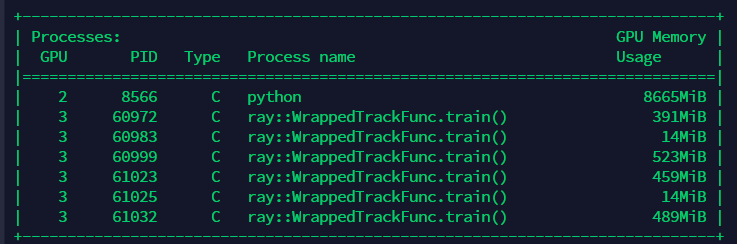
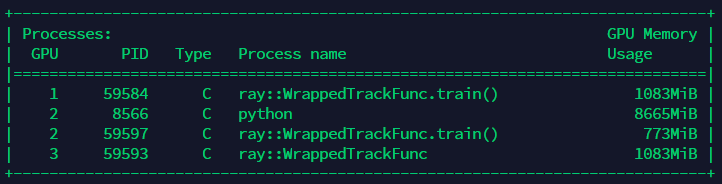

The "num_samples" is the number of trials that sample configuration together and these trials are listed on the table as in the following picture. However, it seems these trials are just generated together, not run in parallel and I guess the "loc" attribute may indicate the current running trial...
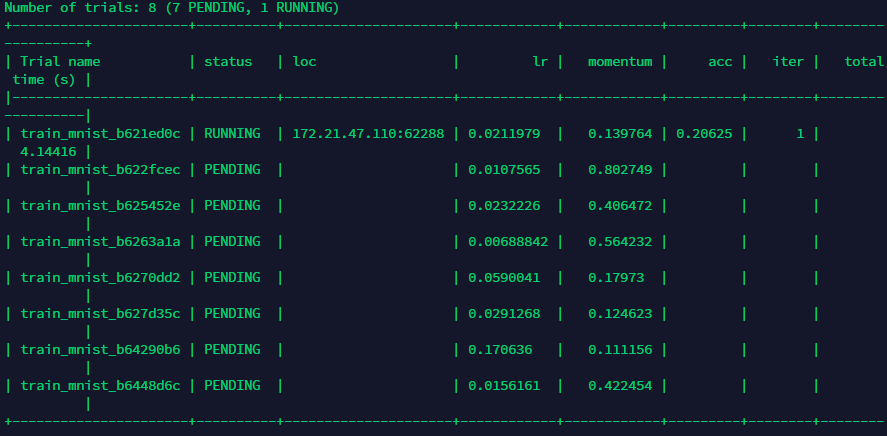
My question is in which way can I control how many generated trials run together? For example, I want 16 trials run together on a server with 4 GPUs and each GPU holds e.g., 4 trials or another self-adjusted number of trials. I don't want these trials generated together but run one by one which is inefficient.
Note that I didn't set up a distributed cluster environment (.yaml file) on my server. I just directly use ray tune for hyper opt purpose.
Ray version and other system information (Python version, TensorFlow version, OS):
Python 3.7.4
OS: linux
Ray: 0.8.5
 guoxuxu
All 2 comments
@guoxuxu Let me try to help you out here.
num_samples is the total number of trials to run. In this case it looks like you want a total of 16 trials.
resources_per_trial is how many resources to allocate for each trial. If you set gpu: 4 here, then 4 GPUs will be reserved for a single trial. So on a 4 GPU machine this can only run 1 trial at a time. Instead you should set gpu: 1 for 1 GPU per trial.
It looks like what you want is a total of 16 trials, with 1 GPU per trial, but you don't want all 16 trials generated at the same time, correct?. In that case, Concurrency Limiter is what you want here (https://docs.ray.io/en/master/tune/api_docs/suggestion.html?20Limiter#concurrencylimiter-tune-suggest-concurrencylimiter). If you wrap your search algorithm in a Concurrency Limiter, you can specify the max number of trials you want to run at a time. So if num_samples is set to 16, there will be a total of 16 trials, but if you want only 4 running at a time, you can set the max_concurrent arg in the Concurrency Limiter to 4. The remainder of the trials are not generated until a currently running trial finishes. So tune will initially start with 4 trials, and then when one finishes, it will get a new hyperparameter config from your search algorithm, and will keep doing this until all 16 trials have finished.
 amogkam
on 30 Jul 2020
amogkam
on 30 Jul 2020
Thank you for your kind and quick response, amogkam. I figured them out finally! Many thanks!
guoxuxu
on 30 Jul 2020
Related issues
 zplizzi
·
3Comments
zplizzi
·
3Comments
 monocongo
·
3Comments
monocongo
·
3Comments
 robertnishihara
·
3Comments
robertnishihara
·
3Comments
 coreylowman
·
3Comments
coreylowman
·
3Comments
 0luhancheng0
·
3Comments
0luhancheng0
·
3Comments
Most helpful comment
@guoxuxu Let me try to help you out here.
num_samplesis the total number of trials to run. In this case it looks like you want a total of 16 trials.resources_per_trialis how many resources to allocate for each trial. If you setgpu: 4here, then 4 GPUs will be reserved for a single trial. So on a 4 GPU machine this can only run 1 trial at a time. Instead you should setgpu: 1for 1 GPU per trial.It looks like what you want is a total of 16 trials, with 1 GPU per trial, but you don't want all 16 trials generated at the same time, correct?. In that case, Concurrency Limiter is what you want here (https://docs.ray.io/en/master/tune/api_docs/suggestion.html?20Limiter#concurrencylimiter-tune-suggest-concurrencylimiter). If you wrap your search algorithm in a Concurrency Limiter, you can specify the max number of trials you want to run at a time. So if
num_samplesis set to 16, there will be a total of 16 trials, but if you want only 4 running at a time, you can set themax_concurrentarg in the Concurrency Limiter to 4. The remainder of the trials are not generated until a currently running trial finishes. So tune will initially start with 4 trials, and then when one finishes, it will get a new hyperparameter config from your search algorithm, and will keep doing this until all 16 trials have finished.