Ray: [Dashboard] The webui failed to load 0.8.6
What is the problem?
Ray version and other system information (Python version, TensorFlow version, OS):
Ray: 0.8.6
Local webview: Mac OS 10.15.5 + Chrome | 83.0.4103.116 (Official Build) (64-bit)
Server: ubuntu 18.04
The port is mapped via ssh -L 8265:localhost:8265 <server node>.
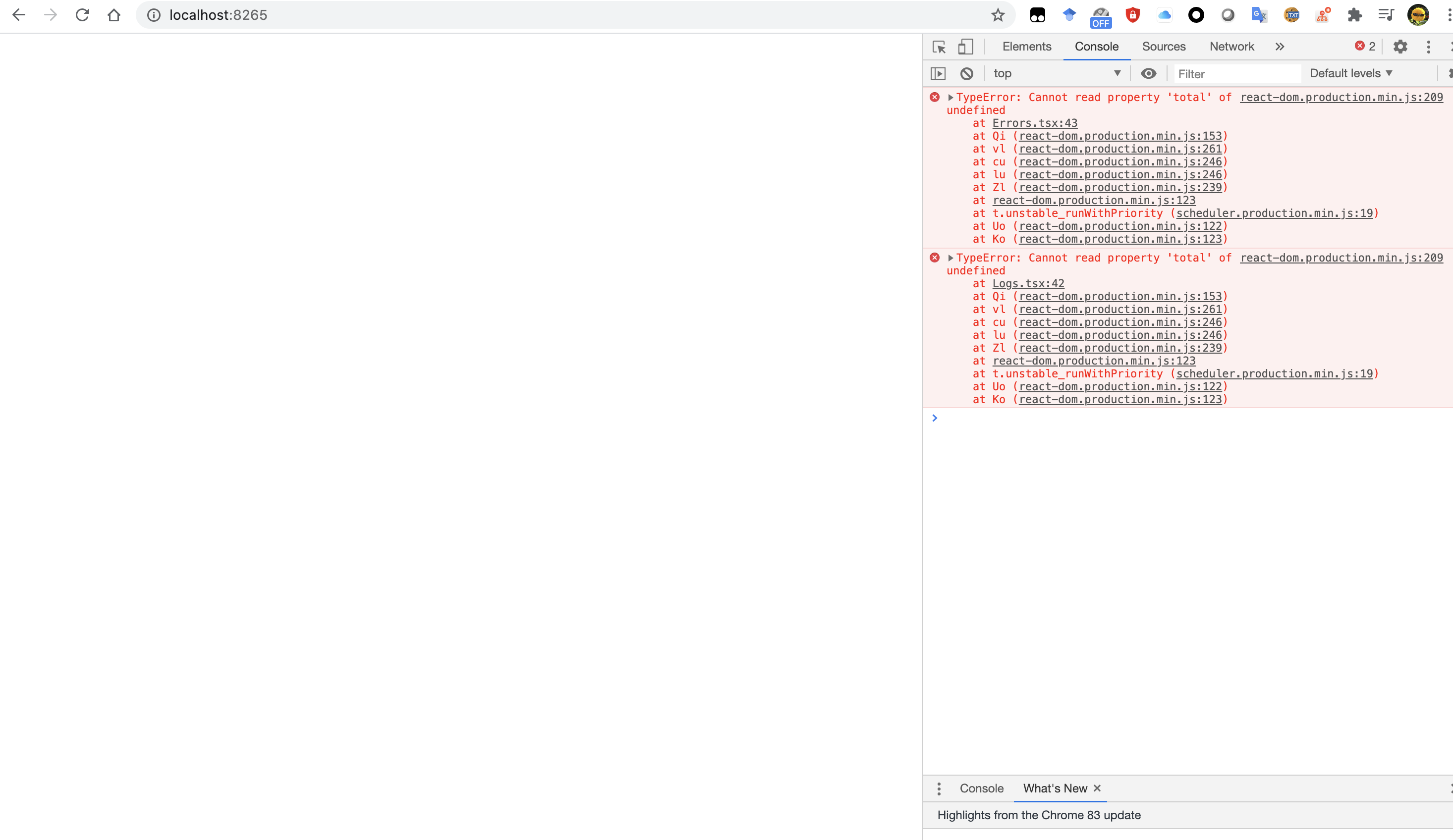
Reproduction (REQUIRED)
I've recorded a video. The web dashboard first works normally (loading), but after few seconds, it failed to load.
- [ ] I have verified my script runs in a clean environment and reproduces the issue.
- [ ] I have verified the issue also occurs with the latest wheels.
 Lyken17
All 16 comments
I can confirm that this happens to me all the time too on 0.8.6. Steps to reproduce:
1) launch Ray cluster on GCP ray up [yaml] -y]
2) submit a job ray submit [yaml] [script]
3) bring up ray monitor [yaml] and ray dashboard [yaml]
-- all is working fine
4) do a new ray up [yaml] for any trivial changes that do not affect the cluster setup itself
-- dashboard flashes and browser console shows this error
I am using GCP preemptible instances, so between steps 3 and 4 some nodes may die etc. Killing and restarting ray dashboard [yaml] has no effect.
PS! Although after step nr 1 the console says 2020-07-06 15:26:27,629 INFO services.py:1165 -- View the Ray dashboard at localhost:8265 this is not true. I have to start ray dashboard [yaml] to see the dashboard.
 martinrebane
on 6 Jul 2020
martinrebane
on 6 Jul 2020
cc @mfitton
 rkooo567
on 6 Jul 2020
rkooo567
on 6 Jul 2020
@martinrebane agreed that the log line you mention in your PS is pretty misleading, however that's a log line from the head node of your cluster saying the dashboard is running on it locally. The ray dashboard command creates a tunnel to your laptop so you can view it at localhost there.
Creating and killing ray dashboard [yaml] only creates/kills the tcp tunnel process, not the actual dashboard running on the cluster. That said, when you run ray up to restart your cluster, it does restart the dashboard process.
If you hard refresh the browser page after running ray up when the page errors, also waiting for the ray up to finish because it takes some time, are you able to see the dashboard again?
 mfitton
on 6 Jul 2020
mfitton
on 6 Jul 2020
@Lyken17 I'm not able to reproduce on Ubuntu with ray installed via pip install ray 0.8.6 and pip install ray[dashboard] as setup commands.
I'm running multiple nodes. Does this only happen to you when a node disconnects and reconnects? Could you please share more details? The video is helpful, but it doesn't show the actions leading up to the error state, and I'm not able to reproduce.
mfitton
on 7 Jul 2020
This is the autoscaler config that I'm working with to try to reproduce your issue.
# An unique identifier for the head node and workers of this cluster.
cluster_name: default

# The minimum number of workers nodes to launch in addition to the head
# node. This number should be >= 0.
min_workers: 1

# The maximum number of workers nodes to launch in addition to the head
# node. This takes precedence over min_workers.
max_workers: 1

# The initial number of worker nodes to launch in addition to the head
# node. When the cluster is first brought up (or when it is refreshed with a
# subsequent `ray up`) this number of nodes will be started.
initial_workers: 1

# Whether or not to autoscale aggressively. If this is enabled, if at any point
#   we would start more workers, we start at least enough to bring us to
#   initial_workers.
autoscaling_mode: default

# This executes all commands on all nodes in the docker container,
# and opens all the necessary ports to support the Ray cluster.
# Empty string means disabled.
docker:
    image: "" # e.g., tensorflow/tensorflow:1.5.0-py3
    container_name: "" # e.g. ray_docker
    # If true, pulls latest version of image. Otherwise, `docker run` will only pull the image
    # if no cached version is present.
    pull_before_run: True
    run_options: []  # Extra options to pass into "docker run"

    # Example of running a GPU head with CPU workers
    # head_image: "tensorflow/tensorflow:1.13.1-py3"
    # head_run_options:
    #     - --runtime=nvidia

    # worker_image: "ubuntu:18.04"
    # worker_run_options: []

# The autoscaler will scale up the cluster to this target fraction of resource
# usage. For example, if a cluster of 10 nodes is 100% busy and
# target_utilization is 0.8, it would resize the cluster to 13. This fraction
# can be decreased to increase the aggressiveness of upscaling.
# This value must be less than 1.0 for scaling to happen.
target_utilization_fraction: 0.8

# If a node is idle for this many minutes, it will be removed.
idle_timeout_minutes: 5

# Cloud-provider specific configuration.
provider:
    type: aws
    region: us-west-2
    # Availability zone(s), comma-separated, that nodes may be launched in.
    # Nodes are currently spread between zones by a round-robin approach,
    # however this implementation detail should not be relied upon.
    availability_zone: us-west-2a,us-west-2b
    # Whether to allow node reuse. If set to False, nodes will be terminated
    # instead of stopped.
    cache_stopped_nodes: True # If not present, the default is True.

# How Ray will authenticate with newly launched nodes.
auth:
    ssh_user: ubuntu
# By default Ray creates a new private keypair, but you can also use your own.
# If you do so, make sure to also set "KeyName" in the head and worker node
# configurations below.
#    ssh_private_key: /path/to/your/key.pem

# Provider-specific config for the head node, e.g. instance type. By default
# Ray will auto-configure unspecified fields such as SubnetId and KeyName.
# For more documentation on available fields, see:
# http://boto3.readthedocs.io/en/latest/reference/services/ec2.html#EC2.ServiceResource.create_instances
head_node:
    InstanceType: m5.large
    ImageId: ami-05931d11d2bf831c3 # Deep Learning AMI (Ubuntu) Version 24.3

    # You can provision additional disk space with a conf as follows
    BlockDeviceMappings:
        - DeviceName: /dev/sda1
          Ebs:
              VolumeSize: 100

    # Additional options in the boto docs.

# Provider-specific config for worker nodes, e.g. instance type. By default
# Ray will auto-configure unspecified fields such as SubnetId and KeyName.
# For more documentation on available fields, see:
# http://boto3.readthedocs.io/en/latest/reference/services/ec2.html#EC2.ServiceResource.create_instances
worker_nodes:
    InstanceType: m5.large
    ImageId: ami-05931d11d2bf831c3 # Deep Learning AMI (Ubuntu) Version 24.3

    # Run workers on spot by default. Comment this out to use on-demand.
    InstanceMarketOptions:
        MarketType: spot
        # Additional options can be found in the boto docs, e.g.
        #   SpotOptions:
        #       MaxPrice: MAX_HOURLY_PRICE

    # Additional options in the boto docs.

# List of shell commands to run to set up nodes.
setup_commands:
    # Note: if you're developing Ray, you probably want to create an AMI that
    # has your Ray repo pre-cloned. Then, you can replace the pip installs
    # below with a git checkout <your_sha> (and possibly a recompile).
    - echo 'export PATH="$HOME/anaconda3/envs/tensorflow_p36/bin:$PATH"' >> ~/.bashrc
    # - pip install -U https://s3-us-west-2.amazonaws.com/ray-wheels/latest/ray-0.9.0.dev0-cp27-cp27mu-manylinux1_x86_64.whl
    # - pip install -U https://s3-us-west-2.amazonaws.com/ray-wheels/latest/ray-0.9.0.dev0-cp35-cp35m-manylinux1_x86_64.whl
    - pip install ray==0.8.6
    - pip install 'ray[dashboard]'   # Consider uncommenting these if you also want to run apt-get commands during setup
    # - sudo pkill -9 apt-get || true
    # - sudo pkill -9 dpkg || true
    # - sudo dpkg --configure -a

# Custom commands that will be run on the head node after common setup.
head_setup_commands:
    - pip install boto3==1.4.8  # 1.4.8 adds InstanceMarketOptions

# Custom commands that will be run on worker nodes after common setup.
worker_setup_commands: []

# Command to start ray on the head node. You don't need to change this.
head_start_ray_commands:
    - ray stop
    - ulimit -n 65536; ray start --head --port=6379 --object-manager-port=8076 --autoscaling-config=~/ray_bootstrap_config.yaml

# Command to start ray on worker nodes. You don't need to change this.
worker_start_ray_commands:
    - ray stop
    - ulimit -n 65536; ray start --address=$RAY_HEAD_IP:6379 --object-manager-port=8076
@mfitton Thanks for the clarification! Much clearer now :)
No, refreshing the page does not work, even opening another browser does not work - still the same error. I have not paid much attention to the exact causes. It always happens after I do another ray up without taking down the cluster completely, but perhaps it is some action before ray up. I will try to keep my eyes open and see if there are any special circumstances that are causing the problem.
(I am now thinking whether it might be caused by a sudden death of an actor? I use preemptible instances and if an instance is killed by GCP then perhaps this will also cause dashboard to crash after ray up? Not sure though, I'll see if it holds next time when I see the error.)
martinrebane
on 7 Jul 2020
@mfitton Some new information.
My ray submit failed with syntax error in python script for ray submit and while I fixed it, one node got lost (or got lost before, cannot recall). Anyhow while the head and the other node were up and while a new worker was starting (doing stuff that is in yaml instructions) dashboard worked fine (I need at least 2 workers to start the job). I had both dashboard and the ray monitor output active on my screen. As soon as the new worker finished and was fully up - and hence should have appeared on the dashboard - then the dashboard crashed with the same error.
I traced the error and the console says it is in file react-dom.production.min.js line 209 and if I open it, the browser highlights this line:
var Bi="function"===typeof WeakSet?WeakSet:Set;function Ci(a,b){var c=b.source,d=b.stack;null===d&&null!==c&&(d=qb(c));null!==c&&pb(c.type);b=b.value;null!==a&&1===a.tag&&pb(a.type);try{console.error(b)}catch(e){setTimeout(function(){throw e;})}}function Di(a,b){try{b.props=a.memoizedProps,b.state=a.memoizedState,b.componentWillUnmount()}catch(c){Ei(a,c)}}function Fi(a){var b=a.ref;if(null!==b)if("function"===typeof b)try{b(null)}catch(c){Ei(a,c)}else b.current=null}
martinrebane
on 7 Jul 2020
@mfitton After check the log history, yes, the dashboard becomes unstable after one node lost connections.
I will try to find a way to consitently reproduce it.
Lyken17
on 7 Jul 2020
@mfitton I could reproduce with this script.
import ray
from ray.cluster_utils import Cluster

cluster = Cluster()
cluster.add_node()
cluster.add_node()
n = cluster.add_node()
ray.init(address=cluster.address)
cluster.remove_node(n)
import time
time.sleep(30)
Seems like when the node is removed, dashboard is broken with this log
Traceback (most recent call last):
  File "/Users/sangbincho/work/ray/python/ray/dashboard/dashboard.py", line 697, in run
    timeout=2)
  File "/Users/sangbincho/anaconda3/envs/dashboard/lib/python3.7/site-packages/grpc/_channel.py", line 826, in __call__
    return _end_unary_response_blocking(state, call, False, None)
  File "/Users/sangbincho/anaconda3/envs/dashboard/lib/python3.7/site-packages/grpc/_channel.py", line 729, in _end_unary_response_blocking
    raise _InactiveRpcError(state)
grpc._channel._InactiveRpcError: <_InactiveRpcError of RPC that terminated with:
    status = StatusCode.UNAVAILABLE
    details = "failed to connect to all addresses"
    debug_error_string = "{"created":"@1594082072.365387000","description":"Failed to pick subchannel","file":"src/core/ext/filters/client_channel/client_channel.cc","file_line":3941,"referenced_errors":[{"created":"@1594082072.365385000","description":"failed to connect to all addresses","file":"src/core/ext/filters/client_channel/lb_policy/pick_first/pick_first.cc","file_line":393,"grpc_status":14}]}"
>
Just note that we will handle this issue next week! :)
rkooo567
on 9 Jul 2020
Yep, I'll be working on this next week. Thanks for all the updates, Sang!
mfitton
on 10 Jul 2020
After watching the video, I don't know if this is exactly the same issue as #8805 because for me it never finishes loading in the first place. I also don't see the an error anywhere except in the browser.
 20zinnm
on 15 Jul 2020
20zinnm
on 15 Jul 2020
@mfitton & @rkooo567 Please let us know if there is anything we can do as users to assist with resolving this issue.
Thanks for your continued work.
 dlio
on 24 Jul 2020
dlio
on 24 Jul 2020
Hey folks! This should be working on the master branch. The issue, as it turns out, is that when a node was leaving the cluster, there was a missing piece of data that was causing the page not to load. That data has now been marked as optional in the master branch, so this issue should be resolved.
I tried to recreate on the master branch, and I was unable to, and due to the code changes, I believe this to be fixed. That said, I would be very grateful if someone who initially ran into the issue could validate that they don't encounter the issue on the master branch.
Assuming it is working as I believe, it will be fixed in the next release.
mfitton
on 30 Jul 2020
Here is a gist with some additional information: https://gist.github.com/mfitton/281619d7eeefb5b49693decb46817a3d
mfitton
on 30 Jul 2020
Related issues
 dragon28
·
3Comments
dragon28
·
3Comments
 0luhancheng0
·
3Comments
0luhancheng0
·
3Comments
 Khalilsqu
·
3Comments
Khalilsqu
·
3Comments
 AndreCNF
·
3Comments
AndreCNF
·
3Comments
 ericl
·
3Comments
ericl
·
3Comments
Most helpful comment
Yep, I'll be working on this next week. Thanks for all the updates, Sang!