Ray: Why ray.get has far more overhead than expected
What is the problem?
I'm referring to this page to run some trial tests for ray: https://rise.cs.berkeley.edu/blog/ray-tips-for-first-time-users/
I have tried several ray versions (0.6.6, 0.7.2, 0.8.2 and the latest whl)
If I run 4 remote functions that sleeps 1s, after calling ray.get, I got total time even more than 1.5s, not duration = 1.0064549446105957 as written in the blog.
Reproduction (REQUIRED)
import time
import ray

ray.init()
print(ray.__version__)


@ray.remote
def do_some_work(x):
    time.sleep(1)  # Replace this is with work you need to do.
    return x


start = time.time()
results = ray.get([do_some_work.remote(x) for x in range(4)])
print("duration =", time.time() - start, "\nresults = ", results)
ray.shutdown()
Running the above code locally prints the duration more than 1.5s, but in the post it says 1.006s. Wondering why there's 0.5s overhead for this trial example? Is there anywhere that I am doing wrong that leads to this result? I run this piece of code on different machines and all get unexpected results. It is weird that on one machine, I get surprisingly 3.x seconds......
The situation would become even worse when I really do something and return some data. Hope to get some help. Thanks so much in advance!
- [x] I have verified my script runs in a clean environment and reproduces the issue.
- [x] I have verified the issue also occurs with the latest wheels.
 hkvision
All 17 comments
When you call ray.init(), the workers are started up in the background, and they are not all ready when ray.init() returns. So what is probably happening is that you are waiting a little bit for the workers to finish starting up before they can run the do_some_work task.
I suspect if you run ray.get([do_some_work.remote(x) for x in range(4)]) a second time, you'll find that it is much faster.
 robertnishihara
on 9 Mar 2020
robertnishihara
on 9 Mar 2020
Hi @robertnishihara
Thank you for your quick response!
I ran the code for three times and get the following results:
duration = 1.6236538887023926
results =  [0, 1, 2, 3]
duration = 1.394596815109253
results =  [0, 1, 2, 3]
duration = 1.0045077800750732
results =  [0, 1, 2, 3]
Seems for the second time, there's still much overhead, and for the third time everything is working perfectly.
So want to ask when are the workers really started? The first (and probably second) time I call ray.get will always have some overhead due to the delay of starting workers? If I use cluster mode, will the delay be longer?
Thanks!
hkvision
on 9 Mar 2020
I'm surprised that the second duration takes so long. I haven't been able to reproduce that locally.
In the cluster setting, once all of the nodes have started up and workers have started up, then there shouldn't be any delays, but of course how long it takes to start up all the nodes depends on a lot of things (like whether you are using the Ray autoscaler to start the nodes or are some other approach.
robertnishihara
on 9 Mar 2020
Hi @robertnishihara
I tried the latest ray and the second time works perfectly.
The above result that the second duration is so long happens at least for ray 0.7.2.
hkvision
on 9 Mar 2020
I'm just using the commands ray start ... on cluster nodes to start a ray cluster. According to my understanding, after running the commands the nodes have started up. From your explanation, at this time, the workers haven't started yet right? Then only when I run ray.get or ray.wait would the workers get fully started? @robertnishihara
hkvision
on 9 Mar 2020
Hi @robertnishihara I have some follow up questions that may need your help to clarify. I'm a new user of ray and do not quite know the internal implementations behind ray. Thanks for your time.
From my experiments, after running the above code, if I run another set of remote functions, the duration of the first run is still longer than the second run. For example:
@ray.remote
def do_some_work2(x):
    print("2")
    time.sleep(2)  # Replace this is with work you need to do.
    return x


start = time.time()
results = ray.get([do_some_work2.remote(x) for x in range(4)])
print("duration =", time.time() - start, "\nresults = ", results)

start = time.time()
results = ray.get([do_some_work2.remote(x) for x in range(4)])
print("duration =", time.time() - start, "\nresults = ", results)
Gives the result:
(pid=18441) 2
(pid=18457) 2
(pid=18663) 2
(pid=18668) 2
duration = 2.014012098312378
results =  [0, 1, 2, 3]
(pid=18441) 2
(pid=18457) 2
(pid=18663) 2
(pid=18668) 2
duration = 2.006427049636841
results =  [0, 1, 2, 3]
There's duration difference between the two runs, even though it is relatively small in this dummy case. But as I try, if I really do some actual work and return some data, the duration difference will be much larger. Is it reasonable?
Also if I print something in a remote function, I notice that for the several runs, all the remote functions have the same set of pid as shown above. So are they running in the same process? I'm wondering in this case, when we run again will there be cache so that reduce the running time?
Thanks so much in advance!
hkvision
on 9 Mar 2020
Hi @ericl @robertnishihara I run the following code, could you help to see if it is reasonable? I'm using ray 0.8.2 BTW.
import time
import ray
import ray.services
import pandas as pd


print(ray.__version__)


@ray.remote
def do_some_work(x):
   time.sleep(1)  # Replace this is with work you need to do.
   return x


ray.init()

start = time.time()
results = ray.get([do_some_work.remote(x) for x in range(4)])
print("duration =", time.time() - start, "\nresults = ", results)

start = time.time()
results = ray.get([do_some_work.remote(x) for x in range(4)])
print("duration =", time.time() - start, "\nresults = ", results)

start = time.time()
results = ray.get([do_some_work.remote(x) for x in range(4)])
print("duration =", time.time() - start, "\nresults = ", results)


@ray.remote(num_cpus=1)
def read_file():
   # print(ray.services.get_node_ip_address())
   start = time.time()
   df_list = []
   for i in range(20):  # Do this multiple times in order to increase task time
       df = pd.read_csv("nyc_taxi.csv")
       # print(len(df))
       df_list.append(df)
   res = pd.concat(df_list)
   print("duration =", time.time() - start)
   return res


start = time.time()
results = ray.get([read_file.remote() for x in range(10)])
print("duration =", time.time() - start)

start = time.time()
results = ray.get([read_file.remote() for x in range(10)])
print("duration =", time.time() - start)
I get the following output:
0.8.2

duration = 1.5062971115112305
results =  [0, 1, 2, 3]
duration = 1.0078372955322266
results =  [0, 1, 2, 3]

(pid=33311) duration = 0.13361358642578125
(pid=33292) duration = 0.13254809379577637
(pid=33307) duration = 0.14573097229003906
(pid=33319) duration = 0.1344003677368164
(pid=33321) duration = 0.13205838203430176
(pid=33317) duration = 0.1341557502746582
(pid=33295) duration = 0.13881540298461914
(pid=33428) duration = 0.1332390308380127
(pid=33299) duration = 0.13246822357177734
(pid=33287) duration = 0.1378040313720703
duration = 0.7399914264678955
(pid=33287) duration = 0.11260819435119629
(pid=33311) duration = 0.12979674339294434
(pid=33292) duration = 0.13153624534606934
(pid=33307) duration = 0.12976813316345215
(pid=33299) duration = 0.1289985179901123
(pid=33319) duration = 0.13034892082214355
(pid=33321) duration = 0.15183138847351074
(pid=33317) duration = 0.12984967231750488
(pid=33295) duration = 0.12929368019104004
(pid=33428) duration = 0.13909912109375
duration = 0.45549511909484863
I use https://analytics-zoo-data.s3.amazonaws.com/nyc_taxi.csv for the test, which contains around 10000 records. You can use any file to reproduce. In each task, I intentionally reads this file for 10 times to increase task time. 10 remote tasks are executed in parallel.
I have two questions below:
- According to the output, the first time it takes 0.74s and the second time it takes 0.45s. Since I have already executed a dummy do_some_work remote task to start the workers (as discussed with @robertnishihara above the first get will include some time to start the workers in the background), may I ask why this still happens that the second get has short duration?
- Also, for the second get, each function only takes around 0.13s, but the overall duration is 0.45s, is it reasonable? If yes, it the overhead all comes from storing data of 100000 records into the object store? If I just return 1 instead of the result dataframe, then there is almost no overhead for the second get.
Please point out if I am doing something wrong when I write or run the program.
As I currently experiment, the overhead of ray.get seems longer than I would expect, and seems in this way, using ray for parallelism doesn't get significant benefit than I just do the work sequentially.
Thanks so much in advance!
hkvision
on 23 Mar 2020
Hi @hkvision, you call two remote functions one by one. Ray will submit task to worker for the first remote task. And then the worker connection will be cached for some time. So the second remote task will be sent to same worker. And ray uses pickle for serialization/deserialization. So there should be gc influences. I updated the code to the following:
@contextlib.contextmanager
def gc_disable():
   gc.collect()
   gc.disable()
   yield
   gc.enable()


@ray.remote(num_cpus=1)
def read_file():
   # print(ray.services.get_node_ip_address())
   with gc_disable():
       start = time.time()
       df_list = []
       for i in range(20):  # Do this multiple times in order to increase task time
           df = pd.read_csv("~/nyc_taxi.csv")
           # print(len(df))
           df_list.append(df)
       res = pd.concat(df_list)
       print("duration =", time.time() - start)
       return res


with gc_disable():
    start = time.time()
    results = ray.get([read_file.remote() for x in range(10)])
    print("duration =", time.time() - start)

with gc_disable():
    start = time.time()
    results = ray.get([read_file.remote() for x in range(10)])
    print("duration =", time.time() - start)
results:
duration = 1.0147476196289062
results =  [0, 1, 2, 3]
duration = 1.0054996013641357
results =  [0, 1, 2, 3]
duration = 1.0048294067382812
results =  [0, 1, 2, 3]
(pid=20523) duration = 0.13813424110412598
(pid=20521) duration = 0.14444351196289062
(pid=20510) duration = 0.1385791301727295
(pid=20508) duration = 0.13724517822265625
(pid=20534) duration = 0.14012956619262695
(pid=20528) duration = 0.13629508018493652
(pid=20527) duration = 0.14610934257507324
(pid=20514) duration = 0.1481027603149414
(pid=20511) duration = 0.13808274269104004
(pid=20513) duration = 0.15846943855285645
duration = 0.6100668907165527
(pid=20523) duration = 0.13509297370910645
(pid=20521) duration = 0.14101219177246094
(pid=20510) duration = 0.13439559936523438
(pid=20508) duration = 0.13519716262817383
(pid=20534) duration = 0.13508987426757812
(pid=20528) duration = 0.13212156295776367
(pid=20527) duration = 0.13887476921081543
(pid=20514) duration = 0.14029860496520996
(pid=20513) duration = 0.1320815086364746
(pid=20511) duration = 0.13327527046203613
duration = 0.6394076347351074
I disable the gc just to get the stable results. Actually, the results can't be almost equally.
 ConeyLiu
on 3 Apr 2020
ConeyLiu
on 3 Apr 2020
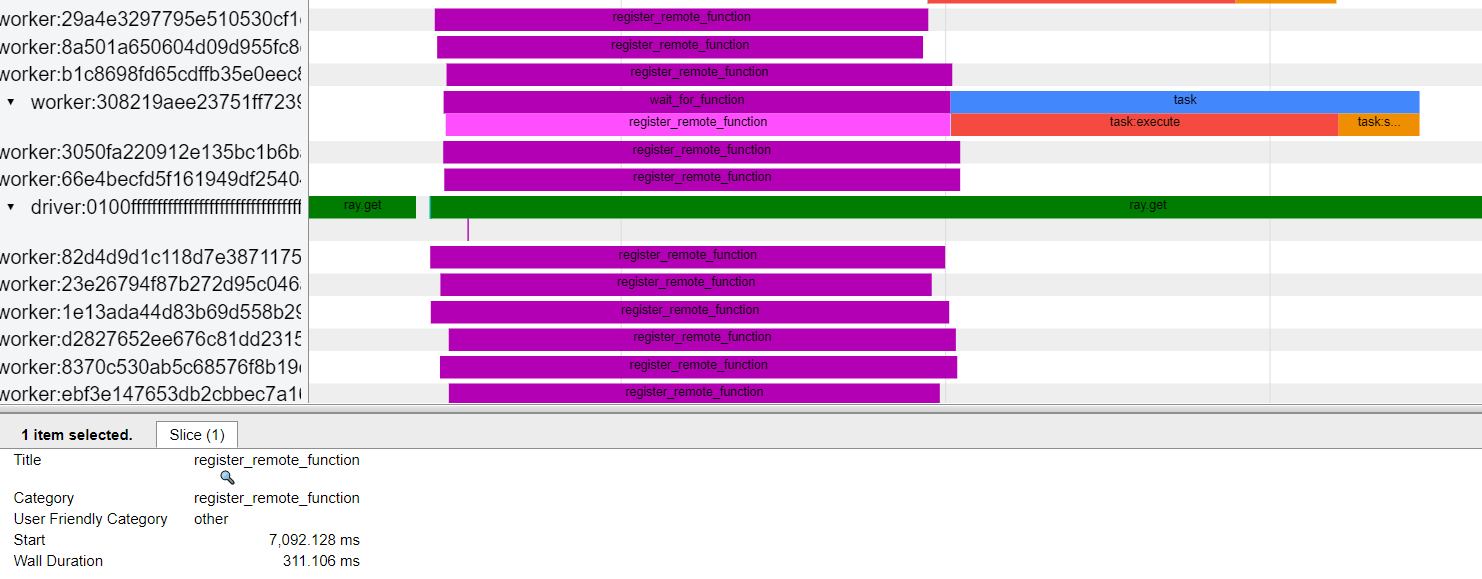
The problem I saw is it takes 300+ ms for register_remote_function for the read_file task, but it only takes less than 1 ms for the do_some_work task. Disabling GC won't help here.
 carsonwang
on 3 Apr 2020
carsonwang
on 3 Apr 2020
Here is the timeline I captured using Ray 0.8.2
carsonwang
on 3 Apr 2020
For the second run, the remote function has already been registered so no time spent on registering. So I saw the time difference between two runs are about 300ms.
carsonwang
on 3 Apr 2020
Disable gc just for stable results. Actually the code is not so stable without ray.
The remote function will be serialized and saved to gcs when calling it firstly. And we use the function id to represent the function in task spec. In the worker side, the worker has a thread that subscribes to a gcs channel that will receive published messages (registered remote function or actor) from gcs. So the worker needs to deserialize the registered function(this happens in another thread) before get the function(by function id) to run. That's the time for register_remote_function.
ConeyLiu
on 3 Apr 2020
add a warm up to verify this:
import time
import ray
import ray.services
import pandas as pd

print(ray.__version__)

@ray.remote
def do_some_work(x):
   time.sleep(1)  # Replace this is with work you need to do.
   return x


ray.init()

#warm up
ray.get(do_some_work.remote(1))

start = time.time()
results = ray.get([do_some_work.remote(x) for x in range(4)])
print("duration =", time.time() - start, "\nresults = ", results)

start = time.time()
results = ray.get([do_some_work.remote(x) for x in range(4)])
print("duration =", time.time() - start, "\nresults = ", results)

start = time.time()
results = ray.get([do_some_work.remote(x) for x in range(4)])
print("duration =", time.time() - start, "\nresults = ", results)


@ray.remote(num_cpus=1)
def read_file():
   # print(ray.services.get_node_ip_address())
   start = time.time()
   df_list = []
   for i in range(20):  # Do this multiple times in order to increase task time
       df = pd.read_csv("~/nyc_taxi.csv")
       # print(len(df))
       df_list.append(df)
   res = pd.concat(df_list)
   print("duration =", time.time() - start)
   return res

# warm up
ray.get(read_file.remote())

start = time.time()
results = ray.get([read_file.remote() for x in range(10)])
print("duration =", time.time() - start)

start = time.time()
results = ray.get([read_file.remote() for x in range(10)])
print("duration =", time.time() - start)

start = time.time()
results = ray.get([read_file.remote() for x in range(10)])
print("duration =", time.time() - start)
Results:
duration = 1.0079083442687988
results =  [0, 1, 2, 3]
duration = 1.0055203437805176
results =  [0, 1, 2, 3]
duration = 1.005202054977417
results =  [0, 1, 2, 3]
(pid=48302) duration = 0.15412139892578125
(pid=48236) duration = 0.16884589195251465
(pid=48295) duration = 0.17581796646118164
(pid=48320) duration = 0.17977046966552734
(pid=48313) duration = 0.17640399932861328
(pid=48309) duration = 0.17650651931762695
(pid=48301) duration = 0.17815780639648438
(pid=48317) duration = 0.17946243286132812
(pid=48302) duration = 0.1481618881225586
(pid=48326) duration = 0.18182778358459473
(pid=48324) duration = 0.18489646911621094
duration = 0.5557510852813721
(pid=48320) duration = 0.1544959545135498
(pid=48313) duration = 0.1550445556640625
(pid=48302) duration = 0.1513068675994873
(pid=48236) duration = 0.15290117263793945
(pid=48295) duration = 0.16000771522521973
(pid=48317) duration = 0.16042613983154297
(pid=48301) duration = 0.16426324844360352
(pid=48326) duration = 0.16692233085632324
(pid=48309) duration = 0.17053508758544922
(pid=48324) duration = 0.1716442108154297
duration = 0.6442530155181885
(pid=48236) duration = 0.15067577362060547
(pid=48295) duration = 0.14973187446594238
(pid=48320) duration = 0.14779400825500488
(pid=48313) duration = 0.15093255043029785
(pid=48309) duration = 0.14012837409973145
(pid=48301) duration = 0.14317536354064941
(pid=48317) duration = 0.1469564437866211
(pid=48302) duration = 0.15059232711791992
(pid=48326) duration = 0.14737534523010254
(pid=48324) duration = 0.14365291595458984
duration = 0.5451409816741943
@hkvision , the 300+ms spent on register_remote_function I mentioned above is caused by pickle.loads(serialized_function). To get rids of this time, I found you have to add import pandas as pd inside of your remote function. After that, the first run becomes faster though I still saw it is slower than the second run.
carsonwang
on 3 Apr 2020
Hi @carsonwang @ConeyLiu
Thanks so much for your responses.
If I'm understanding correctly, the major gap 300ms is remote function registration time. Putting import pandas inside the remote function reduces the time. May I have more explanations why this speeds up the registration? Is it a common practice to put every import used in the remote function inside it?
Also, I have several follow-up questions:
- Disabling gc is usually for debugging purpose to get stable result right?
- Even if for the fastest result, the total time is 0.5s, while the time for each remote function is 0.15s. Is it reasonable? The extra 3s overhead comes from data transfer or communication between workers?
- Is it correct that when I call ray.get for the first time, there is always some extra time needed to start workers? Any way to separate the influence of this? Since usually we won't intentionally something twice.
Thanks so much again!!!
hkvision
on 8 Apr 2020
Actually the 300ms comes from import pandas as pd. You can take a try as follows:
import time

def func():
    start = time.time()
    import pandas
    print(time.time() - start)

func() # about 300ms
func() # very short time
The above code can confirm why the second run is much faster.
Is it a common practice to put every import used in the remote function inside it?
If you don't want to load the import before function execution, I think you should put it inside the function.
Disabling gc is usually for debugging purpose to get stable result right?
Yes
Even if for the fastest result, the total time is 0.5s, while the time for each remote function is 0.15s. Is it reasonable? The extra 3s overhead comes from data transfer or communication between workers?
I think the overhead most comes from three parts:
- serialize the results
- put the serialized results into object store
- deserialize back to python objects
You can take the following try:
@ray.remote(num_cpus=1)
def read_file():
   from ray import cloudpickle as pickle
   # print(ray.services.get_node_ip_address())
   start = time.time()
   df_list = []
   for i in range(20):  # Do this multiple times in order to increase task time
       df = pd.read_csv("~/nyc_taxi.csv")
       # print(len(df))
       df_list.append(df)
   res = pd.concat(df_list)
   res = pickle.dumps(res)
   print("duration =", time.time() - start)
   return res
Results:
(pid=112930) duration = 0.21219491958618164
(pid=112897) duration = 0.21044445037841797
(pid=112931) duration = 0.2105710506439209
(pid=112933) duration = 0.20841693878173828
(pid=112932) duration = 0.2155008316040039
(pid=112956) duration = 0.19979453086853027
(pid=112955) duration = 0.18958425521850586
(pid=112948) duration = 0.20950984954833984
(pid=112946) duration = 0.2117900848388672
(pid=112949) duration = 0.19815707206726074
duration = 0.3171203136444092
In this case, we just store the bytes in the object store. So the overhead mostly comes from put results into object store. You can customize your objects serialize/deserialize if you think it has a big pain for your workloads.
Is it correct that when I call ray.get for the first time, there is always some extra time needed to start workers? Any way to separate the influence of this? Since usually we won't intentionally something twice.
You can start up the cluster before if you want to avoid the worker startup time.
ConeyLiu
on 9 Apr 2020
Okay. I would have a try on your suggestions. Thanks @ConeyLiu
BTW, if I start the cluster using ray start in command line, does it mean that the workers are already started?
hkvision
on 15 Apr 2020
Related issues
robertnishihara
·
3Comments
 timonbimon
·
3Comments
timonbimon
·
3Comments
 0luhancheng0
·
3Comments
0luhancheng0
·
3Comments
 thedrow
·
3Comments
robertnishihara
·
3Comments
thedrow
·
3Comments
robertnishihara
·
3Comments