Ray: [autoscaler] "Cannot perform an interactive login from a non TTY device" when trying to use a private docker registry
I have a .env file with the following values set
DOCKER_USER=<my username>
DOCKER_PASSWORD=<my password>
In initialization_commands, I have the following lines:
initialization_commands: [
    "export $(xargs < ~/.env)",  # Export all .env vars to environment variables
    "sudo apt update",
    "sudo apt install docker.io -y",
    "sudo usermod -a -G docker ubuntu",
    "sudo service docker restart",
    "docker login -u $DOCKER_USER -p $DOCKER_PASSWORD",
]
But when I run ray up, I always get the following error: Error: Cannot perform an interactive login from a non TTY device
How do I fix this?
 preeth1
All 17 comments
I got same error today. is this a new bug?
 olublessed
on 29 Feb 2020
olublessed
on 29 Feb 2020
$(aws ecr get-login --no-include-email --region ap-southeast-1)
Above works for me.
 neerajbansal
on 4 Mar 2020
neerajbansal
on 4 Mar 2020
@neerajbansal, fix here!
 hugofe
on 4 Mar 2020
hugofe
on 4 Mar 2020
There are multiple ways to login as:
Use the command below to login to ecr:
$(aws ecr get-login --no-include-email --region ap-southeast-1)
For above command, make sure you already configure your aws profile, here's the guide to configure aws profile https://docs.aws.amazon.com/cli/latest/userguide/cli-chap-configure.html
If you want to use command like below:
aws ecr get-login-password | docker login --username AWS --password-stdin aws-account.dkr.ecr.aws-region.amazonaws.com/repository
try to upgrade the aws cli
neerajbansal
on 5 Mar 2020
But that doesn't work for docker login?
preeth1
on 6 Mar 2020
On Windows, try adding "winpty" before the "docker ..." command.
It works on GitBash, Putty and MobaXTerm.
 davidpelfree
on 8 Mar 2020
davidpelfree
on 8 Mar 2020
I am using dockerhub and ubuntu 18.04 (so the answers thus far unfortunately do not apply to me)
preeth1
on 9 Mar 2020
Run this to see if you're using 2.0 version - aws --version, if you're then run this
/usr/local/bin/aws ecr get-login-password --region us-west-2 | docker login --username AWS --password-stdin
that bash uses PATH environment variable in order to determine paths sequence where to look for binaries, hence if we update PATH variable using /usr/local/bin in front of everything else, bash will be using newer AWS CLI version by default. Finally,
export PATH=/usr/local/bin:$PATH
 jimmymalhan
on 28 Mar 2020
jimmymalhan
on 28 Mar 2020
get-login is deprecated, so it makes sense to avoid it.
I'm still having trouble figuring out how to use its replacement, get-login-password, without getting "Cannot perform an interactive login from a non TTY device".
 jamiejackson
on 9 Apr 2020
jamiejackson
on 9 Apr 2020
@jamiejackson I am having the same problem. Have tried:
login-to-aws:
    aws ecr get-login-password --region ${REGION_NAME} \
    | docker login --username AWS --password-stdin \
        ${AWS_ACCOUNT_ID}.dkr.ecr.${REGION_NAME}.amazonaws.com
error: "Cannot perform an interactive login from a non TTY device"
PASSWORD=$(shell aws ecr get-login-password --region ${REGION_NAME})
login-to-aws:
        docker login --username AWS --password ${PASSWORD} \
        ${AWS_ACCOUNT_ID}.dkr.ecr.${REGION_NAME}.amazonaws.com
error: "Using --password via the CLI is insecure. Use --password-stdin."
ECR_LOGIN = $(shell aws ecr get-login-password --region ${REGION_NAME} \
        | docker login --username AWS --password-stdin \
                ${AWS_ACCOUNT_ID}.dkr.ecr.${REGION_NAME}.amazonaws.com)
login-to-aws:
        @$(ECR_LOGIN)
error: "Cannot perform an interactive login from a non TTY device"
My config:
aws --version
aws-cli/2.0.5 Python/3.7.4 Darwin/19.3.0 botocore/2.0.0dev9
 tinahbu
on 10 Apr 2020
tinahbu
on 10 Apr 2020
I am getting the same error for:aws ecr get-login-password --region us-east-1 | docker login --username AWS --password-stdin account.dkr.ecr.us-east-1.amazonaws.com/myrepo
aws --version aws-cli/2.0.8 Python/3.7.4 Darwin/19.3.0 botocore/2.0.0dev12
 wbruce-fetch
on 19 Apr 2020
wbruce-fetch
on 19 Apr 2020
I'm getting the same error too.
aws ecr get-login --region us-east-1 --profile profile-name | docker login --username AWS --password-stdin account.dkr.ecr.us-east-1.amazonaws.com/demo
 thejasvi-ks
on 7 May 2020
thejasvi-ks
on 7 May 2020
I am getting same error
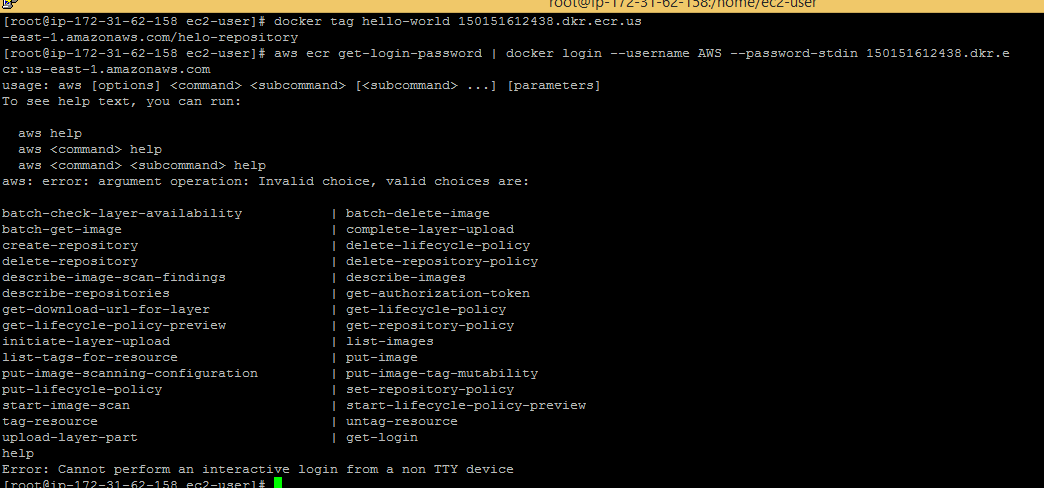
 anish-15
on 23 May 2020
anish-15
on 23 May 2020
Same error here $(aws ecr get-login-password --region eu-central-1 | docker login --username AWS --password-stdin account.dkr.ecr.eu-central-1.amazonaws.com)
 MarkCarbonell98
on 9 Jun 2020
MarkCarbonell98
on 9 Jun 2020
I got this working in github actions without the "non TTY device" message.
It's not an ideal solution as the password is used inline but it works. If you are running it in the makefile you can prepend @ to hide the whole command to be printed
docker login --username AWS --password $(aws ecr get-login-password --region eu-central-1) account.dkr.ecr.eu-central-1.amazonaws.com
 michcald
on 24 Jul 2020
michcald
on 24 Jul 2020
cc @maximsmol @ijrsvt
 richardliaw
on 7 Aug 2020
richardliaw
on 7 Aug 2020
Same error here
$(aws ecr get-login-password --region eu-central-1 | docker login --username AWS --password-stdin account.dkr.ecr.eu-central-1.amazonaws.com)
@MarkCarbonell98 and @tinahbu, try the following:
aws --region eu-central-1 ecr get-login-password | docker login --username AWS --password-stdin account.dkr.ecr.eu-central-1.amazonaws.com
What I changed was:
- Removed the evaluation of the command:
$(...) - Moved
-region eu-central-1to the beginning of the command line
I'm using AWS CLI version 2.
 emramos
on 16 Aug 2020
emramos
on 16 Aug 2020
Related issues
 1beb
·
3Comments
1beb
·
3Comments
 robertnishihara
·
3Comments
robertnishihara
·
3Comments
 AndreCNF
·
3Comments
AndreCNF
·
3Comments
 Khalilsqu
·
3Comments
Khalilsqu
·
3Comments
 WangYiPengPeter
·
3Comments
WangYiPengPeter
·
3Comments
Most helpful comment
get-loginis deprecated, so it makes sense to avoid it.I'm still having trouble figuring out how to use its replacement,
get-login-password, without getting "Cannot perform an interactive login from a non TTY device".