Rawtherapee: The new layout of the crop tool is very "busy" on GTK+ 3.18
Maybe I'm the only one still on 3.18, but the new grid-based layout is very packed with that version of GTK+, as there is no spacing around the elements:
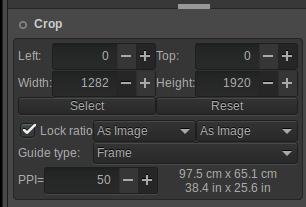
Maybe it's possible to solve it with a CSS? If not, any objections to apply the following patch?
diff --git a/rtgui/crop.cc b/rtgui/crop.cc
--- a/rtgui/crop.cc
+++ b/rtgui/crop.cc
@@ -286,6 +286,20 @@

     nx = ny = nw = nh = 0;
     lastRotationDeg = 0;
+
+//GTK318
+#if GTK_MAJOR_VERSION == 3 && GTK_MINOR_VERSION < 20
+    methodgrid->set_row_spacing(4);
+    methodgrid->set_column_spacing(4);
+    settingsgrid->set_row_spacing(4);
+    settingsgrid->set_column_spacing(4);
+    ppigrid->set_row_spacing(4);
+    ppigrid->set_column_spacing(4);
+    ppisubgrid->set_row_spacing(4);
+    ppisubgrid->set_column_spacing(4);
+#endif
+//GTK318
+
     show_all ();
 }
Here's how it looks like with the above applied:
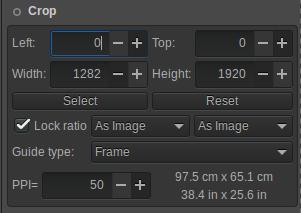
 agriggio
All 13 comments
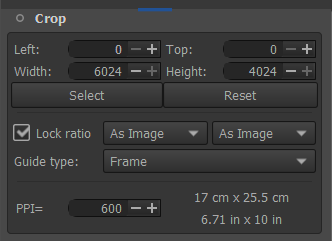
It's not too bad for me on Windows (GTK 3.22.30)
 Thanatomanic
on 25 Nov 2018
Thanatomanic
on 25 Nov 2018
@agriggio just curious. for what reason do you stay on an old development version?
@Thanatomanic some icones are missing
due to lack of ./share/gtk3/settings.ini with content:
[Settings]
gtk-button-images=1
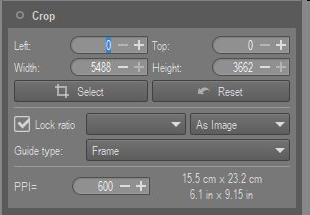
GTK 3.22.30 without the patch:
 gaaned92
on 25 Nov 2018
gaaned92
on 25 Nov 2018
It's not too bad for me on Windows (GTK 3.22.30)
Well, the title says 3.18 for a reason... :stuck_out_tongue_winking_eye:
just curious. for what reason do you stay on an old development version?
Because I tend to never upgrade a system that works unless I'm forced to. I'm using a (derivative of) Ubuntu 16.04, which ships with GTK+ 3.18
agriggio
on 25 Nov 2018
@agriggio no objection
 heckflosse
on 25 Nov 2018
heckflosse
on 25 Nov 2018
@agriggio No objection from me too
@gaaned92 Thanks for the hint about missing settings
Thanatomanic
on 25 Nov 2018
Fixed in 23aa0562aabc2c028202a3291dd03c91dd78ea88
agriggio
on 25 Nov 2018
Hi @agriggio
I'm trying to drop GTK2-era hard-coded styling elements from the code and use GTK3-era CSS for that.
You will find other grids which rely on CSS for padding, probably (from memory) the grids in:
- Preferences > Appearance.
- Preferences > File Browser > Cache Options.
- The work-in-progress "resize to physical dimensions" patch for the Resize tool.
- Profiled Lens Correction.
The CSS code which adds padding in GTK+ >=3.20 and apparently fails to work in 3.18 follows:
/* Add padding to grid cells */

.grid-spacing > * {
    margin: 2px;
}
https://github.com/Beep6581/RawTherapee/blob/dev/rtdata/themes/RawTherapee-GTK3-20_.css#L1040
Would be great if you found a CSS solution which works in 3.18.
 Beep6581
on 26 Nov 2018
Beep6581
on 26 Nov 2018
Update, there is no CSS solution for GTK+ 3.18.
There is a new border-spacing property specifically intended for this, but it is not in any release yet:
https://mail.gnome.org/archives/commits-list/2016-December/msg02402.html
Since we need a viable long-term solution which keeps code clean and consistent, considering the above, I think we should revert to using set_row_spacing and set_column_spacing until RT moves to GTK4.
Beep6581
on 26 Nov 2018
Sorry for being off, but it's related to cropping. Could someone correct the tiny bug in image diagonal calculation?
diff --git a/rtgui/cropwindow.cc b/rtgui/cropwindow.cc
index 45372f1..119a4fe 100644
--- a/rtgui/cropwindow.cc
+++ b/rtgui/cropwindow.cc
@@ -1960,7 +1960,7 @@ void CropWindow::zoomIn (bool toCursor, int cursorX, int cursorY)
                 int x1 = cropHandler.cropParams.x + cropHandler.cropParams.w / 2;
                 int y1 = cropHandler.cropParams.y + cropHandler.cropParams.h / 2;
                 double cropd = sqrt(cropHandler.cropParams.h * cropHandler.cropParams.h + cropHandler.cropParams.w * cropHandler.cropParams.w) * zoomSteps[cropZoom].zoom;
-                double imd = sqrt(imgW * imgW + imgH + imgH);
+                double imd = sqrt(imgW * imgW + imgH * imgH);
                 double d;

                 // the more we can see of the crop, the more gravity towards crop center
 Konyicsiva
on 27 Nov 2018
Konyicsiva
on 27 Nov 2018
@agriggio @Thanatomanic Ok to commit? For me it's a no brainer
heckflosse
on 27 Nov 2018
@agriggio @Thanatomanic Feel free to commit. I'm on a different branch atm
heckflosse
on 27 Nov 2018
@Konyicsiva Very well spotted this bug. Compliment :+1:
heckflosse
on 27 Nov 2018
@Beep6581
Replace in the RT-theme
.grid-spacing > * {
    margin: 2px;
}
with
button,
#MyExpander button,
button.flat,
#MyExpander button.flat,
button.combo,
checkbutton,
radiobutton,
spinbutton,
entry {
    margin: 2px;
}

/* Vertical group of buttons in 1 column */
#MyExpander button.Top,
button.Top {
    margin-bottom: 0;
}
#MyExpander button.MiddleV,
button.MiddleV {
    margin-top: 0;
    margin-bottom: 0;
}
#MyExpander button.Bottom,
button.Bottom {
    margin-top: 0;
}
/* end */

/* Horizontal group of buttons in 1 row */
#MyExpander button.Left,
button.Left {
    margin-right: 0;
}
#MyExpander button.MiddleH,
button.MiddleH {
    margin-left: 0;
    margin-right: 0;
}
#MyExpander button.Right,
button.Right {
    margin-left: 0;
}
/* end */
... and you'll get the spaces everywhere.
 TooWaBoo
on 28 Nov 2018
TooWaBoo
on 28 Nov 2018
Related issues
Beep6581
·
77Comments
 Desmis
·
133Comments
Desmis
·
133Comments
 luisfl
·
75Comments
Desmis
·
297Comments
Desmis
·
167Comments
luisfl
·
75Comments
Desmis
·
297Comments
Desmis
·
167Comments