Rawtherapee: White balance Auto - new algorithm Itcwb
I just commit in branch "autowblocal" a big improvment to "Itcwb" - Auto iterate temperature correlation"
To test :)
Here the summary:
This algorithm try to find temperature correlation between 20 to 40 color between 98 spectral color and about 20 to 40 color found in the image, I just found the idea in the web "correlate with chroma" instead of RGB grey point,but I don't use any algo found on the web.
I have test many many algo to find the first one that work :)
Probably (sure) there are improvment to do...
I have create a table temperature with temp and white point with 100 values between 2000K and 12000K we can obviously change these values, more...with different steps
I have create or recuparate and transformed 98 spectral colors from Colorchecker24, others color and my 468 colors target, or from web flowers, etc. with a step of 5nm, I think it is largey enough.
1) for the cuurent raw file we create a table for each temp of RGB multipliers
2) then, I choose the "camera temp" to initialize calculation (why not ?)
3) for this temp, I calculated XYZ values for the 98 spectrals datas
4) then I create for the image an "histogram", but for xyY (Cie 1931 color space)
5) for each pixel (in fact to accelerate only 1/10 for and 1/10 for y), I determine for each couple xy, the number of occurences
6) I sort this result in ascending order
7) in option we can sort in another maner to take into account chroma : chromax = x - white point x, chromay = y - white point y
8) then I compare this result, with spectral datas found above in 3) with deltaE (limited to chroma)
9) at this point we have xyY values that match Camera temp, and spectral datas associated
10) then I recalculate RGB values from xyY histogram
11) after, I vary temp, between 2000K to 12000K
12) RGB values are recalcualted from 10) with RGB multipliers, and then xyY are calcualted for each temp
13) spectral datas choose are recalculated with temp betwen 2000K to 12000K with matrix spectral calculation, that leeds to xyY values
14) I calculated for each couple xy, Student correlation (without Snedecor test)
15) the good result, is the best correlation
16) we have found the best temperature where color image and color refences are correlate
17) after we pass this value to improccoordinator
Some variables or function are not used, keep in case of.
I have test with cat02 but result are not stable enough ! why ??, therefore cat02 neutralized.
This operation is done (actually) 100 times and compare Student coefficient, and keep the absolute minimum, We can probably optimize....
But actually the goal is to find the good algorithm!
I think, this algo is very good in most cases :) ...to verify of course.
You can used it in images :flowers, landscape, portrait, skin, where illuminants are "normal" (daylight, blackbody).
You must avoid when illuminant is non standard (fluorescent, LED...) and also, when the subject is lost in the image (some target to generate profiles).
You can change 2 parameters in option.cc:
- Itcwb_thres : 20 by default ==> number of color used in final algorithm - between 10 and max 40.
- Itcwb_sort : false by default, can improve algo if true, ==> sort value in something near chroma order, instead of histogram number.
 Desmis
All 66 comments
- The branch compiled and ran fine.
- The results of "Auto iterate temperature correlation G = camera" (AITC) are generally fantastic and natural!
- The WB on this synthetic non-raw image is incorrect when using AITC but correct using all other modes.
http://rawtherapee.com/shared/test_images/8_bit_integer_gamma.png - The Filmstrip thumbnails do not match the navigator thumbnail or main preview:
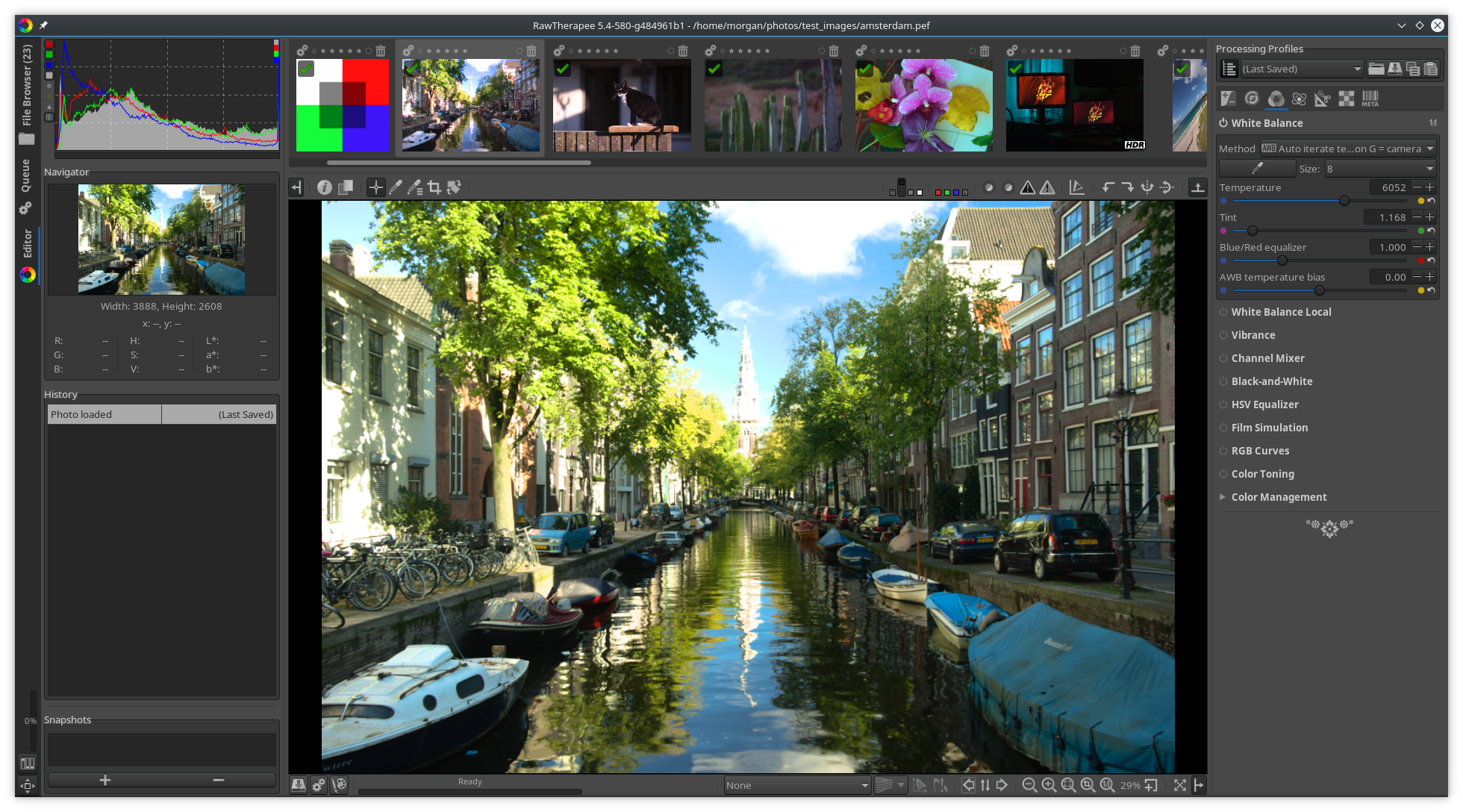
Notice that the Filmstrip thumb is more purple. - One image where AITC didn't do best was:
http://rawtherapee.com/shared/test_images/karin_library_2.hdr.dng
karin_library_2.hdr aitc.jpg.out.pp3.txt
- AITC
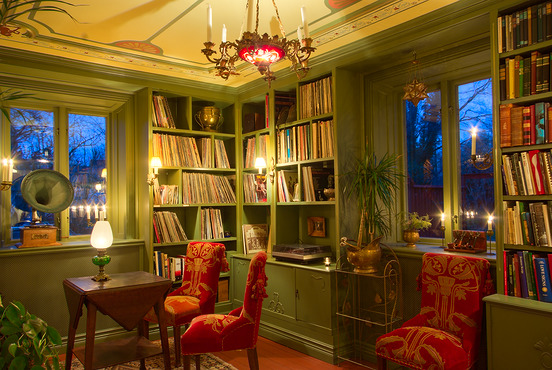
- Auto-Edge was closest to natural
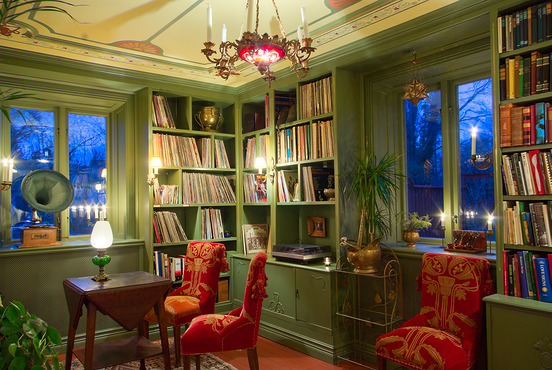
- AITC
- All auto modes (old and new) except for AITC result in complete failure on http://rawtherapee.com/shared/test_images/tracteur.dng but AITC does very well.
- I notice that often the AITC white balance is very close to camera white balance. My SONY ILCE-7M2 has very good auto-white balance. I hope AITC would produce the same good values even if the camera WB was very wrong (I don't currently have any raw files with very wrong camera WB to test this).
- AITC failed on this UniWB photo:
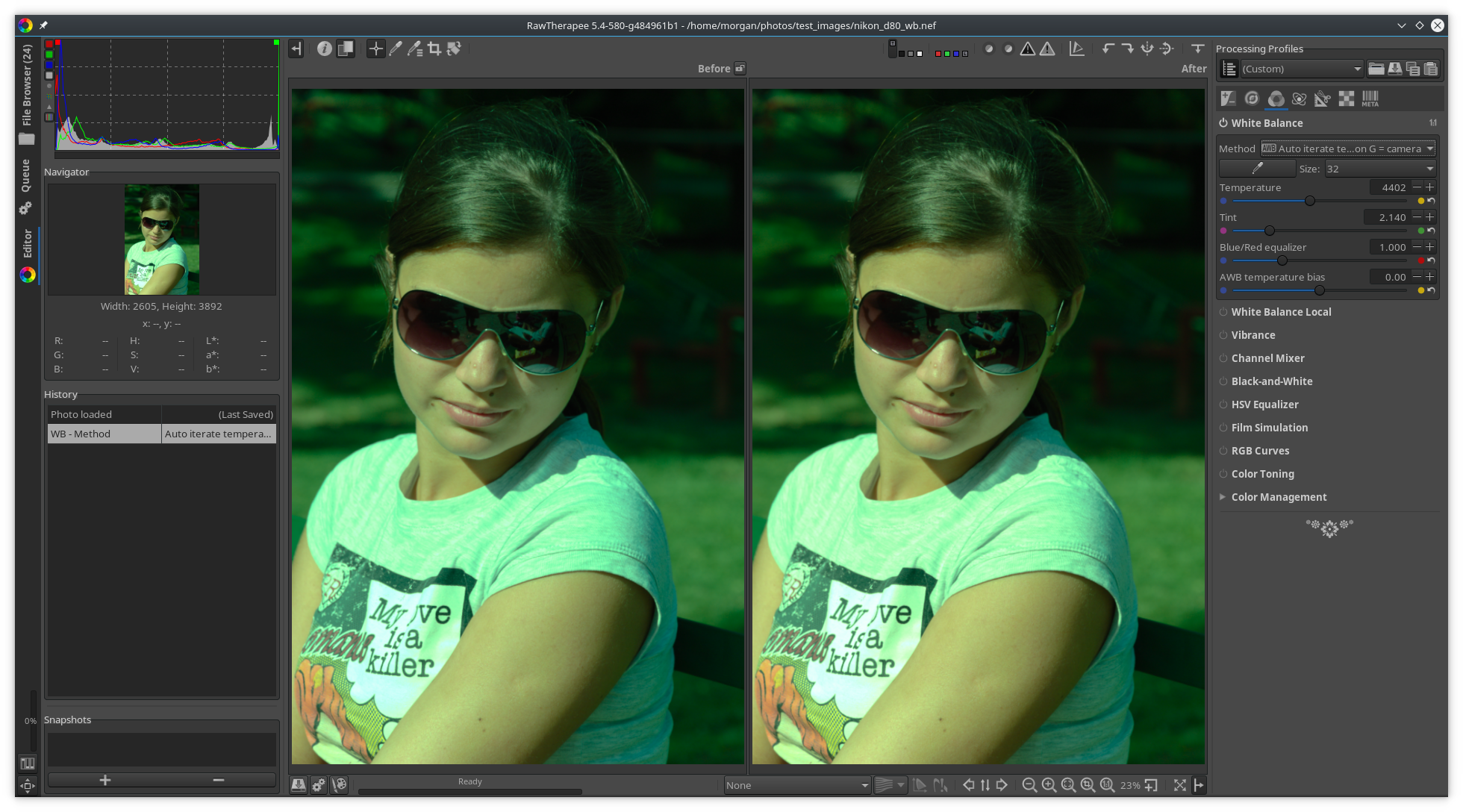
"Camera" on the left, AITC on the right.
http://rawtherapee.com/shared/test_images/nikon_d80_wb.nef
 Beep6581
on 30 Jun 2018
Beep6581
on 30 Jun 2018
@Beep6581
Thank you for testing so fast :)
I think artificial image are not the domain of Itcwb (AITC)
I think if the camera wb is slighly wrong, no problem...but if it is completely wrong perhaps result wil not be good...to verify :)
This algorithm is quite complex, I spent a lot of time and explained during the holidays to my 14 year old grandson the principles of algorithm, which told me, "it's incredibly complex"
jacques
Desmis
on 30 Jun 2018
@Desmis I also tested with a lot of files using AITC. Currently it works good if the camera wb is good, but works bad if the camera wb is totally off (for example in UniWB shots).
Maybe iterate twice (one time starting from old autowb, and another time starting from camera wb) and then pick the best?
 heckflosse
on 30 Jun 2018
heckflosse
on 30 Jun 2018
@heckflosse
Ingo thank you for testing :)
Can you provided image where camera wb is totally off...but of course with "normal" illuminant
But I amm not sure of the result...
Desmis
on 30 Jun 2018
Generaly I think we cannot found an algorithm thats solves all cases, because the problem is mathematically undetermined.
Now we have 2 principles for auto wb
- grey with differents forms
- correlate color
I think the second is best in most cases, but not for all cases...as the auto wb of ours cameras :)
Desmis
on 30 Jun 2018
@Desmis Jacques https://filebin.net/gofuuy25y47xsse0
heckflosse
on 30 Jun 2018
@Desmis I updated my post with more data. If you read this via email you will not see the updates, so please see:
https://github.com/Beep6581/RawTherapee/issues/4650#issuecomment-401545185
Beep6581
on 30 Jun 2018
The wrong result is due to very bad "green"
I have 2 algo, that I had hidden, and I re-put the first where green (and only green) is calculated by auto standard deviation
I just commit this little change :)
Desmis
on 30 Jun 2018
@Desmis Jacques, just an idea: How about starting the iteration with a tint of 1.0 instead of the camera wb tint?
heckflosse
on 30 Jun 2018
Ingo
No problem, I have already tested this way, you put 1. for green!
It's an hypothesis to put 1. and allow the user with a process similar to "awb temperature bias", but with "awb green bias"...why not ??
I have also the possibility to make to converge Y in xyY...until now I have not arrived, but why not !!
Desmis
on 30 Jun 2018
we can also (if my "converge" does not work), calculate green
if camera green near 1 (0.8 ..1.2) then use camera green
else green = 1 and "awb green bias".
Desmis
on 30 Jun 2018
I will try tomorrow or after... "converge" for "Y". I don't understand why it works for xy and not for Y...but...some days ago none works... !!
and also, if not "converge" I will apply an algo as above with green camera
jacques
Desmis
on 30 Jun 2018
@Desmis Jacques, I will test asap
heckflosse
on 30 Jun 2018
I just commit a small change
I limited the value of green camera to avoid very bad values
Arbitrary when green is between 0.83 and 1.20, this value is used by Itcwb
if outside green=1...the user if need can move green, but it does not recalculate AutoWB
Desmis
on 1 Jul 2018
I found my mistake for calculating with green. I was wrong for optimization, it is not Y that should be optimized, but xy, even if it is Y (green) that varies.
The only problem, and that is not obvious is that convergence is not as obvious as with chroma alone, the variations are small!
for now, I'll leave the value of green as it is currently apprehended (camera green, or 1.) and work on the algorithm. But it is not sure, I success :)
Desmis
on 1 Jul 2018
I think, to verify, no line of code is written, it will be possible to optimize green as temp, but with a process slightly different, with some lops adds...after that we would have green and temp (sligthly recalculated)
Of course, to verify, if what I have in mind will work ?
Desmis
on 1 Jul 2018
I just push a commit with an enhance algorithm for "diificult" cases
1) when green camera is between 0.8 ad 1.3, I use always this value
2) when green camera is out these values, I add a new loop where "green" change. After many tests , I reserved this new algo only for this cases "diificult", because as I feared in some cases (images where the colors are weakly saturated for example, the differences of the coeeficient "student" to calculate the correlation are too weak and lead to mediocre results
This new algo is experimental... you can change (if necessary) the "range" of green.
In option the variable itcwb_greenrange = 0, you can put 1 or 2
itcwb_greenrange = 0 green vary between 0.8 and 1.3
itcwb_greenrange = 1 green vary between 0.6 and 1.7
itcwb_greenrange = 2 green vary between 0.3 and 4
For the 2 images one for DrSlony, one for Ingo, I used itcwb_greenrange = 0, and the results seems good
Of course, To verify :)
Desmis
on 2 Jul 2018
I think I can improved this second part but not today..of course to verify.
Today I am not at home
Le sam. 30 juin 2018 23:22, Ingo Weyrich notifications@github.com a
écrit :
@Desmis https://github.com/Desmis Jacques, I will test asap
—
You are receiving this because you were mentioned.
Reply to this email directly, view it on GitHub
https://github.com/Beep6581/RawTherapee/issues/4650#issuecomment-401567030,
or mute the thread
https://github.com/notifications/unsubscribe-auth/ANIIWQuvauUuRZDx5L4FORwy0Iyr2gsBks5uB-v3gaJpZM4U98QI
.
Desmis
on 3 Jul 2018
I push a commit with some improvments to algorithm "extra" (for image where camera settings are wrong)
I introduced other "options" to test, but I think the values by default are generaly the best
All options Itcwb:
**Itcwb_thres** : 20 by default ==> number of color used in final algorithm - between 10 and max 40
**Itcwb_sort** : false by default, can improve algo if true, ==> sort value in something near chroma order, instead of histogram number
**Itcwb_greenrange** : 0 amplitude of green variation - between 0 to 2
**Itcwb_greendeltatemp** : 1 - delta temp in green iterate loop for "extra" - between 0 to 4
**Itcwb_forceextra** : false - if true force algorithm "extra" ("extra" is used when cmaera wbsettings are wrong) to all images
Recall, this algorithm only valid for standard illuminants (blackbody, daylight) between 2100K to 12000K
In other cases results are impredectible (Fluorescent, mixed illuminants, LED, etc.)
Desmis
on 4 Jul 2018
I put a commit with:
a) clean code - I keep between comment variables that can be used in some cases
b) rename some variables to be more readable (I hope it is so...)
I think I have "finished", the work to find a "new algorithm for white balance".
This algorithm must be optimized code and speed :), and also be sure of the 5 options settings.
As above, this algo works well with daylight and blackbody. In general (??), I think green values very different from 1. (0.5..1.5....2...3...) are due to bad illuminant (with "holes") as Fluorescent, or if this day the weather conditions are very different from those that prevailed in the calculations of illuminants D
jacques
Desmis
on 7 Jul 2018
perhaps, after numerous test by users it will be necessary to add some others reference spectral colors
- white
- black
- red
- orange
- yellow
- green
- cyan
- blue
- purple
Actually there are 100 colors, I think globaly it's enough, but ?
Desmis
on 7 Jul 2018
Unlike what I wrote recently, I just modified the Itcwb algorithm.
By default, I change 2 variables in option
Itcwb_greendeltatemp=2 instead of 1
Itcwb_forceextra=true instead of false. Which comes to say that the algorithm "extra" which was used only in the cases where "camera" was "out", is now always used
Of course you can always change these values
Jacques
Desmis
on 8 Jul 2018
I will add about 12 colors reference spectral
Clean code
:)
Desmis
on 8 Jul 2018
With commit bab094f,
- I have slightly modified "green array" to improve algorithm (choice of best couple temp / green by Student comparison)
- I have add 13 spectral references colors
- I clean code, and GUI
:)
Desmis
on 9 Jul 2018
I just fixed a type error in one spectral data, and add 1 data more (black)
I think now, there is the good number of spectral datas - enough "white" and "black"...etc..
Nb - the more there are, the better the results will be...but diificult not to do type error!
To use "Itcwb" or "Aitc", you need first to clean cache :)
jacques
Desmis
on 9 Jul 2018
After have a look at all spectral colors, I think there is a lack in some colors
- violet and magenta
- blue near sky
But now no changes in the code, neither in algorithm, only in spectral datas
I will add about 10 colors :)
Desmis
on 10 Jul 2018
I just add 19 spectral colors for refrence. Now they are 133
I add 3 Violet, 11 Blue and Blusky, 3 black, 2 white
I hope no type error :)
jacques
Desmis
on 10 Jul 2018
I think I have finished, algorithm and datas - of course we can:
a) increase the number of spectral color datas, it is only a "time" problem and it's a tedious job
b) change the algorithm for final choice, actually the couple "temp / green" choose is the one with the green nearest of 1., in the 3 first minimal student correlation.
1) if you want to see result of calculation with "student correlation" you must use "console"
2) in some cases algorithm fails - rarely - and in all cases it seems illuminant is not either "Daylight" either "Blackbody" (big values of green)
jacques
Desmis
on 11 Jul 2018
I add others spectral color, now there is 155 colors.
Also, I add in GUI, value of choosen Student correlation, just above "temperature"
ex "Student itcwb : 0.0013"
I add also a tooltip for this display value :)
jacques
Desmis
on 15 Jul 2018
Would be nice to have this new ITC method in 5.5.
Beep6581
on 16 Jul 2018
I've just quickly looked through the above details, and understand only loosely, but have a suggestion. Is there any mileage in allowing the user to do a (quick) approximate white balance, then apply your algo from that starting point? The user could then flick between the two (via history) and choose the best.
 RawConvert
on 17 Jul 2018
RawConvert
on 17 Jul 2018
@Beep6581
Of course I agree :)
But 3 remarks
1) what we do with "local white balance"
a) keep like that
b) disable but keep the code
c) suppress and wait for the moment where "locallab GUI" run well, and keep code in one branch not deleted.
I propose c)
2) what we do with others auto wb
a) keep only code of "Itcwb" and suppressed all others code (includind the current WB auto)
b) the same but only disactive others call in GUI
c) keep only "Itcwb", "auto edge", "auto robust", "auto standard deviation", "auto grey old"
I propose c)
3) the code needs to be optimized, @heckflosse , Ingo can you have a look, thank you :)
@RawConvert
As the algorithm is done, I do not think there will be differences, between as now and what you propose.
The first "pass" is only to find "Spectral color reference" :)
jacques
Desmis
on 17 Jul 2018
@Desmis Jacques, I will have a look in the evening
heckflosse
on 17 Jul 2018
No worries, it was just a thought.
RawConvert
on 17 Jul 2018
@heckflosse
Ingo, thank you :)
Desmis
on 17 Jul 2018
@Desmis Jacques, because I can not push at the moment, I will post a series of patches.
I measure ItcWB using amsterdam.pef on my old dual core laptop.
Before my patches: 516 ms
heckflosse
on 17 Jul 2018
First patch: 263 ms
diff --git a/rtengine/colortemp.cc b/rtengine/colortemp.cc
index 618b6549..f22ac763 100644
--- a/rtengine/colortemp.cc
+++ b/rtengine/colortemp.cc
@@ -3287,7 +3287,7 @@ void ColorTemp::tempxy(bool separated, int &repref, float **Tx, float **Ty, floa
 double ColorTemp::blackbody_spect(double wavelength, double temperature)
 {
     double wlm = wavelength * 1e-9;   /* Wavelength in meters */
-    return (3.7417715247e-16 / pow(wlm, 5)) /              //3.7417..= c1 = 2*Pi*h*c2  where h=Planck constant, c=velocity of light
+    return (3.7417715247e-16 / rtengine::pow5(wlm)) /              //3.7417..= c1 = 2*Pi*h*c2  where h=Planck constant, c=velocity of light
            (xexp(1.438786e-2 / (wlm * temperature)) - 1.0);  //1.4387..= c2 = h*c/k  where k=Boltzmann constant
 }

diff --git a/rtengine/rawimagesource.cc b/rtengine/rawimagesource.cc
index 7c862ad2..7d379b0b 100644
--- a/rtengine/rawimagesource.cc
+++ b/rtengine/rawimagesource.cc
@@ -36,6 +36,7 @@
 #include "rtlensfun.h"
 #include "cat02adaptation.h"
 #include "pdaflinesfilter.h"
+#define BENCHMARK
 #include "StopWatch.h"
 #include "camconst.h"
 #include "ciecam02.h"
diff --git a/rtengine/rt_math.h b/rtengine/rt_math.h
index 8d55b492..a7feeb3f 100644
--- a/rtengine/rt_math.h
+++ b/rtengine/rt_math.h
@@ -44,6 +44,12 @@ constexpr T pow4(T x)
     return SQR(SQR(x));
 }

+template<typename T>
+constexpr T pow5(T x)
+{
+    return x * pow4(x);
+}
+
 template<typename T>
 constexpr const T& min(const T& a)
 {
Second patch (includes first patch) : 142 ms
diff --git a/rtengine/colortemp.cc b/rtengine/colortemp.cc
index 618b6549..aead7dbf 100644
--- a/rtengine/colortemp.cc
+++ b/rtengine/colortemp.cc
@@ -3287,7 +3287,7 @@ void ColorTemp::tempxy(bool separated, int &repref, float **Tx, float **Ty, floa
 double ColorTemp::blackbody_spect(double wavelength, double temperature)
 {
     double wlm = wavelength * 1e-9;   /* Wavelength in meters */
-    return (3.7417715247e-16 / pow(wlm, 5)) /              //3.7417..= c1 = 2*Pi*h*c2  where h=Planck constant, c=velocity of light
+    return (3.7417715247e-16 / rtengine::pow5(wlm)) /              //3.7417..= c1 = 2*Pi*h*c2  where h=Planck constant, c=velocity of light
            (xexp(1.438786e-2 / (wlm * temperature)) - 1.0);  //1.4387..= c2 = h*c/k  where k=Boltzmann constant
 }

@@ -3423,19 +3423,12 @@ void ColorTemp::spectrum_to_color_xyz_daylight(const double* spec_color, double

         Me = get_spectral_color(lambda, spec_color);
         Mc = daylight_spect(lambda, _m1, _m2);
+        Yo += cie_colour_match_jd[i][1] * Mc;
         X += Mc * cie_colour_match_jd[i][0] * Me;
         Y += Mc * cie_colour_match_jd[i][1] * Me;
         Z += Mc * cie_colour_match_jd[i][2] * Me;
     }

-    for (i = 0, lambda = 350; lambda < 830.1; i++, lambda += 5) {
-
-        double Ms;
-
-        Ms = daylight_spect(lambda, _m1, _m2);
-        Yo += cie_colour_match_jd[i][1] * Ms;
-    }
-
     xx = X / (Yo + epsi);
     yy = Y / (Yo + epsi);
     zz = Z / (Yo + epsi);
@@ -3455,19 +3448,12 @@ void ColorTemp::spectrum_to_color_xyz_blackbody(const double* spec_color, double

         Me = get_spectral_color(lambda, spec_color);
         Mc = blackbody_spect(lambda, _temp);
+        Yo += cie_colour_match_jd[i][1] * Mc;
         X += Mc * cie_colour_match_jd[i][0] * Me;
         Y += Mc * cie_colour_match_jd[i][1] * Me;
         Z += Mc * cie_colour_match_jd[i][2] * Me;
     }

-    for (i = 0, lambda = 350; lambda < 830.1; i++, lambda += 5) {
-
-        double Ms;
-
-        Ms = blackbody_spect(lambda, _temp);
-        Yo += cie_colour_match_jd[i][1] * Ms;
-    }
-
     xx = X / (Yo + epsi);
     yy = Y / (Yo + epsi);
     zz = Z / (Yo + epsi);
diff --git a/rtengine/rawimagesource.cc b/rtengine/rawimagesource.cc
index 7c862ad2..7d379b0b 100644
--- a/rtengine/rawimagesource.cc
+++ b/rtengine/rawimagesource.cc
@@ -36,6 +36,7 @@
 #include "rtlensfun.h"
 #include "cat02adaptation.h"
 #include "pdaflinesfilter.h"
+#define BENCHMARK
 #include "StopWatch.h"
 #include "camconst.h"
 #include "ciecam02.h"
diff --git a/rtengine/rt_math.h b/rtengine/rt_math.h
index 8d55b492..a7feeb3f 100644
--- a/rtengine/rt_math.h
+++ b/rtengine/rt_math.h
@@ -44,6 +44,12 @@ constexpr T pow4(T x)
     return SQR(SQR(x));
 }

+template<typename T>
+constexpr T pow5(T x)
+{
+    return x * pow4(x);
+}
+
 template<typename T>
 constexpr const T& min(const T& a)
 {
Third patch (includes first and second patch) : 112 ms
diff --git a/rtengine/colortemp.cc b/rtengine/colortemp.cc
index 618b6549..aa39df53 100644
--- a/rtengine/colortemp.cc
+++ b/rtengine/colortemp.cc
@@ -3186,6 +3186,7 @@ void ColorTemp::tempxy(bool separated, int &repref, float **Tx, float **Ty, floa
     }

     if (!separated) {
+        std::string wbcat02Method = wbpar.wbcat02Method;
         for (int tt = 0; tt < N_t; tt++) {
             tempw = Txyz[tt].Tem;

@@ -3223,15 +3224,15 @@ void ColorTemp::tempxy(bool separated, int &repref, float **Tx, float **Ty, floa
             float Ywb = 1.;
             float Zwb = Txyz[tt].ZZ;

-            if (wbpar.wbcat02Method == "icam") {//not used
+            if (wbcat02Method == "icam") {//not used
                 icieCAT02float(Xwb, Ywb, Zwb, CAM02BB00, CAM02BB01, CAM02BB02, CAM02BB10, CAM02BB11, CAM02BB12, CAM02BB20, CAM02BB21, CAM02BB22, 1.0);
             }

-            if (wbpar.wbcat02Method == "cam") {
+            if (wbcat02Method == "cam") {
                 cieCAT02float(Xwb, Ywb, Zwb, CAM02BB00, CAM02BB01, CAM02BB02, CAM02BB10, CAM02BB11, CAM02BB12, CAM02BB20, CAM02BB21, CAM02BB22, 1.0);
             }

-            if (wbpar.wbcat02Method != "none") {
+            if (wbcat02Method != "none") {
                 for (int i = 0; i < N_c; i++) {
                     Refxyzcat02[i].Xrefcat = CAM02BB00 * Refxyz[i].Xref + CAM02BB01 * Refxyz[i].Yref + CAM02BB02 * Refxyz[i].Zref ;
                     Refxyzcat02[i].Yrefcat = CAM02BB10 * Refxyz[i].Xref + CAM02BB11 * Refxyz[i].Yref + CAM02BB12 * Refxyz[i].Zref ;
@@ -3264,7 +3265,7 @@ void ColorTemp::tempxy(bool separated, int &repref, float **Tx, float **Ty, floa
 //                    Ty[i][tt] = (float) Refxyz[i].Yref;
 //                    Tz[i][tt] = (float) Refxyz[i].Zref;

-                if (wbpar.wbcat02Method == "none") {
+                if (wbcat02Method == "none") {
                     Tx[i][tt] = (float) Refxyz[i].Xref;
                     Ty[i][tt] = (float) Refxyz[i].Yref;
                     Tz[i][tt] = (float) Refxyz[i].Zref;
@@ -3287,7 +3288,7 @@ void ColorTemp::tempxy(bool separated, int &repref, float **Tx, float **Ty, floa
 double ColorTemp::blackbody_spect(double wavelength, double temperature)
 {
     double wlm = wavelength * 1e-9;   /* Wavelength in meters */
-    return (3.7417715247e-16 / pow(wlm, 5)) /              //3.7417..= c1 = 2*Pi*h*c2  where h=Planck constant, c=velocity of light
+    return (3.7417715247e-16 / rtengine::pow5(wlm)) /              //3.7417..= c1 = 2*Pi*h*c2  where h=Planck constant, c=velocity of light
            (xexp(1.438786e-2 / (wlm * temperature)) - 1.0);  //1.4387..= c2 = h*c/k  where k=Boltzmann constant
 }

@@ -3423,19 +3424,12 @@ void ColorTemp::spectrum_to_color_xyz_daylight(const double* spec_color, double

         Me = get_spectral_color(lambda, spec_color);
         Mc = daylight_spect(lambda, _m1, _m2);
+        Yo += cie_colour_match_jd[i][1] * Mc;
         X += Mc * cie_colour_match_jd[i][0] * Me;
         Y += Mc * cie_colour_match_jd[i][1] * Me;
         Z += Mc * cie_colour_match_jd[i][2] * Me;
     }

-    for (i = 0, lambda = 350; lambda < 830.1; i++, lambda += 5) {
-
-        double Ms;
-
-        Ms = daylight_spect(lambda, _m1, _m2);
-        Yo += cie_colour_match_jd[i][1] * Ms;
-    }
-
     xx = X / (Yo + epsi);
     yy = Y / (Yo + epsi);
     zz = Z / (Yo + epsi);
@@ -3455,19 +3449,12 @@ void ColorTemp::spectrum_to_color_xyz_blackbody(const double* spec_color, double

         Me = get_spectral_color(lambda, spec_color);
         Mc = blackbody_spect(lambda, _temp);
+        Yo += cie_colour_match_jd[i][1] * Mc;
         X += Mc * cie_colour_match_jd[i][0] * Me;
         Y += Mc * cie_colour_match_jd[i][1] * Me;
         Z += Mc * cie_colour_match_jd[i][2] * Me;
     }

-    for (i = 0, lambda = 350; lambda < 830.1; i++, lambda += 5) {
-
-        double Ms;
-
-        Ms = blackbody_spect(lambda, _temp);
-        Yo += cie_colour_match_jd[i][1] * Ms;
-    }
-
     xx = X / (Yo + epsi);
     yy = Y / (Yo + epsi);
     zz = Z / (Yo + epsi);
diff --git a/rtengine/rawimagesource.cc b/rtengine/rawimagesource.cc
index 7c862ad2..7d379b0b 100644
--- a/rtengine/rawimagesource.cc
+++ b/rtengine/rawimagesource.cc
@@ -36,6 +36,7 @@
 #include "rtlensfun.h"
 #include "cat02adaptation.h"
 #include "pdaflinesfilter.h"
+#define BENCHMARK
 #include "StopWatch.h"
 #include "camconst.h"
 #include "ciecam02.h"
diff --git a/rtengine/rt_math.h b/rtengine/rt_math.h
index 8d55b492..a7feeb3f 100644
--- a/rtengine/rt_math.h
+++ b/rtengine/rt_math.h
@@ -44,6 +44,12 @@ constexpr T pow4(T x)
     return SQR(SQR(x));
 }

+template<typename T>
+constexpr T pow5(T x)
+{
+    return x * pow4(x);
+}
+
 template<typename T>
 constexpr const T& min(const T& a)
 {
@Desmis Jacques, please test my patches (testing patch number three should be enough). I will try to make further speedups tomorrow if the tests are ok.
heckflosse
on 18 Jul 2018
@heckflosse
I have tested your patch, but manually, by changing code as you done. I tried to apply patch, but it's fail at several places ?
All works fine :)
Time improvment is important. Very good job as usual :)
I just commit and push your patch to "autowblocal".
Thank you
Jacques
Desmis
on 18 Jul 2018
@Desmis Jacques, thanks for testing :) I'm still working on further improvements for ItcWB. Currently I'm at 78 ms (was 112 ms with last patch).
But, more important, I also made some improvements for RawImageSource::getrgbloc, which currently is quite slow. Current code needs 536 ms for amsterdam.pef on my old dual-core laptop, while new code needs 308 ms.
I will post a patch next days.
Ingo
heckflosse
on 19 Jul 2018
@heckflosse
Ingo, OK thank you
jacques
Desmis
on 19 Jul 2018
@Desmis Jacques, I tested ItcWb with a lot of files and can confirm that even for UniWB files it leads to a good WB. In general it's better than the old AutoWB and I would like to see it as the new AutoWB for RT 5.5.
But we should also keep the old AutoWB in code (not in GUI) for backwards compatibility.
For the other methods (robust, edge,...) I currently see no use case because ItcWB outperforms them in my tests. We should not bloat the dev code and the gui with them.
About optimizations: According to my tests we can completely skip the scaling in getrgbloc for ItcWB. Even better, we can completely skip the whole expensive getrgbloc function when using ItcWB and just use original red, green, blue arrays.
If you like, I can post some patches to integrate a really fast ItcWB into dev the next days. What do you think?
Ingo
heckflosse
on 19 Jul 2018
Let me know when you're not making any changes so that I can merge dev into this branch.
Beep6581
on 19 Jul 2018
@heckflosse
No problem you can make all the patch you want to optimize :)
Thank you
recall : getrgbloc has been create to use with "local", I think it will be necessary ..or something next - if we want a local control of white balance....But probably we can be content with "warm - cool" in "Exposure locallab" (in 95% cases it will be enough) : I think it is a good solution that will simplify code
jacques
Desmis
on 20 Jul 2018
@Beep6581 Please merge dev into this branch
heckflosse
on 20 Jul 2018
@heckflosse wilco, starting now.
Beep6581
on 20 Jul 2018
Done and tested.
Beep6581
on 20 Jul 2018
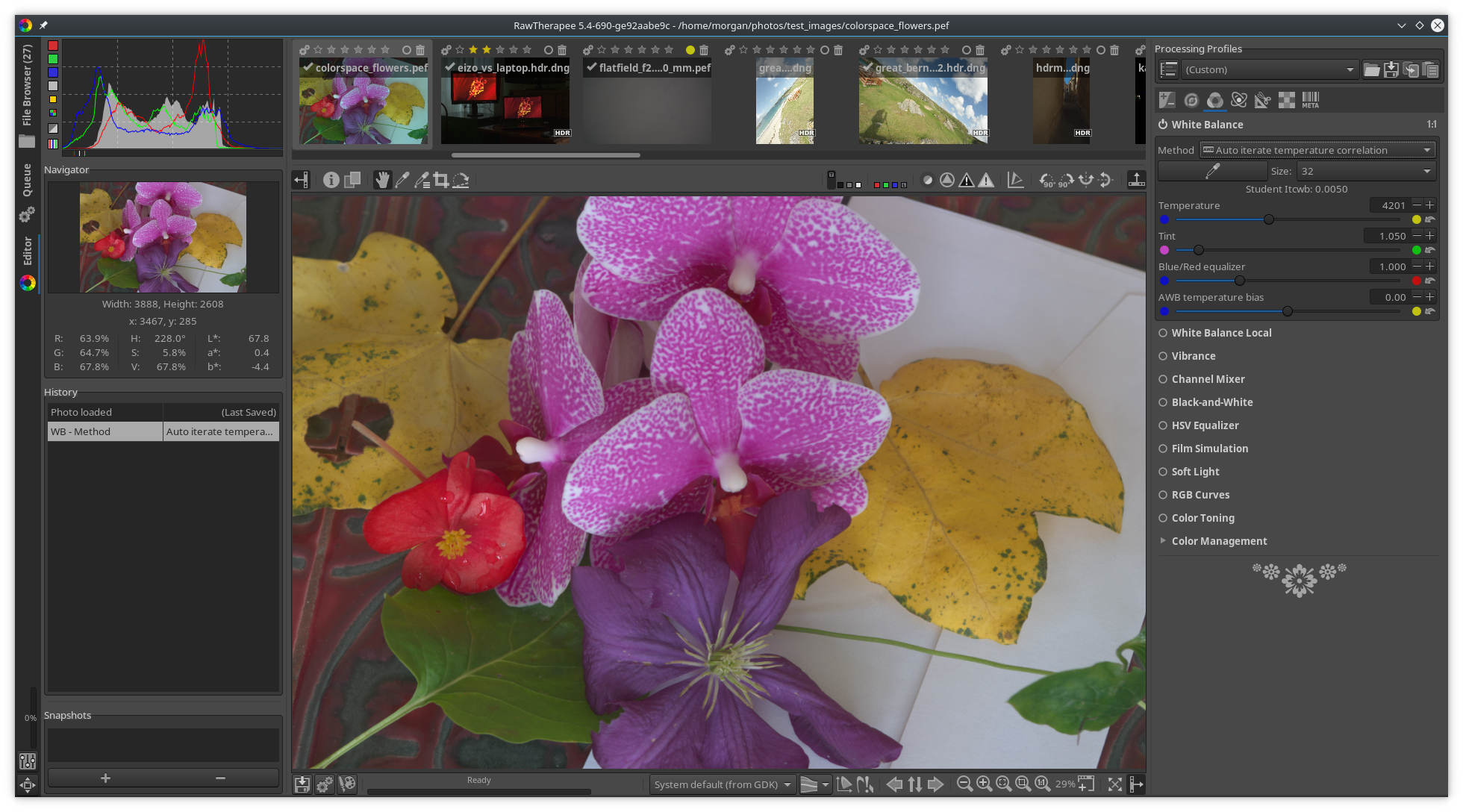
I tested e92aabe9c
White Balance:
- It works well now with UniWB photos. I will shoot some photos later today with very wrong in-camera WB to see how it performs.
- The thumbnail does not match the preview, could that be improved?
White Balance Local:
- When I disable "White Balance Local", click the hand tool and move the widget over the canvas, the progress bar keeps showing me that RT is amaze-demosaicing. It shouldn't, as the WBL tool is disabled.
- When I set the hand toggle-button to "on" to show the on-canvas widget, and then I re-open the same photo or open a different photo, the button is still toggled "on" but there is no on-canvas widget. The other on-canvas widget buttons have the same bug, e.g. the Graduated Filter button. Maybe ping @Hombre57 ?
- There is a sharp jump in the preview temperature between temp 20000 and 20001
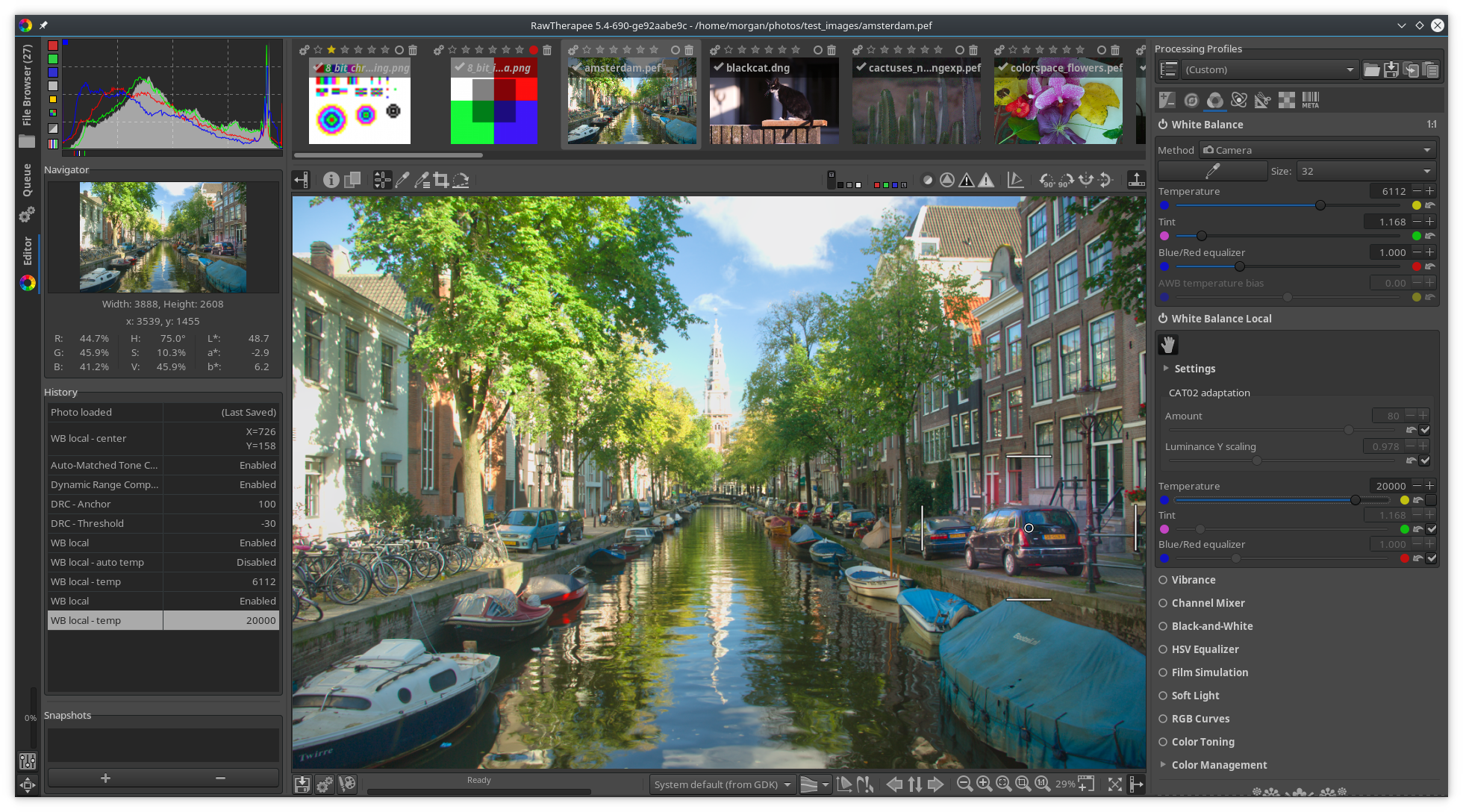
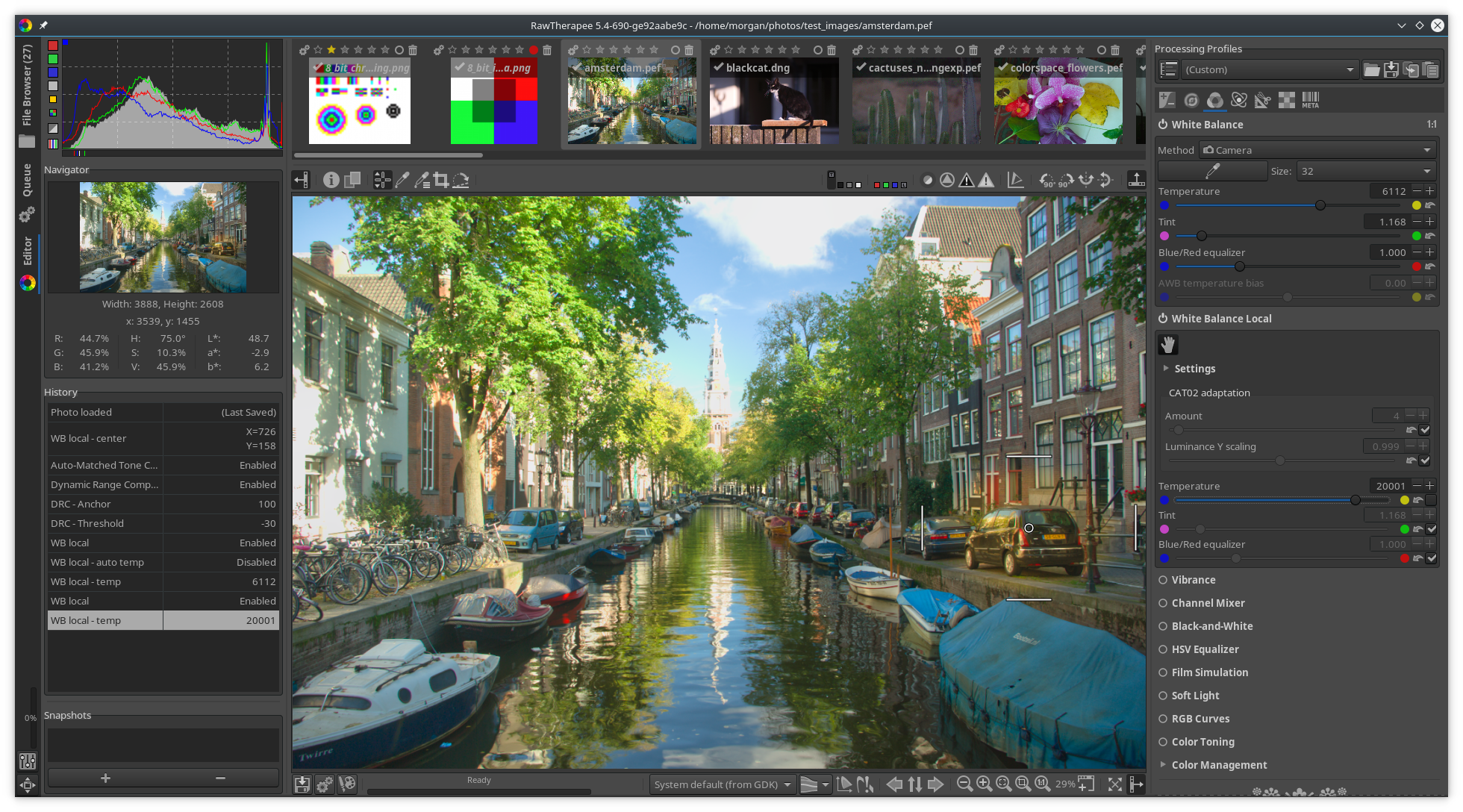
https://filebin.net/4jw5s2i6d6pg17ov/amsterdam.pef.pp3?t=xw1sew1v - The effects of the tool are not shown in the preview depending on the zoom level (everything identical as above, I just zoomed in a bit):

I agree about merging AITC without the other auto methods and without White Balance Local.
Beep6581
on 20 Jul 2018
@Desmis @Beep6581 I will do the merge and solve the open points (thumbs, batch processing etc.). But don't expect it to be ready before tuesday.
heckflosse
on 20 Jul 2018
@heckflosse
No problem with delay...I am used to :)
Thanks in advance for your work...
@Beep6581
Thanks for testing and give your opinion :)
No problem as I say above, to suppress "WB local", there is in locallab "warm - cool" (with cat02), it will works well for all images with illuminant Daylight or Blackbody
For others "auto wb", I agree that "Itcwb" is in quasi all cases superior to others methods, but intellectually, and this raises the question of the aims and objectives of Rawtherapee, should not the other methods be left for educational purposes...(for example in a sub menu) . But if everybody want to suppress them no problem, it's easier to delete than to create
For very bad WB, if illuminant is daylight, or Blackbody, I think algorithm should work, perhaps (probably) with a less good correlation coefficient....To see...
jacques
Desmis
on 20 Jul 2018
For others "auto wb", I agree that "Itcwb" is in quasi all cases superior to others methods, but intellectually, and this raises the question of the aims and objectives of Rawtherapee, should not the other methods be left for educational purposes...(for example in a sub menu) . But if everybody want to suppress them no problem, it's easier to delete than to create
My opinion, and it's only that, is that RawTherapee is sufficiently popular, and sufficiently complicated, that if possible, we should aim to reduce the complication, to eliminate unnecessary variables unless they can be proved to be quite useful. RT used to be called "The Experimental Raw Photo Editor" back when only a handful of people used it, but we moved past that point years ago and now with tens of thousands of users and many new tools it would be nice if the focus shifted on quality and usability (well, it has). We experimented with various WB algos and found one which works best. I would limit the choice of automatic white-balance algorithms in the next stable RT release to only AITC (maybe renamed to just "Auto") because it works best, and leave the worse-performing algos out. Anyone interested in them for educational purposes will still be able to find them in git's history or in their own branch.
Beep6581
on 20 Jul 2018
@Beep6581
I would limit the choice of automatic white-balance algorithms in the next stable RT release to only AITC (maybe renamed to just "Auto") because it works best, and leave the worse-performing algos out.
That is my intention. Though I want to keep the old autowb code for backwards compatibility if someone processes an old raw where 'Auto' is set in pp3.
heckflosse
on 20 Jul 2018
@Beep6581 @heckflosse
May be I express myself badly, I am a grumpy old French who speak English poorly, but no problem at all to suppress... :)
Desmis
on 20 Jul 2018
@Desmis my :+1: was for the but no problem at all to suppress... :), not for the grumpy old French, which you definitely not are, at least not grumpy ;-)
heckflosse
on 20 Jul 2018
@heckflosse
Of course, I'm joking :)
Desmis
on 20 Jul 2018
As it's early days, how about add the new method to the existing ones, saying it's a temporary position, and see how people like the different algorithms, and what wider testing reveals, then keep just the best.
RawConvert
on 20 Jul 2018
@RawConvert In general I agree with you to let people test the different algorithms and how they like them. But in this special case I think it's not about liking some algorithms but evaluating how close they are to the correct auto white balance. Have a look for example at this two files, where the old autowb method completely fails:
http://www.rawtherapee.com/shared/test_images/tracteur.dng
http://www.rawtherapee.com/shared/test_images/yellow_poppy.nef
The new method gives good wb for this two files.
Of course these are just examples. We tested with more than two files, and there also maybe cases where the new method doesn't work as well as in this examples.
Ingo
heckflosse
on 20 Jul 2018
@heckflosse
Ingo
When your work wil be finished - I'm not trying to speed up this branch, I will propose a small improvement (in improccoordinator.cc)
Indeed, the algorithm assumes that "camera temp" is almost good, and adjustements are done on this temp, and especially on the green.
I have tried many variations of algorithm whithout success, in all my tests the results are not so good, so I do not publish these results
On the other hand, the use of "temperature bias" allows in some cases to test small improvements and it works.
Of course, for Itcwb, "tempbias" dos not work as for "auto old", it recalculate algorithm.
However, in all cases that I have tried, the differences are very small :)
Desmis
on 24 Jul 2018
@Desmis Jacques, I will continue work on this, when I'm back home in about one week. For now, with my old laptop, I will only fix some crash issues recently reported.
heckflosse
on 30 Jul 2018
@heckflosse
Ingo
No problem :)
Desmis
on 30 Jul 2018
Commit all "summer 2018" changes to Itcwb
Desmis
on 1 Apr 2019
The autowblocal branch introduced good changes and it would be nice to get them into RawTherapee. How can I help?
Beep6581
on 21 Oct 2019
@Beep6581
No problem,:
1) either you merge "autowb" (not autowblocal which does not work) in dev
2) either you think, a delay is necessary
3) either I merge "autowb" in dev
I just, merge dev in autowb
Cordially
Jacques
Desmis
on 21 Oct 2019
Merged into dev, will be part of 5.9.
Beep6581
on 28 Feb 2020
Related issues
heckflosse
·
76Comments
 Floessie
·
94Comments
heckflosse
·
110Comments
Desmis
·
140Comments
Floessie
·
94Comments
heckflosse
·
110Comments
Desmis
·
140Comments
 Hombre57
·
91Comments
Hombre57
·
91Comments
Most helpful comment
@Beep6581 @heckflosse
May be I express myself badly, I am a grumpy old French who speak English poorly, but no problem at all to suppress... :)