Ratchet: how to trigger onMessage function from server-side ?
in my project , i want to send data to some clients automatically , without receiving any request from clients.but i cant access to clients from out side of MessageComponentInterface class object. i prefer to tell to MessageComponentInterface class ; send to alive clients a message. so i need to trigger onMessage function from server-side , how can i do it ?
here is my WebSocketCon class :
<?php
use Ratchet\MessageComponentInterface;
use Ratchet\ConnectionInterface;

class WebSocketCon implements MessageComponentInterface {
    protected $clients;
    public $users;

    public function __construct() {
        $this->clients = new \SplObjectStorage;
        $this->users = [];
    }

    public function onOpen(ConnectionInterface $conn) {
        $this->clients->attach($conn);
        echo "New connection! ({$conn->resourceId})\n";
    }

    public function onMessage(ConnectionInterface $from, $msg) {
        $data = json_decode($msg);
        if($data->command=="subscribe"){
            $this->users[(int)$data->uid] = $from;
            echo "New subscribe! ({$data->uid})\n";
        }
    }

    public function sendMessageToAll($msg){
        foreach ($this->clients as $client) {
            if ($from !== $client) {
                $client->send($msg);
            }
        }
    }

    public function sendMessageTo($idusers,$msg){
        foreach ($idusers as $idu) {
            $idu = (int) $idu;
            if(array_key_exists($idu,$this->users)){
                $this->users[$idu]->send($msg);
            }
        }
    }

    public function onClose(ConnectionInterface $conn) {
        $this->clients->detach($conn);
            if (($key = array_search($conn, $this->users)) !== false) {
                unset($this->users[$key]);
            }
        echo "Connection {$conn->resourceId} has disconnected\n";
    }

    public function onError(ConnectionInterface $conn, \Exception $e) {
        echo "An error has occurred: {$e->getMessage()}\n";

        $conn->close();
    }
}
and here is my cmd.php :
<?php
require 'vendor/autoload.php';

use Ratchet\Server\IoServer;
use Ratchet\Http\HttpServer;
use Ratchet\WebSocket\WsServer;
require 'classes/WebSocketCon.php';

$server = IoServer::factory(
    new HttpServer(
        new WsServer(
            new WebSocketCon()
        )
    ),
    8081
);

$server->run();
?>
 salehmosleh
All 25 comments
Hello! You should to look at the ZMQ (Push integration) module. It described on socketo.me in the "Push integration" tab. :)
 johankitelman
on 21 Oct 2017
johankitelman
on 21 Oct 2017
Are you just looking for a Web Socket client you can use programmatically? I use textalk/websocket for this.
 halfer
on 23 Oct 2017
halfer
on 23 Oct 2017
Update your cmd.php to give access to yourWebSocketCon class:
<?php
require 'vendor/autoload.php';

use Ratchet\Server\IoServer;
use Ratchet\Http\HttpServer;
use Ratchet\WebSocket\WsServer;
require 'classes/WebSocketCon.php';

$app = new WebSocketCon();

$server = IoServer::factory(
    new HttpServer(
        new WsServer(
            $app
        )
    ),
    8081
);

// Somewhere else:
$app->sendMessageToAll('Hi everyone!');

$server->run();
If you're looking for a full blown WebSocket client see Ratchet's Pawl.
 cboden
on 23 Oct 2017
cboden
on 23 Oct 2017
hi guys , thank you for your answers. im trying to push a notification to some clients, so i use ZMQ (Push integration) module( @dartkinselok ). everything is ok but onBlogEntry does not run. it seems tcp://127.0.0.1:5555 does not work fine. i use wampserver , PHP5.5 and Apache 2.4 on windows 10. Thanks in advance for your help. ( @cboden , @halfer )
here are my server codes( receiver ):
<?php
require 'vendor/autoload.php';
require 'classes/WebSocketCon.php';
$loop   = React\EventLoop\Factory::create();
$pusher = new WebSocketCon;

// Listen for the web server to make a ZeroMQ push after an ajax request
$context = new React\ZMQ\Context($loop);
$pull = $context->getSocket(ZMQ::SOCKET_PULL);
$pull->bind('tcp://127.0.0.1:5555'); // Binding to 127.0.0.1 means the only client that can connect is itself
$pull->on('message', array($pusher, 'onBlogEntry'));

// Set up our WebSocket server for clients wanting real-time updates
$webSock = new React\Socket\Server($loop);
$webSock->listen(8081, '0.0.0.0'); // Binding to 0.0.0.0 means remotes can connect
$webServer = new Ratchet\Server\IoServer(
    new Ratchet\Http\HttpServer(
        new Ratchet\WebSocket\WsServer(
            new Ratchet\Wamp\WampServer(
                $pusher
            )
        )
    ),
    $webSock
);
$loop->run();
here are sender codes :
    require_once("vendor/autoload.php");
    $context = new ZMQContext();
    $socket = $context->getSocket(ZMQ::SOCKET_PUSH,"pusher");
    $socket->connect("tcp://127.0.0.1:5555");
    $entryData = array(
        'category' => "sm"
      , 'title'    => "saleh"
      , 'when'     => time()
    );
    $socket->send(json_encode($entryData));
here are javascripts :
        var conn = new ab.Session('ws://localhost:8081',
            function() {
                conn.subscribe('sm', function(topic, data) {
                    // This is where you would add the new article to the DOM (beyond the scope of this tutorial)
                    console.log(data);
                    alert('New article published to category "' + topic + '" : ' + data.title);
                });
            },
            function() {
                console.warn('WebSocket connection closed');
            },
            {'skipSubprotocolCheck': true}
        );
Are you receiving any errors on either the server or client side?
cboden
on 23 Oct 2017
Also, which Ratchet version are you using ? 0.3.x or 0.4.x ?
If you're using 0.4.x,
$webSock = new React\Socket\Server($loop);
$webSock->listen(8081, '0.0.0.0'); // Binding to 0.0.0.0 means remotes can connect
has to be changed to something like
$webSock = new React\Socket\Server('0.0.0.0:8081', $loop);
 alcalyn
on 23 Oct 2017
alcalyn
on 23 Oct 2017
@cboden , no , it does not display any error.
salehmosleh
on 23 Oct 2017
@alcalyn here is my composer.json file , port 8081 works fine and users can connect and subscribe but port 5555 for tcp does not work.
{
    "name": "smprogram/taskdan",
    "description": "this is a task manager",
    "type": "project",
    "require": {
        "cboden/ratchet": "^0.3.6",
        "react/zmq": "^0.3.0"
    }
}
```
salehmosleh
on 23 Oct 2017
I tested it, Push message it well sent and received by the push server:
Arguments received by onBlogEntry method:
array(1) {
  [0]=>
  string(51) "{"category":"sm","title":"saleh","when":1508784615}"
}
It looks like the problem is after, when broadcasting this message to websocket clients.
alcalyn
on 23 Oct 2017
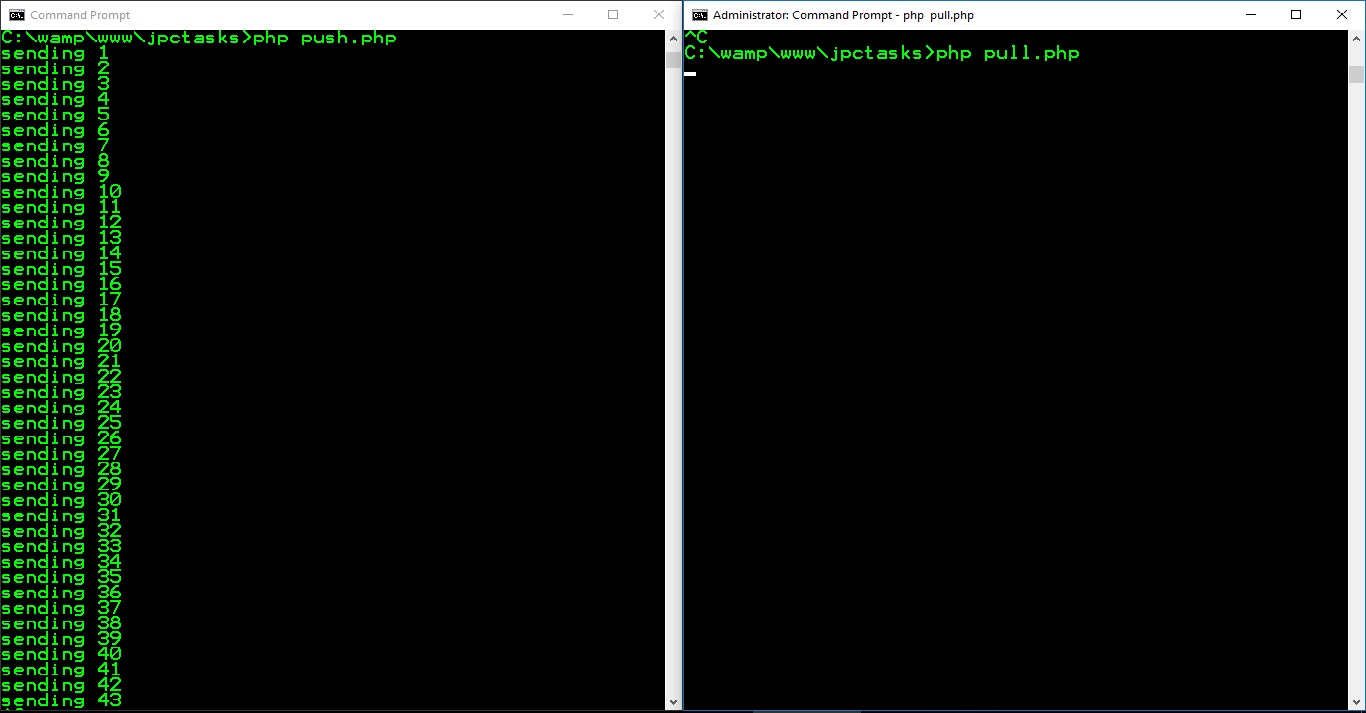
@cboden @alcalyn , i think TCP connection does not work on my local PC. i test below example but it does not work.I'm confused , help me please...
here is my pull.php :
<?php

require 'vendor/autoload.php';

$loop = React\EventLoop\Factory::create();

$context = new React\ZMQ\Context($loop);

$pull = $context->getSocket(ZMQ::SOCKET_PULL);
$pull->bind('tcp://127.0.0.1:5050');

$pull->on('error', function ($e) {
    var_dump($e->getMessage());
});

$pull->on('message', function ($msg) {
    echo "Received: $msg\n";
});

$loop->run();
and here is my push.php :
<?php

require 'vendor/autoload.php';

$loop = React\EventLoop\Factory::create();

$context = new React\ZMQ\Context($loop);

$push = $context->getSocket(ZMQ::SOCKET_PUSH);
$push->connect('tcp://127.0.0.1:5050');

$push->on('error', function ($e) {
    var_dump($e->getMessage());
});

$i = 0;
$loop->addPeriodicTimer(1, function () use (&$i, $push) {
    $i++;
    echo "sending $i\n";
    $push->send($i);

});
$loop->run();
also i disabled my firewall , but it still does not work.
salehmosleh
on 25 Oct 2017
The same code works on my Ubuntu 17.10
Try running console in admin mode or something like that, or having an error message
alcalyn
on 25 Oct 2017
I have the exact same problem. Did you find a solution ?
I didn't try yet, it seems this guy found something : https://stackoverflow.com/questions/34018599/zeromq-not-working-when-sending-request-over-http. But I don't so like the idea to desactivate enforcing mode.
 rfrancois
on 20 Mar 2018
rfrancois
on 20 Mar 2018
@rfrancois, can you be more specific?
I have the exact same problem. Did you find a solution ?
What problem are you having exactly? It may help to (re)state it without reference to anything above (especially since someone above uses the phrase "doesn't work", which is possibly the least informative fault report possible).
halfer
on 20 Mar 2018
@halfer Yes sure.
I am following this tutorial : http://socketo.me/docs/push. I didn't change anything in the code except port number 8080 to 9000, and I added a var_dump("test"); at the begining of onBlogEntry function.
When I launch my file new_post.php which contains code of the section Editing your blog submission, nothing displays in my console. As well as nothing displays in client's console.
If I add a var_dump("test2") in the onSubscribe function, when client connects, it displays "test2" client's console when he opens the page ("Client side").
On stackoverflow, the guy desactivates SELinux to make it work. I do have SELinux in my configuration but I can't just desactivate it. I guess the problem is here.
I'm using RedHat with PHP 5.4.
rfrancois
on 21 Mar 2018
@rfrancois: For web sockets I just use the raw JS class on the browser side, and textalk/websocket on the PHP side (the latter should not cause any different behaviour, all WS libraries should work about the same).
In the client code in that tutorial, I can't see any acknowledgement of the browser to server connection. I do this:
    var
        isSecure = window.location.protocol === 'https:',
        protocol = isSecure ? 'wss://' : 'ws://',
        address = protocol + window.location.host;

    console.log("Attempting a WebSocket connection on `" + address + "`");
    ws = new WebSocket(address);

    ws.onopen = function () {
        console.log('WS connection opened');
    };

    ws.onmessage = function (e) {
        // Handle an incoming message here
    };

    ws.onclose = function (e) {
    }
Try that and see if you get a browser to server connection?
If you think that SELinux is to blame, try a version of Linux without it (either on a separate computer or a virtual machine).
halfer
on 21 Mar 2018
Just to say that it was a problem with SELinux which blocked requests. I can't tell you how to solve this problem because administrator of my area did it for me and didn't tell me what he has done.
Thanks for your help !
rfrancois
on 10 Apr 2018
And there is a solution for windows ?
https://github.com/Silverviql/crm_2.3/blob/master/console/controllers/PusherController.php
https://github.com/Silverviql/crm_2.3/blob/master/console/components/BasePusher.php
https://github.com/Silverviql/crm_2.3/blob/master/console/components/Pusher.php
PHP5.6-x64 and Apache 2.4-x64 on windows 7.
"react/zmq": "v0.4.0",
"cboden/ratchet": "v0.4.1"
create a new event
public function get () {
        $data = [
        'topic_id' => 'onNewData',
        'data'  => 'eventData' . rand(1,100)
    ];
    \console\components\Pusher::sentDataToServer($data);
    var_dump($data);
client
``
$this->registerJsFile('/frontend/web/js/autobahn.min.js');
$script = <<
function(session) {
// eventMonitoring идентификатор, который мы передаём в push класс.
session.subscribe('onNewData', function(topic, data) {
// Сюда будут прилетать данные от вашего веб приложения.
console.info('New data: topic_id: "' + topic + '"');
console.log(data);
});
},
function(code, reason, detail) {
console.warn('WebSocket connection closed: code=' + code + '; reason=' + reason + '; detail=' + detail);
},
{
'maxRetries': 60,
'retryDelay': 4000,
'skipSubprotocolCheck': true
}
);
JS;
$this->registerJs($script);`
 Silverviql
on 18 Jul 2018
Silverviql
on 18 Jul 2018
@Silverviql is that a question or an answer? :smile_cat:
halfer
on 19 Jul 2018
@halfer This is a question). I tried the usual this example https://github.com/friends-of-reactphp/zmq
On the version
"react/zmq": "v0.4.0",
"cboden/ratchet":"v0.4.1
there was an error
`Fatal error: Uncaught exception 'ZMQSocketException' with message 'Failed to bind the ZMQ: Address in use' in C:\OpenServer\domains\crmas\vendor\react\zmq\src\SocketWrapper.php on l
ine 171

ZMQSocketException: Failed to bind the ZMQ: Address in use in C:\OpenServer\domains\crmas\vendor\react\zmq\src\SocketWrapper.php on line 171

Call Stack:
    0.0000     231128   1. {main}() C:\OpenServer\domains\crmas\console\commands\Pull.php:0
    0.0350    1555144   2. React\ZMQ\SocketWrapper->bind() C:\OpenServer\domains\crmas\console\commands\Pull.php:15
    0.0350    1555520   3. React\ZMQ\SocketWrapper->__call() C:\OpenServer\domains\crmas\console\commands\Pull.php:15
    0.0350    1555936   4. call_user_func_array:{C:\OpenServer\domains\crmas\vendor\react\zmq\src\SocketWrapper.php:171}() C:\OpenServer\domains\crmas\vendor\react\zmq\src\SocketWra
pper.php:171
    0.0350    1556304   5. ZMQSocket->bind() C:\OpenServer\domains\crmas\vendor\react\zmq\src\SocketWrapper.php:171

Dump $_SERVER
   $_SERVER['REMOTE_ADDR'] is undefined
   $_SERVER['REQUEST_METHOD'] is undefined
Dump $_SESSION
   $_SESSION['*'] is undefined
Dump $_REQUEST
`
"cboden/ratchet": "v0.3.4",
"react/zmq": "v0.3.0"
nothing comes
 Silverviql
on 19 Jul 2018
Silverviql
on 19 Jul 2018
@halfer
I solved the problem, never deploy the sockets to windows. My solution is to install ubuntu 16.04 and configure and work and forget about the window
Silverviql
on 24 Jul 2018
I seem to have problems that are similar to the ones mentioned in this thread.
I followed the push tutorial and changed nothing to the code.
The client side is working fine (thus subscribing and unsubscribing etc works) but whenever I try to execute the file from the step Editing your blog submission it keeps loading for a long while and eventually gives me the following error message (in Chrome) ERR_CONNECTION_RESET
When I do the following var_dump:
$context = new ZMQContext();

$socket = $context->getSocket(ZMQ::SOCKET_PUSH, 'my pusher');
$socket->connect("tcp://localhost:5555");

var_dump($socket); exit;

$socket->send(json_encode($entryData));
It returns the following:
object(ZMQSocket)#2 (0) { }
(but after the first time it will return the same error as above ERR_CONNECTION_RESET)
I tried disabling the firewall. But that did not make any difference.
Everything else seems to work just fine. But just broadcasting from the server does not work.
It might be important to note that this is all done on a xampp server running on Windows
 tafelnl
on 18 Dec 2018
tafelnl
on 18 Dec 2018
Hmm, whenever I execute the script from the command line it seems to work. But the problem is that in the production version, it also needs to work from the browser.
But I have no idea why it would work from the command line but not when the file is executed by the browser.
Any ideas?
tafelnl
on 18 Dec 2018
@tafelnl - Is this the same issue: https://github.com/ratchetphp/Ratchet/issues/707#issuecomment-449715688 ?
 mbonneau
on 28 Dec 2018
mbonneau
on 28 Dec 2018
@mbonneau Yes it is :)
tafelnl
on 3 Jan 2019
I am having the same issues described by @tafelnl. Any solution?
 carlo-fontanos
on 28 Oct 2020
carlo-fontanos
on 28 Oct 2020
Related issues
 Erseni
·
5Comments
Erseni
·
5Comments
 tasaif
·
6Comments
tasaif
·
6Comments
 clarkk
·
6Comments
clarkk
·
6Comments
 lubatti
·
6Comments
lubatti
·
6Comments
 grappetite-ali
·
5Comments
grappetite-ali
·
5Comments
Most helpful comment
Hello! You should to look at the ZMQ (Push integration) module. It described on socketo.me in the "Push integration" tab. :)