Ratchet: Max connection limit of ratchet websocket
Hi, I am new in ratchet web socket, and my application is like "FACEBOOK", so can i use the ratchet web socket in PHP(Laravel)? And also tell me : How many connections working concurrently?
Sorry for my English...
 sanjayinx
All 25 comments
@sanjayinx I researched that question recently. Take a look at this https://github.com/ratchetphp/Ratchet/issues/300 and also open https://rtcamp.com/tutorials/linux/increase-open-files-limit/.
TLDR: 1024 cocurrent connections in default PHP build, can be recompiled with higher limit. Also You need to raise Your OS nofile limit. But better build scalable Ratchet cluster from the beginning :)
 k-vladyslav
on 30 Oct 2015
k-vladyslav
on 30 Oct 2015
Unfortunately I have the same problem. I tested on both windows and linux ( on linux everything increased and optimised ) and I cannot make more than 254 connections. This is really frustrating and it would be nice to hear some advice/solutions.
 Mecanik
on 6 Jul 2017
Mecanik
on 6 Jul 2017
With PHP 7.1 we have a limit 255. Could it be cause of PHP build?
 alexslipknot
on 3 Aug 2017
alexslipknot
on 3 Aug 2017
@alexslipknot I have already found a solution for this, please see: https://github.com/ratchetphp/Ratchet/issues/300
Mecanik
on 3 Aug 2017
@Mecanik thanks. So I have to use Event instead of LibEvent or SocketStream? I'm not exactly using Ratchet but project is very similar. I'm afraid that moving to another extension will case a lot of work. Maybe it is possible to increase stream_socket limit at least with rebuilding PHP?
alexslipknot
on 3 Aug 2017
@alexslipknot You can increase anything you want, it will still not pass 1024 connections. Using another extension would not affect anything, but you can always test and see. If you use PHP 7 then use "event" and it will be fine.
Mecanik
on 3 Aug 2017
@Mecanik alright, thank you, I'll try :)
alexslipknot
on 3 Aug 2017
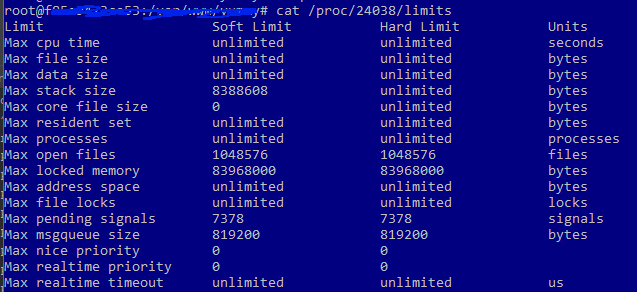
Well. After installing pecl extension "Event" and implementing some websocket-server I found that maximum connections still 255. So I guess there is system restrictions.
I'm using Debian on docker with PHP 7.1.7
Maybe I'm doing something wrong? Here is limits for process:
alexslipknot
on 4 Aug 2017
@alexslipknot Ok, you have gone so far so do not change anything back. Tell me, are you using PHP-FPM ?
Mecanik
on 4 Aug 2017
@Mecanik Yes. Indeed. But anyway I'm starting script within console, so I guess it is CLI in my case
alexslipknot
on 4 Aug 2017
@alexslipknot Ok, have a look at my code above and use it. See what the values are, based on that we can find out where the limit is. I had it before, but I cannot remmeber 100% where. Please use the code I posted above.
Mecanik
on 4 Aug 2017
@Mecanik if you're talking about issue300 - I think there is no need to check if (class_exists)
Because my example using definitely Event. So my code looks like:
Starting server:
    $this->base = new EventBase();
    $this->event = new EventListener($this->base, [$this, 'accept'], $this->base, EventListener::OPT_CLOSE_ON_FREE | EventListener::OPT_REUSABLE, -1, $this->server);
And accept connection method:
public function accept($listener, $connectionId, $address, $id)
{
    $buffer = new EventBufferEvent($this->base, $connectionId, EventBuffer::OPT_CLOSE_ON_FREE);
    $this->clients[$connectionId] = $connectionId;
    echo "connection count: " . count($this->clients) . "\n";
    // ... some more stuff
}
@alexslipknot Well this is where you are wrong, just because you manually call EventBase() does not mean it will use the "event" extension. I tried the same thing before and had no results, until I checked with the code I told you above.
Make sure you are using "even" extension, then the factory will use ExtEventLoop which is what you need.
Make sure the limits are increased accordingly: https://easyengine.io/tutorials/linux/increase-open-files-limit/
Make sure if you are using PHP-FPM, that you have edited /etc/php/7.0/fpm/php-fpm.conf like so:
; Set open file descriptor rlimit for the master process.
; Default Value: system defined value
rlimit_files = 65536

; Set max core size rlimit for the master process.
; Possible Values: 'unlimited' or an integer greater or equal to 0
; Default Value: system defined value
rlimit_core = unlimited
Then give it a try, but please check what I said.
Mecanik
on 4 Aug 2017
@Mecanik Thanks for helping me. I'm really appreciate that.
So about extension: no, when I call new EventBase without extension - it will terminate process immediately with error:
Undefined class
So I'm definitely using Event
But! Event listener is just a worker that starting inside from master. And my master using stream_socket_server to create server. So I guess that can be reason of limitation.
EventListener accept socket in $target param. So should I use something else? In my case this is stream_socket that listen tcp connection over SSL over wss protocol.
alexslipknot
on 4 Aug 2017
@alexslipknot I'm trying to help you, but in order to do that I need you to answer my questions...
Did you do any of the steps I told you to do ?
Mecanik
on 4 Aug 2017
@Mecanik yes I did. Also I've modified php.conf with unlimited instead of 0 (but it's just an alias of zero)
alexslipknot
on 4 Aug 2017
@alexslipknot Please post your configurations on pastebin, set them to expire in like 1 hour so nobody will "take" them. I shall have a look and see what is the actual problem. Please include all your PHP configs, and /etc/security/limits.conf and /etc/pam.d/common-session.
Mecanik
on 4 Aug 2017
I uploaded structured archive with configs.
@Mecanik by the way: I already tried with EventListener (server now using it as $server) instead of stream_socket_server but still no luck. :(
alexslipknot
on 4 Aug 2017
@alexslipknot Checking your configuration, I found the first problem. You are not using "event"properly, I do not think Ratchet detects it. ( react )
So please do the following:
-Create "event.ini" in "\etc\php\7.1\mods-available" and insert: "extension=event.so"
- Perform the following 2 commands:
ln -sf /etc/php/7.1/mods-available/event.ini /etc/php/7.1/fpm/conf.d/20-event.ini
ln -sf /etc/php/7.1/mods-available/event.ini /etc/php/7.1/cli/conf.d/20-event.ini
Then please remove "extension=event.so" from "\etc\php\7.1\fpm\php.ini" because it will not load it here anyway.
Then do: service php7.1-fpm restart
Afterwards please start the server with: "exec /usr/bin/php7.0 index.php" and do your test.
It might not load even now the extension properly, so to further assist you please do exactly the steps I mentioned, and insert in your "index.php" or whatever file you use this:
if (function_exists('event_base_new')) {
            echo "\033[0m We can use LibEventLoop!!" . PHP_EOL;
        } elseif (class_exists('libev\EventLoop', false)) {
            echo "\033[0m We can use LibEvLoop!!" . PHP_EOL;
        } elseif (class_exists('EventBase', false)) {
            echo "\033[0m We can use ExtEventLoop!!" . PHP_EOL;
        }
        else
        {
            echo "\033[0m We can use StreamSelectLoop!!" . PHP_EOL;
        }
So we can see what is the server using when it starts.
Mecanik
on 4 Aug 2017
@Mecanik Even when I know that those things are the same and will not help to )) I did all steps that you mentioned above. And as I expected: We can use ExtEventLoop!!
So really I think that some limitations are in my docker container.
alexslipknot
on 4 Aug 2017
@alexslipknot Great stuff, so it's using the correct extension. Now we know that Ratchet is not limited anymore. Regarding the docker, if it's a container it may have limits from the parent machine! So no matter what we do, it may not work.
Why don't you try with a normal VPS ? But with the same configurations...
Mecanik
on 4 Aug 2017
@Mecanik ))) Thanks for your optimism. I'll try it on real server. Anyway with steam_socket real server has limits with 255 connections. Well... any manipulations on the real production server scare me because I haven't test environment. Only production. But anyway I'll write here the results.
alexslipknot
on 4 Aug 2017
Well, At least I got what's the problem. These limitations are from operating system. So on Debian 7 I have limits with 255 connections and on Debian 8 I have limits with 199 connections. I tried not only with PHP. I also tried with example on C++ ... So I have to look how to avoid those limits on Debian.
alexslipknot
on 25 Aug 2017
@alexslipknot OS limits are easy to increase, and they should increase; but if you are running as a Container it might not be possible because the "mother host" is restricting it and there is nothing you can do.
Mecanik
on 25 Aug 2017
Finally! I found the solution! Thanks a lot for everyone!
Problem was: I was testing connection limits from one browser. But the browser has a limit for it :)
alexslipknot
on 27 Sep 2017
Related issues
 DmitryPorotov
·
3Comments
DmitryPorotov
·
3Comments
 nazar-pc
·
8Comments
nazar-pc
·
8Comments
 elovin
·
3Comments
elovin
·
3Comments
 clarkk
·
6Comments
clarkk
·
6Comments
 johankitelman
·
3Comments
johankitelman
·
3Comments
Most helpful comment
Finally! I found the solution! Thanks a lot for everyone!
Problem was: I was testing connection limits from one browser. But the browser has a limit for it :)