Raspiblitz: Test 64 bit Raspberry Pi OS
Hi. Is it possible to change the system to 64bit using rpi-update?
 Pinkman420
All 30 comments
Never tried .. @openoms do you see any problems here?
 rootzoll
on 22 May 2020
rootzoll
on 22 May 2020
I know that when I ask:
But why?
The obvious answer will be:
Why not!
But it might really make sense to list actual, real world improvements that this change would bring to RaspiBlitz.
 frennkie
on 22 May 2020
frennkie
on 22 May 2020
I would like to compare between 2 Pi4 with 4GB if there is a noticeable difference in performance and stability. I just want to convince myself and not listen to the opinion of others ^^
Pinkman420
on 22 May 2020
Hi. Is it possible to change the system to 64bit using rpi-update?
Not possible since there is no 64 bit Raspbian AFAIK.
See test results with other linux distros here: https://github.com/ThomasKaiser/sbc-bench/blob/master/Results.md
Currently there is no need to switch away from the most supported Raspbian for the RPi, but alternatives are possible, eg.: https://github.com/rootzoll/raspiblitz/issues/1196
or more here: https://github.com/rootzoll/raspiblitz/tree/master/alternative.platforms
 openoms
on 22 May 2020
openoms
on 22 May 2020
Great, thanks for the detailed info! :)
Pinkman420
on 22 May 2020
64bit Raspbian OS is available now as well as an 8 GB version of Raspberry Pi 4 : https://www.raspberrypi.org/blog/8gb-raspberry-pi-4-on-sale-now-at-75/
https://downloads.raspberrypi.org/raspios_arm64/images/
https://twitter.com/bavarianledger/status/12659512738676736
A 64bit Raspbian seems possible now, will start testing so reopening,
openoms
on 28 May 2020
64bit Raspbian OS is available now as well as an 8 GB version of Raspberry Pi 4 : https://www.raspberrypi.org/blog/8gb-raspberry-pi-4-on-sale-now-at-75/
https://downloads.raspberrypi.org/raspios_arm64/images/
https://twitter.com/bavarianledger/status/12659512738676736
A 64bit Raspbian seems possible now, will start testing so reopening,
I have a RPi 4 (2GB RAM) with a Ubuntu server 64bit running 👍
 amiroff157
on 28 May 2020
amiroff157
on 28 May 2020
Changing to a 64bit OS base seems inevitable in the future.
Testing the beta image found that the LCD divers are not compatible (neither with the 64 bit Raspberry OS nor the 64 bit Ubuntu) so opened an issue here: https://github.com/goodtft/LCD-show/issues/212
openoms
on 7 Jun 2020
Updates:
Issues with this OS are tracked here: https://github.com/raspberrypi/Raspberry-Pi-OS-64bit/issues (no talk of the GPIO LCD yet)
Had repetaed warning from the LNd devs that a 32 bit system won't work with a LND database >2GB currently. Solutions are database compaction and swtching to etcd, but 64 bit OS would be preferred.
An alternative is the Ubuntu to try building on (the same displaydriver issue will be present).
openoms
on 23 Jun 2020
+1 for this.
I am running lnd (among many other services) on a Pi4 4GB ubuntu server 20.04 64-bit image and things are stable for several months now (and feel quite a bit snappier too). Since Canonical officially committed to fully support the Pi boards down the road, a move to ubuntu as base OS should be considered.
Optionally, there is a new Pi OS 64bit beta image to be tested too.
 kilrau
on 6 Oct 2020
kilrau
on 6 Oct 2020
@kilrau do you use an LCD display?
Give some support here as there is no progress: https://github.com/goodtft/LCD-show/issues/212
We won't migrate without figuring out the LCD support.
openoms
on 8 Oct 2020
I got one but didn't use it so far. Let me test!
kilrau
on 8 Oct 2020
@holgern mentioned this driver:
https://github.com/tux1c/wavesharelcd-64bit-rpi
looks promising
openoms
on 8 Oct 2020
Good news: the LCD works just fine with this driver and the latest Pi OS 64bit :tada:
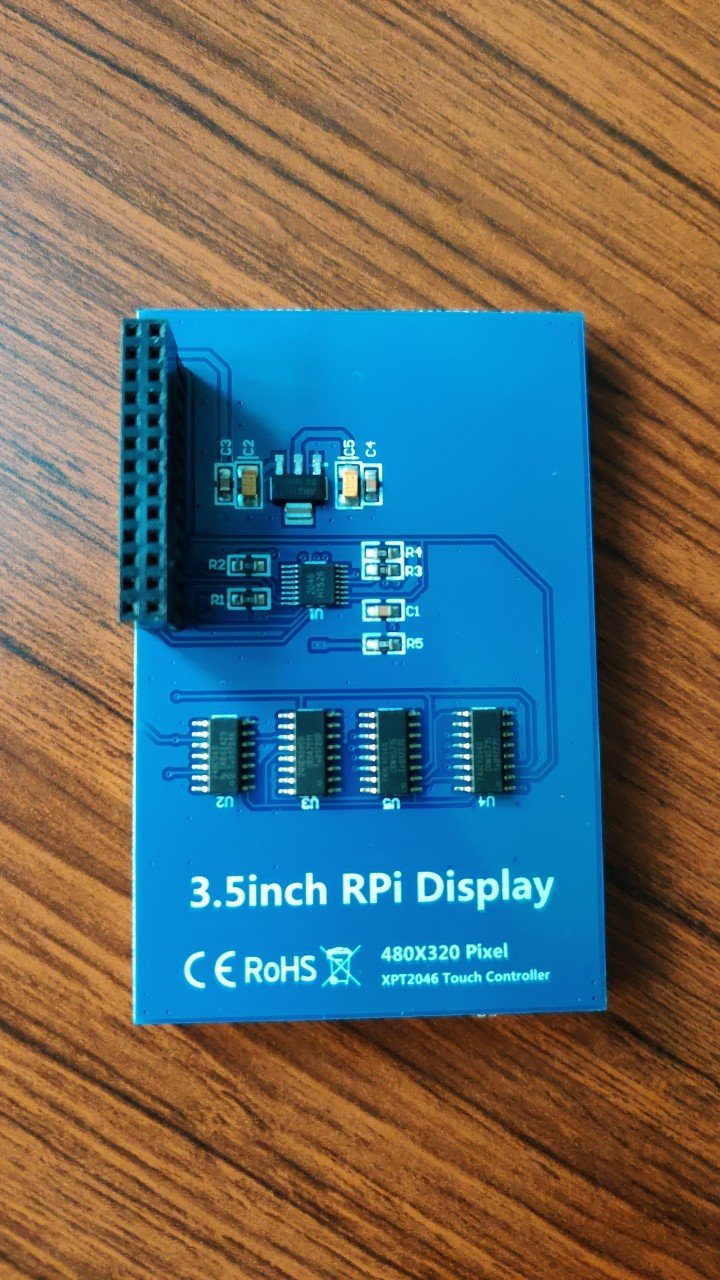
Display:
Result:
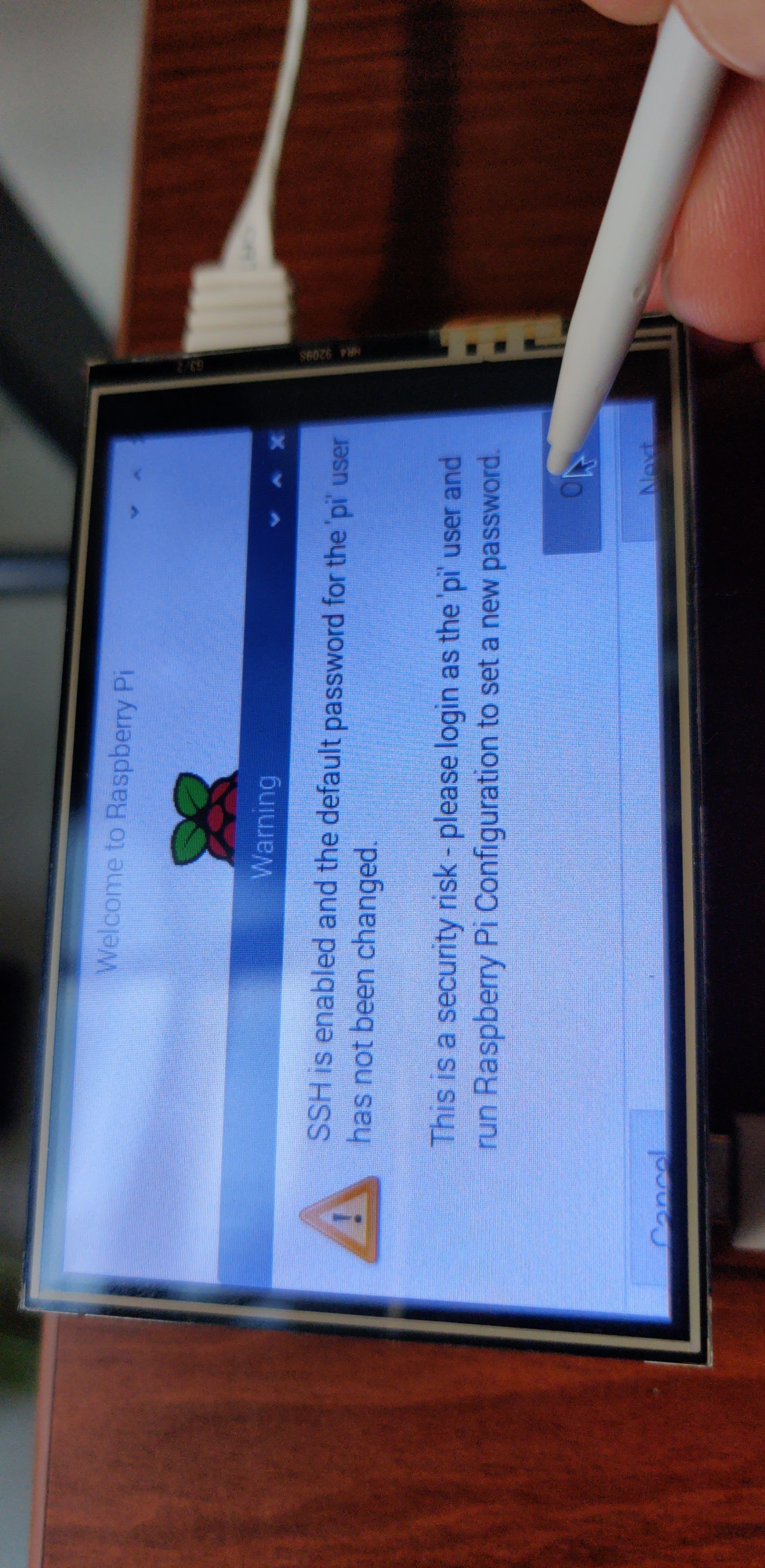
I had to tweak /boot/config.txt slightly to get the display working fully. After this all was good including touch as you can see in the picture above. I didn't fiddle with the overscan.
Next step: Raspiblitz build based on this Pi OS image? Happy to test!
kilrau
on 8 Oct 2020
Next step: Raspiblitz build based on this Pi OS image? Happy to test!
Yes exactly. The steps to test will be to download:
And flash as per:
https://github.com/rootzoll/raspiblitz#build-the-sd-card-image
The build SDcard command will be:
wget https://raw.githubusercontent.com/rootzoll/raspiblitz/v1.6/build_sdcard.sh && sudo bash build_sdcard.sh v1.6
or after the 1.6.1 release:
wget https://raw.githubusercontent.com/rootzoll/raspiblitz/dev/build_sdcard.sh && sudo bash build_sdcard.sh dev.
Will need to catch the logs of the SD card build and test each service. Once stable can make a test image in preparation to v1.7.
openoms
on 8 Oct 2020
Just did that.
- Flashed https://downloads.raspberrypi.org/raspios_arm64/images/raspios_arm64-2020-08-24/
sudo apt update && sudo apt upgradewget https://raw.githubusercontent.com/rootzoll/raspiblitz/v1.6/build_sdcard.sh && sudo bash build_sdcard.sh v1.6Here the complete CLI output. Architecture of bitcoind and lnd correctly detected, looking good imo!- Installed the the lcd drivers and commented out
hdmi_force_hotplug=1in/boot/config.txt+ one more restart. - Created an image, which you can download here. Please help out with testing!
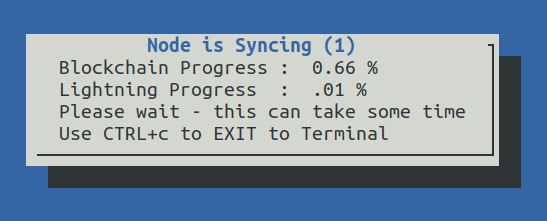
- Flashed the image to a different sd card and connected it to a new Pi4 4GB with empty hard drive. So far setup working all fine and bitcoind is syncing. Only thing that is not working: the LCD shows the Raspberry Pi Desktop Welcome Screen instead of the Raspiblitz SSH UI. Probably a small thing to change that - any hints appreciated!
kilrau
on 9 Oct 2020
Only thing that is not working: the LCD shows the Raspberry Pi Desktop Welcome Screen instead of the Raspiblitz SSH UI. Probably a small thing to change that - any hints appreciated!
Any idea? @openoms @rootzoll
kilrau
on 10 Oct 2020
Only thing that is not working: the LCD shows the Raspberry Pi Desktop Welcome Screen instead of the Raspiblitz SSH UI. Probably a small thing to change that - any hints appreciated!
Not sure .. @frennkie do you have an idea how to change this?
rootzoll
on 12 Oct 2020
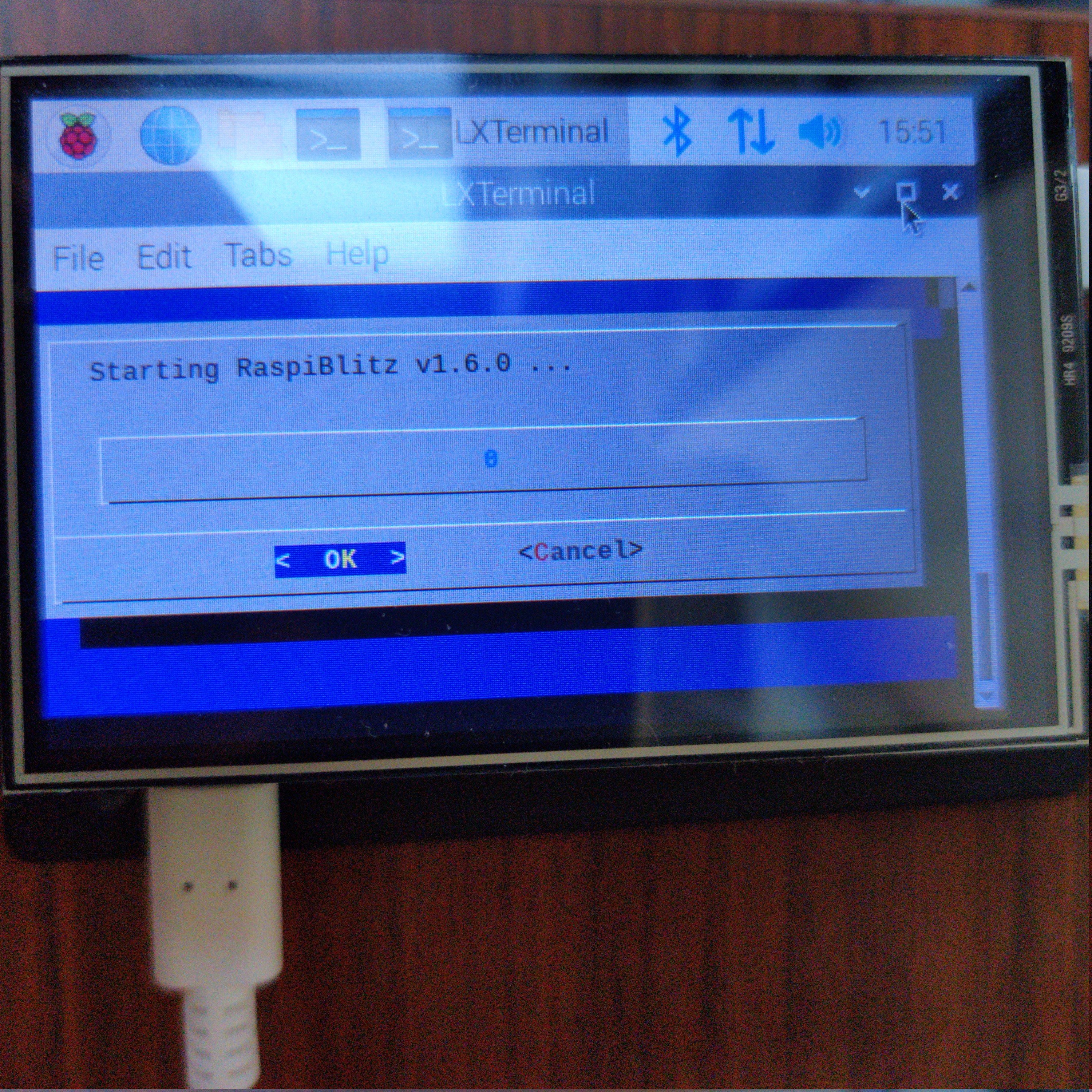
Opening the terminal via the screen icon works btw:
kilrau
on 12 Oct 2020
not supposed to boot into the Raspberry Desktop GUI at all just open a tty output as the pi user on the LCD.
Will surely be able to sort this out.
It is probably set in the /boot/config.txt or some other place for autostart. Need to look at the differences in those between the 32 and 64 bit setups.
openoms
on 12 Oct 2020
Huh, I figured it out. Had to disable a couple of options in /boot/config.txt just like you suspected. Here the working /boot/config.txt, will update the image at some point:
# For more options and information see
# http://rpf.io/configtxt
# Some settings may impact device functionality. See link above for details

# uncomment if you get no picture on HDMI for a default "safe" mode
#hdmi_safe=1

# uncomment this if your display has a black border of unused pixels visible
# and your display can output without overscan
#disable_overscan=1

# uncomment the following to adjust overscan. Use positive numbers if console
# goes off screen, and negative if there is too much border
#overscan_left=16
#overscan_right=16
#overscan_top=16
#overscan_bottom=16

# uncomment to force a console size. By default it will be display's size minus
# overscan.
#framebuffer_width=1280
#framebuffer_height=720

# uncomment if hdmi display is not detected and composite is being output
#hdmi_force_hotplug=1

# uncomment to force a specific HDMI mode (this will force VGA)
#hdmi_group=1
#hdmi_mode=1

# uncomment to force a HDMI mode rather than DVI. This can make audio work in
# DMT (computer monitor) modes
#hdmi_drive=2

# uncomment to increase signal to HDMI, if you have interference, blanking, or
# no display
#config_hdmi_boost=4

# uncomment for composite PAL
#sdtv_mode=2

#uncomment to overclock the arm. 700 MHz is the default.
#arm_freq=800

# Uncomment some or all of these to enable the optional hardware interfaces
#dtparam=i2c_arm=on
#dtparam=i2s=on
#dtparam=spi=on

# Uncomment this to enable infrared communication.
#dtoverlay=gpio-ir,gpio_pin=17
#dtoverlay=gpio-ir-tx,gpio_pin=18

# Additional overlays and parameters are documented /boot/overlays/README

# Enable audio (loads snd_bcm2835)
dtparam=audio=on

# Enable DRM VC4 V3D driver on top of the dispmanx display stack
#dtoverlay=vc4-fkms-v3d

# arm64 settings
arm_64bit=1
dtoverlay=waveshare35a:rotate=90
Moved a routing node to the 64bit RaspberryOS https://downloads.raspberrypi.org/raspios_arm64/images/raspios_arm64-2020-08-24/ out of necessity.
With a channel.db > 1GB it kept LND kept crashing.
Looks ok so far, even the status display is up with these drivers: https://github.com/tux1c/wavesharelcd-64bit-rpi
So far discovered some issues to be investigated:
- [ ] the touchscreen only shows a black screen with a cursor flashing top left
- [ ] lndmanage had some errors during recovery
- [x] Thunderhub had some errors during recovery
openoms
on 1 Dec 2020
Want to share you build_sdcard.sh - happy to run it and help debug
kilrau
on 1 Dec 2020
I just used the latest v1.6 branch:
wget https://raw.githubusercontent.com/rootzoll/raspiblitz/v1.6/build_sdcard.sh
sudo bash build_sdcard.sh v1.6
and did not spot any errors in the output, only when installing services during recovery.
These can be debugged on the fly on the functional node, but will put another one together to break, test BTRFS etc.
openoms
on 1 Dec 2020
How about /boot/config.txt settings?
kilrau
on 1 Dec 2020
How about
/boot/config.txtsettings?
My only active settings now on 64bit are (with LCDrotate off lcdrotate=0):
arm_64bit=1
dtoverlay=waveshare35a:rotate=270
hdmi_force_hotplug=1
dtparam=i2c_arm=on
dtparam=spi=on
enable_uart=1
vs active setting in 32bit (lcdrotate=1):
hdmi_force_hotplug=1
dtparam=i2c_arm=on
dtparam=spi=on
enable_uart=1
dtparam=audio=on
dtoverlay=tft35a:rotate=90
basicly there is no difference except the driver and :
arm_64bit=1
openoms
on 1 Dec 2020
Refactored the build_sdcard.sh in the above PR.
can test with:
# download
wget https://raw.githubusercontent.com/openoms/raspiblitz/64bit-rpi/build_sdcard.sh
# use the scripts from rootzoll's (default) v1.6 branch to keep up-to-date
sudo bash build_sdcard.sh v1.6
I think we are not planning to commit anything more in the v1.6 branch so it can be a good base for a test image.
EDIT: Uploaded the image here:
https://mega.nz/folder/lBdgCZiJ#yB9uN1SD2Z9BJvv1OwP9nQ
sha256sum: 81b82d3208a85cb6b148508652bffe9296ff427c6c00b2db0fb4882bbf03e111 WIPraspiblitz64-v1.6.2-2020-12-2.img.gz
build_sdcard.sh output:
https://pastebin.com/raw/MVamsC9G
openoms
on 2 Dec 2020
Just been made aware of the 64bit pure Debian images for the RPi: https://bitcoinhackers.org/web/statuses/105313530789076007
Should have a look to reduce upstream dependencies and trust: https://raspi.debian.net/
The drawback is that it might need an awful lot of packages installed for the display (desktop) to work: https://raspi.debian.net/defaults-and-settings/
Find the experiment of trying the simlarly (but not as) minimal Raspbian Lite here: https://github.com/rootzoll/raspiblitz/issues/1184#issuecomment-631452592
openoms
on 3 Dec 2020
Running on a pure debian would make the build script more unsiversal - also for use with debian based VMs, correct?
Should have a look to reduce upstream dependencies and trust: https://raspi.debian.net/
As long as dependencies are part of official debian repos we should be good. Can you see any non official debian repos in the process?
The drawback is that it might need an awful lot of packages installed for the display (desktop) to work: https://raspi.debian.net/defaults-and-settings/
The waiting time should not be then problem - as this is just for building the sd card image. For nomal users downloading the image it would not make a difference.
But am I correct that with running on pure debian we will also loose some typical hacks used on raspberryPi like opening up ssh with a file on boot drive called ssh and having no raspi-config?
rootzoll
on 10 Dec 2020
Running on a pure Debian would make the build script more universal - also for use with debian based VMs, correct?
yes, instead of removing things we would need to add them which gives better control and convertibility to other platforms. The extra packages are mainly related to the desktop components we are using for the display.
Non-official repos can be added as needed just as we do it for Tor, but most thing should be available for Debian since the Raspberry OS is also Debian based.
The ssh "hack" is surely not useful for us and not a part of a standard Linux setup. Raspi-config should be ok to be installed since the specific RPi instructions it relies on are included with the proprietary package included in this version of Debian.
The list of added packages to the 64bit Raspberry OS are in this file: https://downloads.raspberrypi.org/raspios_arm64/images/raspios_arm64-2020-08-24/2020-08-20-raspios-buster-arm64.info
The Raspberry OS as well is generated from Debian Buster with this tool: https://github.com/RPi-Distro/pi-gen (which we don't need if the pure Debian works also)
On the 64bit Raspberry OS image I had most things working except the touchscreen so far. It comes to a black screen with the cursor flashing.
openoms
on 10 Dec 2020
Related issues
 pkclyoni
·
3Comments
pkclyoni
·
3Comments
 fluidvoice
·
3Comments
rootzoll
·
3Comments
openoms
·
4Comments
fluidvoice
·
3Comments
rootzoll
·
3Comments
openoms
·
4Comments
 2000jago
·
5Comments
2000jago
·
5Comments
Most helpful comment
64bit Raspbian OS is available now as well as an 8 GB version of Raspberry Pi 4 : https://www.raspberrypi.org/blog/8gb-raspberry-pi-4-on-sale-now-at-75/
https://downloads.raspberrypi.org/raspios_arm64/images/
https://twitter.com/bavarianledger/status/12659512738676736
A 64bit Raspbian seems possible now, will start testing so reopening,