Raspiblitz: Electrum not connecting to Electrs
Just completed indexing electrs. Going into the status screen on the Raspiblitz shows
STATUS ELECTRS SERVICE
configured=1
serviceInstalled=1
serviceRunning=1
isSynced=1
localIP='192.168.0.27'
publicIP=
portTCP='50001'
localTCPPortActive=0
publicTCPPortAnswering=0
portHTTP='50002'
localHTTPPortActive=0
publicHTTPPortAnswering=0
TORrunning=1
TORaddress=
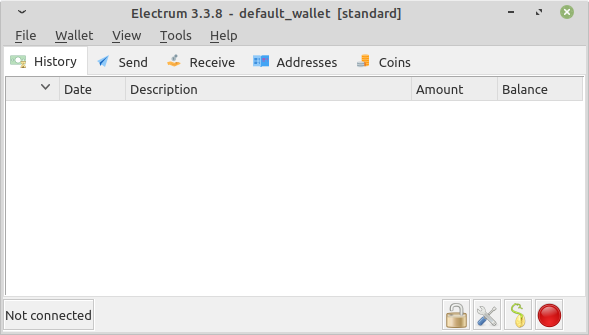
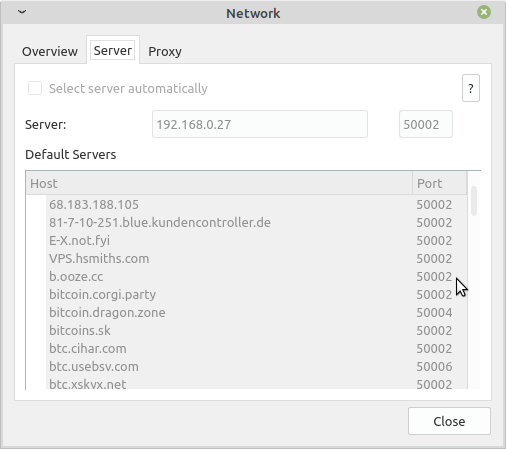
Started electrum with
electrum --oneserver --server 192.168.0.27:50002:s
But it's not connecting
 inpharmaticist
All 20 comments
Try:
electrum --oneserver --server 192.168.0.27:50001:t
for a clearnet connection
and running
./config.scripts/internet.selfsignedcert.sh
to fix the SSL connection.
 openoms
on 23 Apr 2020
openoms
on 23 Apr 2020
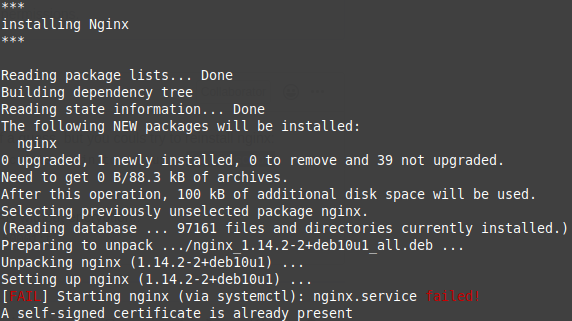
Looks like starting nginx failed. Electrum still not connected
installing Nginx
Reading package lists... Done
Building dependency tree
Reading state information... Done
nginx is already the newest version (1.14.2-2+deb10u1).
0 upgraded, 0 newly installed, 0 to remove and 39 not upgraded.
[FAIL] Starting nginx (via systemctl): nginx.service failed!
Create a self signed SSL certificate
[req]
prompt = no
default_bits = 2048
default_keyfile = localhost.key
distinguished_name = req_distinguished_name
req_extensions = req_ext
x509_extensions = v3_ca[req_distinguished_name]
C = US
ST = California
L = Los Angeles
O = Our Company LlcOU = Org Unit Name
CN = Our Company Llc
emailAddress = [email protected]
[req_ext]
subjectAltName = @alt_names[v3_ca]
subjectAltName = @alt_names[alt_names]
DNS.1 = localhost
DNS.2 = 127.0.0.1Generating a RSA private key
...............................................................................................................+++++
...............+++++writing new private key to 'localhost.key'
inpharmaticist
on 23 Apr 2020
what is the rest of log. Use pastebin.com to share in a link.
Test nginx with:
sudo nginx -t
openoms
on 23 Apr 2020
Which log do you need?
$ sudo nginx -t
nginx: the configuration file /etc/nginx/nginx.conf syntax is ok
nginx: configuration file /etc/nginx/nginx.conf test is successful
inpharmaticist
on 24 Apr 2020
$ sudo systemctl restart nginx
Job for nginx.service failed because the control process exited with error code.
See "systemctl status nginx.service" and "journalctl -xe" for details.
$ systemctl status nginx.service
● nginx.service - A high performance web server and a reverse proxy server
Loaded: loaded (/lib/systemd/system/nginx.service; enabled; vendor preset: en
Active: failed (Result: exit-code) since Fri 2020-04-24 15:30:33 BST; 13s ago
Docs: man:nginx(8)
Process: 6969 ExecStartPre=/usr/sbin/nginx -t -q -g daemon on; master_process
Process: 6970 ExecStart=/usr/sbin/nginx -g daemon on; master_process on; (code
$ journalctl -xe
Hint: You are currently not seeing messages from other users and the system.
Users in the 'systemd-journal' group can see all messages. Pass -q to
turn off this notice.
No journal files were opened due to insufficient permissions.
inpharmaticist
on 24 Apr 2020
Haven't seen this happening before, so it is a bit of a guess, but you could try to reinstall nginx:
sudo apt remove --purge nginx
And run the scripts again to set up :
./config.scripts/internet.selfsignedcert.sh
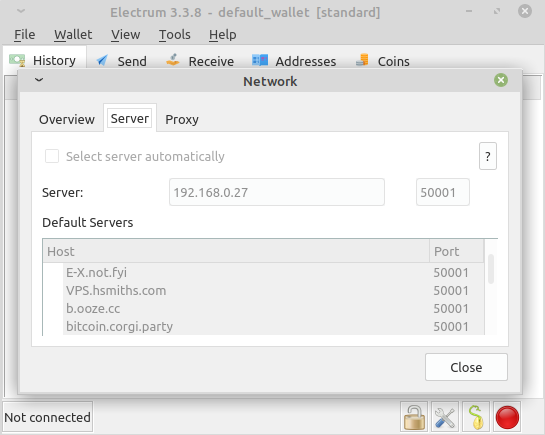
In the meantime you can try connecting on your LAN without encryption::
electrum --oneserver --server 192.168.0.27:50001:t
openoms
on 24 Apr 2020
Neither worked :(
inpharmaticist
on 24 Apr 2020
Did you do any manual modifications?
Is BTCpay installed?
My default nginx.service :
admin@raspberrypi:~ $ cat /lib/systemd/system/nginx.service
# Stop dance for nginx
# =======================
#
# ExecStop sends SIGSTOP (graceful stop) to the nginx process.
# If, after 5s (--retry QUIT/5) nginx is still running, systemd takes control
# and sends SIGTERM (fast shutdown) to the main process.
# After another 5s (TimeoutStopSec=5), and if nginx is alive, systemd sends
# SIGKILL to all the remaining processes in the process group (KillMode=mixed).
#
# nginx signals reference doc:
# http://nginx.org/en/docs/control.html
#
[Unit]
Description=A high performance web server and a reverse proxy server
Documentation=man:nginx(8)
After=network.target nss-lookup.target

[Service]
Type=forking
PIDFile=/run/nginx.pid
ExecStartPre=/usr/sbin/nginx -t -q -g 'daemon on; master_process on;'
ExecStart=/usr/sbin/nginx -g 'daemon on; master_process on;'
ExecReload=/usr/sbin/nginx -g 'daemon on; master_process on;' -s reload
ExecStop=-/sbin/start-stop-daemon --quiet --stop --retry QUIT/5 --pidfile /run/nginx.pid
TimeoutStopSec=5
KillMode=mixed

[Install]
WantedBy=multi-user.target
And status:
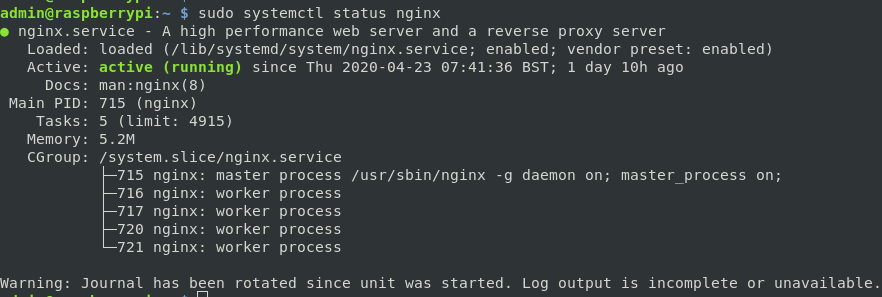
If cannot find differences in the service file it might just be the easiest the flash your SDcard with a clean v1.4 image, which will result in restoring all the services and data now installed. The electrs index will be kept too.
openoms
on 24 Apr 2020
No BTCpay server. The nginx.service is the same. I'll try reflashing the SD card.
inpharmaticist
on 24 Apr 2020
Success! At least with port 50001. Oddly the Electrum android app still isn't connecting (same LAN) but desktop is. Thanks for your help!
inpharmaticist
on 26 Apr 2020
You will need to reinstall the Android app unfortunately. It does not support changing the TLS certificate (which is now new on your blitz).
openoms
on 26 Apr 2020
That didn't seem to work, but I don't really care. I'll mostly use Electrs for my desktop anyway.
inpharmaticist
on 26 Apr 2020
BTW, I hear you're on an upcoming episode of TFTC. Look forward to it.
inpharmaticist
on 26 Apr 2020
You can still check all of the above to make SSL (50002) work.
The next release will come with automatic checks and debugging on this issue: https://github.com/rootzoll/raspiblitz/pull/1113
openoms
on 26 Apr 2020
Damn, it's not working again. I had to power off once, I'm wondering if that changed anything. I'll keep running electrs for now and hope this is resolved in the next release. It's not urgent enough to keep flashing the OS.
inpharmaticist
on 27 Apr 2020
I wonder if your SDcard is healthy getting these weird errors.
I recommend to get new SDcard (an endurance one) for the next release.
openoms
on 27 Apr 2020
Damn, it's not working again. I had to power off once, I'm wondering if that changed anything. I'll keep running electrs for now and hope this is resolved in the next release. It's not urgent enough to keep flashing the OS.
I had a similar problem, deleting the cert for the raspiblitz in ~/.electrum/certs (from the computer, not raspiblitz) fixed the problem for me.
 hermanlim
on 20 Jul 2020
hermanlim
on 20 Jul 2020
@openoms could there be any electRS keys/certs that should be preserved during updatey/recoveries
 rootzoll
on 20 Jul 2020
rootzoll
on 20 Jul 2020
@openoms could there be any electRS keys/certs that should be preserved during updatey/recoveries
Electrs is now using the certs created by blitz.web.sh which are stored in /mnt/hdd/app-data/nginx/ and restored from the disk on update since: https://github.com/rootzoll/raspiblitz/pull/1254/commits/65f29c25fcc30319ca1112243aa198384600e6d3
the Electrum certificates will need to be reset one last time when updating from 1.5 and will be preserved after.
How to: https://github.com/openoms/bitcoin-tutorials/tree/master/electrs#further-help

openoms
on 20 Jul 2020
Update on this. After getting a new SDD, flashing Raspiblitz 1.5, and resyncing the blockchain I was able to get Electrum connected over LAN on port 50002, as well as over TOR. I did have to rerun the self-signed cert script and restart nginx also, but looks like I'm up and running!
./config.scripts/internet.selfsignedcert.sh
sudo systemctl restart nginx
inpharmaticist
on 7 Aug 2020
Related issues
rootzoll
·
4Comments
 ChuckNorrison
·
4Comments
ChuckNorrison
·
4Comments
 2000jago
·
5Comments
2000jago
·
5Comments
 syracusebitcoin
·
3Comments
rootzoll
·
4Comments
syracusebitcoin
·
3Comments
rootzoll
·
4Comments
Most helpful comment
Update on this. After getting a new SDD, flashing Raspiblitz 1.5, and resyncing the blockchain I was able to get Electrum connected over LAN on port 50002, as well as over TOR. I did have to rerun the self-signed cert script and restart nginx also, but looks like I'm up and running!
./config.scripts/internet.selfsignedcert.sh
sudo systemctl restart nginx