Raspiblitz: rsync: write failed on "/mnt/hdd/bitcoin/blocks/blk01103.dat": Read-only file system
Hi, I'm syncing bitcoin blockchain on a rpi 4, I'm using raspiblitz 1.4, I downloaded and validated the blockchain on my laptop and I choose the option to copy from laptop to raspiblitz, this works fine, after I run rsync the shell is copying for hours and it works until the last file, but after it finish I received this error
chainstate/144462.ldb
        703.48K 100%    4.97MB/s    0:00:00 (xfr#6056, to-chk=10/6069)
chainstate/144463.ldb
          2.17M 100%    5.42MB/s    0:00:00 (xfr#6057, to-chk=9/6069)
chainstate/144464.ldb
          1.81M 100%    2.92MB/s    0:00:00 (xfr#6058, to-chk=8/6069)
chainstate/144465.log
          4.97M 100%    4.24MB/s    0:00:01 (xfr#6059, to-chk=7/6069)
chainstate/144466.ldb
         16.42M 100%    7.30MB/s    0:00:02 (xfr#6060, to-chk=6/6069)
chainstate/144467.log
            130 100%    0.86kB/s    0:00:00 (xfr#6061, to-chk=5/6069)
chainstate/144468.ldb
              0 100%    0.00kB/s    0:00:00 (xfr#6062, to-chk=4/6069)
chainstate/144469.ldb
          5.16M 100%    6.96MB/s    0:00:00 (xfr#6063, to-chk=3/6069)
chainstate/CURRENT
             16 100%    0.02kB/s    0:00:00 (xfr#6064, to-chk=2/6069)
chainstate/LOCK
              0 100%    0.00kB/s    0:00:00 (xfr#6065, to-chk=1/6069)
chainstate/MANIFEST-142284
rsync: write failed on "/mnt/hdd/bitcoin/blocks/blk01103.dat": Read-only file system (30)
rsync error: error in file IO (code 11) at receiver.c(374) [receiver=3.1.3]
If I just wanted to run again rsync I get this message
grunch@wepa:/media/grunch/bitcoin/blockchain  $ sudo rsync -avhW --progress ./chainstate ./blocks [email protected]:/mnt/hdd/bitcoin
ssh: connect to host 192.168.0.87 port 22: Connection refused
rsync: connection unexpectedly closed (0 bytes received so far) [sender]
rsync error: unexplained error (code 255) at io.c(235) [sender=3.1.2]
I checked the rsync output and all files were copied but I can't ssh back, then I reboot the rpi and now I can ssh in but it shows me a message telling me that the blockchain data is corrupted and ask me to delete and try again.
I deleted it and tried again and I had the same issue.
 grunch
All 20 comments
Update: while the blockchain files are being copied I can see this output in the rpi screen every 10 seconds more or less, it may be related.

grunch
on 27 Mar 2020
It is what it says, a read error on the disk you are copying to.
Are you using a compatible USB adapter and power source? Did you do a cold using a reset (just pulling the plug) at any point? Are you using a/shimfan with the display?
You will need to restart the copy process after finding what might cause the problem with the hardware.
Type in the RaspiBlitz command line:
repair
and reset the blockchain before starting the copy processs again.
Best is to not only reset the blockchain, but to format the disk. You can format it with your desktop and let the Blitz format again with the appropriate filesystem.
 openoms
on 27 Mar 2020
openoms
on 27 Mar 2020
Yes I'm using a compatible USB adapter and power source, I don't know what do you mean about the doing a cold using a reset and I'm not using a shimfan.
I just formated the disk on ext4 and I will try again
grunch
on 27 Mar 2020
sorry, typo. I meant if you have done a cold reset which could result to corrupt data on the disk.
openoms
on 28 Mar 2020
I get it, no I don't, this was a new one.
I did a fresh install, created the sd card again with balena etcher, formatted the hard disk and I have a new error, I did it two times, I really don't know what is going on.
bitcoin still not running
ls: cannot access '/mnt/hdd/raspiblitz.conf': Permission denied

!!!!!!!!!!!!!!!!!!!!!!!!!!!!!!!!!!!!!!!!!!!!!!!!!!!!!!!!!!!!!!!!!!!!!!!!!!!
FAIL: /mnt/hdd/raspiblitz.conf should exists at this point, but not found!
Please report to: https://github.com/rootzoll/raspiblitz/issues/293
!!!!!!!!!!!!!!!!!!!!!!!!!!!!!!!!!!!!!!!!!!!!!!!!!!!!!!!!!!!!!!!!!!!!!!!!!!!
Press ENTER to EXIT.

admin@raspberrypi:~ $ sudo ls -l /mnt/hdd
total 28
drwxr-xr-x 2 bitcoin bitcoin 4096 Mar 28 16:44 app-data
drwxr-xr-x 2 bitcoin bitcoin 4096 Mar 28 16:44 app-storage
drwxr-xr-x 2 bitcoin bitcoin 4096 Mar 28 16:19 bitcoin
drwxr-xr-x 2 bitcoin bitcoin 4096 Mar 28 16:19 litecoin
drwxr-xr-x 2 bitcoin bitcoin 4096 Mar 28 16:19 lnd
-rwxrwxrwx 1 root    root       0 Mar 28 16:44 raspiblitz.conf
drwxr-xr-x 2 root    root    4096 Mar 28 16:44 ssh
drwxrw-rw- 2 bitcoin bitcoin 4096 Mar 28 16:44 temp
I just checked on that issue but I don't see it related
grunch
on 28 Mar 2020
Can you post a picture or link of yhe USB Disk adapter you are using?
Also whet is the specific power source?
This is a hardware problem.
openoms
on 28 Mar 2020
This is the usb disk adapter
This is the power source.
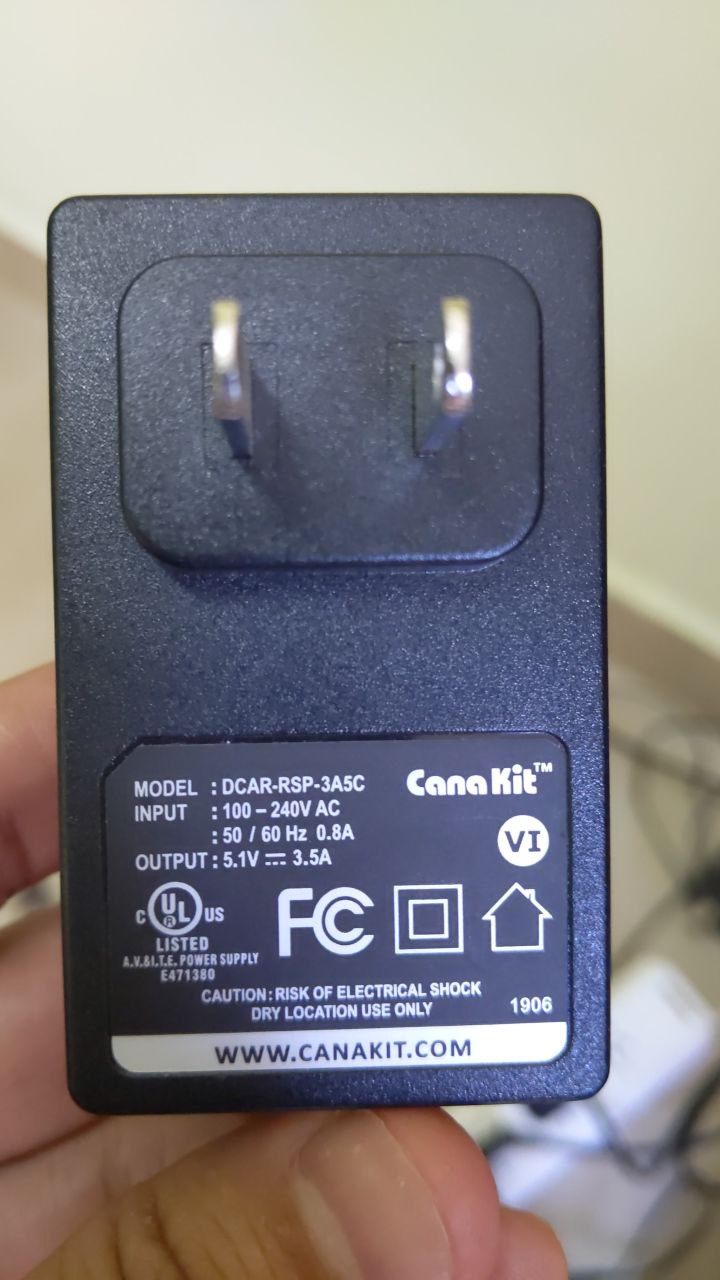
grunch
on 28 Mar 2020
@grunch the power is ok, but your disk adapter is likely not compatible with the RPi4. See UASP issues.
It is recommended to get an adapter from the shopping list in the readme or see this comment for some others: https://github.com/rootzoll/raspiblitz/issues/691#issuecomment-520526004
openoms
on 28 Mar 2020
@openoms thanks for your help, I can't buy those from amazon right now, but I can buy it from a local marketplace here, if an adapter have UASP support would work?
what do you think about this one?
https://articulo.mercadolibre.com.ar/MLA-714734977-bandeja-cofre-para-disco-sata-usb30-orico-envio-gratis-_JM?quantity=1#position=7&type=item&tracking_id=af1b4c5e-4522-4910-b5b3-eb6a1b0eacc2
grunch
on 29 Mar 2020
Mentioning UASP specifically is a positive, but I cannot confirm until someone successfully used it with an RPi 4.
Have a look at the recommendation of other projects using an RPi4 too.
For example:
https://code.samourai.io/ronindojo/RoninDojo/-/wikis/Hardware#hardware
openoms
on 29 Mar 2020
great, I'll buy it and let you know if it works in this issue before close it
grunch
on 30 Mar 2020
@grunch I am having the same issue. I have the same external case for my SSD that you were looking at. Did your case work for you?
My case: https://www.newegg.com/orico-2139u3-bk-enclosure/p/0VN-0003-000Z5?Item=9SIA1DS4VX9128
your case: https://code.samourai.io/ronindojo/RoninDojo/-/wikis/Hardware#hardware
 sedknieper
on 21 Apr 2020
sedknieper
on 21 Apr 2020
Please share what particular disk you are using.
Had issues with the 1TB Crucial MX500: https://github.com/rootzoll/raspiblitz/issues/905#issuecomment-581526545
Ok with Sandisk SSD Plus, WD Blue, Samsung EVO/T5.
openoms
on 21 Apr 2020
Let me start by saying I've had several issues installing and setting up 1.4 Raspiblitz and that this issue only happened 1 or 2 times. I just noticed I had a similar setup and was trying to narrow down if the same external SSD case was an issue (I think it may be). This may belong on another comment thread.
I've had problems syncing the block chain both using the SYNC and over the TOR network. It'll start and usually freeze up. I've never made it over 25% synced. I've started over more than a dozen times, formatting the external SSD and flashing 1.4 back on to the 32 GB micro SD.
My hardware is listed below. At first I didn't use a heat sink and was getting +70C temps. After a few attempts I figured out that was a bad idea. I got a passive heat sink now and keeping temps between low 50s and mid 60s. I also started with a 3 amp power source but have since upgraded to a 3.5 amp power source. I have a small LCD attached and the external SSD is powered through the USB 3.0 on the Raspberry Pi. I'm trying to decide now if my SSD enclosure could be a hardware issue.
My hardware configuration:
- 32GB ScanDisk Ultra micro SD (current)
https://www.newegg.com/sandisk-32gb-microsdhc/p/N82E16820173359?Item=9SIA12K65X1049
Raspberry Pi 4 Model B 2 GB (current) - not using this case
https://www.newegg.com/p/1HD-005N-00086?Item=9SIAHUBA617367ORICO transparent USB 3.0 SATA 2.5 inch SSD enclosure, supports UASP (current)
https://www.newegg.com/orico-2139u3-bk-enclosure/p/0VN-0003-000Z5?Item=9SIA1DS4VX9128Team Group GX2 2.5" 512GB SATA SSD (current) - @openoms ANSWER TO YOUR QUESTION
https://www.newegg.com/team-group-gx2-512gb/p/N82E16820331315?Item=N82E16820331315Touch screen LCD (current) - not using this case
https://www.newegg.com/p/1W8-0117-000A4?Item=9SIAJZVB6G0565Aluminum passive cooling case (current)
https://www.newegg.com/p/2RU-001N-00099?Item=9SIAMTFB6W8490Power supply LABISTS 5.1 V, 3.0 amp w/ switch (OLD NOT CURRENT)
https://www.amazon.com/gp/product/B07WC2HLJ9/ref=ppx_yo_dt_b_asin_title_o07_s00?ie=UTF8&psc=1Power supply CanaKit 3.5 amp (current)
https://www.amazon.com/gp/product/B07TYQRXTK/ref=ppx_yo_dt_b_asin_title_o03_s00?ie=UTF8&psc=1
My Raspiblitz has rebooted and is waiting to restart my Lighting Node. My current debug log is:
https://termbin.com/sqpfz
- RASPIBLITZ DEBUG LOGS
blitzversion: 1.4
chainnetwork: bitcoin / main
15:26:45 up 10:10, 2 users, load average: 0.16, 0.14, 0.10
* BLOCKCHAIN SYSTEMD STATUS *
● bitcoind.service - Bitcoin daemon
Loaded: loaded (/etc/systemd/system/bitcoind.service; enabled; vendor preset: enabled)
Active: activating (auto-restart) (Result: exit-code) since Tue 2020-04-21 15:26:37 BST; 8s ago
Process: 17900 ExecStartPre=/home/admin/config.scripts/blitz.systemd.sh log blockchain STARTED (code=exited, status=0/SUCCESS)
Process: 17902 ExecStart=/usr/local/bin/bitcoind -daemon -conf=/home/bitcoin/.bitcoin/bitcoin.conf -pid=/home/bitcoin/.bitcoin/bitcoind.pid (code=exited, status=1/FAILURE)
* LAST BLOCKCHAIN ERROR LOGS *
sudo journalctl -u bitcoind -b --no-pager -n8
-- Logs begin at Tue 2020-04-21 05:42:28 BST, end at Tue 2020-04-21 15:26:45 BST. --
Apr 21 15:26:37 raspberrypi systemd[1]: bitcoind.service: Service RestartSec=30s expired, scheduling restart.
Apr 21 15:26:37 raspberrypi systemd[1]: bitcoind.service: Scheduled restart job, restart counter is at 974.
Apr 21 15:26:37 raspberrypi systemd[1]: Stopped Bitcoin daemon.
Apr 21 15:26:37 raspberrypi systemd[1]: Starting Bitcoin daemon...
Apr 21 15:26:37 raspberrypi bitcoind[17902]: Error: Cannot write to data directory '/mnt/hdd/bitcoin'; check permissions.
Apr 21 15:26:37 raspberrypi systemd[1]: bitcoind.service: Control process exited, code=exited, status=1/FAILURE
Apr 21 15:26:37 raspberrypi systemd[1]: bitcoind.service: Failed with result 'exit-code'.
Apr 21 15:26:37 raspberrypi systemd[1]: Failed to start Bitcoin daemon.
1587479189 ERROR: Error found in Logs
1587479193 ERROR: Error found in Logs
* LAST BLOCKCHAIN 20 INFO LOGS *
sudo tail -n 20 /mnt/hdd/bitcoin/debug.log
2020-04-21T06:06:33Z UpdateTip: new best=000000000000000191ea32c8cc09977c6832e75166d99e655df2491dfd812da9 height=284317 version=0x00000002 log2_work=76.337301 tx=32310794 date='2014-02-05T16:12:06Z' progress=0.061334 cache=1089.0MiB(9610493txo)
2020-04-21T06:06:34Z UpdateTip: new best=0000000000000000d52d55c15e8c3738f7e3712bc71f7412f2bd60db2a246871 height=284318 version=0x00000002 log2_work=76.337471 tx=32311212 date='2014-02-05T16:19:09Z' progress=0.061334 cache=1089.0MiB(9610475txo)
2020-04-21T06:06:34Z UpdateTip: new best=000000000000000118566787683a25d8bf3b886c674617f82c2fb8ecc9d043ef height=284319 version=0x00000002 log2_work=76.337641 tx=32312300 date='2014-02-05T16:37:09Z' progress=0.061336 cache=1089.0MiB(9610841txo)
2020-04-21T06:06:34Z UpdateTip: new best=0000000000000001212846f104f5887312d7b71ecbe46e3c6e802e09e2165806 height=284320 version=0x00000002 log2_work=76.337811 tx=32313043 date='2014-02-05T16:52:35Z' progress=0.061338 cache=1089.1MiB(9610986txo)
2020-04-21T06:06:34Z UpdateTip: new best=0000000000000000eab8a1fbf5a9bb9e21dcf62d9b4d78f8cb4f3d3eaed50276 height=284321 version=0x00000002 log2_work=76.337982 tx=32313557 date='2014-02-05T17:01:28Z' progress=0.061339 cache=1089.1MiB(9611316txo)
2020-04-21T06:06:34Z UpdateTip: new best=00000000000000015be7695e1efca696e7fb847ff84eb19b35251ec291eb8ac1 height=284322 version=0x00000002 log2_work=76.338152 tx=32313750 date='2014-02-05T17:06:46Z' progress=0.061339 cache=1089.1MiB(9611352txo)
2020-04-21T06:06:34Z Pre-allocating up to position 0xf00000 in rev00112.dat
2020-04-21T06:06:34Z UpdateTip: new best=00000000000000015c758f15c61dc66bb710148e91b7bc2ebffc7693f48d02cf height=284323 version=0x00000002 log2_work=76.338322 tx=32314962 date='2014-02-05T17:33:30Z' progress=0.061341 cache=1089.1MiB(9611434txo)
2020-04-21T06:06:34Z UpdateTip: new best=000000000000000176ebd31e56404bdbbb31a377ccc901a5567bbbf29b87c03c height=284324 version=0x00000002 log2_work=76.338492 tx=32315096 date='2014-02-05T17:34:02Z' progress=0.061342 cache=1088.9MiB(9609466txo)
2020-04-21T06:06:34Z UpdateTip: new best=00000000000000019f7ad3ebfa9fd9ab5a84dbf22cd4b943dce74f29323b5447 height=284325 version=0x00000002 log2_work=76.338662 tx=32315270 date='2014-02-05T17:37:03Z' progress=0.061342 cache=1088.9MiB(9609367txo)
2020-04-21T06:06:34Z UpdateTip: new best=00000000000000008d2ec205d3e5df024ea9148f63fb7f12ad3a8b734544dd5a height=284326 version=0x00000002 log2_work=76.338832 tx=32315813 date='2014-02-05T17:43:12Z' progress=0.061343 cache=1088.9MiB(9609553txo)
2020-04-21T06:06:34Z UpdateTip: new best=0000000000000000296a8646a2d995d999dc94f3d9557cbbb2d86604f7a206fa height=284327 version=0x00000002 log2_work=76.339002 tx=32316445 date='2014-02-05T17:54:29Z' progress=0.061344 cache=1088.9MiB(9609895txo)
2020-04-21T06:06:34Z UpdateTip: new best=0000000000000000625415be199a0ab00cc9fc50ea869c4edc790edd2b7e8f2d height=284328 version=0x00000002 log2_work=76.339172 tx=32317404 date='2014-02-05T18:10:40Z' progress=0.061346 cache=1089.0MiB(9610793txo)
2020-04-21T06:06:34Z UpdateTip: new best=0000000000000001349dfd45adba30c0f7aebb5c1ca4d079a167feeb7d63ab0d height=284329 version=0x00000002 log2_work=76.339342 tx=32317405 date='2014-02-05T18:09:43Z' progress=0.061346 cache=1089.0MiB(9610794txo)
2020-04-21T06:06:34Z UpdateTip: new best=00000000000000002bb4e6a6502b3c5f9fd342121474e304ff2be5da91c7544f height=284330 version=0x00000002 log2_work=76.339511 tx=32317763 date='2014-02-05T18:16:57Z' progress=0.061347 cache=1089.1MiB(9611002txo)
2020-04-21T06:06:34Z UpdateTip: new best=0000000000000001954d53308a17bdd53a2b520d0de1a89bc1be1764c4ee5c1c height=284331 version=0x00000002 log2_work=76.339681 tx=32317816 date='2014-02-05T18:18:04Z' progress=0.061347 cache=1089.1MiB(9611031txo)
2020-04-21T06:06:34Z UpdateTip: new best=0000000000000000cf93792663494dda65d55413e2b87e6e35e54373b09785b4 height=284332 version=0x00000002 log2_work=76.339851 tx=32317953 date='2014-02-05T18:19:56Z' progress=0.061347 cache=1089.0MiB(9610908txo)
2020-04-21T06:06:34Z UpdateTip: new best=000000000000000133d248a072c4168df5e109943b58233d08a0689daca0cca3 height=284333 version=0x00000002 log2_work=76.340021 tx=32318697 date='2014-02-05T18:33:11Z' progress=0.061349 cache=1089.1MiB(9610945txo)
2020-04-21T06:06:34Z UpdateTip: new best=0000000000000000fc33b32b28c8b90ee35f8f91f0d9091a7905ebb74497b4ca height=284334 version=0x00000002 log2_work=76.340191 tx=32319050 date='2014-02-05T18:39:22Z' progress=0.061349 cache=1089.0MiB(9610938txo)
2020-04-21T06:06:34Z UpdateTip: new best=00000000000000000efa539f3984ebb4545c91dad125cd0594d1493d945b9df4 height=284335 version=0x00000002 log2_work=76.340361 tx=32319230 date='2014-02-05T18:43:47Z' progress=0.061350 cache=1089.0MiB(9610786txo)
* LND SYSTEMD STATUS *
● lnd.service - LND Lightning Daemon
Loaded: loaded (/etc/systemd/system/lnd.service; enabled; vendor preset: enabled)
Active: activating (auto-restart) (Result: exit-code) since Tue 2020-04-21 15:26:07 BST; 38s ago
Process: 16746 ExecStartPre=/home/admin/config.scripts/blitz.systemd.sh log lightning STARTED (code=exited, status=0/SUCCESS)
Process: 16752 ExecStart=/usr/local/bin/lnd --tor.active --tor.streamisolation --tor.v3 --listen=127.0.0.1:9735 (code=exited, status=1/FAILURE)
Main PID: 16752 (code=exited, status=1/FAILURE)
Tasks: 0 (limit: 4497)
Memory: 0B
CGroup: /system.slice/lnd.service
* LAST LND ERROR LOGS *
sudo journalctl -u lnd -b --no-pager -n12
-- Logs begin at Tue 2020-04-21 05:42:28 BST, end at Tue 2020-04-21 15:26:46 BST. --
Apr 21 15:25:06 raspberrypi lnd[16152]: loadConfig: log rotation setup failed: failed to create file rotator: open /home/bitcoin/.lnd/logs/bitcoin/mainnet/lnd.log: read-only file system
Apr 21 15:25:06 raspberrypi lnd[16152]: loadConfig: log rotation setup failed: failed to create file rotator: open /home/bitcoin/.lnd/logs/bitcoin/mainnet/lnd.log: read-only file system
Apr 21 15:25:06 raspberrypi systemd[1]: lnd.service: Main process exited, code=exited, status=1/FAILURE
Apr 21 15:25:06 raspberrypi systemd[1]: lnd.service: Failed with result 'exit-code'.
Apr 21 15:26:06 raspberrypi systemd[1]: lnd.service: Service RestartSec=1min expired, scheduling restart.
Apr 21 15:26:06 raspberrypi systemd[1]: lnd.service: Scheduled restart job, restart counter is at 486.
Apr 21 15:26:06 raspberrypi systemd[1]: Stopped LND Lightning Daemon.
Apr 21 15:26:07 raspberrypi systemd[1]: Starting LND Lightning Daemon...
Apr 21 15:26:07 raspberrypi systemd[1]: Started LND Lightning Daemon.
Apr 21 15:26:07 raspberrypi lnd[16752]: loadConfig: log rotation setup failed: failed to create file rotator: open /home/bitcoin/.lnd/logs/bitcoin/mainnet/lnd.log: read-only file system
Apr 21 15:26:07 raspberrypi systemd[1]: lnd.service: Main process exited, code=exited, status=1/FAILURE
Apr 21 15:26:07 raspberrypi systemd[1]: lnd.service: Failed with result 'exit-code'.
* LAST 30 LND INFO LOGS *
sudo tail -n 30 /mnt/hdd/lnd/logs/bitcoin/mainnet/lnd.log
2020-04-21 05:29:39.650 [DBG] CRTR: Mission control state reconstruction finished: n=0, time=15.074µs
2020-04-21 05:29:39.650 [DBG] SRVR: Instantiating payment session source with config: PaymentAttemptPenalty=100, MinRouteProbability=0.01
2020-04-21 05:29:39.652 [INF] LTND: Channel backup proxy channel notifier starting
2020-04-21 05:29:39.652 [INF] ATPL: Instantiating autopilot with max_channels=5, allocation=0.600000, min_chan_size=20000, max_chan_size=16777215, private=false, min_confs=1, conf_target=3
2020-04-21 05:29:39.653 [DBG] LTND: Populating dependencies for sub RPC server: SignRPC
2020-04-21 05:29:39.653 [DBG] LTND: Populating dependencies for sub RPC server: WalletKitRPC
2020-04-21 05:29:39.653 [DBG] LTND: Populating dependencies for sub RPC server: AutopilotRPC
2020-04-21 05:29:39.653 [DBG] LTND: Populating dependencies for sub RPC server: ChainRPC
2020-04-21 05:29:39.653 [DBG] LTND: Populating dependencies for sub RPC server: InvoicesRPC
2020-04-21 05:29:39.653 [DBG] LTND: Populating dependencies for sub RPC server: RouterRPC
2020-04-21 05:29:39.653 [DBG] LTND: Populating dependencies for sub RPC server: WatchtowerRPC
2020-04-21 05:29:39.653 [DBG] LTND: Populating dependencies for sub RPC server: WatchtowerClientRPC
2020-04-21 05:29:39.654 [DBG] SGNR: Signer RPC server successfully register with root gRPC server
2020-04-21 05:29:39.654 [DBG] ARPC: Autopilot RPC server successfully register with root gRPC server
2020-04-21 05:29:39.654 [DBG] NTFR: ChainNotifier RPC server successfully register with root gRPC server
2020-04-21 05:29:39.654 [DBG] IRPC: Invoices RPC server successfully registered with root gRPC server
2020-04-21 05:29:39.654 [DBG] WLKT: WalletKit RPC server successfully registered with root gRPC server
2020-04-21 05:29:39.654 [DBG] WTCL: WatchtowerClient RPC server successfully registered with root gRPC server
2020-04-21 05:29:39.654 [DBG] RRPC: Router RPC server successfully register with root gRPC server
2020-04-21 05:29:39.654 [DBG] RPCS: Starting sub RPC server: SignRPC
2020-04-21 05:29:39.654 [DBG] RPCS: Starting sub RPC server: AutopilotRPC
2020-04-21 05:29:39.654 [DBG] RPCS: Starting sub RPC server: ChainRPC
2020-04-21 05:29:39.654 [DBG] RPCS: Starting sub RPC server: InvoicesRPC
2020-04-21 05:29:39.654 [DBG] RPCS: Starting sub RPC server: WalletKitRPC
2020-04-21 05:29:39.654 [DBG] RPCS: Starting sub RPC server: WatchtowerClientRPC
2020-04-21 05:29:39.654 [DBG] RPCS: Starting sub RPC server: WatchtowerRPC
2020-04-21 05:29:39.654 [DBG] RPCS: Starting sub RPC server: RouterRPC
2020-04-21 05:29:39.658 [INF] LTND: Waiting for chain backend to finish sync, start_height=135084
2020-04-21 05:29:39.659 [INF] RPCS: gRPC proxy started at 0.0.0.0:8080
2020-04-21 05:29:39.660 [INF] RPCS: RPC server listening on 0.0.0.0:10009
TOUCHSCREEN is OFF by config
Loop is OFF by config
RTL is OFF by config
Electrum Rust Server is OFF by config
BTCPayServer is OFF by config
LNBits is OFF by config
* HARDWARE TEST RESULTS *
UndervoltageReports in Logs: 0
raspberryPi=4
powerFAIL=0
powerWARN=0
powerMIN='850000 microVolt'
tempFAIL=0
tempWARN=0
tempMAX='4800 centiGrad'
* SYSTEM STATUS (can take some seconds to gather) *
localIP='192.168.0.24'
tempCelsius='50.1'
uptime=36659
upsStatus='OFF'
startcountBlockchain=975
bitcoinActive=0
bitcoinErrorShort='Error found in Logs'
bitcoinErrorFull='0'
OK: log 'ERROR: Error found in Logs' written to /home/admin/systemd.blockchain.log
startcountLightning=487
lndActive=0
blitzTUIActive=0
blitzTUIRestarts=0
scriptRuntime=0
* OPTION: SHARE THIS DEBUG OUTPUT *
An easy way to share this debug output on GitHub or on a support chat
use the following command and share the resulting link:
/home/admin/XXdebugLogs.sh | nc termbin.com 9999
sedknieper
on 21 Apr 2020
@sedknieper thank you for the details.
I have not seen that SSD used with the RPi4 before and it's power requirements are not stated on the newegg listing.
I would suggest trying an another disk, maybe upgrade a 1TB now.
Found to be good are: Sandisk SSD Plus, WD Blue, Samsung T5
Please utilize this to make this thread readable:
*** OPTION: SHARE THIS DEBUG OUTPUT ***
An easy way to share this debug output on GitHub or on a support chat
use the following command and share the resulting link:
/home/admin/XXdebugLogs.sh | nc termbin.com 9999
Update.
I bought a new SSD enclosure that was recommended on the hardware list (UGREEN) and did a fresh install. Worked great and was able to sync the blockchain in a little over 2 days. The first external SSD case I had was the issue and was not compatible. Lesson that many newbies learn - get known compatible hardware. The SSD itself does not seem to be an issue and seems to be compatible.
Compatible SSD enclosure = UGREEN 50743, USB 3.1 SATA 2.5 inch SSD enclosure
https://www.amazon.com/gp/product/B07D2BHVBD/ref=ppx_yo_dt_b_asin_title_o03_s00?ie=UTF8&psc=1
NOT compatible SSD enclosure = ORICO transparent USB 3.0 SATA 2.5 inch SSD enclosure
https://www.newegg.com/orico-2139u3-bk-enclosure/p/0VN-0003-000Z5?Item=9SIA1DS4VX9128
Also note that I was having a variety of issues during the install and I think they were all related to my SSD cutting out due to the SSD enclosure compatibility. I kept trying to research and fix what I thought were multiple issues that I came across but I think the root cause was that SSD enclosure. I haven't had a single issue since I swapped it out.
sedknieper
on 28 Apr 2020
I added a notice to the README to remind people to best use the exact hardware models from the shopping list to prevent such problems.
 rootzoll
on 28 Apr 2020
rootzoll
on 28 Apr 2020
@sedknieper does your build include a fan? I am unable to SSH (getting the port 22 connection refused response) into my pi after getting the sync to start last night. I am hoping the enclosure you linked to Amazon work. Once the enclosure is here I will start over with a fresh install.
 CoderBoogs
on 18 May 2020
CoderBoogs
on 18 May 2020
@CoderBoogs no fan. I did have to upgrade to a raspberry pi case that is a large passive heatsink. I had done this upgrade and still had issues yet temperatures seemed ok so I started looking at the SSD enclosure.
Here is the heatsink I still use today:
https://www.newegg.com/p/2RU-001N-00099?Item=9SIAMTFB6W8490
I do believe my issue was the SSD enclosure. Once I updated it I had zero issues starting fresh.
sedknieper
on 18 May 2020
@sedknieper what a different an SSD case makes. Got my SSH back and now downloading the blockchain again. Thanks for the help!!
CoderBoogs
on 21 May 2020
Related issues
 ChuckNorrison
·
4Comments
ChuckNorrison
·
4Comments
 tiero
·
4Comments
tiero
·
4Comments
 syracusebitcoin
·
3Comments
syracusebitcoin
·
3Comments
 frennkie
·
5Comments
frennkie
·
5Comments
 philbertw4
·
5Comments
philbertw4
·
5Comments
Most helpful comment
Update.
I bought a new SSD enclosure that was recommended on the hardware list (UGREEN) and did a fresh install. Worked great and was able to sync the blockchain in a little over 2 days. The first external SSD case I had was the issue and was not compatible. Lesson that many newbies learn - get known compatible hardware. The SSD itself does not seem to be an issue and seems to be compatible.
Compatible SSD enclosure = UGREEN 50743, USB 3.1 SATA 2.5 inch SSD enclosure
https://www.amazon.com/gp/product/B07D2BHVBD/ref=ppx_yo_dt_b_asin_title_o03_s00?ie=UTF8&psc=1
NOT compatible SSD enclosure = ORICO transparent USB 3.0 SATA 2.5 inch SSD enclosure
https://www.newegg.com/orico-2139u3-bk-enclosure/p/0VN-0003-000Z5?Item=9SIA1DS4VX9128
Also note that I was having a variety of issues during the install and I think they were all related to my SSD cutting out due to the SSD enclosure compatibility. I kept trying to research and fix what I thought were multiple issues that I came across but I think the root cause was that SSD enclosure. I haven't had a single issue since I swapped it out.