Ths message in Nyx (sudo -u bitcoin nyx) is a returning discussion point:
 [WARN] Before Tor can create a control socket in "/run/tor/control", the directory "/run/tor" needs to exist, and to be accessible only by the user and group account that is running Tor. (OnOn
some Unix systems, anybody who can list a socket can connect to it, so Tor is being careful.) [406 duplicates hidden]n]
 [WARN] /run/tor is not owned by this user (bitcoin, 1002) but by debian-tor (108). Perhaps you are running Tor as the wrong user? [405 duplicates hidden]n]
It can be fixed by modifying the torrc (sudo nano /etc/tor/torrc)
to use the user debian-tor
User debian-tor
and making the /mnt/hdd/tor dir to be owned by the user debian-tor
sudo chown -R debian-tor:debian-tor /mnt/hdd/tor
 [WARN] Your log may contain sensitive information - you disabled SafeLogging, and you're logging more than "notice". Don't log unless it serves an important reason.
Overwrite the log afterwards.
This is fixed in torrc:
change SafeLogging 0 to:
SafeLogging 0 to 1
[WARN] Skipping obsolete configuration option "PortForwarding".
In torrc delete
PortForwarding 1
All about torrc in: https://helpmanual.io/man5/torrc/
 openoms
All 19 comments
Also this line: https://github.com/rootzoll/raspiblitz/blob/v1.4/home.admin/config.scripts/internet.tor.sh#L315 does nothing a the directory changes back to be owned by debian-tor on Tor restart.
See the test:
admin@raspberrypi:~ $ ls -la /var/run/tor/
total 0
drwxr-sr-x  2 debian-tor debian-tor  60 Jan 24 21:40 .
drwxr-xr-x 28 root       root       880 Jan 22 13:35 ..
srw-rw----  1 debian-tor debian-tor   0 Jan 24 21:40 control

admin@raspberrypi:~ $ sudo chown -R bitcoin:bitcoin /var/run/tor/

admin@raspberrypi:~ $ ls -la /var/run/tor/
total 0
drwxr-sr-x  2 bitcoin bitcoin  60 Jan 24 21:40 .
drwxr-xr-x 28 root    root    880 Jan 22 13:35 ..
srw-rw----  1 bitcoin bitcoin   0 Jan 24 21:40 control

admin@raspberrypi:~ $ sudo systemctl restart tor

admin@raspberrypi:~ $ ls -la /var/run/tor/
total 0
drwxr-sr-x  2 debian-tor debian-tor  60 Jan 24 21:41 .
drwxr-xr-x 28 root       root       880 Jan 22 13:35 ..
srw-rw----  1 debian-tor debian-tor   0 Jan 24 21:41 control
One more things needed for LND to be able to access the auth cookie:
sudo usermod -a -G debian-tor bitcoin
as in: https://stadicus.github.io/RaspiBolt/raspibolt_22_privacy.html#installing-tor
openoms
on 24 Jan 2020
Stuck with this because LND was not able to access the Tor auth cookie.
Permission are going strange as even if bitcoin is added to the debian-tor group:
$ cat /etc/group | grep debian-tor
debian-tor:x:116:bitcoin
admin@raspberrypi:~ $
$ sudo -u bitcoin ls -la /mnt/hdd/

drwxr----- 13 debian-tor debian-tor       4096 Jan 24 21:38 tor

$ sudo -u bitcoin ls -la /mnt/hdd/tor

ls: cannot access '/mnt/hdd/tor/..': Permission denied

d????????? ? ? ? ?            ? sys
The line :
ExecStartPre=/usr/bin/install -Z -m 02755 -o debian-tor -g debian-tor -d /run/tor
in /lib/systemd/system/[email protected] changes back the ownership of /run/tor to debian-tor on every start of Tor.
Changing debian-tor to bitcoin solved the user related warn:
ExecStartPre=/usr/bin/install -Z -m 02755 -o bitcoin -g bitcoin -d /run/tor
Running my nodes with this change now, will do a PR if no problems arise.
openoms
on 26 Feb 2020
@openoms can we merge this into v1.5 (before hackday) or better push to v1.6
 rootzoll
on 16 Mar 2020
rootzoll
on 16 Mar 2020
An Odroid HC1 node is running with these settings since.
Will run another round of test on the RPi4.
Before the fix:
sudo -u bitcoin nyx
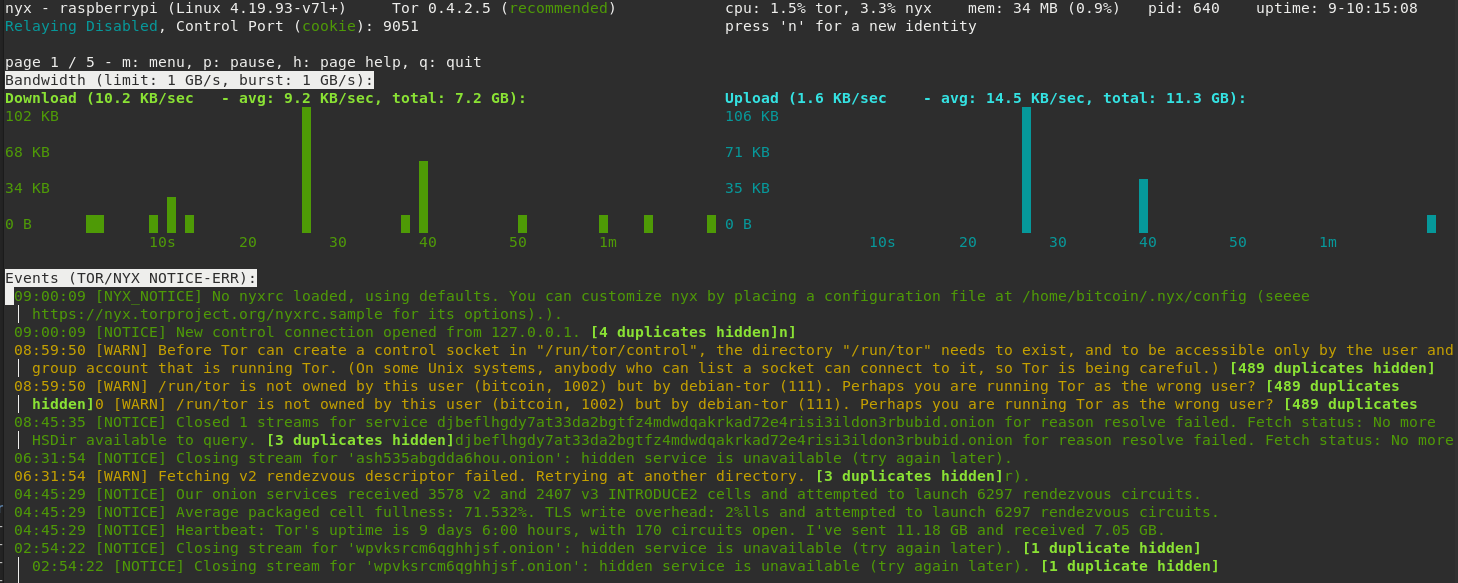
Applying:
sudo sed -i "s/debian-tor/bitcoin/g" /lib/systemd/system/[email protected]
sudo sed -i "s/SafeLogging 0/SafeLogging 1/g" /etc/tor/torrc
sudo sed -i "s/PortForwarding 1//g" /etc/tor/torrc
sudo systemctl daemon-reload
sudo systemctl restart tor
LND now can use the HASHED PASSWORD auth method to Tor: https://github.com/lightningnetwork/lnd/blob/master/docs/configuring_tor.md#authentication
so does not need access to the Tor cookie file.
Tor and and lnd can be all run with a separate user.
openoms
on 10 May 2020
One aim for the v1.7 release should be to go TOR by default - I think thats a good time to take a look at those warning and optimizations.
rootzoll
on 27 May 2020
Agree with Tor as default and it will be also beneficial to ship the Tor binary with the SDcard image (the insatllation could part of the prepare step of the script).
Apparently the torproject.org website is blocked in some jurisdictions (so cannot download), but the Tor network is still usable.
openoms
on 28 May 2020
sudo sed -i "s/debian-tor/bitcoin/g" /lib/systemd/system/[email protected]
@openoms do you expect this to be override e.g. if somebody runs apt upgrade (and a newer package of tor is installed)?
Also: This fix for the logging message is currently NOT in v1.6, right?
Related issue: #402
The fix in https://github.com/rootzoll/raspiblitz/issues/998#issuecomment-599960455 works for me.
 frennkie
on 2 Aug 2020
frennkie
on 2 Aug 2020
sudo sed -i "s/debian-tor/bitcoin/g" /lib/systemd/system/[email protected]
@openoms do you expect this to be override e.g. if somebody runs
apt upgrade(and a newer package of tor is installed)?
the fact that we are running Tor with the bitcoin user is problematic. It breaks apt upgrade as well currently. Should use debian-tor instead, but permissions need to be sorted.
Also: This fix for the logging message is currently NOT in v1.6, right?
Related issue: #402
The fix in https://github.com/rootzoll/raspiblitz/issues/998#issuecomment-599960455 works for me.
Great, we could include the log fixes. That is not controversial.
openoms
on 2 Aug 2020
As there are several things in this issue let's try to "sort" this a bit
- Minor improvements for the settings (SafeLogging, PortForwarding)
- HASHED PASSWORD auth
- The general question whether to run Tor as
bitcoinordebian-tor
For 1) I agree that this is non-controversial - we should create a PR and fix it (either for 1.6 or 1.7).
For 2) - not really urgent right now, agreed?
For 3) This currently leads to the "[WARN]" messages.
A workaround is the sudo sed -i "s/debian-tor/bitcoin/g" /lib/systemd/system/[email protected] which has the downside of being overwritten on apt upgrade.
What permission issue are there if we run Tor with debian-tor? Does this only affect bitcoind ? Or are others apps affected?
frennkie
on 2 Aug 2020
Idea: Include check for debian-tor in /lib/systemd/system/[email protected] in internet.tor.sh which is then called every hour(?!) by _background.sh.
frennkie
on 8 Aug 2020
HASHED PASSWORD auth
The general question whether to run Tor as
bitcoinordebian-torFor 2) - not really urgent right now, agreed?
Do we use tor control socket only from bitcoind and lnd, right?
Hashed password will allow the resolution for both 2 and 3 as we can run tor with the default user not messing with apt-get update.
I'm quite sure I have this configuration on my Debian based testnet setup (not RaspiBlitz)
 nolith
on 5 Sep 2020
nolith
on 5 Sep 2020
Note to self: If not merged earlier ... for v1.7 take a look at: https://github.com/rootzoll/raspiblitz/pull/1506
rootzoll
on 8 Sep 2020
Do we use tor control socket only from bitcoind and lnd, right?
@openoms Can you confirm that those two are the only reason we are running Tor as user bitcoin...?
With the changes in PR #1506 and things in the comments there we no longer have a problem with apt-get update.
On top of the PR this would need to be added (if we decide to keep it as Tor)
# reset ExecStartPre
ExecStartPre=
ExecStartPre=/usr/bin/install -Z -m 02755 -o bitcoin -g bitcoin -d /run/tor
ExecStartPre=/usr/bin/tor --defaults-torrc /usr/share/tor/tor-service-defaults-torrc -f /etc/tor/torrc --RunAsDaemon 0 --verify-config
yes, only bitcoind and lnd are running with the bitcoin user and need access to the control port
openoms
on 9 Sep 2020
Most of this should be fixed by #1571 merged into v1.6.1 ... but check again when working on v1.7
rootzoll
on 28 Sep 2020
Can confirm this works.
This got solved too:
One more things needed for LND to be able to access the auth cookie:
sudo usermod -a -G debian-tor bitcoinas in: https://stadicus.github.io/RaspiBolt/raspibolt_22_privacy.html#installing-tor
Stuck with this because LND was not able to access the Tor auth cookie.
Permission are going strange as even ifbitcoinis added to thedebian-torgroup:$ cat /etc/group | grep debian-tor debian-tor:x:116:bitcoin admin@raspberrypi:~ $$ sudo -u bitcoin ls -la /mnt/hdd/ drwxr----- 13 debian-tor debian-tor 4096 Jan 24 21:38 tor $ sudo -u bitcoin ls -la /mnt/hdd/tor ls: cannot access '/mnt/hdd/tor/..': Permission denied d????????? ? ? ? ? ? sysTIL that +x is needed as well to be allowed to move into a directory: https://github.com/JoinMarket-Org/joinmarket-clientserver/issues/703#issuecomment-708057776
Getting rid of this line from torrc solved the issue:
CookieAuthFile /mnt/hdd/tor/sys/control_auth_cookie
The auth cookie now is created in:
/var/run/tor/control.authcookie
Usage of the auth cookie is described here:
https://github.com/JoinMarket-Org/joinmarket-clientserver/blob/master/docs/PAYJOIN.md#configuring-tor-to-setup-a-hidden-service
Fixes included in this PR: https://github.com/rootzoll/raspiblitz/pull/1666/files#diff-ead50f54f76f0367e510770c5b88ea64c56fcd48350a7035ae1d5f44710d22ceR133
openoms
on 14 Oct 2020
Related issues
 pkclyoni
·
3Comments
rootzoll
·
4Comments
pkclyoni
·
3Comments
rootzoll
·
4Comments
 Kixunil
·
3Comments
Kixunil
·
3Comments
 cedricwalter
·
5Comments
cedricwalter
·
5Comments
 ChuckNorrison
·
4Comments
ChuckNorrison
·
4Comments
Most helpful comment
Do we use tor control socket only from bitcoind and lnd, right?
Hashed password will allow the resolution for both 2 and 3 as we can run tor with the default user not messing with apt-get update.
I'm quite sure I have this configuration on my Debian based testnet setup (not RaspiBlitz)