Raspiblitz: Joinmarket on the RaspiBlitz
Started a project to run JoinMarket on the RaspiBlitz: https://github.com/openoms/bitcoin-tutorials/blob/master/joinmarket/README.md
It is largely python command-line based so it is only a guide for now.
Suggestions and additions are welcome.
 openoms
All 45 comments
Sounds awesome!
 woeisme
on 1 Nov 2019
woeisme
on 1 Nov 2019
@CandleHater is also big on that topic - can you please report your experience here, so that we can turn this into a feature?
 rootzoll
on 16 Nov 2019
rootzoll
on 16 Nov 2019
It is a great idea to implement joinmarket, I've been following your guide and it is well explained and really easy to follow. Being implemented in raspiblitz will bring lots of new users which may feel uncomfortable using terminal so they just use samourai or wasabi. Are you planning to implement also yield generator?
 Tracachang
on 24 Nov 2019
Tracachang
on 24 Nov 2019
I don`t know what else we can do on top of an automated install script. Joinmarket is awesome, but is mostly controlled via the command-line.
The current QT-GUI is made to be a standalone desktop application, cannot be separated from the backend and does not support the Yield Generator itself.
I think the realistic route here is to make the Joinmarket installation an option in the SERVICE menu and link to the documentation about usage.
openoms
on 24 Nov 2019
I do think making a script like the one in the menu (what appears when log in using ssh would be the best) now for example has: FUNDING, SEND, RECEIVE... SERVICES (there add COINJOIN) and inside coinjoin create 3 or 4 tabs (if tumbler is included):
FUND or RECEIVE: when hit enter executes
(jmvenv) $ python wallet-tool.py wallet.jmdat historywith a message saying to fund (external address only, one or many addresses but always ext).
SEND (single coinjoin payment with default options): when hit enter executes
(jmvenv)$ python sendpayment.py wallet.jmdatwhich prompt user to eneter amount and address since the full command it is like:
(jmvenv)$ python sendpayment.py wallet.jmdat 5000000 mprGzBA9rQk82Ly41TsmpQGa8UPpZb2w8c
Yield Generator: When hit enters it will execute in tmux (jmvenv) $ python yield-generator-basic.py wallet.jmdat (ON and OFF button). with a message saying that before turn ON be sure your tx have at least 5 conf.
I would also add some text saying that a GUI is possible using Joinmarket-QT (pointing to your github of bitcoin tutorials and adding just some info about it, like after install in desktop edit the joinmarket.cfg with raspiblitz IP + password B etc)
Do you think adding a another tab with Tumbler would be interesting? (using default settings and only asking user to prompt 3 addresses where they want to receive coins). I think it would be very usefull for user who want to send from their raspiblitz to their own coldstorage.
Let me know your thoughts about it.
Tracachang
on 24 Nov 2019
The Tumbler is one of the main functions of JoinMarket, would definitely worth to include it.
I like the idea of the helper COINJOIN menu, same way the commands for lncli are given. It is also the best way to demonstrate what happens in the background.
openoms
on 24 Nov 2019
Great update on Joinmarket to 0.6.0: https://github.com/JoinMarket-Org/joinmarket-clientserver/blob/master/docs/release-notes/release-notes-0.6.0.md
Will help to run as a systemd service:
Wallet password via stdin

This new option allows one to pass wallet passwords via stdin, so as to allow automated startup of the command line application, without having the security concern that arises from implementing this as a command line argument (shell history/process list etc.).

b83e27c Add --wallet-password-stdin
@openoms is there already some merge for joinmarket? Or jst because of time issues, do we may want to push it to v1.5? Woudl love to get a v14.RC1 out on monday/thuesday.
rootzoll
on 19 Dec 2019
I could not get to do it yet and won't have enough time. Agree that RC1 is priority, we might need to get JM to 1.5.
A simple installation would be quick, but that does not help the users much.
Interacting with the python scripts takes more CLI work than the installation.
Also would need a kind of unlock helper script similar to the LNDunlock to be able to run the Yield Genarator or Tumbler with systemd.
Would like to not rush this as there would be the potential to store keys for significant funds on the device.
Joinmarket is awesome, but really not for the ones who want to avoid the command line and they can set up without an install script..
openoms
on 19 Dec 2019
will execute in tmux (jmvenv) $ python yield-generator-basic.py wallet.jmdat (ON and OFF button)
I would suggest using yg-privacyenhanced.py instead.
 kristapsk
on 25 Dec 2019
kristapsk
on 25 Dec 2019
@kristapsk thanks, testing that already. Updated: https://github.com/openoms/bitcoin-tutorials/commit/f403b8b1f38121dd483d2decec822e093436601a
openoms
on 25 Dec 2019
Just connected the Joinmarket-QT on desktop to a Blitz.
Needed to change the bitcoin.conf (https://github.com/rootzoll/raspiblitz/issues/748):
sudo nano /mnt/hdd/bitcoin/bitcoin.conf
#rpcallowip=127.0.0.1
#rpcbind=127.0.01:8332
rpcallowip=192.168.1.0/24
rpcbind=0.0.0.0
Also UFW needs to be open to allow the RPC connection from LAN:
sudo ufw allow from 192.168.1.0/16 to any port 8332
openoms
on 3 Jan 2020
@openoms I am planning to have a v1.5 out before the Hackday .. mostly some updates and fixes, would you like to have the join market part of this or better to push it to the v1.6 release and maybe even making it part of the hackday v1.6 sprint?
rootzoll
on 16 Mar 2020
v0.6.2 just had been released, which might be especially of interest here, because it has split code / data directories, so you can have JoinMarket code on SD card and logs, wallets, etc. on external HDD (at least that's how I split it with RaspiBolt, not so sure about directory structure used in RaspiBlitz).
kristapsk
on 17 Mar 2020
@openoms Also note that cgan is dead, but there's hackint added instead to default IRC config.
kristapsk
on 17 Mar 2020
@kristapsk indeed this update is very well suited for our needs, updating soon.
@rootzoll will look into an install/uninstall script for the new JM version with the segregated data directory. To have a CLI option is realistic for 1.5, will work on the GUI more for 1.6.
openoms
on 17 Mar 2020
The first iteration of the JoinMarket install script for the RaspiBlitz is here: https://github.com/openoms/raspiblitz/blob/joinmarket-cli/home.admin/config.scripts/bonus.joinmarket.sh
- uses a separate user:
joinmarketwith sudo access. Uses the PASSWORD_B as the user password - the data directory is on the disk at
/mnt/hdd/app-data/.joinmarket, symlinked to/home/joinmarket/.joinmarketand will be kept during the SD-card updates - if someone used this tutorial: https://github.com/openoms/bitcoin-tutorials/tree/master/joinmarket the wallet(s) will be copied to the new data directory automatically
- will be compatible with GUI being worked on here: https://github.com/openoms/joininbox
EDIT:
The latest version of the script is merged to the v1.5 branch:
Test with:
#download:
wget https://raw.githubusercontent.com/rootzoll/raspiblitz/v1.5/home.admin/config.scripts/bonus.joinmarket.sh
#run:
sudo bash bonus.joinmarket.sh on
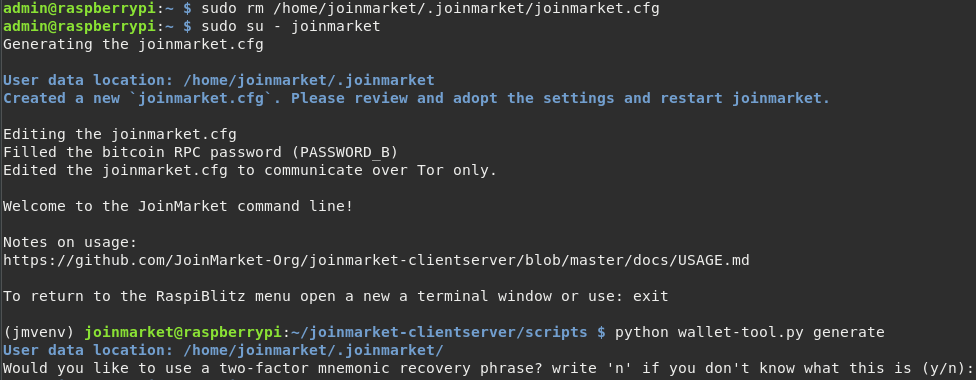
OK I merged PR and install looks good ... but when I want to generate my wallet I get:

rootzoll
on 24 Mar 2020
Right, you will need the activate the venv (jmvenv) . Probably best to put that into the .bashrc too.
openoms
on 24 Mar 2020
Fixed with the PR above:
openoms
on 24 Mar 2020
Tested re-install during an update - looks stable :)
rootzoll
on 24 Mar 2020
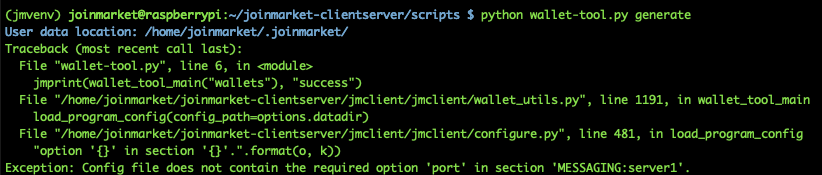
Thanks :) I got one step further .. now I got this:
rootzoll
on 24 Mar 2020
this is fixed too, but need to delete the
/home/joinmarket/.joinmarket/joinmarket.cfg and relogin to regenerate with the updated startup.sh.
The port 6697 needs to be allowed for IRC.
openoms
on 24 Mar 2020
Updated this install guide to use the automated script and help to get started:
https://github.com/openoms/bitcoin-tutorials/blob/master/joinmarket/README.md
@rootzoll do you think we should link to this as the first pointer on usage?
It is also crossreferenced with the JM docs: https://github.com/JoinMarket-Org/joinmarket-clientserver/#more-installation-guides
openoms
on 25 Mar 2020
OK works now also on my machine :) So I thin kthis ticket is clear for v1.5 RC1 release.
@openoms I think its OK to link a more tailored README to the RaspiBlitz-JoinMarket Setup
rootzoll
on 25 Mar 2020
Have been made aware on the Joinmarket IRC of a very interesting possibility to use ssh -X (remote Xserver) to run the Joinmarket-QT-GUI entirely from the node, but with the graphical interface on the desktop.
The qt-gui ependencies need some special packages for ARM, but made it work already.
Will need to change the install script to have this possibility.
Looking into how easy it is to make it work on Windows with Xming or similar.
Would ssh -X work on Mac @rootzoll ?
openoms
on 27 Mar 2020
I see @rootzoll didn't have any trouble installing, but this is what I get when running the install script.
admin@raspberrypi:~ $ sudo bash bonus.joinmarket.sh on
*** INSTALL JOINMARKET ***
OK, running behind Tor.
The bitcoin core wallet is already on
*** Add the 'joinmarket' user ***
adduser: The user `joinmarket' already exists.
*** setting PASSWORD_B as the password for the 'joinmarket' user ***
The user `joinmarket' is already a member of `sudo'.
joinmarket ALL=(ALL) NOPASSWD:ALL
Reading package lists... Done
Building dependency tree
Reading state information... Done
libjpeg-dev is already the newest version (1:1.5.2-2).
python3-pyside2.qtcore is already the newest version (5.11.2-3+rpi1).
python3-pyside2.qtgui is already the newest version (5.11.2-3+rpi1).
python3-pyside2.qtwidgets is already the newest version (5.11.2-3+rpi1).
zlib1g-dev is already the newest version (1:1.2.11.dfsg-1).
0 upgraded, 0 newly installed, 0 to remove and 31 not upgraded.
Reading package lists... Done
Building dependency tree
Reading state information... Done
automake is already the newest version (1:1.16.1-4).
build-essential is already the newest version (12.6).
git is already the newest version (1:2.20.1-2+deb10u1).
libffi-dev is already the newest version (3.2.1-9).
libgmp-dev is already the newest version (2:6.1.2+dfsg-4).
libsodium-dev is already the newest version (1.0.17-1).
libtool is already the newest version (2.4.6-9).
pkg-config is already the newest version (0.29-6).
python3-dev is already the newest version (3.7.3-1).
libssl-dev is already the newest version (1.1.1d-0+deb10u2+rpt1).
python3-pip is already the newest version (18.1-5+rpt1).
0 upgraded, 0 newly installed, 0 to remove and 31 not upgraded.
fatal: destination path 'joinmarket-clientserver' already exists and is not an empty directory.
HEAD is now at f586529 add release notes and version numbers for 0.6.2
Looking in indexes: https://pypi.org/simple, https://www.piwheels.org/simple
Requirement already satisfied: virtualenv in /usr/lib/python3/dist-packages (15.1.0)
sudo: virtualenv: command not found
bonus.joinmarket.sh: line 100: jmvenv/bin/activate: No such file or directory
 grnqrtr
on 28 Mar 2020
grnqrtr
on 28 Mar 2020
@grnqrtr thank you for testing!
I could reproduce the error when installing on top of a previous attempt.
Added the cleaning process to the script: https://github.com/rootzoll/raspiblitz/pull/1098/commits/49b662a506b56ddf9c8fe224d892f1e7f7b7b891
This is a refactored version of what @rootzoll tested, with the added remote QT GUI capability.
Can you please try again:
# remove old script
rm bonus.joinmarket.sh
# download
wget https://raw.githubusercontent.com/openoms/raspiblitz/jm-ssh-x/home.admin/config.scripts/bonus.joinmarket.sh
# run
sudo bash bonus.joinmarket.sh on
Still not quite working, here's output again:
admin@raspberrypi:~ $ sudo bash bonus.joinmarket.sh on
*** INSTALL JOINMARKET ***
OK, running behind Tor.
The bitcoin core wallet is already on
*** Cleaning before install ***
*** Add the 'joinmarket' user ***
Adding user `joinmarket' ...
Adding new group `joinmarket' (1005) ...
Adding new user `joinmarket' (1005) with group `joinmarket' ...
Creating home directory `/home/joinmarket' ...
Copying files from `/etc/skel' ...
*** setting PASSWORD_B as the password for the 'joinmarket' user ***
Adding user `joinmarket' to group `sudo' ...
Adding user joinmarket to group sudo
Done.
joinmarket ALL=(ALL) NOPASSWD:ALL
Reading package lists... Done
Building dependency tree
Reading state information... Done
libjpeg-dev is already the newest version (1:1.5.2-2).
python3-pyside2.qtcore is already the newest version (5.11.2-3+rpi1).
python3-pyside2.qtgui is already the newest version (5.11.2-3+rpi1).
python3-pyside2.qtwidgets is already the newest version (5.11.2-3+rpi1).
zlib1g-dev is already the newest version (1:1.2.11.dfsg-1).
0 upgraded, 0 newly installed, 0 to remove and 31 not upgraded.
Reading package lists... Done
Building dependency tree
Reading state information... Done
automake is already the newest version (1:1.16.1-4).
build-essential is already the newest version (12.6).
git is already the newest version (1:2.20.1-2+deb10u1).
libffi-dev is already the newest version (3.2.1-9).
libgmp-dev is already the newest version (2:6.1.2+dfsg-4).
libsodium-dev is already the newest version (1.0.17-1).
libtool is already the newest version (2.4.6-9).
pkg-config is already the newest version (0.29-6).
python3-dev is already the newest version (3.7.3-1).
libssl-dev is already the newest version (1.1.1d-0+deb10u2+rpt1).
python3-pip is already the newest version (18.1-5+rpt1).
0 upgraded, 0 newly installed, 0 to remove and 31 not upgraded.
Cloning into 'joinmarket-clientserver'...
remote: Enumerating objects: 174, done.
remote: Counting objects: 100% (174/174), done.
remote: Compressing objects: 100% (119/119), done.
remote: Total 6146 (delta 81), reused 112 (delta 54), pack-reused 5972
Receiving objects: 100% (6146/6146), 5.54 MiB | 643.00 KiB/s, done.
Resolving deltas: 100% (4049/4049), done.
HEAD is now at f586529 add release notes and version numbers for 0.6.2
Looking in indexes: https://pypi.org/simple, https://www.piwheels.org/simple
Requirement already satisfied: virtualenv in /usr/lib/python3/dist-packages (15.1.0)
sudo: virtualenv: command not found
bonus.joinmarket.sh: line 104: jmvenv/bin/activate: No such file or directory
TODO: Test with Bebian Buster Laptop and QT GUI ... see: https://github.com/rootzoll/raspiblitz/pull/1098#issue-395019744
rootzoll
on 28 Mar 2020
Successfully tested the to open the JoinMarket QT GUI remotely on a desktop running:
ssh -X joinmarket@RASPIBLITZ_IP joinmarket-clientserver/jmvenv/bin/python joinmarket-clientserver/scripts/joinmarket-qt.py
Tested:
- Debian Buster
- Manjaro - @grnqrtr - also was able to connect with
trezor-agent -c joinmarket@RASPIBLITZIP -- -X joinmarket-clientserver/jmvenv/bin/python joinmarket-clientserver/scripts/joinmarket-qt.py
UPDATE:
- Mac with XQuartz (https://www.xquartz.org/ - see below)
Windows the equivalent is Xming (https://sourceforge.net/projects/xming/) likely to be used with Putty - waiting for confimation on this to work
Android - possible to run an Xserver - further research needed
openoms
on 28 Mar 2020
* did not work so far on Mac
Can confirm this works on Mac. Need to download a piece of software called XQuartz. https://www.xquartz.org/
Enter the command as usual in a mac terminal, xquartz will load and show joinmarket gui.
 k3tan172
on 30 Mar 2020
k3tan172
on 30 Mar 2020
There was a config error fixed in: https://github.com/rootzoll/raspiblitz/pull/1101
Edit the :
nano /home/joinmarket/.joinmarket/joinmarket.cfg
and change to:
usessl = true
under [MESSAGING:server1]
to correct without needing to delete the joinmarket,cfg and reinstall.
Running the Yield Generator on my test-blitz now!
openoms
on 30 Mar 2020
Installed JM with this patch: https://github.com/openoms/raspiblitz/blob/jm-patch/home.admin/config.scripts/bonus.joinmarket.sh
While testing, I ran into a JsonRpcConnectionError. when generating wallet with $ python wallet-tool.py generate :
User data location: /home/joinmarket/.joinmarket/
Traceback (most recent call last):
  File "wallet-tool.py", line 6, in <module>
    jmprint(wallet_tool_main("wallets"), "success")
  File "/home/joinmarket/joinmarket-clientserver/jmclient/jmclient/wallet_utils.py", line 1191, in wallet_tool_main
    load_program_config(config_path=options.datadir)
  File "/home/joinmarket/joinmarket-clientserver/jmclient/jmclient/configure.py", line 505, in load_program_config
    global_singleton.config)
  File "/home/joinmarket/joinmarket-clientserver/jmclient/jmclient/configure.py", line 570, in get_blockchain_interface_instance
    bc_interface = BitcoinCoreInterface(rpc, network)
  File "/home/joinmarket/joinmarket-clientserver/jmclient/jmclient/blockchaininterface.py", line 166, in __init__
    blockchainInfo = self.jsonRpc.call("getblockchaininfo", [])
  File "/home/joinmarket/joinmarket-clientserver/jmclient/jmclient/jsonrpc.py", line 145, in call
    response = self.queryHTTP(request)
  File "/home/joinmarket/joinmarket-clientserver/jmclient/jmclient/jsonrpc.py", line 103, in queryHTTP
    raise exc
  File "/home/joinmarket/joinmarket-clientserver/jmclient/jmclient/jsonrpc.py", line 91, in queryHTTP
    "authentication for JSON-RPC failed")
jmclient.jsonrpc.JsonRpcConnectionError: authentication for JSON-RPC failed
 pretyflaco
on 10 Apr 2020
pretyflaco
on 10 Apr 2020
@pretyflaco the 1.5RC1 has the latest version of the script.
Please try to uninstall and reinstall from the SERVICES menu.
openoms
on 10 Apr 2020
@pretyflaco the 1.5RC1 has the latest version of the script.
Please try to uninstall and reinstall from the SERVICES menu.
pretyflaco
on 10 Apr 2020
@pretyflaco can you please edit your comments and use something like pastebin.com to link these logs? The long pastes makes this thread difficult to follow.
Your issue is likely the bitcoinRPC password is wrong in the joinmarket.cfg.
You could test changing your PasswordB from the menu which should sync the passwords.
Manually you can edit:
sudo nano /home/joinmarket/.joinmarket/joinmarket.cfg
and make sure that the rpc_password matches your PasswordB
If it does not match can you tell if there are any special characters or spaces in your PasswordB?
openoms
on 10 Apr 2020
I had a look into joinmarket.cfg and surprisingly I found
rpc_password = password
which is obv not my Password B.
In raspiblitz menu Password, I changed Password B and rebooted. Checked joinmarket.cfg and now rpc_password was correct. The password itself is alphanumeric with upper/lower case characters, no special characters or spaces.
Swtiched to user joinmarket and tried to generate new wallet. Same result.
Output: https://pastebin.com/bGikqvNL
pretyflaco
on 10 Apr 2020
@pretyflaco I suspect that the problem is that because you used an old version of the script previouly there is a bogus joinmarket.cfg being carried over during the reinstalls.
This is a feature as the script does preserve the old settings, but they weren't set properly (automatically) to start with.
Can you check in:
sudo nano /home/joinmarket/.joinmarket/joinmarket.cfg
that the
rpc_user = raspibolt ?
if correcting that does not help could share your joinmarket.cfg here (without the rpc_password)
openoms
on 10 Apr 2020
@openoms Currently it's
rpc_user = bitcoin
change it to 'raspibolt' ? Did you mean 'raspiblitz' ?
pretyflaco
on 10 Apr 2020
@pretyflaco the RPC user is raspibolt (inherited from the raspibolt project)
but anyway, the issue is the old .cfg.
A quickest solution is to delete it with:
sudo rm -f /home/joinmarket/.joinmarket/joinmarket.cfg
and it will be regenerated when you log back in with:
sudo su - joinmarket
openoms
on 10 Apr 2020
Thank you this worked.
pretyflaco
on 10 Apr 2020
@openoms I like to close this issue preparing for release ... are we missing anything to be done on this?
rootzoll
on 18 Apr 2020
Tested all the functions I use on the blitz, the command line works well and the data is restored on update.
Will continue updating the linked tutorial.
The menu to come is continued to be developed here: https://github.com/openoms/joininbox to function as standalone joinmarket box as well.
Will open a PR for the blitz once mature enough.
openoms
on 18 Apr 2020
Closing this issue for the v1.5 RC2 release - coming as soon as LND 0.10.0 final is out.
rootzoll
on 18 Apr 2020
Related issues
 intorid
·
3Comments
rootzoll
·
4Comments
rootzoll
·
3Comments
openoms
·
3Comments
openoms
·
4Comments
intorid
·
3Comments
rootzoll
·
4Comments
rootzoll
·
3Comments
openoms
·
3Comments
openoms
·
4Comments
Most helpful comment
OK works now also on my machine :) So I thin kthis ticket is clear for v1.5 RC1 release.
@openoms I think its OK to link a more tailored README to the RaspiBlitz-JoinMarket Setup