Raspiblitz: Display info page as img file on pi LCD
Hey Guys,
Wondering if we can create png files and display them on the LCD with a 5-10 sec refresh rate without using up too much resources.
The Idea of using chromium to do the layout is easiest but a bit expensive resource wise.
I think that installing imagemagick in order to create the image file (rendering the text in a predefined template image) and then display the image on the lcd using fbi, could work.
Does anyone have experience with using imagemagick on a pi? is it resource intensive?
 zanderisrael
All 7 comments
That's possible to use imagemagick and I've run a few tests. We already use fbi to display QR-codes. Take a look at scripts like these https://github.com/rootzoll/raspiblitz/blob/master/home.admin/XXdisplayLCD.sh
I was surprised that Imagemagick with fbi was a more resource intensive than simply running chromium or epiphany. I've started writing svg-files that chromium can display in an xserve session. We can take a look at this issue
https://github.com/rootzoll/raspiblitz/issues/88#issuecomment-467578776
in which we discuss how to setup a browser.
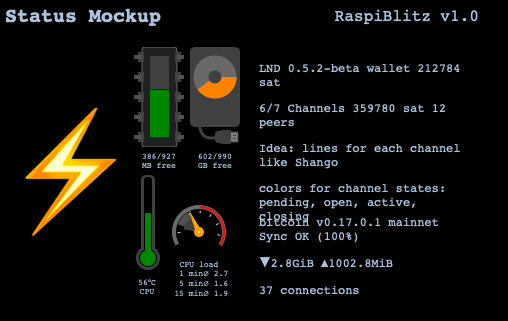
Issue #388 has a mock up of a status page based on svg. This is just a proof of concept and I'm not sure if it's worth the effort and the computing power on this little computer.
@frennkie and @fluidvoice were involved, too.
 raumi75
on 20 May 2019
raumi75
on 20 May 2019
This is my latest svg:
raumi75
on 20 May 2019
That's possible to use imagemagick and I've run a few tests. We already use fbi to display QR-codes. Take a look at scripts like these https://github.com/rootzoll/raspiblitz/blob/master/home.admin/XXdisplayLCD.sh
I was surprised that Imagemagick with fbi was a more resource intensive than simply running chromium or epiphany. I've started writing svg-files that chromium can display in an xserve session. We can take a look at this issue
in which we discuss how to setup a browser.
Issue #388 has a mock up of a status page based on svg. This is just a proof of concept and I'm not sure if it's worth the effort and the computing power on this little computer.
@frennkie and @fluidvoice were involved, too.
Does anyone have some benchmarks on the pi? using chromium and svg images to render the status screen? I can definitely make it look badass as long as the work is not for nothing.
zanderisrael
on 21 May 2019
will look into it
 frennkie
on 21 May 2019
frennkie
on 21 May 2019
We were seing that using a broswer to display a html page on the LCD it takes 300MB+ mem constant even with a small broser like Epiphany. Also running X server with all needed parts to build a GUI for the LCD starts with 150MB+ constant mem.
So we want to research in having a script/info-service building a image to display per framebuffer (fbi command). This mechanism could also be adopted for ePaper displays later. Getting touch working while the LCD is in framebuffer-mode would then make the 4-Button UI possible.
Related issues for Infoservice and Touch to keep in view:
83 #88
https://github.com/frennkie/blitzinfod/blob/master/server.go
 rootzoll
on 21 May 2019
rootzoll
on 21 May 2019
Looks like X server is running with less mem foot print as assumed in the beginning - option is back on the table.
rootzoll
on 28 May 2019
I still really like the HTML Info Page. But I would not run a Browser on the RaspiBlitz. Instead the HTML Info Page will be hosted by blitzd and can be access from
- a desktop/labtop PC
- a mobile phone
- other kinds of devices.
@arcbtc had the idea to use a really small device (ESP32?! Node-MCU? RPi Zero?!..) with a small to medium sized display and use that to show the RaspiBlitz Info Page (physically separated..).
frennkie
on 2 Jun 2019
Related issues
rootzoll
·
36Comments
 becausetheypayme
·
58Comments
becausetheypayme
·
58Comments
 drunkenclam
·
68Comments
rootzoll
·
60Comments
drunkenclam
·
68Comments
rootzoll
·
60Comments
 marssystems
·
37Comments
marssystems
·
37Comments
Most helpful comment
This is my latest svg: