Raspiblitz: Hardware Test on PowerSupply and HeatManagement
I found a good article - What's Wrong With The Raspberry Pi (scroll down to "Power Issues")
In it, one thing pointed out is the problem of inadequate power supply that is a VERY common problem (as in a large number of users have it but don't know it)... it's a "silent" problem that causes all kinds of different symptoms and malfunctioning, eg... slow/throttled performance, corrupted SD cards, hang/lockup, and probably also is causing corrupted blockchain DB files. Is scanning for the low-voltage statements in the logs enough or should we be using instead, or in addition to it, the vcgencmd command as per data below to detect low voltage and CPU throttling?
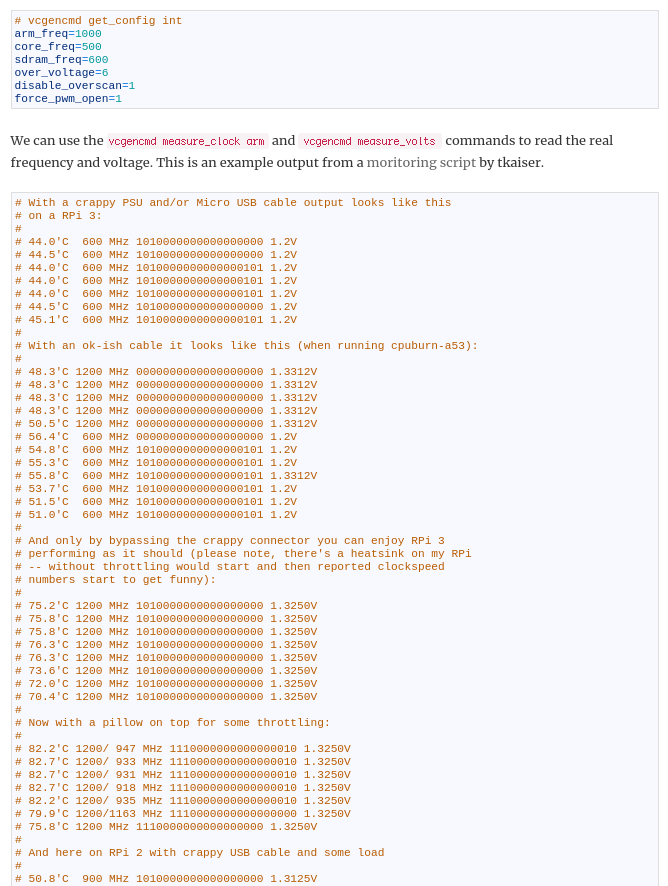
_Originally posted by @fluidvoice in https://github.com/rootzoll/raspiblitz/issues/424#issuecomment-478178382_
 fluidvoice
All 85 comments
@openoms wrote about this power-related data corruption here https://github.com/rootzoll/raspiblitz/issues/368#issue-415058136 which supports the need to detect this under-voltage if possible. @rootzoll we need to find out somehow which low cost power supplies are the best (for putting in the shopping lists)... high current and also stable voltage. Some say the official Raspberry Pi 2.5A supply is good (the best?)
fluidvoice
on 30 Mar 2019
Good find there. I don`t have a Pi running atm, but would be curious to see what it shows. Do you have all normal results when testing your Pi?
Other thing to test for HDD wear and tear is smartmontools. This article got me started with the basics: https://www.howtoforge.com/tutorial/monitor-harddisk-with-smartmon-on-ubuntu/
But there can be even timed tests and email notications set up fro different paramaters.
Both of my USB HDD adapters worked with adding the -d sat parameter:
sudo apt-get install smartmontools
sudo smartctl -i -d sat /dev/sda1
sudo smartctl -a -d sat /dev/sda1
gives a bunch of possibly useful metrics. Especially alarming if the error rates move from 0.
 openoms
on 30 Mar 2019
openoms
on 30 Mar 2019
@fluidvoice Thank you. Do I understand this right? In a perfect setup you have 1.325 V always? My pi mostly measures 1.2 and only occasionally 1.3312 V
 raumi75
on 31 Mar 2019
raumi75
on 31 Mar 2019
@fluidvoice Thank you. Do I understand this right? In a perfect setup you have 1.325 V always? My pi mostly measures 1.2 and only occasionally 1.3312 V
That's how I interpret what was written. I'll update when I've tested mine.
fluidvoice
on 31 Mar 2019
Very interesting. Running this script: https://github.com/bamarni/pi64/issues/4#issuecomment-292707581
I got this on Raspbian, RPi 3 B+ without the HDD connected with a 3A micro USB PSU with a power button (not my usual setup) :
admin@RaspiBlitz:~ $ sudo ./test.sh
To stop simply press [ctrl]-[c]
./test.sh: line 108: printf: warning: 10000000000000000000: Numerical result out of range
51.5'C 1400/ 600 MHz 9223372036854775807 1.3250V
./test.sh: line 108: printf: warning: 10000000000000000000: Numerical result out of range
51.5'C 600/ 600 MHz 9223372036854775807 1.2V
./test.sh: line 108: printf: warning: 10000000000000000000: Numerical result out of range
51.5'C 600/ 600 MHz 9223372036854775807 1.2V
./test.sh: line 108: printf: warning: 10000000000000000000: Numerical result out of range
50.5'C 600/ 600 MHz 9223372036854775807 1.2V
./test.sh: line 108: printf: warning: 10000000000000000000: Numerical result out of range
51.5'C 600/ 600 MHz 9223372036854775807 1.2V
./test.sh: line 108: printf: warning: 10000000000000000000: Numerical result out of range
50.5'C 600/ 600 MHz 9223372036854775807 1.2V
./test.sh: line 108: printf: warning: 10000000000000000000: Numerical result out of range
50.5'C 600/ 600 MHz 9223372036854775807 1.2V
./test.sh: line 108: printf: warning: 10000000000000000000: Numerical result out of range
51.0'C 600/ 600 MHz 9223372036854775807 1.2V
./test.sh: line 108: printf: warning: 10000000000000000000: Numerical result out of range
51.5'C 600/ 600 MHz 9223372036854775807 1.2V
./test.sh: line 108: printf: warning: 10000000000000000000: Numerical result out of range
51.5'C 600/ 600 MHz 9223372036854775807 1.2V
This suggests massive throttling and low voltage.
Will test with the other PSU-s I got.
openoms
on 31 Mar 2019
Made a gist for it: https://gist.github.com/openoms/997f56822a6256234e14ba1c6055c840
removed the command causing the error message.
Run with this line:
wget https://gist.githubusercontent.com/openoms/997f56822a6256234e14ba1c6055c840/raw/6d7ac0fce0fea47b1cb8ddf3daf56a626fa9e3d6/test.sh && sudo chmod +x test.sh && sudo ./test.sh
I am very curious of your results!
openoms
on 31 Mar 2019
My results on the "better" of my two power supplies. The other one was pretty much unusable.
state: bitcoind syncing, no LCD, USB flash boot drive connected, USB HDD connected, no keyboard
To stop simply press [ctrl]-[c]
63.4'C 1400/1200 MHz 1.2375V
63.4'C 1400/1200 MHz 1.2375V
62.3'C 1400/1200 MHz 1.2375V
62.3'C 1400/1200 MHz 1.2375V
62.8'C 1400/1200 MHz 1.2375V
62.3'C 1400/ 600 MHz 1.2375V
62.3'C 1400/1200 MHz 1.2375V
62.8'C 1400/1200 MHz 1.2375V
62.3'C 1400/1200 MHz 1.2375V
62.3'C 600/ 600 MHz 1.2V
62.3'C 1400/1200 MHz 1.2375V
63.4'C 1400/1200 MHz 1.2375V
62.3'C 1400/1200 MHz 1.2375V
62.3'C 1400/1200 MHz 1.2375V
63.4'C 1400/1200 MHz 1.2375V
62.8'C 600/ 600 MHz 1.2375V
62.3'C 1400/1200 MHz 1.2375V
62.8'C 1400/1200 MHz 1.2375V
62.8'C 1400/1200 MHz 1.2375V
fluidvoice
on 31 Mar 2019
@openoms @raumi75 @rootzoll
Experimenting with two different Pi3B+ I have. One has 3.5" LCD, the other not - and two different power supplies both supposedly 2.5A supplies.
Note: my setup is a bit different since I'm experimenting/testing w/DietPi and USB boot (not SD card).
$ sudo vcgencmd get_config int
arm_freq=1400
core_freq=250
gpu_freq=300
sdram_freq=450
PS#1 the better of the two (but has a very thin and long fixed cable)
STATE: starting up bitcoind, LCD screen, USB flash boot, USB HDD connected, keyboard connected, HDMI connected
sudo vcgencmd measure_volts volt=1.2625V
PS#1
STATE: starting up bitcoind, no LCD, no keyboard, HDMI connected, USB flash boot, USB HDD connected
sudo vcgencmd measure_volts volt=1.3375V
PS#2 (would only power Pi+LCD with HDD connected if I waited to plug HDD in after boot started)
STATE: starting up bitcoind, LCD screen, USB flash boot, no keyboard, HDMI connected
sudo vcgencmd measure_volts volt=1.2000V <-- this PS is basically unusable. It's crap.
fluidvoice
on 31 Mar 2019
@openoms
I would love to know these numbers for the recommended "official" Rasberry Pi 2.5A power supply. Particularly with an LCD and HDD connected. Can it handle them both? Does it cause throttling?
I wonder at what voltage point does the risk of data corruption go up?
I'm thinking everyone using an external HDD should be powered or using a powered USB hub.
fluidvoice
on 31 Mar 2019
The comments in that script are informative:
.Watch your Pi! RPi foundation knows that Micro USB for DC-IN
.is sht but also doesn't give a sht. Voltage drops caused by
.average USB cables cause all sorts of instabilities and also
.data corruption but instead of fixing the problem they masked
.it in their 'firmware'. The main CPU on the Raspberry monitors
.voltage drops and then acts on accordingly. If heavy voltage
.drops directly after startup are monitored the firmware lowers
.the core voltage available to CPU cores and also caps CPU
.clockspeed. If voltage drops aren't that severe a more flexible
.approach is used and at least you gain performance back after
.periods of heavy load.
fluidvoice
on 31 Mar 2019
I think the correct way to do this is from 2 terminal windows.
One running: sysbench --test=cpu --cpu-max-prime=10000 --num-threads=4 run ( install it with ` sudo apt install -y sysbench)
The other terminal running the sudo ./test.sh (1st download from the gist)
This way I had (sysbench running and stopping):
61.8'C 1400/1200 MHz 1.2313V
62.3'C 1400/1200 MHz 1.2313V
62.8'C 1400/1200 MHz 1.2313V
60.7'C 600/ 600 MHz 1.2V
58.5'C 600/ 600 MHz 1.2V
Taking the LCD off did not make a difference.
openoms
on 31 Mar 2019
A script automating that test would be good to include in the initial install/config phase of Raspiblitz to alert the user up-front. Perhaps we should also keep a doc tallying of all the poorly performing PS's to stay away from and of course include the known good ones in the shopping lists.
fluidvoice
on 31 Mar 2019
PS#1: 2.5A CanaKit model DCAR-RSP-2A5 (usable but marginal)
https://www.amazon.com/gp/product/B00MARDJZ4/ref=ppx_od_dt_b_asin_title_s00?ie=UTF8&psc=1
PS#2: 2.5A Rhino model PSA-CA006 (basically it's garbage/unusable)
fluidvoice
on 31 Mar 2019
I think the correct way to do this is from 2 terminal windows.
One running:
sysbench --test=cpu --cpu-max-prime=10000 --num-threads=4 run( install it with ` sudo apt install -y sysbench)The other terminal running the
sudo ./test.sh(1st download from the gist)This way I had (sysbench running and stopping):
61.8'C 1400/1200 MHz 1.2313V 62.3'C 1400/1200 MHz 1.2313V 62.8'C 1400/1200 MHz 1.2313V 60.7'C 600/ 600 MHz 1.2V 58.5'C 600/ 600 MHz 1.2VTaking the LCD off did not make a difference.
Multiple sysbench script runs with my "better" PS#1 on my Pi3 (which has no heat sinks), no LCD, USB FD, USB HDD got up to 76.3'C but it stayed at 1400/1200 MHz 1.2375V so no throttling on that one.
fluidvoice
on 31 Mar 2019
I have put it into a repo, so can be modified collaboratively and incorporated into the setup process: https://github.com/openoms/raspiblitz/blob/powertest/home.admin/XXpowertest.sh
sysbench is integrated, running for ~60 secs.
Will need to:
- stop the script automatically
- filter the output to show more readable messages about the PSU quality
To download and run:
wget https://raw.githubusercontent.com/openoms/raspiblitz/powertest/home.admin/XXpowertest.sh && sudo chmod +x XXpowertest.sh && ./XXpowertest.sh
Once downloaded just run: ./XXpowertest.sh
openoms
on 31 Mar 2019
Now we just need someone with the "official" Raspberry Pi 2.5A supply to run it, ideally, on a 3B+ with external USB HDD. @rootzoll you have one of these?
fluidvoice
on 31 Mar 2019
@fluidvoice Can you link to this PSU you mention as official? The shopping lists has been updated I think for 1.0 to recommend 3A supplies.
openoms
on 31 Mar 2019
@openoms I read that the Pi 3B+ throttles around 60C degrees, and our tests show similar; throttled from 58C-63C.
So I wonder if the throttling is due more to the temperature than the voltage? but that's another issue... the more important problem I think is the voltage since reportedly that can/is causing data corruption - a huge issue for blockchain syncing!
fluidvoice
on 31 Mar 2019
@fluidvoice Can you link to this PSU you mention as official? The shopping lists has been updated I think for 1.0 to recommend 3A supplies.
The thing is they can be rated at whatever amps but they still have to have good voltage regulation.
Below is the one I think is official. If you hear otherwise?...
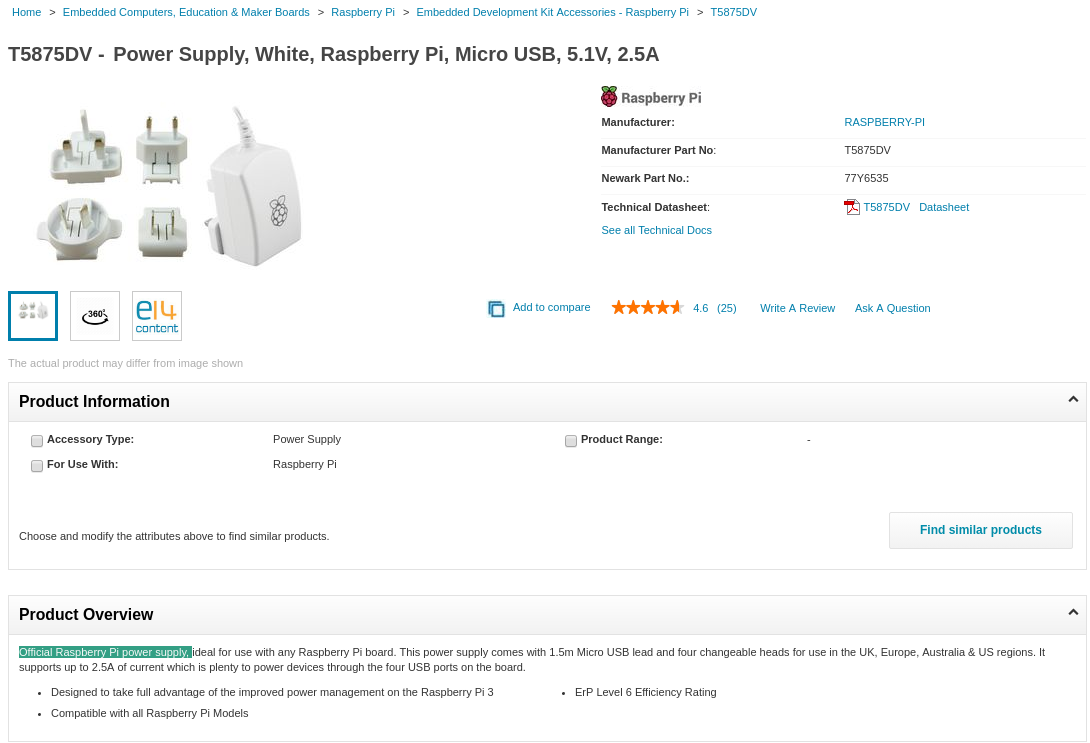
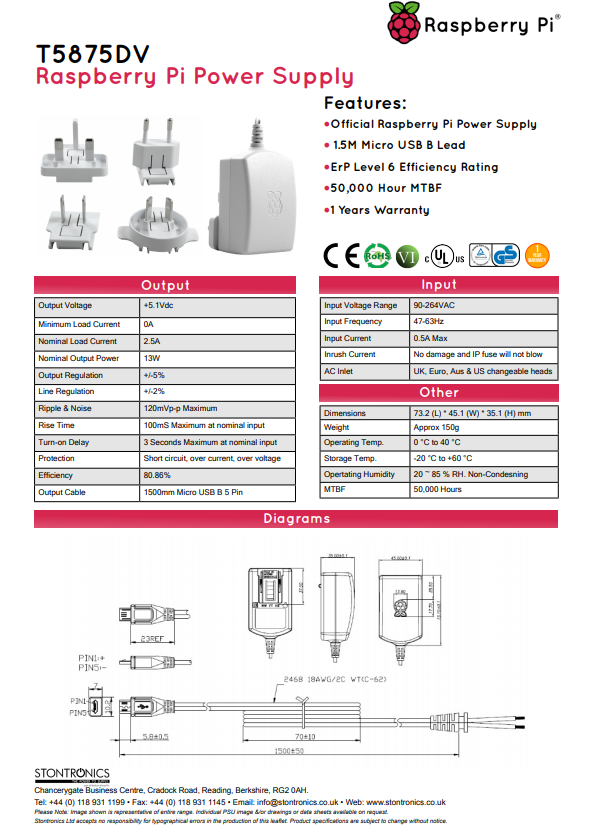
Official RPi-3 2.5Amp power supply (part number T5875DV):
Note the specs 5.1V 2.5A PSU with bult-in 18AWG cable <-- the wire thickness matters!
https://www.newark.com/raspberry-pi/t5875dv/psu-raspberry-pi-5v-2-5a-multi/dp/77Y6535
fluidvoice
on 31 Mar 2019
fluidvoice
on 31 Mar 2019
This guy is seeing throttling at 1.3438V volts even below 50C degrees: https://github.com/rootzoll/raspiblitz/issues/442#issuecomment-478367204
fluidvoice
on 31 Mar 2019
This guy is seeing throttling at 1.3438V volts even below 50C degrees: #442 (comment)
There is no throttling on that output. The sysbench benchmarking is stopped after ~60 secs. There is 5 secs sleep between the measurements, so the output is only relevant for 12 lines.
openoms
on 31 Mar 2019
This guy is seeing throttling at 1.3438V volts even below 50C degrees: #442 (comment)
There is no throttling on that output. The sysbench benchmarking is stopped after ~60 secs. There is 5 secs sleep between the measurements, so the output is only relevant for 12 lines.
Interesting. His output is odd. I'm wondering if the single line throttles are not really valid? Because the OP throttles due to voltage or heat were more consistent, showing 3 to 5 lines at least of consistent throttling. The spurious single and double-line throttles... I wonder if it's just bad voltage regulation in the PS?... esp because it's not accompanied by high temp or low volts. Yeah prob spurious voltage drops with mostly duration less than 5 seconds.
This guy has had various problems, such as corrupted files/data.
fluidvoice
on 31 Mar 2019
The load is fluctuating with multiple services running in the background. See your output is very similar here: https://github.com/rootzoll/raspiblitz/issues/474#issuecomment-478340132 .
Could play with the the length of the load test and the measurement interval by editing the script or commands, but I doubt that it will be conclusive.
openoms
on 31 Mar 2019
The load is fluctuating with multiple services running in the background. See your output is very similar here: #474 (comment) .
Could play with the the length of the load test and the measurement interval by editing the script or commands, but I doubt that it will be conclusive.
yes. good point/observation. I was just biased towards this guy having a bad PS because of his many problems and file corruption that I don't know what's causing them.
fluidvoice
on 31 Mar 2019
I have this: https://geekworm.com/collections/best-sellings/products/raspberry-pi-x820-2-5-inch-sata-storage-board-dc-5v-4a-power-supply-metal-case-kit with the 4A power supply. Powering with the small white micro-usb, because the LCD takes my GPIO. Throttling badly.
54.8'C 1400/ 600 MHz 1010000000000000101 1.2V
56.4'C 1400/ 600 MHz 1010000000000000101 1.2V
56.4'C 1400/ 600 MHz 1010000000000000101 1.2V
56.9'C 1400/ 600 MHz 1010000000000000101 1.2V
56.9'C 1400/ 600 MHz 1010000000000000101 1.2V
58.0'C 1400/ 600 MHz 1010000000000000101 1.2V
57.5'C 1400/ 600 MHz 1010000000000000101 1.2V
58.0'C 1400/ 600 MHz 1010000000000000101 1.2V
58.0'C 1400/ 600 MHz 1010000000000000101 1.2V
58.0'C 1400/ 600 MHz 1010000000000000101 1.2V
58.0'C 1400/ 600 MHz 1010000000000000101 1.2V
58.0'C 1400/ 600 MHz 1010000000000000101 1.2V
58.0'C 1400/ 600 MHz 1010000000000000101 1.2V
58.0'C 1400/ 600 MHz 1010000000000000101 1.2V
Done.
Maximum prime number checked in CPU test: 10000
Test execution summary:
total time: 71.7011s
total number of events: 10000
total time taken by event execution: 286.7295
per-request statistics:
min: 27.79ms
avg: 28.67ms
max: 66.48ms
approx. 95 percentile: 32.71ms
Threads fairness:
events (avg/stddev): 2500.0000/15.65
execution time (avg/stddev): 71.6824/0.01
56.9'C 1400/ 600 MHz 1010000000000000101 1.2V
55.8'C 600/ 600 MHz 1010000000000000101 1.2V
56.4'C 600/ 600 MHz 1010000000000000101 1.2V
This is a great troubleshooting tool @fluidvoice. It could be the part of XXdebuglogs.sh maybe.
openoms
on 31 Mar 2019
I have this: https://geekworm.com/collections/best-sellings/products/raspberry-pi-x820-2-5-inch-sata-storage-board-dc-5v-4a-power-supply-metal-case-kit with the 4A power supply. Powering with the small white micro-usb, because the LCD takes my GPIO. Throttling badly.
Same adapter board and PSU, but now powered through the GPIO port as shown here (takes the place of the screen unfortunately):
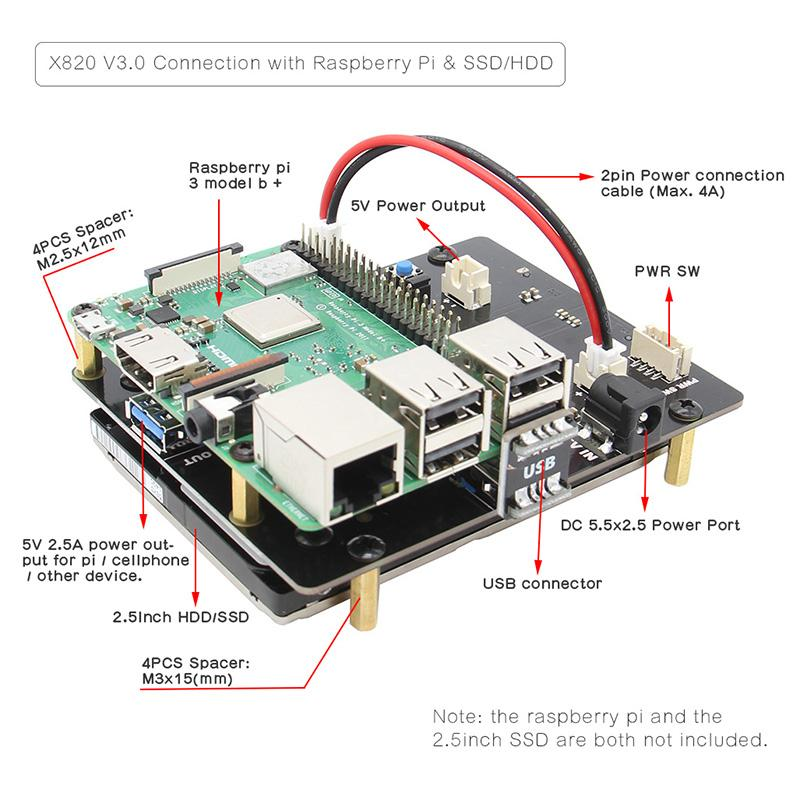
(takes the place of the screen unfortunately):
34.9'C 1400 MHz 0000000000 1.3250V
40.8'C 1400 MHz 0000000000 1.3250V
42.9'C 1400 MHz 0000000000 1.3250V
44.0'C 1400 MHz 0000000000 1.3250V
46.2'C 1400 MHz 0000000000 1.3250V
47.2'C 1400 MHz 0000000000 1.3250V
Done.
Maximum prime number checked in CPU test: 10000
Test execution summary:
total time: 31.2306s
total number of events: 10000
total time taken by event execution: 124.8873
per-request statistics:
min: 11.90ms
avg: 12.49ms
max: 63.93ms
approx. 95 percentile: 14.68ms
Threads fairness:
events (avg/stddev): 2500.0000/28.38
execution time (avg/stddev): 31.2218/0.00
42.9'C 1400 MHz 0000000000 1.3250V
41.9'C 1400 MHz 0000000000 1.3250V
40.8'C 1400 MHz 0000000000 1.3250V
41.3'C 1400 MHz 0000000000 1.3250V
40.8'C 1400 MHz 0000000000 1.3250V
41.9'C 1400 MHz 0000000000 1.3250V
41.9'C 1400 MHz 0000000000 1.3250V
42.4'C 1400 MHz 0000000000 1.3250V
42.4'C 600/ 600 MHz 0000000000 1.3250V
Max voltage achieved, no throttling and more than double the performance. (Load test calculating 1000 primes run in 31 secs vs 71 when there is undervoltage).
Also found evidence for throttling at 60 degrees:
52.1'C 1400 MHz 1.3250V
58.0'C 1400 MHz 1.3250V
59.6'C 1400 MHz 1.2313V
60.1'C 1400 MHz 1.2313V
60.7'C 1200/1400 MHz 1.2313V
60.7'C 1200/1400 MHz 1.2313V
59.1'C 1400 MHz 1.3250V
59.1'C 1400 MHz 1.2313V
59.6'C 1400 MHz 1.3250V
58.5'C 1400 MHz 1.3250V
59.1'C 1400 MHz 1.3250V
The XXpowertest.sh is updated. Now shows "RaspiBlitz powertest v0.1". Load stops after 60 seconds and the output after 15 lines (15x5sec = 75 secs for the whole thing)
openoms
on 1 Apr 2019
During re-sync of the blockchain DB (which is annoyingly slow btw), the throttling is surprisingly low despite the high temperate.
$ sudo ./test.sh
To stop simply press [ctrl]-[c]
72.0'C 1400/1200 MHz 1.2563V
74.7'C 1400/1200 MHz 1.2563V
73.6'C 600/ 600 MHz 1.2V
73.6'C 1400/1200 MHz 1.2563V
74.1'C 1400/1200 MHz 1.2563V
73.6'C 1400/1200 MHz 1.2563V
74.1'C 1400/1200 MHz 1.2563V
73.6'C 1400/1200 MHz 1.2563V
75.2'C 1400/1200 MHz 1.2563V
75.8'C 1400/1200 MHz 1.2563V
75.8'C 1400/1200 MHz 1.2563V
76.3'C 1400/1200 MHz 1.2563V
75.2'C 1400/1200 MHz 1.2563V
74.1'C 1400/1200 MHz 1.2563V
75.2'C 1400/1200 MHz 1.2563V
76.3'C 1400/1200 MHz 1.2563V
75.2'C 1400/1200 MHz 1.2563V
74.7'C 1400/1200 MHz 1.2563V
^C
fluidvoice
on 1 Apr 2019
Max voltage achieved, no throttling and more than double the performance. (Load test calculating 1000 primes run in 31 secs vs 71 when there is undervoltage).
Also found evidence for throttling at 60 degrees:
52.1'C 1400 MHz 1.3250V 58.0'C 1400 MHz 1.3250V 59.6'C 1400 MHz 1.2313V 60.1'C 1400 MHz 1.2313V 60.7'C 1200/1400 MHz 1.2313V 60.7'C 1200/1400 MHz 1.2313V 59.1'C 1400 MHz 1.3250V 59.1'C 1400 MHz 1.2313V 59.6'C 1400 MHz 1.3250V 58.5'C 1400 MHz 1.3250V 59.1'C 1400 MHz 1.3250VThe XXpowertest.sh is updated. Now shows "RaspiBlitz powertest v0.1". Load stops after 60 seconds and the output after 15 lines (15x5sec = 75 secs for the whole thing)
NIce. I need a better power supply like that wall wart you are using.
I wonder why mine is not throttling a lot at such higher temp?
Ideally the XXpowertest.sh should bang on the drive I/O at the same time as CPU load, say with ~150MB file R/W to simulate blockchain syncing. Dunno if there is more power load pulled by the HDD when in use versus just spinning.
fluidvoice
on 1 Apr 2019
Yes, we can play around with sysbench more (http://imysql.com/wp-content/uploads/2014/10/sysbench-manual.pdf). Making the HDD busy did not make any difference to the powertest output with a quick test, but it does add a lot of time.
I have a barrel connector-to-microUSB adapter already, so will test that.
I wonder if it would worth to start a google sheet to record the results for specific power supplies.
I expect a difference between powering the Pi through the GPIO and microUSB, it is not the same circuit.
The GPIO is more direct and therefore also theoretically more exposed to voltage spikes. But yes, defaulting to an HDMI screen would bring a lot of problems with cases, so I don`t see the GPIO power as a viable option. Can be a good reference though.
openoms
on 1 Apr 2019
I expect a difference between powering the Pi through the GPIO and microUSB
This would make no sense to me, that the main power input would perform worse/badly but sure it's possible it's a flaw in the Pi design.
But yes, defaulting to an HDMI screen would bring a lot of problems with cases
what do you mean here?
fluidvoice
on 1 Apr 2019
But yes, defaulting to an HDMI screen would bring a lot of problems with cases
what do you mean here?
Just stating the obvious that an HDMI screen is not a good default option for the Pi mainly because the cases dont accomodate it well and it comes with more cables/connectors. I have tested a HDMI screen with the Odroid XU4 successfully, however a good case is lacking there as well.
openoms
on 1 Apr 2019
But yes, defaulting to an HDMI screen would bring a lot of problems with cases
what do you mean here?Just stating the obvious that an HDMI screen is not a good default option for the Pi mainly because the cases dont accomodate it well and it comes with more cables/connectors. I have tested a HDMI screen with the Odroid XU4 successfully, however a good case is lacking there as well.
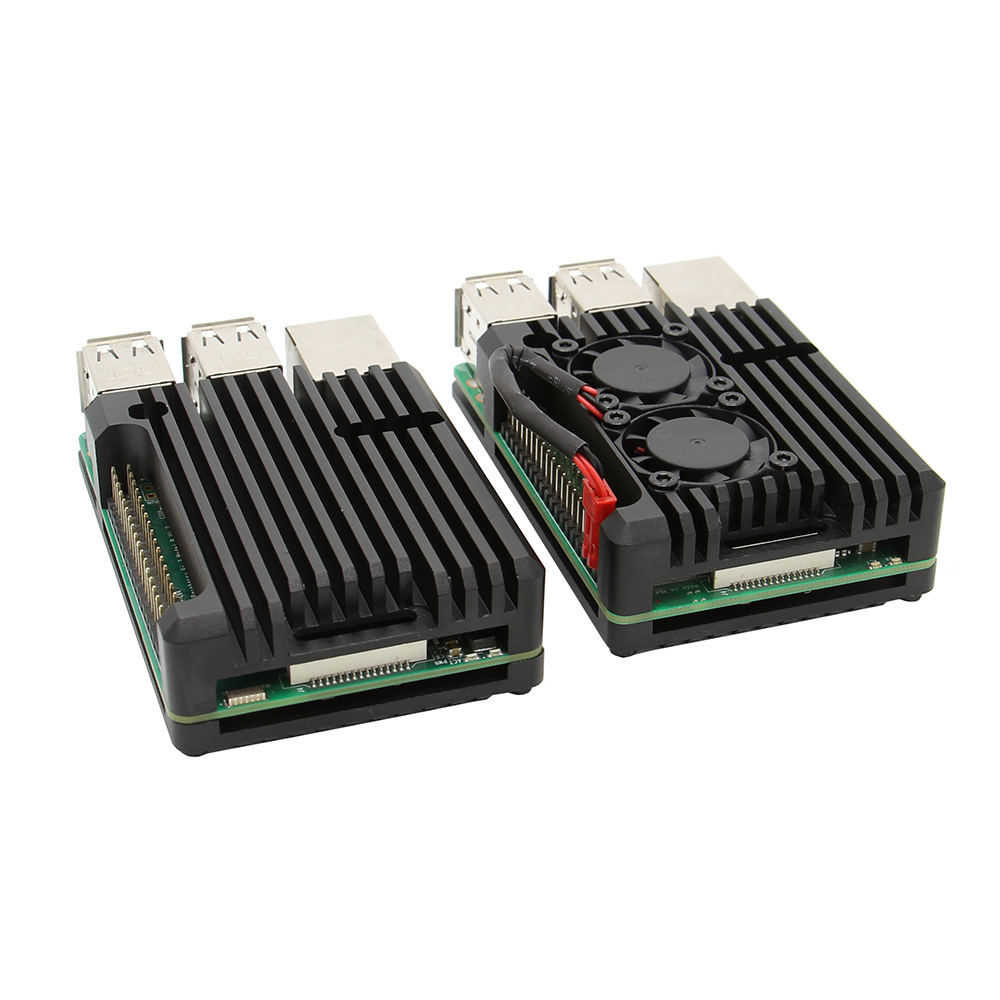
I wonder if the LCD would fit on top of this heatsink w/fan cooling. Then maybe Cryptocloaks can 3D print a case for it. Same problem with the GPIO power pins though. Another issue is the LCD would be sitting on top of the fans but still might work depending on space under/between the LCD. Maybe a GPIO riser would be needed.
https://geekworm.com/blogs/news/raspberry-pi-armor-case-aluminum-aolly-metal-enclosure-to-dress-up-your-raspberry-pi
fluidvoice
on 1 Apr 2019
I wonder if the LCD would fit on top of this heatsink w/fan cooling. Then maybe Cryptocloaks can 3D print a case for it. Same problem with the GPIO power pins though.
https://geekworm.com/blogs/news/raspberry-pi-armor-case-aluminum-aolly-metal-enclosure-to-dress-up-your-raspberry-pi
The left one will work and you don`t even need the a case on top it, because it is a case itself + you don`t want to impair the airflow. The connector of the fan would take the place of the GPIO screen, so not an option.
From the powertests so far we have seen that thermal throttling is not a huge problem (going from 1400 MHz to 1200), but a poor PSU is catastrophic being the the possible cause of HDD corruption and dropping the clock to 600 MHz.
openoms
on 1 Apr 2019
I wonder if the LCD would fit on top of this heatsink w/fan cooling. Then maybe Cryptocloaks can 3D print a case for it. Same problem with the GPIO power pins though.
https://geekworm.com/blogs/news/raspberry-pi-armor-case-aluminum-aolly-metal-enclosure-to-dress-up-your-raspberry-piThe left one will work and you don
t even need the a case on top it, because it is a case itself + you dont want to impair the airflow. The connector of the fan would take the place of the GPIO screen, so not an option.From the powertests so far we have seen that thermal throttling is not a huge problem (going from 1400 MHz to 1200), but a poor PSU is catastrophic being the the possible cause of HDD corruption and dropping the clock to 600 MHz.
The heatsink without a fan will do very little when demand is long duration (like during IBD - initial blockchain download, or re-syncing). I've seen tests done on passive vs active cooling the Pi3B+. A fan is needed for any significant change in temps. It would be easy to mod the GPIO female connector to get access to the two power pins. Or... since the fans should be low power draws connect them somewhere else - perhaps even one of the USB ports.
Edit: read this from an EE which is one reason why the GPIO pins are better for high current - which the fans are not.
To be honest, 3.5A is really pushing the limits of the microUSB connector. That's your bottleneck, as the contacts are so small they add appreciable resistance, which lowers your voltage as the current increases.
fluidvoice
on 1 Apr 2019
To be honest, 3.5A is really pushing the limits of the microUSB connector. That's your bottleneck, as the contacts are so small they add appreciable resistance, which lowers your voltage as the current increases.
Good point. No wonder why all the other SBC-s I know have a barrel connector.
openoms
on 1 Apr 2019
 ThomasKaiser
on 1 Apr 2019
ThomasKaiser
on 1 Apr 2019
@ThomasKaiser Thank you for pointing to this.
In there you write:
So the new behavior is documented at least there. To fix things occurrences of printf "%019d" should be replaced with printf "%021d"
I have tested that, but still get the Numerical result out of range error.
What should happen with the
Health=$(perl -e "printf \"%19b\n\", $(sudo vcgencmd get_throttled | cut -f2 -d=)") ?
In place of the %19b I have tried %21b but getting this:
./XXpowertest.sh: line 32: printf: warning: 10000000000000000000: Numerical result out of range
55.3'C 1400 MHz 009223372036854775807 1.3250V
./XXpowertest.sh: line 35: printf: warning: 10000000000000001000: Numerical result out of range
60.1'C 1400/1200 MHz 009223372036854775807 1.3250V
with %021b the error is gone, but the number still does not make sense:
66.6'C 1400/1200 MHz 000144115188075856384 1.2313V
67.1'C 1400/1200 MHz 000144115188075856384 1.2313V
Sorry I don`t know much about the binary conversion.
openoms
on 1 Apr 2019
Maybe RPi Trading employees changed stuff in ThreadX again and you spot it somewhere here? I mean, it's a closed source world you're dealing here with so good luck. Can't test myself since not using Raspberries for obvious reasons (way too lousy for the use cases I'm interested in).
You might ask over at https://github.com/raspberrypi/firmware/commit/404dfef3b364b4533f70659eafdcefa3b68cd7ae#commitcomment-31620514 (some of the guys are nice and helpful).
ThomasKaiser
on 1 Apr 2019
Right, thanks for the insight. I am not a fan of the closed source either, but did not really come across any truly open source hardware yet. The Odroids and Pine64 meant to be but I`ve reached a closed floor there as well, the difference is only in how deep one can go.
openoms
on 1 Apr 2019
To be honest, 3.5A is really pushing the limits of the microUSB connector. That's your bottleneck, as the contacts are so small they add appreciable resistance, which lowers your voltage as the current increases.
Good point. No wonder why all the other SBC-s I know have a barrel connector.
It's "better" for careful people. But I can see why they didn't make it default on the Pi. There are too many diff barrel connector sizes, supply voltages, etc.
fluidvoice
on 2 Apr 2019
@fluidvoice @openoms great reasearch 👍 I tried to get up to speed. So here are the my short term takeaways for the next release 1.2 so far - please feel free to comment:
- update shopping lists with better power supplies & cables
- add heat sinks to shopping lists (as long as we dont have a fan solution)
- on fresh sd card (setup/update) run a longer testphase with load to check power situation
- on XXdebugLogs.sh add a short power analysis (outage count and threadX voltages)
 rootzoll
on 2 Apr 2019
rootzoll
on 2 Apr 2019
@fluidvoice @openoms great reasearch I tried to get up to speed. So here are mare short term takeaways for the next release 1.2 so far - please feel free to comment:
- update shopping lists with better power supplies & cables
- add heat sinks to shopping lists (as long as we dont have a fan solution)
- on fresh sd card (setup/update) run a longer testphase with load to check power situation
- on XXdebugLogs.sh add a short power analysis (outage count and threadX voltages)
- need to find and add cheap fan solutions. As said above, heatsink only does almost nothing for long duration loads, such as when blockchain syncing. In time perhaps we can find decent case-with-fan combo's.
fluidvoice
on 2 Apr 2019
run a longer testphase with load to check power situation
Pretty easy and done in seconds by using cpuburn. With unreliable powering firing up cpuburn-a53 on the majority of RPi 3 will result in the board powering off immediately. So it's a multi step procedure:
- limit
cpufreq_maxto 600 MHz, fire upcpuburn-a53(orcpuburn-a7on original RPi 2) for 2 seconds and check ThreadX voltage. If below a certain value stop here and report 'powering insufficient' - limit
cpufreq_maxto 1200 MHz and test again 2 seconds. If voltage below a certain value stop here - unlock
cpufreq_maxto 1400 MHz and test again
heatsink only does almost nothing for long duration loads
You know that you can set temp_soft_limit=70 in /boot/config.txt to revert back to previous behavior before RPi Trading guys decided to trash RPi 3B+ performance on the entire planet just to masquerade some QA problems they had with the first production batch?
Maybe the RPi 3B+ footnotes in my sbc-bench results overview are also of interest.
ThomasKaiser
on 2 Apr 2019
Maybe the RPi 3B+ footnotes in my sbc-bench results overview are also of interest.
yes! very interesting indeed. Thanks for compiling that great list.
The NanoPi NEO4 looks like a good inexpensive candidate, esp seeing your review here:
https://github.com/ThomasKaiser/Knowledge/blob/master/articles/Quick_Review_of_NanoPi_NEO4.md
The RockPi 4B also looks interesting esp since it has the same form factor as the Pi3 but more expensive.
@openoms do you know if DietPi runs OK on the RockPi 4B and NEO4 boards?
Also, Thomas about heatsinks: https://github.com/ThomasKaiser/Knowledge/blob/master/articles/Heatsink_Efficiency.md
fluidvoice
on 2 Apr 2019
DietPi runs OK on the NEO4 board?
Dietpi is not a Debian based distro (being debootstrapped from scratch). It's just the ignorant attempt to take someone else's Debian OS image and then let a script modify the userspace obsessed by the idea the less packages would be installed the faster the resulting system would be (which is BS -- all the relevant stuff happens somewhere else instead in this century). And then they clean up the mess somewhat manually and provide this hand-crafted 'new' image rebranded as "DietPi for ...".
They take what they find somewhere on the net and then stumble across 'issues' only by accident, see this nice example of an active cronjob to improve NAS performance. Could've been also a backdoor. Or two. Or just a simple daemon stealing Wi-Fi logon credentials. You never know. DietPi images are not created from scratch so you are not in the position to trust into upstream projects (like Linux kernel and Debian) or audit stuff in a reasonable amount of time. So your only chance is to believe that the DietPi image you downloaded is 100% error/vulnerability/backdoor free which is a funny assumption given the way DietPi images are created (manually) and what they are based on (random stuff from the Internet).
If the base image they took to transform into "DietPi for ..." was set up in a way that a separate repository for bootloader and kernel updates is configured (none of the images they base on is using the ARM kernels provided by upstream Debian), then you might get those security fixes later on 'with DietPi', otherwise not. With DietPi it's possible running 'an OS' that is cut off from important security fixes and DietPi folks don't care since they don't care about such 'low level' stuff like bootloader/kernel and security in general.
No idea whether FriendlyELEC OS images they base their 'DietPi for NanoPi ...' stuff on provides a kernel repo or not. I never use vendor provided OS images on any SBC since I don't feel comfortable having to trust in some human beings somewhere manually fiddling around in an OS image trying to do the right things. I create my OS images from scratch using an appropriate build system so I only have to trust in upstream Debian/Ubuntu and Linux developers and not random human beings manually modifying stuff they often barely understand :)
ThomasKaiser
on 2 Apr 2019
@ThomasKaiser thanks for the input. It's def something to think about esp since this project involves running a crypto-currency node and wallets. I think @openoms was drawn to DietPi due to the user-base, support, knowledge, workarounds, etc., with various SBC's.
Perhaps we will experiment/test building on top of Debian base. Do you feel similar to above about Armbian? (edit: sorry didn't see your build system link)
fluidvoice
on 2 Apr 2019
@ThomasKaiser thank you for this extensive explanation. I understand your concerns now.
I just got an Odroid XU4 with a Cloudshell2 RAID board (https://ameridroid.com/collections/cases/products/cloudshell2-nas-kit) so might as well test Armbian on it.
I like that there are at least one (2 most in most cases) less teams tinkering with the original resource there.
openoms
on 2 Apr 2019
This whole changing platforms question is still in the research phase so I linked your comment to the relating topic. As I understand according to the presented logic Armbian would be even superior to Raspbian in terms of security (and maybe performance)?
openoms
on 2 Apr 2019
drawn to DietPi due to the user-base, support, knowledge, workarounds, etc., with various SBC's
They only deal with the userspace and completely ignore all the relevant bits (bootloader, kernel, low-level settings, security in general). "DietPi for..." can be a pile of crap when the original image they chose was crap while when the original image was a good one taking care of kernel updates, a recent kernel version and appropriate settings, there are a lot less concerns wrt the resulting "DietPi" (which is just a stripped down userland, some scripts and menu-driven tools aiding inexperienced users on top of the relevant base system they took from somewhere else).
DietPi on Raspberries greatly benefits from all relevant settings as well as bootloader/kernel updates provided by RPi Trading Ltd. folks being part of the base image. On any other board you need to check twice since it's hit-and-miss there. Can be an image running an outdated kernel 3.4 which didn't receive any fixes since ages using brain-dead so called DVFS settings leading to an overheating board even in idle. Can also be a base image that does most of the stuff correctly and even includes a repository to fetch kernel updates from (so you get updates but need to trust into that repo or the people behind! Delivering an evil backdoor through apt upgrade is really easy once you control the repo).
And that's IMO the main problem with Linux on ARM: security/trust as long as the device in question is not fully SBSA compliant or supports at least GRUB-ARM-EFI to allow to run upstream distros like Debian/RedHat/SuSE without the need to use special OS images.
Same applies to Armbian (I know this project quite well since being a former developer) but at least here you can generate whole OS images 100% from scratch on your own machine without having to trust in some individuals knowing what they do. You 'only' need to trust into upstream Debian/Ubuntu and Linux kernel teams doing their job. The remaining problem is where you get the kernel updates from. If it's apt.armbian.com you obviously need to trust the owner of this host now. Upstream projects like Debian have several maintainers/contributors and working peer review. With small projects there's often nothing. But with an Armbian generated image it's easy to pull in such kernel updates from somewhere else (your own repository if you have the knowledge to build kernels and package them accordingly).
TL;DR: there's no easy solution especially if you need to take care about security :)
ThomasKaiser
on 2 Apr 2019
No idea whether FriendlyELEC OS images they base their 'DietPi for NanoPi ...' stuff on provides a kernel repo or not
Even if FriendlyELEC provides such a repo DietPi isn't using it: https://github.com/MichaIng/DietPi/issues/1829#issuecomment-429256961 (which means they have no mechanism to update the kernel from within the image on this platform and the kernel they use has been provided by $someone who put files on WeTransfer)
As I understand according to the presented logic Armbian would be even superior to Raspbian in terms of security (and maybe performance)?
Armbian doesn't support Raspberries directly though I prepared OMV images for Raspberry Pi 2 and 3 created by Armbian's build system using Armbian's customization feature and then manually combining the Armbian rootfs with an OS image skeleton suitable for RPi (the ThreadX stuff on the FAT partition being the most important part).
Wrt performance please see https://github.com/bavison/arm-mem/commit/ea0bde27d823bd27f2e38ea0913f124b540c5ecc#commitcomment-32793945 and https://www.cnx-software.com/2019/03/13/raspberry-pi-suddenly-not-working-repair-microsd-card/#comment-561518 (the TL;DR version: Raspbian is performance optimized for some specific use cases like using Chromium while for most other use cases a plain Debian armhf userland as Armbian provides performs slightly better).
Wrt security the situation with RPi is a mess in general due to the closed source nature of the primary OS (ThreadX) but on the other hand RPi Trading employees are pretty good in providing security fixes rather timely. Take Dirty COW for example: RPi Trading guys provided a fix on Oct 25th (6 days after disclosure) while in Armbian we had patched all kernels and provided fixed kernel packages for all +50 boards already on Oct 22th.
With DietPi everything did depend on the base image in question DietPi folks chose to 'transform' into DietPi. DietPi for RPi as such got the fix on Oct 25th due to archive.raspberrypi.org repo configured for kernel updates, other DietPi images back then were based on Armbian and as such received the fixes days earlier, other DietPi images based on crappy base images never received any fix.
ThomasKaiser
on 2 Apr 2019
Armbian doesn't support Raspberries directly though I prepared OMV images for Raspberry Pi 2 and 3 created by Armbian's build system using Armbian's customization feature and then manually combining the Armbian rootfs with an OS image skeleton suitable for RPi (the ThreadX stuff on the FAT partition being the most important part).
This project is based on the RaspberryPi, but I get implications with the closed source ThreadX. By default we will probably need to rely on Raspbian, but that does not stop anyone to use other images for different SBC-s. Some need minimal change in our script (like the Odroid HC1 / XU4) , some significantly more depending on their processor architecture and the base image. DietPi was supposed to provide a fairly standard platform, but I see it is far from perfect and also varies between boards.
The NanoPi NEO4 looks like a good inexpensive candidate
@fluidvoice This Neo4 board is ok, but it needs the 64bit aarch64 builds of bitcoind and lnd vs the armv6 (32 bit) versions what the RPi uses.
I have already set up the aarch64 options for Rock64, so possibly can use that branch to test this board. It is all about someone testing it out.
openoms
on 3 Apr 2019
DietPi was supposed to provide a fairly standard platform, but I see it is far from perfect and also varies between boards
DietPi only cares about the userland. And it does not vary 'between boards' but 'between base images' instead.
Take RK3399 as an example:
- On the FriendlyELEC RK3399 devices they deal with a bizarre Android image format even needing some obscure Windows tools to unpack/repack the whole image. Why? Since FriendlyELEC built their base image in this way and DietPi doesn't deal with 'low level stuff' (as they call it).
- 'DietPi for RockPro64' instead uses a GPT partition layout with 7 partitions. Why? Since @ayufan decided to follow the Rockchip recommendation for Linux
- 'DietPi for ODROID N1' uses again a totally different partition layout. Why? Since Hardkernel and @meveric decided to use something else
With DietPi and with one of these devices situation wrt kernel patches is completely different but it's again not about 'boards' but the base image they found somewhere on the net to base on. With RockPro64 you receive kernel patches from a separate apt repository since @ayufan takes care, with FriendlyELEC devices no kernel updates at all and with ODROID-N1 while the infrastructure provided by @meveric is there most probably no updates will be provided since N1 has been canceled last year (I only added it to the comparison as a 3rd example of a totally different partition layout used with the same SoC)
Boards of the same board family should be treated identical since everything else doesn't make that much sense. But with DietPi it always and only depends on which OS image they found somewhere on the net to base their userland modifications on (to provide the handcrafted result then rebranded as 'DietPi for ...')
Even worse since they only care about the userland everything really relevant is considered out of their scope and will be treated as 'External Bug'. Unfortunately DietPi is really just a bunch of scripts to modify the userland of an otherwise already existing Debian OS image. Great for inexperienced users needing menus even for most simply stuff but not that great if you got the impression it would be an own distro supporting a variety of different hardware (especially in a consistent way)
ThomasKaiser
on 3 Apr 2019
@ThomasKaiser thank you again for taking the time to explain all this, you clearly have a lot of insight about various SBC-s and will continue to follow you work.
My conclusion is:
- so far we got a proof of concept of the RaspiBlitz system working reliably on other SBC-s and can be compatible with updates.
- it is far from being possible to provide a platform which can run easily on different boards without serious security trade-offs
- if we are testing other SBC-s a best base distro should be picked individually for every board according to what is updated the most frequently and reliably.
- this is the limitation of Linux on Arm, but we will continue to work with that given the price and form factor is unmatched in Intel based systems.
openoms
on 3 Apr 2019
The issue of trust is missing. Security updates are important but where do they come from? If you rely on a Debian userland these fixes are provided by Debian teams. On x86 also kernel fixes are provided by Debian and while the same is true for ARM in general none of the popular OS images for the more modern SBC out there uses Debian's kernel since way behind (only really old SBC are fully supported by Debian's ARM kernel and obviously this kernel doesn't receive enough testing anyway).
Wrt kernel patches on ARM we end up looking at individual human beings and not organized teams with established peer review processes almost everywhere. And this could be an issue in its own if you seriously think about security.
BTW: situation with Raspbian is comparable. Raspbian is not real Debian since while they use upstream Debian package sources they have to build every package themselves often running into compatibility issues therefore delaying delivery of packages (same problem is the reason Raspbian never implemented Debian's multiarch support to provide 32-bit and 64-bit binaries at the same time).
So it's not a Debian team providing packages (kernel and ThreadX included) but a few RPi Trading employees instead you need to trust.
ThomasKaiser
on 3 Apr 2019
Yes, I understand this completely, using an SBC at all means we are taking a security compromise.
Please keep in mind that the RaspiBlitz is a project to make it the cheapest and easiest for people to go down the rabbit hole of running their own full Bitcoin and Lightning node, including total noobs. It is well emphasised in the readme that it is not for storing significant amount of value. Obviously the whole Lightning Network is under development and has this the #RECKLESS going for a reason.
For people more savvy and security focused there are plenty other alternatives:
https://github.com/seth586/guides/blob/master/FreeNAS/README.md
https://medium.com/lightning-power-users/lightning-routing-node-starter-pack-704c0e7d79cb
Saying this I see the RaspiBlitz system itself being quite security conscious and making it compatible with more reliable and performant bases (even x86) is a great side project I`d like to continue.
openoms
on 3 Apr 2019
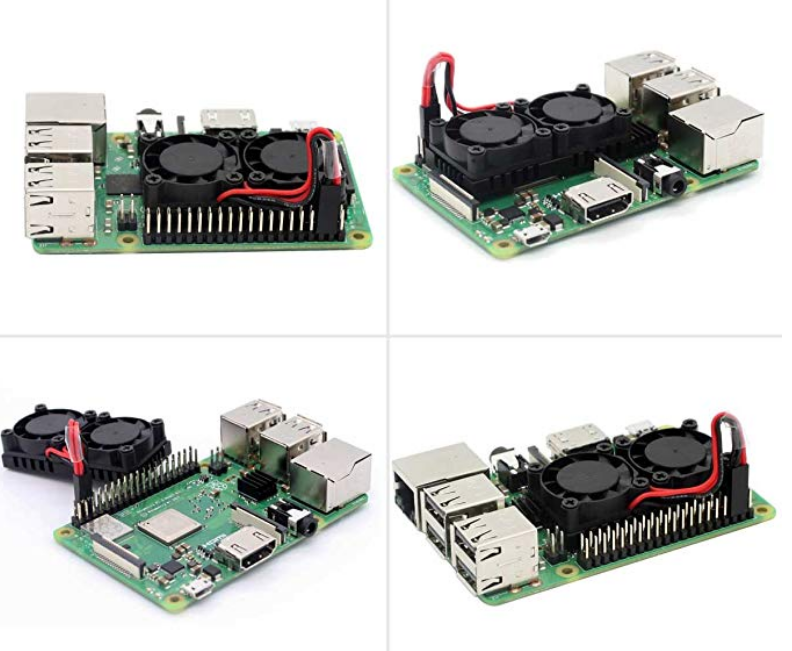
@openoms this heatsink looks like it might work in most cases even with the 3.5" LCD on top as it looks lower than the USB sockets and the LCD sits a little above that. I'll prob get one of these to try out. They go from as low as $6.50 to $12 depending where you buy. Obviously one must apply a workaround for powering the fans.
video review of dual-fan heatsink: https://www.youtube.com/watch?v=j_QrsNwVwNA
https://www.amazon.com/iUniker-Raspberry-Dual-Fan-Heatsink/dp/B07D5WWNH6/ref=as_li_ss_tl
Another single-fan low profile heatsink w/fan:
https://www.banggood.com/3510-Version-Extreme-Cooling-Fan-Copper-Heatsink-Thermal-Tapes-Kit-For-Raspberry-Pi-3B-p-1411599.html
fluidvoice
on 3 Apr 2019
Obviously one must apply a workaround for powering the fans.
Looks cool and probably efficient, but would like to see that workaround
openoms
on 3 Apr 2019
Obviously one must apply a workaround for powering the fans.
Looks cool and probably efficient, but would like to see that workaround
I have some ideas but haven't tried them yet. I think one could be to cut off, say with a hacksaw or Dremel, a tiny portion (few mm?) of the plastic GPIO female connector of the LCD at the top/end of the header where the +3.3v, +5.0v pins are and thus expose the pins where you could solder or just wire-wrap to them. There are lots of places the ground can be obtained from.
It's a shame there are no low-profile GPIO pin "taps" that I can find. Ie, thin plate-like contacts that don't raise the LCD up. DIY by cutting the female plastic header is a PITA most people won't like (not plug n play)
fluidvoice
on 3 Apr 2019
- but we will continue to work with that given the price and form factor is unmatched in Intel based systems.
I don't think the form factor is a big deal to most people for a Bitcoin node. Something no bigger than a NUC or "TV-box" is prob fine for most people. The price of some mini-PC's are quite competitive esp given their spec's (example: https://www.gearbest.com/tv-box-mini-pc/pp_562952.html?wid=1433363). I've thought about testing out one of these.
fluidvoice
on 4 Apr 2019
There are my results with the LEIKE power supply (german shopping list) and very small heat sink:
details see here: https://github.com/rootzoll/raspiblitz/issues/365#issuecomment-479843741
60.1'C 1200/1400 MHz 1.2500V
63.9'C 1200/1400 MHz 1.2500V
65.5'C 1200/1400 MHz 1.2500V
66.6'C 1200/1400 MHz 1.2500V
67.1'C 1200/1400 MHz 1.2500V
67.7'C 1200/1400 MHz 1.2500V
68.8'C 1200/1400 MHz 1.2500V
Done.
Maximum prime number checked in CPU test: 10000
Test execution summary:
total time: 37.9599s
total number of events: 10000
total time taken by event execution: 151.8098
per-request statistics:
min: 11.94ms
avg: 15.18ms
max: 80.64ms
approx. 95 percentile: 20.90ms
Threads fairness:
events (avg/stddev): 2500.0000/20.60
execution time (avg/stddev): 37.9525/0.00
66.6'C 1200/1400 MHz 1.2500V
64.5'C 600/ 600 MHz 1.2500V
65.0'C 1200/1400 MHz 1.2500V
63.4'C 600/1400 MHz 1.2500V
63.4'C 1200/1400 MHz 1.2500V
62.3'C 600/ 600 MHz 1.2V
62.8'C 1200/1400 MHz 1.2500V
62.3'C 1200/1400 MHz 1.2500V
Looks like the max voltage is 1.3750V
@rootzoll You will get the max voltage (and no throttling) below 60 degrees. To make sure the power supply can deliver you could just blow on it (sic!) for a minute to simulate a fan.
We could also test the temp_soft_limit=70 in /boot/config.txt - will require a restart.
I am not really worried about killing the Pi with this sort of temperatures. Did a fair amount of mining and chips (GPU and ASIC) take it well up to 90, usually shut down at 100. High temps were the worst in degrading the heat paste quickly, but that is not a worry here. Never fried any CPU-s yet :)
openoms
on 4 Apr 2019
more on that (which you prob already know)...
For Raspberry Pi 3 Model B+, the PCB technology has been changed to provide better heat dissipation and increased thermal mass. In addition, a soft temperature limit has been introduced, with the goal of maximising the time for which a device can "sprint" before reaching the hard limit at 85'C. When the soft limit is reached, the clock speed is reduced from 1.4GHz to 1.2GHz, and the operating voltage is reduced slightly. This reduces the rate of temperature increase: we trade a short period at 1.4GHz for a longer period at 1.2GHz. By default, the soft limit is 60°C, and this can be changed via the temp_soft_limit setting in config.txt.
Heatsinks
Whilst heatsinks are not necessary to prevent overheating damage to the SoC (the thermal throttling mechanism handles that), a heatsink or small fan will help if you wish to reduce the amount of thermal throttling that takes place. Depending on the exact circumstances, mounting the Pi vertically can also help with heat dissipation, as doing so can improve air flow.Measuring temperature
Due to the architecture of the SoCs used on the Raspberry Pi range, and the use of the upstream temperature monitoring code in the Raspbian distribtution, Linux-based temperature measurements can be inaccurate. There is a gencmd that can provide an accurate and instantaneous reading of the current SoC temperature, as it communicates with the GPU directly:vcgencmd measure_temp
fluidvoice
on 4 Apr 2019
Obviously one must apply a workaround for powering the fans.
Looks cool and probably efficient, but would like to see that workaround
I did not find anything easy. This on/off switch hack gives some idea how it could be done,
http://scruss.com/blog/2017/10/01/installing-the-pimoroni-onoff-shim-the-hard-way/
but is a PITA and a little risky, plus requires soldering. I cannot imagine Pimoroni sold very many of those GPIO "shim" boards. For a fan you could just solder wires on the pins on the under-side of the board - but again most people prob don't own a soldering iron and/or it's not worth the hassle.
fluidvoice
on 4 Apr 2019
When the soft limit is reached, the clock speed is reduced from 1.4GHz to 1.2GHz, and the operating voltage is reduced slightly. This reduces the rate of temperature increase: we trade a short period at 1.4GHz for a longer period at 1.2GHz
The root cause is still QA issues with the very first RPi 3B+ batch: https://github.com/raspberrypi/firmware/issues/1014#issuecomment-401599394 -- that's the only and real reason they introduced the temp_soft_limit value and defaulted it to 60°C.
BTW: why are you testing with sysbench? It's a pretty lightweight load. Also looking at the VCore value (the voltage the CPU is been fed with) can be confusing since in ThreadX they use a formula both depending on input voltage and SoC temperature. Better use cpuminer as already suggested and check frequency capping (input voltage dropping below 4.63V).
BTW: the same guy who wrote the 'sprint' prosa above is also responsible for incorrect documentation of the vcgencmd get _throttled functionality.
ThomasKaiser
on 4 Apr 2019
I did not find a way so far to measure the input voltage with the Pi. It has only one warning connected with the GPIO 35, which can be 1 (normal) and 0 (low <4.65V). That also controls the red LED on the board, so it would go off in case of undervoltage. (https://www.raspberrypi.org/forums/viewtopic.php?p=582098&sid=acf25316ac46eb2f6ac40a42cf23a053#p582098)
Also we are continuously monitoring the undervoltage warnings from syslog already and display a warning on the screen automatically if present.
We should also state that a flashing red light is a sign of a poor power supply.
Vcore is not ideal I agree, but helps identifying the problem with both the power supply and temp.
Sysbench does the job, but sure we can test cpuburn , cpuminer or anything else suggested.
openoms
on 5 Apr 2019
Hi there. The geekworm passive heatsink case arrived - first of all: I really like it
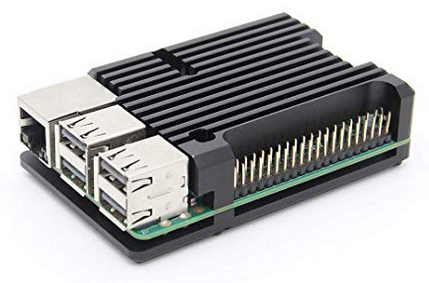
- it completle replaces old case - its a case+heatsink in one
- it fits the LCD hat
- the remaining GPIO pins are better accessible if you want to hack on that
- it looks cool
- and it seems very effective (around -10° compared with small heatsinks)
I ran the powertest again with it - compare with my earlier test (with just small hetasinks):
53.7'C 1400 MHz  1.3688V
58.5'C 1400 MHz  1.3688V
60.1'C 1400 MHz  1.3688V
60.1'C 1200/1400 MHz 1.3688V
60.1'C 1400 MHz  1.3688V
60.1'C 1200/1400 MHz 1.2625V
59.6'C 1200/1400 MHz 1.2625V
Done.

Maximum prime number checked in CPU test: 10000


Test execution summary:
    total time:                          36.1698s
    total number of events:              10000
    total time taken by event execution: 144.6444
    per-request statistics:
         min:                                 11.91ms
         avg:                                 14.46ms
         max:                                109.76ms
         approx.  95 percentile:              23.98ms

Threads fairness:
    events (avg/stddev):           2500.0000/61.87
    execution time (avg/stddev):   36.1611/0.00

56.4'C 1400 MHz  1.3688V
54.8'C 1400 MHz  1.3688V
54.8'C 1400 MHz  1.3688V
54.8'C 1400 MHz  1.3688V
54.8'C 1400 MHz  1.3688V
53.7'C 1400 MHz  1.3688V
53.2'C 1400 MHz  1.3688V
53.7'C  600/ 600 MHz 1.3688V
I tend to add this case+heatsink to all shopping list for v1.2 release. Please let me know if you agree.
rootzoll
on 6 Apr 2019
how much space is between the LCD and sinks or is it touching?
around -10° compared with small heatsinks
nice, is this upon normal running? I wonder what it does during sync/re-sync (ie long duration banging on the CPU)... or you can mod the test script to run for long duration.
fluidvoice
on 6 Apr 2019
around -10° is taken from the powertest run ... just compare my recent one with the one I posted earlier with just a small heatsink and the old case.
This is the new case with the LCD on top of that seen from the side.
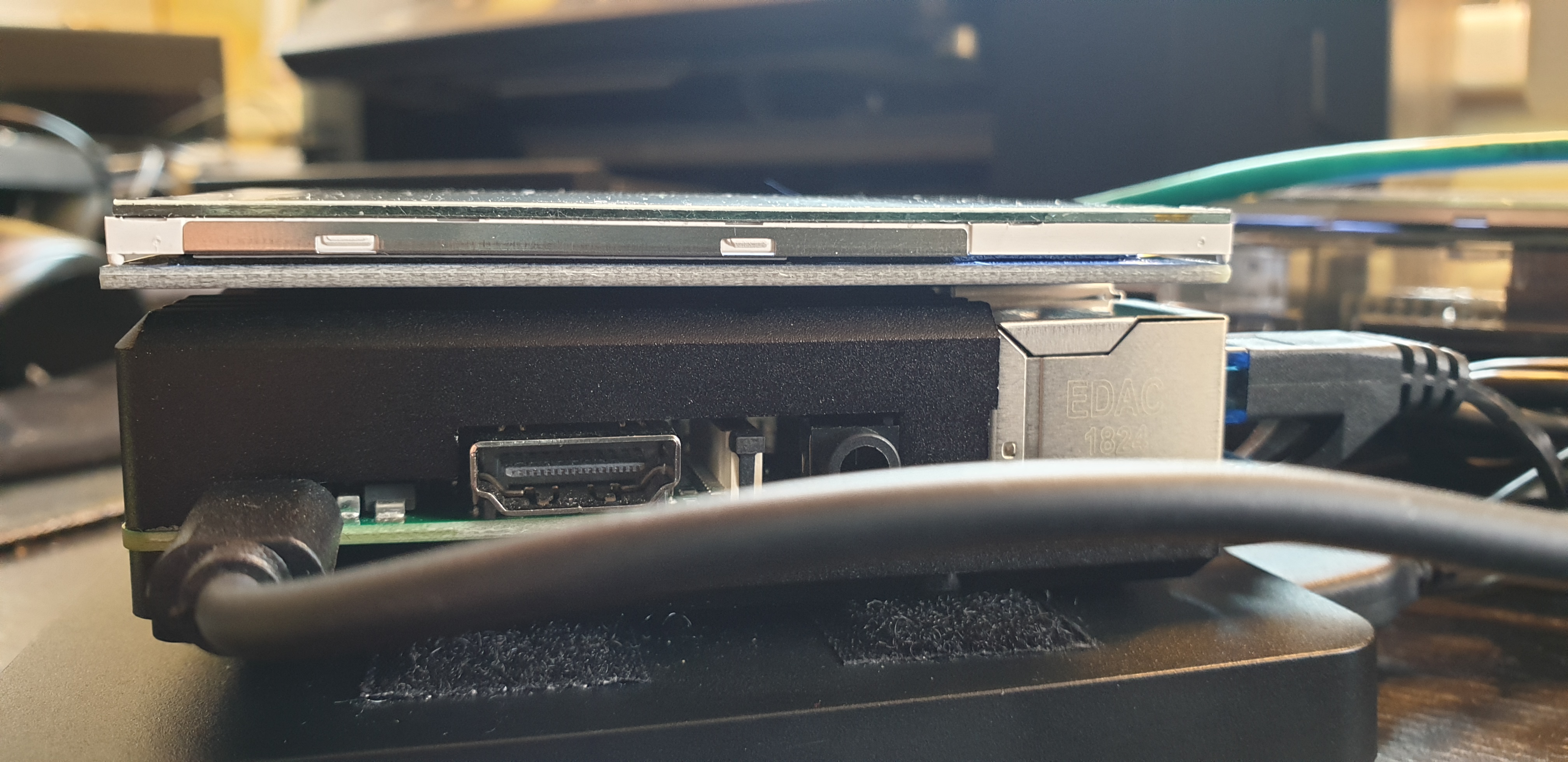
There is not much space between an the small chips on the LCD back may touch the case .. but thats ok I think - it may even work also as a heatsink for those processors/LCD that way.
rootzoll
on 6 Apr 2019
some sorta stick on pad like one of those small rubber feet for case bottoms, stuck on top of the ethernet jack might help support it? Or a blob of silicone glue which would allow still to remove it if needed.
fluidvoice
on 6 Apr 2019
Maybe - but using stickers there might make it hard to deassemble/replace/remove the LCD. I think its OK like it is right now - even when its a bit loose.
The caseworm is deleivered with soft pads (just sticky to the processor side) and then thru the pressure from the screws it gets good contact with the heatsink.
rootzoll
on 6 Apr 2019
Maybe - but using stickers there might make it hard to deassemble/replace/remove the LCD. I think its OK like it is right now - even when its a bit loose.
The caseworm is deleivered with soft pads (just sticky to the processor side) and then thru the pressure from the screws it gets good contact with the heatsink.
I bet if you test with a good thermal paste instead of the stick pads you will get even better results. I'd be curious how much more of a temp drop you'd get with it. On second thought, nah, it's not really needed. This is prob good enough and easier for DIY'ers
fluidvoice
on 6 Apr 2019
I think as default we keep it easy and let people just use the soft pads to connect the heatsink. But the FAQ has always room to suggest further improvements to people.
rootzoll
on 6 Apr 2019
I don't know where the wifi antenna is - could be covered up?. Might be worth a look to see to what extent that huge heatsink might be impacting the wifi signal strength, if at all.
fluidvoice
on 6 Apr 2019
So for the hradware testing script that will be part of the setup I will show warnings about needed hardware update on heat or Power Supply when:
- 70 degrees or more are reached
- power voltage falls below 1.25v
Does anybody thinks these limit values should be different?
rootzoll
on 7 Apr 2019
OK. There is now a power testing script coming with v1.2:
/home/admin/config.scripts/blitz.stresstest.sh [?filenameForReport]
Its based on @openoms script - runs 60secs and after that spits out a report letting us know if power or heat is a problem. It is run on every boot and stores the report to /home/admin/stresstest.report. So if someone calls the XXdebugLogs.sh the reporrt will also be printed and we know if the hardware running has any probs.
TODO: Add a user info/warning on setup if hardware needs improvement and maybe also to LCD & main menu.
rootzoll
on 10 Apr 2019
I also prepared the Shopping Lists for v1.2 release to use the geekworm heatsink as case and tried to find the best looking power supplies in local stores. If the power supplies from shopping lists are still to improve I will add a note during hardware test script, that users should report bad power supplies that are on shopping lists.
rootzoll
on 10 Apr 2019
OK LCD is now showing WARNINGs on weak power supply and you can start the hardware test from the main menu.
TODO: Add it as part of the setup process - first screen before selecting bitcoin/litecoin.
--> done
rootzoll
on 10 Apr 2019
Test if its working that the stresstest will just analyse a FAIL if there was one WARN before.
--> worked
rootzoll
on 10 Apr 2019
TODO: Test during setup and with some bad power supplies or with no heatsinks.
rootzoll
on 11 Apr 2019
OK Worked on Setup.
rootzoll
on 12 Apr 2019
OK. Testing worked so far - will be part of v1.2 release. Closing Issue.
rootzoll
on 12 Apr 2019
Just for the records: If anyone would like to have the Geekworm passive heatsink case >wall-mountable< then please drop an email to [email protected] and let them know. If there is enough demand, they will improve the case.
 Himbeergeld
on 18 Apr 2019
Himbeergeld
on 18 Apr 2019
Just for the records: If anyone would like to have the Geekworm passive heatsink case >wall-mountable< then please drop an email to [email protected] and let them know. If there is enough demand, they will improve the case.
Sounds good. A VESA-mount hole pattern makes the most sense so it could also be mounted on the back of a monitor, and with ability to orientate so that the Pi USB/ETH ports are facing down and the heat sink fins are vertical for better air flow.
fluidvoice
on 18 Apr 2019
Cool idea! Just make sure to send Geekworm an email with your idea. They said:
We are willing to collect advice all over the world, and we will discuss the new requirement together also to make a plan.
Himbeergeld
on 19 Apr 2019
Related issues
 syracusebitcoin
·
3Comments
syracusebitcoin
·
3Comments
 intorid
·
3Comments
openoms
·
3Comments
openoms
·
3Comments
Himbeergeld
·
3Comments
intorid
·
3Comments
openoms
·
3Comments
openoms
·
3Comments
Himbeergeld
·
3Comments
Most helpful comment
Hi there. The geekworm passive heatsink case arrived - first of all: I really like it
I ran the powertest again with it - compare with my earlier test (with just small hetasinks):
I tend to add this case+heatsink to all shopping list for v1.2 release. Please let me know if you agree.