Raspiblitz: RESEARCH: reliability issues
Broader subject is various reliability issues:
SD Card:
quick note I just realized some things today via the recent problems of the /var/logs folder filling up the SD card (https://github.com/rootzoll/raspiblitz/issues/418 https://github.com/rootzoll/raspiblitz/issues/394). This brings up another source of problems... That SD cards, particularly cheap ones, can be unreliable and have a short lifespan (as far as write cycles). This can be causing a lot of "uknown" failures via SD card corruption, crashes, boot problems, etc. And verbose logging by Raspbian, Bitcoind, and LND will impact lifespan - perhaps causing failure withing a year perhaps only months. The lack of endurance of SD cards is well known by users of Cameras, Dashcams, Raspberry Pi's, etc.
- Perhaps the shopping list should mention the option of spending a little more for a "High Endurance" SD card like a:
Samsung Pro Endurance 32GB $13 or SanDisk High Endurance 32GB $11.50
Keep in mind that selling fake SD cards is rampant especially online - seek trusted sellers.
Carcam review of various cards and their top choice.(https://www.storagereview.com/samsung_pro_endurance_card_review_128gb).
I asked on Twitter how long peeps have run their node on a cheap SD card - long term - perhaps booting from a USB Flash drive would increase Raspiblitz node reliability. Do Flash drives have better endurance than SD cards? Plus, perhaps combined saving blockchain chainstate on a bigger USB drive?
 fluidvoice
All 14 comments
Very good point. Even spending $10 more on a card would be a reasonable thing to do. I assume that most people will run mainnet and put $20 or more into lightning channels. If we ruin that experience with too cheap hardware, we'd be doing lightning a disservice.
 raumi75
on 12 Mar 2019
raumi75
on 12 Mar 2019
Couldn't we just have the log files in the external hd?
 LightningK0ala
on 12 Mar 2019
LightningK0ala
on 12 Mar 2019
Couldn't we just have the log files in the external hd?
You could do it for Bitcoin/LND logs but not for ALL of the system logs. It might increase the lifespan of an SD card but would not remove the problem entirely. It's worth considering since most of the logging is being done by LND. Basically we should endeavor to do a little writing to the boot drive as possible. @rootzoll an enhancement? There is a potential problem though that this slows down the system if the logging is going to a slower spinning HDD. dunno. The logging is only really helpful with debugging, and so it can be turned up when needed. With logging turned down and logrotate setup properly this miight not be a problem we need to solve.
fluidvoice
on 12 Mar 2019
The basic bitcoin and LND logs are already on the HDD, but I think the problem is that they are mirrowed thru systemd into the system logs, correct?
 rootzoll
on 12 Mar 2019
rootzoll
on 12 Mar 2019
The basic bitcoin and LND logs are already on the HDD, but I think the problem is that they are mirrowed thru systemd into the system logs, correct?
Yes, one user said when debuglevel=debug that the daemon.log file was full of LND entries.
Basically all various daemons running their log output goes here.
fluidvoice
on 12 Mar 2019
I'm going with the debuglevel=info fix. Just curious that there would be a way to prevent the daemon output to be piped into system logs.
LightningK0ala
on 13 Mar 2019
@LightningK0ala to prevent having it written to daemon logs I think the key is to set the StandardOutput=null in the systemd service file of bitcoind and LND. If this option is not set, it defaults to journal.
rootzoll
on 13 Mar 2019
Or maybe this?
[Service]
StandardOutput=null
StandardError=journal
https://manpages.debian.org/stretch/systemd/systemd.exec.5.en.html
fluidvoice
on 13 Mar 2019
Got it, that makes sense. Thanks @rootzoll @fluidvoice
LightningK0ala
on 13 Mar 2019
Perhaps related to reliability (rumors are that SD cards are less reliable than USB flash drives) is the prospect of booting Raspiblitz from a USB drive instead of SD card.
My attempts at this are over here: https://github.com/rootzoll/raspiblitz/issues/430#issue-421262771
fluidvoice
on 14 Mar 2019
OK I updated almost all shopping lists with the samsung 32gb endurance - 16gb sd card is still ok but the "endurance" is not available smaller then 32GB.
rootzoll
on 15 Mar 2019
OK I updated almost all shopping lists with the samsung 32gb endurance - 16gb sd card is still ok but the "endurance" is not available smaller then 32GB.
@rootzoll Is there an "optional items" list?
A 3-Amp power supply with a built-in on/off button would have been my choice - I don't like plugging/unplugging and it wears out the mini-USB connector.
https://www.amazon.com/Raspberry-Supply-Certified-Compatible-Adapter/dp/B075XMTQJC
https://www.amazon.com/NorthPada-Raspberry-Supply-Charger-Adapter-x/dp/B01N336XEU
https://pt.aliexpress.com/item/Para-Raspberry-Pi-3-5-v-2-5A-Carregador-USB-Adaptador-AC-fonte-de-Alimenta-o/32885644927.html
https://pt.aliexpress.com/item/3-Raspberry-Pi-Modelo-B-Power-Adapter-5-v-3A-fonte-de-Alimenta-o-com-Micro/32835858930.html
https://pt.aliexpress.com/item/Para-Raspberry-Pi-3-5-V-2-5A-com-Interruptor-De-Alimenta-o-fonte-de-Alimenta/32964865348.html
fluidvoice
on 15 Mar 2019
Going thru the power supplies is part of another issue and we should target it after the v1.1 release. But it needs more look for detail. For example I had the first one power supply link you posted and it had undervoltage notices on my machine. Someone posted that a on/off switch cann be a source for unstable output - not sure.
This german power suply seems valid so far - big and stable - the goal would be find similar ones from the other stores. But that will be part of ticket: https://github.com/rootzoll/raspiblitz/issues/365
For the v1.1 release I will close this issue.
rootzoll
on 17 Mar 2019
Found a great article - What's Wrong With The Raspberry Pi
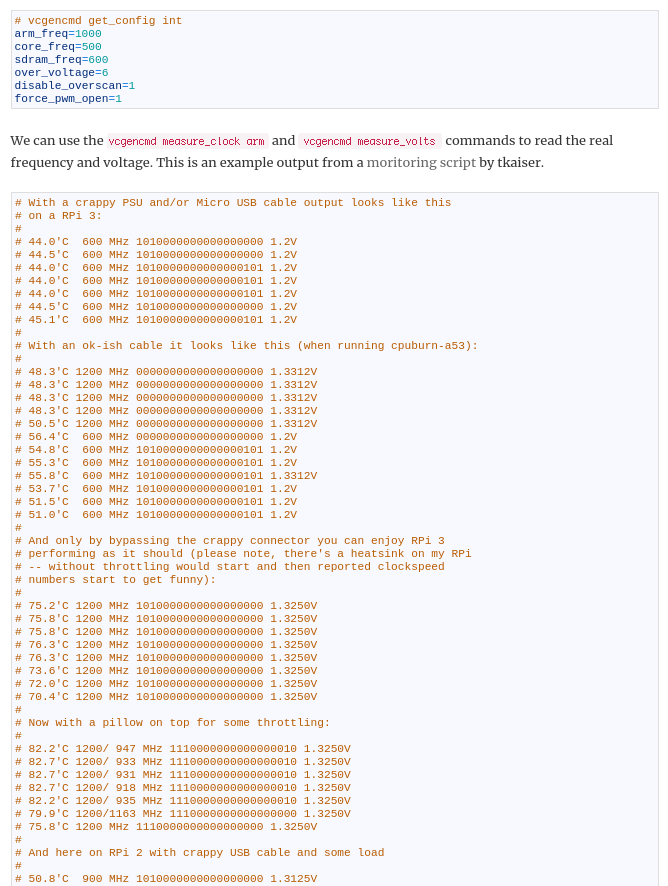
In it, one thing pointed out is the problem of inadequate power supply that is a VERY common problem (as in a large number of users have it but don't know it)... it's a "silent" problem that causes all kinds of different symptoms and malfunctioning from slow/throttled performance, corrupted SD cards, hang/lockup, and probably also corrupted blockchain DB files. So as an enhancement I think we should try to detect this situation using the vcgencmd to expose data showing the problem. The question is when is the appropriate time to measure this?
fluidvoice
on 30 Mar 2019
Related issues
 shawnyeager
·
3Comments
shawnyeager
·
3Comments
 openoms
·
4Comments
openoms
·
3Comments
rootzoll
·
4Comments
fluidvoice
·
3Comments
openoms
·
4Comments
openoms
·
3Comments
rootzoll
·
4Comments
fluidvoice
·
3Comments
Most helpful comment
Yes, one user said when debuglevel=debug that the daemon.log file was full of LND entries.
Basically all various daemons running their log output goes here.