Raspiblitz: Optimize Raspbian Logrotate configuration
Hi - my node just died and it turns out that it was because /var/log/daemon.log & syslog were getting spammed with "Received ChannelUpdate" messages and my (admittedly small 8GB SD card filled up).
I tried burning the recent v1.0 image, but it failed with something like "no value for network" - sorry - didn't make note of the exact error.
Instead, I installed via the script on top of a clean raspbian, plugged in the HDD and after a few hours was back to normal. Cool!
I've now changed the logging level in /mnt/hdd/lnd/lnd.conf from "debug" to "info" and cleared the logs out - cool again!
But perhaps "debug" isn't a good default logging level?
 JohnMcW
All 35 comments
Thanks for reporting in. A change from "debug" to info "info" for v1.1 should be ok. v1.0 "debug" was most important to get good debug logs back on the support threads ... but v1.1 should be ok to revert to "info".
 rootzoll
on 4 Mar 2019
rootzoll
on 4 Mar 2019
Great - thank you
JohnMcW
on 4 Mar 2019
hello I have a problem with my raspiblitz, I have the logs that take all the space on the sdcard that she comende I can use to empty the logs thank you
Filesystem Size Used Avail Use% Mounted on
/dev/root 15G 15G 0 100% /
devtmpfs 460M 0 460M 0% /dev
tmpfs 464M 0 464M 0% /dev/shm
tmpfs 464M 47M 417M 11% /run
tmpfs 5.0M 4.0K 5.0M 1% /run/lock
tmpfs 464M 0 464M 0% /sys/fs/cgroup
/dev/mmcblk0p1 44M 23M 22M 51% /boot
/dev/sda1 916G 305G 566G 35% /mnt/hdd
tmpfs 93M 0 93M 0% /run/user/1000
tmpfs 93M 0 93M 0% /run/user/1001
tmpfs 93M 0 93M 0% /run/user/1002
 mamar59
on 8 Mar 2019
mamar59
on 8 Mar 2019
@mamar59 run the following two commands to delete the log files:
sudo rm /var/log/daemon.log*
&
sudo rm /var/log/syslog*
ok thanks rootzoll
but it remains to use 92% can not clean something else?
Filesystem Size Used Avail Use% Mounted on
/dev/root 15G 13G 1.2G 92% /
devtmpfs 460M 0 460M 0% /dev
tmpfs 464M 0 464M 0% /dev/shm
tmpfs 464M 47M 417M 11% /run
tmpfs 5.0M 4.0K 5.0M 1% /run/lock
tmpfs 464M 0 464M 0% /sys/fs/cgroup
/dev/mmcblk0p1 44M 23M 22M 51% /boot
/dev/sda1 916G 305G 566G 35% /mnt/hdd
tmpfs 93M 0 93M 0% /run/user/1000
tmpfs 93M 0 93M 0% /run/user/1001
tmpfs 93M 0 93M 0% /run/user/1002
mamar59
on 8 Mar 2019
can you post the rest of your log sizes with: sudo ls -la /var/log
rootzoll
on 9 Mar 2019
Hi Here is the result of the order
thanks
total 185928
drwxr-xr-x 5 root root 4096 Mar 8 21:50 .
drwxr-xr-x 11 root root 4096 Feb 14 00:19 ..
-rw-r--r-- 1 root root 9922 Mar 3 16:52 alternatives.log
drwxr-xr-x 2 root root 4096 Mar 7 23:42 apt
-rw-r----- 1 root adm 153985944 Mar 9 05:59 auth.log
-rw-r----- 1 root adm 22783681 Mar 3 06:25 auth.log.1
-rw-r--r-- 1 root root 5007 Mar 8 11:18 boot.log
-rw-r--r-- 1 root root 0 Nov 13 14:10 bootstrap.log
-rw------- 1 root utmp 7366528 Mar 9 05:56 btmp
-rw-r----- 1 root adm 2946 Mar 8 11:18 debug
-rw-r----- 1 root adm 14320 Mar 2 19:57 debug.1
-rw-r--r-- 1 root root 138028 Mar 7 23:42 dpkg.log
-rw-r----- 1 root adm 2751769 Mar 9 05:56 fail2ban.log
-rw-r----- 1 root adm 588039 Mar 3 06:24 fail2ban.log.1
-rw-r--r-- 1 root root 24072 Feb 14 00:13 faillog
-rw-r--r-- 1 root root 0 Nov 13 14:10 fontconfig.log
-rw-r----- 1 root adm 554389 Mar 9 05:49 kern.log
-rw-r----- 1 root adm 427740 Mar 3 06:22 kern.log.1
-rw-rw-r-- 1 root utmp 292876 Mar 9 05:56 lastlog
drwx--x--x 2 root root 4096 Nov 13 14:11 lightdm
-rw-r----- 1 root adm 552083 Mar 9 05:49 messages
-rw-r----- 1 root adm 414903 Mar 3 06:25 messages.1
drwxr-x--- 2 root adm 4096 Aug 13 2018 samba
-rw-r----- 1 root adm 484017 Mar 9 05:49 ufw.log
-rw-r----- 1 root adm 105159 Mar 3 06:22 ufw.log.1
-rw-r----- 1 root adm 1260 Mar 8 11:18 user.log
-rw-r----- 1 root adm 4770 Mar 2 19:57 user.log.1
-rw-rw-r-- 1 root utmp 60288 Mar 9 05:56 wtmp
-rw-r--r-- 1 root root 7340 Feb 14 00:19 Xorg.0.log
mamar59
on 9 Mar 2019
after a reboot of the raspiblitz the problem is to solve
Filesystem Size Used Avail Use% Mounted on
/dev/root 15G 3.7G 11G 27% /
devtmpfs 460M 0 460M 0% /dev
tmpfs 464M 0 464M 0% /dev/shm
tmpfs 464M 13M 452M 3% /run
tmpfs 5.0M 4.0K 5.0M 1% /run/lock
tmpfs 464M 0 464M 0% /sys/fs/cgroup
/dev/mmcblk0p1 44M 23M 22M 51% /boot
/dev/sda1 916G 305G 566G 35% /mnt/hdd
tmpfs 93M 0 93M 0% /run/user/1000
tmpfs 93M 0 93M 0% /run/user/1001
mamar59
on 9 Mar 2019
Also see issue: https://github.com/rootzoll/raspiblitz/issues/418
rootzoll
on 10 Mar 2019
Also see issue: #418
should be renamed "optimize Raspbian Logrotate configuration"
 fluidvoice
on 11 Mar 2019
fluidvoice
on 11 Mar 2019
Hi,
I use the following logrotate configuration and this works very well.
File: /etc/logrotate.d/rsyslog
/var/log/syslog
{
        rotate 7
        daily
        missingok
        notifempty
        delaycompress
        compress
        postrotate
                invoke-rc.d rsyslog rotate > /dev/null
        endscript
}

/var/log/daemon.log
{
        rotate 4
        size=1000M
        missingok
        notifempty
        compress
        delaycompress
        sharedscripts
        postrotate
                invoke-rc.d rsyslog rotate > /dev/null
        endscript
}

/var/log/mail.info
/var/log/mail.warn
/var/log/mail.err
/var/log/mail.log
/var/log/kern.log
/var/log/auth.log
/var/log/user.log
/var/log/lpr.log
/var/log/cron.log
/var/log/debug
/var/log/messages
{
        rotate 4
        weekly
        missingok
        notifempty
        compress
        delaycompress
        sharedscripts
        postrotate
                invoke-rc.d rsyslog rotate > /dev/null
        endscript
}
Cheers
Björn
 bjadel
on 11 Mar 2019
bjadel
on 11 Mar 2019
/var/log/daemon.log
{
rotate 4
size=1000M
missingok
notifempty
compress
delaycompress
sharedscripts
postrotate
invoke-rc.d rsyslog rotate > /dev/null
endscript
}
OK great. So with the size parameter the daily/weekly is ignored. But it seems 1000M (1GB) for the daemon.log is still excessively large. I doubt this file will ever be used. I personally would set it to 100M.
I'd prob also remove daily and set the size to 100M for syslog.
This will perhaps help keep the system runnable on an 8GB SD/USB ? hope so.
fluidvoice
on 11 Mar 2019
I agree with you (@fluidvoice ) that 1000MB is too much in principle. Better is really 100MB. The real problem is that the daemon.log files are 5-6GB in size. That's why I took 1GB, so that the log files are not rotated away and I can read them later. With a size of 100MB I couldn't read them anymore with a high probability.
bjadel
on 11 Mar 2019
I agree with you (@fluidvoice ) that 1000MB is too much in principle. Better is really 100MB. The real problem is that the daemon.log files are 5-6GB in size. That's why I took 1GB, so that the log files are not rotated away and I can read them later. With a size of 100MB I couldn't read them anymore with a high probability.
Why do you want to read it? What does it have that is interesting?... checking for some kind of errors?
fluidvoice
on 11 Mar 2019
Many daemons write log messages to the daemon.log file. Among others also lnd. If there is a problem with any daemon it is advantageous to have the log files. The core of the problem seems to be that lnd floods the daemon.log file with entries like this one:
Jan 21 06:28:48 mynode lnd[21848]: 2019-01-21 06:28:48.135 [DBG] PEER: Received ChannelUpdate(chain_hash=0000000000XXXXXXXXXXXXXXXXXXXXXXXXXXXXX, short_chan_id=12345678, flag=0, update_time=2019-01-21 06:28:01 +0000 GMT) from xxx.xxx.xxx.xxx:60238
These are all debug messages. Is that really necessary?
Update: I just see that the debug level problem including solution is already described above from @JohnMcW :-)
bjadel
on 11 Mar 2019
Many daemons write log messages to the daemon.log file. Among others also lnd. If there is a problem with any daemon it is advantageous to have the log files. The core of the problem seems to be that lnd floods the daemon.log file with entries like this one:
Jan 21 06:28:48 mynode lnd[21848]: 2019-01-21 06:28:48.135 [DBG] PEER: Received ChannelUpdate(chain_hash=0000000000XXXXXXXXXXXXXXXXXXXXXXXXXXXXX, short_chan_id=12345678, flag=0, update_time=2019-01-21 06:28:01 +0000 GMT) from xxx.xxx.xxx.xxx:60238These are all debug messages. Is that really necessary?
Update: I just see that the debug level problem including solution is already described above from @JohnMcW :-)
Log levels are in order of most detailed... {trace, debug, info, warn, error, critical} and "info" is the default so no need to set it in the lnd.conf file. Prob @rootzoll should comment out that setting. Users can enable it if they are having problems and need to send logs to dev's.
fluidvoice
on 11 Mar 2019
TODO v1.1: Changing LND to "info" log level
rootzoll
on 11 Mar 2019
Hi,
I use the following logrotate configuration and this works very well.
File: /etc/logrotate.d/rsyslog
/var/log/syslog
{
        rotate 7
        daily
        missingok
        notifempty
        delaycompress
        compress
        postrotate
                invoke-rc.d rsyslog rotate > /dev/null
        endscript
}

/var/log/daemon.log
{
        rotate 4
        size=1000M
        missingok
        notifempty
        compress
        delaycompress
        sharedscripts
        postrotate
                invoke-rc.d rsyslog rotate > /dev/null
        endscript
}

/var/log/mail.info
/var/log/mail.warn
/var/log/mail.err
/var/log/mail.log
/var/log/kern.log
/var/log/auth.log
/var/log/user.log
/var/log/lpr.log
/var/log/cron.log
/var/log/debug
/var/log/messages
{
        rotate 4
        weekly
        missingok
        notifempty
        compress
        delaycompress
        sharedscripts
        postrotate
                invoke-rc.d rsyslog rotate > /dev/null
        endscript
}
Cheers
Björn
Do u mind eli5 me exactly how to run this script step by step? Yesterday my SD card was 25% used after i removed some logs, today is at 70%.
 CommanderPoe
on 11 Mar 2019
CommanderPoe
on 11 Mar 2019
it runs by itself in the background. Just edit that file and restart. I'd change that 1000M to 100M.
fluidvoice
on 11 Mar 2019
it runs by itself in the background. Just edit that file and restart. I'd change that 1000M to 100M.
Done, lets see how it goes... thank you guys for the contribution @fluidvoice @bjadel
I forced the logrotate with logrotate -f /etc/logrotate.conf in hopes it gets me some free space before i modified the script.. .hope thats fine
Edit/ Btw what happens with deamon.log.1 that one is stupidly big as well in my logs.
Edit#2
-Adding a question: Before editing the script should i delete the logs? which?
-Another question: After editing the script shouold i run any command?
CommanderPoe
on 11 Mar 2019
Hi @CommanderPoe
after editing the file /etc/logrotate.d/rsyslog you have to restart the rsyslog service with the following command:
sudo /etc/init.d/rsyslog restart
The new syntax to restart the rsyslog service is:
sudo service rsyslog restart
Hi @CommanderPoe
after editing the file /etc/logrotate.d/rsyslog you have to restart the rsyslog service with the following command:
sudo /etc/init.d/rsyslog restartThe new syntax to restart the rsyslog service is:
sudo service rsyslog restart
guys don't forget to verify/change your config has debuglevel=info in the /mnt/hdd/lnd/lnd.conf file.
then reboot or just restart LND via sudo systemctl restart lnd.service
fluidvoice
on 12 Mar 2019
guys don't forget to verify/change your config has debuglevel=info in the /mnt/hdd/lnd/lnd.conf file.
then reboot or just restart LND viasudo systemctl restart lnd.service
could u please specify why? thanks in advance.
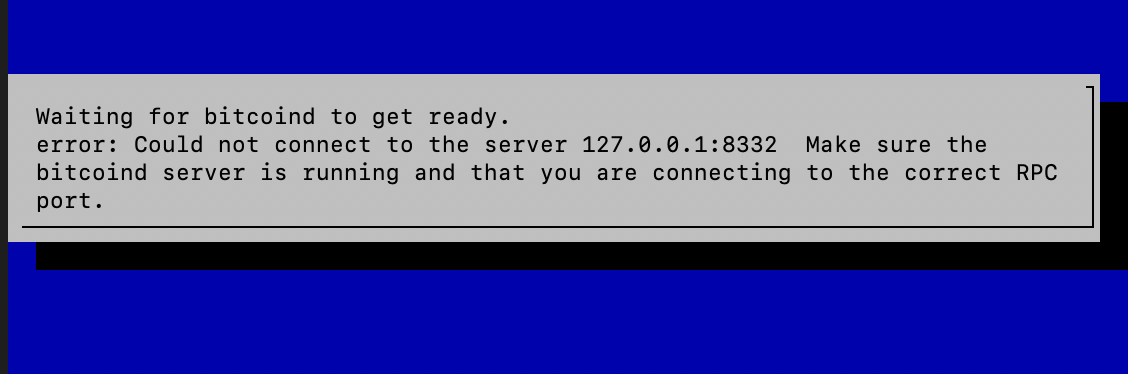
this happened when i changed debuglevel=debug to debuglevel=info
CommanderPoe
on 12 Mar 2019
guys don't forget to verify/change your config has debuglevel=info in the /mnt/hdd/lnd/lnd.conf file.
then reboot or just restart LND viasudo systemctl restart lnd.servicecould u please specify why? thanks in advance.
because debug level is too verbose, and creates large log files that fill up your storage space
this happened when i changed debuglevel=debug to debuglevel=info
This is probably unrelated. What happens when you restart the system?
fluidvoice
on 12 Mar 2019
guys don't forget to verify/change your config has debuglevel=info in the /mnt/hdd/lnd/lnd.conf file.
then reboot or just restart LND viasudo systemctl restart lnd.servicecould u please specify why? thanks in advance.
because debug level is too verbose, and creates large log files that fill up your storage space
this happened when i changed debuglevel=debug to debuglevel=infoThis is probably unrelated. What happens when you restart the system?
i put the debuglevel=debug and restarted and its now working smoothly again. This is weird. I changed only the lnd.conf and restart, didnt do anything else apart from that
CommanderPoe
on 12 Mar 2019
my guess is network related not changing the file.
[edit] I just thought, perhaps the Raspiblitz scripts are looking for some string in the log file that is not there when the log level gets changed. That would make sense if so.
fluidvoice
on 12 Mar 2019
Hi @CommanderPoe
after editing the file /etc/logrotate.d/rsyslog you have to restart the rsyslog service with the following command:
sudo /etc/init.d/rsyslog restartThe new syntax to restart the rsyslog service is:
sudo service rsyslog restart
Hey do i need to run both commands after the script is edited? I ran only sudo /etc/init.d/rsyslog restart but /var/log keep increasing faster than lightning.
CommanderPoe
on 12 Mar 2019
TODO v1.1: Changing LND to "info" log level
See my reply, to see what happened when i changed "debug" for "info" after rebooting.
CommanderPoe
on 13 Mar 2019
TODO v1.1: Changing LND to "info" log level
See my reply, to see what happened when i changed "debug" for "info" after rebooting.
Change it back to "info" and if the problem happens again, post the last 50 lines or so of your LND log file so we can see what's going on.
fluidvoice
on 13 Mar 2019
I have done the following the measures to fix this issue for the v1.1 release ... is that enough?
On every boot the logs get deleted:
sudo rm /var/log/daemon* && sudo rm /var/log/*.gzLND logging level is set to
infoAdded config to
/etc/init.d/rsyslog:
/var/log/daemon.log
{
        rotate 4
        size=100M
        missingok
        notifempty
        compress
        delaycompress
        sharedscripts
        postrotate
                invoke-rc.d rsyslog rotate > /dev/null
        endscript
}
probably yes, though I think it might be unnecessary to delete the logs on every boot and potentially that will make it harder to debug problems. Plus doing this deletes not only the logging from bitcoind and LND but many other system services and daemons running. I would not do this. If this will be a script run only once - like "XXcleanLogs.sh" or more generally "XXcleanSD.sh" then OK to delete things. Just not on every boot.
Also, if it can be determined that a re-installation is being performed, then that is a good time to clean out the logs.
fluidvoice
on 13 Mar 2019
@fluidvoice yeah I was not 100% sure of the deleting part on every boot. At least the LND and bitcoind logs are still on the HDD for debug, but losing other daemons logs can be a minus. On a re-install or update you start with a fresh sd card anyway that has no old logs.
BTW making a fresh v1.0 image is also a solution to clean the logs at the moment.
rootzoll
on 14 Mar 2019
@fluidvoice after a good night sleep I now changed the "delete logs on every boot" to "if on bootup log dir is >1GB then make an emergeny deleteof all logs". So just to have a safeguard in case logs blew up again -> on a reboot they will get flushed.
rootzoll
on 14 Mar 2019
@fluidvoice after a good night sleep I now changed the "delete logs on every boot" to "if on bootup log dir is >1GB then make an emergeny deleteof all logs". So just to have a safeguard in case logs blew up again -> on a reboot they will get flushed.
@rootzoll sounds reasonable. The more I think about it, I doubt any of these system logs will get used 99% of the time. So maybe for release v1.1 a better solution might be to default them writing to /dev/null, which will turn off quite a lot of writing to the SD card (for reliability/endurance), and then have a script like XXenableSystemLogging.sh which stops things, sets the config, and then restarts or reboots. This would be for when people need to do debugging and need to take a look at the system logs. (and XXdisableSystemLogging.sh)
fluidvoice
on 15 Mar 2019
The logs on the sd card will just get now the error output - the standard output of bitcoind and LND with go to /dev/null. The full info logs of LND and bitcoind are on the HDD anyway and get now used as a source of ./XXdebugLogs.sh ... so think we are fine for v1.1 release - closing this issue.
rootzoll
on 17 Mar 2019
Related issues
 frennkie
·
5Comments
rootzoll
·
3Comments
fluidvoice
·
3Comments
frennkie
·
5Comments
rootzoll
·
3Comments
fluidvoice
·
3Comments
 pkclyoni
·
3Comments
pkclyoni
·
3Comments
 ChuckNorrison
·
4Comments
ChuckNorrison
·
4Comments
Most helpful comment
@mamar59 run the following two commands to delete the log files:
&