Raspiblitz: Raspiblitz Plug-n-play version (autogenerate passwords)
Hi @rootzoll , I'm a big fan of the project running my own node :+1: :)
I'm thinking it would be beyond amazing for new users to make a complete plug-n-play version. The interaction with the menus is already pretty much minimal, but what if it was zero? I'm thinking what if:
- All A,B,C,D passwords were autogenerated
- RTL was in by default as it's very noob-friendly
- Torrent download by default as it's the best noob choice
- Passwords A and D are printed on the screen so you can connect to the ssh/RTL and manage your node. Use ssh to retrieve your seet wallet mnemonic words and all the passwords. Then passwords no longer show on screen as the current raspiblitz is.
What do you think? It's just an idea and doesn't necessarily have to be the default, but it can be a seperate version - it will attract a huge audience to the project IMHO.
Regards,
Vasilis
 vmavromatis
All 18 comments
Not sure if the technology is noob friendly, yet. I've lost money to a broken channel.db because I was too reckless. You should know be able to operate ssh and manage passwords to play with this.
That said, autogenerated passwords...? Why not. But the system should make sure they are saved or written drown correctly. The user has to type them back into the terminal (or by connecting a keyboard to the pi)
 raumi75
on 24 Feb 2019
raumi75
on 24 Feb 2019
For the future the setup should be more Plug an Play. The Casa Node is now open source and their UX during setup is quite good - we should see what we can reuse/combine here in the future.
For now I have to agree with @raumi75 .. its all very young and the RaspiBlitz is a form to learn and experiment. Give people the most options and see where the sweetspots are.
Generated passwords and name by default (that can be changed and customized later) are interesting ideas ... to have a node that you just plugin - give it a 1 day to set all up and then you customize it could also speed things up for workshops. I will keep that in mind.
 rootzoll
on 24 Feb 2019
rootzoll
on 24 Feb 2019
Thanks a lot for the response @rootzoll @raumi75
Generated passwords and name by default (that can be changed and customized later) are interesting ideas ... to have a node that you just plugin - give it a 1 day to set all up and then you customize it could also speed things up for workshops. I will keep that in mind.
This gives me hope, I believe it's be a step to the right direction. I agree with you that LND is not yet ready for the "noobs" but it's getting there..... I believe it will be at some point in 2019 (call me optimistic). I'll be keeping an eye on whether autogen passwords get implemented. Cheers.
vmavromatis
on 24 Feb 2019
Hi
I am a noob and installed the new version without any problem...
 lucbran
on 25 Feb 2019
lucbran
on 25 Feb 2019
A more nood friendly version is welcome!
Tried several times to install raspiblitz but i'm always stuck at blockchain menu. Torrent, FTP, clone, or copy does not work. In the end i did found out my external HDD is always mounted as read only.
So tried other HDD but same problem. Tried different formatting (ext4, exfat ntfs) or more partitions as well. Even delete all existing partitions and let the raspiblitz installer handle it but no luck...
External hdd (/dev/sda1) gets mounted under /mnt/hdd but i'm always stuck in readonly mode.
Really love Raspiblitz project though! Too bad i'm such a noob and cannot figure out how to deal with my disk problems. Maybe in the next release this will be easier so i can create my own lightning node as well...
Thx!
 istie
on 10 Mar 2019
istie
on 10 Mar 2019
TODO: For v1.1 add a check for readonly - see if there is a way to handle the HDD setup better.
rootzoll
on 10 Mar 2019
A more nood friendly version is welcome!
Tried several times to install raspiblitz but i'm always stuck at blockchain menu. Torrent, FTP, clone, or copy does not work. In the end i did found out my external HDD is always mounted as read only.
So tried other HDD but same problem. Tried different formatting (ext4, exfat ntfs) or more partitions as well. Even delete all existing partitions and let the raspiblitz installer handle it but no luck...
External hdd (/dev/sda1) gets mounted under /mnt/hdd but i'm always stuck in readonly mode.Really love Raspiblitz project though! Too bad i'm such a noob and cannot figure out how to deal with my disk problems. Maybe in the next release this will be easier so i can create my own lightning node as well...
Thx!
When trying the other HDD's did you use the same external HD case? I saw one Raspbian user who had your problem and the fix for him was a different USB case.
 fluidvoice
on 10 Mar 2019
fluidvoice
on 10 Mar 2019
Woohah!
With another external case my problem is gone and I'm able to copy the blockchain from my LAN.
Thanks a lot for the tip fluidvoice!!!
istie
on 10 Mar 2019
Woohah!
With another external case my problem is gone and I'm able to copy the blockchain from my LAN.
Thanks a lot for the tip fluidvoice!!!
Cool! Was the non-working one an old one or new? which one was it?
fluidvoice
on 10 Mar 2019
It was a new one which I bought (2 pieces) like 8 months ago.
See photo with brand and serial.
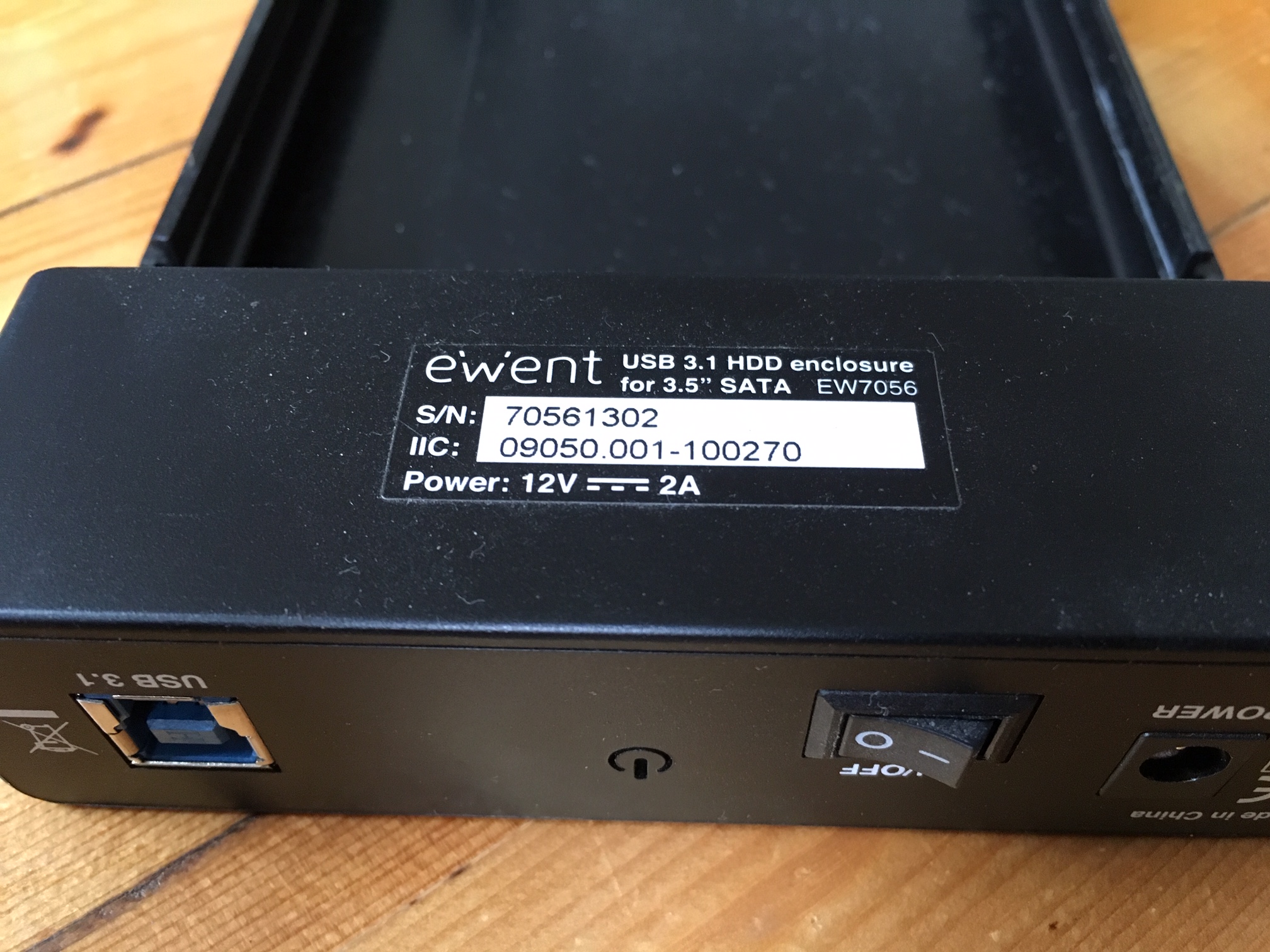
istie
on 10 Mar 2019
Maybe something to do with it being USB 3.1. Is your working case USB 3.X or 2.0?
fluidvoice
on 10 Mar 2019
My working Case is from LC-power (LC-35U3-Becrux)
Its an USB 3.0 with SATA 6GB/s chipset for sata I/II/III
So its looks like USB 3.1 isn't supported yet...??
istie
on 10 Mar 2019
Raspberry Pi ports are USB 2.0 but any decent v3.1 device should work fine since 3.1 and 3.0 are backward compatible with 2.0. That particular case just has some kinda problem.
fluidvoice
on 10 Mar 2019
Ah oké, the strange case will certainly not used with my raspberry anymore... ;-)
But I'm very happy you helped me on my way! Thx
istie
on 10 Mar 2019
Ah oké, the strange case will certainly not used with my raspberry anymore... ;-)
But I'm very happy you helped me on my way! Thx
you can close this issue now :)
fluidvoice
on 10 Mar 2019
@fluidvoice @rootzoll why close my issue... it's about autogenerating passwords during setup....not about this guys external HDD problem - though I'm glad he got it sorted :-)
vmavromatis
on 11 Mar 2019
@fluidvoice @rootzoll why close my issue... it's about autogenerating passwords during setup....not about this guys external HDD problem - though I'm glad he got it sorted :-)
My bad. didn't look at OP.
fluidvoice
on 11 Mar 2019
@vmavromatis correct :)
rootzoll
on 11 Mar 2019
Related issues
 cedricwalter
·
5Comments
cedricwalter
·
5Comments
 philbertw4
·
5Comments
philbertw4
·
5Comments
 shawnyeager
·
3Comments
shawnyeager
·
4Comments
shawnyeager
·
3Comments
shawnyeager
·
4Comments
 intorid
·
3Comments
intorid
·
3Comments
Most helpful comment
Ah oké, the strange case will certainly not used with my raspberry anymore... ;-)
But I'm very happy you helped me on my way! Thx