Raspiblitz: Research: NGINX Webserver
The next steps after version 1.0 release should offer a WebUI and further HTTP based services.
To manage them all on port 80 and put them behind pathes - take a look at:
https://www.raspberrypi.org/documentation/remote-access/web-server/nginx.md
Also check about HTTPS:
https://blog.filippo.io/mkcert-valid-https-certificates-for-localhost/
And how to tun RTL and Setup behind NGINX.
Further links for research are welcome.
 rootzoll
All 21 comments
is this going to be a public node info ui or private one for node management purposes? i could contribute some vuejs based interface. what do you have in mind here?
 joernroeder
on 13 Jan 2019
joernroeder
on 13 Jan 2019
There will be multiple scenarios to have HTTP communication.
One will be hosting the RTL Node Management WebUI: https://github.com/ShahanaFarooqui/RTL
Another will be a SetUp-Process that is closer to what the casaHODL provides.
rootzoll
on 14 Jan 2019
all right, sounds like a plan.
joernroeder
on 15 Jan 2019
Here's a guide on how to setup a reverse proxy with ssl included
https://dev.to/domysee/setting-up-a-reverse-proxy-with-nginx-and-docker-compose-29jg
 badokun
on 17 Jan 2019
badokun
on 17 Jan 2019
see also #275 .. now that the casa node is open source check how they did the server
 geco91
on 26 Feb 2019
geco91
on 26 Feb 2019
I was setting up Nginx to be used with electrs, but now RTL works over https too.
Setup guide: https://github.com/ShahanaFarooqui/RTL/pull/98/files#diff-cb8c8513a661a194d788306a2bab32e7
The nginx.conf addition:
stream {
            upstream RTL {
                    server 127.0.0.1:3000;
            }

            server {
                    listen 3002 ssl;
                    proxy_pass RTL;

                    ssl_certificate /etc/letsencrypt/live/YOUR_DOMAIN/fullchain.pem;
                    ssl_certificate_key /etc/letsencrypt/live/YOUR_DOMAIN/privkey.pem;
                    ssl_session_cache shared:SSL:1m;
                    ssl_session_timeout 4h;
                    ssl_protocols TLSv1 TLSv1.1 TLSv1.2;
                    ssl_prefer_server_ciphers on;
            }
    }
I think installing Nginx (and certbot) could be an option in the service menu.
It needs multiple ports to be forwarded and to have a domain or dynamicDNS set up already.
Here is the script I used to streamline the setup of my second node: https://github.com/openoms/bitcoin-tutorials/blob/master/nginx/README.md
 openoms
on 30 Mar 2019
openoms
on 30 Mar 2019
A really nice feature of nginx is that config snippets can be included. So cipher selections don't have to be repeated x-times, instead you just create one file and include it.
Anyway, I'm still not entirely sure how to handle the wast amount of options that seem to be possible. Let's just take one example with LNbits (could also be RTL or BTCPay):
127.0.0.1:5000(HTTP): the nativeFlaskapplication runs here0.0.0.0:5001(HTTPS): usenginxas a reverse proxy to127.0.0.1:5000for direct HTTPS connections fromLANand possiblyInternet(challenge: TLS cert).127.0.0.1:5002(HTTP): usenginxas a reverse proxy to127.0.0.1:5000for connections only usingTOR(from anywhere).127.0.0.1:5003(HTTPS): usenginxas a reverse proxy to127.0.0.1:5000for connections overTORthat may traverse a TOR2IP/IP2TOR bridge (challenge: TLS cert).
Generating the 3-4 files is not hard - even for multiple apps. With the sites-available and sites-enabled it's also easy to selectively enable only what is needed/requested by the RaspiBlitz owner.
The configs on 0.0.0.0:5001 and 127.0.0.1:5003 could have different certificates (but don't have to).
The same TOR hidden service address can for sure be used for 127.0.0.1:5002 and 127.0.0.1:5003 (using internet.hiddenservice.sh)
 frennkie
on 23 May 2020
frennkie
on 23 May 2020
This would be an overview of the nginx configs (HTTP, HTTPoT, HTTPSoT):
| | | HTTP / native Port | HTTPS | HTTP over TOR | HTTPS over TOR | |
|----|------------------|-----------|-------|----------|-----------|---------------------------------------|
| | RaspiBlitz | | | | | |
| 1 | RB Welcome | 80 | - | - | - | |
| 2 | RB Admin/Info | - | 443 | ? | ? | |
| | Core Services | | | | | |
| 3 | Bitcoin | - | - | - | - | |
| 4 | LND gRPC | 10009 | 10010 | ~10011~ | 10012 | 10009 is already HTTPS |
| 5 | LND REST | 8080 | 8443 | ~8444~ | 8445 | 8080 is already HTTPS. Loop uses 8081 |
| | Apps | | | | | |
| 6 | RTL | 3000 | 3001 | 3002 | 3003 | |
| 7 | BTC-RPC-Explorer | 3020 | 3021 | 3022 | 3023 | |
| 8 | LNbits | 5000 | 5001 | 5002 | 5003 | |
| 9 | BTCPay | 23000 | 23001 | 23002 | 23003 | |
| 10 | Electrs | 50001 | 50002 | 50003 | 50004 | |
TOR over HTTP always uses Port 80 and TOR over HTTPS would use the same .onion but with Port 443.
The native service and the TOR service should always bind to localhost. Only for HTTPS it would (in certain cases) make sense to bind to 0.0.0.0.
Do you see any conflicts? Anything missing?
frennkie
on 24 May 2020
Working on adding another webUI: ThunderHub: https://github.com/rootzoll/raspiblitz/pull/1225
I imagine the ports would be (so far serving on 3010):
| | App | HTTP / native Port | HTTPS | HTTP over TOR | HTTPS over TOR | |
|----|------------------|-----------|-------|----------|-----------|---------------------------------------|
| 11 | ThunderHub | 3010 | 3011 | 3012 | 3013 | |
openoms
on 1 Jun 2020
Sounds reasonable..! :-D
frennkie
on 1 Jun 2020
@frennkie I like the idea of HTTPS by default and showing the SSL cert fingerprint, but I think we should stick to HTTP on port 3000 if the certificate is not yet present.
Got this while installing from the menu on the OdroidC4 with the latest scripts:
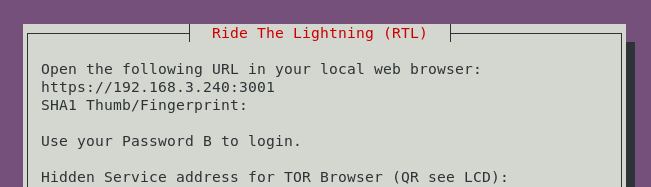
RTL is not served on 3001 only on http:// ... : 3000
Also what is the rationale about forwarding HTTP to 3002 as well when it is already served on 3000?
Same with 3001 vs 3003.
Is there a proxy somewhere for 3002 and 3003?
I might have missed this part but the extra ports for the Tor services seem to be redundant.
Wouldn't it be enough to forward the HTTP port to 80
and the HTTPS port to 443 for every service?
openoms
on 4 Jun 2020
as it looks blitz.web.sh needs to be run as a preparation step during the RTL install.
We did have the internet.selfsignedcert.sh to create a certificate for Electrs and the hidden bonus.btcpaysetdomain.sh so far. It should be made redundant and replaced by the more feature rich blitz.web.sh too.
openoms
on 4 Jun 2020
I might have missed this part but the extra ports for the Tor services seem to be redundant.
Wouldn't it be enough to forward the HTTP port to 80
and the HTTPS port to 443 for every service?
The idea of HTTPS oder TOR is that normally you would not need transport enscryption an HTTP because TOR is making sure of that ... but when in the future you use a IP2Tor bridge HTTPS oder TOR makes sense again because the "last mile" from IP2Tor bridge to clear IP user has no transöort security. So the idea was always to mirrow both (HTTP & HTTPS) over TOR.
rootzoll
on 4 Jun 2020
@rootzoll that is clear, but that still not makes 4 ports necessary only 2 on clearnet and the same 2 over Tor.
With RTL:
HTTP LAN_IP:3000
HTTPS LAN_IP:3001
HTTPoverTor .onion:80 (forwarded from 3000)
HTTPSoverTor .onion:443 (forwarded from 3001)
openoms
on 4 Jun 2020
ah OK - well that looks even a bit simpler @frennkie any objections?
rootzoll
on 4 Jun 2020
There was and is a reasoning behind the 4 ports that I suggested. But the reasoning might be flawed or over-complicated or both... ;-)
Taking LNbits as the example:
- HTTP localhost:5000
- HTTPS LAN_IP:5001
- HTTPoverTor .onion:80 (forwarded from 5002)
- HTTPSoverTor .onion:443 (forwarded from 5003)
Also what is the rationale about forwarding HTTP to 3002 as well when it is already served on 3000?
LNbits uses Python Flask as the backend framework. The dynamic content is generated by the (single threaded Python process) - which is fine. But LNbits also has crucial parts that are static files (so called assets): Images, JavaScript and CCS files. The (very) strong recommendation is also to leave the serving of such asset to a real web server instead of doing this in the single threaded Python process. That is the reason why I included a location /static section in the three nginx file (e.g. https://github.com/rootzoll/raspiblitz/blob/v1.6/home.admin/assets/nginx/sites-available/lnbits_ssl.conf).
So the native service is running on 5000, but any usage is always going through Nginx (which also makes it easier when looking at logs for troubleshooting).
That is why I think it's best that HTTPoverTor uses 5002 and why we should only bind 3000 (the native service) to localhost.
Why both 5001 and 5003
After my PR was merged HTTPS using Nginx is bound to 5001. HTTPSoverTor could simply use the same port 5001 - but I created another port: 5003. My idea behind this is that I believe it makes to have an easy an straight forward way to use a completely different SSL/TLS certificate of the clearnet HTTPS port (5001) that on the HTTPSoverTor port! Setting up two separate config file make it really easy to change understand as only the included SSL would need to point to a different CERT/Key pair.
frennkie
on 4 Jun 2020
but I think we should stick to HTTP on port 3000 if the certificate is not yet present.
Yes.. I agree that the situation shown in your screenshot makes no sense. As per my previous comment the is a rationale behind not exposing 0.0.0.0:3000.
What I don't understand.. why is there no certificate? By default my PR is using the self generated from LND which should always exist if LND is running.
frennkie
on 4 Jun 2020
@frennkie to have the certificate in place the ./config.scripts/blitz.web.sh on
needs to be run.
Will it be triggered during the of the standard setup somewhere in bootstrap and bootstrap.provision.sh?
openoms
on 9 Jun 2020
I think this should go into the build_sdcard.sh... Or alternatively in the _provision script after install/restore, right..?
frennkie
on 10 Jun 2020
The blitz.web.sh generates the dhparam.pem, so needs to be unique on every node therefore part of ghe intial setup rather than the build_sdcard.sh
Added to the 60finishHDD and the _bootstrap.provision.sh to run on both new setups and in recovery as well in every case. See: https://github.com/rootzoll/raspiblitz/pull/1250#issuecomment-642252896
openoms
on 10 Jun 2020
Nginx configuration needs to be set up / reviewed for:
- [x] RTL - ports as above
- [x] THub - ports as above
- [x] BTCRPCExplorer - ports as above
- [x] Electrs - only serving on 50002 through Nginx currently (ok for personal use)
- [x] BTCPay
- [x] LNBits
openoms
on 10 Jun 2020
Related issues
 tiero
·
4Comments
tiero
·
4Comments
 2000jago
·
5Comments
2000jago
·
5Comments
 ChuckNorrison
·
4Comments
ChuckNorrison
·
4Comments
 Kixunil
·
3Comments
openoms
·
3Comments
Kixunil
·
3Comments
openoms
·
3Comments
Most helpful comment
Here's a guide on how to setup a reverse proxy with ssl included
https://dev.to/domysee/setting-up-a-reverse-proxy-with-nginx-and-docker-compose-29jg