Rasa version: 1.7
Rasa SDK version (if used & relevant): 1.7
Rasa X version (if used & relevant):
Python version: 3.6.10/3.6.5
Operating system (windows, osx, ...): Ubuntu 16/18 server TLS
Issue:
I used clean ubuntu 16 and ubuntu 18 server in wmware/virtualbox (8GB RAM) with python 3.6 and pip 20 in virtualenv to install rasa by github source. It built without errors. I tried to init a new project and spoke to bot server during installation and everything was good. After that, i enterred the command with rasa shell, the segmentation fault occurred. It's very strange that it works during the init project but fail with command rasa shell. (see pic below)
I test it with different computers, but the same issues. Also try to rasa train the restaurant example and get the same seg fault.
Error (including full traceback):
Core dump
[Thread debugging using libthread_db enabled]
Using host libthread_db library "/lib/x86_64-linux-gnu/libthread_db.so.1".
Core was generated by `/home/sam/Envs/rasa/bin/python3.6 /home/sam/Envs/rasa/bin/rasa shell'.
Program terminated with signal SIGSEGV, Segmentation fault.
#0  0x00007f1a981e775c in elf_machine_rela (skip_ifunc=0, reloc_addr_arg=0x7f1a5dd74f40, version=0x48, sym=0x7f1a5da694c0, reloc=0x7f1a5da7e640,
    map=0x58003c0) at ../sysdeps/x86_64/dl-machine.h:303
303     ../sysdeps/x86_64/dl-machine.h: No such file or directory.
[Current thread is 1 (Thread 0x7f1a3d7fa700 (LWP 9049))]
Command or request that led to error:
rasa shell
Content of configuration file (config.yml) (if relevant):
Content of domain file (domain.yml) (if relevant):
 Xiao-Chong
All 14 comments
Thanks for the issue, @rctatman will get back to you about it soon!
You may find help in the docs and the forum, too 🤗
 sara-tagger
on 7 Feb 2020
sara-tagger
on 7 Feb 2020
Thank you.
Today, I tried the fresh ubuntu 19.10 server to install the rasa, The same errors and all indicated to ld-xxxx.so error with seg fault and core dump.
I used vmware/vitrualbox software to install the ubuntu as guest OS from different computers and got the same errors. I am wondering such scenario cannot be reproduced or no one encounter such issue.
No errors occurred during installation by buiding form source (git), but run "rasa shell" crash.
Can anyone tell me from 5th Feb 2020 till now who installed it and works nice ? And tell me how. Thank you very much.
What I did was:
sudo apt update
sudo apt install python3-dev python3-pip
sudo -H pip3 install -U virtualenv
virtualenv --system-site-packages -p python3 ./venv
source ./venv/bin/activate
pip install --upgrade pip
git clone https://github.com/RasaHQ/rasa.git
cd rasa
pip install -r requirements.txt
pip install -e .
cd ..
mkdir project1
cd project1
rasa init
rasa shell (seg fault)
Xiao-Chong
on 9 Feb 2020
I have similar issue on Amazon EC-2 and Digital Ocean Ubuntu 1618 droplets, and also on Digital Ocean Debian 10.2 version.
Installation of rasa package goes well, but after that I encounter this issue:
(venv) ubuntu@ip:~/expo-bot/bot_rasa$ rasa shell
2020-02-09 13:16:42 INFO root - Connecting to channel 'cmdline' which was specified by the '--connector' argument. Any other channels will be ignored. To connect to all given channels, omit the '--connector' argument.
2020-02-09 13:16:42 INFO root - Starting Rasa server on http://localhost:5005
Bot loaded. Type a message and press enter (use '/stop' to exit):
Your input -> Segmentation fault (core dumped)
 Terrpsycore
on 9 Feb 2020
Terrpsycore
on 9 Feb 2020
Same thing. DigitalOcean Ubuntu 18.04
appt update && apt upgrade -y && apt dist-upgrade -y && apt install -y build-essential software-properties-common python3-distutils python3-dev
curl https://bootstrap.pypa.io/get-pip.py -o get-pip.py
python3 get-pip.py
pip3 install rasa
rasa init
rasa shell
2020-02-11 07:59:08 INFO root - Generating grammar tables from /usr/lib/python3.6/lib2to3/Grammar.txt
2020-02-11 07:59:09 INFO root - Generating grammar tables from /usr/lib/python3.6/lib2to3/PatternGrammar.txt
2020-02-11 07:59:09 INFO root - Connecting to channel 'cmdline' which was specified by the '--connector' argument. Any other channels will be ignored. To connect to all given channels, omit the '--connector' argument.
2020-02-11 07:59:09 INFO root - Starting Rasa server on http://localhost:5005
2020-02-11 07:59:13 INFO absl - Entry Point [tensor2tensor.envs.tic_tac_toe_env:TicTacToeEnv] registered with id [T2TEnv-TicTacToeEnv-v0]
Bot loaded. Type a message and press enter (use '/stop' to exit):
Your input -> Segmentation fault (core dumped)
 zgordan-vv
on 11 Feb 2020
zgordan-vv
on 11 Feb 2020
Hi,
I'm facing the same issue following the installation doc on a fresh Ubuntu 18.04.4 LTS.
Stable or dev version ends same.
Only he first shell talk after an init is working, all next rasa shell terminates after loading.
Any workaround ?
Thanks for your answer.
 simonsavoca
on 11 Feb 2020
simonsavoca
on 11 Feb 2020
Thanks Terrpsycore took time to confirm the issue and encourage me to believe it must be somewhere wrong.
After testing with several computers and VM, finally I got the root cause:
It's the dependency issue, please just
pip uninstall gym
pip install gym==0.15.4
then everything goes well.
BTW, gym version was changed to 0.15.6 from 3th Feb, 2020. So, It's the hot issue, isn't it? ha ha
Xiao-Chong
on 11 Feb 2020
If you guys install from pip, that is
pip install rasa
please also do the following:
pip uninstall sanic-plugins-framework
pip install sanic-plugins-framework==0.8.2
Xiao-Chong
on 11 Feb 2020
Thanks Terrpsycore took time to confirm the issue and encourage me to believe it must be somewhere wrong.
After testing with several computers and VM, finally I got the root cause:
It's the dependency issue, please justpip uninstall gym
pip install gym==0.15.4then everything goes well.
BTW, gym version was changed to 0.15.6 from 3th Feb, 2020. So, It's the hot issue, isn't it? ha ha
Works, thank you!
zgordan-vv
on 11 Feb 2020
Also worked for my issue. Thanks a lot !
 JapanNeinpan
on 12 Feb 2020
JapanNeinpan
on 12 Feb 2020
Uninstalling gym and reinstalling a previous version solved the sementation fault.
pip uninstall gym
pip install gym==0.15.4
But it started giving Memory error after the processing fo trackers is complete and core training wouldn't start.
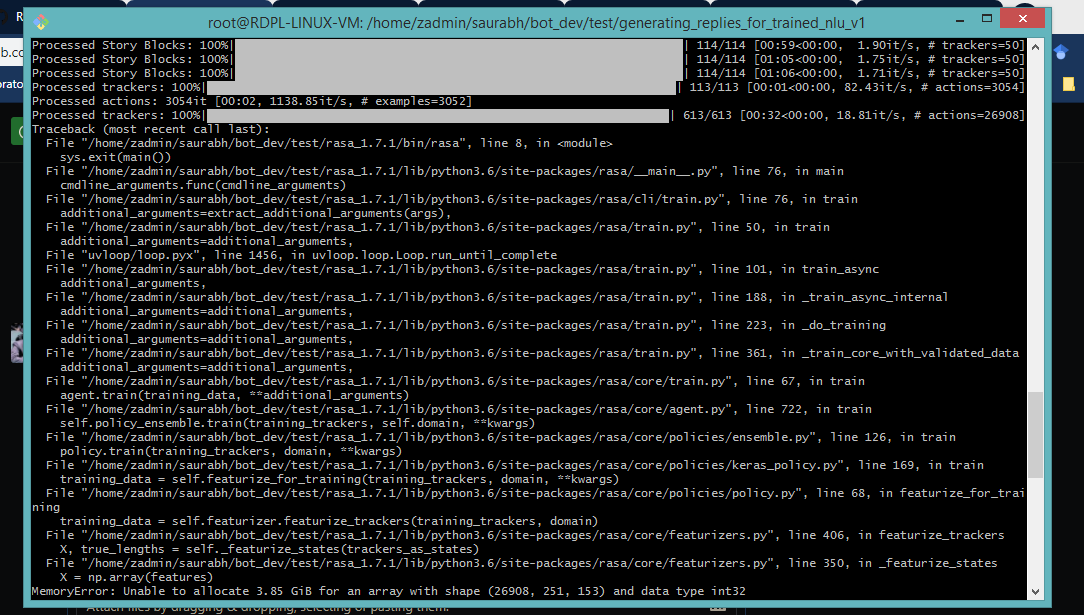
B/W, my OS is Ubuntu18.04 and rasa version is 1.7.1. Both the segmentation fault and Memory error don't come on windows but linux/ubuntu.
 gitpranjal
on 13 Feb 2020
gitpranjal
on 13 Feb 2020
@gitpranjal I think the below information may help you.
stackoverflow article unable-to-allocate-array-with-shape-and-data-type
Xiao-Chong
on 13 Feb 2020
Hi, i got same problem with m'y fresh Ubuntu install
 Suniron
on 14 Feb 2020
Suniron
on 14 Feb 2020
So @ Suniron , do you already use my workaround ?
Xiao-Chong
on 14 Feb 2020
Works well for me.
Thanks a lot !
simonsavoca
on 15 Feb 2020
Related issues
 Arghya999
·
3Comments
Arghya999
·
3Comments
 anishrav
·
3Comments
anishrav
·
3Comments
 Jasperty
·
3Comments
Jasperty
·
3Comments
 Poojan66
·
3Comments
Poojan66
·
3Comments
 connorbrinton
·
3Comments
connorbrinton
·
3Comments
Most helpful comment
Thanks Terrpsycore took time to confirm the issue and encourage me to believe it must be somewhere wrong.
After testing with several computers and VM, finally I got the root cause:
It's the dependency issue, please just
pip uninstall gym
pip install gym==0.15.4
then everything goes well.
BTW, gym version was changed to 0.15.6 from 3th Feb, 2020. So, It's the hot issue, isn't it? ha ha