Description of Problem:
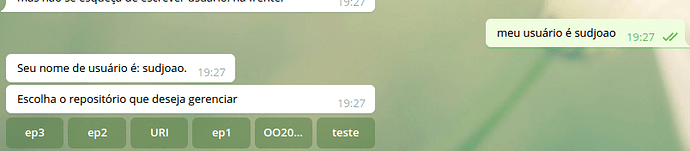
When I create buttons using Rasa and send them to the user within Telegram all the buttons are put on the same line. This is something that sometimes poses a problem since depending on the size of the text that is in the button or the quantity of buttons that are sent, their content can end up being impossible to read.
Versions used:
- rasa-core==0.13.1
- rasa-core-sdk==0.12.1
- rasa-nlu==0.14.1
Overview of the Solution:
It would be intereting to add a parameter to the send button function. Something like how many buttons should be per line or similar to Telegram’s API where several lists of buttons can be put inside another list so in the end there are several lines, each representing a list of buttons.

Examples (if relevant):
You can see more about telegram api and button here: https://core.telegram.org/bots/api#inlinekeyboardbutton
Definition of Done:
- [ ] You can send X buttons per line;
- [ ] Feature is documented.
 sudjoao
All 2 comments
Hey there @sudjoao. As you mentioned, the implementation of this happens in the output channel -- therefore we have no one way of implementing a parameter overall for all of the different output channels.
You can already use the different types of buttons (inline, vertical, reply) in the Telegram connector natively. For you, I would suggest changing from the default (inline) to vertical, by adding button_type: vertical to your utterance template. If you want to customize the setup/order, you can use custom output payloads to send specific json payloads to really customize what you send to the user.
If you were interested specifically in allowing configuration of buttons per line in Telegram via an extra keyword arg, feel free to create a well-thought out PR to the telegram.py file, but otherwise the functionality of making all the buttons visible is already there. Let me know what you think.
 erohmensing
on 12 Jul 2019
erohmensing
on 12 Jul 2019
This issue has been automatically closed because there has been no response to our request for more information from the original author. Without this, we don't have enough information to help you. Please comment below with the requested information if you still need help.
![no-response[bot] picture](https://avatars2.githubusercontent.com/u/26350515?v=4&s=40) no-response[bot]
on 26 Jul 2019
no-response[bot]
on 26 Jul 2019
Related issues
 Poojan66
·
3Comments
Poojan66
·
3Comments
 johnson7788
·
3Comments
johnson7788
·
3Comments
 anishrav
·
3Comments
anishrav
·
3Comments
 nahidalam
·
3Comments
nahidalam
·
3Comments
 jahid-ict
·
3Comments
jahid-ict
·
3Comments
Most helpful comment
Hey there @sudjoao. As you mentioned, the implementation of this happens in the output channel -- therefore we have no one way of implementing a parameter overall for all of the different output channels.
You can already use the different types of buttons (inline, vertical, reply) in the Telegram connector natively. For you, I would suggest changing from the default (inline) to vertical, by adding
button_type: verticalto your utterance template. If you want to customize the setup/order, you can use custom output payloads to send specific json payloads to really customize what you send to the user.If you were interested specifically in allowing configuration of buttons per line in Telegram via an extra keyword arg, feel free to create a well-thought out PR to the
telegram.pyfile, but otherwise the functionality of making all the buttons visible is already there. Let me know what you think.